
11 Best Cross-Platform Parental Control Apps in 2026, Compared
Compare the 11 best cross-platform parental control apps on price, device coverage and monitoring, with every price checked November 7, 2026.
 Shamim Mia, Founder, SerpAstraLast verified November 7, 202614 min read
We compare pricing pages, documentation and public reviews. We never accept payment for rankings.

Key takeaways
- Qustodio is the best all-round pick at $59.95 a year, Bark starts at $5 a month for younger children, and Mobicip is the cheapest paid option at $2.99 a month billed annually.
- Three tools here cost nothing at all: Google Family Link, Apple Screen Time and Microsoft Family Safety, and each one covers its own ecosystem well.
- The single most important buying factor is device coverage: a tool that does not run on your child's actual phone, tablet or computer protects nothing.
- Annual billing is the norm in this category, so the first payment is usually a full year, not one month — budget for $35 to $120 up front.
On this page
Quick comparison
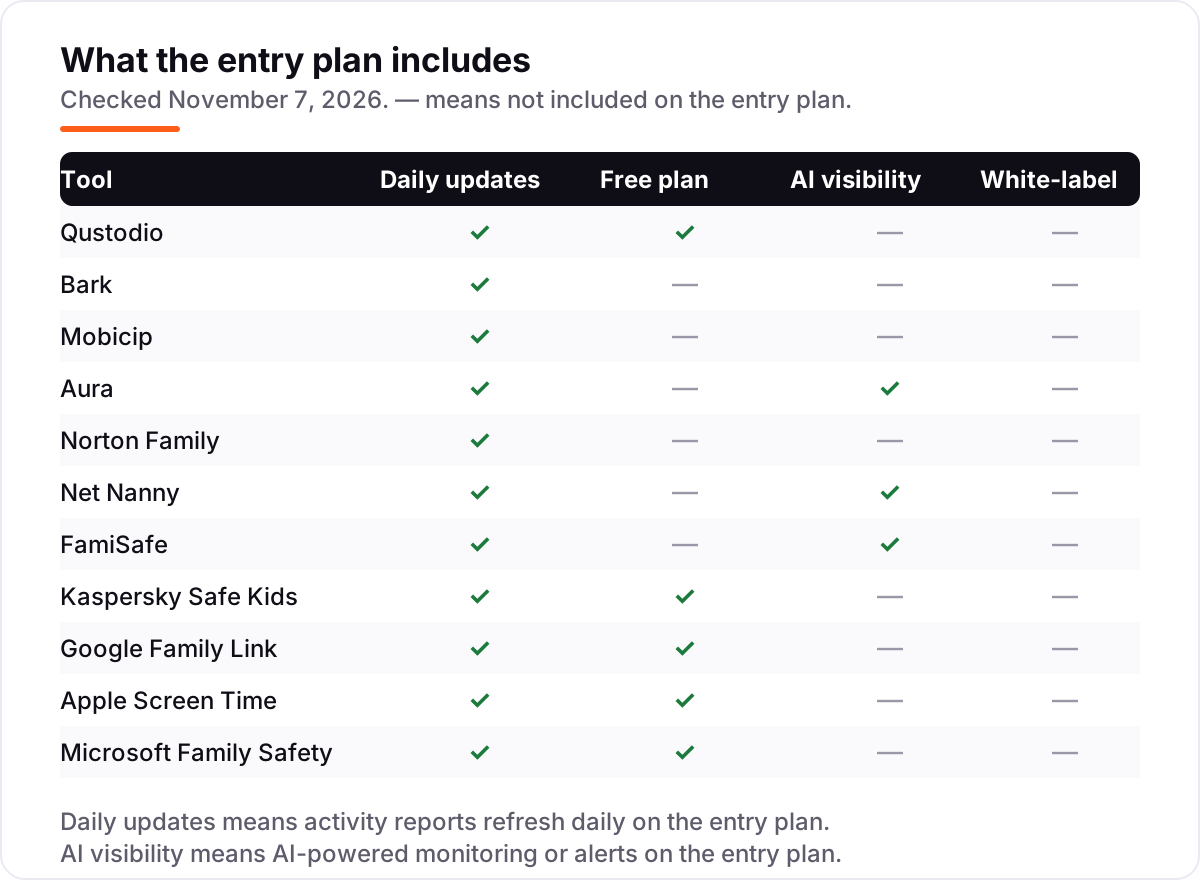
| Tool | Best for | Starting price | Free plan |
|---|---|---|---|
| Qustodio | Mixed-device families that want one dashboard for iPhone, Android, Windows, Mac, Chromebook and Kindle | $59.95/yr | Yes (free plan) |
| Bark | Parents of teenagers who want alerts about risky messages and social posts without reading everything | $5/mo | No (7-day trial) |
| Mobicip | Families on a tight budget that need iOS, Android, Windows, Mac, Chromebook and Kindle under one plan | $2.99/mo | No (7-day trial) |
| Aura | Parents who want parental controls plus antivirus, VPN and identity protection in one family subscription | $10/mo | No (14-day trial) |
| Norton Family | Families already running Norton security who want simple web filtering, schedules and location in one price | $49.99/yr | No (30-day trial) |
| Net Nanny | Parents of younger children who want the strongest real-time web filtering on a shared family computer | $39.99/yr | No (14-day trial) |
| FamiSafe | Parents who want screen time, location and content detection across phones, tablets, desktops and Kindle Fire | $9.99/mo | No (3-day trial) |
| Kaspersky Safe Kids | Families outside the US who want a genuinely useful free tier and the cheapest paid plan here | $14.99/yr | Yes (free plan) |
| Google Family Link | Android and Chromebook families with younger children who want capable free controls and nothing to buy | Free | Yes (free) |
| Apple Screen Time | Apple-only households that want limits, downtime and purchase approvals with nothing to install | Free | Yes (free) |
| Microsoft Family Safety | Windows and Xbox households that want free screen time, content filters and location in one family group | Free | Yes (free) |
Make one of these tools?
We re-check this list every quarter. Send a correction, request a review, or ask about a clearly labeled sponsored spot.
Request a listingThe best cross-platform parental control app

Qustodio
Best for: Mixed-device families that want one dashboard for iPhone, Android, Windows, Mac, Chromebook and Kindle
Qustodio is the safest default for a family with mixed devices. It runs on iOS, Android, Windows, Mac, Chromebook and Kindle, and the parent dashboard looks the same everywhere, so one set of rules follows a child from phone to laptop. Location tracking is its standout: a full daily timeline of where your child has been, plus arrival and departure alerts for places like home and school.
The free plan covers one device with web filtering and time limits, enough to test the system properly. Basic adds app blocking and location for five devices, while Complete adds per-app time limits, YouTube monitoring and call and text monitoring on Android. The honest weakness is the iOS gap: Apple does not allow the deep monitoring Android permits, so iPhone families get filtering and location more than surveillance.
What we like
- Covers six platforms under one parent dashboard, including Chromebook and Kindle
- Location timeline with geofencing alerts and a panic button on Android
- Free plan covers one device with web filtering and time limits
- 30-day money-back guarantee on direct purchases
Watch out for
- Basic costs $59.95 a year and the features most families want need Complete at $104.95 a year
- The $59.95 Basic price was a short-term promo on October 28, 2026; the regular price is about $72.94 a year
- iPhone controls are thinner than Android controls, with no call and text monitoring on iOS

Bark
Best for: Parents of teenagers who want alerts about risky messages and social posts without reading everything
Bark takes a different approach from the filters in this list. Instead of blocking the internet into a small safe corner, it watches your child's activity across 30+ apps and messages, then sends an alert when it detects bullying, predation, self-harm, sexual content or similar risks. You do not read every text; you get told when something needs your attention.
That approach suits teenagers better than lockdown tools do. Bark Jr at $5 a month covers filtering, screen time and location for younger children, while Premium at $14 a month adds the full monitoring suite, and one subscription covers every child and every device in the house. The price is the catch: $14 a month every month adds up against annual rivals, and iPhone monitoring needs extra setup steps.
What we like
- Monitors texts, email and 30+ apps, then alerts you only to concerning content
- One subscription covers unlimited children and unlimited devices
- Bark Jr covers screen time, filtering and location for younger children at $5 a month
- Works with school-issued devices
Watch out for
- Bark Jr at $5 a month has no content monitoring; the alerts need Premium at $14 a month
- iPhone setup takes longer and needs attention after iOS updates
- Bark is sold only in the US, South Africa, Australia and Guam

Mobicip
Best for: Families on a tight budget that need iOS, Android, Windows, Mac, Chromebook and Kindle under one plan
Mobicip is the coverage play: six platforms under one subscription, including Chromebook and Kindle, which several rivals skip. The Lite plan at $2.99 a month billed annually is the cheapest paid entry in this list, covering screen time, website blocking and activity reports on five devices, with a family locator and remote lock included.
Read the tier differences before buying. Social media monitoring and app timers, arguably the point of a parental app for older children, only appear on the $7.99 Premium plan, and the Standard tier mostly adds device count. There is also no geofencing, so location-aware families should look at Qustodio or Bark instead. For basic, affordable, everywhere coverage, Mobicip is hard to beat.
What we like
- Covers six platforms, including Chromebook and Kindle, under one subscription
- Lite is the cheapest paid entry here at $2.99 a month billed annually
- Screen time, app and website blocking and activity reports on every paid plan
- Family locator and remote device lock included from Lite
Watch out for
- Social media monitoring and app timers wait for Premium at $7.99 a month
- No geofencing alerts, so location-aware families need a different tool
- All paid plans bill annually, so the first payment is $35.88 a year or more

Aura
Best for: Parents who want parental controls plus antivirus, VPN and identity protection in one family subscription
Aura sells parental controls as part of a wider digital safety suite, and the bundle math is what makes it interesting. The standalone Kids plan runs $10 a month billed annually, or $13 month to month, covering unlimited children with content filtering, screen-time limits, scheduling, Pause the Internet, and Safe Gaming alerts that flag cyberbullying in PC game voice and text chat.
Step up to the full family plan and the same subscription adds antivirus, a VPN, a password manager and identity theft protection for the adults. The catch is scope: the controls work on iOS and Android only, with no location tracking, and at $120 a year it costs more than focused rivals if all you want is kid monitoring. A 14-day trial and 60-day money-back guarantee give you room to evaluate.
What we like
- Kids plan covers unlimited children with content filtering and screen-time limits
- Safe Gaming alerts flag cyberbullying in PC game voice and text chat
- 14-day trial and a 60-day money-back guarantee on annual plans
- Family plan adds antivirus, VPN, password manager and identity protection
Watch out for
- Controls run on iOS and Android only, with fewer features on iPhones
- No location tracking or geofencing alerts
- At $120 a year it costs more than focused rivals if you only want kid monitoring

Norton Family
Best for: Families already running Norton security who want simple web filtering, schedules and location in one price
Norton Family is the sensible pick if your household already runs Norton antivirus. It comes bundled with Norton 360 Deluxe and higher tiers, which can eliminate a separate subscription entirely. Standalone, it costs $49.99 a year and covers web filtering, time supervision, app management, location tracking with 30-day history, and school-time schedules.
The feature set is honest about its limits: there is no monitoring of texts, calls or social messages, and a child's Mac cannot be protected, though parents can still use the web portal from a Mac. For Windows and Android households that want web categories, schedules and location without message surveillance, it is good value with an unusually generous refund window.
What we like
- One flat $49.99 a year covers unlimited devices with every feature included
- Included free with Norton 360 Deluxe and higher security tiers
- Web supervision plus YouTube video and search monitoring
- 60-day money-back guarantee, the longest in this list
Watch out for
- No monitoring of texts, calls or social messages at any price
- A child's Mac cannot be protected, though parents can manage from a Mac
- No per-app time limits, so screen time is set per device, not per app

Net Nanny
Best for: Parents of younger children who want the strongest real-time web filtering on a shared family computer
Net Nanny is one of the oldest names in parental controls, and its core strength is still content filtering. Rather than checking URLs against a list, it reads page content as it loads and decides whether it fits the child's profile. That catches new and obscure sites that list-based filters miss, which matters for younger children who click everything.
Plans are annual only: $39.99 for one desktop, $54.99 for five devices, $89.99 for twenty, all with the full feature set. There is no monthly billing, so the upfront cost is higher than the per-month figures suggest. Location tracking exists but is basic compared with the GPS timelines elsewhere in this list. Buy Net Nanny for filtering quality, not for finding your teenager.
What we like
- Reads page content as it loads instead of relying only on blocklists
- Family Protection Pass covers 5 devices for $54.99 a year with the full feature set
- YouTube monitoring and instant alerts included on every plan
- Filtering since 1996, one of the oldest names in this category
Watch out for
- The $39.99 plan covers one desktop only; five devices cost $54.99 a year
- Android, Kindle Fire and Chromebook child devices are not currently supported
- macOS support stops at older versions, so check your Mac before paying

FamiSafe
Best for: Parents who want screen time, location and content detection across phones, tablets, desktops and Kindle Fire
FamiSafe is a parental control app from Wondershare, built for parents who want one dashboard for screen time, content filtering and location. You can set app time limits, block inappropriate sites and apps, track real-time location with geofence alerts, and monitor activity across phones, tablets, desktops and even Kindle Fire.
Pricing is $9.99 a month for up to 5 devices, $19.99 a quarter for up to 10, or $59.99 a year, with a 3-day free trial and a 7-day money-back guarantee. The device caps differ by billing term, so count the devices you need to cover before choosing monthly, quarterly or annual billing. Read the Trustpilot reviews before paying: setup and billing complaints are common.
What we like
- One dashboard for screen time, content filtering, location and geofence alerts
- Detects suspicious photos and text on social apps such as YouTube and Instagram
- Annual plan costs $59.99 a year, about $4.99 a month in equivalent terms
- Covers iOS, Android, Windows, Mac, Chromebook and Kindle Fire
Watch out for
- No permanent free plan, only a 3-day free trial
- Device caps differ by billing term: 5 on monthly, 10 on annual
- Trustpilot reviews are poor at 1.9 out of 5, with setup and billing complaints common

Kaspersky Safe Kids
Best for: Families outside the US who want a genuinely useful free tier and the cheapest paid plan here
Kaspersky Safe Kids has the best free tier in this category. The free plan includes web filtering, app management, screen-time controls and YouTube safe search on unlimited devices, which covers the basics for most families at no cost. The Premium tier adds scheduling, GPS tracking, social monitoring and real-time alerts for one of the lowest prices in the market.
The giant asterisk is geography: Kaspersky products cannot be sold in the United States following the government ban, so US families should skip this entry entirely. Outside the US it is a strong budget pick, though social media monitoring stays shallow and iOS functionality is limited, the usual Apple constraints applying here too.
What we like
- Free plan covers unlimited devices with real features, not a demo
- Premium is $14.99 a year for unlimited child profiles and devices
- Premium adds scheduling, GPS tracking, social monitoring and real-time alerts
- Battery tracker and geofencing included on Premium
Watch out for
- Cannot be bought in the US after the government ban on Kaspersky sales
- Social media monitoring is basic and iOS features are limited
- Location tracking shows the current spot only, with no full timeline

Google Family Link
Best for: Android and Chromebook families with younger children who want capable free controls and nothing to buy
If your child uses an Android phone or a Chromebook, start here before spending anything. Family Link handles the fundamentals well: approve or block app downloads, set daily limits and bedtimes, filter content in Google services, and see location. It costs nothing and has no premium tier waiting to upsell you.
The limits are the ecosystem. On an iPhone, Family Link can do far less, and it does nothing for Windows PCs or Macs. There is no monitoring of messages or social apps beyond Google's own services. For a young child whose digital life is mostly Android and YouTube Kids, it is genuinely enough. For a teenager spread across five social apps, pair it with something stronger.
What we like
- Completely free with no paid tier waiting to upsell you
- App approvals, screen-time limits, bedtime schedules and location sharing
- Works on Android phones, tablets and Chromebooks, including school Chromebooks
- Content filtering built into Google services and SafeSearch
Watch out for
- Weak on iPhones and useless for Windows PCs or Macs
- No monitoring of calls, texts or social apps beyond Google services
- Everything is tied to the child's Google account, so account workarounds break the rules

Apple Screen Time
Best for: Apple-only households that want limits, downtime and purchase approvals with nothing to install
Apple Screen Time is the option most iPhone families already have and have not fully set up. Downtime schedules the phone off at bedtime, app limits cap social media or games, and content restrictions filter by age rating across apps, web and purchases. It syncs across your child's Apple devices under one Family Sharing setup.
It costs nothing and needs no third party, which is also its boundary. In a house with an Android tablet or a Windows laptop, Screen Time covers only part of the picture. And teenagers share workarounds online, from changing time zones to using alternative browsers, so treat it as friction rather than a wall. For under-10s on iPads, though, it is often all you need.
What we like
- Built into every iPhone, iPad and Mac with nothing to install or pay for
- Downtime, per-app limits and content restrictions that sync through Family Sharing
- Communication limits control who a child can call and text
- Purchase approvals for children's accounts
Watch out for
- Apple-only, so it covers nothing on an Android tablet or Windows laptop
- The web filter works in Safari and browsers that respect Apple restrictions
- Determined teenagers share workarounds online, so treat it as friction, not a wall

Microsoft Family Safety
Best for: Windows and Xbox households that want free screen time, content filters and location in one family group
Microsoft Family Safety is the free option Windows and Xbox households overlook. It sets screen-time limits across Windows PCs and Xbox consoles from one app, filters web content, manages app and game purchases by age rating, and shares family location. Parents use it from Android or iPhone; the child side covers Windows, Xbox, Android and iOS.
It is strongest where Microsoft is strongest. Game time limits on Xbox and app limits on Windows are genuinely useful, while controls on a child's iPhone are thinner. Driving reports, which summarize a teen driver's phone use behind the wheel, sit behind a Microsoft 365 subscription. As a free layer on top of the devices you already own, it is excellent value.
What we like
- Completely free, with screen time, content filters and location sharing
- Screen-time limits apply across Windows PCs and Xbox consoles from one app
- App and game purchase limits by age rating
- Parents manage everything from Android or iPhone through the Family Safety app
Watch out for
- Controls on a child's iPhone are thinner than on Windows or Android
- Driving safety reports sit behind a Microsoft 365 subscription
- App and game limits work best inside the Microsoft ecosystem
The best cross-platform parental control app for a mixed-device family is the one that covers every device your children actually use, not the one with the longest feature list. A family with an iPhone, an Android tablet, a Windows laptop and a school Chromebook needs one dashboard and one set of rules, and this list ranks eleven tools by how well they do that job, with every price checked on November 7, 2026.
How to choose the best cross-platform parental control app
- List every device first. Write down each child's phone, tablet, computer and console, then check the tool runs on all of them — Net Nanny skips Android child devices, and Norton Family cannot protect a child's Mac.
- Match the tool to the child's age. Younger children need filtering and time limits; teenagers need monitoring and alerts about messages and social posts, which is Bark's whole job.
- Count the devices, not the children. Qustodio Basic covers five devices and Net Nanny's cheapest plan covers one desktop, so a three-child household can outgrow the entry plan fast.
- Check the iPhone gap before you pay. Apple limits what any third-party app can see on iOS, so every tool here does less on an iPhone than on Android — read the iOS limits in the trial.
- Decide whether you need location. If knowing where your child is matters, pick a tool with a real GPS timeline, such as Qustodio, and skip Aura, which has no location tracking at all.
Parental controls are one system in your family's digital life, not the whole answer. If your local business also needs to be found online, our local SEO service covers the visibility side. And before you publish new pages for the services you sell, run your titles through the free SERP snippet preview tool — it shows exactly how the title and description will look in Google.
Whatever you shortlist, try it with your child's real devices before you pay for a year. The free plans and trials in this list are long enough to run one genuine week — the school Chromebook, the shared iPad, the Android phone — and that week tells you more than any review can. Check two things in the trial: that the rules actually apply on every device, and that the parent dashboard shows activity you recognize. Every paid tool here offers a trial or a money-back guarantee, so there is no reason to buy before your child's devices have been tested.
Parental control app pricing: what you will actually pay
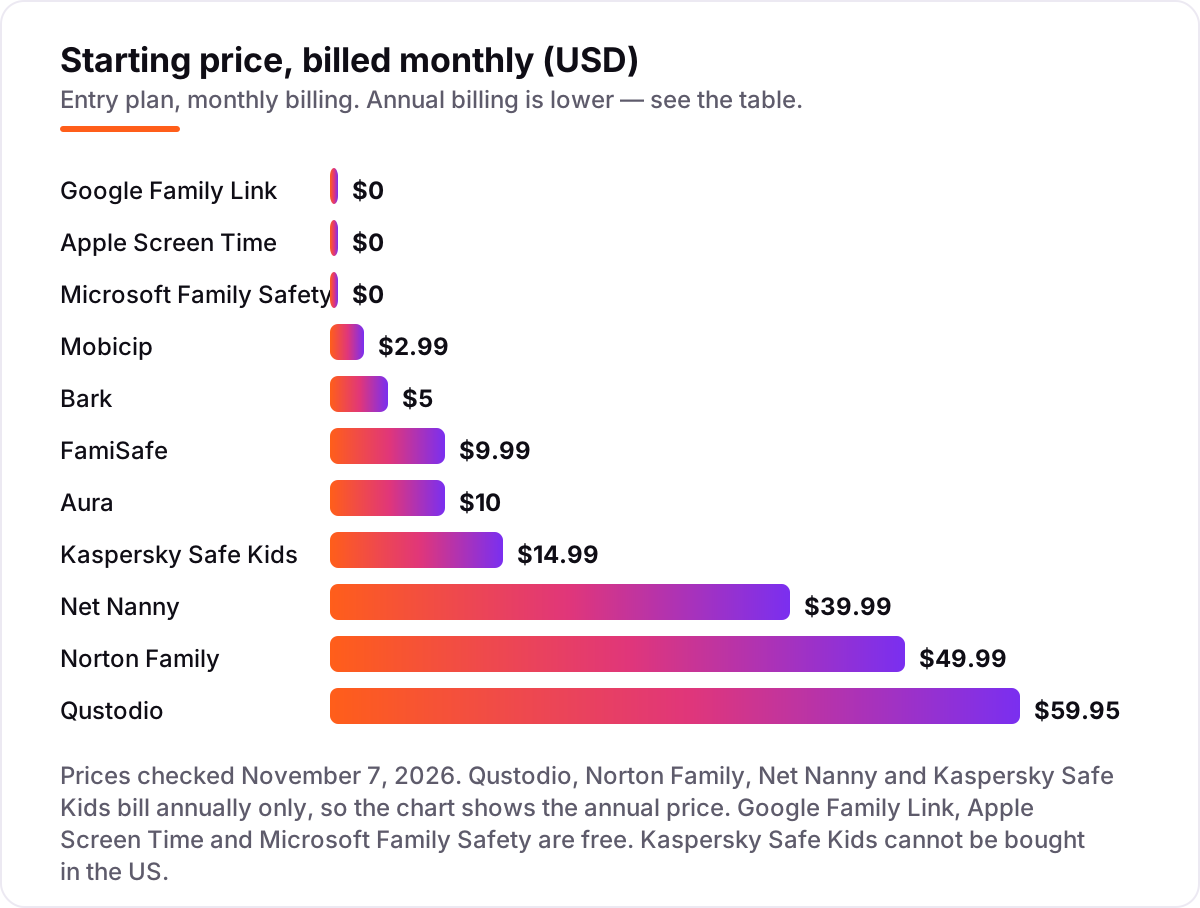
Take a family with two children, five devices between them: two phones, two tablets and a shared laptop. On list prices, the first year costs $0 on Google Family Link, Apple Screen Time or Microsoft Family Safety, $14.99 on Kaspersky Safe Kids Premium, $35.88 on Mobicip Lite billed annually, $39.99 on Net Nanny for one desktop, $49.99 on Norton Family, $59.95 on Qustodio Basic, $59.99 on FamiSafe billed annually, $60 on Bark Jr billed monthly, or $120 on Aura Kids billed annually.
Two of those numbers need adjusting before they are real. Net Nanny's $39.99 covers one desktop only, so five devices need the Family Protection Pass at $54.99 a year. And Bark Jr at $5 a month has no content monitoring, so a family buying Bark for alerts needs Premium at $14 a month, which is $168 a year billed monthly or $99 a year billed annually. With those fixes, the realistic first-year range for a paid tool is $14.99 to $168, and the free built-in tools stay at $0.
Three costs sit outside every number above. First, the promo prices: Qustodio's $59.95 Basic price was a short-term promo on October 28, 2026, with a regular price of about $72.94 a year, so budget on the regular price. Second, device caps: Qustodio Basic stops at five devices, so a sixth device means Complete at $104.95 a year. Third, the iPhone extras: Bark's full iPhone monitoring can need the Bark Sync charger accessory at $6 a month. If your household is mostly Apple, our guide to the best antivirus software covers the security side of the same devices.
Annual billing cuts the bill on most tools here: Bark Premium drops from $168 to $99 a year, FamiSafe from about $120 to $59.99, and Aura Kids from $156 to $120. Qustodio, Norton Family, Net Nanny and Kaspersky Safe Kids publish no monthly price at all, so the annual figure is the whole story. One more cost to check before you commit: a second household is a second subscription on every tool in this list, so separated parents who each want a dashboard should price two accounts, not one.
Know the difference: filtering vs monitoring
The confusion in this category is between blocking and watching. Filtering blocks or limits what a child can see: websites, apps and screen time. Monitoring watches what a child does and alerts you to risks, such as bullying, predatory messages or self-harm signals. Net Nanny leads on filtering, Bark leads on monitoring, and Qustodio does a bit of both — but no tool here does both jobs equally well, so pick the job first and the tool second.
There is a second, quieter confusion: a free plan is not the same as a free trial. Google Family Link, Apple Screen Time and Microsoft Family Safety are free forever, with no paid tier behind them. Qustodio and Kaspersky Safe Kids have free plans with real features and real limits. Bark, Mobicip, Aura, Norton Family, Net Nanny and FamiSafe offer trials of 3 to 30 days, after which the card is charged — set a calendar reminder for the trial end date before you sign up.
A third distinction worth knowing is device coverage versus platform depth. A tool can run on six platforms and still do very little on one of them: every tool here is thinner on iOS than on Android, because Apple limits what third-party apps can see. Cross-platform means the dashboard is the same everywhere, not that every feature works everywhere. Check the iOS feature list for your shortlist before you pay, especially if your children use iPhones.
Quick comparison: tool type by need
| Buyer | Best pick | Why |
|---|---|---|
| Mixed devices, one dashboard | Qustodio | Six platforms and the strongest location tracking, from $59.95/year |
| Teenagers on social media | Bark | Alerts across 30+ apps, Jr from $5/month, Premium $14/month |
| Tight budget, wide coverage | Mobicip | Six platforms from $2.99/month billed annually |
| Parental controls plus security | Aura | Kids plan with Safe Gaming alerts, $10/month billed annually |
| Android and Chromebook family | Google Family Link | Free, with app approvals, limits and location |
| Apple-only household | Apple Screen Time | Free and built in, with downtime and app limits |
Mistakes to avoid
- Buying before checking device coverage. Net Nanny does not support Android child devices, Norton Family cannot protect a child's Mac, and Aura has no location tracking. List your children's devices first, then buy.
- Budgeting on the promo price. Qustodio's $59.95 Basic price was a short-term promo; the regular price is about $72.94 a year. The list price is what you pay at renewal, so compare tools on that number.
- Paying for monitoring when you need filtering. Bark Premium is wasted on a seven-year-old who needs blocked sites and bedtimes, and Net Nanny is wasted on a teenager whose risks live in messages, not web pages.
- Forgetting the trial end date. Bark, Mobicip, Aura, Norton Family, Net Nanny and FamiSafe all charge the card when the trial ends. Put the date in your calendar the day you sign up.
- Installing in secret. Secret surveillance discovered later destroys trust faster than any app can rebuild it. Tell your child what you installed and why, and agree the rules together.
How we chose
We checked each vendor's own pricing page on November 7, 2026 and recorded the starting price exactly as shown, including the annual-billing figure where the page lists one, and we ranked the tools by fit for the most common buyer — a family with children on a mix of iPhone, Android, Windows and Chromebook devices — not by brand size. Two prices could not be read on the vendor's own page today: Qustodio's page is script-rendered, so its $59.95 Basic and $104.95 Complete prices come from independent reads of the vendor's own pricing page on October 18–28, 2026, and Kaspersky Safe Kids' $14.99 Premium price comes from a vendor-page read on October 11, 2026 plus directory listings, because the vendor's US page is blocked by the sales ban. Ratings are shown only where a G2, Capterra or Trustpilot page for the exact product was readable with a score and review count; the other eight tools carry no rating rather than a stale or estimated one. No vendor paid for a place in this list, and none of the links here are affiliate links.
What to do next
Start with the free option that matches your devices — Family Link on Android, Screen Time on Apple, Family Safety on Windows — and add a paid tool only for the gaps it leaves. Run the trial on your children's real devices for a week, check that the rules apply on every one of them, and talk through the dashboard with your child before the trial ends. If the household is sorted but new customers are not finding your business, our monthly SEO service handles the visibility side — or compare providers in our guide to SEO companies for small business. Once your tools are in place, find out what's holding your rankings back.
Your stack only works if people find you
SerpAstra fixes what keeps your site off page one and makes it easy for AI assistants to recommend.
Get a free audit→Sources we checked (14)
- Qustodio pricing — qustodio.com/en/pricing (checked November 7, 2026)
- Bark pricing — support.bark.us pricing (checked November 7, 2026)
- Mobicip pricing — mobicip.com/pricing (checked November 7, 2026)
- Aura parental controls — aura.com/parental-controls (checked November 7, 2026)
- Norton Family pricing — us.norton.com/pricing (checked November 7, 2026)
- Net Nanny — netnanny.com (checked November 7, 2026)
- FamiSafe pricing — famisafe.wondershare.com/pricing-plan-new.html (checked November 7, 2026)
- Kaspersky Safe Kids — usa.kaspersky.com/safe-kids (checked November 7, 2026)
- Google Family Link — families.google.com/familylink (checked November 7, 2026)
- Apple Screen Time — apple.com (checked November 7, 2026)
- Microsoft Family Safety — family.microsoft.com (checked November 7, 2026)
- Qustodio Trustpilot reviews — trustpilot.com/review/www.qustodio.com (checked November 7, 2026)
- Aura Trustpilot reviews — trustpilot.com/review/aura.com (checked November 7, 2026)
- FamiSafe Trustpilot reviews — trustpilot.com/review/famisafe.wondershare.com (checked November 7, 2026)
Shamim
Founder of SerpAstra
A full-stack SEO and digital marketer who spends most days on Local SEO for dental practices, AI search visibility and lead generation.
Frequently asked questions
What is the best cross-platform parental control app?
Qustodio is the best all-round pick for mixed-device families: it covers iOS, Android, Windows, Mac, Chromebook and Kindle from $59.95 a year, with the strongest location tracking. Bark is better for teenagers who need social media alerts, and Mobicip is the cheapest paid option at $2.99 a month billed annually.
How much does a parental control app cost?
Entry prices run from $0 to $14 a month. Google Family Link, Apple Screen Time and Microsoft Family Safety are free. The cheapest paid plans are Mobicip at $2.99 a month billed annually and Bark Jr at $5 a month. Most annual plans cost $40 to $105 a year, paid up front.
Is there a really free parental control app?
Yes, three of them. Google Family Link is free on Android and Chromebooks, Apple Screen Time is free on iPhone, iPad and Mac, and Microsoft Family Safety is free on Windows, Xbox, Android and iOS. Qustodio and Kaspersky Safe Kids also have genuinely useful free tiers with real filtering and time limits.
Do parental control apps work on iPhone and Android at the same time?
Yes, if you pick a truly cross-platform tool. Qustodio, Bark, Mobicip, Aura, FamiSafe and Kaspersky Safe Kids all run on iOS and Android under one parent dashboard. Apple Screen Time covers Apple devices only, and Google Family Link is strongest on Android, so neither one alone covers a mixed household.
Can my child get around a parental control app?
Yes, a determined teenager can find workarounds for every tool here, from alternative browsers to changing time zones, and no app is unbreakable. Treat controls as friction and a conversation starter, not a wall. Tell your child what you installed and why, agree the rules together, and review the dashboard with them each week.
What is the difference between filtering and monitoring?
Filtering blocks or limits what a child can see: websites, apps and screen time. Monitoring watches what a child does and alerts you to risks, such as bullying or predatory messages. Net Nanny leads on filtering, Bark leads on monitoring, and Qustodio does a bit of both. Most families need filtering for younger children and monitoring for teenagers.
Can I use Kaspersky Safe Kids in the US?
No. Kaspersky products cannot be sold in the United States after the government ban, so US families should skip it and pick Qustodio, Bark or Mobicip instead. Outside the US it remains a strong budget pick, with a genuinely useful free tier and Premium at $14.99 a year for unlimited devices.
Free SEO and AI visibility audit
Find out what is holding your rankings back
Send us your site. Within 2 business days you get a written audit, an AI visibility check and a short fix list ranked by impact. Free, with no contract attached.
Request my free audit→Related guides
 Consumer Apps10 Best Learn to Read Apps for Kids in 2026: Free and Paid Apps RankedCompare the 10 best learn to read apps for kids for ages 2 to 8 on price, free plans and phonics teaching, with every price checked November 4, 2026.Read guide →
 Consumer AppsBest Spanish Learning Apps for Kids (2026): 9 Apps Worth DownloadingCompare the 9 best spanish learning app for kids on price, free tiers, ages and speaking practice, with every price checked November 4, 2026.Read guide →
 IT, Security & DevOpsBest Antivirus Software Review for 2026: 10 Options Compared by Use CaseCompare the best antivirus software review picks for 2026: 10 suites with prices, renewal costs, free plans and device limits, checked November 6, 2026.Read guide →