
10 Best Customer Journey Analytics Software in 2026, Compared
The 10 best customer journey analytics software picks for 2026, compared on price, journey mapping and AI insights — with real prices checked November 2, 2026.
 Shamim Mia, Founder, SerpAstraLast verified November 2, 202610 min read
We compare pricing pages, documentation and public reviews. We never accept payment for rankings.

Key takeaways
- Mixpanel is the best pick for most teams: journey maps, funnels and retention from $0, with paid Growth from $140 a month at 1.5M events; Amplitude Plus follows at $49 a month billed annually, and Google Analytics 4 is free.
- Seven tools in this list have a usable free plan — Mixpanel, Amplitude, Google Analytics 4, Contentsquare, Heap, FullStory and Kissmetrics — but only five publish a paid starting price.
- The single most important buying factor is how the tool charges: per event, per session, per user or per month — the same traffic can cost $49 or $999 depending on the meter.
- Every price below was checked on the vendor's own pricing page on November 2, 2026. Ratings are G2, with review counts shown.
On this page
Quick comparison
| Tool | Best for | Starting price | Free plan |
|---|---|---|---|
| Mixpanel | Product and growth teams that want funnels, retention and journey maps on a generous free tier and are ready to pay by event volume | $140/mo (at 1.5M events) | Yes (1M events) |
| Amplitude | Product teams that want the deepest funnel, cohort and retention analysis with AI agents built in | $49/mo (annual) | Yes (2M events) |
| Google Analytics 4 | Small businesses and marketers who want free journey data from the tool they already have installed | Free | Yes (free) |
| Contentsquare | Ecommerce and marketing teams that want website journeys, heatmaps and session replay in one view | $49/mo | Yes (200k sessions) |
| Heap | Product teams that want autocapture and retroactive journey analysis without writing tracking code | Custom quote | Yes (10k sessions) |
| FullStory | UX and product teams that want to watch real sessions and find the exact moment a journey breaks | Custom quote | Yes (30k sessions) |
| Pendo | SaaS product teams that want journey analytics plus in-app guides and session replay in one platform | Custom quote | Yes (500 MAUs) |
| Adobe Customer Journey Analytics | Enterprises already on Adobe Experience Platform that need web, app and offline journeys in one view | Custom quote | No |
| Woopra | Marketing teams that want per-person journey profiles stitched across web, email, support and product | $999/mo | No (30-day trial) |
| Kissmetrics | Small marketing teams that want person-based funnels and revenue reports without enterprise pricing | $99/mo | Yes (100k events) |
Make one of these tools?
We re-check this list every quarter. Send a correction, request a review, or ask about a clearly labeled sponsored spot.
Request a listingThe best customer journey analytics software

Mixpanel
Best for: Product and growth teams that want funnels, retention and journey maps on a generous free tier and are ready to pay by event volume
Mixpanel tops this list because it does the core job — showing how people move through your product. The free plan covers a million events a month, and its Flows report draws the actual paths users take between steps, so you can see where a journey bends or breaks. Funnels, retention and cohorts sit together, and Growth adds unlimited saved reports, multi-touch attribution and the Spark AI assistant.
The catch is the meter. Growth has no flat monthly price: the first million events are free, then you pay $0.28 per 1,000 events, so a 2-million-event month costs about $280 before add-ons. There is also no autocapture, so every event needs tracking code and a clean taxonomy. If your team can instrument events properly, Mixpanel is the best journey tool you can start for free.
What we like
- Free plan covers 1M events a month with funnels, retention, Flows journey maps and 10,000 session replays
- Flows shows the exact paths users take between steps, with drop-off at every stage
- Spark AI answers data questions in plain English on Growth, with unlimited saved reports and cohorts
Watch out for
- No flat monthly price: Growth is usage-based, so the bill climbs with every event past the free 1M
- No autocapture — every event needs tracking code, so setup takes real engineering time
- Extra session replays are billed separately, and group analytics is a paid add-on

Amplitude
Best for: Product teams that want the deepest funnel, cohort and retention analysis with AI agents built in
Amplitude is the deepest analytics engine in this list, and it shows in the journey work. Its funnel and path analysis goes further than the others, with behavioral cohorts that let you compare the journeys of paying customers against those who churn, and session replay built into the same workspace. The AI Agents launched in 2026 answer questions in plain language and are included on every plan, including the free Starter tier.
The free Starter plan is genuinely useful, covering up to 2 million events a month. The step up is where the pricing gets serious: Plus starts at $49 a month billed annually, but Growth and Enterprise are custom quotes with no published rates. Reviewers also warn about a learning curve once you move past simple funnels. Pick Amplitude when analysis depth matters more than a simple price list.
What we like
- Journey and funnel analysis with behavioral cohorts is the deepest in this list
- AI Agents and MCP access are included on every plan, including free Starter
- Free Starter covers up to 2M events a month, the largest free event allowance here
Watch out for
- Growth and Enterprise are custom quote only, so costs jump sharply once you outgrow Plus
- Reviewers report a steep learning curve for advanced features and keeping the event taxonomy clean
- Plus is usage-based above its included volume, so heavy products can outgrow the $49 starting rate fast

Google Analytics 4
Best for: Small businesses and marketers who want free journey data from the tool they already have installed
Google Analytics 4 is the only tool in this list that costs nothing and is probably already installed on your site. Its path exploration report draws the sequences visitors actually follow through pages and events, and its funnel exploration shows drop-off at each step. Built-in predictive metrics estimate purchase and churn probability, and automated Insights flag unusual changes without building a report.
The limits are real. GA4 is session-based, so it cannot show a cross-device journey unless you set up User-ID and move to Analytics 360. Exploration data is sampled above 10 million events and kept for only 14 months on the free tier. And there is no middle tier: the next step is 360, reportedly from $50,000 a year. Use GA4 as your free baseline, then add a person-based tool when the questions get specific.
What we like
- Free, with no event cap that triggers an invoice and no seat charges
- Path exploration shows the exact sequences visitors follow through pages and events
- Built-in predictive metrics (purchase and churn probability) and automated Insights on every property
Watch out for
- Individual user journeys are limited: GA4 is session-based and cannot stitch a full cross-device identity without 360 and User-ID setup
- Exploration data is sampled above 10M events and kept for 14 months on the free tier
- The only paid step is Analytics 360, reportedly from $50,000 a year — there is no middle tier

Contentsquare
Best for: Ecommerce and marketing teams that want website journeys, heatmaps and session replay in one view
Contentsquare is the best pick when the journey happens on a website rather than inside a product. Its journey analysis shows how visitors move from entry to exit, zone-based heatmaps show which parts of each page earn attention, and session replay lets you watch the moment a visitor gets stuck. Sense, its AI layer, finds friction, puts a revenue number on it and suggests what to fix first.
Pricing is transparent for this category: the free plan covers 200,000 sessions a month, and Growth costs $49 a month billed monthly, or $39 billed annually. The trade-off is sampling — replays capture only 5% of sessions on Free and 15% on Growth — so rare journeys slip past. Pro and Enterprise are quote-only. For ecommerce and marketing teams, the combination of journeys, heatmaps and replay at $49 is hard to beat.
What we like
- Journey analysis, zone-based heatmaps and session replay all come with the $49 Growth plan
- Sense AI finds friction, quantifies its impact on conversion and suggests what to fix
- Free plan covers up to 200,000 sessions a month, the largest free session allowance here
Watch out for
- Session replays are sampled (5% on Free, 15% on Growth), so rare journeys can slip through
- Pro and Enterprise are quote-only, and the step above Growth is a steep price jump
- Reviewers note the deeper analysis takes time to learn and session filtering can be fiddly

Heap
Best for: Product teams that want autocapture and retroactive journey analysis without writing tracking code
Heap's pitch is simple: install one snippet and it captures everything. Autocapture records every click, tap and pageview with no tracking code, and you define events retroactively, so a question you think of today can be answered from data collected months ago. Its Journeys view maps every path users take through your product with conversion rates at each step, and Sense AI answers questions in plain English on Growth and above.
The problem is price transparency. Heap's own pricing page publishes no paid price: Growth requires signing up and installing the snippet to get an estimate, and Pro and Premier are custom session pricing. G2 lists Growth from $3,600 a year, but that figure comes from vendor-supplied directory data, not heap.io, so budget on a quote. If you hate writing tracking code, Heap is still worth the sales call.
What we like
- Autocapture records every click, tap and pageview with no tracking code, and events can be defined retroactively
- Journeys maps show every path users take, with conversion rates at each step
- Sense AI answers questions in plain English on Growth and above
Watch out for
- No published paid price: Growth needs a signup and snippet install for an estimate, and Pro and Premier are custom session pricing
- Reviewers report occasional slow performance on very large datasets and a learning curve for advanced reports
- Session replay and heatmaps are paid add-ons, not included in the core analytics plans

FullStory
Best for: UX and product teams that want to watch real sessions and find the exact moment a journey breaks
FullStory answers a different question from the rest of this list: not what users did, but why. Its session replay records real sessions with frustration signals such as rage clicks and dead clicks, so you can watch the exact moment a journey breaks. Searchable sessions and funnels let a support agent pull up the recording of a customer's problem instead of asking them to describe it.
The free plan is generous at 30,000 sessions a month with a year of retention. But every paid plan — Business, Advanced and Enterprise — says 'Request pricing & demo', so there is no way to budget without a sales conversation, and reviewers say the price scales steeply with session volume. Mobile analytics and StoryAI are paid add-ons. Choose FullStory when watching real behavior matters more than a published price.
What we like
- Session replay with frustration signals (rage clicks, dead clicks) shows why a journey fails, not just where
- FullstoryFree is generous: 30,000 sessions a month with 12 months of retention
- Searchable sessions and funnels link a support ticket to the exact recording of the problem
Watch out for
- No published paid price: Business, Advanced and Enterprise all say 'Request pricing & demo'
- Reviewers say large session volumes get overwhelming to filter, and pricing scales steeply with sessions
- Mobile analytics and StoryAI are paid add-ons, and dashboards are excluded from the free plan

Pendo
Best for: SaaS product teams that want journey analytics plus in-app guides and session replay in one platform
Pendo is the only tool here that pairs journey analytics with the means to change the journey. Its analytics show which features customers use and where they drop off, and the same platform lets you publish in-app guides, NPS surveys and onboarding flows to fix what you found. Session replay arrives on Core, and retroactive analytics means new questions can be answered from data collected since installation.
The free plan covers up to 500 monthly active users with analytics and guides included. Above that, every paid plan — Base, Core and the top tier — is a custom quote priced on monthly active users, with annual contracts and several features sold as add-ons. Reviewers also report a steep learning curve and fiddly permissions. Pendo fits SaaS teams that want analytics and guidance in one contract, not two.
What we like
- Analytics, in-app guides, NPS and session replay (Core) sit in one platform
- Retroactive analytics means new questions can be answered from data collected since install
- Leo, the natural-language assistant, is included in every plan, including Pendo Free
Watch out for
- No published paid price: Base, Core and the top tier are all custom MAU-volume quotes on annual contracts
- Session replay is not in Base — it starts on Core — and several features are paid add-ons
- Reviewers report a steep learning curve and fiddly permission management for guides and replay

Adobe Customer Journey Analytics
Best for: Enterprises already on Adobe Experience Platform that need web, app and offline journeys in one view
Adobe Customer Journey Analytics is built for one job the others cannot do: stitching online and offline behavior into a single journey. It combines web, app, call-center and point-of-sale data in one view, and its Data Views and derived fields let analysts change reporting logic without going back to developers. Analysis Workspace remains the most flexible freeform reporting canvas in this list.
Everything about it is enterprise-scale, including the effort. G2 puts average implementation at about 3 months, with identity stitching and XDM schemas to configure, and there is no free plan or trial — both tiers, Core Analysis and Freeform Analysis, are 'Contact Us' quotes. Activation in Adobe Target and Journey Optimizer needs a separate Real-Time CDP licence. It is the right pick only for teams already invested in Adobe Experience Platform.
What we like
- Stitches web, app, call-center and point-of-sale data into one cross-channel journey
- Data Views and derived fields let analysts change reporting logic without developer work
- Analysis Workspace is the most flexible freeform reporting canvas in this list
Watch out for
- Quote-only enterprise pricing with no free plan or trial, and G2 reviewers call the cost hard to justify for smaller teams
- Implementation takes about 3 months on average, per G2, with identity stitching and XDM schemas to configure
- Activation in Adobe Target and Journey Optimizer needs a separate Real-Time CDP licence

Woopra
Best for: Marketing teams that want per-person journey profiles stitched across web, email, support and product
Woopra is the most journey-native tool in this list: it was built around per-person profiles. Each profile stitches web, email, support, SMS and product activity to one person in real time, and its journey reports show the sequences that lead to conversion or churn. Triggers and automations can act on that behavior as it happens, and the Pro plan includes 50 seats and 2-year retention.
The price is the problem. Pro starts at $999 a month for 5 million-plus events, the highest entry price here, and the free and $349 tiers that directories still show are gone from woopra.com — new signups start on Pro with the first month free. With only 207 G2 reviews, it has the second-smallest review base here. Woopra suits marketing teams that live in per-person journeys and can justify the four-figure floor.
What we like
- 360-degree profiles stitch every touchpoint — web, email, support, SMS, product — to one person in real time
- Journey reports, triggers and automations act on behavior as it happens
- 50 seats and 2-year data retention come with the Pro plan
Watch out for
- Pro starts at $999 a month — the highest entry price in this list — and the old free and $349 tiers are gone from woopra.com
- G2 still shows the old Core and Startup tiers, so directory prices for Woopra are stale — check the vendor page
- Only 207 G2 reviews, the second-smallest base here, and reviewers cite long onboarding for data integration

Kissmetrics
Best for: Small marketing teams that want person-based funnels and revenue reports without enterprise pricing
Kissmetrics keeps one idea at the center: every report is about people, not pageviews. Its funnels, cohorts and revenue reports tie each step back to real individuals, so you can see which campaigns brought the customers who stayed and paid. At $99 a month, Growth is the cheapest paid plan in this list, and the free Starter plan covers 100,000 events a month with no card required.
The trade-offs are age and scale. Kissmetrics has the smallest review base here — 168 G2 reviews — and reviewers describe a dated interface, slow reports on long date ranges and a learning curve for new users. There is no AI assistant, and the report set is narrower than the product-analytics suites. For a small marketing team that wants person-based revenue reporting on a tight budget, it is still the cheapest way in.
What we like
- Every report is person-based, so funnels, cohorts and revenue tie back to real individuals
- Growth at $99 a month is the cheapest paid plan in this list
- Free Starter covers 100,000 events a month with no card required
Watch out for
- Smallest review base here (168 G2 reviews) and reviewers note a dated interface and slow reports on large date ranges
- No AI assistant, and the report set is narrower than the product-analytics suites
- Setup takes real work: tracking needs custom code, and reviewers report a learning curve for new users
Customer journey analytics software stitches every touchpoint — website visits, app sessions, emails, support chats and offline purchases — into one ordered path per customer, so you can see where journeys succeed and where they break. This list ranks the 10 best customer journey analytics software options for 2026 by fit for the most common buyer, a mid-market team that needs real journey data without an enterprise contract, with every price checked on the vendor's own pricing page on November 2, 2026.
How to choose the best customer journey analytics software
- Count your volume first. Every tool bills on a different meter — events, sessions or users — so the same traffic can cost $49 on one tool and $999 on another.
- Decide how much instrumentation you can do. Heap and GA4 need little or no tracking code; Mixpanel, Amplitude and Kissmetrics need events coded in.
- Pick your journey: website or whole business. Contentsquare and FullStory excel on website journeys, while Mixpanel, Amplitude and Adobe cover web, app and offline.
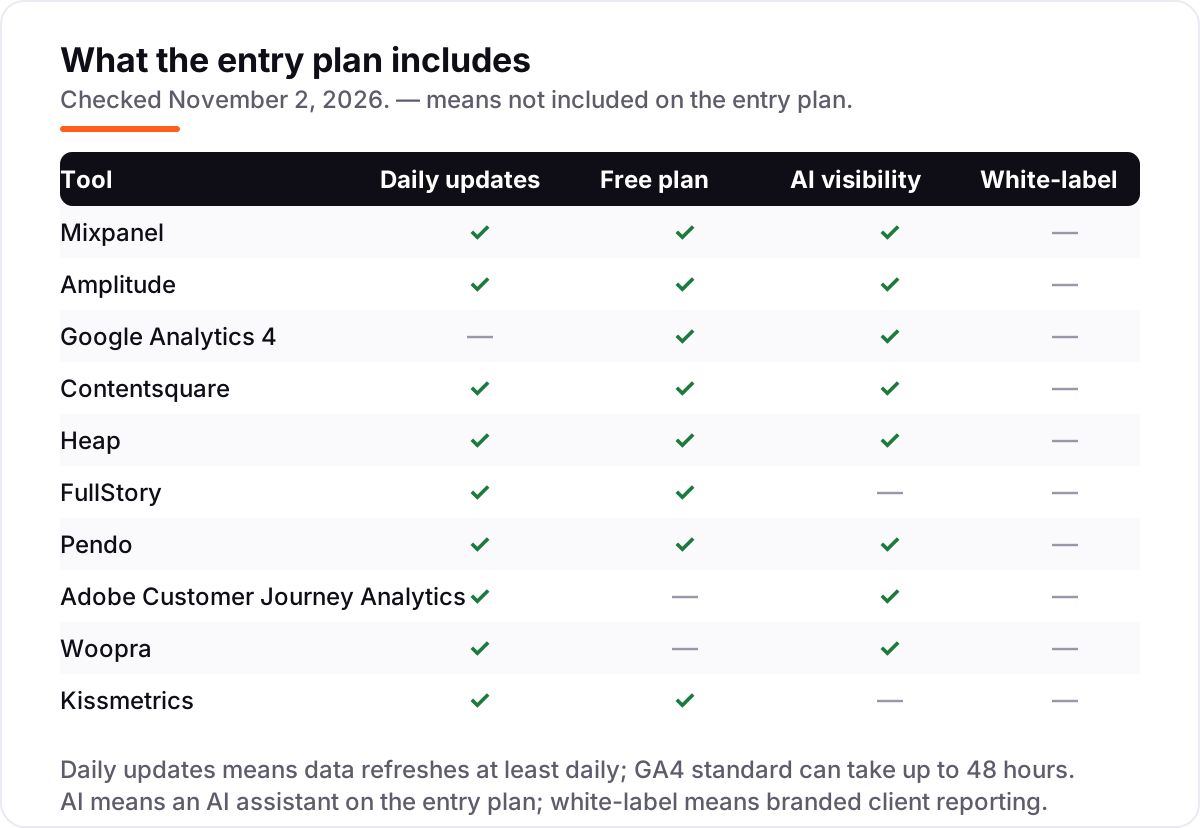
- Check what is included, not just the headline price. Replay, AI assistants and white-label reports are add-ons on several tools here.
- Try the free plan with your real data. Seven tools here have one; run your actual traffic through it for two weeks before paying.
If the data shows your pages lose people before they convert, our AI search optimization service can help fix what the journey reveals.
Quick comparison: tool type by need
| Buyer | Best pick | Why |
|---|---|---|
| Solo site or small business, free first | Google Analytics 4 | Free, path exploration included, no seat charges |
| Product team, best all-rounder | Mixpanel | Journeys, funnels and retention from $0; Growth from $140 at 1.5M events |
| Deepest analysis with AI | Amplitude | Funnels, cohorts and AI agents; Plus $49 a month billed annually |
| Website journeys and replay | Contentsquare | Journeys, heatmaps and replay from $49 a month |
| No tracking code wanted | Heap | Autocapture and retroactive events; paid pricing by quote |
| Enterprise, offline data included | Adobe Customer Journey Analytics | Cross-channel stitching; quote-only, about 3 months to implement |
Customer journey analytics software pricing: what you will actually pay
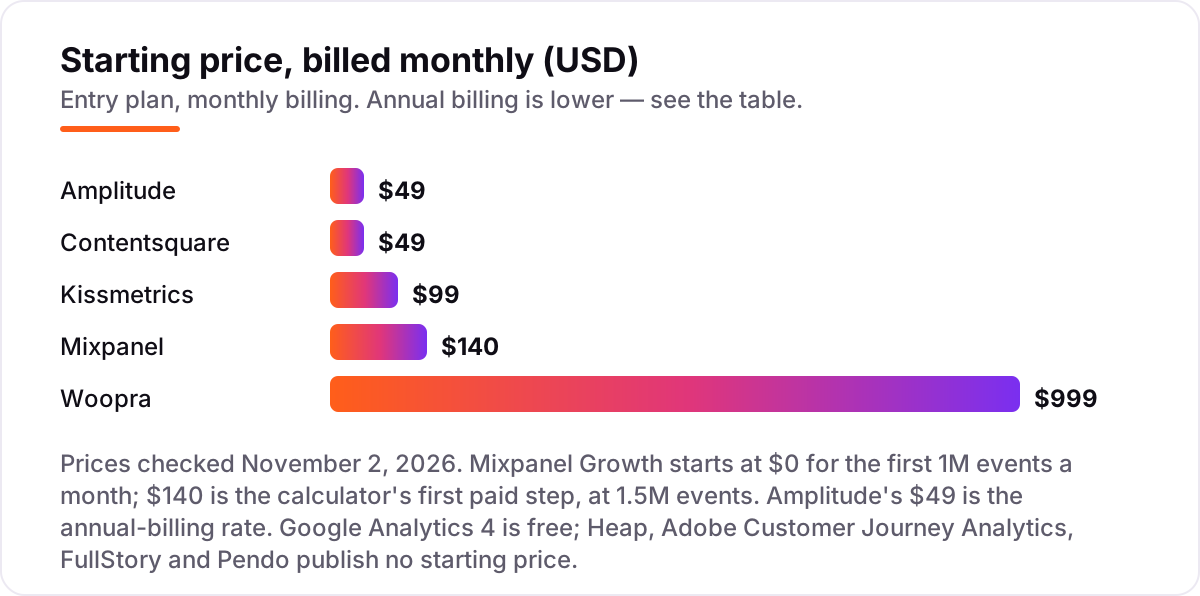
Take a site or app doing 2 million events a month. On Mixpanel Growth, the first million events are free and the next million costs about $280 at the published rate of $0.28 per 1,000 events. Amplitude Plus covers the same volume for $49 a month billed annually, and Kissmetrics lists 2 million events at $299 a month on its own pricing table, or $239 billed annually. Contentsquare bills sessions rather than events, and Growth covers 7,000 to 10 million sessions for $49 a month billed monthly.
Woopra is the outlier: its only paid plan, Pro, starts at $999 a month for 5 million-plus events, so a 2-million-event business pays the $999 floor anyway. Google Analytics 4 costs nothing at this volume. Heap, Adobe Customer Journey Analytics, FullStory and Pendo publish no starting price, so their cost at 2 million events is whatever the quote says. The lesson is to compare tools on your own volume, not on the headline price — and to tag your campaigns with the free UTM builder so the journeys you analyze are attributed correctly.
Customer journey analytics vs product analytics: know the difference
The confusion is understandable: the same vendors sell both. Product analytics measures what people do inside your product — which features they use, how often they return, where they drop off in a signup funnel. It is built around events and cohorts, and Mixpanel and Amplitude are its classic examples.
Customer journey analytics is wider. It follows one person across channels and time: the ad they clicked, the pages they read, the email they opened, the support chat, the store visit and the renewal. GA4 sits in between — its path reports show sequences, but it cannot reliably stitch one person's cross-device journey. If your question is "which feature keeps users?", buy product analytics. If it is "what path led this customer to buy — or to leave?", buy journey analytics.
How we chose
We checked each vendor's own pricing page on November 2, 2026 and recorded the starting price exactly as shown, including the annual-billing figure where the page lists one. Ratings come from G2 review pages opened the same day, with review counts shown. Two prices need a note: Mixpanel's Growth plan has no flat monthly rate, so the $140 figure is the first paid step on its own pricing calculator, at 1.5 million events a month; and Amplitude's $49 is the annual-billing rate. Heap's page publishes no paid price — G2 lists Growth from $3,600 a year from vendor-supplied data, but that number does not appear on heap.io — and Woopra's page now lists only Pro at $999 and Enterprise, although G2 still shows its retired Core and Startup tiers. We ranked the tools by fit for the most common buyer — a mid-market marketing or product team that wants real journey data without an enterprise contract — not by brand size. No vendor paid for a place in this list, and none of the links here are affiliate links.
What to do next
Start with your volume: count monthly events or sessions, then price the five tools that publish a starting rate against that number. Take the free plan of your top pick and run your real traffic through it for two weeks, checking the journey reports against what you already know from GA4. If the free tier answers your questions, stay on it; if you hit its caps, you now know exactly which paid tier to buy. Once your tools are in place, find out what's holding your rankings back.
Your stack only works if people find you
SerpAstra fixes what keeps your site off page one and makes it easy for AI assistants to recommend.
Get a free audit→Sources we checked (21)
- Mixpanel pricing — mixpanel.com/pricing (checked November 2, 2026)
- Mixpanel on G2 — 4.5/5, 1,386 reviews (checked November 2, 2026)
- Amplitude pricing — amplitude.com/pricing (checked November 2, 2026)
- Amplitude on G2 — 4.4/5, 3,092 reviews (checked November 2, 2026)
- Google Analytics — marketingplatform.google.com/about/analytics (checked November 2, 2026)
- Google Analytics on G2 — 4.5/5, 6,885 reviews (checked November 2, 2026)
- Contentsquare pricing — contentsquare.com/pricing (checked November 2, 2026)
- Contentsquare on G2 — 4.6/5, 747 reviews (checked November 2, 2026)
- Heap pricing — heap.io/pricing (checked November 2, 2026)
- Heap on G2 — 4.4/5, 1,097 reviews (checked November 2, 2026)
- FullStory pricing — fullstory.com/pricing (checked November 2, 2026)
- FullStory on G2 — 4.5/5, 1,053 reviews (checked November 2, 2026)
- Pendo pricing — pendo.io/pricing (checked November 2, 2026)
- Pendo on G2 — 4.4/5, 1,827 reviews (checked November 2, 2026)
- Adobe Customer Journey Analytics — adobe.com/analytics/customer-journey-analytics (checked November 2, 2026)
- Adobe Customer Journey Analytics pricing on G2 — both tiers Contact Us (checked November 2, 2026)
- Adobe Customer Journey Analytics on G2 — 4.2/5, 179 reviews (checked November 2, 2026)
- Woopra pricing — woopra.com/pricing (checked November 2, 2026)
- Woopra on G2 — 4.4/5, 207 reviews (checked November 2, 2026)
- Kissmetrics pricing — kissmetrics.io/pricing (checked November 2, 2026)
- Kissmetrics on G2 — 4.1/5, 168 reviews (checked November 2, 2026)
Shamim
Founder of SerpAstra
A full-stack SEO and digital marketer who spends most days on Local SEO for dental practices, AI search visibility and lead generation.
Frequently asked questions
What is the best customer journey analytics software in 2026?
Mixpanel is the best pick for most teams: journey maps, funnels and retention from $0, with paid Growth from $140 a month at 1.5M events. Amplitude is the deeper alternative at $49 a month, and Google Analytics 4 is the free starting point. Enterprises that need offline data stitched in should look at Adobe Customer Journey Analytics instead.
How much does customer journey analytics software cost?
Between $0 and $999 a month at the entry level. Amplitude Plus starts at $49 a month billed annually, Contentsquare Growth at $49, Kissmetrics Growth at $99, and Woopra Pro at $999. Mixpanel Growth is usage-based from $0. Heap, Adobe, FullStory and Pendo publish no starting price, so those need a quote.
Is there a free customer journey analytics tool?
Yes. Google Analytics 4 is completely free, and Mixpanel, Amplitude, Contentsquare, Heap, FullStory and Kissmetrics all have free plans with real journey features. Free tiers cap events or sessions, so a busy site outgrows them. Pendo is free up to 500 monthly active users; Adobe and Woopra have no free plan.
What is the difference between customer journey analytics and product analytics?
Journey analytics follows one person across every touchpoint — web, app, email, support and offline — in the order things happened. Product analytics measures behavior inside the product itself, such as feature use, funnels and retention. The two overlap: Mixpanel and Amplitude do both, while Contentsquare and FullStory focus on the website journey.
Can Google Analytics 4 show individual customer journeys?
Only partly. GA4 path exploration shows the sequences visitors follow, but it is session-based, so it cannot reliably stitch one person's journey across devices. For true per-person journeys you need User-ID setup, or a person-based tool such as Mixpanel, Woopra or Kissmetrics. GA4 works best as the free baseline alongside one of those.
What should I check before paying for customer journey analytics software?
Four things: what the tool counts as billable — events, sessions or users — and what your volume costs on that meter; whether the free plan covers your traffic; whether AI features and replay are included or add-ons; and whether the price is published or quote-only. Five tools here publish a price; the other five need a sales conversation.
Free SEO and AI visibility audit
Find out what is holding your rankings back
Send us your site. Within 2 business days you get a written audit, an AI visibility check and a short fix list ranked by impact. Free, with no contract attached.
Request my free audit→Related guides
 AI, Data & Analytics10 Best Customer Analytics Software in 2026, Compared10 best customer analytics software tools compared on price, free plans and fit, from Mixpanel and Amplitude to free GA4, with prices checked November 2, 2026.Read guide →
 SEO & AI Search10 Best AI Search Optimization Tools in 2026 (Free and Paid, Compared)10 best AI search optimization tools compared on price, AI visibility coverage and content scoring, with real prices checked October 31, 2026.Read guide →
 StrategyHow to track your Google ranking (and what the numbers actually mean)Track your Google ranking the right way: Search Console, free checkers and rank trackers explained, and what average position and CTR really mean today.Read guide →