
Best Dental Imaging Software for 2026: 12 Options Compared by Use Case
Compare the 12 best dental imaging software options for 2026 on price, 2D and 3D imaging, and fit by specialty, with every price checked November 7, 2026.
 Shamim Mia, Founder, SerpAstraLast verified November 7, 202613 min read
We compare pricing pages, documentation and public reviews. We never accept payment for rankings.
Key takeaways
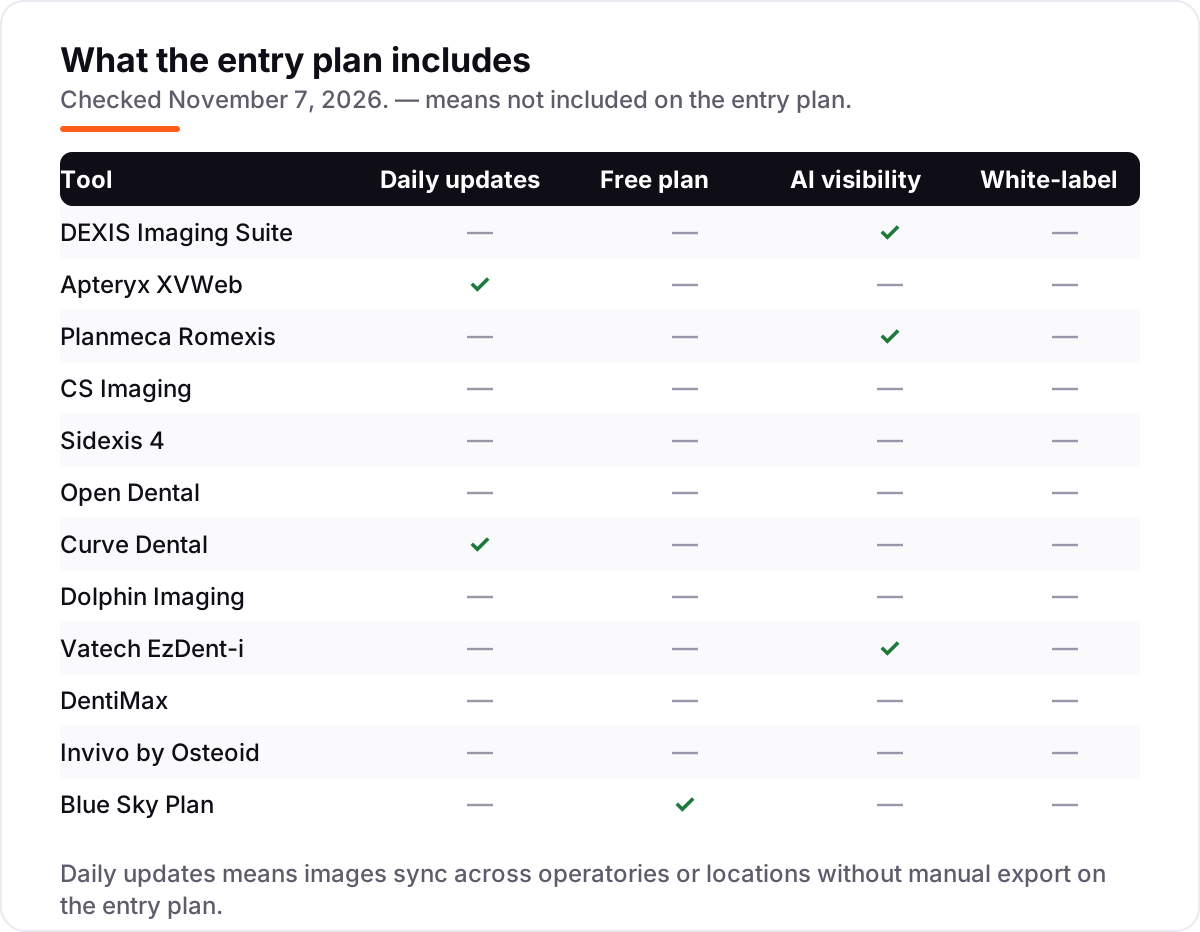
- DEXIS Imaging Suite leads for most general practices, Apteryx XVWeb leads for multi-location groups that want cloud imaging, and Planmeca Romexis leads for implant and surgical 3D planning — all three are sold by quote.
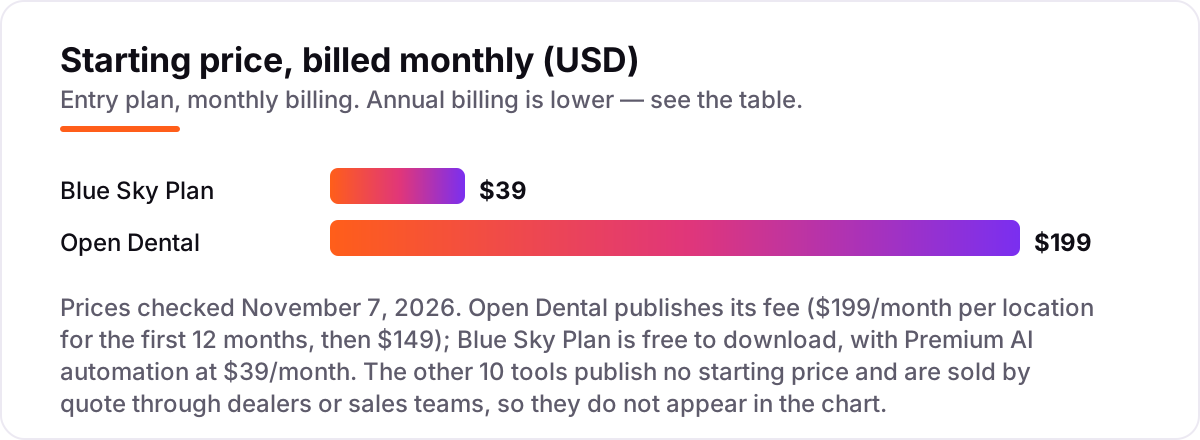
- Open Dental is the only tool here with a published price: $199/month per location for the first 12 months, then $149/month. Blue Sky Plan is free to download, with AI automation at $39/month.
- The single most important buying factor is the hardware you already own: the deepest integrations are single-vendor, and breaking that link is the main reason to pick an open platform like Apteryx XVWeb.
- Ten of the twelve tools publish no price at all, so a written quote — covering licenses, upgrades, support and hardware — is the real price comparison in this category.
On this page
Quick comparison
| Tool | Best for | Starting price | Free plan |
|---|---|---|---|
| DEXIS Imaging Suite | General practices that want the most widely supported imaging platform in US dentistry | Custom quote | No (demo on request) |
| Apteryx XVWeb | Multi-location groups and multi-brand practices that want cloud imaging without hardware lock-in | Custom quote | No (demo on request) |
| Planmeca Romexis | Implant, surgical and high-end restorative practices that plan in 3D every day | Custom quote | No (demo on request) |
| CS Imaging | General practices on Carestream hardware that want dependable everyday 2D imaging | Custom quote | No (demo on request) |
| Sidexis 4 | Practices standardized on Dentsply Sirona equipment, from sensor to CEREC mill | Custom quote | No (demo on request) |
| Open Dental | Practices that want practice management and imaging in one system with fully published pricing | $199/mo | No (free trial version) |
| Curve Dental | Cloud-native practices and startups that want imaging with no server to buy or maintain | Custom quote | No (demo on request) |
| Dolphin Imaging | Orthodontists who need cephalometric tracing, growth prediction and treatment simulation | Custom quote | No (demo on request) |
| Vatech EzDent-i | Practices buying a Vatech CBCT that want capable 2D and 3D software bundled with the machine | Custom quote | No (demo on request) |
| DentiMax | Solo and small practices that want one affordable vendor for scheduling, charting, billing and imaging | Custom quote | No (demo on request) |
| Invivo by Osteoid | Oral surgeons, implantologists and orthodontists who plan complex cases in 3D | Custom quote | No (30-day trial) |
| Blue Sky Plan | Implant practices that want free planning software and only pay for AI automation or exports | Free; Premium $39/mo | Yes (free) |
Make one of these tools?
We re-check this list every quarter. Send a correction, request a review, or ask about a clearly labeled sponsored spot.
Request a listingThe best dental imaging software

DEXIS Imaging Suite
Best for: General practices that want the most widely supported imaging platform in US dentistry
DEXIS is the default choice in dental imaging, and its scale is the reason. As part of Envista Holdings, it brings together 2D and 3D imaging, intraoral scanning and diagnostic software in one connected system, and the newest software, DEXIS Eleven, adds workflow improvements and optional cloud features such as Cloud Backup and CloudVu. Images are available instantly after exposure, with magnification, enhancement filters and annotations for diagnosis.
The practical strength is familiarity: staff, specialists and referral partners have almost certainly used it, and sharing images with colleagues is straightforward. The trade-off is ecosystem gravity. DEXIS works best with DEXIS sensors and scanners, and pricing runs through dealers rather than a public price list, so get the quote in writing before you compare it with anything else.
What we like
- The market leader: the imaging platform most US practices and specialists already know
- Covers 2D, 3D and intraoral scanning in one connected system, with AI-assisted diagnostics in DEXIS Eleven
- Images are available the moment they are taken, with enhancement, measurement and annotation tools
- Cloud Backup, CloudVu and the DEXsync module extend one database across offices
Watch out for
- No published price — every quote comes through a dealer, so budgeting starts with a sales call
- Works best with DEXIS sensors and scanners, so switching hardware brands costs you integration
- Sensor replacement and warranty costs draw the most complaints in G2 reviews

Apteryx XVWeb
Best for: Multi-location groups and multi-brand practices that want cloud imaging without hardware lock-in
Apteryx XVWeb is the answer for practices that refuse to be locked into one hardware brand. Built from the start as a cloud platform for managing, analyzing and processing dental images, it takes an open-architecture approach: you keep whatever sensors and scanners you already own, from any leading manufacturer, and use its imaging tools on top of them.
That freedom extends to the rest of the stack. XVWeb connects with your practice-management software, so you can choose the best mix of software and acquisition hardware rather than accepting a bundle, and for multi-site groups the cloud architecture means images follow the patient, not the server. Pricing is quote-based, so the sales conversation is where the number appears.
What we like
- True cloud imaging: images follow the patient and the provider across offices, with no server to maintain
- Open architecture works with sensors and scanners from any leading manufacturer
- Connects with major practice-management systems instead of forcing a bundled one
- Central archive and backup are handled by the vendor, not by your front desk
Watch out for
- No published price — Capterra lists $250/month, but the vendor publishes no price, so treat that figure as third-party only
- Cloud-only, so a dead internet connection stops image access until it returns
- Fewer native practice-management integrations than the all-in-one platforms

Planmeca Romexis
Best for: Implant, surgical and high-end restorative practices that plan in 3D every day
Planmeca Romexis is the 3D powerhouse for implantologists and oral surgeons. Where most imaging software treats 3D as a module, Romexis was built around it: superior volume rendering, implant planning with surgical guide design, and a toolset that spans endodontics, orthodontics and maxillofacial surgery. The newer Romexis 7 adds AI-driven features, including automatic recognition and segmentation of teeth, nerves and airways.
The depth matters for complex cases. Implant planning, airway analysis, TMJ assessment and orthognathic surgical planning all live in one application, which cuts the file-shuffling between programs that plagues surgical workflows. Romexis is sold through dealers with quote-based pricing, and it shines brightest alongside Planmeca CBCT units.
What we like
- Built around 3D: CBCT volume rendering, implant planning and surgical guide design in one application
- Romexis 7 adds AI-driven segmentation of teeth, nerves and airways plus automatic implant-plan proposals
- One toolset covers endodontics, orthodontics, airway and TMJ assessment and orthognathic planning
- Integrates with the wider Planmeca digital workflow, from intraoral scanning to CAD/CAM
Watch out for
- No published price — sold through dealers, so the quote is the only way to budget
- Most valuable alongside Planmeca CBCT units; the value drops with third-party hardware
- More software than a general practice needs, with a learning curve to match

CS Imaging
Best for: General practices on Carestream hardware that want dependable everyday 2D imaging
Carestream Dental's CS Imaging is the workhorse option for general practices. The software covers the 2D imaging essentials well: image capture, calibration management, analysis tools, treatment planning and data import and export, with video support for intraoral cameras. For practices running Carestream sensors and intraoral cameras, the integration is straightforward.
It pairs with Carestream's practice-management offerings and the CS 3D add-on when CBCT is needed, so it is a dependable, no-drama choice for everyday diagnostic imaging. CS Imaging does not lead on 3D or AI features, where DEXIS and Planmeca have moved faster, and pricing is quote-based. For a general practice on Carestream hardware, it does the job at a sensible total cost.
What we like
- Solid 2D imaging: capture, calibration management, analysis tools and treatment planning
- Handles periapicals, bitewings and panoramics plus intraoral camera video
- Pairs with Carestream practice-management software and the CS 3D add-on for CBCT
- Straightforward integration for practices already running Carestream sensors and cameras
Watch out for
- No published price — sold by quote through dealers
- Its 3D and AI story is weaker than DEXIS or Planmeca
- No Mac support, which rules it out for Apple-based offices

Sidexis 4
Best for: Practices standardized on Dentsply Sirona equipment, from sensor to CEREC mill
Sidexis 4 makes the most sense for practices already invested in Dentsply Sirona equipment. As the imaging software of the world's largest dental equipment maker, it offers powerful local processing and the deepest possible integration with the Dentsply Sirona digital workflow, including CEREC chairside CAD/CAM. When the sensor, the CBCT, the intraoral scanner and the mill all talk to the same software, workflow friction drops.
Images flow into treatment planning and restoration design without exports and imports, which is the whole pitch: one vendor, one workflow. The limitation is the obvious one. Sidexis is at its best inside the ecosystem, and stepping outside it for a better-priced sensor means losing the integration advantage. Pricing is quote-based through dealers.
What we like
- Deep integration with CEREC chairside CAD/CAM and the full Dentsply Sirona digital workflow
- Takes bitewings, panoramics and CBCT scans on the same system, with 2D and 3D in one viewer
- Powerful local processing with no cloud dependency for day-to-day capture
- G2 reviewers praise clear, fast capture and strong implant-planning support
Watch out for
- No published price — sold by quote through dealers
- G2 reviewers report difficult customer service when equipment or integration problems arise
- Best value requires staying inside the Dentsply Sirona ecosystem

Open Dental
Best for: Practices that want practice management and imaging in one system with fully published pricing
Open Dental is the rare practice-management system with imaging taken seriously. Instead of bolting on a third-party viewer, it integrates image capture, storage and display into the same database as scheduling, charting and billing, which means one vendor, one support line and one backup strategy. Imaging bridges connect to the major sensor and software brands, and an optional AI image-analysis add-on is available.
The pricing transparency is unique in this list. The vendor publishes everything: $199 per month per location for the first 12 months, covering all computers and up to 3 providers, dropping to $149 after a year, with a 90-day money-back guarantee. The software is Windows-based and self-hosted, which demands more IT attention than cloud options, and the interface is utilitarian.
What we like
- The only fully published price here: $199/month per location for 12 months, then $149/month
- Imaging is built into the same database as scheduling, charting and billing — one vendor, one backup
- Imaging bridges connect to the major sensor and imaging brands
- A 90-day money-back guarantee and a free trial version with no expiry
Watch out for
- Windows-based and self-hosted, so backups, updates and IT fall on the practice
- The interface prioritizes function over polish, with a learning curve for new staff
- eServices such as reminders and online scheduling cost extra per month

Curve Dental
Best for: Cloud-native practices and startups that want imaging with no server to buy or maintain
Curve Dental is the cloud-native option for practices that want imaging without a server. Founded in 2005 and focused exclusively on dentistry, Curve delivers practice management and imaging as a true cloud service: no servers, no manual updates, no IT closet, with access from anywhere on any device. The all-in-one pitch covers scheduling, charting, treatment planning, billing and imaging with HIPAA-compliant data protection.
For startups, that means opening day without a server quote; for multi-location groups, it means one system across offices without VPNs and replication headaches. Pricing is not published, which is the main frustration, and G2 reviewers flag the monthly fee as high. But for practices that have decided the server era is over, Curve is the most dentistry-focused cloud option.
What we like
- 100% cloud-based: no servers, no manual updates, access from any device anywhere
- All-in-one practice management with imaging: scheduling, charting, treatment planning and billing
- HIPAA-compliant data protection with vendor-managed backups
- G2 reviewers praise fast onboarding and an interface new staff learn quickly
Watch out for
- No published price — the quote is the only way to learn what a location costs
- G2 reviewers flag the monthly fee as high, even when they call it justified
- Cloud-only, so an internet outage takes scheduling, charting and imaging down together

Dolphin Imaging
Best for: Orthodontists who need cephalometric tracing, growth prediction and treatment simulation
Dolphin Imaging has owned orthodontic imaging since 1988. For cephalometric tracing, growth prediction, treatment simulation and the case-presentation tools that orthodontic practices run on, it remains the reference standard that competitors are measured against. Superimpositions, Bolton analyses and surgical treatment planning for orthognathic cases all live in the same system.
The specialty focus is the strength. Dolphin understands orthodontic workflows at a depth that general imaging platforms cannot match, and integration with the major orthodontic practice-management systems keeps the data flowing. General dentists should look elsewhere; Dolphin is not built for the restorative workflow. Pricing is quote-based.
What we like
- The orthodontic imaging standard since 1988, built for ceph tracing and growth prediction
- Treatment simulation and case-presentation tools that help sell orthodontic plans
- Superimpositions, Bolton analyses and orthognathic surgical planning in one system
- Side-by-side image comparison and CBCT review that G2 reviewers single out
Watch out for
- Specialty-focused: not a general dentistry platform, and general dentists should look elsewhere
- No published price — sold by quote
- G2 reviewers report extra fees for basic functions and patient-limit increases, and an interface that feels dated

Vatech EzDent-i
Best for: Practices buying a Vatech CBCT that want capable 2D and 3D software bundled with the machine
Vatech's EzDent-i comes bundled with some of the best-value CBCT hardware in dentistry. The Korean manufacturer built its reputation on image quality per dollar, and the software follows the same logic: full 2D and 3D imaging, implant planning and diagnostic tools in one package that arrives with the machine. EzDent-i is the capture and 2D diagnosis window, while the companion Ez3D-i reads the CBCT volume.
For practices adding 3D for the first time, the Vatech bundle is often the most affordable path to CBCT. The software handles panoramic, cephalometric and CBCT volumes with the measurement, slicing and rendering tools that implant and surgical planning require, and Pearl's AI detection flags caries and inflammation inside the workflow. The ecosystem is narrower than DEXIS or Planmeca.
What we like
- Bundled with strong-value Vatech CBCT hardware, so 3D arrives with the machine, not as a second purchase
- Unified 2D diagnosis and consultation: image management, simulation and case reporting on one screen
- Pearl Second Opinion AI detection integrates directly into the workflow for caries and inflammation flagging
- Speaks DICOM and integrates with the major practice-management programs, not only Vatech's own
Watch out for
- Tied to Vatech hardware — it captures from Vatech systems, not from any sensor
- EzDent-i handles 2D only; CBCT volumes need the companion Ez3D-i software
- Smaller US dealer and support footprint than DEXIS, Planmeca or Dentsply Sirona

DentiMax
Best for: Solo and small practices that want one affordable vendor for scheduling, charting, billing and imaging
DentiMax is the budget-conscious all-in-one for small practices. Founded in 2004, it bundles practice management with imaging at a price point aimed squarely at solo and small-group offices that find the market leaders overkill. The value proposition is simplicity: one vendor for scheduling, charting, billing and imaging, with enough capability for everyday general dentistry.
DentiMax Flow, the browser-based version, runs from any device with a single login, which suits small teams and multi-location groups that do not want servers. It will not match DEXIS on imaging depth or Curve on cloud architecture, and pricing is not published. But as an affordable entry point to digital dental software, it has kept small practices running for two decades.
What we like
- Affordable all-in-one for small offices: practice management plus imaging from one vendor since 2004
- DentiMax Flow is browser-based, so the practice runs from any device with one login
- Easy to learn and train new staff on, with US-based support reviewers praise
- Covers everyday general dentistry without the enterprise price tag or complexity
Watch out for
- No published price — third-party listings quote $499/month for DentiMax Flow Core, but the vendor publishes no price
- Smaller feature set than the market leaders, with extra features behind upgrades and fees
- Reviewers report occasional slowness and a conversion process that can be rough

Invivo by Osteoid
Best for: Oral surgeons, implantologists and orthodontists who plan complex cases in 3D
Invivo started as Anatomage's dental 3D imaging product and now lives under Osteoid, a dental-focused company spun out of Anatomage. The platform covers the full arc of 3D dentistry: Invivo7 for treatment planning, Invivo Guide for surgical guides, Invivo Model for orthodontic visualization, and Invivo Workspace for sharing cases with colleagues and labs. It works with scans from virtually any CBCT or CT device.
The vendor sells it as Invivo One, a subscription that bundles Invivo7, Invivo Workspace and support and training, with a 30-day free trial of the Premium tier. The vendor does not publish pricing, so budget planning requires a quote. It is also strictly dental 3D, unlike the general viewers — and unlike the all-in-one platforms, it does not run the front desk.
What we like
- Invivo7 is a dedicated 3D treatment-planning platform: implant, orthodontic, endodontic and surgical planning
- Invivo Guide designs surgical guides and Invivo Model handles orthodontic visualization
- Works with scans from virtually any CBCT or CT device, not only one manufacturer's
- Invivo Workspace shares cases with colleagues and labs, with a free tier for recipients
Watch out for
- No published price — sold by quote through representatives
- Strictly a 3D planning platform, not a general 2D imaging or practice-management system
- The G2 listing covers the older Invivo5, so there is no current-version public rating to check

Blue Sky Plan
Best for: Implant practices that want free planning software and only pay for AI automation or exports
Blue Sky Plan is computer software for viewing and reformatting images created by CT and CBCT scans, used for virtual implant treatment planning and surgical guide fabrication. It is free to download in many countries, with no annual license fee to install it and start planning, and new version 5.1 installs include a free trial of the AI and automation features.
The model is simple: planning costs nothing, and you pay only when you export a designed case to a 3D printer or milling machine, using export credits. After the free trial, the version 5.1 AI tools — the Automatic Wizard and full-arch surgical guide design — require the Premium subscription at $39 a month. The Manual Wizard and all standard functionality stay free.
What we like
- Free to download and plan: virtual implant placement and surgical guide design at $0
- Works with CT and CBCT (DICOM) data for viewing, evaluation and implant planning
- Premium at $39/month unlocks AI automation: automatic implant placement and full-arch guide design
- No upgrade fees or annual license fees, and updates arrive at no charge
Watch out for
- Exporting a designed case to a 3D printer or mill costs export credits on top of the free software
- The AI automation tools — Automatic Wizard and full-arch guide design — need the $39/month Premium subscription
- Built for implant planning only; it is not a general imaging or practice-management system
The best dental imaging software is usually bought with the hardware, but the software decision deserves its own evaluation, because you will live with it far longer than the sensor. We ranked the twelve tools below by fit for the most common buyer — a general dental practice choosing its everyday imaging platform — starting with the market leader and ending with a free implant-planning tool, and every price was checked on the vendor's own site on November 7, 2026.
How to choose the best dental imaging software
- Start with your specialty. General dentists need fast, reliable 2D with good patient communication tools; orthodontists need ceph tracing and growth prediction; implant and surgical practices need 3D planning and surgical guides.
- Match the software to your hardware, or decide to break the link. The deepest integrations are single-vendor: Sidexis with Dentsply Sirona, Romexis with Planmeca, EzDent-i with Vatech. If you want hardware freedom, Apteryx XVWeb is built for exactly that.
- Decide where your images live. Cloud platforms remove servers and make multi-site access easy, but they need reliable internet; on-premise systems keep data in the building but need backups, updates and IT support.
- Ask what the quote actually covers. Ten of the twelve tools here publish no price, so compare written quotes that itemize licenses, upgrades, support, training and hardware — not headline claims.
- Check the bridge to your practice-management system. Most practices run imaging from one vendor and scheduling from another, and the bridge between them is the most common source of daily friction.
Imaging is one system in your practice, not the whole practice. If the software is sorted but new patients are not finding you, our local SEO service covers the visibility side — and our guide to local SEO for dentists covers what actually moves a dental practice up the map pack. Before you publish new service pages for the treatments you offer, run your titles through the free local business schema generator — it builds the structured data that helps Google understand a dental practice.
Whatever you shortlist, try it with your own sensors and your own difficult cases before you pay. Every imaging platform looks impressive in a sales demo with perfect sample images, so insist on a trial with the noisy pano, the gagger and the implant with scatter. The software that handles your worst images gracefully is the one you want, and a demo with your own cases tells you more than any review can.
Dental imaging software pricing: what you will actually pay
Take a single-location general practice. On the two published prices, the software costs $0 a year on Blue Sky Plan if you plan implant cases without the AI tools, $468 a year on Blue Sky Plan Premium at $39 a month, and $2,388 in the first year on Open Dental at $199 a month per location, falling to $1,788 a year once the rate drops to $149 a month after 12 months. A three-location group on Open Dental pays $597 a month in the first year, or $7,164 for the year, falling to $447 a month, or $5,364 a year, after the first year at each location.
Those are the only firm numbers in this category, because the other ten tools are sold by quote. A practice buying DEXIS, Planmeca Romexis, Sidexis 4 or CS Imaging should budget separately for the hardware — sensors, scanners and CBCT units — which typically costs far more than the software, and ask about upgrade and support fees before committing. Get every quote in writing, itemized the same way, so the comparison is between like-for-like numbers rather than between a list price and a sales promise.
Three costs sit outside every number above. First, the support contract: several vendors charge separately for support, training and upgrades, so ask whether the quote includes them. Second, the bridge to your practice-management system, which can carry its own fee. Third, the archive: your images are a clinical record you must keep for years, so confirm before you buy that you can export them in a standard format, such as DICOM for 3D, if you ever switch vendors.
Know the difference: dental imaging software vs practice management software
The confusion in this category is between a tool that takes pictures and a tool that runs the practice. Dental imaging software captures, enhances, stores and displays radiographs — 2D images such as periapicals, bitewings and panoramics, and 3D CBCT volumes for implant and surgical planning. Practice-management software schedules patients, charts treatment, bills and handles insurance. The two meet at the bridge that links a patient record to their images, and that bridge is where most daily friction lives.
Three tools in this list do both jobs: Open Dental, Curve Dental and DentiMax bundle imaging into a practice-management system, so there is one vendor, one database and no bridge to maintain. The other nine are dedicated imaging platforms, and they assume you already run a separate practice-management system. Neither shape is better in general; the right one depends on whether you are replacing your whole stack or only your imaging.
A third distinction worth knowing is 2D versus 3D. 2D imaging covers the everyday diagnostic work — intraoral X-rays, panoramics and cephalometrics — while 3D, usually CBCT, reconstructs volumetric data for implant planning, surgical guides, airway analysis and endodontic assessment. Most vendors offer both, but the 3D capabilities vary enormously: Planmeca Romexis and Invivo are built for surgical planning, while the 3D viewers inside general platforms are fine for simple implant cases and little more.
Quick comparison: tool type by need
| Buyer | Best pick | Why |
|---|---|---|
| Most general practices | DEXIS Imaging Suite | The market leader, with the broadest support and ecosystem |
| Multi-location groups | Apteryx XVWeb | Cloud imaging with open architecture, no hardware lock-in |
| Implant and surgical practices | Planmeca Romexis | 3D planning, implant tools and surgical guide design in one app |
| Orthodontists | Dolphin Imaging | Ceph tracing, growth prediction and treatment simulation since 1988 |
| Budget-conscious small practices | Open Dental | Published price of $199/month per location, imaging built in |
| Free implant planning | Blue Sky Plan | Free to download and plan, Premium AI automation at $39/month |
Mistakes to avoid
- Budgeting on a headline that does not exist. Ten of the twelve tools publish no price, so a comparison built on list prices is fiction. Compare written, itemized quotes instead.
- Buying the hardware and inheriting the software. The sensor or CBCT decision usually drags its matching software along with it. Decide whether you want that bundle before the hardware quote lands, not after.
- Ignoring the bridge. Most practices run imaging from one vendor and scheduling from another. Ask any vendor exactly how their bridge works with your specific practice-management system, and talk to a reference customer running the same combination.
- Forgetting the archive. Your images are a clinical record you must keep for years. Make sure you can export them in a standard format before you commit, or switching vendors later means losing access to your own history.
- Paying for 3D you will not use. A general practice that places few implants does not need a surgical planning platform. Buy the 2D workflow you use every day, and add 3D when the case mix justifies it.
How we chose
We checked each vendor's own site on November 7, 2026 and recorded the starting price exactly as shown — which, for ten of the twelve tools, means no published price at all, only a dealer or sales quote — and we ranked the tools by fit for the most common buyer, a general dental practice, not by brand size. Two third-party figures appear in this post only as context, never as verified prices: Capterra lists Apteryx XVWeb at $250 a month and DentiMax Flow Core at $499 a month, but neither vendor publishes a price, so both tools are listed here as custom quote. Ratings are shown only where a G2 or Capterra page with a score and review count was verified on November 7, 2026; six tools carry a rating and six do not, because their review pages were missing, covered an older version, or belonged to a whole product suite rather than the imaging tool itself. No vendor paid for a place in this list, and none of the links here are affiliate links.
What to do next
Shortlist two or three tools that match your specialty and your hardware, then get a written, itemized quote for each and a demo on your own sensors with your own difficult cases. Check that the bridge to your practice-management system works with your version, and that you can export your full image archive in a standard format. If the software is sorted but new patients are not finding the practice, our local SEO service can help with the visibility side. Once your tools are in place, find out what's holding your rankings back.
Your stack only works if people find you
SerpAstra fixes what keeps your site off page one and makes it easy for AI assistants to recommend.
Get a free audit→Sources we checked (18)
- DEXIS Imaging Suite — dexis.com (checked November 7, 2026)
- Apteryx XVWeb — apteryx.com (checked November 7, 2026)
- Planmeca Romexis — planmeca.com (checked November 7, 2026)
- Sidexis 4 — dentsplysirona.com (checked November 7, 2026)
- CS Imaging — carestreamdental.com (checked November 7, 2026)
- Dolphin Imaging — dolphinimaging.com (checked November 7, 2026)
- Vatech EzDent-i — vatech.com (checked November 7, 2026)
- Open Dental fees — opendental.com/site/fees.html (checked November 7, 2026)
- Curve Dental — curvedental.com (checked November 7, 2026)
- DentiMax — dentimax.com (checked November 7, 2026)
- Invivo by Osteoid — osteoidinc.com/products-and-services (checked November 7, 2026)
- Blue Sky Plan — blueskybio.digital/download (checked November 7, 2026)
- DEXIS Imaging Suite G2 rating — g2.com (checked November 7, 2026)
- Apteryx XVWeb Capterra rating — capterra.co.nz (checked November 7, 2026)
- Sidexis 4 G2 rating — g2.com (checked November 7, 2026)
- Open Dental G2 rating — g2.com (checked November 7, 2026)
- Curve Dental G2 rating — g2.com (checked November 7, 2026)
- Dolphin Imaging G2 rating — g2.com (checked November 7, 2026)
Shamim
Founder of SerpAstra
A full-stack SEO and digital marketer who spends most days on Local SEO for dental practices, AI search visibility and lead generation.
Frequently asked questions
What is the best dental imaging software for a general practice?
DEXIS Imaging Suite is the market leader, with the broadest support and ecosystem. Apteryx XVWeb is the best choice for practices that want cloud imaging and hardware independence. CS Imaging is a solid workhorse for practices on Carestream hardware. All three handle everyday 2D imaging well.
How much does dental imaging software cost?
Most dental imaging software is sold through dealers with quote-based pricing, so expect a sales conversation. The exceptions publish their prices: Open Dental charges $199 per month per location for the first year, dropping to $149 after 12 months, and Blue Sky Plan is free, with Premium AI automation at $39 a month.
Is there free dental imaging software?
Yes, one option here is genuinely free. Blue Sky Plan is free to download and plan implant cases, with no annual license fee; you pay only for export credits when a case goes to a printer or mill, and $39 a month for Premium AI automation. Open Dental also offers a free trial version, limited to 30 patients.
What is the difference between 2D and 3D dental imaging software?
2D dental imaging software handles intraoral X-rays, panoramic and cephalometric images: capture, enhancement, measurement and archiving. 3D software, often called CBCT software, reconstructs volumetric data for implant planning, surgical guides, airway analysis and endodontic assessment. Most vendors offer both, but 3D capabilities vary enormously.
Can dental imaging software integrate with my practice management system?
Yes, through bridges or native integration. Most imaging vendors maintain bridges to the major practice-management systems, and Apteryx XVWeb is designed for open integration. All-in-one platforms like Open Dental, Curve Dental and DentiMax integrate imaging natively. Always verify the specific bridge for your PMS version before buying.
Is cloud dental imaging software safe for patient data?
Reputable cloud imaging vendors use HIPAA-compliant infrastructure with encryption in transit and at rest, and many practices find vendor-managed security stronger than their own server closet. Confirm you can export your full image archive in standard formats like DICOM, and understand the vendor's data retention policy before committing.
Free SEO and AI visibility audit
Find out what is holding your rankings back
Send us your site. Within 2 business days you get a written audit, an AI visibility check and a short fix list ranked by impact. Free, with no contract attached.
Request my free audit→Related guides
 Local SEOLocal SEO for dentists: a practical patient growth guideA practical local SEO guide for dental practices: Google Business Profile, service pages, reviews, citations and tracking that turn searches into booked patients.Read guide →
 SEO & AI Search9 Best Medical SEO Companies (2026): Who to Hire and What It Costs9 best medical SEO companies compared on price, specialty and AI visibility, with real starting prices where published and custom-quote warnings where not.Read guide →
 Digital Marketing & Ads8 Best Automation Tools for Marketing in Healthcare in 2026, ComparedThe 8 best automation tools for marketing in healthcare, compared on price, HIPAA readiness and patient-journey automation. Prices checked November 4, 2026.Read guide →