
11 Best Desktop Accounting Software for Small Business in 2026, Compared
11 best desktop accounting software for small business compared on price, license and features, with real 2026 prices checked November 2, 2026.
 Shamim Mia, Founder, SerpAstraLast verified November 2, 202611 min read
We compare pricing pages, documentation and public reviews. We never accept payment for rankings.

Key takeaways
- Sage 50cloud Accounting is the most complete desktop accounting a small business can still buy new, from $132.17/month; AccountEdge Pro is the cheapest paid option at $20/month; QuickBooks Desktop Enterprise starts at $1,873/year.
- The single most important buying factor is whether you can still buy it: Intuit stopped selling QuickBooks Desktop Pro Plus, Premier Plus and Mac Plus to new customers in September 2024, so Enterprise is the only QuickBooks desktop left for new buyers.
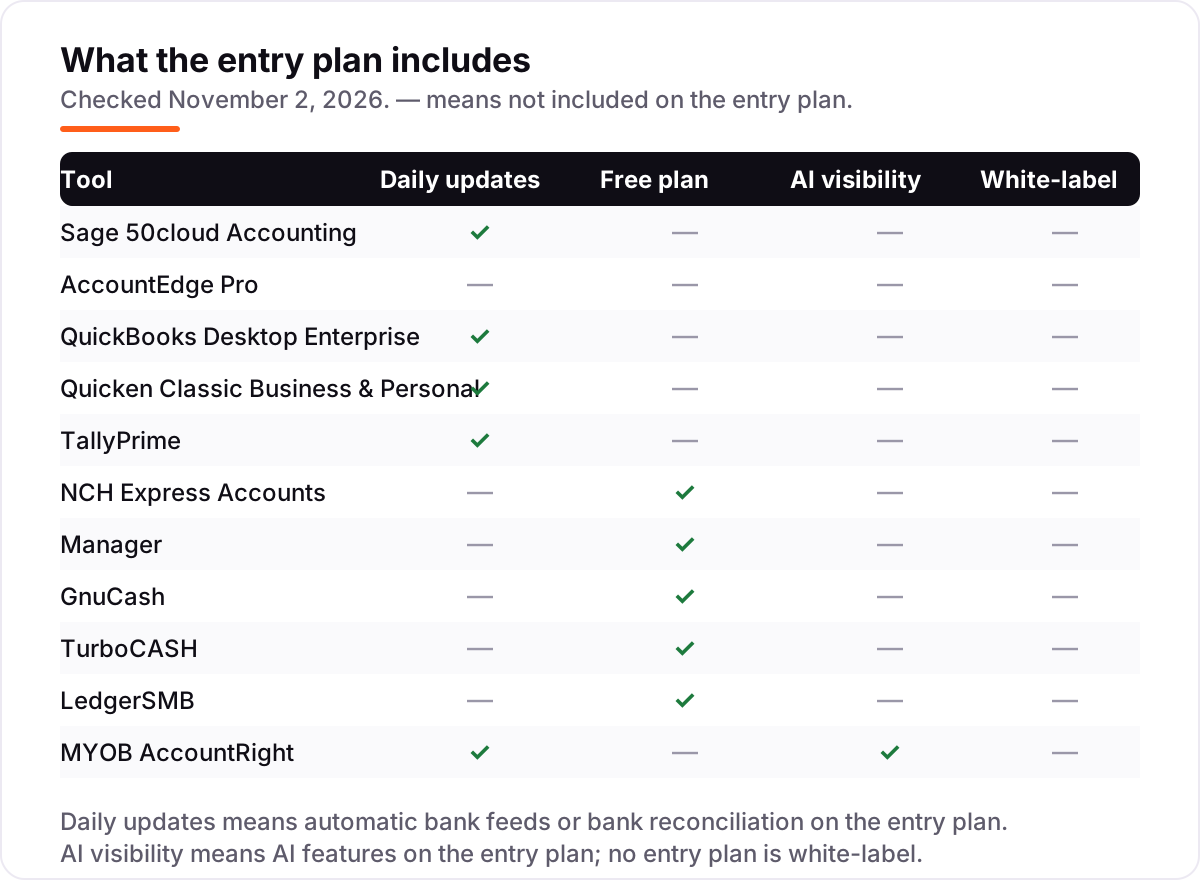
- Four tools in this list are free — Manager, GnuCash, TurboCASH and LedgerSMB — and all four run fully offline, but none includes phone support or automatic bank feeds.
- Every price below was checked on the vendor's own pricing page on November 2, 2026, except QuickBooks Desktop Enterprise and NCH Express Accounts, whose prices are third-party sourced and labeled as such.
On this page
Quick comparison
| Tool | Best for | Starting price | Free plan |
|---|---|---|---|
| Sage 50cloud Accounting | Small businesses with one user that want the most complete desktop accounting they can still buy new | $132.17/mo | No (30-day refund) |
| AccountEdge Pro | Small businesses and bookkeepers that want real desktop accounting for $20 a month | $20/mo | No (30-day trial) |
| QuickBooks Desktop Enterprise | Growing businesses with complex inventory, job costing or up to 40 users that need QuickBooks on the desktop | $1,873/yr | No (30-day trial) |
| Quicken Classic Business & Personal | Sole proprietors and freelancers who run business and personal money in one desktop app | $149.88/yr | No (30-day refund) |
| TallyPrime | Small businesses that want a low-cost desktop ledger with the option of a one-time perpetual license | $99 / 3 mo | No (30-day trial) |
| NCH Express Accounts | Very small businesses with under 5 employees that want a free or one-time-cost desktop ledger | $139 one-time | Yes (under 5 staff) |
| Manager | Small businesses that want a full-featured desktop ledger for free and work offline | Free | Yes (free desktop) |
| GnuCash | Freelancers and tiny businesses comfortable with double-entry bookkeeping that want a free, open-source ledger | Free | Yes (free) |
| TurboCASH | Small businesses that want a free open-source general ledger with stock and multi-user options | Free | Yes (free) |
| LedgerSMB | Technically confident small businesses that want a free open-source ERP with accounting at its core | Free | Yes (free) |
| MYOB AccountRight | Established small businesses in Australia or New Zealand that need desktop accounting with local tax and payroll | A$165/mo | No (free trial) |
Make one of these tools?
We re-check this list every quarter. Send a correction, request a review, or ask about a clearly labeled sponsored spot.
Request a listingThe best desktop accounting software for small business

Sage 50cloud Accounting
Best for: Small businesses with one user that want the most complete desktop accounting they can still buy new
Sage 50cloud Accounting is the most complete desktop accounting a small business can still buy new. The Pro plan covers invoicing, expenses, payments, inventory and job management for one user, with automated bank reconciliation and one-click reports, and Sage will migrate your data from most QuickBooks versions for free.
The catch is the price and the platform. At $132.17 a month under a one-year minimum commitment, it costs more than every other paid tool here, payroll is a separate module priced by employee count, and there is no Mac version. Buy it when your books need inventory and job costing; buy AccountEdge when they do not.
What we like
- The fullest desktop accounting in this list: invoicing, inventory, job costing and automated bank reconciliation on the entry plan
- Over 40 years of development and more than 2 million customers, per Sage, with free migration from most QuickBooks versions
- Premium and Quantum tiers scale to 5 and 40 users with multi-company support and audit trails
Watch out for
- The most expensive entry plan in this list, and the price rises with each additional user
- Windows only, with no Mac version and no full mobile app
- Payroll is a separate paid module priced by employee count, not included in the entry plan

AccountEdge Pro
Best for: Small businesses and bookkeepers that want real desktop accounting for $20 a month
AccountEdge Pro is the cheapest paid desktop accounting in this list, and it does not feel cheap. For $20 a month you get a real double-entry general ledger, invoicing, inventory, time billing and reporting on Windows or Mac, with ten company files included and future updates in the price.
The trade-offs are the add-ons and the look. Bank feeds cost $5 a month extra, payroll is another $20 a month, and G2 reviewers call the interface dated and slow with large data sets. If you want the lowest honest monthly price for proper desktop books, start here; if you need bank feeds included, look at Sage 50 instead.
What we like
- Cheapest paid desktop accounting in this list at $20 a month, with ten company files included
- True desktop software for Windows and Mac: invoicing, inventory, time billing, reporting and payroll as a $20 a month add-on
- G2 reviewers praise the double-entry general ledger, audit trails and offline reliability
Watch out for
- Bank feeds cost $5 a month extra and telephone support costs $10 a month extra
- G2 reviewers call the interface dated and report slow performance with large data sets
- You must connect to the internet at least once every 30 days or the software drops to read-only mode

QuickBooks Desktop Enterprise
Best for: Growing businesses with complex inventory, job costing or up to 40 users that need QuickBooks on the desktop
QuickBooks Desktop Enterprise is the only QuickBooks desktop a new buyer can purchase in 2026, and it is built for businesses that have outgrown the small-business editions. Silver covers core accounting, advanced reporting and six industry editions, and the range scales to 40 users with advanced inventory, pricing and payroll on the higher tiers.
The price is the honest problem. Silver starts at $1,873 a year for one user, and the bill climbs steeply as you add seats, so a five-person team pays several thousand a year before add-ons. It is the right pick when your inventory or job costing genuinely needs Enterprise depth; for a one-person business it is far more tool than the books require.
What we like
- The only QuickBooks desktop product still sold to new customers, in six industry editions at no extra charge
- Advanced inventory, advanced pricing, job costing and custom reporting that QuickBooks Online cannot match
- Supports up to 40 users and scales to very large customer, supplier and employee lists
Watch out for
- The highest starting price in this list, and the price climbs steeply as you add users
- G2 reviewers call the interface dated and report slow report loading on large data sets
- Intuit shows exact totals only at checkout, so you cannot see a firm price on a public pricing page

Quicken Classic Business & Personal
Best for: Sole proprietors and freelancers who run business and personal money in one desktop app
Quicken Classic Business & Personal is the desktop app for the self-employed owner who runs business and personal money side by side. It adds invoicing, business cash-flow reports and built-in Schedules C, E and F to a full personal finance suite, and one subscription covers up to ten businesses.
Know what it is not. This is a sole-proprietor tool: there is no employee payroll, no inventory and no multi-user mode, and the $12.49 a month headline is billed annually, so $149.88 leaves your account in one payment. For a freelancer or landlord it is the simplest desktop route; a business with staff should look at Sage 50 or AccountEdge.
What we like
- The only tool here that manages business and personal finances together, with invoicing and Schedule C, E and F tax reports
- Connects to more than 14,000 financial institutions and manages up to 10 businesses on one subscription
- A true Windows and Mac desktop app, with automatic transaction downloads and a 30-day money-back guarantee
Watch out for
- Built for sole proprietors, not for businesses with employees, inventory or multiple users
- The $12.49 a month figure is billed annually, so the real outlay is $149.88 a year in one payment
- No double-entry general ledger as strict as Sage 50 or AccountEdge, and no client portal

TallyPrime
Best for: Small businesses that want a low-cost desktop ledger with the option of a one-time perpetual license
TallyPrime is the low-cost desktop ledger with the most flexible pricing in this list. Silver starts at $99 for three months, and the $855 perpetual license buys the software outright with no further subscription, which is rare in 2026. It covers invoicing, inventory and bank reconciliation, with more than 350 reports.
The audience is narrower than the price suggests. TallyPrime is strongest for general accounting and inventory; it has no US payroll and no US sales-tax filing, and G2 reviewers say the interface looks old-fashioned and beginners need time to learn the shortcuts. Buy it for a low-cost ledger you own outright; buy Sage 50 if you need payroll in the same package.
What we like
- Quarterly billing from $99 for 3 months, or a $855 perpetual license with no further subscription
- One-click automatic bank reconciliation, invoicing, inventory and more than 350 reports on the entry plan
- Runs fully offline with your data on your own computer, and handles unlimited companies at no extra cost
Watch out for
- G2 reviewers call the interface old-fashioned and say beginners need time to learn the keyboard shortcuts
- Remote access and team sharing need extra setup, and custom reports usually need a Tally partner
- The US edition is built around general accounting, not US payroll or US sales-tax filing

NCH Express Accounts
Best for: Very small businesses with under 5 employees that want a free or one-time-cost desktop ledger
NCH Express Accounts is the cheapest way into desktop accounting: free for businesses with under five employees, then a $139 one-time Basic license. It runs fully offline on Windows and Mac, with invoicing, quotes, orders, payables and receivables, and more than 40 built-in reports.
The limits match the price. There is no automatic bank feed on the entry edition, no payroll module and no multi-user support, and the $139 figure comes from third-party listings because NCH shows paid prices only at checkout. For a micro-business that wants a simple offline ledger, it is hard to beat; growing teams will outgrow it fast.
What we like
- Free forever for businesses with under 5 employees, and a $139 one-time Basic license above that
- Works fully offline on Windows and Mac, with invoicing, quotes, orders and bank reconciliation
- More than 40 built-in reports, including profit and loss, cash flow, trial balance and sales tax
Watch out for
- The $139 Basic price is third-party sourced: NCH shows paid prices only at checkout, not on its product page
- No automatic bank feeds on the entry edition, so transactions arrive by manual import
- No payroll module and no multi-user support on the Basic edition

Manager
Best for: Small businesses that want a full-featured desktop ledger for free and work offline
Manager is the best free desktop accounting in this list, and the desktop edition is genuinely complete. You get double-entry accounting, invoicing, inventory, fixed assets, multi-currency and payroll, with a flexible chart of accounts, for $0 — no ads, no feature limits and no expiry.
The cost of free is support and sharing. The desktop edition is single-user, so a second person needs the paid Cloud edition, bank statements arrive by manual file import rather than an automatic feed, and help comes from the user forum, not a phone line. For a solo owner who can self-serve, it is the strongest free option here.
What we like
- A complete double-entry desktop edition that is free, with no ads, no feature limits and no expiry
- Invoicing, inventory, fixed assets, multi-currency and payroll, with a flexible chart of accounts
- Runs offline on Windows, macOS and Linux, and one download covers unlimited companies
Watch out for
- Single-user desktop software, so a second person needs the paid Cloud edition at $15 a user a month
- No phone support: help comes from the user forum and guides, not a support desk
- Bank statements arrive by manual file import, with no automatic daily bank feed on the free edition

GnuCash
Best for: Freelancers and tiny businesses comfortable with double-entry bookkeeping that want a free, open-source ledger
GnuCash is the free open-source standard for small-business bookkeeping, and it has been maintained by volunteers for decades. It enforces proper double-entry accounting, with invoicing, customers, vendors, jobs, budgets and scheduled transactions, plus investment tracking and reports.
It asks more of the user than the paid tools. G2 reviewers call the interface clunky and report a real learning curve for anyone new to double-entry, there is no multi-user mode and no automatic bank feed, and support comes from volunteer mailing lists. If you know double-entry and want zero cost, it is dependable; if you want hand-holding, pay for Manager's cloud or AccountEdge.
What we like
- Free and open source under the GPL, with small-business features: invoicing, customers, vendors, jobs and tax reports
- Proper double-entry accounting with scheduled transactions, budgets and investment tracking
- Runs on Windows, macOS and Linux, and your data file stays entirely on your own computer
Watch out for
- G2 reviewers call the interface clunky and report a real learning curve for anyone new to double-entry
- No phone or chat support: help comes from volunteer mailing lists and documentation
- No multi-user mode and no automatic bank feeds, so statements arrive by manual OFX or QIF import

TurboCASH
Best for: Small businesses that want a free open-source general ledger with stock and multi-user options
TurboCASH is a free open-source general ledger for small businesses that keep stock. The free desktop version covers double-entry accounting, cash book, debtors, creditors, stock and invoicing, runs as many companies as your hard disk can hold, and reports in IFRS or GAAP formats.
It is the roughest tool in this list to live with. The interface looks dated, setup takes longer than a guided cloud signup, and cloud access and bank feeds sit behind the optional annual subscription rather than the free version. Choose it when you need stock control for $0 and can tolerate the learning curve.
What we like
- A free open-source double-entry general ledger with debtors, creditors, stock and invoicing
- Runs as many companies as your hard disk can hold, in 25 languages, with IFRS and GAAP reporting
- Actively maintained, with SourceForge updates as recent as September 2026
Watch out for
- The interface looks dated next to modern tools, and setup takes longer than a guided cloud signup
- Cloud access and bank feeds sit behind the optional annual subscription, not the free desktop version
- Support is community-based, with no vendor help desk on the free edition
LedgerSMB
Best for: Technically confident small businesses that want a free open-source ERP with accounting at its core
LedgerSMB is a free open-source ERP with accounting at its core, and it is the most capable free tool in this list. It covers the general ledger, invoicing, sales and purchase orders, quotations, inventory and fixed assets, with multi-currency accounting in 45 languages and no per-user fees.
It is also the hardest to start. You install and run it on your own server, the interface is functional rather than friendly, and there are no automatic bank feeds — transactions arrive by import and payroll needs an add-on. Pick it when you are technically confident and want an ERP for $0; pick Manager when you want a free desktop app you can install in minutes.
What we like
- Free and open source, with general ledger, invoicing, orders, quotations, inventory and fixed assets
- Current stable version 1.13 was released in October 2025 and is supported until October 2027
- Multi-currency accounting in 45 languages, with no vendor lock-in and no per-user fees
Watch out for
- You install and run it on your own server, so there is no guided signup and no vendor support desk
- The interface is functional rather than friendly, and setup assumes comfort with servers and databases
- No automatic bank feeds: transactions arrive by import, and payroll needs an add-on

MYOB AccountRight
Best for: Established small businesses in Australia or New Zealand that need desktop accounting with local tax and payroll
MYOB AccountRight is the desktop accounting standard for Australian and New Zealand small businesses, and it is the only tool in this list built around Australian tax. AccountRight Plus includes unlimited inventory and unlimited payroll at no extra cost, with in-built AI features and priority support.
Two things limit it for everyone else. It is sold only in Australia and New Zealand and priced in Australian dollars — A$165 a month after the offer period — and since June 2026 the desktop app works only with company files stored online, so it is no longer fully offline. For an Australian business it is the natural pick; for a US business it is not an option.
What we like
- The desktop accounting standard for Australian and New Zealand small businesses, with GST, BAS and payroll built in
- Unlimited inventory and unlimited payroll at no extra cost on the AccountRight Plus plan
- In-built AI features on the current plans, plus priority support and multi-currency on Premier
Watch out for
- Sold only in Australia and New Zealand, and priced in Australian dollars at A$165 a month after the offer period
- Since June 2026 the desktop app works only with company files stored online, so it is no longer fully offline
- The A$165 a month figure is the post-offer price: the first 3 months cost A$66 a month
Desktop accounting software still runs the books for millions of small businesses, and the best desktop accounting software for small business in 2026 is the one you can still buy, install on your own computer, and keep using offline. We ranked 11 tools by fit for a typical small business — a one-to-five-person operation that needs invoicing, bank reconciliation and solid reports without handing its data to a cloud vendor.
How to choose the best desktop accounting software for small business
Start with the questions that separate a good purchase from a bad one.
- Can you still buy it? Intuit stopped selling QuickBooks Desktop Pro Plus, Premier Plus and Mac Plus to new customers in September 2024. Check that a product is actually for sale before you fall for it.
- License or subscription? A one-time license costs once; a subscription costs every year; a free tool costs $0 but usually means community support only.
- Does it work offline? True desktop software keeps working without internet. Some modern desktop apps still need an online company file or a monthly license check.
- How do bank transactions arrive? Automatic bank feeds save hours; manual file imports are free but slow.
- What costs extra? Payroll, bank feeds, extra users and phone support are often add-ons. Price the bundle, not the headline.
- Who do you call? Paid tools come with a support desk; free tools come with forums and documentation.
Before you publish new pages for the services you invoice for, run your titles through the free SERP snippet preview tool — it shows exactly how the title and description will look in Google.
Desktop accounting software for small business pricing: what you will actually pay
Take a one-person business with one user and no payroll, and compare the first year:
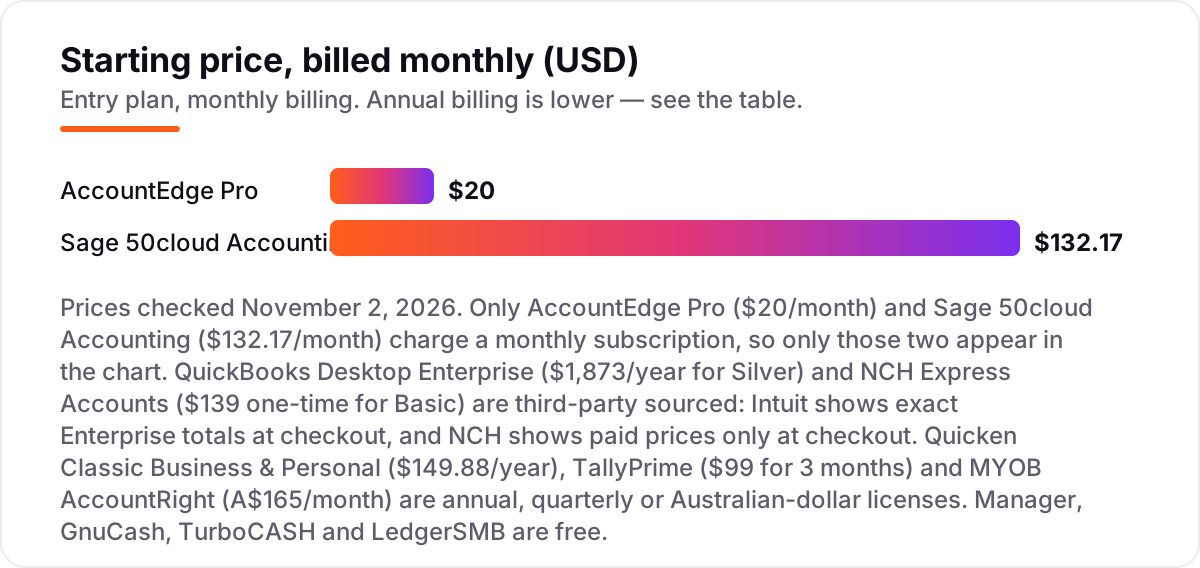
- Sage 50cloud Accounting Pro: $132.17 a month under a one-year minimum commitment, so $1,586.04 for the year.
- AccountEdge Pro: $20 a month, so $240 for the year; add bank feeds at $5 a month and the total is $300.
- QuickBooks Desktop Enterprise Silver: $1,873 for the year, before extra users.
- Quicken Classic Business & Personal: $149.88 for the year, paid in one annual payment.
- TallyPrime Silver: $99 for three months, so $396 for the year — or $855 once for a perpetual license that never renews.
- NCH Express Accounts Basic: $139 once, and free if the business has under five employees.
- Manager, GnuCash, TurboCASH and LedgerSMB: $0.
Two patterns matter. First, only AccountEdge and Sage 50 charge a true monthly subscription; everything else is an annual, quarterly or one-time payment, so compare yearly totals, not monthly headlines. Second, the cheapest paid route for a one-person business is AccountEdge at $240 a year, while the free tools cost $0 — the money you save buys the hours you spend on manual imports and forum support. Finance firms face the same trade-off on the visibility side: the best SEO platform for finance guide covers the tools that get firms like yours found.
One more cost to budget for is the second year. TallyPrime's perpetual license and NCH's one-time license stop the clock after the first payment, while every subscription renews at its full rate — Sage 50 at $1,586.04 a year and AccountEdge at $240 — so a tool that looks cheap in year one can cost more over three years than a tool you buy once. MYOB AccountRight is the clearest example: A$66 a month for the first three months, then A$165 a month, so a full year after the offer costs A$1,980.
Desktop vs cloud accounting: know the difference
Desktop accounting installs on your computer and stores the company file on your own disk. You own the data, you control the backups, and most of these tools keep working with no internet at all. Cloud accounting runs in a browser, stores your books on the vendor's servers, and stops working the moment your subscription lapses or your connection drops.
The confusion in 2026 is that the line has blurred. Sage 50 now sells a cloud edition beside its desktop edition, MYOB's desktop app has required online company files since June 2026, and several desktop tools check their license online once a month. Before you buy, ask where the company file lives and what happens if you stop paying: with a true desktop license you keep read access to your books, while a cloud subscription can lock you out entirely.
One more change shapes this whole list. Intuit stopped selling QuickBooks Desktop Pro Plus, Premier Plus and Mac Plus to new US customers on September 30, 2024, and there will be no newer version — Desktop 2024 is the last release, though Intuit said in August 2026 it will keep supporting it with no sunset date. Existing subscribers can keep renewing, but a new buyer who wants QuickBooks on the desktop has one option: Enterprise. That is why Pro Plus, the best-known desktop accounting name in the US, is not in this list — and why Sage 50, AccountEdge and the free tools take its place.
Quick comparison: tool type by need
| Buyer | Best pick | Why |
|---|---|---|
| Small business that wants the full package | Sage 50cloud Accounting | $132.17/month, invoicing, inventory, automated bank reconciliation |
| Tight budget, real desktop software | AccountEdge Pro | $20/month with payroll available as a $20/month add-on |
| Already a QuickBooks shop | QuickBooks Desktop Enterprise | The only QuickBooks desktop still sold to new customers |
| Sole proprietor mixing business and personal | Quicken Classic Business & Personal | $149.88/year, Schedules C, E and F built in |
| No budget at all | Manager or GnuCash | Free desktop editions with full double-entry accounting |
| Business in Australia or New Zealand | MYOB AccountRight | A$165/month after the offer period, with Australian tax and payroll built in |
How we chose
We checked each vendor's own pricing page on November 2, 2026 and recorded the starting price exactly as shown, including the billing term. Two prices could not be verified on a vendor page and are labeled third-party sourced: QuickBooks Desktop Enterprise, where Intuit shows exact totals only at checkout, so we used the published February 2026 list price of $1,873 a year for Silver; and NCH Express Accounts, where paid prices appear only at checkout, so we used the $139 one-time Basic price from third-party listings. Ratings come from G2 pages opened the same day; tools without a G2 or Capterra page show no rating rather than an estimate. We ranked by fit for the most common buyer — a small business of one to five people buying desktop accounting for the first time — not by brand size. No vendor paid for a place in this list, and none of the links here are affiliate links.
What to do next
Start with the license question: if you want a supported product you can buy today, trial Sage 50cloud Accounting or AccountEdge Pro; if your budget is $0, install Manager and run a month of real transactions through it before you commit your books. Keep your company file backed up somewhere off the computer it lives on, and check the yearly total — not the monthly headline — before you pay. Small businesses choosing software usually need the marketing side too: our guides to the best marketing platforms for small business SEO and the best SEO companies for small business cover what to do once the books are sorted. If your books are in order but new customers cannot find you, our monthly SEO service covers the search side. Once your tools are in place, find out what's holding your rankings back.
Your stack only works if people find you
SerpAstra fixes what keeps your site off page one and makes it easy for AI assistants to recommend.
Get a free audit→Sources we checked (20)
- Sage 50cloud Accounting pricing — sage.com/en-us/products/sage-50cloud/ (checked November 2, 2026)
- Sage 50cloud Accounting on G2 — 3.9/5, 163 reviews (checked November 2, 2026)
- AccountEdge pricing — accountedge.com/pricing/ (checked November 2, 2026)
- AccountEdge on G2 — 3.9/5, 31 reviews (checked November 2, 2026)
- QuickBooks Desktop Enterprise — quickbooks.intuit.com/desktop/enterprise/ (checked November 2, 2026)
- QuickBooks Desktop Enterprise pricing, February 2026 list price — kempercpa.com (checked November 2, 2026)
- QuickBooks Desktop Enterprise on G2 — 4.3/5, 1,068 reviews (checked November 2, 2026)
- Quicken plans and pricing — quicken.com/compare/ (checked November 2, 2026)
- Quicken on G2 — 4.3/5, 77 reviews (checked November 2, 2026)
- TallyPrime US pricing — tallysolutions.com/us/tally-30-day-pack/ (checked November 2, 2026)
- TallyPrime on G2 — 4.4/5, 311 reviews (checked November 2, 2026)
- NCH Express Accounts — nchsoftware.com/accounting/ (checked November 2, 2026)
- NCH Express Accounts pricing, Basic $139 and Plus $195 — fitsmallbusiness.com (checked November 2, 2026)
- Manager — manager.io (checked November 2, 2026)
- GnuCash — gnucash.org (checked November 2, 2026)
- GnuCash on G2 — 4.2/5, 23 reviews (checked November 2, 2026)
- TurboCASH — turbocash.net (checked November 2, 2026)
- LedgerSMB — ledgersmb.org (checked November 2, 2026)
- MYOB Business pricing — myob.com/au/products/myob-business (checked November 2, 2026)
- QuickBooks Desktop discontinued: what changed in 2026 — method.me (checked November 2, 2026)
Shamim
Founder of SerpAstra
A full-stack SEO and digital marketer who spends most days on Local SEO for dental practices, AI search visibility and lead generation.
Frequently asked questions
What is the best desktop accounting software for small business?
Sage 50cloud Accounting is the best fit for most small businesses: the most complete desktop accounting still sold to new buyers, from $132.17 a month. AccountEdge Pro is the best value at $20 a month, and Manager is the best free option. The right pick depends on whether you need inventory, payroll, or just a clean double-entry ledger.
Can I still buy QuickBooks Desktop Pro?
No, not as a new customer. Intuit stopped selling QuickBooks Desktop Pro Plus, Premier Plus and Mac Plus to new US customers on September 30, 2024. Existing subscribers can keep renewing, and Desktop 2024 has no announced sunset date. A new buyer who wants QuickBooks on the desktop must buy QuickBooks Desktop Enterprise, from $1,873 a year for Silver.
Is there free desktop accounting software?
Yes — four tools in this list are free. Manager has the most complete free desktop edition, GnuCash is the best-known free open-source ledger, TurboCASH adds stock control, and LedgerSMB is a free open-source ERP. All four run offline and cost $0, but none includes phone support or automatic bank feeds, so expect manual imports and forum help.
What is the difference between desktop and cloud accounting software?
Desktop software installs on your computer and stores the company file on your own disk, so it usually works offline and you control the backups. Cloud software runs in a browser and stores your books on the vendor's servers, so it stops working if your subscription lapses. The line has blurred: some desktop apps now need an online company file or a monthly license check.
How much does desktop accounting software cost?
From $0 to $1,873 a year at the entry level. Four tools in this list are free, AccountEdge Pro costs $20 a month, Quicken Classic costs $149.88 a year, TallyPrime costs $99 for three months, NCH Express Accounts costs $139 once, and Sage 50cloud Accounting costs $132.17 a month. Enterprise is the outlier at $1,873 a year. Always compare yearly totals, since most desktop licenses are annual or one-time.
Does desktop accounting software work without internet?
Most of it does, but not all of it. Manager, GnuCash, TurboCASH and AccountEdge Pro keep working offline for everyday tasks, and TallyPrime runs fully offline. Sage 50 needs internet access to verify its license, and MYOB AccountRight has required online company files since June 2026. Check the offline terms before you buy.
Can I switch from QuickBooks Desktop to another desktop program?
Yes. Sage offers free data migration from most QuickBooks versions, with help from its support team, and the other desktop tools import standard files such as QIF, OFX and CSV. Before you switch, export a full backup of your QuickBooks company file and check that your invoices, customers and open balances all arrive intact.
Free SEO and AI visibility audit
Find out what is holding your rankings back
Send us your site. Within 2 business days you get a written audit, an AI visibility check and a short fix list ranked by impact. Free, with no contract attached.
Request my free audit→Related guides
 SEO & AI Search8 Best SEO Platforms for Finance in 2026 (Pros, Cons and Pricing)8 best SEO platform for finance options compared on price, YMYL content tools, branch tracking and AI visibility. All prices checked November 1, 2026.Read guide →
 SEO & AI Search12 Best Marketing Platforms for Small Business SEO in 2026, ComparedThe 12 best marketing platforms for small business SEO, compared on real prices, SEO tools and AI visibility. Every price checked November 1, 2026.Read guide →
 SEO & AI Search8 Best SEO Companies for Small Business in 20268 best SEO companies for small business compared on price, contracts and AI visibility, with prices checked on each agency's own site on November 1, 2026.Read guide →