
11 Best Digital Signage Companies in 2026
Compare the 11 best digital signage companies on per-screen price, free plans and hardware, with every price checked November 4, 2026, before you buy.
 Shamim Mia, Founder, SerpAstraLast verified November 4, 202614 min read
We compare pricing pages, documentation and public reviews. We never accept payment for rankings.

Key takeaways
- Yodeck is the best fit for most buyers at $8 per screen per month with one screen free; OptiSigns follows at $10 with three screens free, and ScreenCloud at $20 for workplaces that need dashboards and SSO.
- The cheapest honest starting prices are Xibo Cloud at £3.50 per display per month and TelemetryTV at $8 per device per month; Navori QL, Scala and Samsung MagicINFO publish no price and quote per deployment.
- The single most important buying factor is the tier your must-have feature sits on: proof of play, SSO and dashboard apps all live one or two plans above the entry price.
- Samsung MagicINFO on-premise reaches end of sale on December 31, 2026, so new Samsung buyers should price the VXT subscription instead of the old perpetual licence.
On this page
Quick comparison
| Tool | Best for | Starting price | Free plan |
|---|---|---|---|
| Yodeck | Small businesses and multi-site teams that want the lowest honest per-screen price with a free player | $8/mo | Yes (1 screen free) |
| OptiSigns | Restaurants, offices and retailers that want the widest app library and a free 3-screen start | $10/mo | Yes (3 screens free) |
| ScreenCloud | Workplaces and franchises that need dashboards, SSO and enterprise integrations on screens | $20/mo | No (14-day trial) |
| Rise Vision | K-12 schools and campuses that need emergency alerts and education templates | $11/mo | No (14-day trial) |
| NoviSign | Restaurants, schools and offices that want an easy drag-and-drop editor with AI creation on the next tier | $14/mo | No (30-day trial) |
| TelemetryTV | Operations teams that want live data dashboards and metrics on screens | $8/mo | No (free trial) |
| Pickcel | Growing organisations that want Power BI dashboards and multi-user control on screens | $13.50/mo | No (14-day trial) |
| Xibo | IT teams that want an open-source CMS they can self-host for free or run in the cloud | £3.50/mo | Yes (self-hosted) |
| Navori QL | Enterprises and retailers that need rule-based playback on Windows, Android and system-on-chip displays | Custom quote | No (free trial) |
| Scala | Large retail and hospitality networks buying through an integrator partner | Custom quote | No |
| Samsung MagicINFO | Businesses that already run Samsung displays and want the native CMS built into the screen | Custom quote | Yes (Lite, 25 displays) |
Make one of these tools?
We re-check this list every quarter. Send a correction, request a review, or ask about a clearly labeled sponsored spot.
Request a listingThe best digital signage companies

Yodeck
Best for: Small businesses and multi-site teams that want the lowest honest per-screen price with a free player
Yodeck is the value pick in this list, and the math is simple: Basic costs $8 per screen per month, Premium $12 and Enterprise $16, and the first screen is free forever. Annual plans include a free Raspberry Pi player per screen, which removes the hardware question. The library covers 800+ templates and 147 apps, including Canva, Power BI and Google Drive playlists.
The catches are small but real. The free screen is only free while it is the account's only screen — add a second screen and both are billed. Proof-of-play reports start on Premium, and menu boards need DSMenu, a separate account, because Yodeck does not read POS data. Choose Yodeck when you want the lowest honest bill and a free player; choose OptiSigns when you want three screens free instead of one.
What we like
- One screen free forever, with no credit card, and a free Raspberry Pi player on annual plans
- Flat $8 per screen per month on Basic, with the same price on monthly and annual billing
- More than 800 templates and 147 apps, including Canva, Power BI and Google Drive playlists
- Players keep playing for 30 days or more offline, so a dead connection does not blank the screen
Watch out for
- The free screen stops being free the moment you add a second screen — both screens are then billed
- Proof-of-play reports start on Premium at $12 per screen per month, not Basic
- Menu boards need DSMenu, a separate account, because Yodeck reads no POS data directly
OptiSigns
Best for: Restaurants, offices and retailers that want the widest app library and a free 3-screen start
OptiSigns wins the app-library contest with more than 140 integrations, pulling content from Google Slides, YouTube, social feeds and POS systems into screen layouts. The free plan covers three screens with a watermark and 25 basic apps, which is enough to run a small cafe for nothing. Standard costs $10 per screen per month, or $9 billed annually, and adds scheduling, zones, templates and unlimited storage.
The tier ladder matters more here than the entry price. Dashboard apps for Power BI, Salesforce and Tableau need Pro Plus at $15, interactive kiosks need Engage at $30, and video walls and background music are paid add-ons. The free plan also caps files at 25MB and has no scheduling. Pick OptiSigns when you want the most apps per dollar; pick Yodeck when you want a free player with the subscription.
What we like
- Free plan covers 3 screens forever, with 25 apps and 1GB of storage, at $0
- Standard at $10 per screen per month includes 140+ apps, unlimited storage and scheduling
- Runs on cheap hardware: Amazon Fire TV Stick, Android boxes, Chromecast and Raspberry Pi
- US-based phone and email support from the entry paid plan
Watch out for
- Scheduling, zones and templates need a paid plan — the free plan is display-only in practice
- Dashboard apps for Power BI and Salesforce wait for Pro Plus at $15 per screen per month
- Video walls, background music and wireless presentations are paid add-ons per screen

ScreenCloud
Best for: Workplaces and franchises that need dashboards, SSO and enterprise integrations on screens
ScreenCloud is the workplace communications platform of digital signage: clean templates for company updates, KPI walls and onboarding content, deep integrations with Slack, Teams and BI tools, and an enterprise security layer that survives IT review. Core costs $20 per screen per month billed annually, or $24 month to month, and includes unlimited users, unlimited storage and lockable brand templates.
The price is the whole argument against it. Pro costs $30 per screen per month and holds the dashboards, QR metrics and proof of play, while SSO and SCIM wait for Enterprise with its 25-screen minimum. A 10-screen network costs $2,400 a year on Core against $960 on Yodeck. Buy ScreenCloud when dashboards and enterprise security are the job; buy Yodeck or OptiSigns when the screens just need to look good.
What we like
- Deepest app library for workplace comms: Slack, Teams, Salesforce and Power BI dashboards
- Unlimited users and unlimited file storage on Core, with lockable brand templates
- Enterprise-grade security: SSO, SCIM, audit logs and proof of play on Pro and Enterprise
- Free media player on annual plans, and a purpose-built ScreenCloud OS device
Watch out for
- Highest entry price here at $20 per screen per month, double most rivals
- Dashboards, QR metrics and proof of play wait for Pro at $30 per screen per month
- SSO and SCIM are Enterprise-only, with a 25-screen minimum

Rise Vision
Best for: K-12 schools and campuses that need emergency alerts and education templates
Rise Vision is the education specialist: the template library covers school announcements, sports scoreboards, cafeteria menus, emergency notifications and digital yearbooks, and the platform can override every display on campus with an emergency message. Basic costs $11 per display per month, Advanced $13, and the Unlimited plan covers a whole school for $1,399 a year. A 14-day trial is the only free option for non-education buyers.
The $11 Basic price comes from vendor-supplied pricing data on G2, because the plan prices did not render on Rise Vision's own pricing page when we checked on November 4, 2026 — see How we chose. The limits are scope, not price: retail menus and POS integrations are thin, and CAP emergency alerts need Advanced. Choose Rise Vision for a school or campus; choose Yodeck or OptiSigns for a shop or restaurant.
What we like
- Education-first templates: announcements, lunch menus, sports scores and emergency alerts
- Emergency overrides and CAP alerts can take over every display on campus at once
- Unlimited users on every plan, with single sign-on via Google, Microsoft and ClassLink
- Whole-school Unlimited plan at $1,399 a year covers every display in one school
Watch out for
- The permanent free licence is gone — non-education buyers get a 14-day trial only
- Advanced plan at $13 per display per month is needed for emergency alerts from CAP services
- Fewer retail and menu-board features than the general-purpose tools in this list

NoviSign
Best for: Restaurants, schools and offices that want an easy drag-and-drop editor with AI creation on the next tier
NoviSign is built for teams that want signage running this week without an IT project: a drag-and-drop editor, more than 500 templates, 50-plus widgets and apps, and free setup assistance and training with every plan. Business costs $14 per screen per month billed annually and includes scheduling, offline playback, reports and remote screen management. The 30-day trial needs no credit card.
The newer AI features sit one tier up. Studio AI content creation, device management, data sources and Zapier automation need Business Plus at $17 per screen per month, while white-label, SSO and content approvals wait for Premium at $25. There is no permanent free plan. Pick NoviSign when ease of use matters most; pick OptiSigns when you want three screens free.
What we like
- 30-day free trial with no credit card, and free setup assistance and training
- 500+ templates and a drag-and-drop editor that non-technical staff can run
- Business Plus at $17 adds Studio AI content creation, device management and data sources
- Runs on almost any player: Android, Windows, ChromeOS, BrightSign and Amazon Signage Stick
Watch out for
- No permanent free plan — the trial ends after 30 days
- AI creation, device management and Power BI sit on Business Plus, not the $14 Business plan
- White-label and SSO wait for Premium at $25 per screen per month
TelemetryTV
Best for: Operations teams that want live data dashboards and metrics on screens
TelemetryTV is the data-wall specialist: it streams live dashboards, metrics and KPIs to screens in real time, which suits operations rooms, warehouses and offices that already live in their data tools. Entry costs $8 per device per month on an annual term with no minimum device count, Core costs $13 and adds API access and group permissions, and Elite costs $16 with proof of play.
The trade-off is breadth. The template and app library is smaller than Yodeck's or OptiSigns', and there is no permanent free plan — only a free trial. Enterprise at $35 per device per month needs 100 devices. Choose TelemetryTV when the screens show live numbers; choose Yodeck when the screens show announcements, menus and promotions.
What we like
- Entry at $8 per device per month with no minimum device count
- Built for live data: dashboards, metrics and KPIs stream to screens in real time
- Core at $13 adds API access, group permissions and activity logs
- Elite at $16 adds proof of play and premium support for ad-funded networks
Watch out for
- No permanent free plan — a free trial is the only way to test before paying
- Enterprise at $35 per device per month needs a 100-device minimum
- Smaller template and app library than Yodeck or OptiSigns

Pickcel
Best for: Growing organisations that want Power BI dashboards and multi-user control on screens
Pickcel is the all-in-one option for growing networks: Professional costs $13.50 per device per month billed annually and includes more than 100 templates, 60-plus content apps, advanced scheduling and remote troubleshooting. The platform runs on nearly every player and display, from Android and BrightSign to Samsung and LG system-on-chip screens, and it is SOC 2 Type II certified.
The step up comes sooner than the price suggests. Professional covers a single user and 3GB of storage, so a team that needs multi-user roles, Power BI dashboards or 4K media needs Business at $22.50 per device per month. There is no permanent free plan. Pick Pickcel when the network is growing and compliance matters; pick OptiSigns when the budget is tighter.
What we like
- Professional at $13.50 per device per month includes 100+ templates and 60+ content apps
- Business at $22.50 adds Power BI dashboards, 4K media and multi-user roles
- Runs on Android, Windows, BrightSign, Linux, Samsung, LG, iOS and Fire TV Stick
- SOC 2 Type II certified, with 24/7 chat and phone support on Business and Enterprise
Watch out for
- No permanent free plan — only a 14-day trial of the Professional plan
- Professional covers a single user; teams need Business at $22.50 per device per month
- 4K media, content sync and video walls wait for Business or Enterprise

Xibo
Best for: IT teams that want an open-source CMS they can self-host for free or run in the cloud
Xibo is the only open-source option here, and it changes the deal completely: self-host the CMS on your own servers for free, with no screen limit and no per-user fees, or let Xibo host it from £3.50 per display per month on the Professional cloud plan. The Windows player is free under an open-source licence, while Android, LG webOS and Samsung Tizen players are perpetual per-device licences.
The saving is paid for in IT time. Self-hosting means you own the server, the database, backups and upgrades, and the template library is thinner than the SaaS tools. A 14-day trial covers the cloud plans. Choose Xibo when you have IT staff and strict data rules; choose Yodeck when you want signage working today with no server to run.
What we like
- Self-hosted CMS is free and open source, with no screen limit and no per-user fees
- Cloud hosting from £3.50 per display per month, the cheapest paid plan in this list
- Commercial players for Android, LG webOS and Samsung Tizen; the Windows player is free
- You own the server, the database and the content — no vendor lock-in on data
Watch out for
- Self-hosting means you run the server, backups, upgrades and security yourself
- Commercial player licences are perpetual per-device fees on top of the cloud plan
- Fewer ready-made templates and apps than the SaaS tools, and setup takes longer

Navori QL
Best for: Enterprises and retailers that need rule-based playback on Windows, Android and system-on-chip displays
Navori QL is the enterprise-grade option for networks that need rules, not just playlists: content changes automatically by time, audience or live data, and the QL Player runs on Windows, Android and system-on-chip displays, so many screens need no external player at all. The platform deploys in the cloud or on-premise, with multi-user, multi-level management and an open API for CRM and data integrations.
The price is the problem for budgeting. Navori publishes no starting price and quotes every deployment, and third-party listings conflict — $14 a month on some directories, $20 on others — so neither figure is safe to plan around. A free trial is available. Choose Navori QL when rule-based playback and on-premise control are required; choose ScreenCloud when you want published prices and self-serve signup.
What we like
- Runs on Windows, Android and system-on-chip displays, so many screens need no external player
- Rule-based playback changes content automatically by time, audience or data triggers
- Cloud or on-premise deployment, with multi-user, multi-level content management
- Open API and data integrations for CRM, social feeds and live data sources
Watch out for
- No published starting price — every deployment is quoted, so budgeting needs a sales call
- Third-party price listings conflict ($14 and $20 a month), so neither figure can be trusted
- Reviewers report bugs in QL Player and a cumbersome licence renewal process

Scala
Best for: Large retail and hospitality networks buying through an integrator partner
Scala is the oldest name in this list, running large retail and hospitality networks since 1987, and it is built for scale that the cloud tools do not attempt: video walls, interactive kiosks, wayfinding, in-store targeting and fitting-room experiences, all from one platform. Designer, Content Manager and Player cover the full workflow, and the software is sold and supported through integration partners, so deployments include local service.
Everything about buying Scala is partner-led. The site shows no prices and offers no self-serve sign-up or free trial, and reseller listings put a single PC Player licence at roughly $810 to $840 one-off, before the Content Manager server and maintenance. Vertiseit completed its purchase of Scala in June 2026. Choose Scala for a large network with a partner; choose a cloud tool for anything under twenty screens.
What we like
- The veteran enterprise platform, running large retail and hospitality networks since 1987
- Designer, Content Manager and Player cover the full workflow from creation to playback
- Sold and supported through integration partners, so deployments include local service
- Handles video walls, interactive kiosks, wayfinding and in-store targeting in one platform
Watch out for
- No price on scala.com and no self-serve sign-up — everything goes through a partner quote
- High cost and a steep learning curve, per user reviews on Capterra
- No free trial or free version, so you cannot test it before committing

Samsung MagicINFO
Best for: Businesses that already run Samsung displays and want the native CMS built into the screen
Samsung MagicINFO is the native CMS for Samsung displays, and that is its whole pitch: the software runs inside the screen, so compatible displays need no external player, no extra box and no extra power cable. Lite covers basic scheduling free for up to 25 displays, while Premium adds WebAuthor, Rule Sets, multi-zone layouts and DataLink integrations. More than 1 million licences are in use.
The clock is the catch. Samsung set December 31, 2026 as the end of sale for on-premise MagicINFO, and from January 2027 the only Samsung-branded path is VXT, a yearly subscription with no on-premise option. Licences were sold per display through partners, with no published Samsung price. Buy MagicINFO only if you already run Samsung screens; otherwise price VXT, or a cloud tool, first.
What we like
- Built into Samsung displays — no external player needed on compatible screens
- Over 1 million licences in use, with Author, Server and Player covering the full workflow
- MagicINFO Lite covers basic scheduling free for up to 25 displays
- Premium adds WebAuthor, Rule Sets, multi-zone layouts and DataLink integrations
Watch out for
- On-premise MagicINFO reaches end of sale on December 31, 2026 — new buyers are moved to Samsung VXT
- No published Samsung price; licences are sold per display through partners and resellers
- VXT, the replacement, is a yearly subscription, so the old one-off licence model ends
The best digital signage companies charge per screen, per month — mostly $8 to $20 — so a 10-screen network costs $960 to $2,400 a year in software before you buy a single player. We ranked the 11 companies below by fit for the most common buyer, a small or mid-size business putting screens in lobbies, stores, restaurants or schools, and every price was checked on the vendor's own pricing page on November 4, 2026, except where we say otherwise.
How to choose the best digital signage companies
- Count your screens first. The per-screen price is the whole budget: 10 screens at $8 is $80 a month, and at $20 it is $200. The free tiers matter here — Yodeck gives one screen free, OptiSigns three.
- Match the player to the screen. System-on-chip displays from Samsung and LG run signage software inside the screen; anything else needs a player, from a $40 Fire TV Stick to a $200 purpose-built box.
- Check what sits on the next tier. Proof of play, SSO, dashboard apps and white-label all live one or two plans above the entry price on most tools here.
- Decide cloud or on-premise early. Cloud tools are a monthly subscription with self-serve signup; on-premise tools need a server, licences and IT time, and suit strict data rules.
- Test on a real screen before you pay. Every tool here offers a free plan or a 14-to-30-day trial — run one genuine week of your own content through it and watch how the screen behaves when the internet drops.
Screens are one system in your stack, not the whole stack. If the screens carry QR codes, build the links with the free UTM builder so you can see which screen drove each visit. And if the business behind the screens also needs to be found online, our guide to marketing platforms for small business SEO covers the visibility side.
Whatever you shortlist, try it with real content before you commit. The free plans and trials in this list are long enough to run one genuine week — your menus, your announcements, your dashboards — and that week tells you more than any review can. Check two things in the trial: that the screen recovers on its own after a power cut, and that a non-technical colleague can update a slide without calling you.
Digital signage companies pricing: what you will actually pay
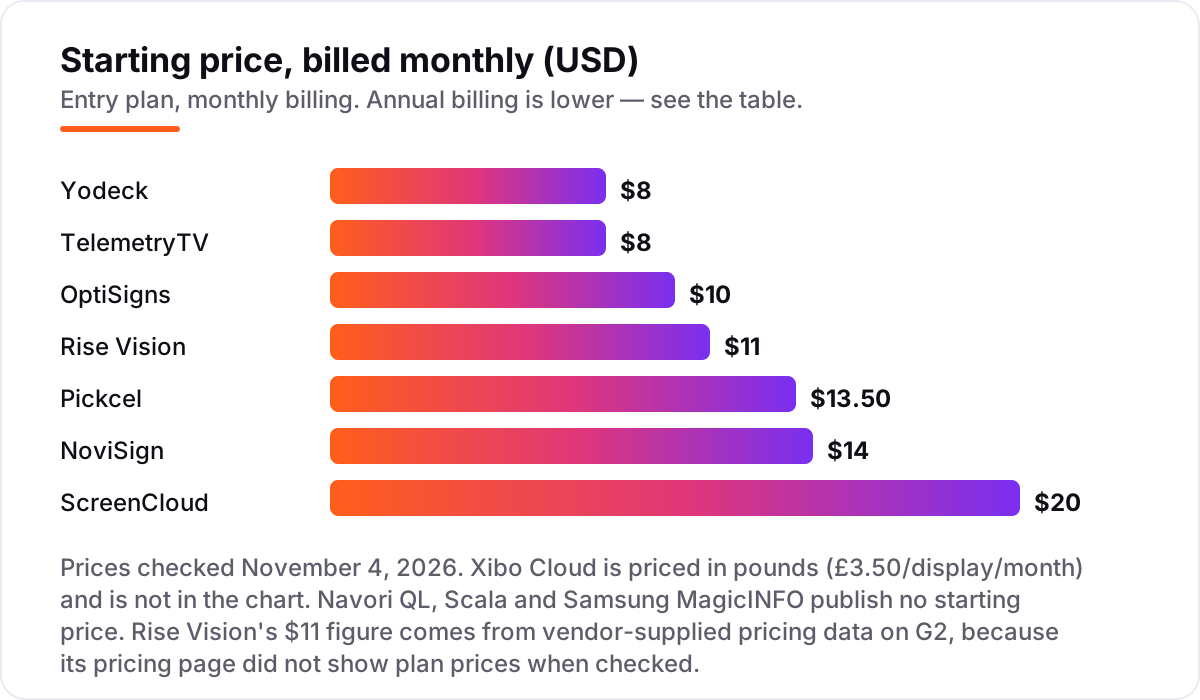
Take a 10-screen network in one location, on list prices, billed monthly. Yodeck Basic costs $80 a month and TelemetryTV Entry the same $80, Rise Vision Basic $110, Pickcel Professional $135, NoviSign Business $140 and ScreenCloud Core $200. OptiSigns is the interesting one: its free plan covers three screens, so only seven are billed, at $10 each — $70 a month, or $63 a month on annual billing. Xibo Cloud Professional costs £35 a month for the same ten screens.
Over a year, that is $756 on OptiSigns billed annually, $960 on Yodeck or TelemetryTV, $1,320 on Rise Vision, $1,620 on Pickcel, $1,680 on NoviSign and $2,400 on ScreenCloud Core. The same ten screens cost $756 a year at the cheap end and $2,400 at the dear end — a $1,644 gap that comes entirely from the free tier and the per-screen rate, not from features. Xibo sits outside the dollar comparison at £420 a year, and Navori QL, Scala and Samsung MagicINFO are quoted per deployment, so get their numbers before you shortlist.
Two costs sit outside every number above. First, hardware: a player per screen if the display has no built-in player, from about $40 for a Fire TV Stick to around $200 for a purpose-built player, plus mounts and installation. Second, the tier jump: the feature that made you shortlist a tool — proof of play, SSO, Power BI dashboards — often sits one plan up, and on 10 screens that jump is $40 to $100 a month. If the screens are part of a wider marketing push, compare providers in our guide to SEO companies for small business before you sign.
Annual billing cuts the bill on most tools here: OptiSigns Standard drops from $10 to $9 a screen, ScreenCloud Core from $24 to $20, and Pickcel Professional is priced at $13.50 only on the annual plan. Yodeck charges the same $8 whether you pay monthly or annually, so there is no discount for paying yearly — the free player is the annual perk instead. One more cost to check before you commit: a second location is not a second subscription on most tools here, since billing is per screen, but check the minimums — ScreenCloud Enterprise needs 25 screens, and TelemetryTV Enterprise needs 100 devices.
Know the difference: cloud CMS vs on-premise signage
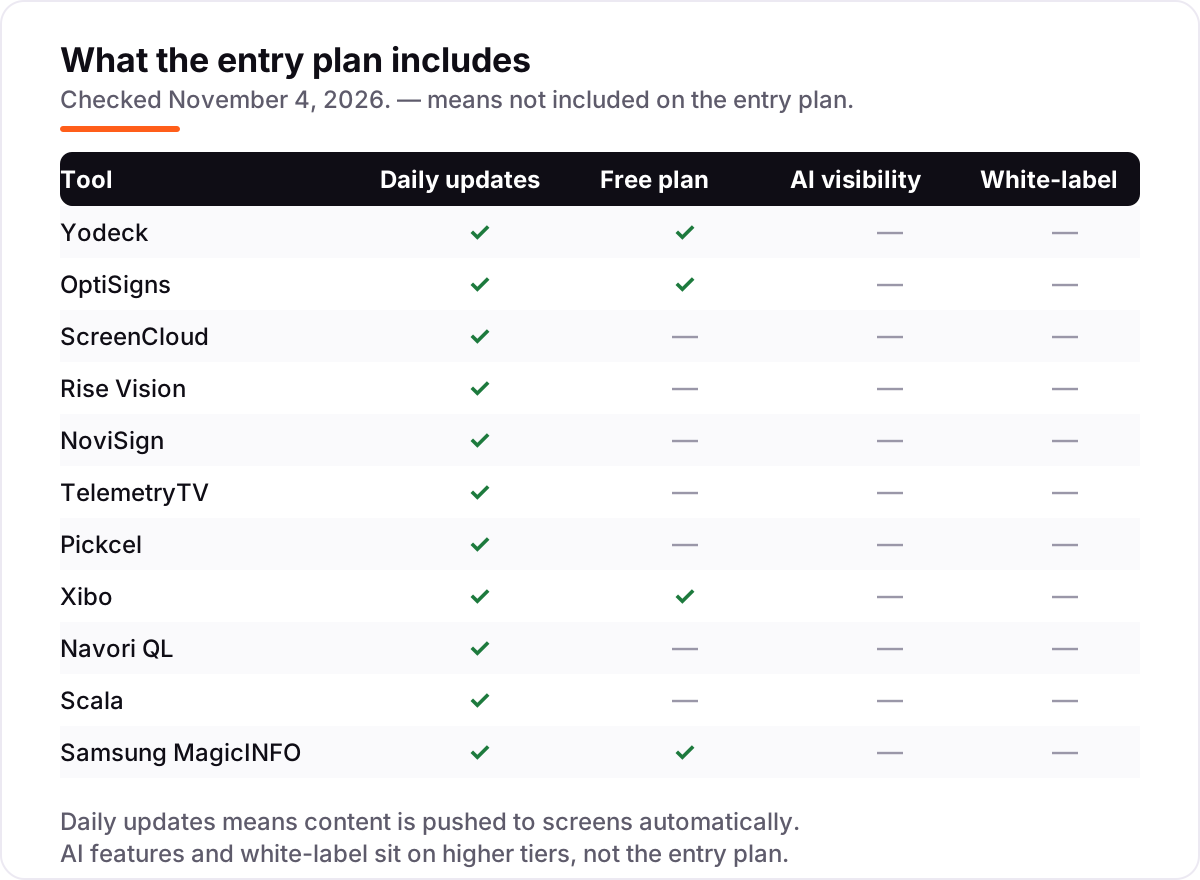
The confusion in this category is between two ways of buying the same outcome. A cloud CMS — Yodeck, OptiSigns, ScreenCloud, Rise Vision, NoviSign, TelemetryTV, Pickcel and Xibo Cloud — is a monthly subscription per screen, hosted by the vendor, with self-serve signup and a free trial. You pay per screen, you cancel any time, and the vendor runs the servers. That suits almost every small and mid-size buyer.
On-premise signage — Scala, Navori QL's self-hosted option and the old Samsung MagicINFO — runs on your own server, with licences bought once or quoted per deployment, and no monthly per-screen fee. You own the server, the data and the uptime, which suits strict data rules and very large networks, but you also own the maintenance, the backups and the upgrades. The middle path is Xibo self-hosted: the CMS is free and open source, and you pay only for commercial player licences where you need them.
A third distinction worth knowing is the display itself. A commercial display from Samsung or LG has the signage player built in and is rated to run 16 hours a day, every day; a consumer TV is cheaper but is not rated for that duty, and its warranty usually excludes commercial use. If the screens run all day, buy commercial displays and budget for them — the software saving from a cheap tool disappears fast if a TV dies in year two.
Quick comparison: tool type by need
| Buyer | Best pick | Why |
|---|---|---|
| One screen, $0 budget | Yodeck | One screen free forever, $8 per screen after that |
| Small venue, 3 screens | OptiSigns | Three screens free, paid from $10 per screen |
| Workplace dashboards | ScreenCloud | Slack, Teams and BI dashboards, from $20 per screen |
| School or campus | Rise Vision | Emergency alerts and education templates, $11 per display |
| Restaurant menus | NoviSign | Drag-and-drop editor with free training, $14 per screen |
| Live data walls | TelemetryTV | Real-time dashboards, $8 per device, no minimum |
| IT team, tight budget | Xibo | Free self-hosted CMS, cloud from £3.50 per display |
| Big retail network | Scala | Enterprise platform through a partner, priced per deployment |
Mistakes to avoid
- Budgeting on the per-screen price alone. The software is one line: add a player per screen, mounts, installation and the time to make content, or the first invoice will surprise you.
- Assuming the free screen stays free. Yodeck's free screen is only free while it is the account's only screen — add a second screen and both are billed at $8.
- Buying on the annual price when you need monthly flexibility. The annual figure is lower on most tools, but it locks you in for a year; Yodeck charges the same $8 either way, so there is no penalty for paying monthly.
- Ignoring the tier your feature sits on. Proof of play, SSO and Power BI dashboards all live above the entry plan here. Price the plan that has your must-have feature, not the cheapest plan on the page.
- Picking on-premise without a maintenance budget. Scala, Navori QL self-hosted and the old MagicINFO need someone to run the server. If nobody owns that job, a cloud tool is cheaper in practice — and MagicINFO on-premise stops selling on December 31, 2026 anyway.
How we chose
We checked each vendor's own pricing page on November 4, 2026 and recorded the starting price exactly as shown, including the annual-billing figure where the page lists one, and we ranked the companies by fit for the most common buyer — a small or mid-size business putting screens in lobbies, stores, restaurants or schools — not by brand size. Two prices are not vendor-verified: Rise Vision's $11 comes from vendor-supplied pricing data on G2, because the plan prices did not render on Rise Vision's own pricing page when we checked, and Xibo's £3.50 comes from Xibo's own cloud-hosting page, which quotes the price in pounds. Navori QL publishes no price and third-party listings conflict — $14 a month on some directories, $20 on others — so we show it as a custom quote rather than pick a figure. Samsung MagicINFO's free Lite tier for up to 25 displays is per a Samsung distributor's pricing page, not Samsung's own site. This list carries no review ratings: the G2 and Capterra review pages could not be opened to verify a score and count on November 4, 2026, and we would rather show no rating than a stale or estimated one. No vendor paid for a place in this list, and none of the links here are affiliate links.
What to do next
Start with the free plan or trial of your top pick and run one real week of your own content through it. Check that the screen recovers after a power cut, that a colleague can update a slide without you, and that the player you already own is on the supported list. If the screens are sorted but new customers are not finding you, our monthly SEO service handles the visibility side — or compare providers in our guide to SEO companies for small business. Once your tools are in place, find out what's holding your rankings back.
Your stack only works if people find you
SerpAstra fixes what keeps your site off page one and makes it easy for AI assistants to recommend.
Get a free audit→Sources we checked (15)
- Yodeck pricing — yodeck.com/pricing (checked November 4, 2026)
- OptiSigns pricing — optisigns.com/pricing (checked November 4, 2026)
- ScreenCloud pricing — screencloud.com/pricing (checked November 4, 2026)
- Rise Vision pricing — risevision.com/pricing (checked November 4, 2026)
- Rise Vision pricing, vendor-supplied data — g2.com/products/rise-vision/pricing (checked November 4, 2026)
- NoviSign pricing — novisign.com/pricing (checked November 4, 2026)
- TelemetryTV pricing — telemetrytv.com/digital-signage-software-pricing (checked November 4, 2026)
- Pickcel pricing — pickcel.com/pricing (checked November 4, 2026)
- Xibo pricing — xibosignage.com/pricing (checked November 4, 2026)
- Xibo cloud hosting — xibosignage.com/hosting (checked November 4, 2026)
- Navori QL pricing, third-party listings — trustradius.com/products/navori-ql/pricing (checked November 4, 2026)
- Scala pricing — g2.com/products/scala/pricing (checked November 4, 2026)
- Scala alternatives and reseller pricing — brixsignage.com (checked November 4, 2026)
- Samsung MagicINFO end of sale and VXT pricing — fingoweb.com (checked November 4, 2026)
- MagicINFO Lite free tier and cloud pricing — magicinfoservices.com (checked November 4, 2026)
Shamim
Founder of SerpAstra
A full-stack SEO and digital marketer who spends most days on Local SEO for dental practices, AI search visibility and lead generation.
Frequently asked questions
What is the best digital signage company?
Yodeck is the best fit for most buyers: $8 per screen per month, one screen free forever and a free player on annual plans. OptiSigns is the better pick when you want three screens free and the widest app library. ScreenCloud suits workplaces that need dashboards, SSO and enterprise integrations.
How much does digital signage cost per month?
Cloud signage runs $8 to $20 per screen per month: Yodeck and TelemetryTV start at $8, OptiSigns at $10, Rise Vision at $11 and ScreenCloud at $20. A 10-screen network costs $960 to $2,400 a year in software. Players, mounts and installation are extra, and enterprise platforms quote per deployment.
Is there free digital signage software?
Yes, with limits. Yodeck gives one screen free forever, OptiSigns gives three screens free, and Xibo's self-hosted CMS is free with no screen limit. Samsung MagicINFO Lite is free for up to 25 displays. The other tools here offer free trials of 14 or 30 days instead of a permanent free plan.
Do I need a media player for each screen?
Usually yes, unless the display has the software built in. Samsung and LG commercial displays run MagicINFO and webOS apps inside the screen, and system-on-chip displays run Navori QL and Xibo without a box. Otherwise budget $40 for a Fire TV Stick up to around $200 for a purpose-built player per screen.
What is the difference between cloud and on-premise digital signage?
Cloud signage is a monthly subscription per screen, hosted by the vendor, with self-serve signup — Yodeck, OptiSigns and ScreenCloud work this way. On-premise signage runs on your own server with licences bought once, which suits strict data rules but needs IT time. Scala and Navori QL offer on-premise deployments.
Can I use my own TV for digital signage?
Yes. A consumer TV plus a $40 Fire TV Stick or Raspberry Pi player runs Yodeck or OptiSigns, and that is the cheapest way to start. Commercial displays cost more but are built to run 16 hours a day, every day, with brighter panels and warranties that cover commercial use — consumer TVs are not rated for that.
What happens to Samsung MagicINFO in 2027?
Samsung set December 31, 2026 as the end of sale for on-premise MagicINFO, so no new perpetual licences ship after that date. Existing installations keep running, but the fleet cannot grow with new MagicINFO licences. From January 2027 the Samsung-branded path is VXT, a yearly subscription with no on-premise option.
Free SEO and AI visibility audit
Find out what is holding your rankings back
Send us your site. Within 2 business days you get a written audit, an AI visibility check and a short fix list ranked by impact. Free, with no contract attached.
Request my free audit→Related guides
 SEO & AI Search8 Best AI Visibility Companies (2026): Who to Hire and What It Costs8 best AI visibility companies compared on price, services and fit, with real published fees. Find the right AI visibility partner for your budget and timeline.Read guide →
 SEO & AI Search12 Best Marketing Platforms for Small Business SEO in 2026, ComparedThe 12 best marketing platforms for small business SEO, compared on real prices, SEO tools and AI visibility. Every price checked November 1, 2026.Read guide →
 SEO & AI Search8 Best SEO Companies for Small Business in 20268 best SEO companies for small business compared on price, contracts and AI visibility, with prices checked on each agency's own site on November 1, 2026.Read guide →