
10 Best Digital Tools for Construction Management in 2026, Compared
Compare the 10 best digital tools for construction management on price, field tools, job costing and AI features, with every price checked November 7, 2026.
 Shamim Mia, Founder, SerpAstraLast verified November 7, 202614 min read
We compare pricing pages, documentation and public reviews. We never accept payment for rankings.

Key takeaways
- Procore leads for large general contractors, but it is quote-only; JobTread is the transparent-priced pick at $199 a month with the highest rating here, 4.9 out of 5 on G2, and Contractor Foreman is the cheapest full suite at $49 a month.
- Five of the ten tools publish no starting price at all, so compare them on the pricing model — per user, per volume, or per year — not on a headline number that does not exist.
- The most common mistake is buying a suite when you need a field app, or a field app when you need job costing: match the tool to the job it runs, then check the per-seat total for your whole crew.
- Fieldwire is the only genuinely free starting point here, with a free Basic plan for 5 users, while Bluebeam is the cheapest way to add professional markups and takeoffs at $260 a user a year.
On this page
Quick comparison
| Tool | Best for | Starting price | Free plan |
|---|---|---|---|
| Procore | Large general contractors running complex multi-trade projects from preconstruction to closeout | Custom quote | No |
| Buildertrend | Home builders and remodelers who want scheduling, estimating, job costing and client communication in one place | Custom quote | No |
| Autodesk Forma | Firms already working in the Autodesk ecosystem where BIM models drive the job | Custom quote | No |
| JobTread | Small to midsize builders who want transparent pricing and every feature on one plan | $199/mo | No |
| Fieldwire | Field teams living on drawings, tasks and punch lists, on mobile and offline | $54/user/mo | Yes (Basic) |
| JobNimbus | Roofing and exterior contractors who sell, produce and bill from one system | Custom quote | No (14-day trial) |
| Contractor Foreman | Small contractors wanting the most modules per dollar on a flat company price | $49/mo | No (30-day trial) |
| ServiceTitan | Service and specialty contractors scaling dispatch, invoicing and marketing | Custom quote | No |
| Bluebeam | Estimators, project managers and architects who live in PDF markups and takeoffs | $260/yr | No (14-day trial) |
| Knowify | Trade contractors who need job costing, AIA billing and QuickBooks sync in one login | $149/mo | No |
Make one of these tools?
We re-check this list every quarter. Send a correction, request a review, or ask about a clearly labeled sponsored spot.
Request a listingThe best digital tools for construction management

Procore
Best for: Large general contractors running complex multi-trade projects from preconstruction to closeout
Procore is the default enterprise choice for a reason: it covers preconstruction through closeout in one system, so drawings, RFIs, submittals, daily logs, punch lists and financials all share the same record. With unlimited users on every contract, the field and the office finally work from the same data, and the integration network is the deepest in the category.
The catch is how it is sold. Procore prices on annual construction volume, not seats, and every deal is negotiated, so a small contractor cannot budget from a list price. Rolling it out takes real effort too. Buy Procore when you run multiple large projects with dedicated project managers; start further down this list when you run a ten-person crew.
What we like
- End-to-end platform covering preconstruction, project management, financials and closeout
- Unlimited users on every contract, so the whole project team works in one record
- Deep financial tools including budgets, change orders and job costing
- Largest integration and support network in construction software
Watch out for
- Quote-only pricing based on annual construction volume, so small firms cannot budget from a list price
- Rollout takes real effort, with implementation and training to plan for
- Overkill for a small crew that only needs scheduling and invoicing

Buildertrend
Best for: Home builders and remodelers who want scheduling, estimating, job costing and client communication in one place
Buildertrend is the all-in-one platform for residential construction: scheduling, estimating, job costing, client communication and payments under one roof. Its client portal is genuinely good, giving homeowners real-time visibility that cuts the daily status-call load, and onboarding managers help configure the system around your actual jobs.
The frustration is pricing. Buildertrend removed published prices from its site in 2026, so you negotiate blind, and long-term users report steady increases at renewal. Budget for a serious annual commitment and get the quote in writing. For builders who want one vendor instead of five logins, it remains the most complete residential option.
What we like
- CRM-to-financials in one system, built for residential construction
- Strong client portal that cuts the daily status-call load
- Guided onboarding with a manager who configures the system around your jobs
- Unlimited users and projects, with no per-seat fees
Watch out for
- No published pricing since 2026, so you negotiate without a list price to anchor on
- Long-term users report steady price increases at renewal
- Feature breadth can overwhelm a small team at first

Autodesk Forma
Best for: Firms already working in the Autodesk ecosystem where BIM models drive the job
Autodesk Forma is the current name for what was long known as Autodesk Construction Cloud, and it connects design, preconstruction and field execution in one environment. Model coordination, document management and the Build field tools share a single source of truth, which makes it the natural pick when your architects and engineers already live in Revit and AutoCAD.
Like Procore, it is sold rather than bought: expect a sales process, three bundles to choose between, and implementation planning. Small contractors will find it heavy and expensive relative to simpler tools. But for firms where BIM is central to how they win and deliver work, nothing else ties the design model to the jobsite this tightly.
What we like
- Deep BIM and design integration, tying the model to the jobsite
- Model coordination, document management and field tools share one environment
- Proven at massive scale on large commercial and infrastructure work
- More than 400 integrations across the Autodesk ecosystem
Watch out for
- Pricing requires a sales conversation, with three quote-based bundles to choose between
- Complex to administer, and heavy for small residential work
- Per-user licensing costs add up fast on large field teams

JobTread
Best for: Small to midsize builders who want transparent pricing and every feature on one plan
JobTread is the anti-enterprise option: one plan, every feature, published prices. At $199 a month, or $159 on annual billing, you get estimating, job costing, scheduling, change orders, invoicing and client portals with unlimited jobs. Additional internal users run $20 a month each, while subs, vendors and clients use the portals free.
The honesty extends to a 30-day money-back guarantee instead of a trial. The trade-off is depth: field collaboration and reporting are not as strong as the bigger platforms, and training beyond the basics comes through partners at extra cost. For builders who want to know exactly what they will pay before the sales call, JobTread is refreshing.
What we like
- Published pricing with no quote games: $199 a month, or $159 billed annually
- Every feature on one plan, with unlimited jobs and portal users
- Estimating, job costing, scheduling, change orders and invoicing in one login
- Subcontractors, vendors and clients use the portals free
Watch out for
- No free trial, only a 30-day money-back guarantee on monthly plans
- Every extra internal user costs $20 a month, so a big office team adds up
- Field collaboration and reporting are lighter than the enterprise platforms

Fieldwire
Best for: Field teams living on drawings, tasks and punch lists, on mobile and offline
Fieldwire does one job extremely well: getting the right drawings, tasks and punch lists into the hands of the crew. Plan viewing with automatic version control, markups tied to locations on the sheet, and offline access make it the field app other platforms try to copy. The free Basic tier covers 5 users and 3 projects, enough to run a real job.
Paid plans start at $54 per user per month billed monthly, or $39 billed annually, for Pro, rising to $89 for Business Plus with RFIs, submittals and budgets. It is not a full business platform, so you will still need something for estimating and accounting, but for field execution it is the easiest yes on this list.
What we like
- Excellent mobile and offline experience, built for the jobsite
- Genuinely useful free tier covering 5 users and 3 projects
- Automatic drawing versioning, so the crew always works from the current sheet
- Tasks, markups and punch lists pinned to locations on the plan
Watch out for
- Per-seat pricing punishes large crews: every invited user is a paid seat
- No estimating, job costing or invoicing, so it sits next to another system
- RFIs, submittals and budgets wait for Business Plus at $89/user/month

JobNimbus
Best for: Roofing and exterior contractors who sell, produce and bill from one system
JobNimbus is a CRM and project platform tuned for roofers, siders and exterior contractors. Lead tracking, estimating with built-in SumoQuote proposals, production boards, invoicing and automated follow-ups cover the full roofing sales-to-install cycle. Integrations with EagleView for measurements and CompanyCam for photos fit the trade.
The annoyance is pricing: JobNimbus does not publish rates, and plans combine base fees with per-user charges by role, so get the quote for your actual headcount, including the texting bundle most roofers need. If you run a roofing company and want software that speaks your language, the fit is excellent; just negotiate with eyes open.
What we like
- Built for roofing workflows, from lead tracking to production boards
- SumoQuote proposals and EagleView measurements fit the trade
- Strong automations for follow-ups, invoicing and customer updates
- Integrations with CompanyCam for jobsite photos
Watch out for
- No published pricing: every plan is a quote based on users and add-ons
- Per-user model gets expensive as the team grows
- Texting and some integrations are paid add-ons

Contractor Foreman
Best for: Small contractors wanting the most modules per dollar on a flat company price
Contractor Foreman packs an almost absurd number of modules into $49 a month: estimating, scheduling, daily logs, time tracking, GPS timecards, safety meetings, equipment logs, a client portal and more. Higher tiers at $105, $166, $221 and $332 add users at flat rates, so costs stay predictable as you grow.
The price shows in places: the interface is functional rather than beautiful, and native QuickBooks integration needs pricier tiers. But the 30-day trial plus a 100-day money-back guarantee on annual plans make it nearly risk-free to test. For small contractors who need breadth on a budget, nothing else delivers this much for $49.
What we like
- Cheapest full suite here: estimating, scheduling, daily logs and time cards from $49/month
- Flat-rate tiers priced by user caps, not per seat, so costs stay predictable
- Free private training sessions and implementation help on paid tiers
- Price-lock guarantee keeps your rate fixed at signup
Watch out for
- Basic covers one user, and the interface feels busy and dated
- QuickBooks sync needs pricier tiers on lower plans
- Local material pricing is not included on Basic or Standard

ServiceTitan
Best for: Service and specialty contractors scaling dispatch, invoicing and marketing
ServiceTitan dominates residential and commercial service trades: HVAC, plumbing, electrical and similar businesses run dispatch, agreements, invoicing and marketing on it. The reporting is a genuine strength, with real-time costing and dashboards that show per-technician and per-job profitability. More than 70 integrations connect it to accounting and supplier systems.
This is enterprise-grade commitment disguised as trade software: pricing is quote-only, contracts are substantial, and implementation needs attention. It is the right tool when you have dispatchers, CSRs and a growing technician fleet. A five-person shop will drown in it; a fifty-person operation will wonder how it ever ran without it.
What we like
- Deep service workflows: dispatch, agreements, invoicing and marketing in one system
- Strong reporting with real-time costing and per-technician profitability
- More than 70 integrations connect it to accounting and supplier systems
- Call tracking and booking tools that tie marketing spend to jobs
Watch out for
- Quote-only pricing with substantial contracts, so small shops cannot budget from a list
- Implementation takes real effort and a dedicated rollout
- A five-person shop will drown in it; it is built for growing fleets

Bluebeam
Best for: Estimators, project managers and architects who live in PDF markups and takeoffs
Bluebeam Revu is the markup tool the industry standardized on. Quantity takeoffs, punch markups, submittal reviews and collaborative Studio sessions where the whole team marks up the same set in real time: this is the daily work of estimators, project managers and architects. The measurement tools alone justify it for many firms.
Pricing is annual per user: Basics at $260, Core at $330, Complete at $440 and Max at $590 as an introductory price. It is Windows-first software, so Mac-based teams work through the browser version. Bluebeam will not schedule your project or invoice your client, but paired with any platform above, it handles the document side better than anything else.
What we like
- Industry standard for PDF markups, takeoffs and plan review
- Studio sessions let the whole team mark up the same set in real time
- Precise measurement tools for length, area, counts and volumes
- You can mix plans across the team, so only estimators need Complete
Watch out for
- Windows-first: Mac teams work through the browser version
- Annual per-user billing only, with no monthly option
- Not a project management platform, so it pairs with a suite rather than replacing one

Knowify
Best for: Trade contractors who need job costing, AIA billing and QuickBooks sync in one login
Knowify is built for trade contractors who win fixed-price and AIA work: estimating, contracts, scheduling, time tracking and invoicing, with job costing that ties every expense to the right project and phase. The AIA pay applications are the real thing, with automated schedules of values and retainage tracking, and the two-way QuickBooks sync keeps the books in step.
Core costs $149 a month, or $99 billed annually, for one user, with extra users at $29 a month each. Job costing and the AI Connector wait for Advanced, so price the tier you actually need. Support is US-based and onboarding sessions are included. For a trade contractor who lives on job costs, Knowify earns its keep.
What we like
- Real G702/G703 AIA pay applications with retainage tracking
- Job costing that ties every expense to the right project and phase
- Two-way QuickBooks sync, so the books and the jobs stay in step
- US-based support with one-on-one onboarding sessions included
Watch out for
- AI Connector and job costing wait for Advanced; Core is bidding and invoicing only
- Reporting and commission calculations draw reviewer complaints
- Each extra user costs $29 a month on top of the base plan
The best digital tools for construction management do one job well: they keep the office, the field and the client working from the same record, so a drawing change, a change order and a payment all land in the same place. We ranked the ten tools below by fit for the most common buyer — a contractor who needs scheduling, job costing and field coordination without paying for a system built for someone else — and every price was checked on the vendor's own pricing page on November 7, 2026.
How to choose the best digital tools for construction management
- Start with the kind of work you do. Residential builders belong with Buildertrend or JobTread, roofers with JobNimbus, service trades with ServiceTitan, and large commercial contractors with Procore or Autodesk Forma.
- Count the whole crew, not one seat. Fieldwire charges per user, JobTread charges per internal user, and Procore and Buildertrend charge on annual volume — the same five people cost very different amounts on each model.
- Check what the entry plan leaves out. RFIs and budgets wait for Fieldwire Business Plus, job costing waits for Knowify Advanced, and Bluebeam Basics cannot host Studio sessions or measure perimeters.
- Test the mobile app on a real jobsite. Offline access, drawing versioning and photo markups decide whether the crew actually uses the tool, and Fieldwire and Bluebeam are the strongest here.
- Ask for the quote in writing. Five tools here publish no price, so get the contract, the renewal terms and any onboarding fee in writing before you sign.
Construction software is one system in your stack, not the whole stack. If the business also needs to be found online, our local SEO service covers the visibility side for contractors. And before you publish new pages for the services you sell, run your titles through the free SERP snippet preview tool — it shows exactly how the title and description will look in Google.
Whatever you shortlist, try it with real data before you pay. The free plans and trials in this list are long enough to run one genuine job — your drawings, your schedule, your crew — and that job tells you more than any review can. Check two things in the trial: that the field app works offline on the site, and that your accountant can see the job costs without a second login. Every tool here that charges per user lets you invite clients and subcontractors through free portals, so there is no reason to buy before the crew has tried it.
Construction management pricing: what you will actually pay
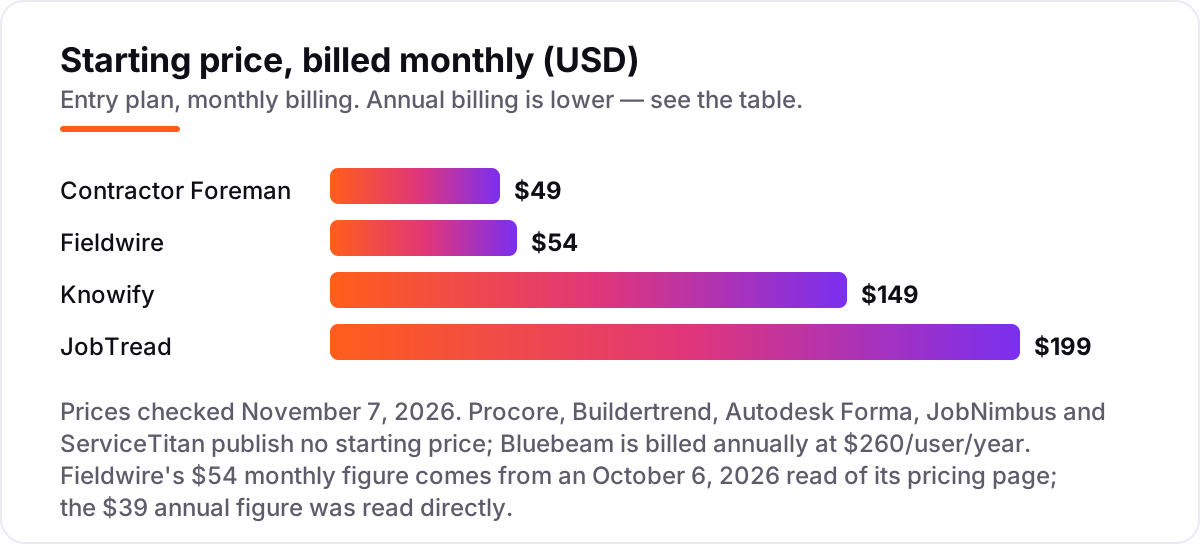
Take a five-person team: one owner in the office and four people in the field. On list prices, the subscription costs $49 a month on Contractor Foreman Basic, $149 on Knowify Core, $199 on JobTread, and $270 a month on Fieldwire Pro at $54 per user. Two of those numbers need adjusting before they are real: JobTread covers one internal user, so four extra users at $20 each bring it to $279 a month, and Knowify Core covers one user, so four extra users at $29 each bring it to $265 a month.
Over a year, that is $588 on Contractor Foreman Basic billed annually, $1,908 on JobTread billed annually at $159 a month plus four users at $16, $2,340 on Fieldwire Pro billed annually at $39 a user, and $2,580 on Knowify Core billed annually at $99 a month plus four users at $29. Add Bluebeam Basics for the same five people and that is another $1,300 a year, or about $108 a month if you spread the annual bill evenly. The same five people cost $588 a year at the cheap end and $2,580 before markups — a gap that comes entirely from the pricing model, not from features.
Three costs sit outside every number above. First, the quote-only tools: Procore, Buildertrend, Autodesk Forma, JobNimbus and ServiceTitan publish no price, so their cost is whatever the sales conversation produces, and volume-based quotes can run into five figures a year. Second, onboarding and implementation, which the enterprise tools charge for and the small tools mostly include. Third, card processing on the invoices you send, which is charged per transaction rather than per month. If you run a contracting firm rather than a general builder, the visibility tools differ too — see our guide to the best marketing software for contractors.
Annual billing cuts the bill on every tool here that publishes one: JobTread drops from $199 to $159 a month, Fieldwire Pro from $54 to $39 a user, and Knowify Core from $149 to $99. Contractor Foreman Basic is sold on yearly billing only, so $49 a month is the annual figure, and monthly billing starts at $139. One more cost to check before you commit: a second business is a second subscription on every tool in this list, and per-user tools charge for every employee who logs in, so price the whole crew before you commit to a tool for one person.
Know the difference: a platform, a field app and a markup tool
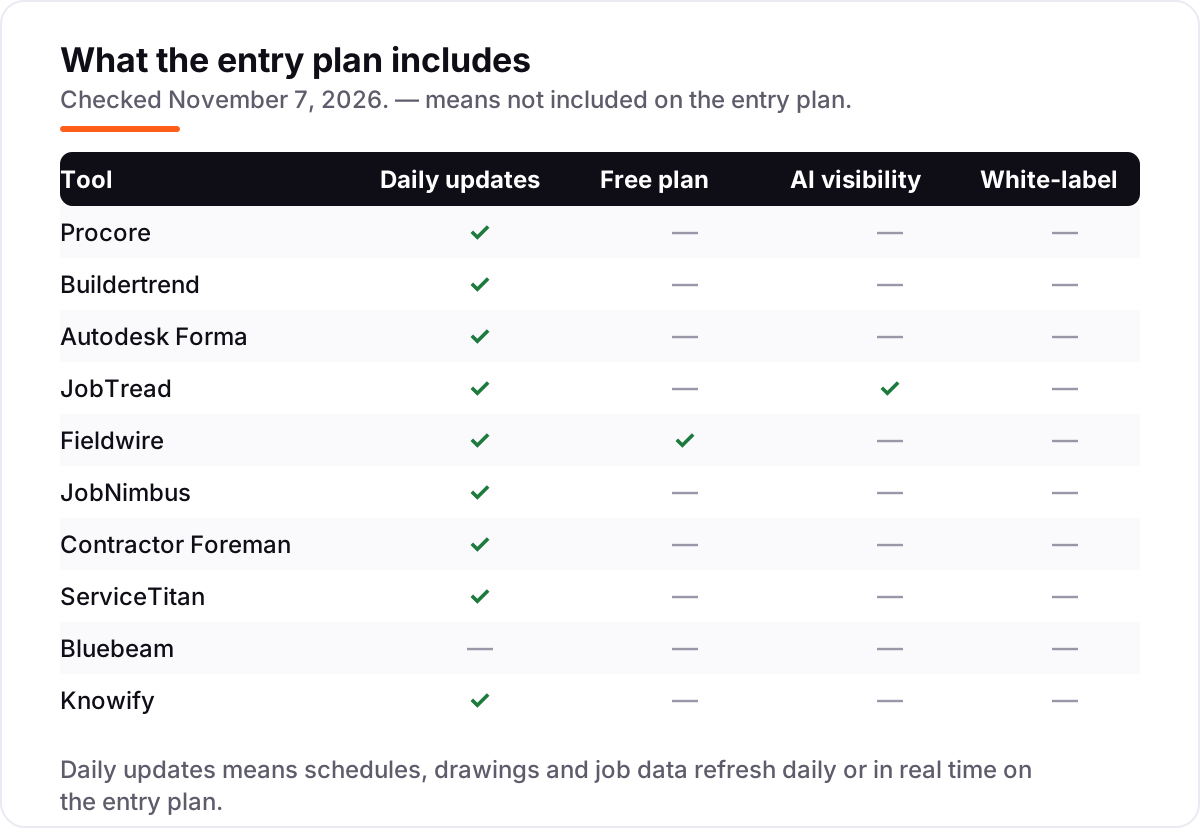
The confusion in this category is between three different kinds of tool that all call themselves construction software. A platform — Procore, Buildertrend, JobTread, Knowify — runs the business: estimating, scheduling, job costing, invoicing and client communication in one system. A field app — Fieldwire — runs the jobsite: drawings, tasks, punch lists and forms on a phone, with no estimating or billing. A markup tool — Bluebeam — runs the documents: PDF markups, measurements and takeoffs, with no scheduling at all.
Most firms need one platform plus one of the other two, not one tool that claims to do everything. A five-person remodeler runs fine on JobTread plus Fieldwire's free tier; a roofer runs JobNimbus plus Bluebeam for takeoffs; a large general contractor runs Procore plus Bluebeam for the document side. Buying a platform when you only needed a field app wastes thousands a year, and buying a field app when you needed job costing means buying the platform later anyway.
There is a second, quieter confusion: per-user pricing versus per-volume pricing. Per-user tools such as Fieldwire, Bluebeam and Knowify scale with headcount, so the bill grows every time you hire. Per-volume tools such as Procore and Buildertrend scale with annual construction volume, so the bill grows when you win bigger jobs. Neither is cheaper in general — the right question is which one grows with the thing your business grows by.
Quick comparison: tool type by need
| Buyer | Best pick | Why |
|---|---|---|
| Large general contractor | Procore | End-to-end platform, unlimited users, priced on volume |
| Home builder or remodeler | Buildertrend | Residential all-in-one with a strong client portal |
| BIM-driven design-build firm | Autodesk Forma | Model-to-jobsite in one environment, quote-based |
| Small builder who wants a published price | JobTread | One plan, every feature, $199/month, rated 4.9/5 on G2 |
| Field team on drawings and punch lists | Fieldwire | Free Basic plan, Pro is $54/user/month |
| Roofing or exterior contractor | JobNimbus | Built for roofing sales-to-install, quote-based |
| Small contractor on a tight budget | Contractor Foreman | Most modules per dollar, $49/month flat |
| Service trade scaling dispatch | ServiceTitan | Dispatch, invoicing and marketing in one system |
| Estimators and plan reviewers | Bluebeam | Industry-standard markups, $260/user/year |
| Trade contractor needing job costing | Knowify | AIA billing and job costs, $149/month |
Mistakes to avoid
- Budgeting on one seat. A $54 per-user tool is $270 a month for five people and $2,700 for fifty. Price the whole crew, including the office staff who only check in occasionally.
- Buying a suite when you need a field app. If the crew lives on drawings and punch lists, Fieldwire's free tier or Pro at $39 a user a year solves the problem; Procore does not make the drawings easier to read.
- Buying a field app when you need job costing. Fieldwire and Bluebeam track no costs, so a firm that needs to know whether each job made money still has to buy a platform on top.
- Signing a quote-only contract without a rate lock. Procore, Buildertrend, Autodesk Forma, JobNimbus and ServiceTitan all negotiate price, and Buildertrend users report increases at renewal — get the renewal terms in writing.
- Forgetting the second business. If you run two companies, you pay for two subscriptions, and per-user tools charge for every employee who logs in. Price the second set of books before you commit to a tool for the first.
How we chose
We checked each vendor's own pricing page on November 7, 2026 and recorded the starting price exactly as shown, including the annual-billing figure where the page lists one. Five tools publish no starting price, so we say so instead of guessing: Procore, Buildertrend, Autodesk Forma, JobNimbus and ServiceTitan are all quote-based. Fieldwire's $54 monthly figure comes from an October 6, 2026 read of Fieldwire's own pricing page by Workyard; the $39 annual figure we read directly from fieldwire.com/pricing on November 7, 2026. Ratings are G2 scores from fresh search-index copies of the exact G2 review pages, crawled within the last few days, with the count shown on each card. We ranked the tools by fit for the most common buyer — a contractor who needs scheduling, job costing and field coordination — not by brand size. CoConstruct was left out because it is no longer sold to new customers; buyers are sent to Buildertrend instead. No vendor paid for a place in this list, and none of the links here are affiliate links.
What to do next
Start with the free plan or trial of your top pick and run one real job through it. Check that the field app works offline on the site, that the job costs land where your accountant expects them, and that the client portal shows what your customers actually need to see. If the tools are sorted but new customers are not finding you, our local SEO service handles the visibility side — or compare providers in our guide to marketing software for contractors. Once your tools are in place, find out what's holding your rankings back.
Your stack only works if people find you
SerpAstra fixes what keeps your site off page one and makes it easy for AI assistants to recommend.
Get a free audit→Sources we checked (21)
- Procore pricing — procore.com/pricing (checked November 7, 2026)
- Buildertrend pricing — buildertrend.com/pricing (checked November 7, 2026)
- Autodesk Forma pricing — construction.autodesk.com/pricing (checked November 7, 2026)
- JobTread pricing — jobtread.com/pricing (checked November 7, 2026)
- Fieldwire pricing — fieldwire.com/pricing (checked November 7, 2026)
- JobNimbus pricing — jobnimbus.com/pricing (checked November 7, 2026)
- Contractor Foreman plans — contractorforeman.com/plans (checked November 7, 2026)
- ServiceTitan pricing — servicetitan.com/pricing (checked November 7, 2026)
- Bluebeam pricing — bluebeam.com/pricing (checked November 7, 2026)
- Knowify pricing — knowify.com/pricing (checked November 7, 2026)
- Knowify vs JobTread pricing — knowify.com/knowify-vs-jobtread (checked November 7, 2026)
- Procore reviews — g2.com/products/procore/reviews (checked November 7, 2026)
- Buildertrend reviews — g2.com/products/buildertrend/reviews (checked November 7, 2026)
- Autodesk Forma reviews — g2.com/products/autodesk-forma-formerly-autodesk-construction-cloud/reviews (checked November 7, 2026)
- JobTread reviews — g2.com/products/jobtread/reviews (checked November 7, 2026)
- Fieldwire reviews — g2.com/products/fieldwire/reviews (checked November 7, 2026)
- JobNimbus reviews — g2.com/products/jobnimbus/reviews (checked November 7, 2026)
- Contractor Foreman reviews — g2.com/products/contractor-foreman/reviews (checked November 7, 2026)
- ServiceTitan reviews — g2.com/products/servicetitan/reviews (checked November 7, 2026)
- Bluebeam reviews — g2.com/products/bluebeam/reviews (checked November 7, 2026)
- Knowify reviews — g2.com/products/knowify/reviews (checked November 7, 2026)
Shamim
Founder of SerpAstra
A full-stack SEO and digital marketer who spends most days on Local SEO for dental practices, AI search visibility and lead generation.
Frequently asked questions
What is the best digital tool for construction management?
Procore is the best fit for large general contractors, with the deepest platform and a 4.6 out of 5 rating on G2. JobTread is the best pick for small to midsize builders at $199 a month with transparent pricing and a 4.9 rating. Fieldwire is the best field app, free to start, and Bluebeam is the best markup tool.
How much do digital tools for construction management cost?
Published prices run from $49 a month for Contractor Foreman to $199 a month for JobTread, with Fieldwire at $54 per user a month and Knowify at $149 a month. Five tools here publish no price at all, including Procore and Buildertrend, which quote on annual construction volume. Bluebeam costs $260 a user a year.
Is there a free construction management tool?
Fieldwire is the only tool here with a genuinely free plan: Basic covers 5 users, 3 projects and 100 sheets at $0. The rest offer free trials of 14 to 30 days, or a money-back guarantee instead of a trial. JobTread and Autodesk Forma both use a 30-day money-back guarantee rather than a free trial.
What is the difference between Procore and Buildertrend?
Procore is built for large general contractors running complex commercial work, with deep financials and unlimited users on volume-based contracts. Buildertrend is built for residential builders and remodelers, with a strong client portal and the same volume-based pricing. Both are quote-only, so the choice is about the kind of work you do.
Do I need Procore, or is a cheaper tool enough?
Most small and midsize builders do not need Procore. JobTread at $199 a month or Contractor Foreman at $49 a month cover estimating, scheduling, job costing and invoicing for a small team. You need Procore when you run several large projects at once, with dedicated project managers and complex financial reporting.
Can I use Fieldwire on its own?
Yes, for field execution: drawings, tasks, punch lists, forms and inspections work well alone, and the free Basic plan covers a small crew. But Fieldwire has no estimating, job costing or invoicing, so most firms pair it with a business platform such as JobTread, Knowify or Procore, plus accounting software for the books.
How do I switch construction management software?
Start at your quietest point in the year, not mid-project. Export your open jobs, budgets, contacts and document sets from the old tool, then run one live job on the new tool with a small crew before moving the rest. JobTread and Knowify both include onboarding help, so use it rather than migrating alone.
Free SEO and AI visibility audit
Find out what is holding your rankings back
Send us your site. Within 2 business days you get a written audit, an AI visibility check and a short fix list ranked by impact. Free, with no contract attached.
Request my free audit→Related guides
 Digital Marketing & Ads7 Best Marketing Software for Contractors in 2026, ComparedCompare the 7 best marketing software for contractors on price, reviews and trade-specific features, with every price checked November 5, 2026.Read guide →
 Digital Marketing & Ads12 Best Project Management Software for Marketing Teams in 2026, ComparedCompare the 12 best project management software for marketing teams on price, proofing, timelines and client seats, with prices checked November 5, 2026.Read guide →
 Companies & Services9 Best Home Service Franchises in 2026: Prices, Pros and Cons ComparedCompare the 9 best home service franchises on initial investment, franchise fees and royalties, with every figure from the 2026 FDD, checked November 4, 2026.Read guide →