
12 Best Project Management Software for Marketing Teams in 2026, Compared
Compare the 12 best project management software for marketing teams on price, proofing, timelines and client seats, with prices checked November 5, 2026.
 Shamim Mia, Founder, SerpAstraLast verified November 5, 202615 min read
We compare pricing pages, documentation and public reviews. We never accept payment for rankings.

Key takeaways
- Asana leads for most marketing teams at $13.49/user/month; monday.com follows at $12/seat/month with the most visual boards, and ClickUp at $12/user/month with the widest feature set.
- Hive is the cheapest paid entry at $7/user/month, and ProofHub's flat $50/month covers unlimited users — the cheapest bill here for a 10-person team.
- The single most important buying factor is the seat rule: per-seat pricing, seat minimums and who counts as a seat decide what you actually pay, not the headline price.
- Proofing, time tracking and AI are often paid extras, so check whether your plan includes them before you compare headline prices.
On this page
Quick comparison
| Tool | Best for | Starting price | Free plan |
|---|---|---|---|
| Asana | Marketing teams that run campaigns across channels and need timelines, approvals and unlimited guests | $13.49/mo | Yes (Personal) |
| monday.com | Visual marketing teams that plan work on colorful boards and want automations without a learning curve | $12/mo | Yes (free plan) |
| ClickUp | Marketing teams that want one app for tasks, docs, chat, goals and time tracking at a low per-seat price | $12/mo | Yes (Free Forever) |
| Wrike | Marketing teams of 2–15 people that need Gantt charts, dashboards and structured workflows | $10/mo (annual) | Yes (free plan) |
| Hive | Marketing and creative teams that want projects, proofing, chat and time tracking in one workspace | $7/mo | Yes (free, up to 10) |
| Teamwork | Agencies and client-facing marketing teams that bill hours and share work with clients | $13.99/mo | Yes (free plan) |
| Smartsheet | Marketing operations teams that already plan in spreadsheets and want rows, reports and dashboards | $12/mo | No (30-day trial) |
| Airtable | Marketing teams that track campaigns as structured data — content calendars, influencer lists, asset libraries | $24/mo | Yes (free plan) |
| Notion | Marketing teams that live in docs and want campaign briefs, wikis and project tracking in one place | $12/mo | Yes (free plan) |
| Trello | Small marketing teams that want the simplest possible board and will not need reporting | $6/mo | Yes (free plan) |
| Basecamp | Marketing teams that want one calm place for projects, messages, files and schedules — no setup maze | $15/mo | Yes (free plan) |
| ProofHub | Growing marketing teams that want predictable flat pricing and built-in proofing for creative work | $50/mo flat | No (14-day trial) |
Make one of these tools?
We re-check this list every quarter. Send a correction, request a review, or ask about a clearly labeled sponsored spot.
Request a listingThe best project management software for marketing teams

Asana
Best for: Marketing teams that run campaigns across channels and need timelines, approvals and unlimited guests
Asana is the campaign manager's workhorse: every campaign becomes a project with sections for brief, creative, review and launch, and the timeline view shows how channels overlap before deadlines collide. Starter costs $13.49 per user a month billed monthly, or $10.99 billed annually, and it includes timeline and Gantt views, dashboards, unlimited automations, forms and custom fields. Unlimited free guests mean clients and freelancers join projects without consuming paid seats.
The catch is what Starter leaves out. Time tracking, approvals and proofing wait for Advanced at $30.49 per user a month billed monthly, so teams that review creative inside Asana pay nearly three times the Starter rate. Portfolios and resource management wait there too. Buy Asana when campaigns span channels and owners change often; buy Hive or Trello when the work is simpler and the budget is tighter.
What we like
- Timeline and Gantt views, dashboards and unlimited automations from Starter
- Unlimited free guests, so clients and contractors do not consume paid seats
- AI Teammates, Asana Dash and AI Studio credits included on Starter
- More than 100 integrations cover Slack, Google Drive, Salesforce and HubSpot
Watch out for
- No time tracking on Starter — it waits for Advanced at $24.99/user/month billed annually
- Per-seat pricing adds up fast on large teams, and Enterprise is quote-only
- Portfolios, goals and resource management all wait for Advanced

monday.com
Best for: Visual marketing teams that plan work on colorful boards and want automations without a learning curve
monday.com is the board-first choice: campaigns live on colorful boards where status, owner, deadline and budget sit in columns the whole team can read at a glance. Basic costs $12 per seat a month billed monthly, or $9 billed annually, and includes unlimited items, unlimited free viewers and 1,000 AI credits a month. For a team that plans visually and reports to stakeholders who want dashboards, that readability is the selling point.
The pricing traps are the seat minimum and the feature gates. Every paid plan bills at least three seats, so a two-person team pays for three, and Basic includes no automations at all — those start on Standard. Time tracking and private boards wait for Pro. Buy monday.com when the board is the plan of record; buy ClickUp when you need time tracking and docs cheaper.
What we like
- The most visual boards here, with 1,000 AI credits a month on Basic
- Unlimited items and unlimited free viewers on every paid plan
- 152 integrations cover Slack, Google Drive, Salesforce, HubSpot and Figma
- Rated the easiest board tool here to pick up, with 24/7 live-rep support
Watch out for
- Every paid plan bills at least 3 seats, so a solo marketer still pays $36/month on Basic billed monthly
- No automations on Basic — they start on Standard at $14/seat/month billed monthly
- Time tracking, private boards and formulas wait for Pro at $24/seat/month billed monthly

ClickUp
Best for: Marketing teams that want one app for tasks, docs, chat, goals and time tracking at a low per-seat price
ClickUp is the one-app bet: tasks, docs, chat, goals, calendars and native time tracking live in a single workspace, so a marketing team can run campaigns without separate docs and chat tools. Core costs $12 per user a month billed monthly, or $9 billed annually, and includes unlimited storage, spaces, forms, Gantt charts and ClickUp Chat. The Free Forever plan, with unlimited members and tasks, is the most generous free tier in this list.
The trade-offs are setup effort and AI pricing. ClickUp's breadth means the workspace needs real configuration before the team is fluent, and Brain AI is a separate paid add-on rather than part of the seat price. Guest seats on paid plans are also capped. Buy ClickUp when you want to consolidate tools; buy Asana when unlimited client guests matter more than an all-in-one workspace.
What we like
- The widest feature set at this price: tasks, docs, chat, goals, calendars and native time tracking
- Free Forever plan has unlimited members, tasks and subtasks
- Unlimited storage, spaces, forms and Gantt charts on Core
- 255 integrations, the widest here, plus 24/7 live-rep support
Watch out for
- AI features are a paid add-on (Brain), not included in the seat price
- The breadth of features means setup takes real effort before the team is fluent
- Guest seats on paid plans are limited, unlike Asana's unlimited free guests

Wrike
Best for: Marketing teams of 2–15 people that need Gantt charts, dashboards and structured workflows
Wrike is the structured choice for small marketing teams: interactive Gantt charts, shareable dashboards, custom fields and workflows give campaign plans a rigor that simple boards lack. Team costs $10 per user a month billed annually, covers 2 to 15 users, and includes AI Essentials. For a team that runs multi-channel launches with dependencies between creative, content and paid media, that structure prevents the slipped handoff that boards hide.
The hard edge is the 15-user cap. A 16th seat forces Business at $25 per user a month billed annually — a 150% jump — and resource planning, time tracking and workload charts all wait there too. There is also no published monthly rate, so the $10 figure means a year-long commitment. Buy Wrike when the team stays small and plans are dependency-heavy; buy Asana when headcount may pass 15.
What we like
- Interactive Gantt charts and shareable dashboards from the Team plan
- AI Essentials included on Team, with custom fields and workflows
- Built for cross-team campaign work, with approvals and proofing higher up
- 24/7 live-rep support and integrations with Slack, Teams and HubSpot
Watch out for
- Team is capped at 15 users — a 16th seat forces Business at $25/user/month billed annually
- Resource planning, time tracking and workload charts wait for Business
- No monthly-billing rate is published; the $10 figure assumes an annual commitment

Hive
Best for: Marketing and creative teams that want projects, proofing, chat and time tracking in one workspace
Hive is the budget pick with a serious feature list: six project views, built-in chat, notes and email in one workspace, aimed at marketing, creative and agency teams. Starter costs $7 per user a month billed monthly, or $5 billed annually, and the free plan covers up to 10 members with unlimited tasks. For a small team that wants Gantt charts and chat without Asana or monday.com rates, Hive is the cheapest way in.
The catch is the add-on menu. Proofing, timesheets, resourcing, analytics and AI each cost $5 per user a month on top of the plan, so Teams with all six add-ons costs $42 per user a month — more than Asana Advanced. Price Hive with the add-ons you need, not the headline rate. Buy Hive when the base set suffices; buy ClickUp when add-ons would erase savings.
What we like
- The cheapest paid entry here: Starter at $7/user/month billed monthly
- Six project views — Gantt, Kanban, calendar, table and more — plus built-in chat
- Free plan covers up to 10 members with unlimited tasks and notes
- Time tracking, portfolios and custom fields on the Teams plan
Watch out for
- Proofing, timesheets, resourcing and analytics are $5/user/month add-ons each, so the real price climbs fast
- Six add-ons on top of Teams take an 8-user team from $96 to $336 a month
- Enterprise is quote-only, and the add-on menu makes budgeting fiddly

Teamwork
Best for: Agencies and client-facing marketing teams that bill hours and share work with clients
Teamwork is built for client work, and it shows: unlimited free client users on Deliver and above mean agencies can give every client a seat without paying for it, while time tracking connects hours to billing. Deliver costs $13.99 per user a month billed monthly, or $10.99 billed annually, and adds automations, intake forms and project status reports. For an agency juggling ten clients, the free client seats alone can beat a cheaper rival.
The limits are reporting depth and integrations. Workload, capacity and advanced budgeting wait for Grow, and only six integrations are listed — far fewer than Asana or ClickUp — so check your stack first. Recent coverage reports Deliver may be renamed Basics, so confirm the plan name at checkout. Buy Teamwork when clients and billable hours are the job; buy Asana when integrations matter more.
What we like
- Unlimited free client users on Deliver and above — clients never consume paid seats
- Time tracking and invoicing hooks built for billable client work
- Automations, forms and project status reports from Deliver
- 24/7 live-rep support with a reputation for fast, friendly answers
Watch out for
- Workload, capacity and advanced budgeting wait for Grow at $19.99/user/month billed annually
- Only 6 integrations are listed, far fewer than Asana, ClickUp or monday.com
- Recent coverage reports the Deliver plan may be renamed Basics — confirm the plan name at checkout

Smartsheet
Best for: Marketing operations teams that already plan in spreadsheets and want rows, reports and dashboards
Smartsheet is the spreadsheet graduate: campaign plans live in grid-style sheets with formulas, and Gantt, board and calendar views sit on top. Pro costs $12 per member a month billed monthly, or $9 billed annually, and includes unlimited sheets and dashboards, 250 automations a month and 20 GB of storage. Free Contributors can view, comment and attach files, so stakeholders stay in the loop without a paid seat.
The catches are the missing free plan and the member cap. New signups get a 30-day trial, not a free tier, and Pro stops at 10 members — an 11th member forces Business at $24 per member a month billed monthly. Complex sheets can feel slow, and the learning curve is real. Buy Smartsheet when the team thinks in rows and formulas; buy Airtable when records must link across tables.
What we like
- Spreadsheet-style sheets with Gantt, board and calendar views on top
- 250 automations a month and 20 GB storage on Pro
- Unlimited free Contributors can view, comment and attach files without a paid seat
- 102 integrations cover Excel, Microsoft 365, Google Workspace and Power BI
Watch out for
- No free plan for new signups — only a 30-day trial, then paid from day one
- Pro caps at 10 members and 250 automations a month; bigger teams need Business
- The learning curve is steep, and complex sheets can feel slow

Airtable
Best for: Marketing teams that track campaigns as structured data — content calendars, influencer lists, asset libraries
Airtable is the database disguised as a project tool: campaigns become bases where content calendars, influencer lists and asset libraries link to each other, and interfaces turn those tables into dashboards for stakeholders. Team costs $24 per seat a month billed monthly, or $20 billed annually, and includes 50,000 records per base, 25,000 automation runs a month and 15,000 AI credits per paid user. For data-heavy marketing operations, nothing else here connects records this deeply.
The price is the highest per seat in this list, and the seat rule stings: Team bills anyone with Commenter access or higher, so reviewers who only leave comments still cost $24 a month. Record caps and slower performance at scale are the other complaint. Buy Airtable when campaign data must link and report; buy Notion when docs and wikis matter more than a database.
What we like
- The deepest database here: linked records, interfaces, forms and automations
- 15,000 AI credits per paid user a month and 25,000 automation runs on Team
- Gantt and timeline views plus 20 GB attachments per base
- 76 integrations cover Slack, Zapier, Salesforce and Typeform
Watch out for
- The most expensive per-seat price here: $24/seat/month billed monthly
- Team bills anyone with Commenter access or higher, so reviewers become paid seats
- Record caps bite: 50,000 records per base on Team, with performance complaints at scale
Notion
Best for: Marketing teams that live in docs and want campaign briefs, wikis and project tracking in one place
Notion is the docs-first workspace: campaign briefs, brand wikis, meeting notes and project trackers live as pages and databases in one place, so the brief and the task list never drift apart. Plus costs $12 per member a month billed monthly, or $10 billed annually, and includes unlimited blocks for teams, unlimited file uploads, 30-day page history and unlimited guests. For content-led teams, the brief-to-task flow is the reason to choose it.
The gaps are AI, time tracking and reporting. Full Notion AI lives on Business at $24 per member a month billed monthly — Plus gets a trial only — and there is no native time tracking, so billable teams need another tool. Large databases can also feel slow. Buy Notion when docs and wikis lead the work; buy Asana when timelines and workload views lead it.
What we like
- Docs, wikis and databases in one workspace, with unlimited blocks on Plus
- Unlimited file uploads, 30-day page history and unlimited guests on Plus
- 229 integrations and a huge template library for campaign planning
- Notion Calendar and Sites extend the workspace without extra tools
Watch out for
- Full Notion AI lives on Business at $24/member/month billed monthly — Plus gets a trial only
- No native time tracking and weaker reporting than Asana or Wrike
- Large, data-heavy databases can feel slow, and offline work is limited

Trello
Best for: Small marketing teams that want the simplest possible board and will not need reporting
Trello is the simplest board in this list, and proud of it: cards move across columns, checklists break work down, and a new hire is productive in minutes with no training. Standard costs $6 per user a month billed monthly, or $5 billed annually, and adds unlimited boards and collaborators, custom fields, advanced checklists and 1,000 automation runs a month. For a small team tracking social posts or one launch, that simplicity is enough.
The ceiling arrives quickly. Calendar, Timeline, Table, Dashboard and Map views all wait for Premium at $12.50 a month billed monthly — double Standard — and there are no task dependencies and only weak reporting. The free plan caps a Workspace at 10 collaborators and 10 boards. Buy Trello when the work fits on boards; buy Asana or Wrike when campaigns need dependencies and reporting.
What we like
- The easiest tool here to learn: drag-and-drop boards in minutes, no training
- Standard adds unlimited boards, custom fields and 1,000 automation runs a month
- Atlassian Intelligence features included on paid plans at no extra cost
- 30 integrations cover Slack, Google Drive, Gmail and Microsoft Teams
Watch out for
- Calendar, Timeline, Table, Dashboard and Map views wait for Premium at $12.50/user/month billed monthly
- Free plan caps a Workspace at 10 collaborators and 10 open boards
- Weak reporting and no task dependencies make it a poor fit for complex campaigns

Basecamp
Best for: Marketing teams that want one calm place for projects, messages, files and schedules — no setup maze
Basecamp is the calm alternative to the feature race: each project gets message boards, to-do lists, a schedule, docs, file storage and group chat, and nothing else to configure. Plus costs $15 per user a month, clients and contractors are always free, and Pro Unlimited replaces per-seat billing with a flat $299 a month billed annually for unlimited users. For a team drowning in tool sprawl, one place for projects and conversation is the appeal.
The simplicity has hard limits: no Gantt chart, no time tracking and no task dependencies at any price, and only 13 integrations are listed — the fewest here. Plus also has no annual discount, so $15 is the price in month one and month twelve. Buy Basecamp when communication and simplicity matter most; buy Wrike or Asana when plans need timelines and dependencies.
What we like
- One price, every feature: message boards, to-dos, schedules, docs and chat in each project
- Clients and contractors are always free — only employees count toward the per-seat charge
- Pro Unlimited is a flat $299/month billed annually for unlimited users, a bargain past 20 seats
- The fastest setup here for teams that hate configuration
Watch out for
- No Gantt chart, no time tracking and no task dependencies at any price
- Only 13 integrations listed, the fewest here, so it leans on outside tools less
- Per-seat price is high for small teams, and there is no annual discount on Plus

ProofHub
Best for: Growing marketing teams that want predictable flat pricing and built-in proofing for creative work
ProofHub is the flat-rate answer to per-seat fatigue: Essential costs $50 a month billed monthly, or $45 billed annually, and covers unlimited users, so adding a tenth or twentieth marketer never raises the bill. Proofing, discussions, group chat, Kanban boards, Gantt charts and time tracking all live in one tool, which suits creative teams that review artwork in the same place they plan it. For a growing team, that predictability is the point.
The limits are projects, storage and AI. Essential caps at 40 projects and 15 GB of storage — unlimited projects need the top tier — and there is no free plan, only a 14-day trial, plus no AI features and a short integration list. Buy ProofHub when headcount growth would punish per-seat pricing; buy Asana when integrations and AI matter more than a flat bill.
What we like
- Flat pricing: $50/month covers unlimited users, so headcount never raises the bill
- Built-in proofing, discussions, group chat, Kanban, Gantt and time tracking in one tool
- The cheapest bill here for a 10-person team: $540 a year billed annually
- Phone, email, chat and 24/7 live-rep support included
Watch out for
- No free plan — only a 14-day trial, then paid from day one
- Essential caps at 40 projects and 15 GB storage; unlimited projects need the top tier
- No AI features and a short integration list compared with Asana or ClickUp
The best project management software for marketing teams does one job well: it turns a campaign plan into assigned work with visible deadlines, so briefs, creative, reviews and launches stop living in chat threads and inboxes. We ranked the twelve tools below by fit for the most common buyer — a marketing team running multi-channel campaigns — starting with the strongest all-rounders and ending with the flat-rate options, and every price was checked on November 5, 2026.
How to choose the best project management software for marketing teams
- Count who actually needs a paid seat. Asana and Teamwork give clients free access, while Airtable bills commenters and monday.com bills a 3-seat minimum. The seat rule, not the headline price, decides the bill.
- Match the view to the work. Timeline and Gantt views suit launches with dependencies; boards suit social and content queues; databases suit content calendars and influencer lists that must link together.
- Check proofing and approvals before you buy. Creative teams need annotation and sign-off inside the tool; Asana gates approvals to Advanced, while ProofHub includes proofing in its flat price.
- Price the add-ons, not just the plan. Hive's $5-per-add-on menu and ClickUp's Brain AI can double a small team's bill, so add the extras you need to the headline rate.
- Test with a real campaign, not a demo project. Run one live launch through the trial: the brief, the review rounds, the client feedback and the report. That week tells you more than any feature list.
A project tool alone will not bring in clients — the work still needs to be found. If the team also owns visibility, our monthly SEO service covers the search side, and before you publish campaign landing pages, run your titles through the free SERP snippet preview tool to see exactly how they will look in Google.
Whatever you shortlist, trial it with real campaign data before you pay. The free plans and trials in this list are long enough to run one genuine launch — your briefs, your reviewers, your deadlines — and that launch tells you more than any review can. Check two things in the trial: that clients can comment without consuming paid seats, and that the reporting answers the question your manager actually asks.
Project management software for marketing teams pricing: what you will actually pay
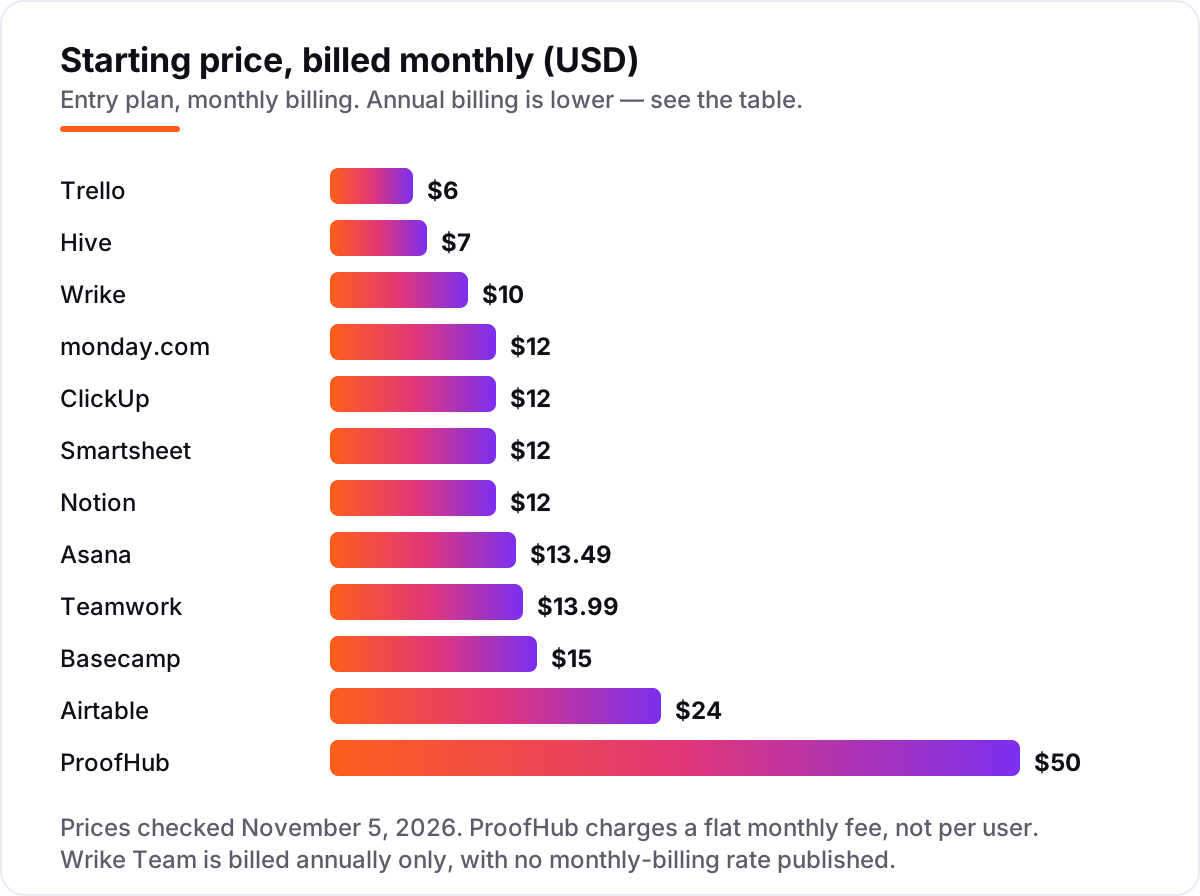
Take a 10-person marketing team running monthly campaigns. On monthly billing, the subscription costs $50 a month on ProofHub Essential (flat, unlimited users), $60 on Trello Standard, $70 on Hive Starter, $100 on Wrike Team (annual billing only), $120 on monday.com Basic, ClickUp Core, Smartsheet Pro and Notion Plus, $134.90 on Asana Starter, $139.90 on Teamwork Deliver, $150 on Basecamp Plus and $240 on Airtable Team. Two of those numbers need adjusting before they are real: monday.com bills a 3-seat minimum, which a 10-person team already clears, and Wrike Team's $10 figure is annual-only, so a team that will not commit to a year cannot buy it at that rate.
Over a year on annual billing, that is $540 on ProofHub Essential, $600 on Trello Standard and Hive Starter, $1,080 on monday.com Basic, ClickUp Core and Smartsheet Pro, $1,200 on Wrike Team and Notion Plus, $1,318.80 on Asana Starter and Teamwork Deliver, $1,800 on Basecamp Plus and $2,400 on Airtable Team. The same ten people cost $540 a year at the cheap end and $2,400 at the dear end — an $1,860 gap that comes entirely from pricing models and seat rules, not from features. ProofHub wins on price at this headcount precisely because it ignores headcount.
Three costs sit outside every number above. First, the add-ons: Hive's six $5 add-ons can take a Teams subscription to $42 per user a month, and ClickUp's Brain AI is a separate charge. Second, the tier jumps: Wrike's 16th seat forces Business at $25 per user a month, and Smartsheet's 11th member forces Business at $24. Third, the reviewers: Airtable bills commenters on Team, so a team that invites clients to comment pays for them. If the team also needs its campaign pages to rank, compare providers in our guide to marketing platforms for small business SEO.
Annual billing cuts the bill on most tools here: Asana Starter drops from $1,618.80 to $1,318.80 a year for ten seats, monday.com Basic from $1,440 to $1,080, and Airtable Team from $2,880 to $2,400. Basecamp Plus has no annual discount, so $1,800 is the price either way. One more cost to check before you commit: a second workspace is a second subscription on most tools here, so a team running a separate client workspace pays twice whatever the chart shows.
Know the difference: per-seat pricing vs flat-rate pricing
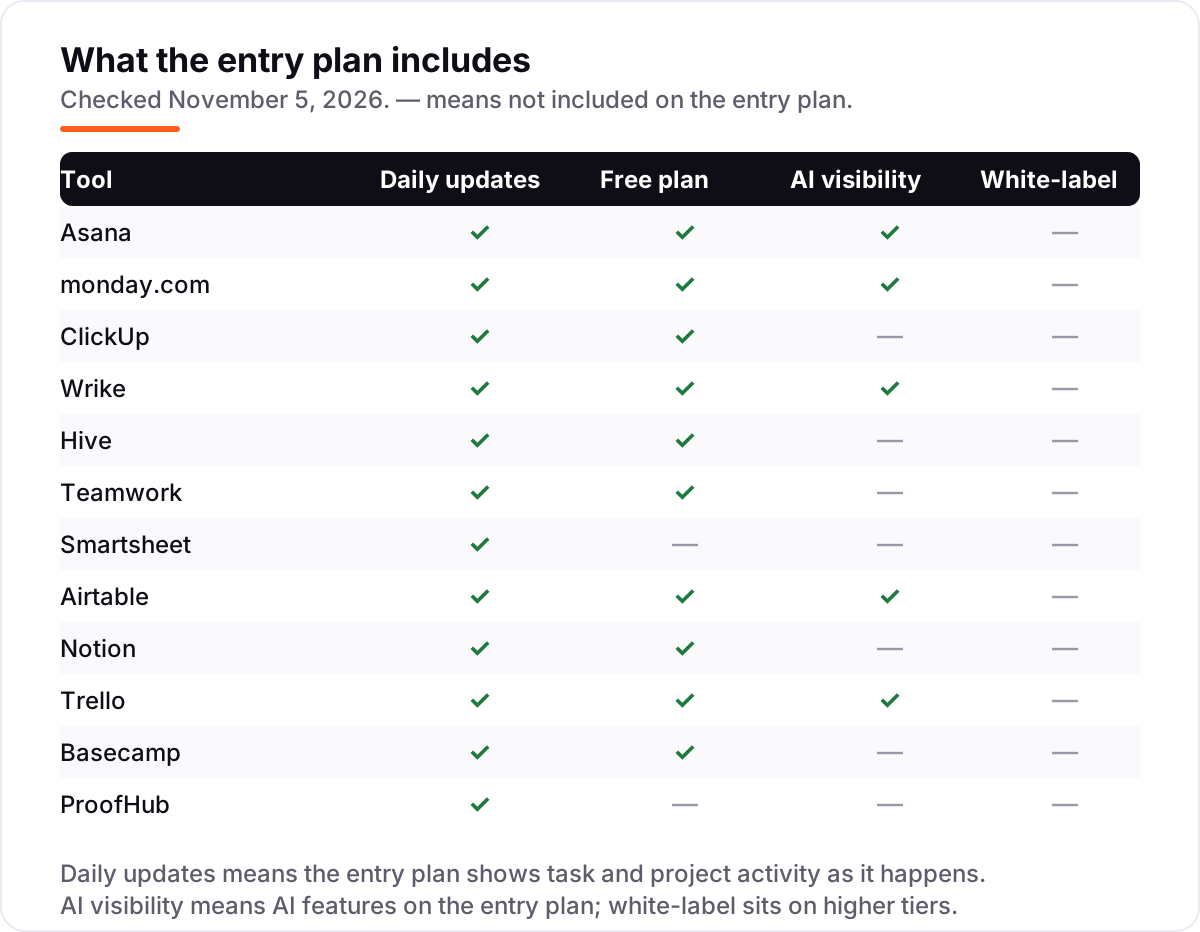
The confusion in this category is between two billing models that look similar on a pricing page. Per-seat pricing charges for every user, so the bill grows with headcount: ten people on Airtable Team cost $240 a month billed monthly, and twenty cost $480. Flat-rate pricing charges one fee whatever the headcount: ProofHub Essential is $50 a month for unlimited users, and Basecamp Pro Unlimited is $299 a month for unlimited users, so both get cheaper per person as the team grows.
There is a second, quieter confusion: free guests, free viewers and free collaborators are not the same thing. Asana's unlimited free guests can edit tasks in shared projects, monday.com's free viewers can only watch, and Smartsheet's free Contributors can view, comment and attach files but cannot create sheets. A tool can advertise "free collaborators" and still charge for the people who do the work, so check what each free role can actually do before counting on it.
A third distinction worth knowing is the entry plan versus the plan you will actually need. Trello Standard at $6 looks cheap until the team wants timeline views, which need Premium at $12.50; Wrike Team at $10 looks cheap until the 16th seat forces Business at $25. The entry price is the price of getting in, not the price of staying — always price the plan that includes the views, proofing and reporting your campaigns need.
Quick comparison: tool type by need
| Buyer | Best pick | Why |
|---|---|---|
| Most marketing teams | Asana | Timelines, dashboards and unlimited guests, from $13.49/user/month |
| Visual planning teams | monday.com | The most readable boards, from $12/seat/month, 3-seat minimum |
| Teams that want one app | ClickUp | Tasks, docs, chat and time tracking from $12/user/month |
| Small team, tight budget | Hive | Real project features from $7/user/month, free up to 10 members |
| Agencies with clients | Teamwork | Unlimited free client seats, from $13.99/user/month |
| Growing team, flat bill | ProofHub | Flat $50/month for unlimited users, proofing included |
Mistakes to avoid
- Budgeting on the entry price. Trello Standard, Wrike Team and Hive Starter all look cheap until the team needs timeline views, a 16th seat or a proofing add-on. Price the plan that includes what your campaigns actually need.
- Ignoring who counts as a seat. Airtable bills commenters on Team, monday.com bills a 3-seat minimum, and Smartsheet caps Pro at 10 members. The seat rule is where budgets break.
- Paying for AI twice. ClickUp's Brain, Hive's add-ons and Notion's Business-tier AI are all separate charges. If AI matters, compare the all-in price, not the seat price.
- Buying a board for dependency-heavy launches. Trello and Basecamp have no task dependencies, so a multi-channel launch with handoffs will outgrow them fast. Buy Asana or Wrike when work has dependencies.
- Forgetting the second workspace. A separate client workspace is usually a second subscription. Price the second workspace before you commit to a tool for the first.
How we chose
We checked each vendor's own pricing page on November 5, 2026 and recorded the starting price exactly as shown, including the annual-billing figure where the page lists one; Asana's and ClickUp's pricing pages were opened directly on November 5, 2026, and the remaining prices were verified against fresh November 2026 crawls of the vendors' own pricing pages. We ranked the tools by fit for the most common buyer — a marketing team running multi-channel campaigns — not by brand size. One disclosure: Hive's G2 listing under the plain "Hive" name covers a different product (a data tool), so its 4.6/5 rating comes from G2's own alternatives listing for project tools, which names Hive's project-management product at 4.6/5 across 666 reviews. No vendor paid for a place in this list, and none of the links here are affiliate links.
What to do next
Start with the free plan or trial of your top pick and run one real campaign through it. Check that clients can comment without consuming paid seats, that the timeline view shows dependencies clearly, and that reporting answers your manager's questions before you commit to a year. If the campaigns are sorted but new customers are not finding you, our monthly SEO service handles the visibility side — or compare providers in our guide to content marketing software. Once your tools are in place, find out what's holding your rankings back.
Your stack only works if people find you
SerpAstra fixes what keeps your site off page one and makes it easy for AI assistants to recommend.
Get a free audit→Sources we checked (24)
- Asana pricing — asana.com/pricing (checked November 5, 2026)
- monday.com pricing — monday.com/pricing (checked November 5, 2026)
- ClickUp pricing — clickup.com/pricing (checked November 5, 2026)
- Wrike pricing — wrike.com/price (checked November 5, 2026)
- Hive pricing — hive.com/pricing (checked November 5, 2026)
- Teamwork pricing — teamwork.com/pricing (checked November 5, 2026)
- Smartsheet pricing — smartsheet.com/pricing (checked November 5, 2026)
- Airtable pricing — airtable.com/pricing (checked November 5, 2026)
- Notion pricing — notion.com/pricing (checked November 5, 2026)
- Trello pricing — trello.com/pricing (checked November 5, 2026)
- Basecamp pricing — basecamp.com/pricing (checked November 5, 2026)
- ProofHub pricing — proofhub.com/pricing (checked November 5, 2026)
- Asana reviews — g2.com/products/asana/reviews (checked November 5, 2026)
- monday.com reviews — g2.com/products/monday-com/reviews (checked November 5, 2026)
- ClickUp reviews — g2.com/products/clickup/reviews (checked November 5, 2026)
- Wrike reviews — g2.com/products/wrike/reviews (checked November 5, 2026)
- Hive rating — g2.com Teamwork alternatives listing (checked November 5, 2026)
- Teamwork reviews — g2.com/products/teamwork-projects/reviews (checked November 5, 2026)
- Smartsheet reviews — g2.com/products/smartsheet/reviews (checked November 5, 2026)
- Airtable reviews — g2.com/products/airtable/reviews (checked November 5, 2026)
- Notion reviews — g2.com/products/notion/reviews (checked November 5, 2026)
- Trello reviews — g2.com/products/trello/reviews (checked November 5, 2026)
- Basecamp reviews — g2.com/products/basecamp/reviews (checked November 5, 2026)
- ProofHub reviews — g2.com/products/proofhub/reviews (checked November 5, 2026)
Shamim
Founder of SerpAstra
A full-stack SEO and digital marketer who spends most days on Local SEO for dental practices, AI search visibility and lead generation.
Frequently asked questions
What is the best project management software for marketing teams?
Asana is the best fit for most marketing teams: timelines, dashboards, unlimited guests and approvals cover the full campaign workflow from $13.49/user/month. monday.com suits visual teams, ClickUp suits teams that want everything in one app, and Hive suits small teams on a tight budget.
How much does project management software for a marketing team cost?
Entry prices run from $6 to $50 a month, depending on the pricing model. Per-seat tools cost $6–$24 per user a month billed monthly, while ProofHub charges a flat $50 a month for unlimited users and Basecamp Pro Unlimited is a flat $299 a month. A 10-person team pays $540–$2,400 a year.
Is there free project management software for marketing teams?
Yes, with limits. Asana, monday.com, ClickUp, Wrike, Hive, Airtable, Notion, Trello, Basecamp and Teamwork all offer free plans, but caps apply — monday.com allows 2 users, Trello allows 10 collaborators and 10 boards, and Smartsheet and ProofHub offer trials only, with no free plan.
What is the difference between per-seat and flat-rate pricing?
Per-seat pricing charges for every user, so the bill grows with headcount — a 10-person team on Airtable Team pays $240 a month billed monthly. Flat-rate pricing charges one fee whatever the headcount: ProofHub Essential is $50 a month for unlimited users, so it gets cheaper per person as the team grows.
Do marketing teams need proofing and approvals in their project tool?
Teams that produce creative work do, and the feature sits in different tiers. Asana puts approvals and proofing on Advanced, Wrike on higher plans, and ProofHub and Hive include proofing on their entry or add-on tiers. If clients approve artwork, check the proofing tier before you buy, not just the headline price.
Can a marketing team switch project management tools later?
Yes, but plan the move between campaigns, not during one. Export tasks, files, comments and custom fields from the old tool, import them into the new one, and re-check automations and integrations before going live. Most tools import from Asana, Trello and monday.com, which eases the move.
Free SEO and AI visibility audit
Find out what is holding your rankings back
Send us your site. Within 2 business days you get a written audit, an AI visibility check and a short fix list ranked by impact. Free, with no contract attached.
Request my free audit→Related guides
 SEO & AI Search12 Best Marketing Platforms for Small Business SEO in 2026, ComparedThe 12 best marketing platforms for small business SEO, compared on real prices, SEO tools and AI visibility. Every price checked November 1, 2026.Read guide →
 Digital Marketing & Ads10 Best Content Marketing Software in 2026, Compared10 best content marketing software tools compared on price, planning, optimization and publishing, with starting prices and the right pick for every team size.Read guide →
 Digital Marketing & Ads8 Best All-In-One Marketing Platforms in 2026, ComparedCompare the 8 best all-in-one marketing platforms on price, free plans and automation, with every price verified in November 2026 and sorted by buyer.Read guide →