
10 Best E-Signature Software for Real Estate in 2026, Compared
Compare the 10 best e-signature software for real estate on price, free plans, forms and broker review, with every price checked November 7, 2026.
 Shamim Mia, Founder, SerpAstraLast verified November 7, 202613 min read
We compare pricing pages, documentation and public reviews. We never accept payment for rankings.

Key takeaways
- DocuSign is the safest default at $15/month, dotloop is the best transaction platform at $34.99/month, and signNow is the cheapest per-user signing at $8/month billed annually.
- Four tools here have real free plans — dotloop, PandaDoc, Dropbox Sign and Zoho Sign — while DocuSign, Adobe and signNow offer trials only.
- The single most important buying factor is whether your brokerage mandates a platform: if it does, that mandate decides the purchase before price does.
- Envelope and invite caps, not the headline price, decide what a busy agent actually pays — DocuSign caps Standard at 100 envelopes a year and signNow at 100 invites.
On this page
Quick comparison
| Tool | Best for | Starting price | Free plan |
|---|---|---|---|
| DocuSign | Agents and brokerages that want the signature clients already trust, with real-estate plans and NAR member pricing | $15/mo | No (30-day trial) |
| dotloop | Solo agents and small teams that want forms, signing and broker review in one transaction loop | $34.99/mo | Yes (up to 10 deals) |
| Lone Wolf Transactions | Agents already using zipForm or TransactionDesk who want signing inside their forms | $13/mo | No (14-day trial) |
| SkySlope | Brokerages that want signing inside transaction management with broker file review | $6.25/mo (annual) | No (14-day trial) |
| PandaDoc | Agents who send polished listing presentations, buyer packets and proposals that need signing | $35/mo | Yes (5 docs/mo) |
| Adobe Acrobat Sign | PDF-heavy agents and teams already paying for Adobe Acrobat who sign inside the PDF editor | $24.99/mo | No (7-day trial) |
| signNow | Cost-conscious teams that sign in volume and want the lowest per-user price | $20/mo | No (7-day trial) |
| Dropbox Sign | Solo agents and small teams already in Dropbox who want simple, unlimited signing | $20/mo | Yes (3 sends/mo) |
| Zoho Sign | Solo agents and Zoho users who want a free plan and the cheapest paid upgrade | $12/mo | Yes (5 docs/mo) |
| SignWell | Solo agents with light signing needs who want the cheapest simple tool | $10/mo | Yes (3 docs/mo) |
Make one of these tools?
We re-check this list every quarter. Send a correction, request a review, or ask about a clearly labeled sponsored spot.
Request a listingThe best e-signature software for real estate

DocuSign
Best for: Agents and brokerages that want the signature clients already trust, with real-estate plans and NAR member pricing
DocuSign is the default e-signature in real estate because almost every buyer and seller has signed one before. That familiarity matters at the kitchen table: no explaining the tool, no trust friction, and no client asking whether the signature is legal. Personal costs $15 a month for one user and 5 envelopes a month, while Standard costs $45 a month billed monthly, or $30 billed annually, for up to 50 users.
Real estate gets its own plans. Real Estate Starter is $10 a month billed annually for one user, Real Estate costs $25 per user a month, and the REALTORS plan is $20 per user a month for NAR members. The catch is the envelope cap: Standard includes 100 envelopes per user per year, and extra envelopes cost $3 to $8 each. Buy DocuSign when clients or brokers expect it.
What we like
- The most recognized e-signature brand — clients rarely ask what it is or hesitate to sign
- Real-estate plans with association forms: Real Estate Starter $10/month billed annually, REALTORS plan $20/user/month for NAR members
- Strong audit trails and authentication that satisfy broker compliance review
- More than 1,000 integrations, including CRMs, transaction platforms and storage tools
Watch out for
- Personal covers one user and 5 envelopes a month — a busy agent outgrows it fast
- Standard and Business Pro cap at 100 envelopes per user per year, with overage fees on top
- No real-estate forms library — forms come from your transaction platform, not DocuSign

dotloop
Best for: Solo agents and small teams that want forms, signing and broker review in one transaction loop
dotloop thinks in transactions, not documents. Each deal gets a loop containing every form, disclosure and signed document, with e-signature built into the workflow rather than bolted on. Auto-population across forms saves retyping client data, and broker review tools handle compliance. Premium costs $34.99 a month per user, or $344 a year, and includes unlimited transactions, MLS and association forms, SMS texting and a clause manager.
The free plan is genuinely useful: up to 10 transactions with forms, e-sign and task lists included. The trade-off is scope and price — dotloop does one industry deeply instead of many shallowly, and $34.99 a month per user is more than a standalone signing tool. Teams and brokerages pay by quote. Pick dotloop when you want the transaction managed, not just the signature captured; pick DocuSign when you only need signatures.
What we like
- Built for real estate from the ground up: every deal lives in a loop with its forms and signatures
- MLS and association forms with auto-population, so client details are typed once
- Broker review and compliance tools built into the same workflow
- Free plan covers up to 10 transactions, enough to try it on real deals
Watch out for
- Premium is $34.99/month per user — dearer than a standalone signing tool
- Team and Business+ pricing is by quote, so brokerages cannot budget from the page
- Real-estate only — it does not cover signing outside property deals

Lone Wolf Transactions
Best for: Agents already using zipForm or TransactionDesk who want signing inside their forms
Lone Wolf Transactions, formerly zipForm Plus, is the forms backbone of North American residential real estate: the standard contracts and disclosures for nearly every market, with Authentisign e-signature built in and transaction management around it. Many agents already get it through an MLS or association member benefit, so check your membership before paying anything. Bought directly, Authentisign costs $13 a month or $129 a year per agent.
The price is flat and simple: one plan, no per-signature fee, and no envelope counting. The ecosystem tie-in cuts both ways — deep integration for Lone Wolf brokerages, little flexibility outside it — and the interface shows its age. Pick Lone Wolf Transactions when you want the authoritative forms library with signing attached, especially where it arrives as a member benefit.
What we like
- Near-total North American real-estate forms coverage through zipForm and TransactionDesk
- Authentisign e-signature is built in, so filled forms go straight to signature
- Often supplied free as an MLS or association member benefit — check before paying
- One flat $129/year per agent when bought directly, with no per-signature fee
Watch out for
- Sold mainly through Lone Wolf Transactions, MLS or association bundles — buying it alone is the exception
- Interface reflects its long history and feels dated next to newer signing tools
- Almost no use outside real estate, and integrations stay inside the Lone Wolf ecosystem

SkySlope
Best for: Brokerages that want signing inside transaction management with broker file review
SkySlope's DigiSign lives inside a full transaction management platform: forms, document storage, broker file review, commission tracking and e-signature in one login. Agents move from paperwork to signed documents without switching systems, and brokers get audit-ready files. DigiSign costs $6.25 a month billed annually, or $75 a year per account, with unlimited envelopes — but it is an add-on, so check whether your Suite quote includes it.
The Suite itself starts at $340 a month for the brokerage, with most brokerages paying by quote, so solo agents who only need signatures will find the suite heavier than necessary. The value compounds for teams and brokerages standardizing compliance. Pick SkySlope when the brokerage wants signing embedded in the file-review workflow.
What we like
- DigiSign e-signature lives inside the transaction file, with unlimited envelopes
- Forms, broker file review, checklists and commission tracking in one login
- Strong compliance tools: audit-ready files and automated checklist enforcement
- Used by more than 900,000 real-estate professionals, so clients and TCs know it
Watch out for
- Suite starts at $340/month for the brokerage — far more than a signing tool alone
- DigiSign is an add-on at $75/year per account, not included in every Suite quote
- Per-account DigiSign billing means transaction coordinators working for several brokerages pay several times

PandaDoc
Best for: Agents who send polished listing presentations, buyer packets and proposals that need signing
PandaDoc blends document building with signing: create a polished listing presentation, buyer packet or proposal, then collect signatures in the same flow. Engagement analytics show when clients open and read documents, which is useful when a buyer goes quiet after an offer. Starter costs $35 a month per seat billed monthly, or $19 billed annually, and includes unlimited documents and e-signatures plus an AI assistant.
The real-estate gap is structural: no forms libraries, no deal checklists, no broker oversight. It suits agents who produce marketing-heavy documents and want signing attached, complementing rather than replacing a transaction platform. A free eSign plan covers 5 documents a month. Pick PandaDoc when the document itself wins the client; pick dotloop when the forms win the deal.
What we like
- Build the document and collect the signature in one flow — proposals, listing presentations, buyer packets
- Document analytics show when a client opens and reads what you sent
- Free eSign plan covers 5 documents a month for light signing needs
- AI assistant included on Starter, plus CRM integrations on Business
Watch out for
- Starter at $35/month billed monthly is dear for signing alone — the value is the document builder
- Custom branding, reminders and CRM integrations wait for Business at $65/month billed monthly
- No real-estate forms library, deal checklists or broker oversight

Adobe Acrobat Sign
Best for: PDF-heavy agents and teams already paying for Adobe Acrobat who sign inside the PDF editor
Adobe Acrobat Sign makes sense for teams already paying for Acrobat: the signing experience integrates directly into the PDF editor, so agents who live in PDF documents do not switch tools to collect signatures. Acrobat Standard for individuals costs $24.99 a month billed monthly, or $14.99 billed annually, and includes PDF editing plus signing and tracking. Pro adds custom branding, web forms and bulk sending at $19.99 a month billed annually.
The catch is the bundle: you cannot buy e-signature alone, and team plans cap at 150 signature transactions per user per year below enterprise. Adobe restructured Acrobat pricing more than once in 2026, so confirm the current tier names on its pricing page before budgeting. Pick Acrobat Sign when the team already pays for Acrobat and signs inside PDFs.
What we like
- Signing built into the Acrobat PDF editor — no app-switching for PDF-heavy workflows
- Strong form logic, reusable templates and bulk sending on Pro plans
- Deep Microsoft 365 and Salesforce integrations for teams that live in those tools
- Enterprise tier adds higher-grade authentication and compliance controls
Watch out for
- Signing is bundled into Acrobat — there is no standalone e-signature plan to buy alone
- Team plans cap at 150 signature transactions per user per year below enterprise
- Enterprise Acrobat Sign Solutions is custom-quoted, so larger teams cannot budget from the page

signNow
Best for: Cost-conscious teams that sign in volume and want the lowest per-user price
signNow, from airSlate, wins on a pricing model other vendors avoid: unlimited users on every plan. Most rivals charge per seat, which discourages company-wide adoption, while signNow lets a whole team sign without counting heads. Business costs $20 a month per user billed monthly, or $8 billed annually, and includes unlimited templates, fillable forms, custom branding and role-based signing order.
The trade-off is the invite cap: Business includes 100 signature invites per user per year, and extra invites cost about $1.50 each, so high-volume teams should model the annual total before committing. There is no free plan, only a 7-day trial. Pick signNow when the team signs in volume and per-seat pricing is the deal-breaker.
What we like
- Lowest annual per-user price here: Business is $8/user/month billed annually
- Unlimited users on every plan — no per-seat counting as the team grows
- Custom branding and unlimited templates on the entry Business plan
- Solid mobile apps for in-person signing at the kitchen table
Watch out for
- Business caps at 100 signature invites per user per year — over that, extra invites cost about $1.50 each
- No free plan, only a 7-day trial, so you pay before you can test it properly
- Brand recognition trails DocuSign, so some clients ask what it is

Dropbox Sign
Best for: Solo agents and small teams already in Dropbox who want simple, unlimited signing
Dropbox Sign, formerly HelloSign, does one thing well: get a document signed with minimal friction. The interface is among the simplest in this category, and Dropbox users get natural file integration. Essentials costs $20 a month billed monthly, or $15 billed annually, for one user with unlimited signature requests and 5 templates. Standard costs $30 per user a month billed monthly and adds branding, bulk send and reporting.
Real-estate structure is absent: no forms libraries, no transaction loops, no broker review. It works for independent agents handling straightforward signings who keep their forms elsewhere, and for teams already living in Dropbox. The free plan covers 3 signature requests a month. Pick Dropbox Sign when simplicity matters more than transaction structure.
What we like
- The simplest signing flow here: upload, place fields, send, sign
- Unlimited signature requests on every paid plan — no envelope counting
- Natural fit for Dropbox users, with Google Drive and Word integrations
- Free plan covers 3 signature requests a month with unlimited self-signing
Watch out for
- Essentials covers one user only — a second signer means Standard at $30/user/month billed monthly
- No real-estate forms library, transaction loops or broker review
- Branding, bulk send and reporting wait for Standard, not Essentials

Zoho Sign
Best for: Solo agents and Zoho users who want a free plan and the cheapest paid upgrade
Zoho Sign is the budget pick in this list because the free plan is real: 5 documents a month for one user, with no expiry date, covering occasional signings at $0. Standard costs $12 a month per user billed monthly, or $10 billed annually, and raises the cap to 25 envelopes per user per month with templates, signer authentication and integrations. Professional costs $20 a month billed monthly and removes the envelope limit.
The catches are the caps and the credits: SMS verification and bulk sending consume paid credits on top of the plan, and there is no real-estate structure of any kind. Pick Zoho Sign when the budget matters most and you already live in the Zoho ecosystem, or when the free plan covers your first months.
What we like
- A real free plan: 5 documents a month for one user, with no expiry date
- Cheapest paid step up here — Standard is $12/user/month billed monthly
- Deep Zoho ecosystem: CRM, Books and Workplace connect without third-party tools
- Templates, signer authentication and third-party integrations from Standard
Watch out for
- Standard caps at 25 envelopes per user per month — unlimited signing waits for Professional
- SMS verification and bulk sending consume paid credits on top of the plan
- No real-estate forms or transaction structure — it signs documents, nothing more

SignWell
Best for: Solo agents with light signing needs who want the cheapest simple tool
SignWell, formerly Docsketch, keeps e-signature simple and cheap: upload, place fields, send, sign. A free plan handles 3 documents a month, and Personal costs $10 a month billed monthly, or $8 billed annually, with unlimited document sends — the single biggest differentiator at this price, since every rival caps sends or envelopes. Business costs $24 a month billed annually for 3 senders with branding and bulk send.
There is no real-estate specialization and fewer integrations than the leaders. It works for solo agents with light signing needs who find the big platforms overkill, and it carries the highest G2 rating in this list at 4.8 out of 5. Pick SignWell when you want signatures without a platform commitment.
What we like
- Unlimited document sends on the $8/month annual Personal plan — no envelope counting
- Highest G2 rating here at 4.8/5 from 566 reviews
- Free plan for occasional use, and setup takes minutes
- In-person signing and request attachments included on paid plans
Watch out for
- Free plan covers only 3 documents a month — a busy week exhausts it
- Personal caps at 5 templates; branding and bulk send need the $24/month Business plan
- Smallest vendor here, with the thinnest integration list and no industry tooling
The best e-signature software for real estate does more than collect a squiggle on a screen: it gets a listing agreement, an offer or a disclosure signed on a phone at the kitchen table, with an audit trail a broker can defend. We ranked the ten tools below by fit for the most common buyer — a US agent or small brokerage closing residential deals — starting with the industry standard and ending with the cheapest simple tools, and every price was checked on November 7, 2026.
How to choose the best e-signature software for real estate
- Check your brokerage mandate first. Many brokerages require dotloop, SkySlope or DocuSign for compliance, and that requirement decides the purchase before price does — ask your broker before you buy anything.
- Decide whether you need forms or just signatures. dotloop, Lone Wolf Transactions and SkySlope bundle state forms and deal checklists; DocuSign, PandaDoc and the general tools sign whatever document you upload.
- Count your envelopes, not just your seats. DocuSign Standard caps at 100 envelopes per user per year and signNow Business at 100 invites — a busy agent closes 30 to 50 deals a year, and each deal can take several envelopes.
- Test mobile signing with a real client. A large share of real-estate signatures happen on phones, often with clients who are not tech-savvy — if they cannot find the signature box, the tool fails.
- Check the forms library for your state. National coverage claims always deserve a spot check for your market and your association, because the wrong form costs more than any subscription.
Real estate is a local business, and the tool only matters if clients find you first. Our guide to social media platforms for real estate agents covers the visibility side, and the local SEO service handles rankings and map-pack calls. Before you publish new listing pages, run your titles through the free SERP snippet preview tool — it shows exactly how the title and description will look in Google.
Whatever you shortlist, try it on a real deal before you pay for a year. The free plans and trials in this list cover genuine signings — dotloop gives you 10 free transactions, PandaDoc 5 documents a month — and one real deal tells you more than any review can. Check three things in the trial: that a client can sign on a phone without calling you, that the audit trail shows who signed what and when, and that your broker can open the finished file without asking for a different format.
E-signature software for real estate pricing: what you will actually pay
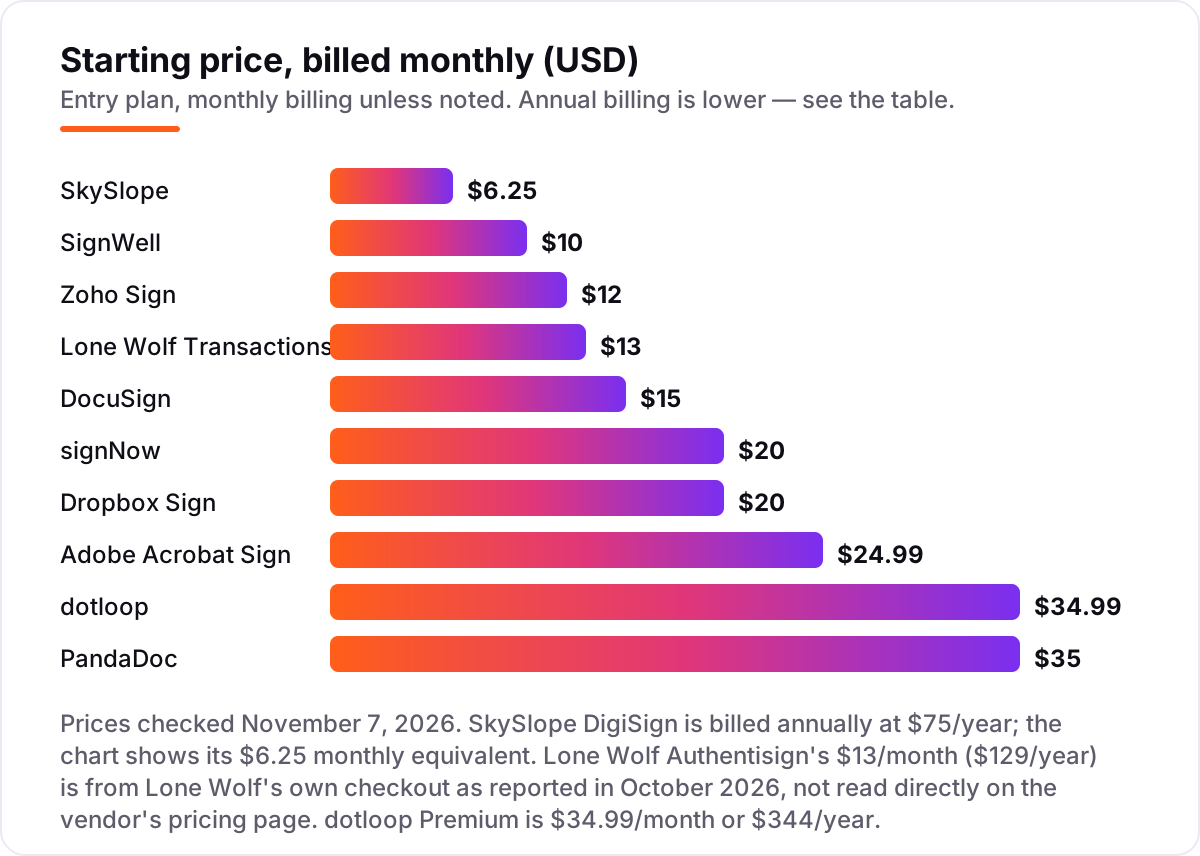
Take a five-person team closing about 40 deals a year. On list prices billed monthly, signing costs $50 a month on SignWell Personal, $60 on Zoho Sign Standard, $65 on Lone Wolf Authentisign, $100 on signNow Business or Dropbox Sign Essentials, $125 on Adobe Acrobat Standard, $175 on PandaDoc Starter and $175 on dotloop Premium — and $225 on DocuSign Standard, since Personal covers one user only. SkySlope DigiSign is the outlier at $31.25 a month for five accounts — but only if the brokerage already pays the Suite from $340 a month.
Annual billing changes the picture sharply. The same five people pay $480 a year on signNow Business at $8 a user a month, $600 on Zoho Sign Standard, $645 on Lone Wolf Authentisign, $900 on Dropbox Sign Essentials, $1,019 on Adobe Acrobat Standard for teams at $16.99 a licence, $1,140 on PandaDoc Starter, $1,720 on dotloop Premium at $344 a year each, and $1,800 on DocuSign Standard at $30 a user a month. The cheapest annual bill and the dearest differ by $1,320 — and dotloop, at $1,720, is the only one in that range that also supplies the forms.
Three costs sit outside every number above. First, the caps: DocuSign Standard includes 100 envelopes per user per year, so a five-person team sending 600 envelopes pays overage of roughly $3 to $8 each, while signNow charges about $1.50 per invite past 100 per user. Second, the forms: if your signing tool has no forms library, budget for the MLS or association forms separately — or for the member benefit that supplies them free. Third, the brokerage platform: SkySlope Suite from $340 a month and dotloop Teams by quote are brokerage bills, not agent bills, so confirm who pays before you compare them with a $10 signing plan.
Know the difference: e-signature vs transaction management
The confusion in this category is between a signature and a deal. E-signature software captures a legally binding signature on a document you upload, with an audit trail. Transaction management runs the whole deal: the forms, the checklists, the deadlines, the broker review and the commission paperwork, with signing as one step inside it. DocuSign, PandaDoc, signNow, Dropbox Sign, Zoho Sign, SignWell and Adobe Acrobat Sign are signature tools. dotloop, Lone Wolf Transactions and SkySlope are transaction platforms with signing built in.
That distinction decides the bill. A signature tool costs $8 to $35 a month per user and leaves you to find the forms elsewhere — from your MLS, your association or a forms library you pay for separately. A transaction platform costs $13 to $35 a month per user, or $340 a month for a brokerage suite, and supplies the forms, but it also locks you into one way of running deals. Most agents need one of each kind of capability, which is why the common setup is dotloop or SkySlope for the deal plus DocuSign for anything outside it.
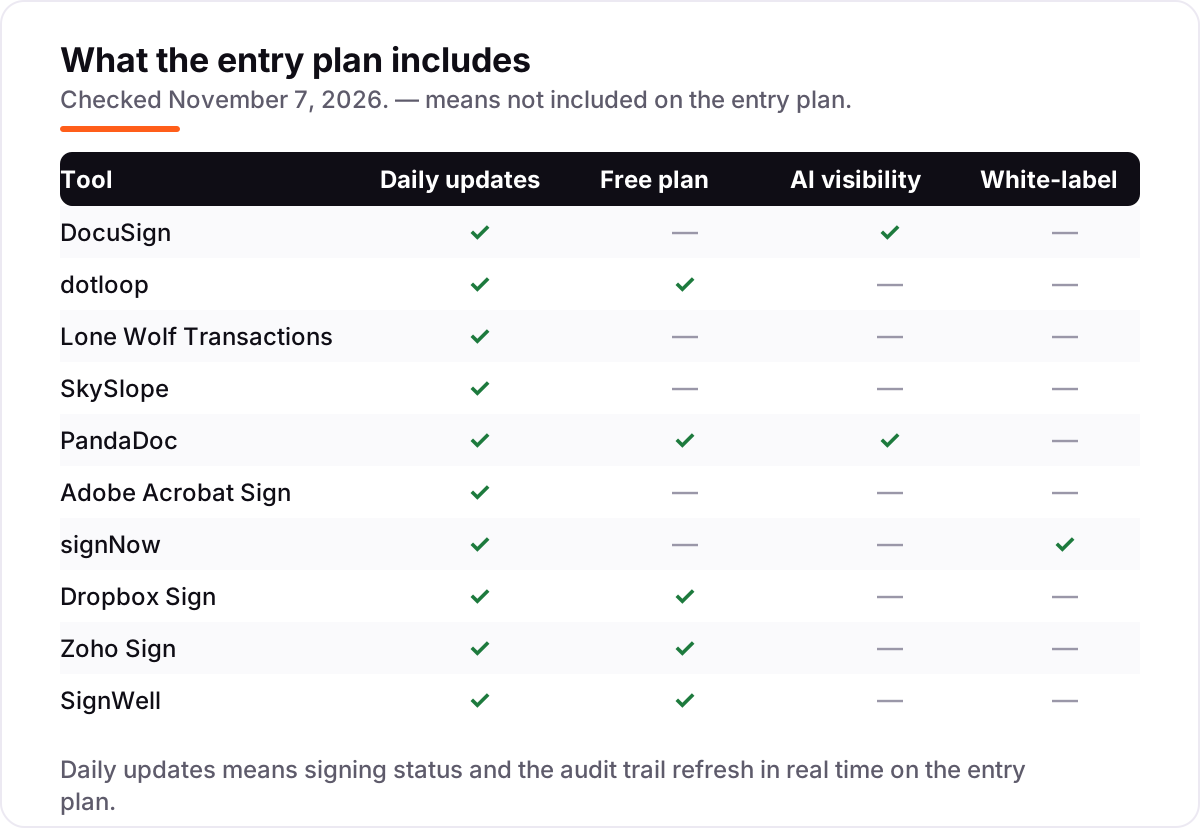
A second, quieter confusion is free signing versus a free plan. DocuSign, Adobe and signNow offer free trials, not free plans — the signing stops when the trial ends. dotloop, PandaDoc, Dropbox Sign, Zoho Sign and SignWell offer free plans that keep working, with a monthly cap on documents or deals. If you sign fewer than five documents a month, a free plan may be all you ever need.
Quick comparison: tool type by need
| Buyer | Best pick | Why |
|---|---|---|
| Agent whose clients expect the standard | DocuSign | The signature everyone already trusts, from $15/month |
| Solo agent who wants forms and signing together | dotloop | Loops, MLS forms and broker review, from $34.99/month |
| Agent already on zipForm or TransactionDesk | Lone Wolf Transactions | Forms plus Authentisign signing, from $13/month |
| Brokerage standardizing compliance | SkySlope | DigiSign inside file review, $6.25/month billed annually |
| Agent who sells with polished documents | PandaDoc | Proposals plus signing, from $35/month |
| Team that signs in volume on a budget | signNow | $8/user/month billed annually, unlimited users |
Mistakes to avoid
- Buying before checking the brokerage mandate. If your broker requires dotloop or SkySlope, a DocuSign subscription is wasted money — ask first, buy second.
- Budgeting on the annual price while paying monthly. The gap is large here: signNow is $8 a month billed annually but $20 billed monthly, and PandaDoc is $19 against $35. Compare tools on the billing you will actually use.
- Ignoring the envelope cap. A tool can be cheap and still be the wrong buy: DocuSign Standard at $30 a month billed annually is no bargain once you pass 100 envelopes per user per year and start paying overage.
- Paying for forms you already get free. Many agents receive Lone Wolf Transactions or dotloop through an MLS or association membership — check your member benefits before buying either one.
- Testing on a desktop and signing on a phone. Most real-estate signatures happen on a client's phone. If you only test the desktop flow, the first kitchen-table signing is where the problems appear.
How we chose
We checked each vendor's own pricing page on November 7, 2026 and recorded the starting price exactly as shown, including the annual-billing figure where the page lists one, and we ranked the tools by fit for the most common buyer — a US agent or small brokerage closing residential deals — not by brand size. Two prices need a note: Lone Wolf Authentisign's $13/month ($129/year) comes from Lone Wolf's own checkout as reported in October 2026, and Adobe's $24.99/month ($14.99 billed annually) comes from independent October 2026 reads of Adobe's pricing page, whose prices render in script and did not appear in the page text we fetched today. Ratings come from G2 pages crawled within the last few days. No vendor paid for a place in this list, and none of the links here are affiliate links.
What to do next
Start with the free plan or trial of your top pick and run one real deal through it. Check that a client can sign on a phone without calling you, that the audit trail shows who signed what and when, and that your broker accepts the finished file. If the signing is sorted but new clients are not finding you, our monthly SEO service handles the visibility side — or compare providers in our guide to social media platforms for real estate agents. Once your tools are in place, find out what's holding your rankings back.
Your stack only works if people find you
SerpAstra fixes what keeps your site off page one and makes it easy for AI assistants to recommend.
Get a free audit→Sources we checked (20)
- DocuSign pricing — docusign.com/products/electronic-signature/pricing (checked November 7, 2026)
- dotloop pricing — dotloop.com/products/plans-pricing (checked November 7, 2026)
- Lone Wolf Authentisign pricing — signsend.com/authentisign-pricing (checked November 7, 2026)
- SkySlope pricing — skyslope.com/pricing (checked November 7, 2026)
- PandaDoc pricing — pandadoc.com/pricing (checked November 7, 2026)
- Adobe Acrobat plans and pricing — adobe.com/acrobat/business/pricing.html (checked November 7, 2026)
- signNow pricing — signnow.com/pricing (checked November 7, 2026)
- Dropbox Sign pricing — sign.dropbox.com/products/dropbox-sign/pricing (checked November 7, 2026)
- Zoho Sign pricing — zoho.com/sign/pricing.html (checked November 7, 2026)
- SignWell pricing — signwell.com/pricing (checked November 7, 2026)
- DocuSign reviews — g2.com/products/docusign/reviews (checked November 7, 2026)
- dotloop reviews — g2.com/products/dotloop/reviews (checked November 7, 2026)
- Lone Wolf Transact reviews — g2.com/products/lone-wolf-transact/reviews (checked November 7, 2026)
- SkySlope reviews — g2.com/products/skyslope/reviews (checked November 7, 2026)
- PandaDoc reviews — g2.com/products/pandadoc/reviews (checked November 7, 2026)
- Adobe Acrobat Sign reviews — g2.com/products/adobe-acrobat-sign/reviews (checked November 7, 2026)
- signNow reviews — g2.com/products/signnow/reviews (checked November 7, 2026)
- Dropbox Sign reviews — g2.com/products/dropbox-sign-formerly-hellosign/reviews (checked November 7, 2026)
- Zoho Sign reviews — g2.com/products/zoho-sign/reviews (checked November 7, 2026)
- SignWell reviews — g2.com/products/signwell/reviews (checked November 7, 2026)
Shamim
Founder of SerpAstra
A full-stack SEO and digital marketer who spends most days on Local SEO for dental practices, AI search visibility and lead generation.
Frequently asked questions
What is the best e-signature software for real estate?
DocuSign is the best fit for most agents: the signature clients already trust, with real-estate plans from $10/month billed annually. dotloop is better when you also need forms and transaction management, and SkySlope suits brokerages that want signing inside file review.
How much does e-signature software for real estate cost?
Entry prices run from $6.25 to $34.99 a month. SignWell starts at $10/month billed monthly, Zoho Sign at $12, DocuSign at $15, and dotloop Premium at $34.99. A five-person team typically pays $480 to $2,700 a year for signing alone, before transaction-platform fees.
Is there really free e-signature software for real estate?
Yes, with limits. dotloop is free for up to 10 transactions, PandaDoc covers 5 documents a month, Dropbox Sign 3 signature requests a month, and Zoho Sign 5 documents a month. None of the free plans includes a real-estate forms library, so check what your forms cost separately.
Do I need a real-estate-specific tool, or will DocuSign do?
DocuSign alone is enough when your brokerage supplies the forms and only the signature is missing. You need a real-estate tool — dotloop, Lone Wolf Transactions or SkySlope — when you also need state forms, deal checklists or broker review, because DocuSign has no forms library of its own.
Are electronic signatures legally valid for real estate?
Yes, in all fifty states under the federal ESIGN Act and state UETA laws, with a few exceptions such as wills that rarely touch residential deals. What matters is the audit trail: who signed, when, which version, and that the signer agreed to sign electronically. Every tool here records that automatically.
Can I switch e-signature software later?
Yes, but plan the move between deals, not during one. Export your templates and completed documents with their audit trails first, then rebuild the templates in the new tool and test one real signing before going live. Signed documents stay valid after a switch, since the audit trail travels with the file.
Free SEO and AI visibility audit
Find out what is holding your rankings back
Send us your site. Within 2 business days you get a written audit, an AI visibility check and a short fix list ranked by impact. Free, with no contract attached.
Request my free audit→Related guides
 Email, SMS & Social Media10 Best Social Media Platforms for Real Estate Agents in 2026, ComparedCompare the 10 best social media platforms for real estate agents on audience, formats and cost — every platform free to join, checked Nov 6, 2026.Read guide →
 Email, SMS & Social Media11 Best Email Signature Software in 2026, ComparedCompare the 11 best email signature software options on price, free plans, central management and banner campaigns, with prices checked November 6, 2026.Read guide →
 Digital Marketing & Ads7 Best Marketing Software for Contractors in 2026, ComparedCompare the 7 best marketing software for contractors on price, reviews and trade-specific features, with every price checked November 5, 2026.Read guide →