
11 Best Email Signature Software in 2026, Compared
Compare the 11 best email signature software options on price, free plans, central management and banner campaigns, with prices checked November 6, 2026.
 Shamim Mia, Founder, SerpAstraLast verified November 6, 202612 min read
We compare pricing pages, documentation and public reviews. We never accept payment for rankings.

Key takeaways
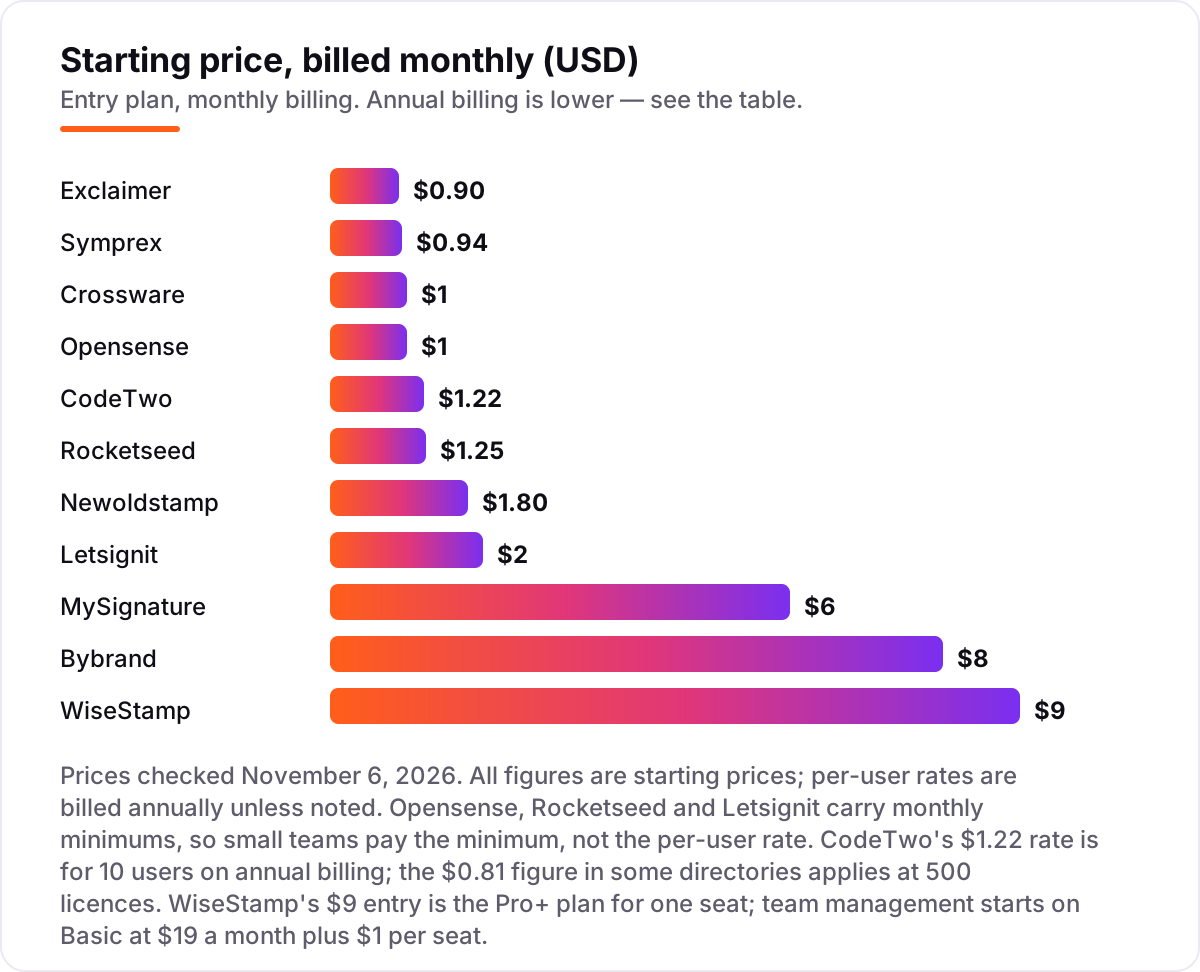
- WiseStamp is the best fit for most growing teams from $9/month; Exclaimer leads for large Microsoft 365 and Google Workspace organizations at $0.90/user/month, and Bybrand is the cheapest flat start at $8/month for 10 signatures.
- The per-user price is rarely the real bill: Opensense has a $500/month minimum, Rocketseed $50 and Letsignit $60, so small teams pay the minimum, not the headline rate.
- The single most important buying factor is how signatures reach every device: server-side stamping covers mobile and webmail, while client-side tools only cover the inbox where they are installed.
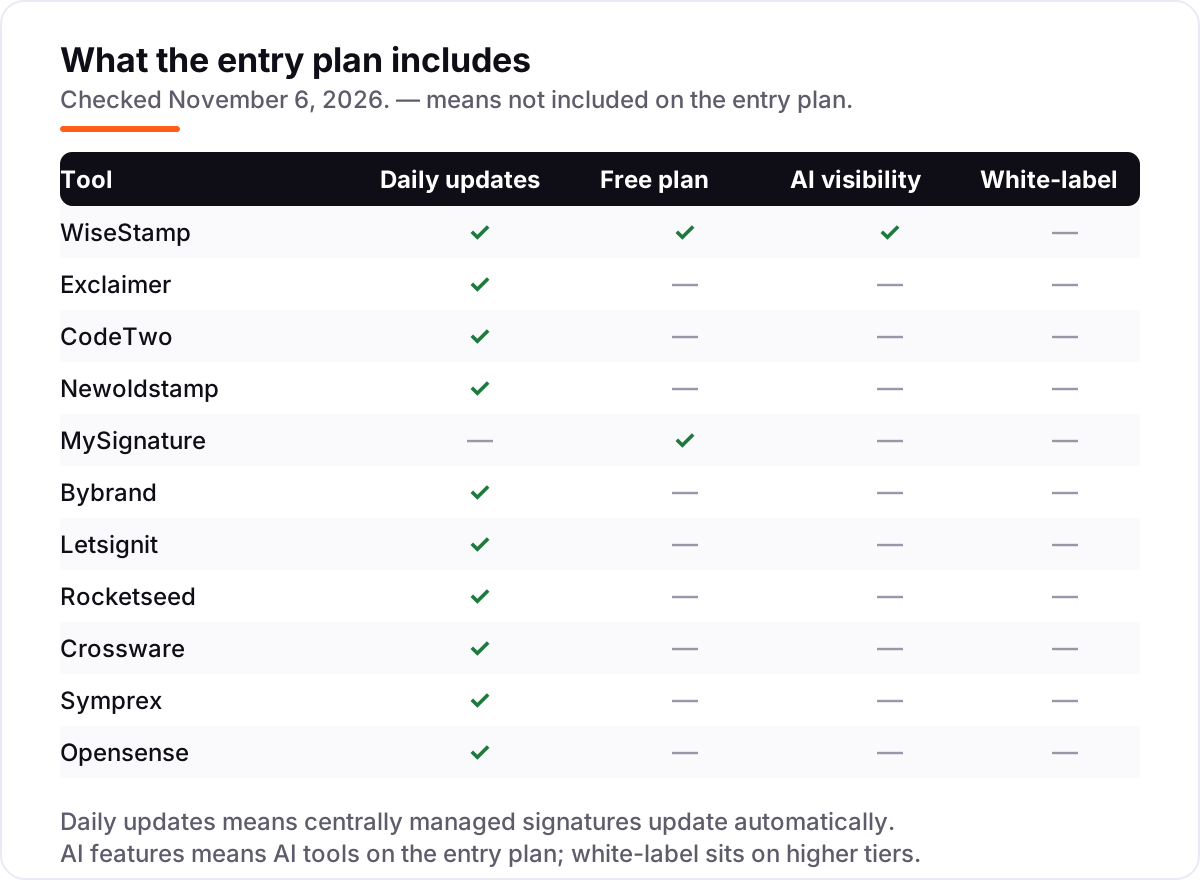
- Two tools have genuinely free plans — WiseStamp for individuals and MySignature for one signature — and every paid tool here offers a free trial.
On this page
Quick comparison
| Tool | Best for | Starting price | Free plan |
|---|---|---|---|
| WiseStamp | Growing teams that want branded signatures with marketing banners without an IT project | $9/mo | Yes (free plan) |
| Exclaimer | Mid-size and large organizations on Microsoft 365 or Google Workspace that need enforced, compliant signatures | $0.90/user/mo | No (14-day trial) |
| CodeTwo | Microsoft 365 shops that want server-side signatures with rules, at a low per-user price | $1.22/user/mo | No (14-day trial) |
| Newoldstamp | Marketing-led teams that want every email to carry a scheduled banner campaign | $1.80/signature/mo | No (7-day trial) |
| MySignature | Freelancers and small teams that want a polished personal signature plus email tracking | $6/user/mo | Yes (free plan) |
| Bybrand | Small teams and agencies that want consistent signatures for a flat $8 a month | $8/mo | No (free trial) |
| Letsignit | Large teams that want signatures as a managed internal-communications channel | $2/user/mo | No (free trial) |
| Rocketseed | Franchises and multi-brand organizations that need tight central control | $1.25/user/mo | No (14-day trial) |
| Crossware | Microsoft 365 teams that want simple, reliable signatures without enterprise overhead | $1/user/mo | No (free trial) |
| Symprex | Microsoft 365 teams that want one flat per-user price and a 14-day trial with no card | $0.94/user/mo | No (14-day trial) |
| Opensense | Large organizations that want signatures plus sales analytics and CRM tracking | $1/user/mo | No (trial only) |
Make one of these tools?
We re-check this list every quarter. Send a correction, request a review, or ask about a clearly labeled sponsored spot.
Request a listingThe best email signature software

WiseStamp
Best for: Growing teams that want branded signatures with marketing banners without an IT project
WiseStamp is the easiest way for a growing team to get professional signatures without an IT project: pick a template, add your logo and social icons, and deploy it to everyone on Google Workspace or Microsoft 365 in minutes. The $9 Pro+ plan covers one seat, so a solo user pays $9 a month; a team moves to Basic at $19 a month plus $1 per seat, which adds auto-inject and campaign banners.
The catch is the pricing shape. The $9 headline is a single-seat plan, and per-seat costs climb as the team grows — a 10-person team on Basic pays $29 a month, not $9. Server-side routing, which stamps signatures on mobile and webmail too, waits for the Platform or Enterprise plan. Buy WiseStamp for branded signatures this week; buy Exclaimer when every device must carry the same signature.
What we like
- Free plan covers individuals, so one person can start at $0
- AI Designer builds signature templates on paid plans
- Basic at $19 a month plus $1 per seat adds auto-inject and campaigns
- Deploys in minutes on Google Workspace and Microsoft 365
Watch out for
- Per-seat costs add up past 20 people, so large teams pay far more than $9 a month
- Server-side routing needs the Platform or Enterprise plan
- The free plan carries WiseStamp branding and has no AI Designer

Exclaimer
Best for: Mid-size and large organizations on Microsoft 365 or Google Workspace that need enforced, compliant signatures
Exclaimer is the enterprise standard for a reason: it manages signatures centrally for whole organizations, syncing names, titles and departments from Microsoft Entra ID or the Google Workspace directory, so a reorganization never leaves stale signatures behind. Starter costs $0.90 per user a month billed annually, with a 10-user minimum; Standard is $1.45 and Pro is $1.75, adding templates, campaign scheduling and analytics.
The trade-off is scope. Starter allows only one signature template, so most organizations need Standard at $1.45 per user, and the 10-user minimum means the smallest bill is $9 a month. There is no free plan, only a 14-day trial. Buy Exclaimer when brand consistency and legal disclaimers are non-negotiable; buy WiseStamp or Bybrand when the team is small and the budget is tight.
What we like
- Deepest Microsoft 365 and Google Workspace integration in this list
- Directory sync keeps names, titles and departments correct automatically
- Disclaimers apply by rule, covering regional compliance requirements
- Server-side stamping covers mobile, webmail and Outlook alike
Watch out for
- 10-user minimum means a $9 a month floor even for a tiny team
- Starter allows only one signature template
- Analytics and campaign scheduling wait for Standard and Pro

CodeTwo
Best for: Microsoft 365 shops that want server-side signatures with rules, at a low per-user price
CodeTwo has served Microsoft email for decades, and it shows: one tier carries every feature, including unlimited rules and templates, server-side and client-side deployment, Entra ID sync, marketing banners, legal disclaimers and an autoresponder. Pricing is per mailbox and falls with volume — about $1.22 per user a month for 10 users on annual billing, dropping toward $0.81 at 500 licences.
The limits are platform, not price. CodeTwo covers Microsoft 365 only, so a Google Workspace team needs another tool, and small teams pay the highest per-user rate. Server-side signatures also stay invisible while composing, which confuses some users. Pick CodeTwo when the whole company lives in Microsoft 365 and you want the lowest per-user price from a specialist.
What we like
- One tier with every feature — no upsell ladder to climb
- Rule engine targets departments, regions and internal versus external mail
- 14-day trial extends to 21 days with full support included
- Microsoft-certified, with decades of Exchange and Microsoft 365 focus
Watch out for
- Microsoft 365 only — Google Workspace teams need a different tool
- Per-user price falls with volume, so small teams pay the highest rate
- Users do not see server-side signatures while composing

Newoldstamp
Best for: Marketing-led teams that want every email to carry a scheduled banner campaign
Newoldstamp treats the signature as marketing inventory: banners, calls to action and campaigns ride along in every email, managed centrally, with a scheduler that rotates them on a timetable — product launches, events and announcements appear on schedule. Pricing is per signature, $1.80 a month billed annually, and the generator is quick enough that a small marketing team can be live the same day.
The per-signature model is the thing to price carefully. Ten signatures cost $18 a month, but a 100-person company pays $180, and the analytics that prove the campaigns work sit on paid tiers. Enterprise management is also lighter than Exclaimer or CodeTwo. Choose Newoldstamp when every email is a marketing impression; choose CodeTwo when the priority is IT control, not campaigns.
What we like
- Campaign scheduler rotates banners automatically on a set timetable
- Click analytics show which banners and campaigns perform
- Quick generator that needs no design skills
- Integrates with CRMs and helpdesks beyond email
Watch out for
- Price is per signature and climbs with headcount
- Analytics need paid tiers
- Enterprise management is lighter than Exclaimer or CodeTwo

MySignature
Best for: Freelancers and small teams that want a polished personal signature plus email tracking
MySignature is the quick free generator: build a professional signature in minutes, paste it into your email client, and you are done. The free plan covers one signature with MySignature branding; Core costs $6 per user a month billed annually and adds Gmail email tracking, and Connect at $7 adds a digital business card with a second signature for replies and forwards.
The individual plans have no central deployment, so a team that needs every signature identical must step up to the Teams plans, which start at $2.40 per user a month for 5 seats and fall to about $1.90 at 10 seats. Paid signatures also stop working if the subscription lapses. Start here when one person needs to look professional today; move to WiseStamp when consistency across the team becomes the problem.
What we like
- Free plan builds one signature with no account needed
- Connect adds a digital business card for $7 a user a month
- Teams plans drop to $2.40 a user a month at 5 seats
- Works with Gmail, Outlook, Apple Mail and Thunderbird
Watch out for
- No central deployment on individual plans
- Free signature carries MySignature branding
- Paid signatures stop working if the subscription lapses

Bybrand
Best for: Small teams and agencies that want consistent signatures for a flat $8 a month
Bybrand is built for small teams and agencies that need consistent signatures without an enterprise budget: the $8 base plan covers up to 10 signatures with all standard features, and beyond that you pay $0.80 per extra signature created manually, or $0.50 per employee synced through Google Workspace or Microsoft 365. There are no seat minimums and no tiers to decode.
The flat price stops being flat at scale. A 20-signature team pays about $16 a month, and a 100-person company pays about $58, while campaign analytics stay thinner than Newoldstamp or Letsignit. The vendor is also smaller, with a shorter integration list. Pick Bybrand when the team is under 20 people and the budget is $8 a month; look at Exclaimer once the headcount passes 50.
What we like
- Cheapest flat starting point here — $8 covers 10 signatures
- Extra signatures cost $0.80 each, synced employees $0.50
- Simple editor with no seat minimums to learn
- Free trial before paying
Watch out for
- Campaign analytics are thinner than Newoldstamp or Letsignit
- Per-employee pricing takes over past 10 signatures
- Smaller vendor with a smaller integration list

Letsignit
Best for: Large teams that want signatures as a managed internal-communications channel
Letsignit turns signatures into a communication channel: marketing campaigns, banners and internal announcements are pushed to signatures centrally, with segmentation by department or location, and digital business cards let recipients save contact details with one tap. The Pro plan starts at $2 per user a month, and it covers both Microsoft 365 and Google Workspace.
The minimum is the catch. The $60 a month floor on an annual commitment means a 10-person team pays $60, not $20, and the Enterprise plan for complex organizations is a custom quote. The vendor is also better known in Europe than in the US. Choose Letsignit when internal communications is the job; choose Exclaimer when compliance, not comms, decides the buy.
What we like
- Campaigns push internal announcements through signatures
- Segmentation targets departments and locations
- Digital business cards included
- Solid Microsoft 365 and Google Workspace support
Watch out for
- $60 a month minimum on annual commitment
- Enterprise plan is custom quote
- Smaller US presence and community than Exclaimer

Rocketseed
Best for: Franchises and multi-brand organizations that need tight central control
Rocketseed gives brand managers control without a tier ladder: one plan, the Signature Complete Solution, includes centrally designed templates, banner campaigns, analytics, CRM integrations and 24/7 support from about $1.25 per user a month on annual billing. Franchise controls are the standout — corporate owns the template while locations customize only the approved fields.
The $50 a month minimum billed annually means a 10-person team pays $50, not $12.50, and the product is built for teams of 40 or more, with custom pricing above 200 users. The vendor is also smaller than Exclaimer, with less ecosystem around it. Pick Rocketseed for franchises and multi-brand groups; pick Bybrand or WiseStamp for a single small team.
What we like
- One plan with every feature — no tiered lockouts
- Franchise controls let locations customize approved fields only
- Legal disclaimers enforced by rule across regions
- Monthly billing available for teams of 50 or more
Watch out for
- $50 a month minimum, billed annually
- Built for teams of 40 or more
- Smaller vendor with less ecosystem than Exclaimer

Crossware
Best for: Microsoft 365 teams that want simple, reliable signatures without enterprise overhead
Crossware Mail Signature does Microsoft 365 signatures simply and well: centralized templates, directory integration and consistent deployment, at about $1 per user a month depending on user count. It covers hybrid Exchange and Microsoft 365 environments, which suits organizations still migrating, and there are no tiers to compare — one per-user price covers the job.
It does not try to be a marketing platform, so campaign features are thin, and the vendor is smaller than Exclaimer or CodeTwo, with a smaller community around it. The per-user rate also varies with team size, so confirm your exact price before budgeting. Choose Crossware for straightforward Microsoft signatures; choose Newoldstamp when the signature must sell, not just identify.
What we like
- Straightforward setup with no enterprise overhead
- Covers hybrid Exchange and Microsoft 365 environments
- Per-user pricing with no tiers to compare
- Long track record — the company dates to 1992
Watch out for
- Few marketing campaign features
- Smaller vendor with a smaller community
- Pricing depends on user count, so confirm your exact rate

Symprex
Best for: Microsoft 365 teams that want one flat per-user price and a 14-day trial with no card
Symprex Signature 365 keeps pricing as simple as its pitch: all the features for one per-user price, $0.94 a month billed annually — 10 users cost $9.40 a month — with volume discounts as you add licences. Directory sync pulls user details from Microsoft 365, templates apply centrally, and a free 14-day trial starts with no credit card and no commitment.
The focus is narrow: Microsoft 365 only, so Google Workspace teams must look elsewhere, and campaign features are thinner than the marketing-led tools. We also found no G2 rating page for Symprex, so peer feedback is thin compared with the rest of this list. Pick Symprex for straightforward Microsoft signatures at one flat rate; pick CodeTwo when you need the deepest rule engine.
What we like
- All features for one per-user price — no tiers to compare
- Volume discounts lower the rate as you add licences
- 14-day trial with no credit card required
- Invoice billing available on yearly subscriptions
Watch out for
- Microsoft 365 only
- No G2 rating page found, so peer feedback is thin here
- Campaign features are thinner than the marketing-led tools

Opensense
Best for: Large organizations that want signatures plus sales analytics and CRM tracking
Opensense manages company-wide signatures and turns them into a sales channel: the Signature plan at $1 per user a month covers centrally managed templates and compliance disclaimers, while Pipeline at $3 and Complete at $5 add campaign analytics, sales tracking and CRM integration. Deployment is server-side or through an Outlook add-in, and GCC High support covers regulated teams.
The $1 headline hides a $500 a month platform minimum plus a service plan, so a 10-person company pays $500, not $10 — and banners and directory sync cost $3 to $5 a user on the higher tiers. There is no free plan, and trials are for qualified accounts. Buy Opensense when the organization is large enough to clear the minimum; anyone smaller should start with Bybrand or WiseStamp.
What we like
- Pipeline and Complete tiers add campaign analytics and CRM integration
- Server-side or Outlook add-in deployment
- GCC High support available for regulated teams
- Strong G2 rating from 391 reviews
Watch out for
- $500 a month minimum plus a service plan — small teams pay far more than $1 a user
- Banners and directory sync cost $3–$5 a user on higher tiers
- No free plan, and trials are for qualified accounts only
The best email signature software turns every email your team sends into a consistent, on-brand touchpoint — the same logo, the same job titles, the same legal disclaimer — without anyone pasting a signature by hand. We ranked the 11 tools below by fit for the most common buyer, a small or mid-size team that wants branded signatures fast, and every price was checked on the vendor's own pricing page on November 6, 2026.
How to choose the best email signature software
- Check your mail platform first. CodeTwo, Crossware and Symprex are Microsoft-focused; the other eight tools cover Google Workspace and Microsoft 365 alike.
- Ask how the signature reaches the inbox. Server-side stamping covers mobile and webmail; client-side tools only cover the inbox where they are installed.
- Read the minimum, not just the per-user rate. Opensense charges at least $500 a month, Letsignit $60 and Rocketseed $50 — small teams pay the minimum.
- Decide whether the signature must sell. Newoldstamp and Letsignit run scheduled banner campaigns; Exclaimer and CodeTwo are built for control and compliance.
- Try the free plan or trial with real users. Build one template, deploy it to five people, and check it on a phone before you pay for the whole company.
Email signatures are one small part of how a business presents itself online. If the wider email setup also needs work, our guide to email marketing software for small business covers the sending side. And before you publish new pages for the services you sell, run your titles through the free SERP snippet preview tool — it shows exactly how the title and description will look in Google.
Whatever you shortlist, test it the way your team actually works. The free plans and trials in this list are long enough to deploy one template to a handful of real users, and that test tells you more than any review can. Check two things: that the signature looks right on a phone, and that a title change in the directory reaches the signature without anyone touching a template.
Email signature software pricing: what you will actually pay
Take a 10-person team on annual billing. On list prices the subscription costs $8 a month on Bybrand, $9 on Exclaimer, $9.40 on Symprex, $10 on Crossware, $12.20 on CodeTwo, $18 on Newoldstamp, $19 on MySignature Teams, $29 on WiseStamp Basic, $50 on Rocketseed, $60 on Letsignit and $500 on Opensense. Three of those numbers need adjusting before they are real: Rocketseed, Letsignit and Opensense are all at their monthly minimums, so a 10-person team pays the floor, not the per-user rate.
Over a year, that is $96 on Bybrand, $108 on Exclaimer, $112.80 on Symprex, $120 on Crossware, $146.40 on CodeTwo, $216 on Newoldstamp, $228 on MySignature Teams, $348 on WiseStamp Basic, $600 on Rocketseed, $720 on Letsignit and $6,000 on Opensense. The same 10 people and the same 10 signatures cost $96 a year at the cheap end and $6,000 at the dear end — and the gap comes almost entirely from minimums, not from features.
Two costs sit outside every number above. First, the one-time setup some vendors charge: Rocketseed charges a setup fee for technical integration, custom design and training, so ask for the full first-year figure before signing. Second, the step-up when the team grows: WiseStamp Basic at $29 a month for 10 people becomes $39 at 20, and Newoldstamp at $1.80 a signature doubles from $18 to $36. Price the team you will have in a year, not the team you have today.
Know the difference: a signature generator vs signature management software
The confusion in this category is between a tool that builds one signature and a tool that runs signatures for a company. A generator — MySignature is the example here — builds a polished signature for one person to paste into their email client. It is fast, cheap and free to start, and it is the right buy for an individual. It cannot keep 50 signatures identical, because every person owns their own copy.
Management software does the opposite job. An admin designs the templates once, the directory fills in each person's details, and the signatures deploy to everyone from one console — Exclaimer, CodeTwo, WiseStamp and the rest of this list all work this way. When someone is promoted, the signature updates itself; when the logo changes, every signature changes with it. If more than five people need identical signatures, that is the buy.
There is a second, quieter confusion: per-user price versus minimum bill. A $1 per-user rate sounds cheap until the vendor's $500 a month minimum arrives, and a $9 flat plan sounds dear until you realize it covers 10 people. Compare tools on the monthly bill for your headcount, not on the rate in the headline.
Quick comparison: tool type by need
| Buyer | Best pick | Why |
|---|---|---|
| One person who needs a signature today | MySignature | Free generator, polished result in minutes, Core is $6/month with tracking |
| Growing team that wants it done fast | WiseStamp | Templates and banners from $9/month, deploys in minutes |
| Large Microsoft 365 or Google organization | Exclaimer | Enforced, compliant signatures from $0.90/user/month |
| Microsoft-only shop on a budget | CodeTwo | Every feature in one tier from $1.22/user/month |
| Marketing team that wants campaigns | Newoldstamp | Scheduled banners from $1.80/signature/month |
| Small team on a flat $8 budget | Bybrand | 10 signatures for $8/month, no seat minimums |
Mistakes to avoid
- Budgeting on the per-user rate. Opensense at $1 a user is $500 a month once the minimum applies, and Rocketseed at $1.25 is $50. Price the monthly bill for your headcount.
- Buying a generator for a team. A pasted signature drifts the week someone edits theirs. Past five people, buy central management, not a generator.
- Ignoring mobile mail. A client-side signature never reaches a phone. If your team reads mail on phones, the tool must stamp server-side.
- Paying for campaigns you will not run. Newoldstamp and Letsignit earn their price from banner campaigns. If nobody will schedule banners, the cheaper control-first tools do the same job for less.
- Skipping the directory test. Connect the directory in the trial and change one title. If the signature does not update itself, the tool will cost you manual work every time someone is promoted.
How we chose
We checked each vendor's own pricing page on November 6, 2026 and recorded the starting price exactly as shown, including the annual-billing figure where the page lists one, and we ranked the tools by fit for the most common buyer — a small or mid-size team that wants branded signatures fast — not by brand size. Two prices needed judgment calls, and both are disclosed here: CodeTwo prices by a slider, so we used the 10-user annual rate of $1.22 per user a month, while the $0.81 figure in some directories applies at 500 licences; Letsignit's current vendor page lists a $2 per-user base plan, while older directory listings show $1.50. Ratings come from G2 pages checked the same day; Symprex has no G2 rating, so we show none for it rather than an estimate. No vendor paid for a place in this list, and none of the links here are affiliate links.
What to do next
Start with the free plan or trial of your top pick and deploy one template to five real users. Check that the signature looks right on a phone, that a directory change flows through on its own, and that the monthly bill matches the quote before you roll it out to everyone. If the signatures are sorted but new customers are not finding you, our monthly SEO service handles the visibility side — or compare providers in our guide to email automation tools. Once your tools are in place, find out what's holding your rankings back.
Your stack only works if people find you
SerpAstra fixes what keeps your site off page one and makes it easy for AI assistants to recommend.
Get a free audit→Sources we checked (21)
- WiseStamp pricing — wisestamp.com/pricing (checked November 6, 2026)
- Exclaimer pricing — exclaimer.com/pricing (checked November 6, 2026)
- CodeTwo pricing — codetwo.com/email-signatures-365/pricing (checked November 6, 2026)
- Newoldstamp pricing — newoldstamp.com/pricing (checked November 6, 2026)
- MySignature pricing — mysignature.io/pricing (checked November 6, 2026)
- Bybrand pricing — bybrand.io/pricing (checked November 6, 2026)
- Letsignit pricing — letsignit.com/pricing (checked November 6, 2026)
- Rocketseed pricing — rocketseed.com/pricing (checked November 6, 2026)
- Crossware pricing — crossware365.com/pricing (checked November 6, 2026)
- Symprex Signature 365 pricing — symprex.com/signature-365/pricing (checked November 6, 2026)
- Opensense pricing — opensense.com/pricing (checked November 6, 2026)
- WiseStamp reviews — g2.com/products/wisestamp/reviews (checked November 6, 2026)
- Exclaimer reviews — g2.com/products/exclaimer/reviews (checked November 6, 2026)
- CodeTwo reviews — g2.com/products/codetwo-email-signatures-365/reviews (checked November 6, 2026)
- Newoldstamp reviews — g2.com/products/newoldstamp/reviews (checked November 6, 2026)
- MySignature reviews — g2.com/products/mysignature/reviews (checked November 6, 2026)
- Bybrand reviews — g2.com/products/bybrand/reviews (checked November 6, 2026)
- Letsignit reviews — g2.com/products/letsignit/reviews (checked November 6, 2026)
- Rocketseed reviews — g2.com/products/rocketseed/reviews (checked November 6, 2026)
- Crossware reviews — g2.com/products/crossware-email-signature/reviews (checked November 6, 2026)
- Opensense reviews — g2.com/products/opensense-email-signatures/reviews (checked November 6, 2026)
Shamim
Founder of SerpAstra
A full-stack SEO and digital marketer who spends most days on Local SEO for dental practices, AI search visibility and lead generation.
Frequently asked questions
What is the best email signature software?
WiseStamp is the best fit for most growing teams: easy setup, templates, banners and a free plan, from $9 a month. Exclaimer is the better pick for large Microsoft 365 or Google Workspace organizations that need enforced, compliant signatures, from $0.90 per user a month. Individuals should start with the free MySignature generator.
How much does email signature software cost?
Per-user prices run from $0.90 to $6 a month on annual billing, and flat plans start at $8 a month for 10 signatures. The real cost is often the minimum: Opensense charges at least $500 a month, Letsignit $60 and Rocketseed $50, so a 10-person team pays the minimum, not the per-user rate.
Is there really free email signature software?
Yes, with limits. WiseStamp has a free plan for individuals, and MySignature builds one free signature with its branding. Both are genuine generators, not trials. For a whole team, though, free plans do not cover central management — the cheapest team options are Bybrand at $8 a month and Exclaimer at $0.90 per user.
What is the difference between a signature generator and signature management software?
A generator builds one signature for one person to paste into their email client — MySignature is the example here. Management software deploys and updates signatures for the whole company from one console, syncs details from the directory and enforces disclaimers. If more than five people need identical signatures, you need management, not a generator.
Do email signatures work on mobile phones?
Only when the tool stamps signatures server-side. Exclaimer, CodeTwo, Crossware and Opensense apply signatures as mail passes through the server, so mobile and webmail carry the same branding as Outlook. Client-side tools only stamp mail sent from the inbox where the signature was installed, so phone mail goes out bare.
Does email signature software work with Gmail and Outlook?
Most tools here cover both: WiseStamp, Exclaimer, Newoldstamp, MySignature, Bybrand, Letsignit, Rocketseed and Opensense support Google Workspace and Microsoft 365. CodeTwo, Crossware and Symprex are Microsoft-focused, so a Gmail or Google Workspace team should pick one of the dual-platform tools instead.
Can I switch email signature software later?
Yes, and the move is mostly a redeployment, not a migration. Export or rebuild your templates in the new tool, connect the directory, and roll the new signatures out group by group. Run both tools briefly during the switch so no email goes out unsigned, and cancel the old subscription only after the new signatures are live everywhere.
Free SEO and AI visibility audit
Find out what is holding your rankings back
Send us your site. Within 2 business days you get a written audit, an AI visibility check and a short fix list ranked by impact. Free, with no contract attached.
Request my free audit→Related guides
 Digital Marketing & Ads11 Best Email Marketing Software for Small Business in 2026, ComparedThe 11 best email marketing software for small business, compared on real 2026 prices, free plans and automation — Brevo starts at $9/month.Read guide →
 Digital Marketing & Ads10 Best Email Automation Tools in 2026 (Free and Paid, Compared)Compare the 10 best email automation tools on price, free plans and automation depth, with every starting price checked on November 5, 2026.Read guide →
 Digital Marketing & Ads10 Best Cold Email Software in 2026: Pricing, Features and Pros & ConsCompare the 10 best cold email software tools on price, free plans, warm-up and AI features, with every price checked November 5, 2026, before you buy.Read guide →