
Best Email Client Software for 2026: 9 Options Compared by Use Case
Compare the 9 best email client software options for 2026 on price, free plans, AI features and privacy, with every price checked November 5, 2026.
 Shamim Mia, Founder, SerpAstraLast verified November 5, 202614 min read
We compare pricing pages, documentation and public reviews. We never accept payment for rankings.

Key takeaways
- Gmail is the best fit for most buyers at $7/user/month with a custom domain, Outlook follows at $7/user/month inside Microsoft 365, and Proton Mail is the privacy pick at $4.99/month.
- Apple Mail and Thunderbird both cost $0 with no paid tier at all, and Spark has the most generous free plan among the paid clients.
- The single most important buying factor is whether the client replaces your email service or sits on top of it: Superhuman, at $30/month, still needs a Gmail or Outlook account underneath.
- Microsoft raised Business Basic from $6 to $7 per user on July 1, 2026, so older comparisons quoting $6 are out of date.
On this page
Quick comparison
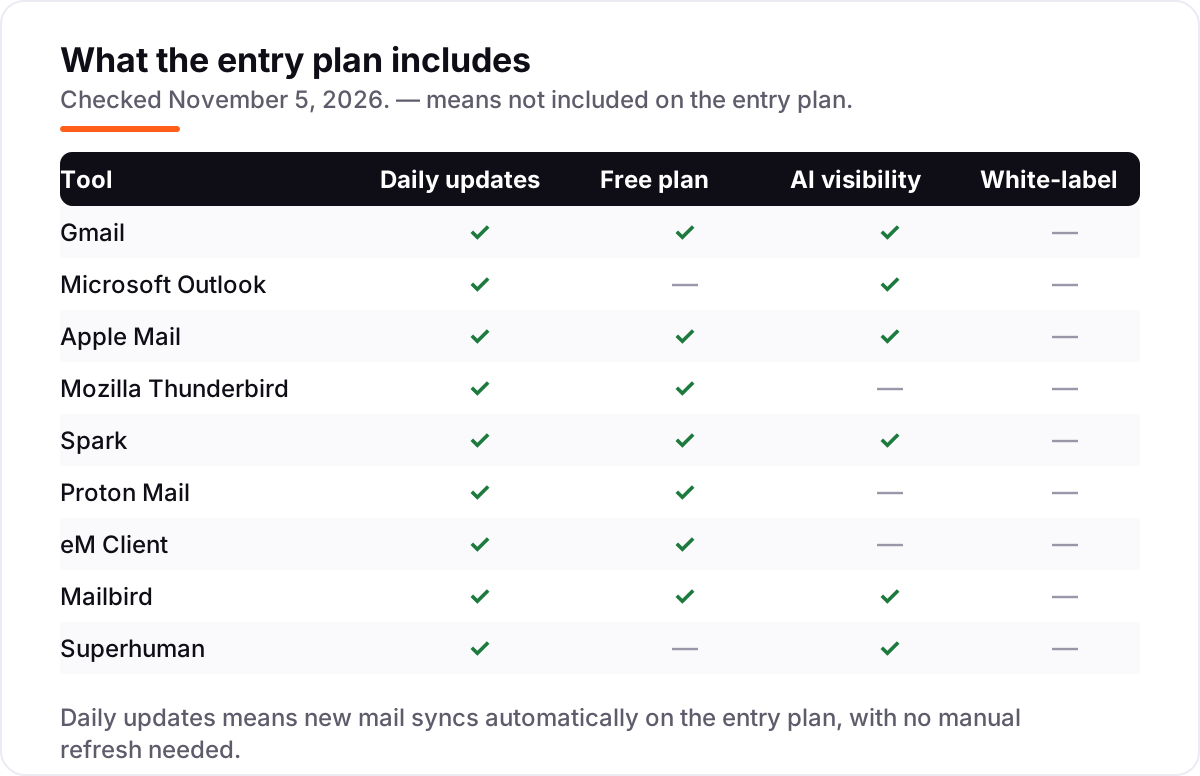
| Tool | Best for | Starting price | Free plan |
|---|---|---|---|
| Gmail | Businesses that want the world's most-used inbox with a custom domain, Gemini AI and Google Drive in one subscription | $7/user/mo | Yes (free Gmail) |
| Microsoft Outlook | Teams already in Microsoft 365 that want email, calendar, Teams and 1 TB of storage in one subscription | $7/user/mo | No (1-month trial) |
| Apple Mail | Apple users who want a fast, private inbox that is already on every device they own | Free | Yes (free) |
| Mozilla Thunderbird | Anyone who wants a free, open-source client for any email account, with no subscription and no tracking | Free | Yes (free) |
| Spark | People who want a smarter inbox with AI writing help and shared inboxes, without Superhuman's price | $10/user/mo | Yes (free plan) |
| Proton Mail | People who want end-to-end encrypted email with their own domain, from a Swiss provider | $4.99/mo | Yes (free plan) |
| eM Client | Windows and Mac users who want a full Outlook-style desktop client with calendar, tasks and chat in one window | $40/yr | Yes (free plan) |
| Mailbird | Windows and Mac users who want a fast unified inbox with apps like WhatsApp and Slack docked beside their mail | $27.36/yr | Yes (free plan) |
| Superhuman | Founders, executives and salespeople who live in their inbox and will pay to clear it twice as fast | $30/user/mo | No |
Make one of these tools?
We re-check this list every quarter. Send a correction, request a review, or ask about a clearly labeled sponsored spot.
Request a listingThe best email client software

Gmail
Best for: Businesses that want the world's most-used inbox with a custom domain, Gemini AI and Google Drive in one subscription
Gmail is the default inbox for a reason: most people already have an account, the spam filter is the best in this list, and search, labels and filters handle archives of tens of thousands of messages without slowing down. For business use, Google Workspace Business Starter costs $7 per user a month on a 1-year commitment and adds a custom domain, 30 GB of pooled storage, the Gemini AI assistant inside Gmail, and 100-participant video meetings.
The trade-off is that Gmail is a web app first. There is no desktop app, so offline use and keyboard triage are weaker than in Outlook or Superhuman, and the $7 rate needs the annual commitment — month-to-month billing costs $8.40 per user. Pick Gmail when your team lives in Google Drive and Docs; pick Outlook when it lives in Word, Excel and Teams.
What we like
- The inbox most people already know, with the strongest spam filter in this list
- Business Starter adds a custom domain, 30 GB pooled storage and Gemini AI in Gmail for $7 per user
- Search, labels and filters handle huge archives better than any desktop client here
- Works everywhere — web, iOS and Android — with no install or setup to maintain
Watch out for
- No desktop app — Gmail runs in the browser or through another client
- The $7 rate needs a 1-year commitment; month-to-month billing costs $8.40 per user
- Ads-free only on paid Workspace plans; the free personal account shows ads

Microsoft Outlook
Best for: Teams already in Microsoft 365 that want email, calendar, Teams and 1 TB of storage in one subscription
Outlook is the business inbox: email, calendar, contacts and meetings in one window, with Teams, OneDrive and SharePoint in the same subscription. Microsoft 365 Business Basic costs $7 per user a month on annual billing and gives every user a 50 GB Exchange mailbox, 1 TB of OneDrive storage, and the web and mobile versions of Word, Excel and PowerPoint. It is rated 4.5 out of 5 on G2 from 3,573 reviews.
Two things to know before you buy. First, the price rose from $6 to $7 per user on July 1, 2026, so older guides quoting $6 are out of date. Second, Business Basic has no desktop Office apps, and the classic desktop Outlook, the new Outlook, the web version and the mobile app all behave slightly differently. Pick Outlook when your business runs on Microsoft 365.
What we like
- Email, calendar, contacts and scheduling in one place, with Teams built into the same subscription
- The strongest business integrations here: Word, Excel, OneDrive, SharePoint and Power Automate
- Focused Inbox, rules and shared mailboxes suit teams that process mail together
- Rated 4.5 out of 5 on G2 from 3,573 reviews, checked November 5, 2026
Watch out for
- Business Basic rose from $6 to $7 per user on July 1, 2026, and includes web and mobile apps only
- The classic desktop app, the new Outlook, the web version and the mobile app behave differently
- No desktop Office apps on Basic — Word, Excel and PowerPoint run in the browser only

Apple Mail
Best for: Apple users who want a fast, private inbox that is already on every device they own
Apple Mail is the inbox most Apple users never think about, and that is the point: it is already on every Mac, iPhone and iPad, it costs $0, and it needs no install, no setup and no subscription. It handles Gmail, Outlook, Yahoo, iCloud and plain IMAP accounts, blocks remote tracking pixels with Mail Privacy Protection, and puts Apple Intelligence writing tools on supported devices at no extra cost.
The limits are platform and power. There is no Windows or Android version, so a mixed-device household needs a second client, and the feature list is thinner than the paid clients here — no snippets, no read statuses, no shared inboxes, and weaker rules than Gmail or Superhuman. Pick Apple Mail when everyone uses Apple devices; pick Thunderbird when the team mixes platforms and still wants to pay $0.
What we like
- Costs $0 and needs no install, no account setup and no subscription on any Apple device
- Mail Privacy Protection hides your IP address and blocks remote tracking pixels
- Apple Intelligence writing tools work on supported devices at no extra cost
- iCloud mail, Hide My Email and tight Calendar and Contacts integration come in the same app
Watch out for
- Mac, iPhone and iPad only — there is no Windows or Android version
- Fewer power features than Thunderbird or eM Client: no snippets, no read statuses, no shared inboxes
- Smart mailboxes and rules are weaker than the filtering in Gmail or Superhuman

Mozilla Thunderbird
Best for: Anyone who wants a free, open-source client for any email account, with no subscription and no tracking
Thunderbird is the free, open-source answer to email: no account, no ads, no tracking and no subscription, forever. It connects to any account — Gmail, Outlook, Yahoo, iCloud or plain IMAP — in one window, with tabbed email, a built-in calendar and task list, message encryption and a large add-on library. Mail is stored locally, so it works offline and a dead connection never locks you out of old messages.
The trade-off is polish and modern features. The interface looks dated next to Spark or Superhuman, setup takes more clicks than a cloud inbox, and there is no AI writing or triage — Thunderbird keeps mail local and plain. There is also no mobile app, so phone mail still needs another client. Pick Thunderbird when $0 and privacy matter most.
What we like
- Completely free and open source, with no account, no ads and no data collection
- Connects to any account — Gmail, Outlook, Yahoo, iCloud or plain IMAP — in one window
- Tabbed email, a built-in calendar and tasks, encryption and add-ons cover the whole job
- Works offline and stores mail locally, so a dead connection never locks you out of old mail
Watch out for
- No AI writing or triage features — Thunderbird keeps mail local and plain
- The interface looks dated next to Spark or Superhuman, and setup takes more clicks
- No mobile app of its own, so phone mail still needs another client

Spark
Best for: People who want a smarter inbox with AI writing help and shared inboxes, without Superhuman's price
Spark is the middle ground between a free inbox and Superhuman: a smart, cross-platform client with a genuinely useful free plan — unified inbox, snooze and send later at $0 — and AI features that justify the paid tier. Plus costs $10 per user a month billed monthly, or $99 a year, and adds Spark +AI writing and summaries, an AI assistant that answers questions about your inbox, Gatekeeper, Priority sorting and 40 AI meeting notes a month.
The catches are the tiering and the cloud. The full AI set needs Plus, read statuses and shared inboxes wait for Pro at $20 a month, and Spark stores account tokens on its servers for its cloud features, which privacy-first buyers dislike. Pick Spark when you want AI help and a unified inbox for a third of Superhuman's price.
What we like
- The most generous free plan among the paid clients here: unified inbox, snooze and send later at $0
- Spark +AI writes, rewrites and summarizes mail, and the AI assistant answers questions about your inbox
- Smart Inbox, Gatekeeper and Priority sort the mail that matters from the newsletters
- Runs on Mac, Windows, iOS and Android and connects to Gmail, Outlook, iCloud, Yahoo and Exchange
Watch out for
- The best AI features need Plus at $10 a month — the free plan only previews them
- Read statuses and shared inboxes wait for Pro at $20 a month
- Spark stores account tokens on its servers for cloud features, which privacy-first buyers dislike

Proton Mail
Best for: People who want end-to-end encrypted email with their own domain, from a Swiss provider
Proton Mail is the privacy-first inbox: end-to-end encryption on message bodies and attachments, no ads, no tracking, and Swiss privacy law behind it. The free plan gives you 1 GB of storage and one address, and Mail Plus costs $4.99 a month billed monthly, or $3.99 billed annually, adding 15 GB of storage, 10 addresses, a custom domain and Bridge access so desktop clients like Thunderbird can read your mail.
The trade-off is speed and convenience. The web app is slower than Gmail or Outlook, search cannot read encrypted message bodies, and there is no native desktop app — desktop access runs through Bridge or the browser. Calendar sharing and the full privacy suite need Unlimited at $9.99 a month billed annually. Pick Proton Mail when privacy is the deciding factor; pick Gmail when speed and search matter more.
What we like
- End-to-end encryption on message bodies and attachments, under Swiss privacy law
- Mail Plus adds a custom domain, 15 GB of storage and 10 addresses for $4.99 a month
- Bridge gives IMAP and SMTP access, so Thunderbird and other clients can read Proton mail
- No ads and no tracking, with a free plan that is usable rather than a demo
Watch out for
- The web app is slower than Gmail or Outlook, and search cannot read encrypted message bodies
- Calendar sharing and the full privacy suite need Unlimited at $9.99 a month billed annually
- No native desktop app — desktop access runs through the Bridge app or the browser

eM Client
Best for: Windows and Mac users who want a full Outlook-style desktop client with calendar, tasks and chat in one window
eM Client is the desktop client for people who want Outlook's depth without Outlook's subscription: one window holding mail, calendar, contacts, tasks, notes and chat, with PGP and S/MIME encryption, snooze, send later and mass mail included. A Personal subscription costs $40 a year, and a one-time Personal license at $150 covers lifetime upgrades, so the subscription itself is optional.
The catches are the buying experience and the phone. The pricing page renders its prices in JavaScript, so the $40-a-year figure comes from eM Client's own comparison page rather than the price table, AI features cost a $2-a-month add-on, and there is no mobile app — eM Client is desktop only. Pick eM Client when the desktop is where you work; pick Spark when phone and desktop must match.
What we like
- The closest Outlook-style desktop experience here, at $40 a year instead of a monthly subscription
- One window holds mail, calendar, contacts, tasks, notes and chat
- PGP and S/MIME encryption, snooze, send later and mass mail are included on the paid plans
- A one-time Personal license at $150 covers lifetime upgrades, so the subscription is optional
Watch out for
- The pricing page renders its prices in JavaScript, so the $40-a-year figure comes from eM Client's own comparison page
- AI features cost a $2-a-month add-on and are not included in the subscription
- No mobile app — eM Client is desktop only, so phone mail needs another client

Mailbird
Best for: Windows and Mac users who want a fast unified inbox with apps like WhatsApp and Slack docked beside their mail
Mailbird is the fast unified inbox for Windows and Mac: every account in one window, with reply context kept intact, and WhatsApp, Slack, Google Calendar and Dropbox docked beside the mail. Standard costs $27.36 a year for up to 3 accounts, Premium costs $48.36 a year for unlimited accounts, and a $99.75 pay-once Premium license buys lifetime access with no monthly bill at all.
The free plan covers one email account only, so a second account forces the paid plan, and the pricing page does not render its prices as text — the $27.36 figure comes from Mailbird's own blog post about its pricing. There is no Linux version, and the Mac app needs macOS Ventura or later. Pick Mailbird when Windows is your main machine; pick eM Client when calendar and tasks matter as much as mail.
What we like
- A genuinely fast unified inbox that merges every account while keeping reply context
- Built-in apps dock WhatsApp, Slack, Google Calendar and Dropbox beside the inbox
- Email tracking, templates, snooze and send later are included on the paid plans
- A $99.75 pay-once Premium license buys lifetime access, with no monthly bill at all
Watch out for
- The free plan covers one email account — a second account needs a paid plan
- The pricing page does not render its prices as text, so the $27.36 figure comes from Mailbird's own blog
- No Linux version, and the Mac app needs macOS Ventura or later

Superhuman
Best for: Founders, executives and salespeople who live in their inbox and will pay to clear it twice as fast
Superhuman is the premium speed inbox: keyboard shortcuts, Split Inbox, snippets and read statuses built to clear mail in half the time, with Superhuman AI triaging, drafting and summarizing from the Starter plan. Starter costs $30 per user a month billed monthly, or $25 billed annually, and Business at $40 a month adds Auto Drafts, Ask AI and CRM integrations. It is rated 4.7 out of 5 on G2 from 1,323 reviews.
The price is the whole argument against it. Superhuman sits on top of Gmail or Outlook, so you keep paying for that account too — a single user on Gmail plus Superhuman costs $37 a month on annual billing. The keyboard-first workflow also has a real learning curve, and there is no unified inbox across multiple accounts. Pick Superhuman when email is your job.
What we like
- The fastest inbox here: keyboard shortcuts, Split Inbox and snippets clear mail in half the time
- Superhuman AI triages, drafts and summarizes, and Business adds Auto Drafts and Ask AI
- Read statuses, reminders and follow-up nudges keep deals and threads from going cold
- Rated 4.7 out of 5 on G2 from 1,323 reviews, checked November 5, 2026
Watch out for
- The most expensive client here at $30 a month, and it sits on top of Gmail or Outlook, which you still pay for
- Keyboard-first workflow has a real learning curve — the first week feels slower, not faster
- No unified inbox across multiple accounts, and the calendar view frustrates some reviewers
The best email client software does one job well: it shows every account in one place, clears the inbox fast, and never makes you think about where a message lives. We ranked the nine clients below by fit for the most common buyer — a professional who answers a lot of mail every day — starting with the two defaults, then the free options, and ending with the premium speed pick, and every price was checked on the vendor's own pricing page on November 5, 2026.
How to choose the best email client software
- Decide whether you need a service or just an app. Gmail, Outlook and Proton Mail store your mail; Thunderbird, Spark, eM Client and Mailbird only read it. Superhuman is only an app — it still needs a Gmail or Outlook account underneath.
- Count your accounts first. Mailbird's free plan covers one account and eM Client's covers two, so a second inbox forces a paid plan. Gmail, Outlook, Apple Mail and Thunderbird take unlimited accounts at the entry price.
- Check the platform. Apple Mail is Apple-only, Thunderbird runs on Windows, Mac and Linux, and Spark, eM Client and Mailbird cover Windows and Mac. A mixed-device team needs a client on every device it uses.
- Weigh AI against privacy. Gmail, Outlook, Spark and Superhuman all offer AI writing or triage on the entry plan, but their servers see your mail. Proton Mail and Thunderbird keep mail encrypted or local, and offer no AI in return.
- Price the stack, not the app. A $30 Superhuman seat still needs a $7 Gmail or Outlook seat underneath, so the real cost is $37 a month, not $30.
Email is one system in your stack, not the whole stack. If the business also sends marketing mail, our guide to email marketing platforms covers the sending side, and our guide to AI tools for email marketing covers the writing side. And before you publish new pages for the services you sell, run your titles through the free SERP snippet preview tool — it shows exactly how the title and description will look in Google.
Whatever you shortlist, try it with your real inbox before you pay. The free plans and trials in this list are long enough to run one genuine week — your accounts, your mail volume, your folders — and that week tells you more than any review can. Check two things in the trial: that every account syncs without daily fixing, and that the keyboard shortcuts feel natural after three days. Every paid client here refunds or trials the first month, so there is no reason to buy before you have lived in it.
Email client software pricing: what you will actually pay
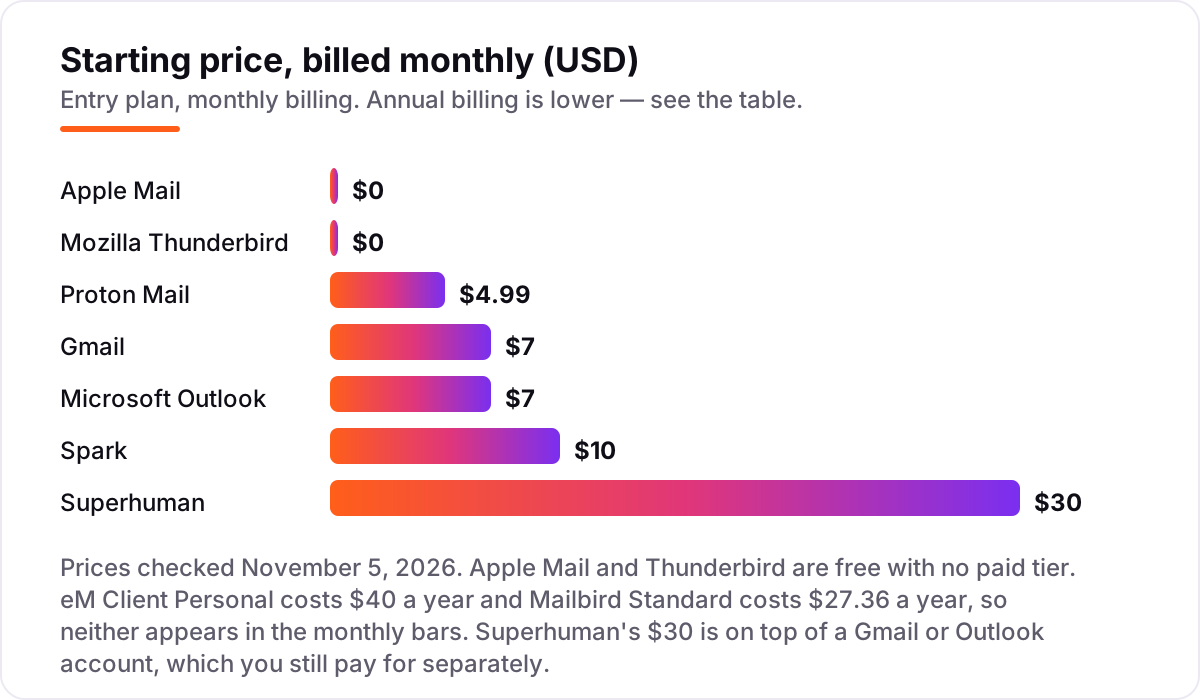
Take a five-person team that all need a custom-domain inbox. On list prices, the subscription costs $0 a month on Apple Mail or Thunderbird, $35 a month on Gmail Business Starter or Outlook Business Basic, $24.95 a month on Proton Mail Plus billed annually, $50 a month on Spark Plus billed monthly, and $150 a month on Superhuman Starter billed monthly. Two of those numbers need adjusting before they are real: Superhuman sits on top of Gmail or Outlook, so a five-person team pays $35 for the accounts plus $150 for Superhuman, $185 a month in total — and Proton Mail Plus is a personal plan, so a team that wants shared domains and admin controls needs Proton's business plans instead.
Over a year, that is $0 on Apple Mail or Thunderbird, $299.40 on Proton Mail Plus billed annually for five people, $420 on Gmail Business Starter or Outlook Business Basic, $495 on Spark Plus billed annually, and $1,800 on Superhuman Starter billed annually plus $420 for the underlying Gmail or Outlook accounts — $2,220 in total. The same five people and the same inboxes cost $0 a year at the free end and $2,220 at the premium end, and the gap comes entirely from AI features and speed, not from the mail itself.
Three costs sit outside every number above. First, the annual-billing discount: Gmail and Outlook cost $8.40 per user on month-to-month billing against $7 on the annual plan, so paying monthly adds $84 a year for a five-person team. Second, the one-time licenses: eM Client Personal at $150 with lifetime upgrades and Mailbird Premium pay-once at $99.75 both beat their subscriptions after about three years. Third, the price rise: Microsoft raised Business Basic from $6 to $7 per user on July 1, 2026, so any guide quoting $6 is out of date. If the team also sends marketing mail rather than just reading it, the sending tools differ too — see our guide to the best B2B email marketing software.
Know the difference: an email client is not an email service
The confusion in this category is between the app and the account. An email service stores your mail and gives you the address: Gmail, Outlook.com, Proton Mail, iCloud. An email client is the app you read it in: Thunderbird, Spark, Apple Mail, eM Client, Mailbird. Some tools are both — Gmail the service and Gmail the app are the same product — and some are only one side. Superhuman is only a client: it reads and writes through your Gmail or Outlook account, and if you cancel Gmail, Superhuman has nothing to show.
There is a second, quieter confusion: a free plan and a free client are different things. Thunderbird and Apple Mail are free clients with no paid tier at all — nobody can charge you for them later. Gmail, Spark, Proton Mail, eM Client and Mailbird have free plans inside paid products, and the free plan is a capped version of the same app: one account on Mailbird, two on eM Client, 1 GB of storage on Proton Mail. The cap you hit first is your real starting price, and it is usually the account count.
A third distinction worth knowing is AI help versus privacy. Gmail, Outlook, Spark and Superhuman all offer AI writing, summaries or triage on the entry plan, and all of them process your mail on their servers to do it. Proton Mail encrypts message bodies end to end, so its servers cannot read them — and that is exactly why it offers no AI triage. Thunderbird keeps mail local for the same reason. You can have AI help or you can have mail nobody can read, but no client in this list gives you both.
Quick comparison: tool type by need
| Buyer | Best pick | Why |
|---|---|---|
| Most businesses | Gmail | The default inbox with a custom domain, from $7/user/month |
| Microsoft 365 teams | Outlook | Email, calendar and Teams in one subscription, $7/user/month |
| Apple-only households | Apple Mail | Free, private and already on every device, $0 |
| Free and open source | Thunderbird | Every account in one place, $0, no tracking |
| Smart inbox on a budget | Spark | AI writing and a unified inbox, free plan then $10/user/month |
| Privacy first | Proton Mail | End-to-end encryption with your own domain, from $4.99/month |
| Desktop power user | eM Client | Outlook-style depth for Windows and Mac, $40/year |
| High-volume professional | Superhuman | The fastest inbox here, $30/user/month on top of Gmail or Outlook |
Mistakes to avoid
- Budgeting on the app price and forgetting the account. Superhuman at $30 a month still needs a $7 Gmail or Outlook seat underneath. Price the stack, not the app.
- Buying on the free plan, then finding the second account costs extra. Mailbird Free covers one account and eM Client Free covers two. If you run two inboxes, count the paid plan in the price from day one.
- Quoting the old Microsoft price. Business Basic rose from $6 to $7 per user on July 1, 2026. Any guide or quote still showing $6 is out of date.
- Paying monthly when annual billing is the same product. Gmail and Outlook cost $8.40 per user month to month against $7 on the annual plan — $84 a year extra for a five-person team, for nothing.
- Choosing AI help and then being surprised the server reads your mail. AI triage and summaries need the provider to process your messages. If that bothers you, pick Proton Mail or Thunderbird and skip the AI tier entirely.
How we chose
We checked each vendor's own pricing page on November 5, 2026 and recorded the starting price exactly as shown. Two prices needed a footnote: eM Client's pricing page renders its prices in JavaScript, so the $40-a-year Personal figure comes from eM Client's own comparison page, and Mailbird's pricing page does not render its prices as text, so the $27.36-a-year Standard figure comes from Mailbird's own blog post. Superhuman's pricing page did not load when we tried it on November 5, 2026, so the $30 Starter figure comes from Superhuman's own pricing page as read in October 2026 and from the vendor-supplied pricing on its G2 profile, which lists Starter at $30.00 a seat a month. We ranked the tools by fit for the most common buyer — a professional who answers a lot of mail every day — not by brand size. Only Outlook and Superhuman carry a review rating here, because their G2 pages were opened and verified on November 5, 2026; the other seven tools show no rating rather than a stale or estimated one. No vendor paid for a place in this list, and none of the links here are affiliate links.
What to do next
Start with the free plan or trial of your top pick and run one real week of mail through it. Check that every account syncs, the search finds old threads, and the shortcuts feel natural before you commit to a year. If the inbox is sorted but new customers are not finding you, our monthly SEO service handles the visibility side — or compare providers in our guide to SEO companies for small business. Once your tools are in place, find out what's holding your rankings back.
Your stack only works if people find you
SerpAstra fixes what keeps your site off page one and makes it easy for AI assistants to recommend.
Get a free audit→Sources we checked (11)
- Google Workspace pricing — workspace.google.com/pricing (checked November 5, 2026)
- Microsoft 365 Business pricing — microsoft.com/microsoft-365/business (checked November 5, 2026)
- Apple Mail support — support.apple.com/mail (checked November 5, 2026)
- Thunderbird — thunderbird.net (checked November 5, 2026)
- Spark pricing — sparkmailapp.com/pricing (checked November 5, 2026)
- Proton Mail pricing — proton.me/mail/pricing (checked November 5, 2026)
- eM Client pricing — emclient.com/pricing (checked November 5, 2026)
- Mailbird pricing — getmailbird.com/pricing (checked November 5, 2026)
- Superhuman pricing — superhuman.com/pricing (checked November 5, 2026)
- Microsoft Outlook on G2 — g2.com/products/microsoft-outlook/reviews (checked November 5, 2026)
- Superhuman Mail on G2 — g2.com/products/superhuman-mail/reviews (checked November 5, 2026)
Shamim
Founder of SerpAstra
A full-stack SEO and digital marketer who spends most days on Local SEO for dental practices, AI search visibility and lead generation.
Frequently asked questions
What is the best email client software?
Gmail is the best fit for most buyers: free for personal use, $7 per user a month with a custom domain on Google Workspace, and the strongest spam filter here. Outlook is the better pick inside Microsoft 365, and Apple Mail or Thunderbird are the best free options.
How much does email client software cost?
From $0 to $30 a month. Apple Mail and Thunderbird are free with no paid tier, Proton Mail Plus costs $4.99 a month, Gmail and Outlook cost $7 per user a month, Spark Plus costs $10, and Superhuman costs $30 on top of your Gmail or Outlook account.
Is there really free email client software?
Yes. Apple Mail is free on every Mac and iPhone, Thunderbird is free and open source on Windows, Mac and Linux, and Gmail, Spark, Proton Mail, eM Client and Mailbird all have free plans. The free plans cap accounts, storage or AI features, but they are real inboxes.
What is the difference between an email client and an email service?
An email service stores your mail and gives you the address — Gmail, Outlook.com, Proton Mail. An email client is the app you read it in — Thunderbird, Spark, Apple Mail. Some tools are both, and some, like Superhuman, are only a client that sits on your existing Gmail or Outlook account.
Do I still need Gmail or Outlook if I buy Superhuman?
Yes. Superhuman is a client, not a service: it reads and writes through your Gmail or Outlook account, so you keep paying for that account too. One user on Google Workspace Starter plus Superhuman Starter costs $32 a month on annual billing, not $25.
Can I switch email clients later?
Yes, and it is easier than switching services. Your mail stays with Gmail, Outlook or Proton Mail, so changing clients means signing into the new app and letting it sync. Export your rules and templates first, since those live in the client and do not travel with the account.
Which email client is best for privacy?
Proton Mail, because the service itself encrypts message bodies end to end under Swiss privacy law. Thunderbird is the best free privacy option: open source, no ads and no tracking, with local storage. Apple Mail also blocks tracking pixels by default on every Apple device.
Free SEO and AI visibility audit
Find out what is holding your rankings back
Send us your site. Within 2 business days you get a written audit, an AI visibility check and a short fix list ranked by impact. Free, with no contract attached.
Request my free audit→Related guides
 Digital Marketing & Ads7 Best AI Tools for Email Marketing in 2026 (Free and Paid, Compared)7 best AI tools for email marketing compared on price, AI features and free plans, with real starting prices checked November 4, 2026 and sorted by use case.Read guide →
 Digital Marketing & Ads8 Best Email Marketing Platforms for 2026 (Pros, Cons and Pricing)8 best email marketing platforms compared on real starting prices, free plans and automation. Brevo $9/month, Mailchimp $13. Checked Nov 4, 2026.Read guide →
 Digital Marketing & Ads7 Best B2B Email Marketing Software in 2026, ComparedCompare the 7 best b2b email marketing software tools on starting price, automation depth and free plans, with every price checked November 4, 2026.Read guide →