
7 Best Email Deliverability Services in 2026
Compare the 7 best email deliverability services on real prices, inbox testing, warmup and monitoring, with every price checked November 5, 2026.
 Shamim Mia, Founder, SerpAstraLast verified November 5, 202612 min read
We compare pricing pages, documentation and public reviews. We never accept payment for rankings.

Key takeaways
- Mailtrap is the best all-rounder at $15/month, GlockApps is the testing pick at $59/month, and Folderly is the full platform at $120 per mailbox a month.
- The single most important buying factor is matching the tool to the problem: warmup tools build reputation, testing tools prove placement, and sending platforms keep it.
- Free plans exist at Mailtrap, GlockApps, Postmark and Mailgun, but the free tiers are small — budget for the first paid plan when you send real volume.
- Warmup is priced per inbox, so a 10-inbox outreach team pays $190–$1,200 a month before sending a single campaign email.
On this page
Quick comparison
| Tool | Best for | Starting price | Free plan |
|---|---|---|---|
| Mailtrap | Product teams that want email testing, sending and deliverability monitoring in one platform | $15/mo | Yes (free plan) |
| GlockApps | Senders who need to prove where their mail lands before a campaign goes out | $59/mo | Yes (free plan) |
| Folderly | Outreach teams that want one platform to monitor, fix and maintain sender reputation | $120/mo | No (free test tier) |
| Postmark | App teams that need transactional mail — password resets, receipts, notifications — to arrive fast | $15/mo | Yes (free plan) |
| Mailgun | Developers and growing apps that need a flexible email API with room to scale | $15/mo | Yes (free plan) |
| Lemwarm | Cold outreach senders who want automated warmup inside the Lemlist ecosystem | $29/mo | No |
| Warmbox | Solo senders and small teams warming a few cold outreach inboxes on a budget | $19/mo | No |
Make one of these tools?
We re-check this list every quarter. Send a correction, request a review, or ask about a clearly labeled sponsored spot.
Request a listingThe best email deliverability services

Mailtrap
Best for: Product teams that want email testing, sending and deliverability monitoring in one platform
Mailtrap is the broadest tool in this list because it covers three jobs at once: a sandbox for pre-send email testing, a sending API and SMTP service for transactional and bulk mail, and analytics covering delivery, bounces and spam complaints per provider. The sending plan starts at $15 a month for 10,000 emails, with 5 domains and 3 users, and the free plan covers 4,000 emails a month.
The key design choice is the separate sending streams. Transactional mail and bulk mail travel on different infrastructure by default, so a marketing blast that trips a spam filter never touches the reputation of your password resets. The catch: testing is a separate product starting at $17 a month, and dedicated IPs with automatic warmup wait for Business at $85. Buy Mailtrap when you want testing, sending and monitoring in one account.
What we like
- One platform covers testing sandboxes, transactional and bulk sending, and deliverability analytics
- Separate sending streams keep marketing blasts off the reputation of transactional mail
- Free plan includes 4,000 emails a month, so small projects can start at $0
- Detailed logs, webhooks and per-provider stats make delivery problems easy to trace
Watch out for
- Sending and testing are billed as separate products, so the full setup costs more than one subscription
- Dedicated IPs and automatic warmup wait for the Business plan at $85/month
- No built-in warmup network for cold outreach inboxes — that job needs a separate warmup tool

GlockApps
Best for: Senders who need to prove where their mail lands before a campaign goes out
GlockApps answers one question before you press send: where will this message actually land? Its Inbox Insight test sends your email to seed inboxes across providers and reports inbox, spam and promotions placement, plus the authentication and content issues behind the result. Essential costs $59 a month and includes 360 spam test credits, DMARC analytics for 600,000 messages, and uptime and IP reputation monitors.
The monitors are the part buyers underestimate. Uptime checks and IP reputation tracking run between campaigns, so a blocklist listing or a broken authentication record surfaces before it costs you a launch. The limits are the free plan, which covers just 2 test credits a month, and the per-test cost if you test heavily. Buy GlockApps when placement proof matters more than sending volume.
What we like
- Inbox Insight shows placement across providers — inbox, spam and promotions — before you send
- DMARC analytics for 600,000 messages a month on the entry plan, with domain monitoring included
- Uptime and IP reputation monitors catch blocklist problems before they cost a campaign
- Clear, actionable reports that explain why a message failed, not just that it did
Watch out for
- The free plan covers only 2 spam test credits a month — real testing starts at $59
- Per-test pricing makes heavy pre-send testing add up fast on the Essential plan
- Some reviewers report invasive identity checks when upgrading plans

Folderly
Best for: Outreach teams that want one platform to monitor, fix and maintain sender reputation
Folderly is the full-service option: it monitors each mailbox continuously, scores its deliverability in real time from inbox rate, spam triggers and setup checks, and then applies automated fixes rather than leaving you with a report. The core plan is priced per mailbox at $120 a month billed monthly, or $96 billed annually, and includes a dedicated success manager — a level of help no other tool here bundles into the entry plan.
That per-mailbox price is the whole buying decision. One mailbox is manageable; five mailboxes cost $600 a month billed monthly, or $5,760 a year on annual billing. Inbox placement testing sits in the separate Inbox Insights product, which has a free tier of 2 tests a month and a paid plan at $79. Buy Folderly when deliverability is a revenue problem, not a curiosity.
What we like
- Real-time deliverability score per mailbox, built from inbox rate, spam triggers and setup checks
- Automated fixes and a dedicated success manager on the core plan, not just reports
- Spam-trigger detection explains exactly which content or setup issue is hurting placement
- High reviewer satisfaction at 4.8/5 across 103 G2 reviews, the joint-highest here
Watch out for
- Per-mailbox pricing gets expensive fast — five mailboxes cost $600 a month billed monthly
- No published monthly price on the vendor page; the $120 figure comes from Folderly's own G2 listing
- Inbox Insights is a separate product, so placement tests are not bundled into the core plan

Postmark
Best for: App teams that need transactional mail — password resets, receipts, notifications — to arrive fast
Postmark exists for one kind of email: the message a user is waiting for right now. Password resets, receipts, invoices and notifications go out fast, and the platform keeps transactional and broadcast mail on separate streams so a newsletter never risks a password reset. Basic costs $15 a month for 10,000 emails, with 5 sending domains and 45 days of full message content history.
The 45-day history is the diagnostic advantage. When a user says an email never arrived, you can trace the exact message, its delivery events and its content, instead of guessing from aggregate stats. The trade-offs are no annual billing discount and dedicated IPs that need 300,000 emails a month to qualify. Buy Postmark when transactional delivery speed and traceability matter most.
What we like
- Consistently fast delivery with separate streams for transactional and broadcast mail
- 45 days of full message content history on every plan, so delivery failures are easy to diagnose
- DMARC monitoring add-on from $14 a month per domain for authentication problems
- Strict sending rules keep shared IPs clean, which protects every sender on the platform
Watch out for
- No annual billing, so there is no discount for paying yearly
- Dedicated IPs start at $50 a month and need 300,000 emails a month to qualify
- Bulk marketing mail must run on a separate message stream, which complicates setup

Mailgun
Best for: Developers and growing apps that need a flexible email API with room to scale
Mailgun is the developer's sending platform: a REST API and SMTP relay built to move application mail at any volume, with inbound routing, webhooks and an email validation add-on for cleaning lists before you send. Basic costs $15 a month for 10,000 emails, Foundation costs $35 for 50,000, and Scale costs $90 for 100,000, with overage pricing per thousand emails on every tier.
Pick Mailgun over the other senders here for scale and control. You can pick a US or EU sending region from one account, add dedicated IP pools at higher volumes, and grow from 10,000 to millions of emails without changing providers. The entry plan's weakness is 1 day of log retention — Foundation is the realistic starting point if you debug delivery problems. Buy Mailgun when the app sends the mail and the volume will grow.
What we like
- Mature API and SMTP relay with inbound routing, webhooks and email validation add-ons
- Volume-based pricing scales smoothly from 10,000 to millions of emails a month
- US or EU sending regions from one account for data-residency requirements
- Largest review base here at 328 G2 reviews, with setup commonly reported under a day
Watch out for
- Only 1 day of log retention on Basic — Foundation at $35 a month is needed for 5 days
- Deliverability extras like dedicated IP pools and send-time optimization wait for Scale at $90
- Support on the entry plans is ticket-only; chat and phone support start higher up

Lemwarm
Best for: Cold outreach senders who want automated warmup inside the Lemlist ecosystem
Lemwarm warms up cold outreach inboxes automatically: it exchanges realistic emails with a network of more than 20,000 real domains, gradually raising sending volume so providers learn to trust a new mailbox. Essential costs $29 per email a month, or $24 billed annually, and includes a technical setup check for SPF, DKIM and DMARC plus a deliverability score out of 100 with alerts.
The network is the selling point and the limitation. Warmup through real Lemlist and Lemwarm users beats a seed list of fake accounts, and the Smart plan at $49 per email adds personalized warmup emails and industry-matched warmup. But Lemwarm does not test inbox placement, so pair it with GlockApps or Folderly if you need placement proof. Buy Lemwarm when you already run outreach on Lemlist and want warmup in the same ecosystem.
What we like
- Warmup network of more than 20,000 real domains, tailored to your industry on Smart
- Automatic warmup plus a technical setup check for SPF, DKIM and DMARC
- Deliverability score out of 100 with alerts when a mailbox drifts
- Built by the Lemlist team, so it pairs naturally with Lemlist outreach campaigns
Watch out for
- No standalone G2 or Capterra listing, so there is no independent review score to check
- Per-email pricing means warming 10 inboxes costs $290 a month on Essential
- No true inbox placement testing — it warms and scores, but does not show tab placement

Warmbox
Best for: Solo senders and small teams warming a few cold outreach inboxes on a budget
Warmbox is the cheapest way to warm an inbox: Solo costs $19 a month billed monthly, or $15 billed annually, for one inbox at 50 warmup emails a day, and every plan includes the full feature set — auto-reply, auto-remove from spam, spam-score monitoring and realistic GPT-4 and hybrid warmup emails. There are no gated features waiting on a higher tier, which is rare in this category.
The price stays honest as you grow, but it grows per inbox: Start-up is $79 a month for 3 inboxes and Growth is $159 for 6, so a 10-inbox team is looking at two Growth plans or a custom Team deal. Warmbox also does not test placement or report on DMARC — it builds reputation, and diagnosis needs another tool. Buy Warmbox when the budget is tight and the inbox count is small.
What we like
- Cheapest warmup here: Solo is $19 a month monthly, $15 billed annually
- Every plan includes the full feature set — no features are gated behind higher tiers
- GPT-4 and hybrid realistic warmup emails with auto-reply, auto-remove from spam and spam-score monitoring
- Works with Gmail, Outlook, Yahoo, iCloud, Zoho, SendGrid, Mailgun, Amazon SES and any SMTP inbox
Watch out for
- No standalone G2 listing, so there is no independent review score to check
- Solo covers 1 inbox and 50 emails a day — a team warms up slowly or pays for Start-up at $79
- No inbox placement testing or DMARC reporting; it warms, it does not diagnose
The best email deliverability services fix the same painful problem from different angles: your mail is not reaching the inbox. Some tools test placement before you send, some warm up new inboxes so providers trust them, and some are the sending platforms themselves, built to keep your reputation clean. We ranked the seven tools below by fit for the most common buyer — a sender whose mail is landing in spam or promotions — and every price was checked on the vendor's own pricing page on November 5, 2026.
How to choose the best email deliverability services
- Name the problem first. Mail landing in spam needs warmup or reputation repair; mail landing in promotions needs placement testing and content fixes; mail bouncing needs list cleaning and a better sending platform.
- Match the tool type to the problem. Warmup tools (Lemwarm, Warmbox) build reputation, testing tools (GlockApps) prove placement, and sending platforms (Mailtrap, Postmark, Mailgun) keep it. Buying the wrong type wastes the subscription.
- Count inboxes, not seats. Warmup and Folderly charge per mailbox, so a 10-inbox team pays per inbox, while sending platforms charge per email volume. Price the setup you actually run.
- Check authentication before you buy anything. SPF, DKIM and DMARC must pass or no tool will save you — GlockApps, Lemwarm and Postmark's DMARC add-on all check this, and the fixes are usually free DNS changes.
- Try the free tier with a real mailbox. Mailtrap, Postmark and Mailgun all let you send free, and GlockApps tests 2 messages a month free. Run one real campaign through the trial before committing.
Deliverability is one part of getting found and answered online. If the business also needs to be found on search, our monthly SEO service covers the visibility side, and our guide to email automation tools covers what happens after the inbox. Before you publish new landing pages for the campaigns you send, run your titles through the free SERP snippet preview tool — it shows exactly how the title and description will look in Google.
Whatever you shortlist, diagnose before you buy. Send a test to GlockApps or Mailtrap's sandbox, check your authentication records, and look at which providers are filtering you. That one test tells you whether you need warmup, placement testing, a new sending platform, or just a DNS fix — and it stops you paying for the wrong category.
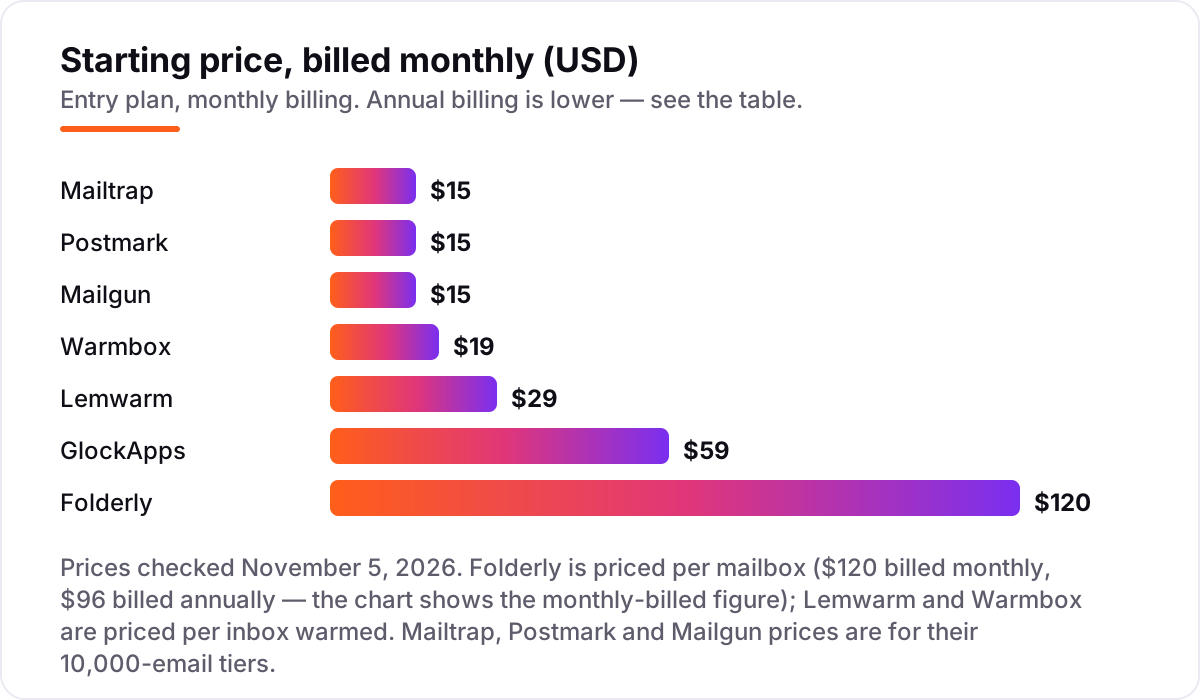
Deliverability pricing: what you will actually pay
Take a small outreach team warming 5 inboxes and sending 10,000 transactional emails a month. On list prices, warmup costs $145 a month on Lemwarm Essential (5 inboxes at $29), $159 on Warmbox Growth (6 inboxes, billed monthly), or $600 on Folderly (5 mailboxes at $120 billed monthly). Add sending through Mailgun Basic at $15 and placement testing on GlockApps Essential at $59, and the realistic monthly stack is $219 with Lemwarm, $233 with Warmbox, or $674 with Folderly.
Over a year on annual billing, the warmup bill alone is $1,440 on Lemwarm (5 inboxes at $24), $1,668 on Warmbox Growth (at $139), or $5,760 on Folderly (5 mailboxes at $96). The gap comes entirely from the per-mailbox price, not from features — Warmbox includes every feature on every plan, and Lemwarm's Smart plan at $49 per email adds personalized warmup that Warmbox includes at $19. Two costs sit outside every number above: overage emails past your tier (Mailgun charges from $1.80 per thousand, Postmark $1.80 per thousand on Basic) and dedicated IPs, which start at $50 a month on Postmark and $59 on Mailgun.
One more cost to check before you commit: a second domain is a second warmup bill. Warmup and Folderly both charge per mailbox, so an agency running 10 client inboxes pays 10 times the per-inbox price — $190 a month on Warmbox Solo pricing, $290 on Lemwarm Essential, or $1,200 on Folderly billed monthly. Sending platforms are kinder here: Mailgun, Postmark and Mailtrap charge by volume, not by domain count, so the sending side of the stack barely moves when you add a domain. If you only need one tool, start with testing — a month of GlockApps Essential at $59 before a 100,000-email launch is the cheapest insurance in this list.
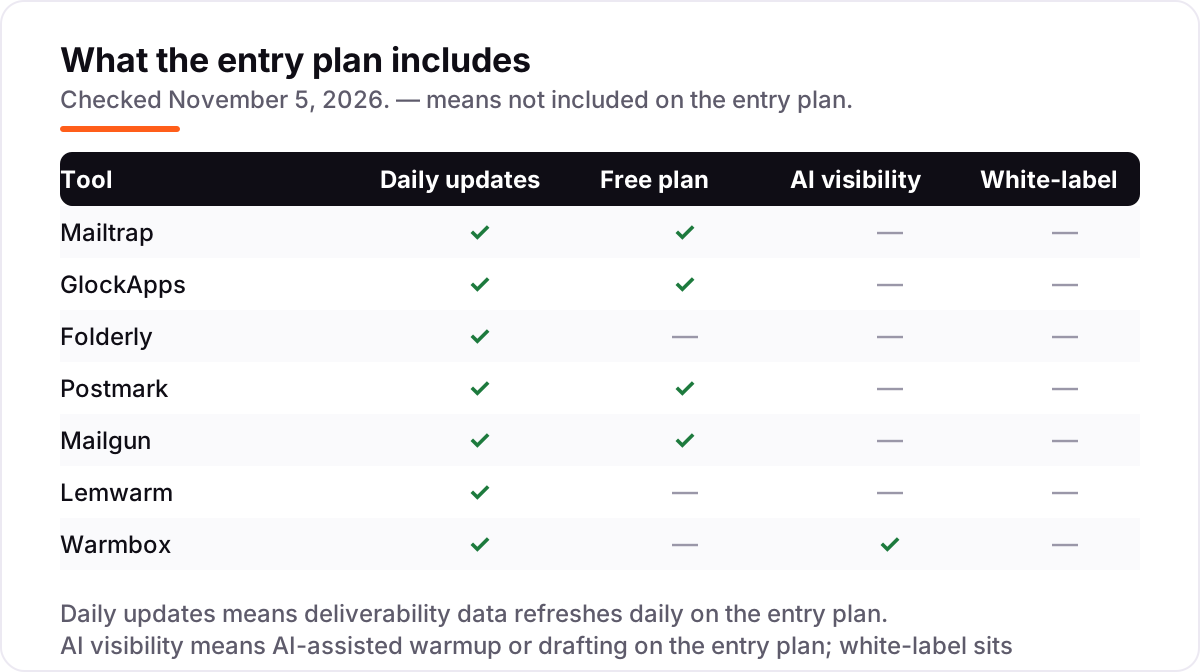
Know the difference: warmup vs testing vs sending
The confusion in this category is between three jobs that sound alike. Warmup builds reputation: a tool like Lemwarm or Warmbox exchanges realistic emails with a trusted network so providers learn to trust a new inbox. Testing proves placement: GlockApps sends your message to seed inboxes and reports where it landed. Sending moves real mail: Mailtrap, Postmark and Mailgun carry your transactional and bulk email and protect its reputation with clean IPs and authentication.
Buying the wrong job is the most common waste here. Warmup will not tell you why a campaign landed in promotions, testing will not warm a cold domain, and switching sending platforms will not fix a domain that providers already distrust. The right order is: fix authentication first, warm new inboxes second, test placement before big campaigns third, and pick the sending platform that keeps all three healthy. Most teams need two tools from this list, not one — typically a warmup tool plus a testing tool, or a sending platform plus a testing tool.
A second distinction worth knowing is shared versus dedicated IPs. Every sending platform here starts you on shared IPs, which is fine at low volume because the provider polices them. Dedicated IPs give you full control of your reputation, but they only help once you send enough volume to build that reputation yourself — Postmark requires 300,000 emails a month, and Mailgun includes one at 100,000-plus volumes. Buying a dedicated IP too early is worse than staying shared: a cold dedicated IP with low volume looks suspicious to providers.
Quick comparison: tool type by need
| Buyer | Best pick | Why |
|---|---|---|
| Testing, sending and monitoring in one place | Mailtrap | Sandbox, sending API and analytics from $15/month |
| Placement proof before a big campaign | GlockApps | Inbox, spam and promotions reporting from $59/month |
| Full reputation management for outreach | Folderly | Monitoring plus automated fixes, $120 per mailbox a month |
| Transactional mail that must arrive fast | Postmark | Fast delivery with 45-day message history, from $15/month |
| Developer API that scales | Mailgun | Proven API from 10,000 to millions of emails, from $15/month |
| Budget warmup for a few inboxes | Warmbox | Full features from $19/month for one inbox |
Mistakes to avoid
- Buying warmup when the problem is authentication. If SPF, DKIM or DMARC fails, providers filter you no matter how warm the inbox is. Check authentication first — it is usually a free DNS fix.
- Pricing warmup per seat instead of per inbox. Warmup tools charge per mailbox warmed, so a 10-inbox team pays 10 times the headline price. Count inboxes before you compare plans.
- Skipping placement testing before a big launch. A campaign that lands in promotions to half your list costs more than GlockApps Essential at $59 — test first, send second.
- Switching sending platforms to fix a reputation problem. A new platform inherits your domain's reputation. Fix the domain with warmup and list hygiene before you move providers.
- Buying a dedicated IP too early. Dedicated IPs only help at real volume — Postmark requires 300,000 emails a month. Below that, a well-policed shared IP delivers better.
How we chose
We checked each vendor's own pricing page on November 5, 2026 and recorded the starting price exactly as shown, including the annual-billing figure where the page lists one, and we ranked the tools by fit for the most common buyer — a sender whose mail is landing in spam or promotions — not by brand size. Two disclosures: Folderly's own pricing page shows the annual figure ($96 per mailbox a month), and the $120 monthly-billed figure comes from Folderly's own G2 listing, which Folderly provides; and Lemwarm and Warmbox carry no review rating because neither has a standalone G2 or Capterra listing, and we would rather show no rating than borrow a parent product's score. No vendor paid for a place in this list, and none of the links here are affiliate links.
What to do next
Start with the free tier of your top pick and run one real test through it: send to GlockApps' seed inboxes, warm one mailbox on Warmbox, or move a small transactional stream to Postmark or Mailgun. Check that placement improves and that your authentication passes before you commit to a year. If the inbox is sorted but new customers are not finding you, our monthly SEO service handles the visibility side — or compare sending platforms in our guide to email marketing platforms. Once your tools are in place, find out what's holding your rankings back.
Your stack only works if people find you
SerpAstra fixes what keeps your site off page one and makes it easy for AI assistants to recommend.
Get a free audit→Sources we checked (12)
- Mailtrap pricing — mailtrap.io/pricing (checked November 5, 2026)
- GlockApps pricing — glockapps.com/pricing (checked November 5, 2026)
- Folderly pricing — folderly.com/pricing (checked November 5, 2026)
- Postmark pricing — postmarkapp.com/pricing (checked November 5, 2026)
- Mailgun pricing — mailgun.com/pricing (checked November 5, 2026)
- Lemwarm pricing — lemwarm.com/pricing (checked November 5, 2026)
- Warmbox pricing — warmbox.ai/pricing (checked November 5, 2026)
- Mailtrap reviews — g2.com/products/mailtrap/reviews (checked November 5, 2026)
- GlockApps reviews — g2.com/products/glockapps/reviews (checked November 5, 2026)
- Folderly reviews — g2.com/products/folderly/reviews (checked November 5, 2026)
- Postmark reviews — g2.com/products/postmark/reviews (checked November 5, 2026)
- Mailgun reviews — g2.com/products/mailgun/reviews (checked November 5, 2026)
Shamim
Founder of SerpAstra
A full-stack SEO and digital marketer who spends most days on Local SEO for dental practices, AI search visibility and lead generation.
Frequently asked questions
What is the best email deliverability service?
Mailtrap is the best all-rounder at $15/month because it combines testing, sending and monitoring in one account. GlockApps is the better pick when you need placement proof before a campaign, and Folderly is the pick when deliverability is a revenue problem worth $120 per mailbox a month.
How much do email deliverability services cost?
Entry prices run from $0 to $120 a month. Mailtrap, Postmark and Mailgun all start at $15 a month, warmup tools cost $19–$29 per inbox a month, GlockApps testing starts at $59, and Folderly's full platform costs $120 per mailbox. A 5-inbox outreach team typically pays $145–$600 a month for warmup alone.
What is email warmup, and do I need it?
Warmup is the gradual process of building a new inbox's sender reputation by exchanging realistic emails with a trusted network before real campaigns start. You need it for cold outreach from a fresh domain or inbox; without it, providers treat sudden volume as spam. Established senders with a warm domain and steady volume usually do not.
Can I fix deliverability without paying for a tool?
Partly. Correct SPF, DKIM and DMARC records, a clean list, consistent volume and engaged recipients fix many problems for free, and Mailtrap, Postmark and Mailgun all have free tiers for small senders. But placement testing across providers and automated warmup both need a paid tool — there is no free way to see every provider's inbox.
What is the difference between Mailtrap and GlockApps?
Mailtrap is a sending and testing platform: it moves your real email and gives you a sandbox for staging. GlockApps is a testing-only tool: it sends test messages to seed inboxes and reports where they land, but it never sends your campaigns. Use Mailtrap to send, GlockApps to prove placement before a big launch, or both together.
Do warmup tools work for newsletters, or only cold email?
Warmup tools are built for cold outreach inboxes, where a new domain needs reputation from scratch. Newsletters to opted-in subscribers do not need warmup — they need clean lists, correct authentication and consistent volume through a sending platform like Mailtrap, Postmark or Mailgun, plus placement testing from GlockApps before a large send.
Free SEO and AI visibility audit
Find out what is holding your rankings back
Send us your site. Within 2 business days you get a written audit, an AI visibility check and a short fix list ranked by impact. Free, with no contract attached.
Request my free audit→Related guides
 Digital Marketing & Ads10 Best Email Automation Tools in 2026 (Free and Paid, Compared)Compare the 10 best email automation tools on price, free plans and automation depth, with every starting price checked on November 5, 2026.Read guide →
 Digital Marketing & Ads8 Best Email Marketing Platforms for 2026 (Pros, Cons and Pricing)8 best email marketing platforms compared on real starting prices, free plans and automation. Brevo $9/month, Mailchimp $13. Checked Nov 4, 2026.Read guide →
 Digital Marketing & Ads7 Best B2B Email Marketing Software in 2026, ComparedCompare the 7 best b2b email marketing software tools on starting price, automation depth and free plans, with every price checked November 4, 2026.Read guide →