
Best Email Sending Software for 2026: 10 Options Compared by Use Case
Compare the 10 best email sending software options for 2026 on price, free plans and deliverability, with every price checked November 6, 2026.
 Shamim Mia, Founder, SerpAstraLast verified November 6, 202614 min read
We compare pricing pages, documentation and public reviews. We never accept payment for rankings.

Key takeaways
- Postmark is the best fit for most teams at $15/month, with SendGrid at $19.95/month as the all-rounder and Brevo at $9/month as the cheapest all-in-one.
- Amazon SES is the cheapest way to send at volume — about $1 for 10,000 emails — but you build the tooling yourself.
- Free tiers are real but small: Resend gives 3,000 emails a month, Mailtrap 4,000, and Brevo 300 a day, while SendGrid has no free plan at all.
- The single most important buying factor is the volume floor: most tools make you pay for 10,000 or 50,000 emails even when you send far fewer.
- Transactional and marketing email are different jobs — keep them on separate streams, or pick one of the two vendors here that genuinely do both.
On this page
Quick comparison
| Tool | Best for | Starting price | Free plan |
|---|---|---|---|
| Postmark | Product teams that need transactional email to land in the inbox fast, every time | $15/mo | Yes (100/mo) |
| SendGrid | Teams that want transactional email and marketing campaigns from one established vendor | $19.95/mo | No (60-day trial) |
| Mailgun | Developers who want an API-first transactional platform with deep control over every send | $15/mo | Yes (100/day) |
| Brevo | Small businesses that want transactional email, campaigns, automation and a light CRM in one cheap account | $9/mo | Yes (300/day) |
| Resend | Modern developer teams starting fresh who want a clean API and React-based email templates | $20/mo | Yes (3,000/mo) |
| Amazon SES | High-volume senders already on AWS who want the lowest per-email cost | $0.10/1K | Yes (first 12 mo) |
| MailerSend | Small apps and side projects that want transparent pricing and a free tier | $7/mo | Yes (500/mo) |
| Mailtrap | Development teams that want test inboxes and production sending from one vendor | $15/mo | Yes (4,000/mo) |
| Loops | SaaS teams that want marketing, lifecycle and transactional email in one platform | $49/mo | Yes (free plan) |
| Mailchimp Transactional | Teams already paying for Mailchimp Standard who want receipts and alerts in the same account | $20/block | No (500 test emails) |
Make one of these tools?
We re-check this list every quarter. Send a correction, request a review, or ask about a clearly labeled sponsored spot.
Request a listingThe best email sending software

Postmark
Best for: Product teams that need transactional email to land in the inbox fast, every time
Postmark does one job and does it better than anyone else here: getting transactional email into the inbox quickly. Password resets, receipts, signup confirmations and alerts go out through an API or SMTP relay, with transactional and broadcast traffic kept on separate streams so a newsletter can never drag down the reputation of your password resets. Basic costs $15 a month for 10,000 emails, and the price rises with volume from there.
The limits are the point of the product. There is no marketing automation, no campaign builder and no free plan beyond 100 test emails a month, and every new account is reviewed by hand before sending starts. Buy Postmark when the emails that must arrive are the whole job; buy Brevo or SendGrid when you also need newsletters and automation in the same account.
What we like
- Separate streams keep transactional mail apart from broadcast mail, so a newsletter never harms password-reset deliverability
- Detailed delivery analytics and webhooks show exactly what happened to every message
- Fast delivery and strong inbox placement are the product's whole reputation
- No annual billing and no seat charges — the price is the volume you pick
Watch out for
- Free plan covers only 100 emails a month, so it is for testing, not production
- Strictly transactional — newsletters and marketing automation need another tool
- New accounts are reviewed by hand, so approval can take time

SendGrid
Best for: Teams that want transactional email and marketing campaigns from one established vendor
SendGrid, now part of Twilio, is the established all-rounder in this list: one account can send transactional email through the API or SMTP relay and run marketing campaigns with templates and automation. The Email API Essentials plan costs $19.95 a month for 50,000 emails, which makes it the cheapest option here once you pass about 20,000 emails a month, and the documentation and SDK coverage mean most stacks integrate in an afternoon.
The pricing structure deserves attention. The free plan ended in May 2025, so new accounts get a 60-day trial at 100 emails a day and then must pay, and the Email API and Marketing Campaigns are separate subscriptions — a team using both pays twice. Pick SendGrid when you want the safe default with the widest ecosystem; pick Postmark when transactional deliverability is the only job.
What we like
- One account covers transactional email, templates, automation and marketing campaigns
- Proven deliverability at very large scale, with SDKs for every major language
- Essentials covers up to 50,000 emails for $19.95, cheap in the 20,000–50,000 range
- Template editor and analytics dashboard need no in-house tooling
Watch out for
- No permanent free plan since May 2025 — only a 60-day trial
- Email API and Marketing Campaigns are separate subscriptions, so using both means paying twice
- No dedicated IP below Pro, and support is the lowest-rated part of the product

Mailgun
Best for: Developers who want an API-first transactional platform with deep control over every send
Mailgun is the developer's email API: REST and SMTP sending, inbound routing, suppression management, webhooks and detailed event logs, with validation and deliverability suites alongside. It fits teams that treat email as infrastructure and want programmatic control over every part of it, including parsing incoming mail and validating addresses before sending. Basic costs $15 a month for 10,000 emails, and a free tier of 100 emails a day never expires.
The lineup has expanded well beyond simple sending, so price the pieces you actually need rather than assuming one subscription covers everything. Log retention is the quiet catch — one day on Basic, five on Foundation — and 30 days needs Scale at $90 a month. Choose Mailgun when your developers want depth and control; choose Resend when they want the simplest possible API.
What we like
- REST API and SMTP relay with webhooks, event logs and inbound message routing
- Email validation and deliverability tooling sit alongside sending
- Free tier of 100 emails a day never expires
- Foundation at $35 adds a dedicated IP and 50,000 emails
Watch out for
- Log retention is 1 day on Basic and 5 days on Foundation — 30 days needs Scale at $90/month
- Optimize, Validate and Inspect are separate products, so the lineup gets complex
- Prices rise steeply with volume, and overage runs $1.10–$1.80 per 1,000

Brevo
Best for: Small businesses that want transactional email, campaigns, automation and a light CRM in one cheap account
Brevo, formerly Sendinblue, is the cheapest all-in-one in this list: one account covers transactional email through its API and SMTP relay, marketing campaigns, automation workflows, SMS and WhatsApp, and a lightweight CRM. Starter costs $9 a month for 5,000 emails, and every plan includes the transactional API — there is no separate sending product to buy. The free plan sends 300 emails a day with full API access.
The catch is the contact cap hiding inside the volume price. Starter at the 5,000-email tier stores only 500 contacts, so a 5,000-person list pushes you to a higher tier even if you email it once a month, and removing Brevo branding costs $12 a month extra. Pick Brevo when one cheap vendor for everything email beats a best-of-breed stack; pick Postmark when transactional mail deserves its own specialist.
What we like
- Every plan includes the transactional API, SMTP relay and webhooks — no separate sending product
- Priced by emails sent, not contacts stored, so a big list emailed rarely stays cheap
- Free plan sends 300 emails a day with full SMTP and API access
- SMS, WhatsApp, live chat and a light CRM share the same login
Watch out for
- Starter caps stored contacts at 500 on the 5,000-email tier, so a 5,000-person list costs more
- Removing Brevo branding costs $12 a month extra on Starter
- Unused email credits expire at month-end and do not roll over

Resend
Best for: Modern developer teams starting fresh who want a clean API and React-based email templates
Resend is the modern answer to transactional email: a clean API, thoughtful documentation and React Email for building templates in code. Developers who found the older platforms clunky tend to reach for Resend first for new projects, and onboarding is fast — domain verification is often the only real step. The free plan sends 3,000 emails a month, and Pro costs $20 a month for 50,000 with no daily limit.
Youth is the trade-off. The feature set is narrower than SendGrid or Mailgun: no address validation, thinner analytics, and dedicated IPs only on Scale at $90 plus a $30 add-on. The free plan also caps at 100 emails a day, which can block a launch-day burst when the monthly total fits. Choose Resend for a new product starting fresh; choose an incumbent when the sending setup is complex.
What we like
- Clean, modern API with official SDKs for more than ten languages
- React Email lets developers build templates in code, not a drag-and-drop editor
- Free plan covers 3,000 emails a month with no time limit
- Test mode simulates sending without risking real inboxes
Watch out for
- Free plan caps at 100 emails a day, which can block a launch-day burst
- No address validation, and dedicated IPs need Scale at $90 plus $30 a month
- Every plan keeps only 30 days of email data

Amazon SES
Best for: High-volume senders already on AWS who want the lowest per-email cost
Amazon SES (Simple Email Service) is the cost leader for high-volume sending: $0.10 per 1,000 emails with no subscription, running on AWS infrastructure, with a free tier of 3,000 message charges a month for the first 12 months. For a team already in AWS, it fits naturally with IAM permissions, VPC configuration and existing billing, and the price per thousand emails undercuts every dedicated platform at serious volume.
What you save in money you spend in effort. SES is infrastructure, not a product: the console is minimal, templates and analytics are basic, and deliverability monitoring, bounce handling and reputation management are largely your job. Teams with AWS expertise and high volume love it; everyone else should price their engineering time before calling it cheap.
What we like
- Lowest per-email cost here — 10,000 emails cost about $1
- No monthly commitment: send nothing, pay nothing
- Fits naturally with IAM permissions, VPC configuration and existing AWS billing
- Scales to millions of emails without a plan change
Watch out for
- Bare-bones console: templates, analytics and campaign tools are minimal
- Deliverability monitoring, bounce handling and reputation management are largely your job
- The free tier ends after 12 months, and dedicated IPs cost $24.95 a month extra

MailerSend
Best for: Small apps and side projects that want transparent pricing and a free tier
MailerSend is the newer developer-friendly option with the most transparent pricing in this list: a free plan with 500 emails a month, Hobby at $7 a month for 5,000 emails, Starter at $28 for 50,000, and Professional at $88, plus a 14-day Professional trial. The product covers transactional email via API or SMTP, with templates, inbound routing, email verification, scheduled sending and analytics in a clean dashboard.
Enterprise buyers will note it lacks the decade-long track record of SendGrid or Mailgun, and the free tier is small enough that a growing app moves to a paid plan quickly. But for teams choosing a transactional sender today who want modern tooling and honest pricing, MailerSend sits in the sweet spot between the newcomers and the incumbents, and the free tier makes it the easiest to try.
What we like
- The clearest published pricing here: free, $7, $28 and $88 tiers with no hidden fees
- Free plan includes templates, a drag-and-drop builder and email threads
- Inbound routing, email verification, scheduled sending and analytics included
- API and SMTP relay with clean documentation
Watch out for
- Free tier covers only 500 emails a month, so growing apps move to paid quickly
- Younger platform with less enterprise track record than SendGrid or Mailgun
- Recent G2 reviews cite forced plan upgrades and pricing changes

Mailtrap
Best for: Development teams that want test inboxes and production sending from one vendor
Mailtrap solves the staging problem first: during development, your app's emails go to a sandbox inbox instead of real customers, where you can inspect HTML, check spam scores and share previews with the team. It has since added production sending, so a team can test and send from one vendor. Basic sending costs $15 a month for 10,000 emails, and the free plan sends 4,000 real emails a month.
The honest use is hybrid: Mailtrap for every non-production environment, and either Mailtrap or a dedicated sender in production. Testing and sending are separate subscriptions, so a team that wants both pays twice, and as a production sender it is less battle-tested at high volume than Postmark or Mailgun. Nobody wants a password reset going to a real user from a staging deploy.
What we like
- Email Sandbox catches test mail before it ever reaches real customers
- Separate streams keep transactional and bulk mail apart, even on the free plan
- Industry-best analytics show delivery by mailbox provider
- Free plan sends 4,000 real emails a month, the largest free sending tier here
Watch out for
- Testing (Sandbox) and sending are separate subscriptions — teams needing both pay twice
- As a production sender it is less proven at high volume than the incumbents
- Dedicated IPs and auto warm-up wait for Business at $85 a month

Loops
Best for: SaaS teams that want marketing, lifecycle and transactional email in one platform
Loops is the email platform built for SaaS teams: marketing campaigns, lifecycle workflows and transactional email in one place, with contacts kept in sync with product data. Pricing follows subscribed contacts, not sends — paid plans start at $49 a month for up to 5,000 contacts with unlimited sends and no per-seat charges. Deliverability safeguards are built in, with automatic bounce suppression, send pacing and manual review of sending.
The positioning is deliberately narrow: SaaS companies sending lifecycle email. A publisher or ecommerce brand may find Brevo's marketing depth a better fit, and a dormant list still raises the bill because pricing follows contact count. For a SaaS startup that wants one email vendor from waitlist to scale, Loops is the low-friction pick, and the free plan makes trying it frictionless.
What we like
- One plan holds marketing campaigns, lifecycle workflows and transactional email together
- Unlimited sends on paid plans — the bill follows contact count, not volume
- No per-seat charges and every feature on every tier
- Deliverability safeguards like bounce suppression and send pacing are built in
Watch out for
- Priced by subscribed contacts, so a dormant list still raises the bill
- Free plan caps at 1,000 contacts and adds a Loops footer to emails
- SaaS-focused, so less suited to ecommerce or publisher senders

Mailchimp Transactional
Best for: Teams already paying for Mailchimp Standard who want receipts and alerts in the same account
Mailchimp Transactional, formerly Mandrill, is the transactional add-on for teams that already live in Mailchimp: receipts, password resets and order confirmations go out through the same templates and reporting as the marketing campaigns, with no second vendor to learn. It is sold in blocks of 25,000 emails at $20 a block, falling to $10 a block above 4 million emails, and new users can send 500 free test emails to a verified domain.
The catch is the entry ticket. Transactional sending is not sold on its own — you need a Mailchimp Standard plan from $20 a month first, so the real minimum is $40 a month. Blocks are also bought in advance and unused emails do not roll over. Buy it when the marketing team already lives in Mailchimp; buy a standalone sender when it does not.
What we like
- Shares Mailchimp templates, reporting and contact data — no second vendor to learn
- Block pricing is published and falls to $10 a block above 4 million emails
- Reliable delivery with strong reporting and debugging tools
- Sub-account sending reputation is monitored and reported
Watch out for
- Not sold on its own — you need a Mailchimp Standard plan from $20 a month first
- Blocks are bought in advance and unused emails do not roll over
- Per-hour send limits start low, so large lists must ramp up slowly
The best email sending software for 2026 is the one that gets your transactional email into the inbox without making you pay for volume you never send. We ranked the ten tools below by fit for the most common buyer — a product team sending password resets, receipts and signup confirmations — starting with the deliverability specialists and ending with the add-on for existing Mailchimp users, and every price was checked on the vendor's own pricing page on November 6, 2026.
How to choose the best email sending software
- Start with the email type. Transactional email (receipts, resets, verifications) demands deliverability, speed and per-message tracking, while marketing email (newsletters, campaigns) demands templates, lists and workflows. Pick a specialist for the first and an all-in-one for the second.
- Price your real volume, including growth. Most tools make you pay for a floor — 10,000 emails on Postmark, Mailgun and Mailtrap, 50,000 on SendGrid — even when you send far fewer, while Amazon SES charges only for what you send.
- Check the free tier honestly. Resend gives 3,000 emails a month and Mailtrap 4,000, but both cap daily sends, and SendGrid has no free plan at all since May 2025.
- Ask what sits outside the headline price. Dedicated IPs, email validation, advanced analytics and logo removal are separate line items at most vendors here, and they add up fast.
- Test deliverability before you commit. Send to seed addresses at Gmail, Outlook and Yahoo, check placement, and review bounce and complaint handling. Every vendor here offers a trial or free tier precisely for this.
Email is one system in your stack, not the whole stack. If the business also needs to be found online, our monthly SEO service covers the visibility side. And before you send campaigns that link back to your site, build clean tracking links with the free UTM builder tool — it keeps your analytics honest about which emails actually drive visits.
Whatever you shortlist, try it with real traffic before you pay. The free plans and trials in this list are long enough to send a genuine week of receipts and resets through, and that week tells you more than any review can. Check two things in the trial: that mail lands in the inbox at Gmail and Outlook, and that the delivery logs let you find a single failed message in seconds. Every tool here exposes that data, so there is no reason to buy before you have looked at it.
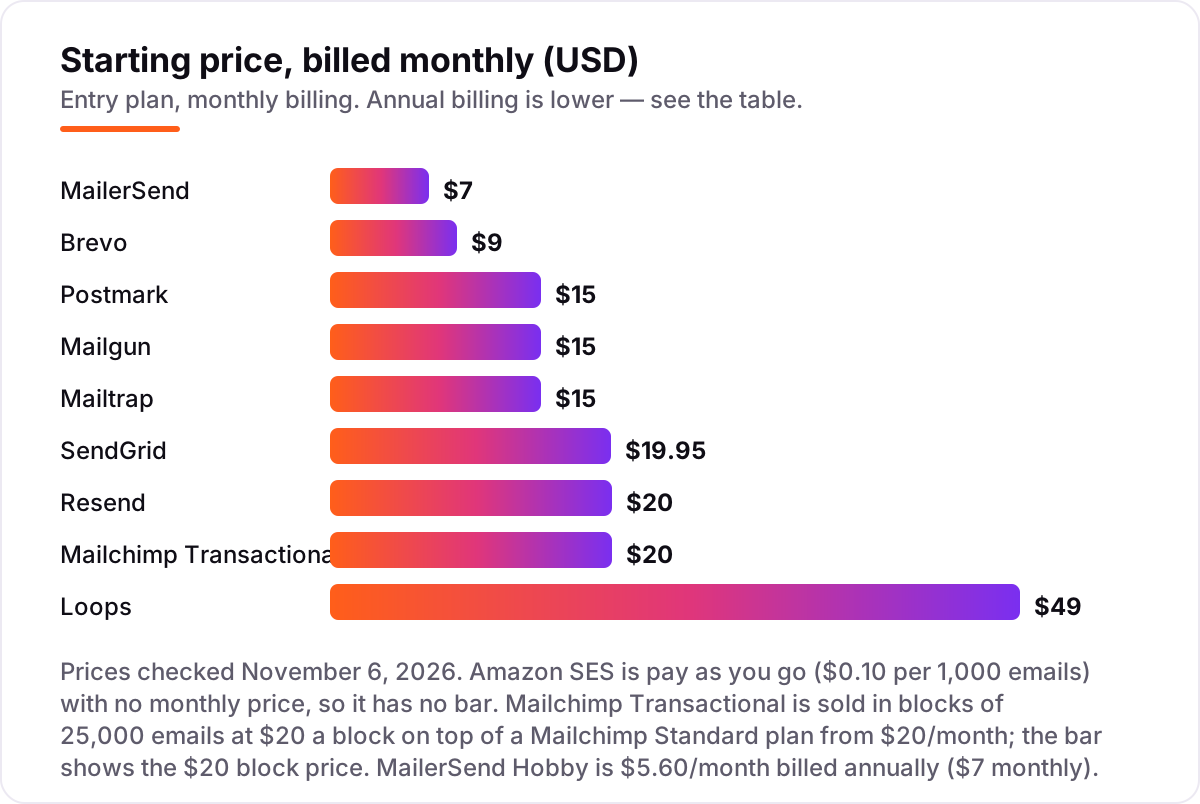
Email sending software pricing: what you will actually pay
Take a small app that sends 5,000 transactional emails a month — order confirmations, password resets, signup verifications. On list prices, the subscription costs $0.50 on Amazon SES, $7 on MailerSend Hobby, $9 on Brevo Starter, $15 on Postmark Basic, Mailgun Basic or Mailtrap Basic, $19.95 on SendGrid Essentials, $20 on Resend Pro, $40 on Mailchimp Transactional, and $49 on Loops. Three of those numbers need adjusting before they are real: Resend's free plan stops at 3,000 emails, so 5,000 needs Pro; Loops' free plan stops at 4,000 sends, so 5,000 needs the paid plan; and Mailchimp Transactional's $20 block sits on top of a $20 Standard plan.
Over a year, that is $6 on Amazon SES, $67.20 on MailerSend Hobby billed annually, $97 on Brevo Starter billed annually, $180 on Postmark, Mailgun or Mailtrap, $239.40 on SendGrid Essentials, $240 on Resend Pro, $480 on Mailchimp Transactional with its required Standard plan, and $588 on Loops. The same 5,000 emails cost $6 a year at the cheap end and $588 at the dear end — a gap that comes entirely from volume floors and what each plan counts, not from deliverability.
Three costs sit outside every number above. First, the overage rates: Postmark charges $1.80 per extra 1,000 emails on Basic, Mailgun $1.80 on Basic, Mailtrap $1.00, and Resend $0.90, so a busy month costs more than the sticker price. Second, dedicated IPs: $24.95 a month on Amazon SES, $29.95 on Mailchimp Transactional, and $30 on Resend Scale, and only SendGrid Pro includes one. Third, the add-ons: Brevo charges $12 a month to remove its branding on Starter, and Mailgun sells validation and deliverability suites separately. If you run a small business rather than a product team, the marketing side of the decision differs too — see our guide to the best email automation tools.
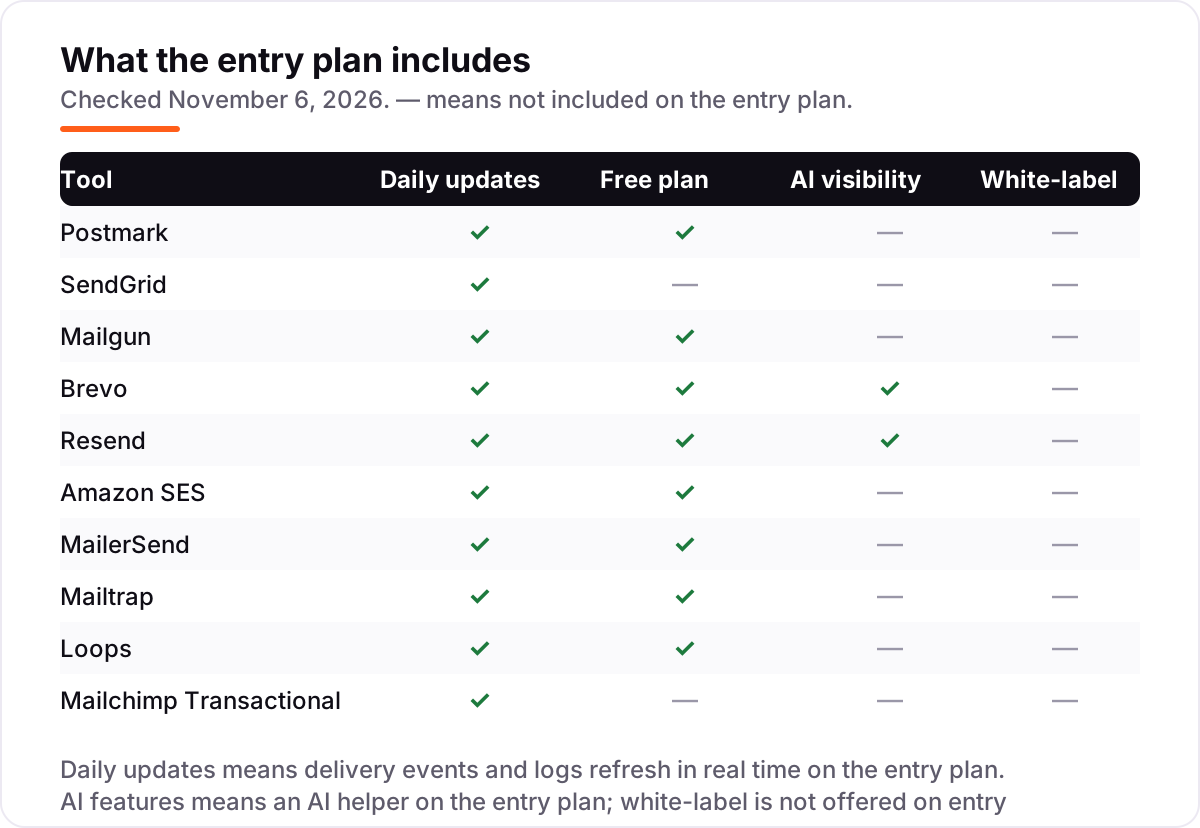
Know the difference: transactional email vs marketing email
The confusion in this category is between two kinds of email that look identical in the inbox but are judged differently by mailbox providers. Transactional email is triggered by one person's action — a password reset, a receipt, a signup confirmation — and it is expected, wanted and opened quickly. Marketing email is bulk — newsletters, promotions, announcements — and it is judged on engagement, complaints and unsubscribes. Send the two through the same stream and the marketing mail's complaints drag down the transactional mail's reputation, which is how password resets end up in spam.
That is why specialists like Postmark and Mailtrap keep the streams separate by default, and why SendGrid and Brevo sell their marketing products as separate subscriptions from their transactional APIs. The separation is not a sales trick; it is how deliverability works. A newsletter that lands in spam is a bad afternoon. A password reset that lands in spam is a locked-out customer.
There is a second, quieter confusion: an email API is not an email marketing platform. An API sends the messages your code triggers and reports on each one; it does not manage lists, design campaigns or run automations. Brevo, SendGrid and Loops bundle both jobs, while Postmark, Mailgun, Resend, Amazon SES, MailerSend and Mailtrap are sending infrastructure first. If a tool only sends, it belongs in this list; if it only campaigns, it belongs in a marketing list.
Quick comparison: tool type by need
| Buyer | Best pick | Why |
|---|---|---|
| Team that needs resets and receipts to arrive | Postmark | Deliverability-first specialist, separate streams, from $15/month |
| Team that wants one vendor for everything | SendGrid | Transactional API plus marketing campaigns, from $19.95/month |
| Developer team that wants API depth | Mailgun | REST and SMTP with inbound routing, from $15/month |
| Small business on a tight budget | Brevo | Transactional API plus CRM and SMS, from $9/month |
| New product starting fresh | Resend | Clean modern API, free up to 3,000 emails a month |
| High-volume sender already on AWS | Amazon SES | $0.10 per 1,000 emails, no monthly subscription |
| Side project or small app | MailerSend | Transparent pricing, free plan, from $7/month |
| Team that tests email before shipping | Mailtrap | Sandbox plus production sending, from $15/month |
| SaaS team wanting one email vendor | Loops | Marketing, lifecycle and transactional in one plan, from $49/month |
| Team already on Mailchimp Standard | Mailchimp Transactional | Same templates and reporting, $20 per 25,000-email block |
Mistakes to avoid
- Budgeting on the free tier. Resend's free plan stops at 3,000 emails a month and 100 a day, Mailtrap's at 4,000, and Postmark's at 100 a month. A launch-day burst blows past all three, so count the first paid plan in the price from day one.
- Paying for a floor you never reach. Postmark, Mailgun and Mailtrap all start at 10,000 emails, and SendGrid at 50,000. If you send 2,000 emails a month, Amazon SES costs about $0.20 and Brevo's free plan costs $0.
- Mixing transactional and marketing mail. One stream means one reputation. A promotional blast that draws complaints will push your password resets toward spam, so keep the streams separate even when one vendor sells both.
- Buying a dedicated IP too early. Dedicated IPs help only at consistent high volume, roughly 100,000-plus emails a month, and they need careful warmup. Below that, shared IPs perform fine and cost nothing.
- Forgetting the add-ons. Brevo charges $12 a month to remove its branding, Mailgun sells validation separately, and dedicated IPs run $25–$30 a month. Price the extras before you commit to a tool for the first.
How we chose
We checked each vendor's own pricing page on November 6, 2026 and recorded the starting price exactly as shown, including the annual-billing figure where the page lists one, and we ranked the tools by fit for the most common buyer — a product team sending transactional email — not by brand size. Ratings come from G2 pages checked the same day; Loops and Mailchimp Transactional show no rating because we could not find a G2, Capterra or Trustpilot listing for them, and we would rather show no rating than a stale or estimated one. Amazon SES has no monthly price because it is pay as you go, so it has no bar in the price chart. No vendor paid for a place in this list, and none of the links here are affiliate links.
What to do next
Start with the free plan or trial of your top pick and send a real week of transactional mail through it. Check that receipts land in the inbox at Gmail and Outlook, and that you can find a single failed message in the logs in seconds. If the sending is sorted but new customers are not finding you, our monthly SEO service handles the visibility side — or compare providers in our guide to email deliverability services. Once your tools are in place, find out what's holding your rankings back.
Your stack only works if people find you
SerpAstra fixes what keeps your site off page one and makes it easy for AI assistants to recommend.
Get a free audit→Sources we checked (18)
- Postmark pricing — postmarkapp.com/pricing (checked November 6, 2026)
- SendGrid Email API pricing — twilio.com/en-us/products/email-api/pricing (checked November 6, 2026)
- Mailgun pricing — mailgun.com/pricing (checked November 6, 2026)
- Brevo pricing — brevo.com/pricing (checked November 6, 2026)
- Resend pricing — resend.com/pricing (checked November 6, 2026)
- Amazon SES pricing — aws.amazon.com/ses/pricing (checked November 6, 2026)
- MailerSend pricing — mailersend.com/pricing (checked November 6, 2026)
- Mailtrap pricing — mailtrap.io/pricing (checked November 6, 2026)
- Loops pricing — loops.so/pricing (checked November 6, 2026)
- Mailchimp pricing — mailchimp.com/pricing (checked November 6, 2026)
- Postmark reviews — g2.com/products/activecampaign-postmark/reviews (checked November 6, 2026)
- SendGrid Email API reviews — g2.com/products/twilio-sendgrid-email-api/reviews (checked November 6, 2026)
- Mailgun reviews — g2.com/products/mailgun/reviews (checked November 6, 2026)
- Brevo reviews — g2.com/products/brevo-brevo/reviews (checked November 6, 2026)
- Resend reviews — g2.com/products/resend/reviews (checked November 6, 2026)
- Amazon SES reviews — g2.com/products/amazon-simple-email-service-amazon-ses/reviews (checked November 6, 2026)
- MailerSend reviews — g2.com/sellers/mailersend (checked November 6, 2026)
- Mailtrap reviews — g2.com/products/mailtrap/reviews (checked November 6, 2026)
Shamim
Founder of SerpAstra
A full-stack SEO and digital marketer who spends most days on Local SEO for dental practices, AI search visibility and lead generation.
Frequently asked questions
What is the best email sending software?
Postmark is the best fit for most teams: the strongest transactional deliverability, separate streams for transactional and broadcast mail, from $15/month. SendGrid is the better all-rounder when you also need marketing campaigns, and Brevo is the cheapest all-in-one at $9/month.
How much does email sending software cost?
For 5,000 emails a month, expect $0.50 on Amazon SES, $7 on MailerSend, $9 on Brevo, $15 on Postmark, Mailgun or Mailtrap, $20 on Resend, $19.95 on SendGrid, $40 on Mailchimp Transactional with its required Standard plan, and $49 on Loops.
What is the difference between transactional and marketing email?
Transactional email is triggered by user actions: password resets, receipts, signup confirmations. Marketing email is bulk campaigns: newsletters, promotions. They have different deliverability requirements, which is why specialists like Postmark keep them on separate sending streams, so a newsletter never harms a password reset.
Is there really free email sending software?
Yes, with small limits. Resend gives 3,000 emails a month, Mailtrap 4,000, Brevo 300 a day and Mailgun 100 a day, all free. SendGrid has no free plan since May 2025, only a 60-day trial, and Postmark's free plan covers just 100 emails a month.
Can I use one tool for transactional and marketing email?
Yes. SendGrid and Brevo both cover transactional sending and marketing campaigns in one account, and Loops covers marketing, lifecycle and transactional email for SaaS teams. The alternative is pairing a transactional specialist with a marketing tool, which keeps deliverability reputations separate.
Do I need a dedicated IP address?
Only at consistent high volume, roughly 100,000-plus emails a month on a regular schedule. Below that, shared IPs from reputable vendors perform fine and warm up faster. Dedicated IPs cost extra at most vendors and require careful warmup, so do not buy one before you need it.
Free SEO and AI visibility audit
Find out what is holding your rankings back
Send us your site. Within 2 business days you get a written audit, an AI visibility check and a short fix list ranked by impact. Free, with no contract attached.
Request my free audit→Related guides
 Digital Marketing & Ads10 Best Email Automation Tools in 2026 (Free and Paid, Compared)Compare the 10 best email automation tools on price, free plans and automation depth, with every starting price checked on November 5, 2026.Read guide →
 Digital Marketing & Ads7 Best Email Deliverability Services in 2026Compare the 7 best email deliverability services on real prices, inbox testing, warmup and monitoring, with every price checked November 5, 2026.Read guide →
 Digital Marketing & Ads9 Best Email and SMS Marketing Software in 2026, Compared9 best email and sms marketing software compared on price, SMS costs and free plans. Real starting prices checked November 4, 2026, sorted by use case.Read guide →