
11 Best Email Marketing Software for Small Business in 2026, Compared
The 11 best email marketing software for small business, compared on real 2026 prices, free plans and automation — Brevo starts at $9/month.
 Shamim Mia, Founder, SerpAstraLast verified November 4, 202616 min read
We compare pricing pages, documentation and public reviews. We never accept payment for rankings.

Key takeaways
- Brevo is the best value for most small businesses: automation and a free plan from $9/month for 5,000 emails. MailerLite ($12/month) and Mailchimp ($13/month) are the closest rivals.
- Free plans are real here — Kit covers up to 10,000 subscribers free and Brevo sends 300 emails a day free — but paid plans start at $9–$13/month and remove the branding and the caps.
- The single most important buying factor is how the price scales with your list: Mailchimp and Constant Contact charge by contacts, Brevo by emails sent, so the cheapest entry price is rarely the cheapest at 1,000 contacts.
- Every price below was cross-checked on November 4, 2026 against independent sources that read each vendor's own pricing page in October–November 2026; no review-site ratings are shown because those pages could not be opened for verification.
On this page
Quick comparison
| Tool | Best for | Starting price | Free plan |
|---|---|---|---|
| Brevo | Small businesses sending up to 5,000 emails a month that want automation and a free plan for $9/month | $9/mo | Yes (300/day) |
| MailerLite | Small businesses and solo senders who want the easiest builder and a free plan that covers the first 250 subscribers | $12/mo | Yes (250 subs) |
| Mailchimp | Small businesses that want the biggest template library and the most integrations, and accept that the bill rises with the list | $13/mo | Yes (250 contacts) |
| Constant Contact | Local businesses and event organisers that want phone support and event tools in a fixed paid plan | $12/mo | No (30-day trial) |
| Moosend | Budget senders who want every feature — automation, landing pages, A/B testing — for a single low price | $9/mo | No (30-day trial) |
| GetResponse | Small teams that want email plus webinars, a website builder and courses in one subscription | $19/mo | Yes (500 contacts) |
| AWeber | Newsletter senders who want a long-running tool with automation and landing pages from $15 a month | $15/mo | No (14-day trial) |
| Kit | Creators and newsletter writers growing a subscriber list they plan to monetise | $39/mo | Yes (10,000 subs) |
| ActiveCampaign | Small businesses that need real marketing automation — multi-step workflows and tagging — and will grow into Plus | $19/mo | No (14-day trial) |
| Omnisend | Online stores on Shopify or WooCommerce that want email, SMS and push in one place | $16/mo | Yes (250 contacts) |
| HubSpot | Small businesses that want email inside a free CRM, with one contact record for marketing and sales | $20/mo/seat | Yes (2,000 emails/mo) |
Make one of these tools?
We re-check this list every quarter. Send a correction, request a review, or ask about a clearly labeled sponsored spot.
Request a listingThe best email marketing software for small business

Brevo
Best for: Small businesses sending up to 5,000 emails a month that want automation and a free plan for $9/month
Brevo is the cheapest way into real email marketing because the $9 Starter plan does not feel like a starter plan: automation, an AI content generator, landing pages and forms are all included, and the free plan sends 300 emails a day without asking for a card. For a small business sending a weekly newsletter to a few hundred people, the free tier alone can carry the first year.
The catch is the contact cap. Starter's 5,000-email tier only stores 500 contacts, so a 1,200-contact list pays $17 a month, not $9 — check the tier your list actually needs before you compare prices. And removing the Brevo logo costs another $12 a month, which makes Standard ($18) the honest comparison for anyone who wants clean emails.
What we like
- Cheapest paid entry here at $9/month, with email automation included on Starter
- Free plan sends 300 emails a day and stores up to 100,000 contacts at no cost
- Prices by emails sent, not contacts — a large list emailed rarely costs less than on contact-priced tools
Watch out for
- Starter caps stored contacts at 500 on the 5,000-email tier — a 1,200-contact list needs the $17 tier
- Removing the Brevo logo from Starter emails costs $12/month extra, as much as the plan itself
MailerLite
Best for: Small businesses and solo senders who want the easiest builder and a free plan that covers the first 250 subscribers
MailerLite is the easiest tool in this list to learn, and the free plan is the reason to start here: landing pages, forms, automation and the drag-and-drop editor are all included before you pay anything. Comfort adds unlimited templates, multivariate testing and three user seats for $12 a month, which is the lowest price in this list for a plan with no meaningful limits.
The free plan is smaller than it used to be — 250 subscribers and 2,500 emails a month, down from 1,000 and 12,000 — so treat it as a trial runway, not a permanent home. Comfort's send cap is 10x your subscriber count, which is generous for a monthly newsletter but tight if you mail several times a week.
What we like
- Cleanest builder in this list — landing pages, forms and automation are all in the free plan
- Comfort unlocks unlimited templates, multivariate testing and 3 users for $12/month
- Charges only for active subscribers — bounced and unsubscribed contacts do not count
Watch out for
- The free plan shrank twice in a year: now 250 subscribers and 2,500 emails a month, down from 1,000 and 12,000
- Comfort caps monthly sends at 10x your subscriber count, so heavy senders outgrow it fast

Mailchimp
Best for: Small businesses that want the biggest template library and the most integrations, and accept that the bill rises with the list
Mailchimp is the default choice for a reason: the template library is the largest here, the integration catalogue runs to more than 300 apps, and almost every freelancer or agency you hire already knows it. Essentials costs $13 a month for 500 contacts and adds scheduling, A/B testing and 24/7 support, which covers a straightforward newsletter with no fuss.
The bill is the problem. Mailchimp charges for every contact stored, including unsubscribed ones, so a 10,000-contact list with a third inactive still bills at the 10,000-contact tier unless you archive them. Automation is also thin on Essentials — multi-step journeys need Standard at $20 a month — and there is no annual discount on the lower tiers.
What we like
- Largest template library and integration catalogue in this list — 300+ integrations on Essentials
- Essentials adds scheduling, A/B testing and 24/7 support from $13/month
- Predictive segmentation and send-time optimisation arrive on Standard ($20/month)
Watch out for
- You pay for every contact stored, including unsubscribed ones — archive them or the bill climbs
- Automation is thin on Essentials — multi-step journeys sit on Standard, and there is no annual-billing discount on the lower tiers

Constant Contact
Best for: Local businesses and event organisers that want phone support and event tools in a fixed paid plan
Constant Contact is the pick for businesses that want a human on the phone when something goes wrong: every paid plan includes phone, chat and email support, which no other tool here offers on its entry plan. Lite costs $12 a month for 500 contacts and bundles event registration and social posting with email, so a business that runs events gets three tools for one price.
There is no free plan — only a 30-day trial — so the meter starts sooner than on the free-tier tools, and Lite's automation is a single template. Scheduling, subject-line A/B testing and resends to non-openers all need Standard at $35 a month, which is nearly triple Lite's price for the features most small businesses actually want.
What we like
- Every paid plan includes phone, chat and email support — the only tool here with phone support on the entry plan
- Built-in event registration and social posting alongside email, with no free-plan gaps to work around
- Lite starts at $12/month for 500 contacts with 5,000 sends a month
Watch out for
- No free plan at all — the 30-day trial ends and the meter starts
- Automation is minimal on Lite (one template); scheduling and A/B testing need Standard ($35/month)

Moosend
Best for: Budget senders who want every feature — automation, landing pages, A/B testing — for a single low price
Moosend is the simplest deal in this list: one paid plan, every feature, priced only by contacts. Pro costs $9 a month for 500 contacts with unlimited sends, full automation workflows, landing pages, A/B testing and the AI Writer included — nothing is held back for a higher tier. For a budget sender who mails often, unlimited sends alone makes it cheaper than the contact-priced tools.
The trade-off is the absence of a free plan: after the 30-day trial you pay or you stop sending, so it suits businesses that already mail regularly rather than beginners testing the water. The template library is also smaller than Mailchimp's, and the integration list is shorter — check that your store or CRM connects before you commit.
What we like
- One plan, every feature: unlimited sends, full automation, landing pages and A/B testing from $9/month
- Prices only by contacts, so heavy senders pay the same as light ones
- 30-day trial with no credit card gives full Pro access to up to 1,000 contacts
Watch out for
- No permanent free plan — after 30 days you pay or you stop sending
- A smaller template library and fewer native integrations than Mailchimp or Brevo

GetResponse
Best for: Small teams that want email plus webinars, a website builder and courses in one subscription
GetResponse is the bundle pick: email, landing pages, a website builder, webinar hosting and course tools in one subscription, where the other tools here sell email alone. Starter costs $19 a month for 1,000 contacts and includes three user seats, autoresponders and an AI content generator — a small team can run its whole funnel without a second subscription.
Starter's automation is the limit to watch: one custom automation workflow, with unlimited workflows held for Marketer at $59 a month. The free plan covers 500 contacts and 2,500 emails a month, but it carries GetResponse branding and no integrations — and the same address on two lists can count twice toward your contact limit.
What we like
- Bundles email with webinar hosting, a website builder and course tools in one login
- Starter includes 3 user seats — the only entry plan here built for a small team
- Free plan covers 500 contacts and 2,500 emails a month with no credit card
Watch out for
- Starter allows only one custom automation workflow — unlimited workflows need Marketer ($59/month)
- The same email address on two lists can count twice toward your contact limit

AWeber
Best for: Newsletter senders who want a long-running tool with automation and landing pages from $15 a month
AWeber has sold email marketing for more than twenty years, and Lite shows it: $15 a month for 500 subscribers with unlimited sends, three automations, three landing pages and three users, plus the full template library and AI subject lines. There is no free plan — only a 14-day trial — so the first decision is whether the paid plan is worth it from day one.
Lite's caps are the thing to check: one list, three automations and three landing pages, with unlimited everything held for Plus at $30 a month. AWeber branding also stays on Lite emails — removing it needs Plus — so the plan that feels finished costs twice the entry price, and the interface looks dated next to MailerLite.
What we like
- Lite includes 3 automations, 3 landing pages and the full template library from $15 a month
- Lite is $15/month for 500 subscribers with unlimited sends and 3 users
- Twenty-plus years in business, with 24/7 support on every plan
Watch out for
- Lite caps you at 1 list, 3 automations and 3 landing pages — Plus ($30/month) removes the caps
- AWeber branding stays on Lite emails; removing it needs Plus

Kit
Best for: Creators and newsletter writers growing a subscriber list they plan to monetise
Kit is built for creators, not for blasted lists: tagging, visual automations and paid newsletters are the core, and the free plan covers up to 10,000 subscribers with unlimited sends, landing pages and forms. No other free plan here comes close, which makes Kit the cheapest way to grow a newsletter from zero to a real audience before paying anything.
Creator is where the bill starts, and it rose sharply: $39 a month for 1,000 subscribers, up from $29 in late 2025, with Creator Pro at $79. For a general small business that is a lot to pay for email alone — Kit earns its price for creators who sell digital products and paid newsletters, and less so for a shop that just sends a monthly offer.
What we like
- Free plan covers up to 10,000 subscribers with unlimited sends, landing pages and forms
- Tagging and visual automations are built for creators, not blasted lists
- Built-in paid newsletters and digital-product sales with a 3.5% + 30c transaction fee
Watch out for
- Creator jumped from $29 to $39/month in late 2025 — the steepest recent rise in this list
- No built-in SMS or advanced reporting; ecommerce integrations are thinner than Omnisend or Mailchimp

ActiveCampaign
Best for: Small businesses that need real marketing automation — multi-step workflows and tagging — and will grow into Plus
ActiveCampaign has the deepest automation in this list, and it shows from the entry plan: multi-step workflows, tagging and conditional logic, plus AI automation and campaign builders, for $15 a month billed annually at 1,000 contacts. If your marketing runs on behaviour — a welcome series, a win-back flow, a post-purchase sequence — no other tool here builds it as well.
Starter's limits are real, though: each automation caps at five actions with no branching, so a serious workflow needs Plus at $49 a month, and there is no free plan — only a 14-day trial. New accounts are also billed for every contact, including unsubscribed ones, so clean your list before you import it or the meter runs on dead addresses.
What we like
- Deepest automation in this list: multi-step workflows, tagging and conditional logic from Starter
- Starter includes AI automation and campaign builders, 250+ templates and 15 business goals
- Scales cleanly from 1,000 to 25,000 contacts on the same four plans
Watch out for
- Starter caps each automation at 5 actions with no branching — real workflows need Plus ($49/month)
- No free plan, and new accounts are billed for every contact including unsubscribed ones

Omnisend
Best for: Online stores on Shopify or WooCommerce that want email, SMS and push in one place
Omnisend is the ecommerce pick: email, SMS and web push in one plan, with deep Shopify and WooCommerce integrations and pre-built workflows for abandoned carts, welcome series and post-purchase follow-ups. Standard costs $16 a month for 500 contacts, and the free plan includes the full feature set — automation, segmentation and AI subject lines — capped at 250 contacts.
SMS is the catch for new sign-ups: it is not available on Standard any more and needs Pro at $59 a month, so the omnichannel pitch costs more than the headline price. Standard also caps sends at 12x your contact count, which is fine for a weekly newsletter but tight for a store that mails daily — and the 24/7 support is genuinely on every plan, including free.
What we like
- Email, SMS and web push in one plan, with deep Shopify and WooCommerce integrations
- Free plan includes the full feature set — automation, segmentation and AI subject lines — capped at 250 contacts
- 24/7 live chat and email support on every plan, including free
Watch out for
- SMS is not available on Standard for new sign-ups — it needs Pro ($59/month)
- Standard caps sends at 12x your contact count, so frequent senders hit the ceiling fast

HubSpot
Best for: Small businesses that want email inside a free CRM, with one contact record for marketing and sales
HubSpot is the CRM pick: the free Smart CRM stores up to one million contacts with forms, live chat and 2,000 emails a month, so a small business can run email inside the same contact record its sales uses. Starter costs $20 a month per seat, removes HubSpot branding, and adds email automation, landing pages and 25 active lists for 1,000 marketing contacts.
The pricing model is the warning: every extra seat costs another $20 a month, and extra contacts cost $50 per 1,000, so a three-person team with 5,000 contacts pays far more than the $20 headline. The next tier is a cliff, not a step — Professional is $890 a month plus a $3,000 onboarding fee — so HubSpot suits businesses that will stay small or grow into a full CRM.
What we like
- Free CRM stores up to 1 million contacts with forms, live chat and 2,000 emails a month
- Starter removes HubSpot branding and adds email automation, landing pages and 25 active lists
- One contact record across marketing, sales and service — no syncing between tools
Watch out for
- Per-seat pricing: every extra user costs another $20/month, and extra contacts cost $50 per 1,000
- The jump to Professional is $890/month plus a $3,000 onboarding fee — there is no middle tier
The best email marketing software for small business is the one that stays cheap as your list grows, not the one with the lowest sticker price. We compared 11 tools on their real 2026 prices, free plans and automation, and ranked them by fit for a business sending to a few thousand contacts — not by brand size.
What an email marketing tool actually does
An email marketing tool collects subscribers, designs the email, sends it to the list, automates the follow-ups and reports what happened — opens, clicks, unsubscribes and sales. That is the whole job: no copying addresses into a spreadsheet, no sending from a personal inbox, no guessing whether anyone read it. You build the list once, and the tool handles the sending, the timing and the record you can show a client or a partner.
People search for this category three ways — email marketing software, email marketing tools and newsletter software — and they all mean the same thing. The products differ in how they charge and what else they bundle around the sending: some price by contacts, some by emails sent, and a few bundle webinars, courses or a full CRM into the same subscription.
One number that shows why the choice matters: Litmus's State of Email 2025 survey found email returns an average of $36 for every $1 spent, with 35% of companies reporting $10–$36 and 30% reporting $36–$50 per $1. That return is why a $9 tool that gets used beats a $39 tool that sits idle — the software is cheap next to the list it serves.
Free options first
If you send to a small list, you may not need to pay at all. Kit covers up to 10,000 subscribers free, Brevo sends 300 emails a day free, and MailerLite, GetResponse and Omnisend all run free plans with automation included. The free tiers are honest products, not demos — but they cap out fast, and the moment your list passes a few hundred subscribers, a paid plan is cheaper than the time you lose working around the limits.
Four tools here have no free plan at all: Constant Contact offers a 30-day trial, Moosend a 30-day trial, ActiveCampaign a 14-day trial and AWeber a 14-day trial. For a business that already mails every week, a trial is enough to decide. For a business still building its first list, start on a free plan — Kit or Brevo — and upgrade when the subscriber count, not the calendar, says so.
Automation and AI: where the tools split
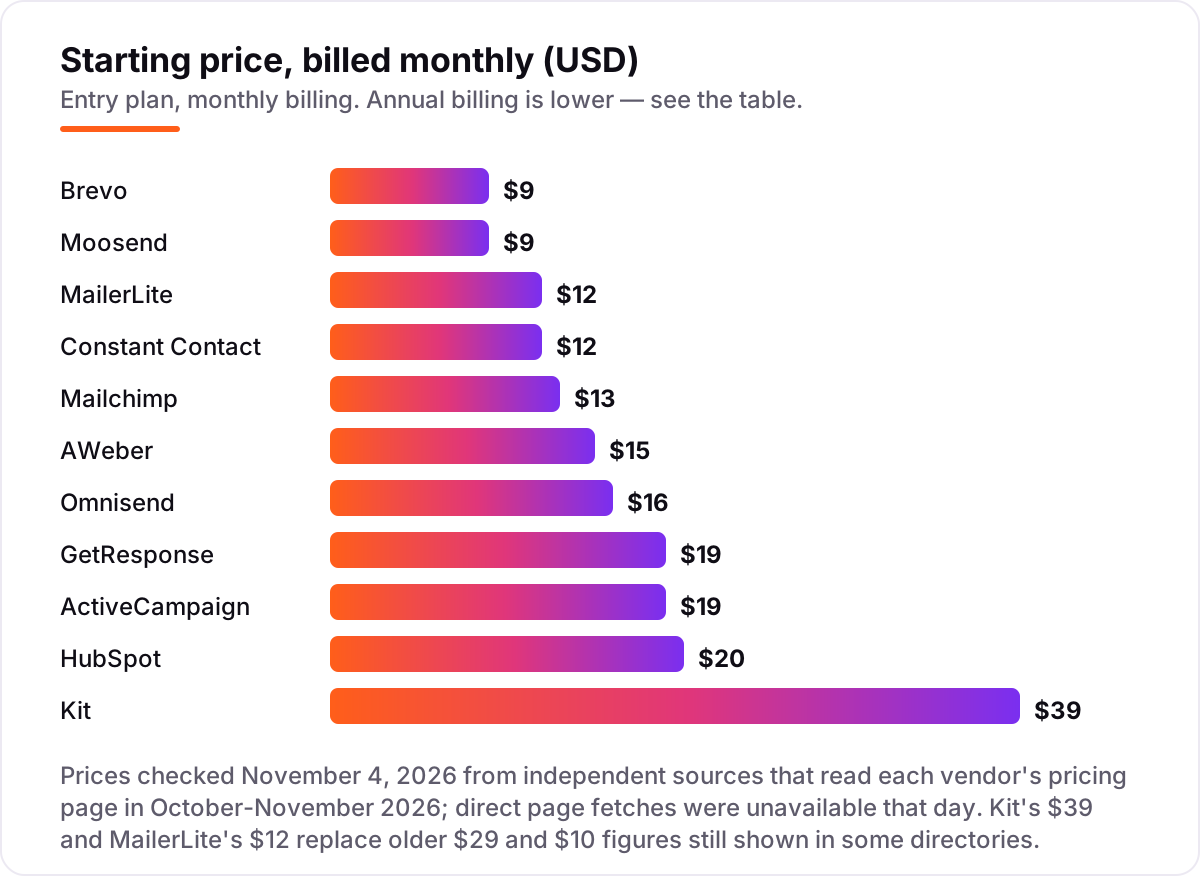
Automation is where the entry plans diverge. ActiveCampaign includes multi-step workflows on Starter but caps each one at five actions, GetResponse allows one custom workflow on Starter, Constant Contact allows one automation template on Lite, and Mailchimp keeps multi-step journeys on Standard. The lesson is to check what the entry plan actually automates — a welcome series that needs the next tier is not an entry-plan feature.
AI writing is now an entry-plan feature on most tools here: Brevo, MailerLite, GetResponse, AWeber, Omnisend and ActiveCampaign all include an AI subject-line or content assistant on their cheapest paid plan. Mailchimp, Constant Contact, Kit and HubSpot hold their AI tools for higher tiers. If you write every email yourself, AI matters less than deliverability — and if email is one channel among several, our monthly SEO service covers the search side of the same funnel. Our guide to email marketing for local business explains how the same tools work for a shop with a local list.
Email marketing software for small business pricing: what you will actually pay
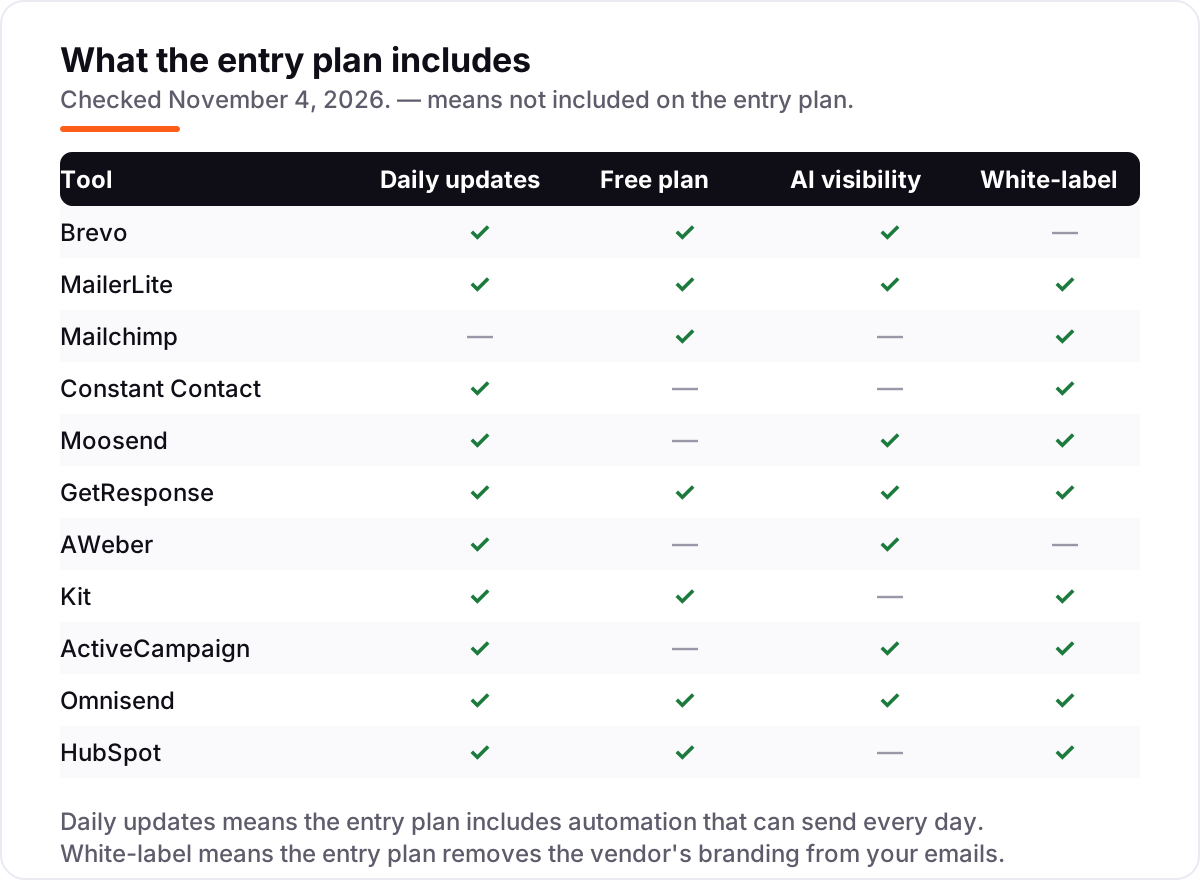
Take a small business with 500 contacts sending a weekly newsletter, paying monthly. Brevo Starter costs $9 a month, or $108 a year; MailerLite Comfort costs $12 a month, or $144 a year; Mailchimp Essentials costs $13 a month, or $156 a year; Constant Contact Lite costs $12 a month, or $144 a year; Moosend Pro costs $9 a month, or $108 a year; GetResponse Starter costs $19 a month, or $228 a year; AWeber Lite costs $15 a month, or $180 a year; Kit Creator costs $39 a month, or $468 a year; ActiveCampaign Starter costs $19 a month, or $228 a year; Omnisend Standard costs $16 a month, or $192 a year; and HubSpot Starter costs $20 a month per seat, or $240 a year for one seat. The same 500 contacts cost $108 a year at the cheap end and $468 at the dear end — a $360 gap that comes from what each plan includes, not from the list size.
Annual billing cuts the bill where it exists: Brevo drops from $9 to $8.08 a month, or $96.96 a year; MailerLite from $12 to $10.80, or $129.60 a year; Constant Contact from $12 to $10.20, or $122.40 a year; Moosend from $9 to $7, or $84 a year; GetResponse from $19 to $15.58, or $186.96 a year; AWeber from $15 to $12.50, or $150 a year; Kit from $39 to $33, or $396 a year; and ActiveCampaign from $19 to $15, or $180 a year. Mailchimp has no annual discount on its lower tiers, and Omnisend and HubSpot show no annual rate in the figures in this list, so their monthly price is the price.
Two costs sit outside those numbers. First, the billing unit: Brevo charges by emails sent, so a 500-contact list mailed once a month stays on the $9 tier, while Mailchimp and Constant Contact charge by contacts stored, so the same list costs $13 and $12 a month before a single email goes out. Second, the contact cap: Brevo's $9 tier stores only 500 contacts, so a list that grows past 500 moves to the $17 tier — check the price at the list size you will have in six months, not the one you have today.
Know the difference: dedicated email tools vs all-in-one suites
The confusion in this category is between tools that only send email and suites that bundle email with the rest of the business. The dedicated email tools — Brevo, MailerLite, Mailchimp, Constant Contact, Moosend, AWeber, Kit and Omnisend — do one job and do it well. They collect subscribers, they send email, and they stay out of the way. They are usually cheaper per contact and faster to learn.
The suites — GetResponse with webinars and courses, ActiveCampaign with CRM and deep automation, and HubSpot with a full CRM — bundle email with the rest of the business. You pay more, but you replace two or three subscriptions. The right camp depends on what you already pay for: if you own a CRM, use a dedicated email tool; if you need the CRM too, a suite costs less than buying the tools separately.
Quick comparison: tool type by need
| Buyer | Best pick | Why |
|---|---|---|
| Tightest budget | Brevo | $9/month with automation and a free plan |
| Easiest to learn | MailerLite | $12/month, clean builder, free to 250 subscribers |
| Most templates and integrations | Mailchimp | $13/month Essentials, but the bill rises with contacts |
| Events and phone support | Constant Contact | $12/month Lite, 30-day trial, no free plan |
| Full features for $9 | Moosend | Pro from $9/month, unlimited sends, no free plan |
| Creators and newsletters | Kit | Free to 10,000 subscribers, Creator $39/month |
| Deepest automation | ActiveCampaign | Starter $15/month billed annually, 5-action limit |
| Online stores | Omnisend | $16/month Standard, email plus SMS and push |
| Email inside a CRM | HubSpot | $20/seat/month Starter, free CRM included |
How to choose the best email marketing software for small business
Worked example — one list of 1,000 contacts, monthly billing: Brevo $17 (you need the 10,000-email tier for the contact cap), MailerLite $19, Mailchimp $26.50, Constant Contact $30, Moosend $16, GetResponse $19, AWeber $25, Kit $39, ActiveCampaign $19 and HubSpot $20 per seat. The cheapest entry price is rarely the cheapest at your real list size.
- Count your contacts first. Under 500, the free plans and the cheapest paid plans cover you. Over 1,000, the price at your list size decides — Brevo, Moosend and MailerLite win at small volumes.
- Check how you are billed. Brevo charges by emails sent, most others by contacts stored. A large list emailed rarely is cheaper on Brevo; a small list emailed daily is cheaper on a contact-priced tool.
- Decide what the entry plan automates. If you need a welcome series or an abandoned-cart email, make sure it is on the plan you buy — several tools hold real automation for the next tier.
- Try the free plan or trial with your real list. Import your contacts, send a real campaign and check the numbers against your old tool before you commit.
- Price the next tier before you buy. The jump from Starter to the next plan is where the bill surprises people — HubSpot's is $890 a month, and ActiveCampaign's Plus is $49.
Before you send your first campaign, build tracked links with the free UTM builder so you can see which emails actually bring orders.
Mistakes to avoid
- Comparing entry prices without checking the billing unit. Brevo's $9 buys 5,000 emails for 500 contacts; Mailchimp's $13 buys 500 contacts and 5,000 sends. Same numbers, different maths — check the price at your list size.
- Paying for contacts you do not mail. Mailchimp and ActiveCampaign charge for unsubscribed contacts on new accounts. Archive or delete the dead addresses before you import, or the meter runs on people who will never open.
- Buying automation you cannot use. Starter caps are real: one workflow on GetResponse, one template on Constant Contact, five actions on ActiveCampaign. If the workflow you need is capped, the plan you need is the next one up.
- Trusting a directory price. Kit still shows $29 on several directories; the live pricing page says $39. MailerLite still shows $10 in older roundups; the current Comfort price is $12. Always check the vendor's own page — and our guide to marketing automation for small business explains which of these caps matter most.
- Forgetting the trial ends. Set a reminder for the day the trial converts, and export a backup of your list before you cancel anything.
How we chose
We cross-checked each vendor's own pricing page figure on November 4, 2026 through independent sources that had read the vendor pages in October and November 2026, because direct page fetches were unavailable that day; where sources disagreed — Kit's $29 against $39, MailerLite's $10 against $12 — we used the most recent dated check and named the older figure in this guide. No review-site ratings are shown because the G2 and Capterra pages could not be opened for verification. We ranked the tools by fit for the most common buyer — a small business sending to a few thousand contacts — not by brand size. No vendor paid for a place in this list, and none of the links here are affiliate links.
What to do next
Start with the decision path above: count your contacts, check the billing unit, and confirm the entry plan automates what you need. Then take the free plan or trial of your top pick and send a real campaign to your real list for a week. If the emails land, the reports make sense and the price at your list size still looks right, you have your tool. Once your tools are in place, find out what's holding your rankings back.
Your stack only works if people find you
SerpAstra fixes what keeps your site off page one and makes it easy for AI assistants to recommend.
Get a free audit→Sources we checked (23)
- Brevo pricing — brevo.com/pricing (corroborated November 4, 2026)
- Brevo pricing cross-check — digitaltreed.com (October 2026)
- MailerLite pricing — mailerlite.com/pricing (corroborated November 4, 2026)
- MailerLite pricing cross-check — emailsoftwareinsights.com (checked October 28, 2026)
- Mailchimp pricing — mailchimp.com/pricing/marketing (corroborated November 4, 2026)
- Mailchimp pricing cross-check — drry.com (October 2026)
- Constant Contact pricing — constantcontact.com/pricing (corroborated November 4, 2026)
- Constant Contact pricing cross-check — marketingemailtools.com (read October 7, 2026)
- Moosend pricing — moosend.com/pricing (corroborated November 4, 2026)
- Moosend pricing cross-check — marketingemailtools.com (October 7, 2026)
- GetResponse pricing — getresponse.com/pricing (corroborated November 4, 2026)
- GetResponse pricing cross-check — thatmarketingbuddy.com (verified October 19, 2026)
- AWeber pricing — aweber.com/pricing (corroborated November 4, 2026)
- AWeber pricing cross-check — profitsanity.com (checked October 2026)
- Kit pricing — kit.com/pricing (corroborated November 4, 2026)
- Kit pricing cross-check — newsletterpricing.com (checked November 3, 2026)
- ActiveCampaign pricing — activecampaign.com/pricing (corroborated November 4, 2026)
- ActiveCampaign pricing cross-check — softwarestackpro.com (checked October 29, 2026)
- Omnisend pricing — omnisend.com/pricing (corroborated November 4, 2026)
- Omnisend pricing cross-check — thebrandcaptain.com (checked October 25, 2026)
- HubSpot pricing — hubspot.com/pricing/marketing (corroborated November 4, 2026)
- HubSpot pricing cross-check — mailsoftly.com (checked October 18, 2026)
- Litmus State of Email 2025 — email ROI of $36 per $1 spent
Shamim
Founder of SerpAstra
A full-stack SEO and digital marketer who spends most days on Local SEO for dental practices, AI search visibility and lead generation.
Frequently asked questions
What is the best email marketing software for small business?
Brevo is the best value for most small businesses: automation included and a free plan from $9/month for 5,000 emails. MailerLite is the easiest at $12/month, and Mailchimp is the best-known at $13/month. If you sell online, Omnisend fits better; if you want email inside a CRM, HubSpot Starter is $20 per seat.
How much does email marketing software cost?
Between $9 and $39 a month at the entry level. Brevo and Moosend start at $9, MailerLite at $12, Mailchimp at $13 and Kit at $39. The entry price is not the whole story: at 1,000 contacts Brevo costs $17, Mailchimp $26.50 and Constant Contact $30 a month, so check the price at your list size.
Is there a free email marketing tool for small business?
Yes, with limits. Kit covers up to 10,000 subscribers free, Brevo sends 300 emails a day free, and MailerLite, GetResponse and Omnisend all have free plans. Constant Contact, Moosend, ActiveCampaign and AWeber have no free plan — only a trial of 14 to 30 days.
What is the difference between Brevo and Mailchimp?
The billing model. Brevo charges by emails sent, so a large list emailed rarely stays cheap; Mailchimp charges by contacts stored, including unsubscribed ones, so the bill climbs as the list grows. Brevo starts at $9 a month, Mailchimp at $13, and Brevo includes automation on its entry plan while Mailchimp keeps multi-step journeys on Standard.
Do I need automation, or is a newsletter tool enough?
A newsletter tool is enough if you send one broadcast a week to one list. Automation pays the moment you want a welcome series, an abandoned-cart email or a birthday offer to send itself. Every tool in this list except Mailchimp's Essentials includes automation on its entry plan, so check what the entry plan actually automates before you pay.
Can I switch email marketing tools later?
Yes. Every tool here lets you export your contacts as a CSV file, and most offer a free import or migration service. The work is rebuilding your templates and automations, which do not transfer. Keep your list clean and export a backup before you cancel, so a switch is a weekend job rather than a rebuild.
What should I check before paying for an email marketing tool?
Four things: how the price is calculated (contacts or emails sent), what the price is at your list size rather than the entry tier, whether automation and branding removal are on the entry plan, and what the next tier costs. The comparison table at the top of this guide shows the starting price and free plan for each tool.
Free SEO and AI visibility audit
Find out what is holding your rankings back
Send us your site. Within 2 business days you get a written audit, an AI visibility check and a short fix list ranked by impact. Free, with no contract attached.
Request my free audit→Related guides
 MarketingEmail marketing for local businesses (that customers actually open)Email marketing for local businesses: build a list the right way, send emails customers open, and turn past customers into repeat bookings without spam.Read guide →
 MarketingMarketing automation for small businesses: what to automate (and what not to)Marketing automation for small businesses, explained: what to automate first, what to keep human, and the tools that save hours without losing customers.Read guide →
 SEO & AI Search12 Best Marketing Platforms for Small Business SEO in 2026, ComparedThe 12 best marketing platforms for small business SEO, compared on real prices, SEO tools and AI visibility. Every price checked November 1, 2026.Read guide →