
Best Email Tracking Software for 2026: 11 Options Compared by Use Case
Compare the 11 best email tracking software options for 2026 on price, free plans and open tracking, with every price checked November 6, 2026.
 Shamim Mia, Founder, SerpAstraLast verified November 6, 202613 min read
We compare pricing pages, documentation and public reviews. We never accept payment for rankings.

Key takeaways
- Yesware is the best fit for most buyers at $19/seat/month; Mailsuite is the simplest free tracker, and HubSpot Sales Hub pairs free tracking with a free CRM.
- Eight of the eleven tools have a free plan, and the cheapest paid plans are Mailbutler at $5/user/month and Right Inbox at $7.95/month billed annually.
- The single most important buying factor is the per-seat multiplier: Lemlist's $69 flat Email plan covers unlimited users, while per-seat tools charge for every rep.
- Open rates are directional, not exact — Apple Mail Privacy Protection inflates them, so judge messages on clicks and replies.
On this page
Quick comparison
| Tool | Best for | Starting price | Free plan |
|---|---|---|---|
| Yesware | Sales reps on Gmail and Outlook who want proven open tracking plus templates and campaigns in one add-in | $19/seat/mo | Yes (Free Forever) |
| Mailsuite | Freelancers and founders who only need to know whether a proposal was opened | €6.99/user/mo | Yes (free plan) |
| HubSpot Sales Hub | Small teams that want free email tracking inside a free CRM with room to grow | $20/seat/mo | Yes (free CRM) |
| Streak | Gmail-only teams that want tracking plus pipelines without leaving the inbox | $59/user/mo | Yes (email tools) |
| Mixmax | Sales reps who want engaging outreach — polls, calendar embeds and sequences — from Gmail | $29/user/mo (annual) | Yes (free plan) |
| Mailbutler | Mixed Gmail, Outlook and Apple Mail teams that need the same tracking everywhere | $5/user/mo | Yes (Starter) |
| Right Inbox | Light Gmail users who want tracking, send-later and reminders for the lowest paid price here | $7.95/mo (annual) | Yes (5/mo) |
| GMass | Gmail users sending mail-merge campaigns who want tracking on every send | $29.95/mo | No (7-day trial) |
| Apollo | Outbound teams that want a contact database, sequences and tracking in one seat | $49/user/mo (annual) | Yes (free plan) |
| Lemlist | Email-first teams that want flat pricing — unlimited users — with personalization and warm-up built in | $55/mo (annual) | Yes (free plan) |
| Staffbase Email | Internal comms teams at large organizations that must prove employees read company email | Custom quote | No (demo only) |
Make one of these tools?
We re-check this list every quarter. Send a correction, request a review, or ask about a clearly labeled sponsored spot.
Request a listingThe best email tracking software

Yesware
Best for: Sales reps on Gmail and Outlook who want proven open tracking plus templates and campaigns in one add-in
Yesware has tracked sales email since 2010, longer than any other tool here, and that maturity shows in the details: the free plan covers basic open and attachment tracking, a meeting scheduler and 10 campaign recipients a month, so a solo rep can start tracking without paying anything. Pro costs $19 a seat a month, or $15 billed annually, and removes the limits with unlimited open, link and attachment tracking.
Premium costs $45 a seat a month and adds team reporting, shared templates and unlimited campaigns, while Enterprise at $85 adds the Salesforce sync that larger teams need. The trade-off is scope: Yesware lives in Gmail and Outlook only, and the free tier is deliberately thin. Buy it when you want the proven default for a sales team that works from the inbox.
What we like
- Free tier includes basic open and attachment tracking
- Unlimited open, link and attachment tracking on Pro
- Campaigns, templates and a meeting scheduler in the same add-in
- Salesforce sync on Enterprise for teams that live in Salesforce
Watch out for
- Free tier caps campaigns at 10 recipients a month
- Team reporting and shared templates need Premium at $45/seat/month
- Gmail and Outlook only — no Apple Mail support

Mailsuite
Best for: Freelancers and founders who only need to know whether a proposal was opened
Mailsuite, formerly Mailtrack, is the simplest tracker in this list: a Gmail and Outlook extension that puts double check-marks beside an email the moment it is opened, with a real-time notification to match. The free plan tracks unlimited opens, which is enough for a freelancer checking whether a proposal was read, though every free email carries a visible Mailsuite signature.
Paid plans start with Mailtrack at €6.99 a user a month, which removes the signature and adds link tracking and a week of history; the Mailsuite plan at €19.99 adds full history and campaigns. There is no CRM and no sequencing, so this is a tracking tool and nothing else. Pick Mailsuite when the only question you need answered is whether an email was opened.
What we like
- Free plan tracks unlimited opens with real-time notifications
- Double check-marks show opens right inside Gmail
- Installs in seconds with no setup and no learning curve
- Paid tiers add link tracking, campaigns and full history
Watch out for
- Free plan adds a visible "Sent with Mailsuite" signature
- Link tracking and full history need a paid plan
- No CRM, sequences or template depth

HubSpot Sales Hub
Best for: Small teams that want free email tracking inside a free CRM with room to grow
HubSpot is the only tool here where tracking comes with a real CRM at no cost: the free tools include open and click tracking in Gmail and Outlook, contact management, deal pipelines and meeting scheduling for up to two users. Every open is logged against the contact and deal automatically, so a follow-up call starts with the full history instead of a guess about whether the email landed.
Sales Hub Starter costs $20 a seat a month at list, with a limited-time $7 rate for new customers on annual billing, and adds more pipelines, workflows and calling minutes. Professional jumps to $90 a seat a month plus a $1,500 onboarding fee, which is where sequences and forecasting live. Choose HubSpot when tracking should feed a CRM, not sit in a browser extension.
What we like
- Free plan includes open and click tracking plus a real CRM
- Tracked opens log automatically against contacts and deals
- Gmail and Outlook integrations included from the free plan
- Scales from free tools to a full sales platform
Watch out for
- Starter's $7 rate is a limited-time new-customer offer — the list price is $20
- Sequences and real automation wait for Professional at $90/seat/month
- Free emails carry HubSpot branding

Streak
Best for: Gmail-only teams that want tracking plus pipelines without leaving the inbox
Streak lives entirely inside Gmail as a browser extension, and its free plan is the most useful free tier here for a Gmail user: email and link tracking, snippets, 50 mail-merge sends a day and thread tools, all at no cost. Tracked opens feed straight into deal records, so the pipeline and the inbox stay in sync without anyone copying data between apps.
The catch is the price of the CRM itself: the old free CRM tier is gone, so pipelines start on Pro at $49 a user a month billed annually, or $59 month to month, and automations need Pro+ at $69. There is no Outlook support at any price. Buy Streak when your whole team lives in Gmail and wants the pipeline where the email already is.
What we like
- Free plan includes email and link tracking, snippets and mail merge
- Pipelines sit inside Gmail beside the email
- Tracked opens feed deal records automatically
- 14-day Pro+ trial to test the CRM before paying
Watch out for
- The old free CRM tier is gone — pipelines start at Pro ($49/user/month annual)
- Gmail only, with no Outlook support
- Automations and integrations need Pro+ at $69/user/month

Mixmax
Best for: Sales reps who want engaging outreach — polls, calendar embeds and sequences — from Gmail
Mixmax turns Gmail into a sales engagement tool, and its free plan is generous: email tracking, scheduling, templates, polls and surveys, with no card required. The paid plans are now sold as Copilots — Inbox Copilot at $29 a user a month billed annually, or $34 month to month — and add mail merge, shared calendars and shared templates for small teams.
Engagement Copilot at $49 billed annually adds sequences and rules-based automation, while the full Suite reaches $89. Interactive touches like polls and calendar embeds are the draw, and they sit inside the email itself. Pick Mixmax when outreach should feel engaging rather than templated, and check the Copilot pricing carefully before you budget.
What we like
- Free plan covers tracking, scheduling, templates and polls
- Sequences with personalization and rules automate follow-up
- Interactive polls and calendar embeds lift replies
- Salesforce and HubSpot integrations on higher tiers
Watch out for
- Recent repricing into Copilot plans makes the full suite cost more than the $29 headline
- Advanced automation and CRM sync sit on higher tiers
- Strongest in Gmail, weaker everywhere else

Mailbutler
Best for: Mixed Gmail, Outlook and Apple Mail teams that need the same tracking everywhere
Mailbutler is the only tracker in this list that works the same way in Apple Mail as it does in Gmail and Outlook, which makes it the default for mixed-device teams. The free Starter plan includes unlimited tracked emails and signatures, with a visible watermark, while the paid Starter at $5 a user a month, or $4 billed annually, removes it.
The Smart plan at $14 a user a month, or $11 billed annually, is the one most buyers want: per-recipient tracking on group sends, plus device and location details for each open. Business adds a custom tracking subdomain and CRM sync. Choose Mailbutler when your team is split across mail clients and needs identical tracking everywhere.
What we like
- Only tool here that tracks in Apple Mail as well as Gmail and Outlook
- Free Starter includes unlimited tracked emails
- Smart plan adds per-recipient tracking and device and location details
- Business adds a custom tracking subdomain
Watch out for
- Meaningful engagement data needs the Smart plan at $14/user/month ($11 annual)
- Free Starter adds a visible watermark to outgoing email
- Smaller integration ecosystem than HubSpot or Yesware

Right Inbox
Best for: Light Gmail users who want tracking, send-later and reminders for the lowest paid price here
Right Inbox is the minimalist option: a Gmail extension that adds open tracking, send-later scheduling, reminders and templates to the compose window, with nothing to configure. The free plan covers 5 tracked emails a month, which is enough to test it, and Professional at $9.95 a month, or $7.95 billed annually, removes the cap entirely.
The Team plan at $19.95 a month, or $16.95 billed annually, covers unlimited members, which keeps a small team cheap. The limits are clear: Gmail only, no CRM, and mail merge sits on Professional. One warning from reviewers: Trustpilot carries reports of charges continuing after cancellation, so check your billing after any trial.
What we like
- Cheapest paid plan in this list at $7.95/month billed annually
- Scheduling, reminders and sequences sit inside the Gmail compose window
- Installs in seconds with almost no learning curve
- Team plan covers unlimited members for $16.95/month
Watch out for
- Free plan covers only 5 tracked emails a month
- Gmail only, with no CRM depth
- Trustpilot reviewers report charges continuing after cancellation

GMass
Best for: Gmail users sending mail-merge campaigns who want tracking on every send
GMass turns Gmail into a mail-merge and campaign tool, and tracking is built into every send: opens and clicks, custom tracking domains and campaign reports come with the Standard plan. Prices rose on January 1, 2026, so Standard now costs $29.95 a month, or $20 a month billed annually at $249 a year, and the old $25 rate you will see in older roundups is stale.
Premium at $39.95 a month adds follow-up sequences, API access and A/B testing, while Professional at $59.95 adds inbox rotation for larger senders. The free plan is gone — new accounts get a 7-day trial capped at 50 emails a day — and Gmail's own sending limits still apply. Pick GMass when campaigns run from Gmail and nowhere else.
What we like
- Unlimited emails, contacts and campaigns on every paid plan
- Open and click tracking with custom tracking domains
- Spam Solver and verification included on Standard
- Works entirely inside Gmail with no new app to learn
Watch out for
- No free plan since December 2023 — only a 7-day trial
- Gmail only, with no Outlook sending
- Sequences, API access and A/B testing need Premium at $39.95/month

Apollo
Best for: Outbound teams that want a contact database, sequences and tracking in one seat
Apollo is the only tool here that finds the people to email as well as tracking them: a database of 275 million contacts with 65 search filters, sequences, a dialer and an AI assistant in one seat. The free plan includes 900 credits a year, and Basic at $65 a user a month, or $49 billed annually, adds 30,000 credits a year, unlimited sequences and email warm-up.
Credits are the catch: one credit reveals an email, eight reveal a phone number, and unused credits expire at the end of each billing cycle. Data accuracy is also the top complaint in G2 reviews, so verify before you trust a list. Choose Apollo when one seat should cover finding, emailing and tracking, not just the tracking.
What we like
- 275M+ contact database with 65+ search filters in the same seat as sequences
- Free plan includes 900 credits a year and the AI Assistant
- Unlimited sequences and email warm-up on Basic
- Chrome extension tracks engagement from Gmail and LinkedIn
Watch out for
- Contact data accuracy is the top G2 complaint, especially phone numbers
- Credits expire at the end of each billing cycle
- Every seat on an account must be on the same plan

Lemlist
Best for: Email-first teams that want flat pricing — unlimited users — with personalization and warm-up built in
Lemlist prices by sending volume, not by seat, which makes its Email plan the bargain of this list for teams: $69 a month, or $55 billed annually, covers unlimited users and senders and 50,000 emails a month. Warm-up is included on every plan, and dynamic images and AI personalization sit in the same builder as the sequences.
The trade-off is credits: the Email plan includes none, so finding and verifying addresses costs extra at $10 per 1,000 credits, and Multichannel Expert jumps to $109 a user a month for LinkedIn, calls and SMS. Pick Lemlist when the whole team sends email and one flat price beats five per-seat bills.
What we like
- Flat Email price covers unlimited users and senders — rare in this list
- Warm-up (lemwarm) included on every plan
- Dynamic images and AI personalization lift replies
- 450M+ lead database included
Watch out for
- The Email plan includes no enrichment credits — finder credits cost extra
- Multichannel jumps to $87/user/month billed annually
- LinkedIn automation runs through a Chrome extension, which carries account risk

Staffbase Email
Best for: Internal comms teams at large organizations that must prove employees read company email
Staffbase Email, formerly Bananatag, is the only tool in this list built for internal communications: it tracks opens, clicks and engagement on employee email, then breaks the numbers down by department, location and role. Pulse surveys run inside the message, and distribution lists keep company-wide sends manageable, all with Outlook integration.
There is no price list and no free plan: Staffbase sells by tailored quote only, with annual billing and modular packages, and deployments typically take three to four months. That makes it the most expensive and slowest option here by a wide margin. Buy it only when proving employees read company email is the job itself.
What we like
- Built for employee communications, not sales outreach
- Engagement broken down by department, location and role
- Outlook integration and distribution-list management
- Pulse surveys run inside the message
Watch out for
- Quote-based pricing with no self-serve option
- Enterprise buying motion with 3–4 month deployments
- Overkill for anyone tracking sales outreach
The best email tracking software answers one question the moment it matters: did they open it? The eleven tools below all do that, but they serve very different buyers — a freelancer checking one proposal, a sales team running sequences, and an internal comms team proving employees read the CEO's update. Every price was checked on the vendor's own pricing page on November 6, 2026.
Most of the tools here cost nothing to start: eight of the eleven have a free plan, and the cheapest paid plan is $5 a month. The expensive mistakes are not the subscription fees — they are buying a CRM when you only needed a tracker, or paying per seat when a flat price would cover the whole team. The guide below sorts the tools by the buyer they fit, so start with your situation, not the brand name.
How to choose the best email tracking software
- Start with your mail client. Streak, Right Inbox and GMass work in Gmail only; Mailbutler is the only tracker here that also covers Apple Mail, and Yesware, Mixmax and HubSpot cover Gmail and Outlook.
- Decide whether tracking is the job or part of it. Mailsuite and Right Inbox only track; Streak, HubSpot, Apollo and Lemlist add pipelines, sequences or a database — and charge for them.
- Check the free plan's real limit. Mailsuite tracks unlimited opens free; Right Inbox stops at 5 a month; Streak's free plan has tracking but no pipelines; GMass has no free plan at all.
- Count seats before you compare prices. Lemlist's $69 Email plan covers unlimited users, while Yesware, Apollo and Streak charge per seat — a five-person team multiplies the headline price by five.
- Ask what an open actually proves. Apple Mail Privacy Protection and image prefetching inflate open counts, so treat opens as a timing signal and clicks as the stronger proof.
The tool also needs to fit how your team already works. If everyone lives in Gmail, a browser extension like Streak or Right Inbox disappears into the inbox; if half the team is on Outlook or Apple Mail, only Mailbutler and the bigger platforms cover everyone. And if tracking should feed a CRM, start with HubSpot or Apollo rather than bolting a tracker onto a system it cannot talk to.
Before you send anything trackable, set up clean links. Our free UTM builder adds campaign parameters to your links so clicks in the tracker line up with what Google Analytics shows — without it, you will see opens but never know which campaign earned the click.
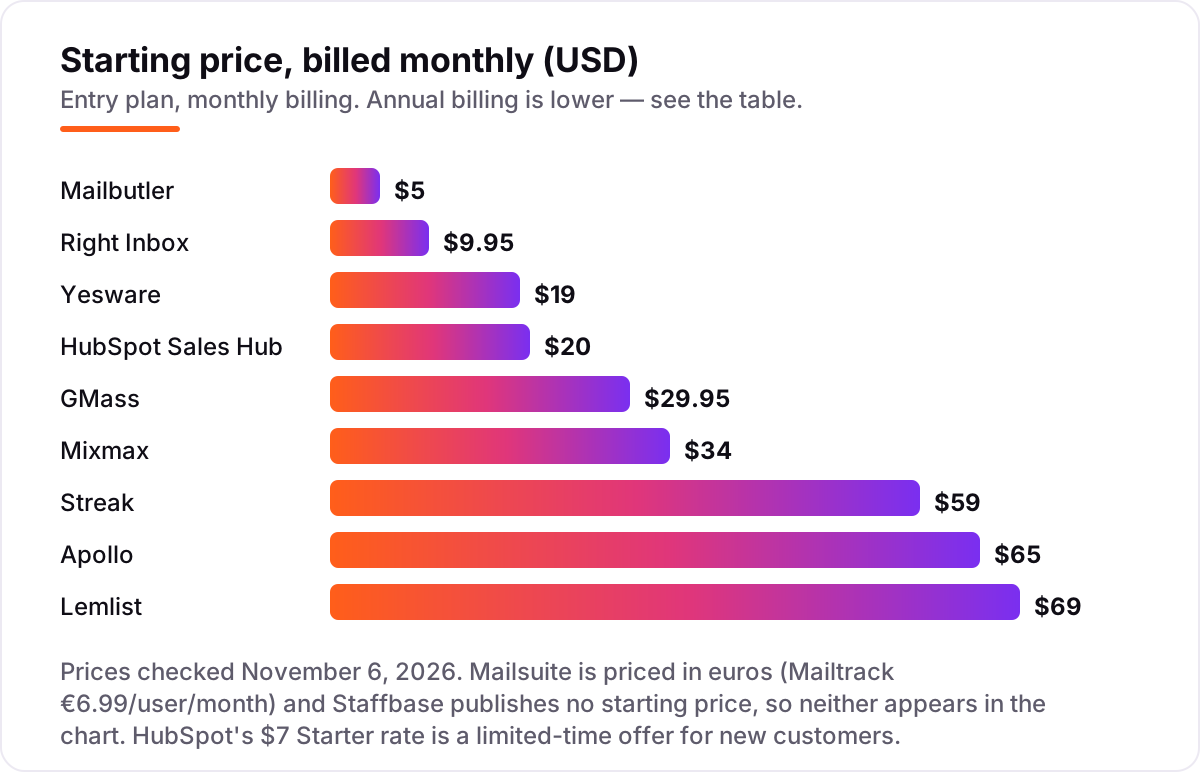
Email tracking software pricing: what you will actually pay
Take a five-person sales team that lives in Gmail and sends about 200 tracked emails a week. On monthly billing, the bill is $25 on Mailbutler Starter, $49.75 on Right Inbox Professional, $95 on Yesware Pro, $100 on HubSpot Starter, $149.75 on GMass Standard, $170 on Mixmax Inbox Copilot, $295 on Streak Pro and $325 on Apollo Basic. Lemlist breaks the pattern: its Email plan is $69 a month flat, no matter how many of the five send. Mailsuite costs €34.95 a month for five users on the Mailtrack plan, and Staffbase is a custom quote.
Annual billing changes the order. A year costs $240 on Mailbutler, $477 on Right Inbox, $660 on Lemlist, $900 on Yesware, $1,200 on HubSpot at list — or $420 while the $7 new-customer offer lasts — $1,245 on GMass, $1,740 on Mixmax, and $2,940 on both Streak and Apollo. The same five people cost $240 a year at the cheap end and $2,940 at the dear end, a $2,700 gap that comes entirely from per-seat pricing and what else the tool does.
Three costs sit outside every number above. First, the add-ons: Apollo charges extra credits once the allowance runs out, Lemlist sells finder credits at $10 per 1,000, and Streak's automations need Pro+. Second, the seat math: every per-seat tool here charges for each user, so a hire is a price rise. Third, the platform tax: GMass and Streak are Gmail-only, so a team that adds an Outlook user pays for a second tool. If the team also runs campaigns rather than one-to-one email, compare the automation side in our guide to the best email automation tools.
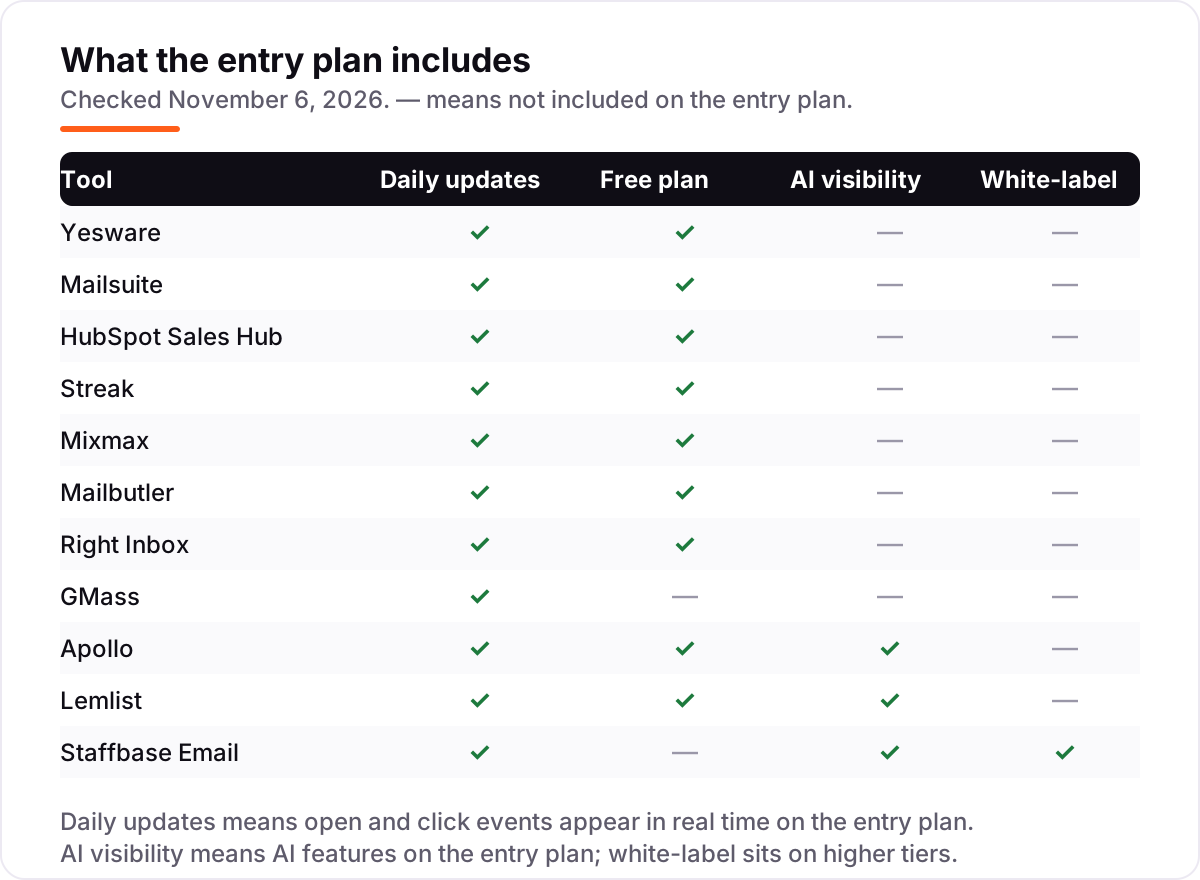
Know the difference: open tracking vs click tracking
The biggest confusion in this category is treating an open as a fact. Open tracking works by hiding a tiny image — a tracking pixel — in the email, and counting the email as opened when the image loads. Apple Mail Privacy Protection now loads images privately before the recipient ever sees the message, and corporate filters prefetch images too, so opens are inflated and sometimes recorded for people who never read the email.
Click tracking is the stronger signal: it rewrites links so a click is recorded only when a real person taps. That is why the serious tools in this list — Yesware, HubSpot, Apollo and Lemlist — report opens and clicks side by side, and why Streak itself warns that tracking pixels inflate counts. Use opens to time a follow-up, and clicks to judge whether the message worked.
There is a second confusion worth clearing up: tracking is not automation. A tracker tells you what happened to an email you sent; an automation tool sends the next email for you. Mailsuite and Right Inbox only track, while Mixmax, Lemlist and Apollo also send sequences — and the sequence tools cost more because they do more.
Quick comparison: tool type by need
| Buyer | Best pick | Why |
|---|---|---|
| Solo freelancer checking proposals | Mailsuite | Free unlimited open tracking, double check-marks in Gmail |
| Sales rep on Gmail and Outlook | Yesware | Proven tracking plus templates, Pro is $19/seat/month |
| Small team that wants a free CRM too | HubSpot Sales Hub | Free tracking inside a free CRM, Starter is $20/seat/month |
| Gmail team that wants pipelines in the inbox | Streak | Free email tools, Pro is $49/user/month billed annually |
| Mixed Gmail, Outlook and Apple Mail team | Mailbutler | The only tracker here with Apple Mail, from $5/user/month |
| Outbound team that needs contacts too | Apollo | 275M+ contacts plus sequences, Basic is $49/user/month billed annually |
| Internal comms team at a large company | Staffbase Email | Engagement analytics by department, priced by quote |
Mistakes to avoid
- Buying a CRM when you only needed a tracker. Streak Pro and HubSpot Professional cost $49–$90 a seat mostly for pipelines and automation — if the only question is whether an email was opened, Mailsuite answers it free.
- Budgeting on the promo price. HubSpot's $7 Starter rate and GMass's $20 annual rate are the discounted figures; the list prices are $20 and $29.95, and that is what you pay when the offer ends.
- Trusting open rates as exact numbers. Apple Mail Privacy Protection and prefetching inflate opens, so a 70% open rate can mean 70% of inboxes loaded an image, not 70% of people read the email. Judge subject lines on clicks and replies.
- Forgetting the seat multiplier. A $19 tool is $95 a month for five people, and Lemlist's flat $69 only looks expensive until you price five seats anywhere else.
- Tracking without a privacy note. Tracking pixels record recipient behaviour without asking, which raises questions under GDPR and workplace privacy rules — say in your privacy policy that sales emails are tracked, and check local rules before tracking at scale.
How we chose
We checked each vendor's own pricing page on November 6, 2026 and recorded the starting price exactly as shown, including the annual-billing figure where the page lists one, and we ranked the tools by fit for the most common buyer — a salesperson or founder who wants to know whether an email was opened — not by brand size. Two prices need a note: Mailsuite's vendor page prices in euros, so its entry paid tier is €6.99 a user a month and it does not appear in the dollar price chart; Staffbase publishes no prices at all, so it is listed as a custom quote. Ratings come from G2 pages checked the same day. No vendor paid for a place in this list, and none of the links here are affiliate links.
What to do next
Start with the free plan of your top pick and send a real week of email through it — your proposals, your follow-ups, your inbox — then check whether the opens line up with the replies you actually get. If the free tier's cap bites first, that tells you which paid plan fits. If email is only one channel and search is the bottleneck, our monthly SEO service handles the visibility side — or compare outreach options in our guide to the best cold email software. Once your tools are in place, find out what's holding your rankings back.
Your stack only works if people find you
SerpAstra fixes what keeps your site off page one and makes it easy for AI assistants to recommend.
Get a free audit→Sources we checked (22)
- Yesware pricing — yesware.com/pricing (checked November 6, 2026)
- Mailsuite pricing — mailsuite.com/pricing (checked November 6, 2026)
- HubSpot Sales Hub pricing — hubspot.com/pricing/sales (checked November 6, 2026)
- Streak pricing — streak.com/pricing (checked November 6, 2026)
- Mixmax pricing — mixmax.com/pricing (checked November 6, 2026)
- Mailbutler pricing — mailbutler.io/pricing (checked November 6, 2026)
- Right Inbox pricing — rightinbox.com/pricing (checked November 6, 2026)
- GMass pricing — gmass.co/pricing (checked November 6, 2026)
- Apollo pricing — apollo.io/pricing (checked November 6, 2026)
- Lemlist pricing — lemlist.com/pricing (checked November 6, 2026)
- Staffbase pricing — staffbase.com/pricing (checked November 6, 2026)
- Yesware on G2 — g2.com/products/yesware/reviews (checked November 6, 2026)
- Mailsuite on G2 — g2.com/products/mailsuite-mailtrack/reviews (checked November 6, 2026)
- HubSpot Sales Hub on G2 — g2.com/products/hubspot-sales-hub/reviews (checked November 6, 2026)
- Streak on G2 — g2.com/products/streak/reviews (checked November 6, 2026)
- Mixmax on G2 — g2.com/products/mixmax/reviews (checked November 6, 2026)
- Mailbutler on G2 — g2.com/products/mailbutler/reviews (checked November 6, 2026)
- Right Inbox on G2 — g2.com/products/right-inbox/reviews (checked November 6, 2026)
- GMass on G2 — g2.com/products/gmass/reviews (checked November 6, 2026)
- Apollo on G2 — g2.com/products/apollo-io/reviews (checked November 6, 2026)
- Lemlist on G2 — g2.com/products/lemlist/reviews (checked November 6, 2026)
- Staffbase on G2 — g2.com/products/staffbase/reviews (checked November 6, 2026)
Shamim
Founder of SerpAstra
A full-stack SEO and digital marketer who spends most days on Local SEO for dental practices, AI search visibility and lead generation.
Frequently asked questions
What is the best email tracking software?
Yesware is the best fit for most buyers: the longest track record in this list, a free tier with basic open tracking, and unlimited tracking from $19 a seat a month. Mailsuite is the better pick when you only need free open tracking, and HubSpot Sales Hub wins when tracking should feed a free CRM.
How much does email tracking software cost?
Entry prices run from $0 to $69 a month. Eight of the eleven tools here have a free plan, and the cheapest paid plans are Mailbutler at $5 a user a month and Right Inbox at $7.95 billed annually. A five-person team pays $240 to $2,940 a year depending on the tool, before any add-ons.
Is there really free email tracking software?
Yes, with limits. Mailsuite tracks unlimited opens free, Yesware's free tier covers basic open tracking, and HubSpot, Streak, Mixmax and Mailbutler all include tracking in free plans. Right Inbox stops at 5 tracked emails a month, and GMass has no free plan — only a 7-day trial.
How accurate is email open tracking?
Opens are directional, not exact. Apple Mail Privacy Protection loads tracking images before the recipient reads the message, and corporate filters prefetch them too, so open counts run high. Click tracking is more reliable because it needs a real tap, so judge subject lines on clicks and replies, not opens alone.
Can I track emails in Outlook?
Yes, with the right tool. Yesware, Mixmax, HubSpot Sales Hub, Mailbutler and Staffbase Email all track in Outlook, and Mailbutler also covers Apple Mail. Streak, Right Inbox and GMass are Gmail-only, so skip them if any of your team sends from Outlook.
Is email tracking legal?
It depends on where you and the recipient are. Tracking pixels collect behaviour data without the recipient's explicit consent, which raises questions under GDPR and workplace privacy rules. Say in your privacy policy that sales emails are tracked, use tracking mainly for one-to-one sales email, and check local rules before tracking at scale.
What is the difference between email tracking and email automation?
Tracking reports what happened to an email you already sent — opens, clicks and replies. Automation sends the next email for you, in sequences with delays and conditions. Mailsuite and Right Inbox only track, while Mixmax, Lemlist and Apollo do both, and charge more because they do more.
Free SEO and AI visibility audit
Find out what is holding your rankings back
Send us your site. Within 2 business days you get a written audit, an AI visibility check and a short fix list ranked by impact. Free, with no contract attached.
Request my free audit→Related guides
 Digital Marketing & Ads10 Best Email Automation Tools in 2026 (Free and Paid, Compared)Compare the 10 best email automation tools on price, free plans and automation depth, with every starting price checked on November 5, 2026.Read guide →
 Digital Marketing & Ads10 Best Cold Email Software in 2026: Pricing, Features and Pros & ConsCompare the 10 best cold email software tools on price, free plans, warm-up and AI features, with every price checked November 5, 2026, before you buy.Read guide →
 Digital Marketing & Ads12 Best CRM Email Marketing Software in 2026, Compared12 best crm email marketing software tools compared on price, CRM depth and automation, with real starting prices checked on November 4, 2026.Read guide →