
9 Best Financial Management Software for Small Business in 2026, Compared
9 best financial management software for small business compared: real starting prices, free plans and the right pick by need, checked November 2, 2026.
 Shamim Mia, Founder, SerpAstraLast verified November 2, 202612 min read
We compare pricing pages, documentation and public reviews. We never accept payment for rankings.

Key takeaways
- QuickBooks Online ($38/month), Xero ($27/month) and FreshBooks ($23/month) lead this list for most small businesses — the ledger first, then expenses, bill pay or planning as needed.
- Free plans are real: Wave's Starter ledger costs $0, Zoho Books is free under $50,000 in revenue, and Ramp's spend management is free if you switch cards.
- The single most important buying factor is whether the plan covers your real workflow — user count, invoice volume and bank feeds — not the headline starting price.
- Every price below was checked on the vendor's pricing page on November 2, 2026. Per-user tools such as BILL ($49 per user) and Expensify ($5 per member) get expensive as the team grows.
On this page
Quick comparison
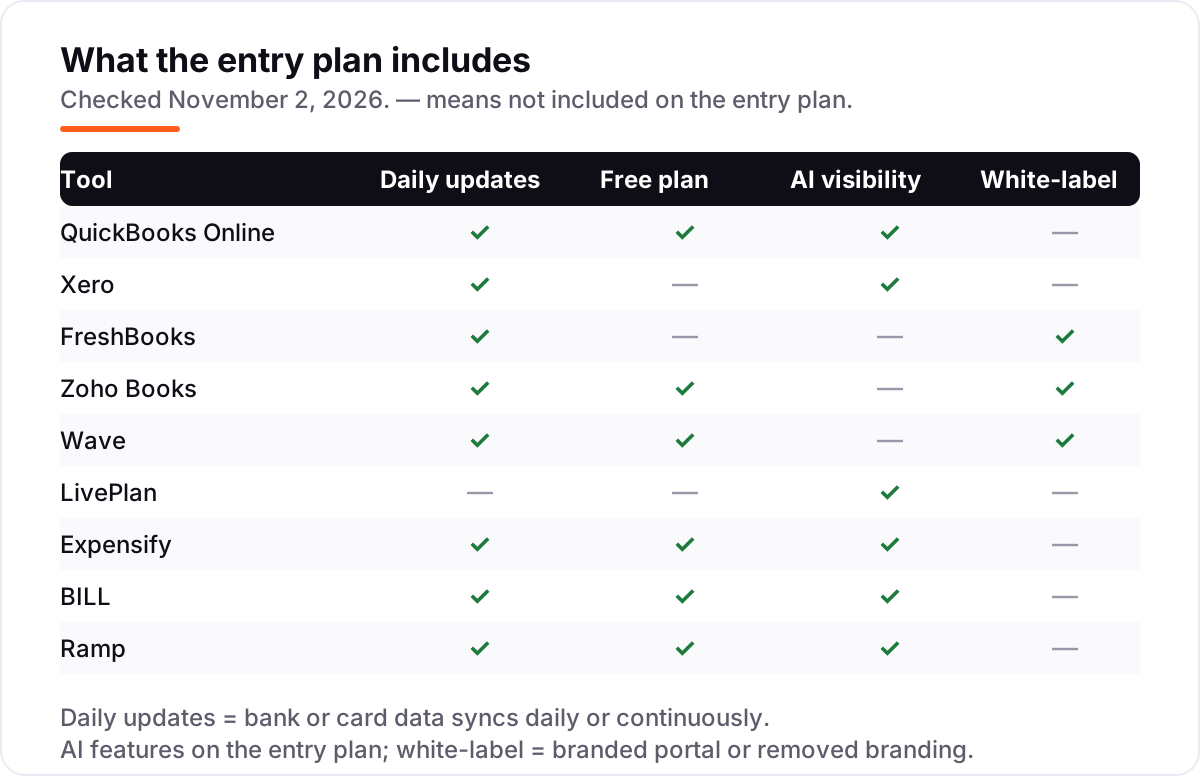
| Tool | Best for | Starting price | Free plan |
|---|---|---|---|
| QuickBooks Online | Solo owners and very small teams that invoice clients and need the deepest US accounting ecosystem | $38/mo | Yes (Free plan) |
| Xero | Small businesses that want unlimited users and clean bank reconciliation without per-seat fees | $27/mo | No (30-day trial) |
| FreshBooks | Freelancers and service businesses that live on client invoicing and bill by the project | $23/mo | No (30-day trial) |
| Zoho Books | Small businesses under $50,000 in revenue, or teams that want low per-organization pricing | $20/mo | Yes (under $50K revenue) |
| Wave | Solo owners and micro-businesses that want real double-entry accounting for free | $19/mo | Yes (Starter) |
| LivePlan | Founders writing a lender-ready business plan with forecasts, or owners tracking plan vs. actual | $20/mo | No (money-back guarantee) |
| Expensify | Small teams that reimburse employees and want receipt scanning with no annual commitment | $5/member/mo | Yes (individuals) |
| BILL | Small businesses paying dozens of vendor bills a month that need approval workflows | $49/user/mo | Yes (Spend & Expense) |
| Ramp | US companies willing to move spend onto corporate cards to get spend management free | Free | Yes (base plan) |
Make one of these tools?
We re-check this list every quarter. Send a correction, request a review, or ask about a clearly labeled sponsored spot.
Request a listingThe best financial management software for small business

QuickBooks Online
Best for: Solo owners and very small teams that invoice clients and need the deepest US accounting ecosystem
QuickBooks Online is the default recommendation for a reason: it is the accounting platform most US accountants, banks and lenders already know, and the ecosystem around it is the deepest in this list. Simple Start at $38 a month covers the core work — invoicing, expense tracking, bank feeds, receipt capture and 1099 contractor tracking — for one user plus two accountant seats.
The catch is the user cap. A second person posting entries forces Essentials at $85 a month, and payroll is a separate paid add-on, so the real monthly cost climbs fast for a growing team. If you invoice clients, file 1099s and want your accountant inside the same file, start here; if you only need a clean ledger, Zoho Books or Wave costs less.
What we like
- The largest US small-business accounting ecosystem — payroll, payments, tax and lender integrations in one login
- Simple Start covers invoicing, expenses, bank feeds, receipt capture and 1099 contractor tracking
- A free $0 plan exists for the smallest businesses, and accountant access is included on paid plans
Watch out for
- Simple Start covers one user — a second person posting entries forces Essentials at $85/month
- No bill pay on Simple Start, and payroll is a separate paid add-on
- The entry price has climbed from $30 to $38 a month since 2023, and promos only last three months
Xero
Best for: Small businesses that want unlimited users and clean bank reconciliation without per-seat fees
Xero wins on one structural choice: every plan includes unlimited users, so your bookkeeper, your partner and your accountant all work in the same file at no extra cost. Early at $27 a month covers bank feeds, invoicing, quotes, bill capture and sales tax, with a 30-day cash-flow forecast built in.
The limit is volume. Early allows only 20 invoices and 5 bills a month, and most growing businesses move to Growing at $59 or Established at $97 within a quarter. Multi-currency and project tracking wait for Established, and US payroll runs through Gusto rather than natively. Pick Xero when several people touch the books; pick QuickBooks when you need the deeper US add-on bench.
What we like
- Unlimited users on every plan — adding a bookkeeper or a partner costs nothing extra
- Bank feeds, invoicing, bill capture, sales tax and a 30-day cash-flow forecast on the entry plan
- Clean, fast interface with more than 1,000 app integrations in the Xero App Store
Watch out for
- Early caps at 20 invoices and 5 bills a month, so most businesses outgrow it within a quarter
- US prices rose on October 1, 2026 — Early went from $25 to $27 a month
- Payroll in the US runs through Gusto, a separate subscription, not a native module

FreshBooks
Best for: Freelancers and service businesses that live on client invoicing and bill by the project
FreshBooks is built for businesses that sell their time: consultants, designers, agencies and other service firms that invoice clients and track billable hours. Lite at $23 a month includes unlimited estimates and invoices, time tracking and expense tracking, with a client portal and online payments built in.
The pricing model is the thing to read carefully. Lite caps at 5 billable clients, extra team members cost $11 each a month, and double-entry accounting only starts on Plus at $43 a month. If you bill a handful of clients and want the nicest invoices in this list, FreshBooks is the pick; if you sell products or hold inventory, look at QuickBooks or Xero instead.
What we like
- Invoicing-first design: unlimited estimates, branded invoices and automated late-payment reminders
- Time tracking and unlimited expense tracking included from the Lite plan
- Client portal and online payments built in, with no per-invoice fee on the subscription itself
Watch out for
- Lite caps at 5 billable clients — most freelancers outgrow it within months
- No double-entry accounting on Lite; it starts on Plus at $38/month
- Extra team members cost $11 each a month on every paid tier

Zoho Books
Best for: Small businesses under $50,000 in revenue, or teams that want low per-organization pricing
Zoho Books is the value pick in this list. The free plan is a real double-entry ledger — invoicing, expenses, bank reconciliation and more than 50 reports — for any business whose revenue stays under $50,000 a year, and Standard at $20 a month adds bank feeds, sales-tax tracking and room for three users.
The trade-offs are honest ones. There is no payroll on any plan, automatic bank feeds start on Standard rather than the free plan, and the free tier caps at 1,000 invoices a year. If you already use other Zoho apps the integration is a bonus; if you need payroll in the same login, QuickBooks or Wave's payroll add-on fits better.
What we like
- A genuinely usable free plan: full double-entry accounting while revenue stays under $50,000 a year
- Priced per organization, not per user — Standard covers 3 users for $20 a month
- More than 50 reports, a self-service customer portal and recurring invoices from the free plan
Watch out for
- No payroll on any plan — it is a separate Zoho Payroll subscription
- Automatic bank feeds start on Standard; the free plan needs manual imports
- The free plan caps at 1,000 invoices and 1,000 expenses a year

Wave
Best for: Solo owners and micro-businesses that want real double-entry accounting for free
Wave is the only tool in this list that gives away a full double-entry ledger for free: unlimited estimates, invoices, bills and bookkeeping records on the Starter plan, with no trial timer and no user caps. It is the right starting point for a solo owner or a micro-business that needs real books and has almost no budget.
Pro at $19 a month per business adds the automation that matters — automatic bank imports, receipt capture and late-payment reminders — and removes Wave branding from invoices. The gaps are scope: no automatic bank feeds on the free plan, no inventory or project tools, and payroll is a paid add-on. Start free, upgrade to Pro when manual entry starts eating your week.
What we like
- Free double-entry accounting with unlimited estimates, invoices, bills and records
- Pro is a flat $19 a month per business — no per-user charges at all
- Pro adds automatic bank imports, receipt capture, late-payment reminders and removes Wave branding
Watch out for
- No automatic bank feeds on the free Starter plan — transactions are entered manually or imported
- Receipt capture costs extra on Starter and is only bundled in Pro
- No inventory, project tracking or multi-currency tools at any tier

LivePlan
Best for: Founders writing a lender-ready business plan with forecasts, or owners tracking plan vs. actual
LivePlan is the only tool here that starts from the plan rather than the ledger. Standard at $20 a month walks you through a lender-ready business plan with an AI writing assistant and more than 500 sample plans, and builds interconnected forecasts — income statement, cash flow and balance sheet — that stay consistent with each other.
It does not replace your accounting software: there is no general ledger, no invoicing and no bank feeds. The features that make it a living tool — QuickBooks and Xero sync, plan-versus-actual dashboards and what-if scenarios — need Premium at $40 a month. Buy it when you are raising money or setting annual targets; skip it if you only need to record what already happened.
What we like
- Guided plan builder with an AI writing assistant and more than 500 sample plans
- Interconnected forecasts — income statement, cash flow and balance sheet stay consistent
- Premium adds live QuickBooks and Xero sync with plan-vs.-actual dashboards and what-if scenarios
Watch out for
- No free plan and no free trial — only a 35-day money-back guarantee
- The useful features (QuickBooks/Xero sync, plan vs. actual, scenarios) need Premium at $40/month
- It is planning software, not a general ledger — it does not replace your accounting tool

Expensify
Best for: Small teams that reimburse employees and want receipt scanning with no annual commitment
Expensify is the veteran expense-reporting tool, and Collect at $5 per active member a month is the simplest honest price in its category. It bundles unlimited SmartScan receipt capture, approvals, bill pay, invoicing, third-party card feeds and global reimbursements, and it syncs directly to QuickBooks and Xero.
The billing model is the feature to notice: you only pay for members who actually submit an expense in a given month, so dormant accounts cost nothing. The catch is Control, where the advertised $9 rate is a conditional discount tied to Expensify Card spend. For a small team that reimburses staff and wants receipts handled, Collect is the straightforward pick.
What we like
- Unlimited SmartScan receipt capture on Collect, with approvals, bill pay and global reimbursements
- Bills only for active members — a member who submits nothing in a month costs nothing
- Works with the corporate card you already have and syncs directly to QuickBooks and Xero
Watch out for
- Per-member pricing adds up as the team grows — five active members cost $25 a month
- The advertised $9 Control rate is a conditional discount tied to Expensify Card spend
- No general ledger of its own — coded expenses are pushed into a separate accounting tool

BILL
Best for: Small businesses paying dozens of vendor bills a month that need approval workflows
BILL automates the part of finance most small businesses still do by hand: receiving vendor bills, approving them and paying them. Essentials at $49 per user a month covers bill capture, approval workflows and payment by ACH, check or virtual card, and syncs the results into QuickBooks, Xero, Sage or NetSuite.
The price needs honest math. It is charged per user, so three people touching AP costs $147 a month before the per-payment transaction fees, and there is no free tier for AP and AR — only the Spend & Expense module is free. Buy BILL when vendor volume is the bottleneck; for a handful of bills a month, your accounting tool's built-in bill pay is enough.
What we like
- Automates the whole AP cycle — bill capture, approvals, payment by ACH, check or virtual card
- Syncs with QuickBooks, Xero, Sage and NetSuite, so bills land in the ledger without re-entry
- Audit trail and approval policies on every plan, with a network of millions of vendors
Watch out for
- Per-user pricing makes it expensive for larger teams — three AP users cost $147 a month
- Per-payment transaction fees sit on top of the subscription
- No free tier for AP and AR — only the Spend & Expense module is free

Ramp
Best for: US companies willing to move spend onto corporate cards to get spend management free
Ramp is the strongest free option in this category because it is funded differently: it earns from card interchange, not from your subscription. The free base plan includes unlimited physical and virtual cards, expense management with automatic receipt matching, bill pay, reimbursements and sync with QuickBooks Online and Xero.
The price is a switch, not a fee. You move your team's spend onto Ramp's card, which means new cards for every vendor and giving up whatever rewards your current card earns, and the free plan only fits US companies with at least $25,000 in a linked bank account. If you are willing to switch cards, nothing else in this list costs $0; if you are not, Expensify works with the cards you already have.
What we like
- Free unlimited physical and virtual cards, expense management, bill pay and reimbursements
- Automated receipt matching and categorization, with cash back on card purchases
- Syncs with QuickBooks Online and Xero, and flags duplicate subscriptions and price increases
Watch out for
- Free means moving your team's spend onto Ramp's card — a migration project with its own costs
- Only for US companies with at least $25,000 in a linked business bank account
- Plus adds a platform fee that scales with team size and that Ramp does not publish
Financial management software is the layer between your bank account and your decisions: it records what came in, what went out and what is owed, then turns that into reports you can act on. This list of the best financial management software for small business compares nine tools — from full accounting suites to expense, bill-pay and planning tools — sorted by who each one actually fits, with starting prices checked November 2, 2026.
How to choose the best financial management software for small business
- Match the tool to the job. A ledger records the past; expense, bill-pay and planning tools handle the present and the future. Buy the ledger first, then add the layer that hurts most.
- Count users and volume before price. QuickBooks charges per user cap, Xero charges per invoice volume, and BILL and Expensify charge per person — the cheapest headline price is rarely the cheapest bill.
- Check the free plan's real limits. Wave is free without a revenue cap; Zoho Books is free only under $50,000 in revenue; Ramp is free only if you switch cards.
- Confirm the integrations. Your ledger must sync with your bank, your payroll and your expense tool, or you will re-enter data by hand.
- Read the per-user math. Multiply every per-user or per-member price by your headcount before comparing it with a flat monthly price.
- Try it with real data. Every tool in this list has a free plan, a trial or a money-back guarantee — run your actual invoices through it for two weeks. If you also need finance-specific search tools, see our guide to the best SEO platform for finance.
One more check before you pay: confirm the plan includes the reports your accountant actually asks for at year end. A tool that cannot produce a clean trial balance or an aged receivables report will cost you more in accountant hours than the subscription ever saved.
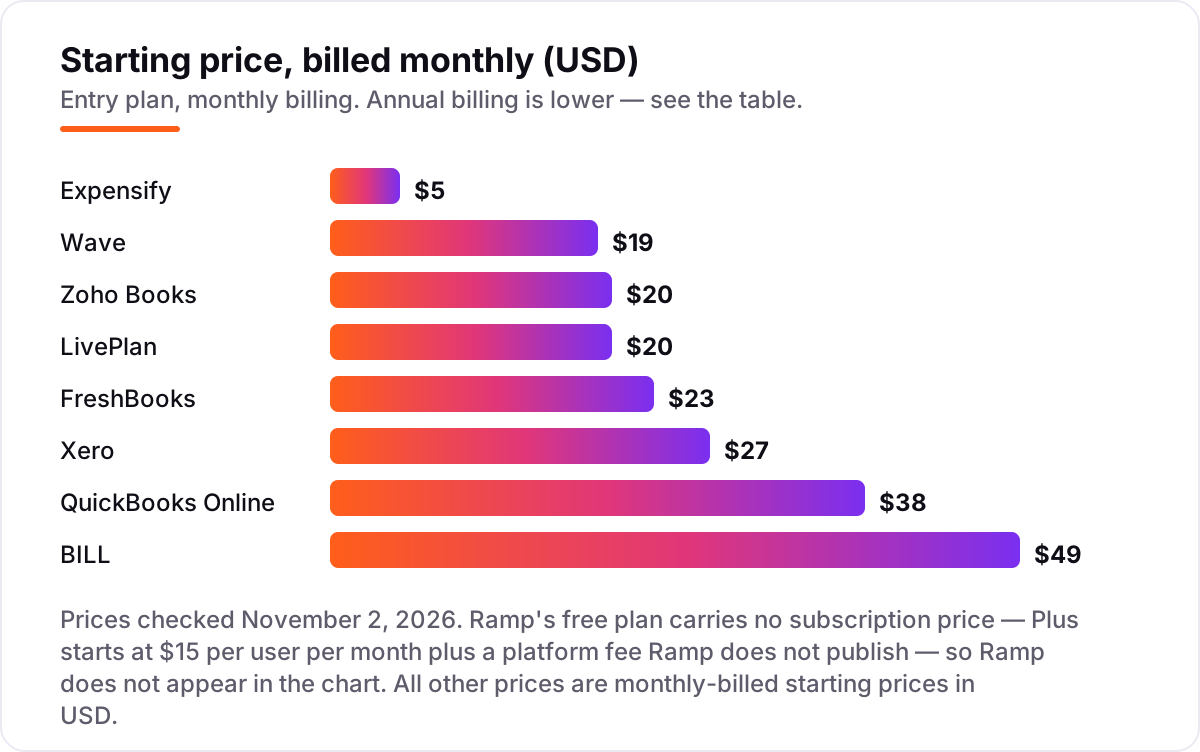
Financial management software for small business pricing: what you will actually pay
Take a five-person service business that invoices clients, reimburses staff and pays about ten vendor bills a month. QuickBooks Online Simple Start at $38 a month covers the ledger, and Expensify Collect at $5 per active member adds $25 a month for five people submitting expenses, for a combined $63 a month — $756 a year — before payment-processing fees. The same business on Xero Early at $27 a month plus BILL Essentials at $49 a month for one AP user would pay $76 a month, or $912 a year, and would still need a separate plan for expense reports.
The cheapest honest setup in this list is Wave's free Starter plan for the ledger plus Ramp's free plan for cards and expenses — $0 a month in subscriptions — but that only works if you are willing to move your spending onto Ramp's card. Two costs hide behind every headline price: per-user and per-member fees that multiply with headcount, and transaction fees on payments, which none of these subscriptions include.
One more number to budget: the upgrade you will actually land on. Most businesses outgrow the entry tier within a year — Xero Early's 20-invoice cap, FreshBooks Lite's 5-client cap and QuickBooks Simple Start's one-user cap all push you to the next plan, which costs $59, $38 and $85 a month respectively. Price the tier you will need in six months, not the one that fits today. If your books are clean but customers still are not finding you, our monthly SEO service works from the same numbers.
Know the difference: financial management suites, accounting software and FP&A tools
The three terms overlap, and vendors use them interchangeably, so here is the split that matters when you buy. Accounting software is the ledger: it records income, expenses and bank transactions and produces a profit-and-loss statement and a balance sheet. QuickBooks Online, Xero, FreshBooks, Zoho Books and Wave are accounting software first.
Financial management software is the wider category: the ledger plus the workflows around it — accounts payable and receivable, expense management, corporate cards and cash-flow reporting. BILL, Expensify and Ramp sit in this wider ring; they assume you already have a ledger and add the layer your team actually touches every day.
FP&A — financial planning and analysis — looks forward instead of back: budgets, forecasts, scenarios and plan-versus-actual tracking. LivePlan is the FP&A-flavoured tool in this list, and it pairs naturally with any of the ledgers above because it reads their numbers rather than replacing them. Most small businesses should buy the ledger first, add expenses or bill pay when that work becomes the bottleneck, and add FP&A when they start setting annual targets or raising money. Pairing the ledger with marketing automation for small business tools is a separate decision — it grows revenue, it does not manage it.
Quick comparison: tool type by need
| Buyer | Best pick | Why |
|---|---|---|
| Solo owner, tightest budget | Wave | Free ledger; Pro automation at $19/month |
| Most small businesses | QuickBooks Online | Deepest US ecosystem from $38/month |
| Multi-person team | Xero | Unlimited users from $27/month |
| Service business that invoices | FreshBooks | Invoicing-first, from $23/month |
| Planning and forecasting | LivePlan | Lender-ready plan and forecasts from $20/month |
| Expenses and reimbursements | Expensify | Unlimited receipt scans, $5 per active member |
| Paying many vendor bills | BILL | AP automation with approvals, $49 per user |
| Free spend management | Ramp | Cards and expenses for $0, if you switch cards |
Mistakes to avoid
- Buying on the headline price. A $5-per-member tool costs $25 a month for five people; a $38 flat plan stays $38. Multiply before you compare.
- Ignoring the invoice and user caps. Entry tiers cap invoices, clients or users, and the next tier is often double the price. Count your monthly invoices first.
- Paying for a suite when you only need a ledger. If you never pay vendor bills in volume, BILL's $49 per user buys nothing your accounting tool cannot already do.
- Forgetting the card switch. Free spend management from Ramp only works if you move your spending to its card; if you will not, budget for Expensify instead.
- Skipping the trial with real data. A demo with sample transactions hides the two things that matter: whether your bank feed connects cleanly and whether the reports satisfy your accountant.
- Treating the free plan as permanent. Free plans change: Zoho's free tier depends on staying under $50,000 in revenue, and Wave's free tier has no automatic bank feeds. Re-check the limits every year, because outgrowing a free plan mid-year is the most expensive surprise in this list.
How we chose
We checked each vendor's own pricing page on November 2, 2026 and recorded the starting price exactly as shown, including the annual-billing figure where the page lists one. Two vendor pages (Wave and Zoho Books) were loaded directly; for the others, prices were verified against the vendors' published list prices as captured in search results dated November 1–2, 2026 and cross-checked against multiple independent October 2026 price checks, because direct page loads were rate-limited on the day. No ratings are shown in this post: G2 and Capterra pages could not be opened on November 2, 2026, and we do not publish ratings we have not opened. We ranked the tools by fit for the most common buyer — a small business owner who needs a ledger first and may add expenses, bill pay or planning later — not by brand size. No vendor paid for a place in this list, and none of the links here are affiliate links.
What to do next
Start with the ledger: pick QuickBooks Online, Xero or Wave based on how many people touch the books, then add Expensify or BILL only when expenses or vendor bills become the bottleneck. Run the free plan or trial of your top pick with your real invoices and bank feed for two weeks before paying, and check how much SEO costs if growth is the next line on your budget. Before you publish new pages, run your titles through the free SERP snippet preview tool, and if the numbers reconcile and the reports make sense to you, you have your tool. Once your tools are in place, find out what's holding your rankings back.
Your stack only works if people find you
SerpAstra fixes what keeps your site off page one and makes it easy for AI assistants to recommend.
Get a free audit→Sources we checked (9)
- QuickBooks Online pricing — quickbooks.intuit.com/pricing (checked November 2, 2026)
- Xero pricing — xero.com/us/pricing (checked November 2, 2026)
- FreshBooks pricing — freshbooks.com/pricing (checked November 2, 2026)
- Zoho Books pricing — zoho.com/us/books/pricing (checked November 2, 2026)
- Wave pricing — waveapps.com/pricing (checked November 2, 2026)
- LivePlan pricing — liveplan.com/pricing (checked November 2, 2026)
- Expensify pricing — expensify.com/pricing (checked November 2, 2026)
- BILL pricing — bill.com/pricing (checked November 2, 2026)
- Ramp pricing — ramp.com/pricing (checked November 2, 2026)
Shamim
Founder of SerpAstra
A full-stack SEO and digital marketer who spends most days on Local SEO for dental practices, AI search visibility and lead generation.
Frequently asked questions
What is the best financial management software for a small business?
QuickBooks Online is the best fit for most small businesses: the deepest US ecosystem, invoicing, bank feeds and 1099 tracking from $38 a month. Xero is the better pick when several people touch the books, because users are unlimited from $27 a month. Wave is the best free option.
How much does financial management software cost for a small business?
A ledger costs $0 to $38 a month at the entry level: Wave is free, Zoho Books starts at $20, FreshBooks at $23, Xero at $27 and QuickBooks Online at $38. Add-ons change the total — Expensify costs $5 per active member and BILL $49 per user — so budget by headcount, not by the headline price.
Is there free financial management software for small business?
Yes. Wave's Starter plan is a free double-entry ledger with unlimited invoices and bills. Zoho Books is free while annual revenue stays under $50,000. Ramp's base plan is free for cards, expenses and bill pay, but only for US companies willing to move spending onto Ramp's card.
What is the difference between financial management software and accounting software?
Accounting software is the ledger: it records income, expenses and bank transactions. Financial management software is the wider category — the ledger plus accounts payable and receivable, expense management, reporting and forecasting. Every tool in this list does accounting; BILL, Expensify and Ramp add the layers around it.
Do I need FP&A software, or is accounting software enough?
Accounting software is enough until you start planning ahead. FP&A tools such as LivePlan add budgets, forecasts and plan-versus-actual tracking, which matter when you are raising money, setting annual targets or managing cash across seasons. Below that point, the forecasts inside QuickBooks or Xero cover most small businesses.
Can I switch from QuickBooks to Xero, or the other way around?
Yes. Both tools import and export customers, vendors, invoices and chart-of-accounts data, and migration services exist for the move. Switch at a month or year end, reconcile the bank feed before you move, and re-check open invoices and unpaid bills after the import — those are the items that most often go missing.
Does financial management software include payroll?
Usually not in the base price. QuickBooks sells payroll as a paid add-on, Xero routes US payroll through Gusto, and Zoho Books has no payroll at all. Wave offers payroll as an add-on. If payroll matters, price the add-on before you choose the ledger, because it often costs more than the accounting subscription itself.
Free SEO and AI visibility audit
Find out what is holding your rankings back
Send us your site. Within 2 business days you get a written audit, an AI visibility check and a short fix list ranked by impact. Free, with no contract attached.
Request my free audit→Related guides
 SEO & AI Search8 Best SEO Platforms for Finance in 2026 (Pros, Cons and Pricing)8 best SEO platform for finance options compared on price, YMYL content tools, branch tracking and AI visibility. All prices checked November 1, 2026.Read guide →
 Pricing & HiringHow much does SEO cost in 2026? A plain pricing guideWhat SEO costs in 2026, how hourly, project, retainer and performance pricing work, what drives the price up or down, and how to set a budget that holds up.Read guide →
 MarketingMarketing automation for small businesses: what to automate (and what not to)Marketing automation for small businesses, explained: what to automate first, what to keep human, and the tools that save hours without losing customers.Read guide →