
12 Best Fixed Asset Software for Small Business in 2026, Compared
12 best fixed asset software for small business compared on price, asset limits, free plans and depreciation — every price checked November 10, 2026.
 Shamim Mia, Founder, SerpAstraLast verified November 10, 202617 min read
We compare pricing pages, documentation and public reviews. We never accept payment for rankings.
Key takeaways
- AssetTiger is the best fit for most small businesses: full tracking with depreciation reports from $20/month and unlimited users; Sortly is the easiest start at $49/month, and MaintainX has a genuinely free plan.
- The single most important buying factor is how the price scales: flat per month, per user, per admin, or per asset — the cheapest headline price is rarely the cheapest at your headcount and asset count.
- No tool here does everything: trackers find your equipment, maintenance tools keep it running, and only Sage Fixed Assets does audit-proof depreciation — pick the job first, then the tool.
- Every price below was checked November 10, 2026 — Sortly and AssetTiger on the vendors' own pricing pages, the rest against fresh November reads of each vendor's page. Ratings appear only where a G2 page was crawled in the last few days.
On this page
Quick comparison
| Tool | Best for | Starting price | Free plan |
|---|---|---|---|
| AssetTiger | Small businesses that want the cheapest real asset tracker with unlimited users and depreciation reports | $20/mo | No (30-day trial) |
| Sortly | Small teams that want photo-first tracking on phones and a free plan to start | $49/mo | Yes (100 items) |
| EZO | Small businesses that want a full-featured tracker with unlimited users and purchase orders | $44.75/mo (annual) | No (15-day trial) |
| MaintainX | Frontline teams that want maintenance work orders and asset records in one phone-first app | Free; Essential $20/user/mo | Yes (Basic free) |
| UpKeep | Small maintenance teams that want a mobile-first CMMS with an AI assistant on every plan | $24/user/mo | No (free trial) |
| Snipe-IT | Small IT teams that want free open-source tracking they can self-host with no asset cap | Free; hosting $39.99/mo | Yes (self-host free) |
| Fiix | Small plants and workshops standardised on Rockwell Automation that need real asset hierarchies | Free; Basic $45/user/mo | Yes (free plan) |
| GoCodes | Contractors and trades teams that track tools and equipment across jobsites with QR labels | $500/yr | No (free trial) |
| Asset Panda | Teams with unusual assets that need deep customisation without writing code | Custom quote | No (14-day trial) |
| CHEQROOM | Media, AV and education teams that lend expensive equipment out and need bookings, not just a list | $184/admin/mo | No (7-day trial) |
| ManageEngine AssetExplorer | Small IT teams that want a full ITAM platform with discovery and a genuinely free edition | $115/mo | Yes (50 nodes) |
| Sage Fixed Assets | Accounting teams that need audit-proof depreciation, tax books and IRS forms, not a barcode scanner | Custom quote | No |
Make one of these tools?
We re-check this list every quarter. Send a correction, request a review, or ask about a clearly labeled sponsored spot.
Request a listingThe best fixed asset software

AssetTiger
Best for: Small businesses that want the cheapest real asset tracker with unlimited users and depreciation reports
AssetTiger wins on the maths that matters to a small business: one flat price, no per-seat meter, and the same features on every paid plan. At $20 a month for 500 assets, a five-person team pays $240 a year — less than one month of several rivals — and every user, site and location is included. Barcode and QR scanning, check-in and check-out, maintenance scheduling and depreciation reports all ship on the entry plan.
The trade-off is scope. AssetTiger schedules maintenance but is not a full maintenance system, so a plant that lives on work orders will want MaintainX or Fiix instead. Stock quantities are a separate $15-a-month add-on. Buy it when the job is knowing what you own, where it is, who has it and what it is worth — which is the job most small businesses actually have.
What we like
- Cheapest paid plan here: $20/month for 500 assets, and every paid plan includes unlimited users at no extra charge
- Depreciation, audit reconciliation, maintenance costs and contract expiry are among 80+ built-in report types
- No feature-gating by tier — every paid plan has the same features, including the REST API and barcode/QR scanning
- Check-in/check-out with a full custody chain, maintenance scheduling and disposal workflows included
Watch out for
- No free plan — the 30-day trial is the only way to try it free, and it caps at 250 assets and 2 users
- No maintenance work-order depth: it schedules maintenance but is not a full CMMS like MaintainX or UpKeep
- Stock/inventory tracking is a separate $15/month add-on, not included in the asset plans

Sortly
Best for: Small teams that want photo-first tracking on phones and a free plan to start
Sortly is the easiest tracker in this list to hand to a non-technical crew. Items are photos first and SKUs second: staff scan a QR label, see the photo, and check the item in or out from a phone. The free plan covers 100 items for one user, and Advanced at $49 a month raises that to 500 items for two users with unlimited QR label creation.
The pricing catch is the annual promo. The $24-a-month figure on the pricing page is a 50%-off first-year offer; after year one the discount drops to 20%, so budget on the $49 monthly rate, not the promo. Sortly also has no depreciation and no work orders. Buy it when the team needs to find things fast — not when finance needs a depreciation schedule.
What we like
- Free plan covers 100 items and 1 user, so a solo operator can run it without paying
- Photo-led records with folders, tags, locations and QR labels — staff find items by sight, not by SKU
- Unlimited QR code label creation on Advanced, with barcode labels and purchase orders from Ultra
- QuickBooks Online integration on Premium for teams that invoice from the same asset list
Watch out for
- The $24/month annual figure is a first-year promo only — after year one the annual discount drops to 20%
- Only 2 user licences on Advanced, so a third teammate forces a jump to Ultra at $149/month
- No depreciation schedules or maintenance work orders — it tracks where things are, not what they are worth over time

EZO
Best for: Small businesses that want a full-featured tracker with unlimited users and purchase orders
EZO is the all-rounder of the pure trackers: asset tracking, reservations, check-in and check-out, maintenance scheduling and barcode, QR and RFID scanning in one login, with unlimited users on every plan. The $44.75-a-month Essential plan covers 100 items billed annually, and the Advanced plan adds purchase orders, custom fields and team-based access controls.
The catch is the volume model. The headline price buys only 100 items; a 500-item register costs $81.41 a month on the annual rate, so count your items before you compare EZO with AssetTiger's flat $20. There is also no free plan, only a 15-day trial. Buy EZO when the team is bigger than the asset list — unlimited users is where it earns its price.
What we like
- Unlimited users on every plan — the price scales with items tracked, never with headcount
- Check-in/check-out, reservations, maintenance scheduling and barcode/QR/RFID scanning in one tool
- Purchase orders, custom fields and team-based access controls from the Advanced plan
- Largest review base in this list among pure trackers, at 4.4/5 on G2
Watch out for
- Pricing is volume-based, so the bill rises with item count — 500 items costs $81.41/month on the annual rate, not $44.75
- No free plan, only a 15-day trial, and the mobile app draws mixed reviews for glitches
- Stock quantities are a separate inventory system from the asset register, which adds a second thing to manage

MaintainX
Best for: Frontline teams that want maintenance work orders and asset records in one phone-first app
MaintainX is the adoption pick: a mobile-first maintenance app that technicians actually open, with asset records attached to the work orders. The free Basic plan covers unlimited work orders and unlimited requesters, and Essential at $20 per user a month billed annually adds unlimited repeating work orders — the preventive-maintenance core most teams need. It holds the highest G2 score in this list, 4.8 out of 5.
The cost caveat is the per-user meter. Five users cost $100 a month on Essential, and the AI procedure generator and parts inventory wait on Premium at $65 per user. Buy MaintainX when the job is keeping equipment running with a crew that works from phones; buy a pure tracker when the job is only knowing where things are.
What we like
- Free Basic plan with unlimited work orders, procedures and requester users — a real $0 start
- Highest-rated tool here at 4.8/5 on G2 across 1,512 reviews, with ease of use the most-mentioned strength
- QR codes on equipment pull up the asset record in seconds, and technicians message planners in real time
- Requesters are free and unlimited on every plan, so anyone can report an issue without a licence
Watch out for
- The AI procedure generator (CoPilot) and parts inventory sit on Premium at $65/user/month, not Essential
- Per-user pricing adds up fast: 10 users on Essential cost $200/month billed annually
- Reporting depth and multi-site controls are thinner than Fiix or UpKeep at the same price
UpKeep
Best for: Small maintenance teams that want a mobile-first CMMS with an AI assistant on every plan
UpKeep is the most approachable modern maintenance system in this list, and the pricing page proves it: Essential at $24 per user a month covers unlimited work orders and locations, asset management, barcode scanning and the Nova AI assistant. A technician gets the work order, sees the asset's history, logs time and parts, and closes it from the phone.
The tiering is the thing to check before you buy. Preventive-maintenance scheduling and custom checklists start at Premium ($55 per user), and depreciation, warranty tracking and custom asset fields wait on Enterprise. Buy UpKeep when the team works from phones and wants AI help on every plan; buy MaintainX when a free plan matters more than the AI.
What we like
- Nova AI assistant included on every plan, with a monthly credit allowance from Essential up
- Unlimited work orders and locations on Essential, with asset management and barcode scanning built in
- Mobile-first design technicians actually adopt, with offline mode from Professional
- Published per-user pricing with no quote needed to start, and a free trial that needs no credit card
Watch out for
- No free plan, only a free trial, and PM scheduling plus custom checklists start at Premium ($55/user/month)
- Depreciation, warranty tracking and custom asset fields are Enterprise features, not on Essential
- No annual rate is published, so there is no yearly-billing discount to take

Snipe-IT
Best for: Small IT teams that want free open-source tracking they can self-host with no asset cap
Snipe-IT is the free route into asset tracking, and it is genuinely free: the open-source version self-hosts with unlimited assets and unlimited users, and the only costs are a small server and your time. It tracks hardware, software licences, accessories and consumables with check-in and check-out, audit trails and depreciation, and hosted plans start at $39.99 a month for teams that would rather not run a server.
The honest cost is effort. There is no network discovery, so every asset is entered or imported by hand, and self-hosting means your team owns upgrades, backups and security. Buy Snipe-IT when the assets are IT equipment and someone technical can run the server; buy a cloud tracker when the assets are tools and nobody wants server duty.
What we like
- Free and open source to self-host, with unlimited assets and unlimited users and no licence cost
- Tracks hardware, licences, accessories and consumables with check-in/check-out and audit trails
- Hosted plans start at $39.99/month with managed servers, automated upgrades and email support
- Open code means no vendor lock-in: export everything and move whenever you want
Watch out for
- No network discovery — assets are entered or imported by hand, so onboarding a big fleet takes real effort
- Self-hosting means your team owns installation, upgrades, backups and security
- No dedicated mobile app, and API safeguards are limited on the $39.99/month Basic hosting plan

Fiix
Best for: Small plants and workshops standardised on Rockwell Automation that need real asset hierarchies
Fiix is the maintenance system for plants that think in assets rather than tickets. The free plan covers unlimited work orders and 25 active preventive-maintenance schedules with unlimited parts and supplies, and Basic at $45 per user a month adds the asset hierarchy, PM engine and parts inventory in full. As part of Rockwell Automation, it connects machine signals to work orders through FactoryTalk.
The price to watch is the per-user meter: ten users on Basic cost $450 a month, and the API and SSO wait on Professional at $75 per user. Fiix is also built for plants, so a shop with no maintenance team pays for depth it never uses. Buy it when the assets are machines with service histories; buy a tracker when the assets are tools in a van.
What we like
- Free plan covers unlimited work orders and 25 active PMs with unlimited parts and supplies
- Asset hierarchy, preventive maintenance engine and parts inventory are deeper than the mobile-first tools
- Rockwell Automation ownership means machine signals can flow into maintenance workflows via FactoryTalk
- Fiix Foresight reviews maintenance history to surface failure trends and suggest PM intervals
Watch out for
- Per-user pricing punishes broad adoption: 10 users on Basic cost $450/month
- Advanced workflow controls, SSO and the integration hub/API sit on Professional ($75/user/month) or above
- Strongest for plants — a general small business with no maintenance team will pay for depth it never uses

GoCodes
Best for: Contractors and trades teams that track tools and equipment across jobsites with QR labels
GoCodes is built for contractors: tools, equipment and vehicles tracked across jobsites from one account, with custom QR labels included in the price instead of sold separately. Scan a label with the phone app and the tool's location, custodian and history come up. GPS trackers and Bluetooth beacons are available as add-ons when a trailer or generator is worth more than a phone scan.
The catch is the billing model. There is no monthly option: Standard is $500 a year for 200 assets and 3 users, and a 500-asset crew needs Premium at $1,000 a year. There is also no depreciation and no IT tracking. Buy GoCodes when the assets are physical, the crew is in the field, and the labels matter as much as the software.
What we like
- Custom QR code labels are included in the subscription price — no separate tag order to budget
- GPS trackers and Bluetooth beacons are available as add-ons for high-value equipment
- Built for trades: tools, equipment and vehicles tracked across jobsites from one account
- Simple flat annual pricing with no per-user meter on the Standard plan
Watch out for
- Annual billing only — Standard is $500/year with no monthly payment option
- Standard covers just 200 assets and 3 users, so a 500-asset crew needs Premium at $1,000/year
- No depreciation schedules and no IT or software-licence tracking — physical assets only

Asset Panda
Best for: Teams with unusual assets that need deep customisation without writing code
Asset Panda is the customisation pick. Where other trackers give you fixed fields, it lets a team build its own: custom fields, workflows and dashboards with no code, plus mobile barcode and QR scanning, condition capture, damage tickets and audit counts. Five depreciation methods and tamper-proof audit trails make it the choice for teams that answer to auditors as well as to the warehouse.
The price is the problem for a small business. The pricing page no longer lists prices — it is a quote form — and the last public price list, archived in February 2026, started at $3,000 a year for 5 users and 1,000 assets. Run the 14-day trial to test the configurability, but get the quote in writing before you commit to anything.
What we like
- Most configurable tracker here: custom fields, workflows and dashboards with no code
- Five depreciation methods with tamper-proof audit trails built for compliance-minded teams
- Mobile barcode and QR scanning with condition capture, damage tickets and audit counts
- Free mobile app for iOS and Android, with asset profiles carrying images, documents and videos
Watch out for
- No published pricing — the pricing page is now a quote form, so budgeting starts with a sales call
- Archived 2026 pricing started at $3,000/year for 5 users, which prices out the smallest teams
- Reviewers consistently call it expensive for the feature set, with costs climbing as asset count grows

CHEQROOM
Best for: Media, AV and education teams that lend expensive equipment out and need bookings, not just a list
CHEQROOM is the only tool in this list built around lending rather than listing. A media department or university equipment room books cameras, kits and lights out to named borrowers, tracks returns, and sees what is available right now. Regular users and assets are unlimited on every plan; only the admins who run the system are metered, at $184 each a month on Core.
The catch is the 3-admin minimum. Core costs $552 a month before a single item is borrowed, covers one location only, and has no standard reporting — reports start on Business at $275 per admin. That prices CHEQROOM out of most small businesses. Buy it when lending is the business; buy a tracker when the equipment mostly stays put.
What we like
- Built for lending: reservations, check-out, kits and bookings, not just a static asset list
- Unlimited assets and regular users on every plan — only admins are metered
- GPS tracking and advanced reporting from the Business plan up
- Purpose-built for AV, media and higher-education equipment rooms
Watch out for
- Priced per admin, not per user, and every plan starts at 3 admins — Core costs $552/month before anyone borrows anything
- Core covers 1 location only, with no standard reporting; reports start on Business at $275/admin/month
- No free plan, and most features that matter to a small team are locked behind the higher tiers

ManageEngine AssetExplorer
Best for: Small IT teams that want a full ITAM platform with discovery and a genuinely free edition
AssetExplorer is the most complete IT asset platform in this list: hardware and software discovery, licence compliance, a configuration database, purchase orders and contracts, with visual lifecycle workflows on top. The free edition is fully functional and never expires, covering 50 nodes in the cloud or 25 on-premises — enough for a small office to run real IT asset management without paying.
The paid step is the awkward part. Pricing is node-based and the vendor's own page does not show the number plainly; third-party reads of the vendor's pricing put cloud at $115 a month for 250 assets, or $1,245 a year. AssetExplorer is also IT-only. Buy it when the assets live on the network; buy a physical tracker when they live in a van.
What we like
- Free edition is fully functional and never expires — hardware and software discovery included
- Hardware and software asset discovery, licence compliance, a CMDB and purchase-order management in one platform
- Unlimited technicians on every paid tier, with cloud or on-premises deployment
- Visual lifecycle workflows and contract management cover the whole asset life, not just the inventory
Watch out for
- Paid pricing is node-based and the vendor's own page does not show the number plainly — budget from a quote or a reseller list
- The free edition caps at 50 nodes in the cloud (25 on-premises), so a 200-device office outgrows it fast
- IT-only: no help for tools, vehicles or other physical assets outside the network

Sage Fixed Assets
Best for: Accounting teams that need audit-proof depreciation, tax books and IRS forms, not a barcode scanner
Sage Fixed Assets is the only tool in this list that is really about the books. It calculates depreciation across more than 50 methods, applies over 300,000 IRS tax and GAAP rules, produces tax forms 4562 and 4797, and handles construction-in-progress — the work a tracker with a depreciation report cannot do to audit standard. It integrates with Sage Intacct, Sage 100 and Sage 300.
Everything else about it is enterprise-shaped. There is no published price and no free trial, so evaluation runs through a demo and a quote, and the learning curve is steeper than any tracker here. Buy Sage when the year-end close and the tax return are the problem; buy a tracker when finding the equipment is the problem.
What we like
- More than 50 depreciation methods with over 300,000 IRS tax and GAAP rules built in
- Produces tax forms 4562 and 4797 and handles construction-in-progress management
- Integrates with Sage Intacct, Sage 100 and Sage 300, plus other ERPs, for a single source of truth
- Asset inventory tracking and reconciliation with customised reporting for financial and tax reporting
Watch out for
- No published pricing — Sage sells it by custom quote, so the budget conversation starts with sales
- Built for mid-market accounting teams, with a steeper learning curve than any tracker in this list
- No free trial is currently offered, so evaluation runs through a demo rather than a self-serve signup
The best fixed asset software for small business owners does one job before anything else: it tells you what you own, where it is, and who has it — without charging per head for the privilege. Some tools in this list do that for $20 a month flat, some charge per user or per admin, and two will not even show you a price until you talk to sales. We ranked the twelve tools below by fit for the most common buyer — a small business owner or office manager tracking a few hundred pieces of equipment — and every price was checked on November 10, 2026.
How to choose the best fixed asset software for small business
- Count your assets first, then your users. AssetTiger and EZO charge by asset count with unlimited users; MaintainX, UpKeep and Fiix charge per user; CHEQROOM charges per admin. A five-person team with 500 assets pays very different amounts on each model.
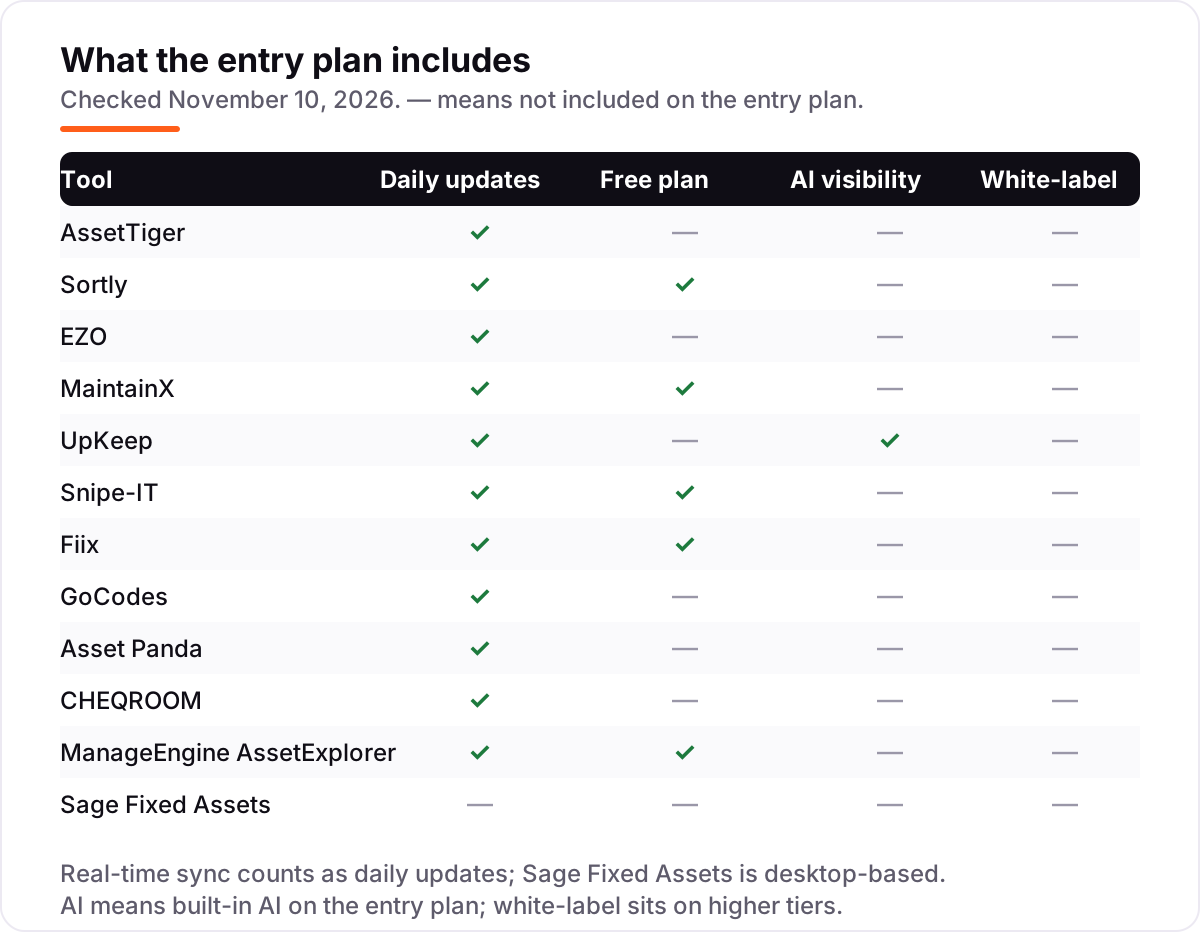
- Decide whether you need depreciation or just locations. Trackers find equipment; only AssetTiger, Asset Panda, Snipe-IT and Sage Fixed Assets calculate depreciation, and only Sage does it to audit standard.
- Check the cap on the plan you would actually buy. Sortly Advanced stops at 500 items, GoCodes Standard at 200 assets, and ManageEngine's free edition at 50 nodes — the cheapest plan is no bargain if you outgrow it in month two.
- Ask what the label costs. GoCodes includes custom QR labels in the price; the rest generate labels you print yourself, and a separate tag order can add hundreds to the first year.
- Test it on your own register. Import fifty real assets, scan them in and out for a week, and run the depreciation report before you pay. A trial on your data tells you more than any review can.
Getting found matters as much as getting organised — if customers cannot find the business, the tidiest asset register in the world will not save it. Our local SEO service handles the visibility side. And before you publish new service pages for the equipment you track, run your titles through the free SERP snippet preview tool to see exactly how they will look in Google.
Fixed asset software pricing: what you will actually pay
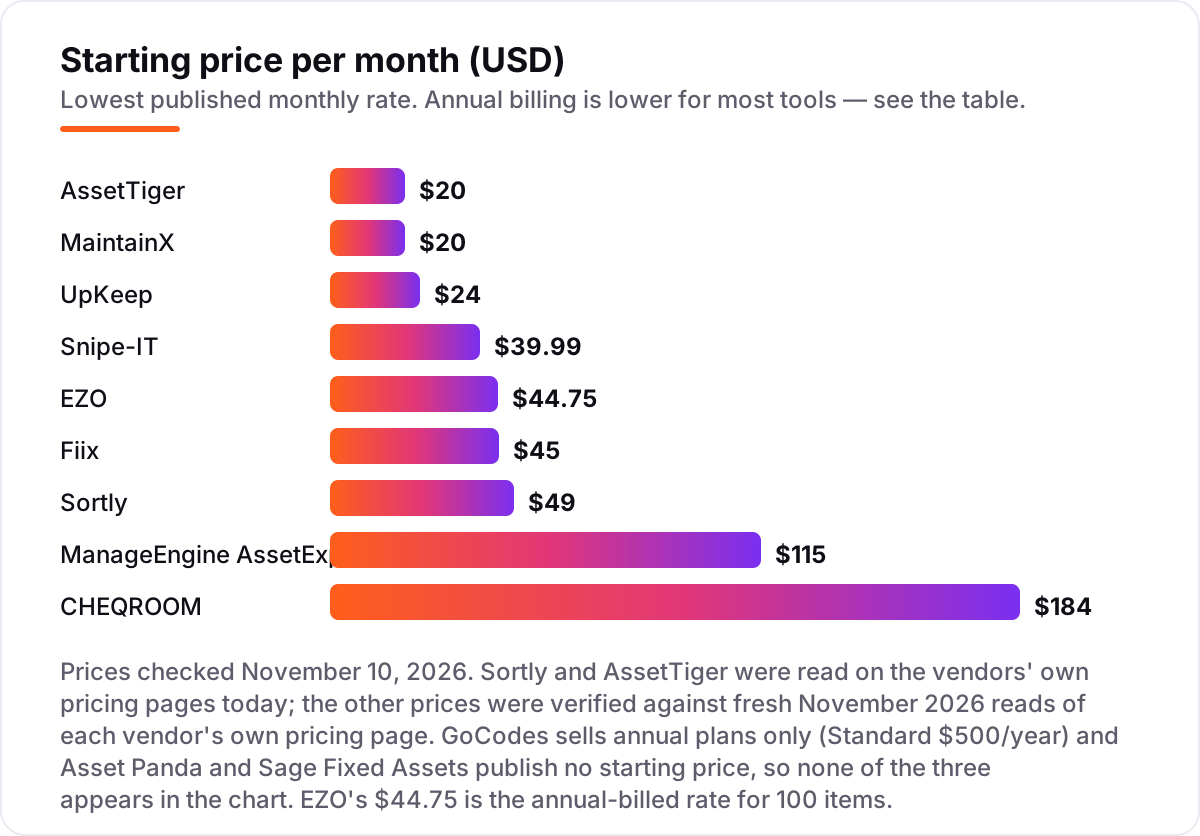
Take a five-person team tracking 500 assets for a year. On list prices, AssetTiger Basic costs $240 a year, Snipe-IT Basic hosting costs about $480 (or $0 in licence fees if you self-host and pay only for a server), Sortly Advanced costs $588 on monthly billing or $288 in the first year on the annual promo, GoCodes Premium costs $1,000 a year for 500 assets, and EZO costs about $977 a year at $81.41 a month on the annual rate for 500 items.
The per-user tools change the maths completely. MaintainX Essential costs $100 a month billed annually for five users, or $1,200 a year; UpKeep Essential costs $120 a month, or $1,440 a year; and Fiix Basic costs $225 a month, or $2,700 a year — though Fiix's free plan covers the same team at $0 until the 25-PM cap bites. ManageEngine's cloud tier for 250 assets is $115 a month, or $1,380 a year, and the 500-asset tier is priced higher. CHEQROOM is the outlier: its 3-admin minimum makes Core $552 a month, or $6,624 a year, before a single item is borrowed.
Asset Panda and Sage Fixed Assets publish no price, so budget them by quote: the last public Asset Panda list, archived in February 2026, started at $3,000 a year. The cheapest honest year in this list is $240 on AssetTiger; the dearest is $6,624 on CHEQROOM — and the gap comes entirely from the pricing model, not from the assets. If the books side matters more than the tracking side, our guide to the best accounting software for small businesses covers the tools that handle the ledger.
Know the difference: asset tracking vs depreciation vs maintenance
The confusion in this category is between three different jobs that all call themselves fixed asset software. Asset tracking is the register: what you own, where it is, who has it, and what condition it is in. AssetTiger, Sortly, EZO, GoCodes, CHEQROOM and Asset Panda do this job, and you pay by asset count, by user, or by admin. Maintenance is the upkeep: work orders, preventive schedules, parts and inspections for the assets that wear out. MaintainX, UpKeep and Fiix do this job, and you pay per user.
Depreciation is the accounting: how much each asset loses in value, what it is worth on the books, and what goes on the tax return. Only AssetTiger, Asset Panda, Snipe-IT and Sage Fixed Assets calculate it at all, and only Sage does it with 50-plus methods and IRS rules to audit standard. If you buy a tracker expecting depreciation, or a maintenance tool expecting a tax return, you will buy twice. Pick the job first — tracking, maintenance or depreciation — then pick the tool. Our guide to the best accounting software for small business with inventory covers the accounting side in more depth.
Quick comparison: tool type by need
| Buyer | Best pick | Why |
|---|---|---|
| Most small businesses | AssetTiger | $20/month flat, unlimited users, depreciation included |
| Easiest start, photo-first | Sortly | Free plan, QR labels, $49/month on Advanced |
| Bigger team, small asset list | EZO | Unlimited users, $44.75/month billed annually |
| Maintenance crews on phones | MaintainX or UpKeep | Free Basic or $24/user/month, AI on every UpKeep plan |
| IT equipment, zero budget | Snipe-IT | Free to self-host, hosted from $39.99/month |
| Plants and workshops | Fiix | Free plan, deep asset hierarchies, $45/user/month |
| Tools on jobsites | GoCodes | QR labels included, $500/year Standard |
| Equipment lending | CHEQROOM | Bookings and kits, from $184/admin/month |
| Tax and depreciation | Sage Fixed Assets | 50+ methods and IRS forms, priced by quote |
Mistakes to avoid
- Comparing headline prices without checking the meter. A $20 flat plan beats a $20-per-user plan the moment the team grows past one person, and a $184-per-admin plan costs $552 a month because of its 3-admin minimum.
- Buying a tracker and expecting depreciation. Sortly, CHEQROOM, EZO and the maintenance tools do not calculate depreciation. If the tax return matters, the register needs AssetTiger, Asset Panda or Sage.
- Budgeting on a first-year promo. Sortly's $24-a-month annual figure is a first-year offer only; after year one the discount drops to 20%, so model year two before you commit.
- Ignoring the asset cap. Sortly Advanced stops at 500 items, GoCodes Standard at 200 assets and ManageEngine's free edition at 50 nodes. Count your real register first — including the spares in the cupboard.
- Paying for a quote-only tool before you have a quote. Asset Panda and Sage Fixed Assets publish no price. Get both quotes in writing before comparing them with the published prices in this list.
How we chose
We checked Sortly and AssetTiger on the vendors' own pricing pages on November 10, 2026, and verified the other ten prices against fresh November 2026 reads of each vendor's own pricing page, because the direct page reader was rate-limited during part of the research. Two prices are third-party-sourced rather than vendor-verified: EZO's $44.75/month annual rate, where older reads still show a $40 flat rate that the vendor's page has replaced with volume-based pricing, and ManageEngine AssetExplorer's $115/month cloud rate, which comes from November 2026 reads of the vendor's pricing page rather than a direct open today. Asset Panda and Sage Fixed Assets publish no starting price, so both are listed as custom quote. Ratings appear only where a G2 page was crawled within the last few days — MaintainX, Sortly, EZO and Snipe-IT — and no rating is shown for the other eight tools rather than a stale one. No vendor paid for a place in this list, and none of the links here are affiliate links.
What to do next
Start with the free plan or trial of your top pick and run it against your real register: import fifty assets, scan them in and out for a week, and run the depreciation report. Check that the count matches, that the labels survive the field, and that the numbers drop into your accounting workflow without retyping. If the tracking side is sorted but new customers are not finding you, our monthly SEO service handles the visibility side — or compare providers in our guide to the best bookkeeping and payroll software for small business. Once your tools are in place, find out what's holding your rankings back.
Your stack only works if people find you
SerpAstra fixes what keeps your site off page one and makes it easy for AI assistants to recommend.
Get a free audit→Sources we checked (16)
- AssetTiger pricing — assettiger.com/pricing (checked November 10, 2026)
- Sortly pricing — sortly.com/pricing (checked November 10, 2026)
- EZO pricing — ezo.io (checked November 10, 2026)
- MaintainX pricing — getmaintainx.com/pricing (checked November 10, 2026)
- UpKeep pricing — upkeep.com/pricing (checked November 10, 2026)
- Snipe-IT pricing — snipeitapp.com (checked November 10, 2026)
- Fiix pricing — fiixsoftware.com (checked November 10, 2026)
- GoCodes pricing — gocodes.com (checked November 10, 2026)
- Asset Panda pricing — assetpanda.com/pricing (checked November 10, 2026)
- CHEQROOM pricing — cheqroom.com (checked November 10, 2026)
- ManageEngine AssetExplorer — manageengine.com/products/asset-explorer (checked November 10, 2026)
- Sage Fixed Assets — sage.com/en-us/products/sage-fixed-assets (checked November 10, 2026)
- Sortly on G2 — 4.3/5, 27 reviews (checked November 10, 2026)
- EZO on G2 — 4.4/5, 392 reviews (checked November 10, 2026)
- MaintainX on G2 — 4.8/5, 1,512 reviews (checked November 10, 2026)
- Snipe-IT on G2 — 4.6/5, 27 reviews (checked November 10, 2026)
Shamim
Founder of SerpAstra
A full-stack SEO and digital marketer who spends most days on Local SEO for dental practices, AI search visibility and lead generation.
Frequently asked questions
What is the best fixed asset software for a small business?
AssetTiger is the best fit for most small businesses: full tracking with depreciation reports from $20/month, unlimited users, and no per-seat meter. Sortly is the easiest to start with at $49/month, and MaintainX has a genuinely free plan. If the job is depreciation for the tax return rather than finding equipment, Sage Fixed Assets is the specialist pick.
How much does fixed asset software cost?
From $0 to $552 a month at the entry level. Free options include Snipe-IT self-hosted, Sortly's free plan, MaintainX Basic and Fiix's free plan. Paid trackers start at $20/month (AssetTiger), maintenance tools at $20–$24 per user a month, and CHEQROOM's 3-admin minimum makes it $552/month. Asset Panda and Sage Fixed Assets are quote-only.
Is there free fixed asset software?
Yes, with limits. Snipe-IT is free and open source to self-host with no asset cap, Sortly tracks 100 items free, MaintainX Basic is free with unlimited work orders, Fiix's free plan covers 25 active PMs, and ManageEngine AssetExplorer's free edition covers 50 nodes. Free plans suit a small register; once you pass the cap, a paid plan is cheaper than the time lost to spreadsheets.
What is the difference between asset tracking and fixed asset accounting?
Asset tracking answers where things are and who has them — barcode scans, check-in and check-out, locations. Fixed asset accounting answers what things are worth — depreciation schedules, book value, tax books and IRS forms. AssetTiger and Asset Panda do a bit of both; Sage Fixed Assets does only the accounting side, and to audit standard.
Do I need barcode or QR scanning?
Yes, if the team moves equipment between people, rooms or jobsites — scanning is what keeps the register honest, and every tracker in this list except Sage Fixed Assets offers it. If the assets never move, a spreadsheet-style register is enough and scanning adds little. GoCodes includes custom QR labels in the price; the others generate labels you print yourself.
Can fixed asset software calculate depreciation?
Some of it can. AssetTiger includes depreciation in its 80+ reports, Asset Panda offers five depreciation methods, and Snipe-IT tracks depreciation on IT assets. Sage Fixed Assets is the dedicated tool, with 50+ methods and IRS tax rules. Sortly, CHEQROOM, EZO and the maintenance tools do not calculate depreciation — they track location and condition instead.
What should I check before paying for fixed asset software?
Four things: how many assets the plan covers and what counts as one, how the price scales — flat, per user, per admin or per asset — whether depreciation is included or needs a second tool, and whether the price is monthly or annual billing. All four vary widely; the comparison table at the top of this guide shows the starting price and free plan for each tool.
Free SEO and AI visibility audit
Find out what is holding your rankings back
Send us your site. Within 2 business days you get a written audit, an AI visibility check and a short fix list ranked by impact. Free, with no contract attached.
Request my free audit→Related guides
 Accounting, Tax & Finance7 Best Accounting Software for Small Businesses in 2026, ComparedCompare the 7 best accounting software for small businesses on price, free plans, bank feeds and AI features, with every price checked November 2, 2026.Read guide →
 SEO & AI Search10 Best Accounting Software for Small Business with Inventory in 2026, Compared10 best accounting software for small business with inventory, compared on price, stock depth and free plans. Prices checked November 2, 2026.Read guide →
 Accounting, Tax & Finance10 Best Bookkeeping and Payroll Software for Small Business in 2026, ComparedThe 10 best bookkeeping and payroll software for small business, compared on real 2026 prices, per-employee payroll fees and free plans at your headcount.Read guide →