
12 Best General Contractor Software in 2026, Compared
Compare the 12 best general contractor software tools on price, free plans, estimating and field features, with every price checked November 7, 2026.
 Shamim Mia, Founder, SerpAstraLast verified November 7, 202615 min read
We compare pricing pages, documentation and public reviews. We never accept payment for rankings.

Key takeaways
- Buildertrend is the best fit for most residential builders, but it is priced by quote; JobTread follows at $159/month billed annually and Contractor Foreman at $49/month for small firms on a budget.
- Fieldwire, Buildxact and Houzz Pro all offer genuinely free plans — Fieldwire's free Basic plan runs a real job for up to 5 users and 3 projects.
- The single most important buying factor is the pricing model: flat monthly, per user or by construction volume decides what you actually pay, not the headline price.
- Four of the twelve tools publish no starting price at all, so budget for a sales call — and get the quote in writing, including the renewal price.
On this page
Quick comparison
| Tool | Best for | Starting price | Free plan |
|---|---|---|---|
| Buildertrend | Home builders and remodelers who want one system for scheduling, selections, budgets and client communication | Custom quote | No (demo only) |
| JobTread | Residential builders and remodelers who want estimating discipline without enterprise complexity | $159/mo (annual) | No (money-back) |
| Contractor Foreman | Small contractors who want the widest feature set for the lowest flat monthly price | $49/mo (annual) | No (30-day trial) |
| Buildern | Growing custom home builders who want estimating, budgets and field data connected from the start | $225/mo | No (7-day trial) |
| Buildxact | Residential builders who sell on accurate estimates priced from live dealer material costs | $169/mo (annual) | Yes (free Go) |
| Knowify | Trade contractors who bill fixed-price and AIA work from QuickBooks and need job costing by phase | $99/mo (annual) | No (14-day trial) |
| Fieldwire | Field teams and superintendents who live on drawings, tasks and punch lists | Free; Pro $39/user/mo | Yes (free) |
| Houzz Pro | Design-build firms and remodelers whose clients start by browsing photos and ideas online | $99/mo | Yes (free) |
| CompanyCam | Small crews who need every job photo organized, time-stamped and searchable without paperwork | $79/mo | No (14-day trial) |
| Raken | Self-performing general contractors and subs whose daily report is the main workflow | Custom quote | No (trial reported) |
| Procore | Large commercial general contractors running many jobs with many subcontractors and strict reporting | Custom quote | No (demo only) |
| Autodesk Forma Build | Commercial teams already working in Revit, AutoCAD and other Autodesk design tools | Custom quote | No (30-day trial) |
Make one of these tools?
We re-check this list every quarter. Send a correction, request a review, or ask about a clearly labeled sponsored spot.
Request a listingThe best general contractor software

Buildertrend
Best for: Home builders and remodelers who want one system for scheduling, selections, budgets and client communication
Buildertrend is the default all-in-one for residential builders because it covers the whole job in one account: schedules, budgets, selections, change orders, daily logs and a client portal that keeps homeowners informed without phone calls. Estimates feed into budgets, so a builder spots a job drifting off target before the final invoice, and subcontractors get their own portal access.
The friction is pricing. Buildertrend stopped publishing prices in early 2025 and now quotes a custom price based on annual construction volume, so two firms can pay different amounts for similar use. Its last published plans, from December 2024, started at $449 a month billed annually. There is no free trial, so evaluation means a sales demo. Buy it when you run several residential projects a year and want everything under one roof.
What we like
- The most complete residential toolkit here: scheduling, selections, change orders, budgets and client portal in one account
- Unlimited users and projects on every tier, so adding subs and clients costs nothing extra
- QuickBooks and Xero sync keeps estimates, budgets and invoices in step
- Strong client portal that cuts the phone calls from homeowners during a build
Watch out for
- No published price — every quote depends on annual construction volume
- Costs can rise steeply at renewal, according to reviewer reports
- No free trial; evaluation means a sales demo

JobTread
Best for: Residential builders and remodelers who want estimating discipline without enterprise complexity
JobTread starts where many jobs are won or lost: the estimate. Builders can build priced proposals, turn them into budgets, track actual costs against those budgets and invoice from the same job record. That chain matters because it shows margin while work is still in progress, not only at closeout. The interface is direct, and the company includes all features in its plan rather than splitting core tools across tiers.
The trade-off is the trial. JobTread assigns every client a customer success manager and runs in-depth implementation, so it offers no free trial — only a 30-day money-back guarantee. Pricing is transparent for the category: $159 a month billed annually for the first user, plus $18 a month for each extra internal user. Pick it when estimating discipline is the priority and you want one plan with everything included.
What we like
- Every feature is included in the one plan — no tier to unlock for job costing or scheduling
- Estimates turn into live budgets, so margin is visible while work is in progress
- Customer, vendor and subcontractor portal users are free and unlimited
- Highest reviewer satisfaction here, with support reviewers praise most
Watch out for
- No free trial — the 30-day money-back guarantee is the only way to test it
- Extra internal users cost $18 each a month on annual billing, so the bill grows with headcount
- Fewer third-party integrations than the older platforms

Contractor Foreman
Best for: Small contractors who want the widest feature set for the lowest flat monthly price
Contractor Foreman packs scheduling, estimates, invoices, daily logs, time tracking and document storage into a plan that starts at $49 a month. That price makes it a realistic first system for a contractor moving off spreadsheets, and it suits firms that need one login for office and field staff without paying per seat at the entry level. Support is a stated strength, with live help on weekdays.
No tool at this price does everything at a premium level. Reporting and advanced financial views are thinner than in Procore or Buildertrend, and user caps push growing teams up the tiers: Standard is $105 a month for 3 users, Plus $166 for 8, Pro $221 for 15 and Unlimited $332. On value alone, few rivals match it — buy it when the budget is tight and features matter more than polish.
What we like
- Lowest starting price in this list: $49/month for one user, billed annually
- Flat pricing by user cap, not per seat, so the bill stays predictable as the crew grows
- Estimates, Gantt scheduling, daily logs, time cards, change orders and invoicing on every tier
- 100-day money-back guarantee on annual plans, the longest here
Watch out for
- Basic covers one user — a crew needs Standard at $105/month for 3 users or higher
- Interface reviewers describe as busy once many modules are switched on
- Local material pricing is not included on Basic or Standard

Buildern
Best for: Growing custom home builders who want estimating, budgets and field data connected from the start
Buildern covers the full arc from takeoff to invoice, with a clear strength in early-stage pricing. Builders can measure from plans, link those quantities to cost catalogs and turn the result into a branded proposal. That link reduces retyping and keeps the budget tied to what was actually measured. Schedules, budgets, change orders and client communication then run from the same job.
The clever part is the seat model: Starter at $225 a month includes 2 paid seats, and field workers, subcontractors and vendors are free on every plan. The trade-off is youth — the integration ecosystem is thinner than Buildertrend's, and a few advanced features are still catching up. The 7-day trial is short, so run a real estimate through it on day one rather than clicking around.
What we like
- Takeoff linked to estimates: quantities measured from plans flow straight into the proposal
- Field workers, subcontractors, vendors and clients join free on every plan
- Estimates become live budgets that update as bills, purchase orders and timesheets arrive
- No contracts, no setup fees and no training fees on the published plans
Watch out for
- $225 a month is real money for a one-person shop, and the trial lasts only 7 days
- Newer in the North American market, so the integration list is thinner than Buildertrend's
- Professional at $360/month is needed for takeoff, RFIs and submittals

Buildxact
Best for: Residential builders who sell on accurate estimates priced from live dealer material costs
Buildxact's differentiator is the estimate itself. Digital takeoff runs from uploaded plans, live dealer material pricing feeds the quote, and the estimate that wins the job becomes the cost baseline during construction, with estimate-to-actual costing connecting committed and actual costs in one workflow. All plans include unlimited users, and accounting sync covers QuickBooks and Xero.
Foundation at $169 a month billed annually is estimating-heavy; the job-management depth lives in Pro at $339 a month billed annually, which adds schedules and the Onsite mobile app. The free Go plan includes five AI estimating credits, which is a way to test the style of the product rather than a full takeoff setup. Buy Buildxact when the estimate is the bottleneck; buy JobTread when the whole job needs managing.
What we like
- Digital takeoff runs from uploaded plans, with live dealer material pricing feeding the quote
- Unlimited users on every plan — subs and office staff cost nothing extra
- The winning estimate becomes the cost baseline, with estimate-to-actual tracking built in
- Free Go plan lets a builder test the AI estimating style before paying
Watch out for
- Real job management and scheduling start on Pro at $339/month billed annually, not Foundation
- Annual plans require a 12-month commitment
- AI estimating add-ons cost extra: Estimate Generator +$99/month on Foundation, Takeoff Assistant +$99 and Estimate Reviewer +$149 on Pro

Knowify
Best for: Trade contractors who bill fixed-price and AIA work from QuickBooks and need job costing by phase
Knowify was built for trade contractors, and that focus shows in its billing and costing tools. It handles long projects with progress billing and change orders, and it also handles fast service calls with dispatch, parts and invoicing. The QuickBooks connection is the central selling point, with budgets, invoices and payments kept in sync so office staff do not re-enter the same numbers twice.
The price to watch is not Core but Advanced. Core at $99 a month billed annually covers estimates, AIA billing and scheduling for one user, but real-time job costing and work-in-progress reporting need Advanced at $329 a month billed annually with 10 users. Compare the Advanced price, not the Core price, if job costing is why you are buying — and budget the $99 a month Service Pro add-on if you dispatch service calls.
What we like
- The deepest native two-way QuickBooks sync in this list, across Online, Desktop, Payments and Time
- Licensed AIA G702/G703 pay applications with retainage, built for commercial billing
- Handles both long projects with progress billing and fast service calls in one system
- No implementation fee and no contract, so a pilot is low-risk
Watch out for
- Core at $99/month has no job costing or budgeting — those need Advanced at $329/month
- Core covers one user; extra users cost $29 each a month
- Service dispatch is a separate $99/month add-on, not part of any plan

Fieldwire
Best for: Field teams and superintendents who live on drawings, tasks and punch lists
Fieldwire takes a different angle from the all-in-one platforms. It focuses on the jobsite: current drawings, tasks, checklists, photos and punch lists, all updated in real time. A foreman can mark up a plan, assign a task and attach a photo without returning to the office. The free Basic plan covers up to five users and three projects, which is enough to test it on a real job.
Fieldwire is not a full business system. It does not replace estimating or accounting software, so firms that want one tool for billing and job costing will need another system beside it. Paid plans start at $39 per user per month billed annually, and costs rise with headcount. For general contractors that already have accounting covered and need field coordination done well, Fieldwire is hard to beat on simplicity.
What we like
- The only free plan here that runs a real job: 5 users, 3 projects and 100 sheets at $0
- Plan viewing with automatic version control, so the field always works from the current drawing
- Tasks, checklists and punch lists pinned to drawing locations, with photos attached
- Works offline in the field and syncs when the connection returns
Watch out for
- No estimating or accounting depth — it is a field tool, not a business system
- Reports, exports and project templates start on Pro, not the free plan
- Paid plans are priced per user, so a large crew pays a large bill

Houzz Pro
Best for: Design-build firms and remodelers whose clients start by browsing photos and ideas online
Houzz Pro blends business management with the Houzz marketplace, which is its main distinction. Design-build firms can create estimates and proposals, manage schedules and selections, and present designs with a 3D floor planner, while also drawing leads from Houzz traffic. Invoicing and payment tools keep the job moving once a proposal is accepted.
The limits are tied to that same blend. Pricing is $99 a month for the Design plan covering one user, with Pro at $199 adding takeoffs, bid management, change orders and scheduling, and Teams from $399 with unlimited users. Lead volume and quality differ by city and trade, and the advertising add-on starts at about $499 a month. For a remodeler that already gets inquiries through Houzz, keeping leads, design and project tools in one account saves real admin time.
What we like
- The only tool here that brings leads with it, through the Houzz homeowner marketplace
- 3D floor planner with LiDAR room scanning for client presentations
- Estimates, proposals, invoicing and online payments in the same account
- Subcontractor access is free and unlimited on every plan
Watch out for
- Subscriptions need a 12-month commitment, payable monthly or annually
- Takeoffs, bid management, contracts and scheduling wait for Pro at $199/month
- Advertising is a separate add-on from about $499/month — the subscription alone buys no placement

CompanyCam
Best for: Small crews who need every job photo organized, time-stamped and searchable without paperwork
CompanyCam is a team photo platform, and it does one job well: every photo from the jobsite is time- and location-stamped, filed by project and searchable, so nobody digs through a camera roll to prove what happened on Tuesday. Annotations and reports go straight to clients and subcontractors from the phone, which is why small crews adopt it in a day.
It is not a project platform, so it sits beside a system like JobTread or Buildertrend rather than replacing one. The 2026 plans are Core at $79 a month, or $63 a month billed annually, for one to two users, with Crew at $149 and Scale at $249. That price comes from third-party reviews of the vendor's pricing page rather than a direct read, so confirm it before buying — the G2 listing also shows a $63 price.
What we like
- Unlimited photos, automatically time- and location-stamped and filed by project
- AI photo organization that finds a picture without digging through a camera roll
- Crews adopt it in a day — reviewers rate it among the easiest tools here to set up
- Photos, annotations and reports share straight to clients and subs from the jobsite
Watch out for
- Photo documentation only — no estimating, scheduling or accounting of its own
- Core covers 1–2 users; each extra user costs about $29 a month on annual billing
- Core price is from third-party reviews, not the vendor's own pricing page

Raken
Best for: Self-performing general contractors and subs whose daily report is the main workflow
Raken is the simplest way to do daily reporting on the jobsite. Crews log the day's work, weather, photos and surveys from a phone, and the office gets a branded PDF per job per day without chasing paper. Production tracking, time cards, safety forms and RFIs sit on the higher Performance tier, and integrations cover the accounting systems GCs actually use, including Sage 100 Contractor and Foundation.
The cost is the issue. Raken does not publish prices; its pricing page is a request form, and third-party reviews in 2026 report roughly $23 a user a month for Basic and $59 for Performance, both billed annually with a three-user minimum. Those figures disagree between sources, so treat them as a range and get a written quote — including the year-two price, which reviewers say can rise.
What we like
- Daily reports, photos, weather and surveys in one branded PDF per job per day
- Time cards, production tracking, safety and quality tools on the Performance tier
- Syncs with Procore, Sage 100 Contractor, Foundation and QuickBooks, so office systems stay in step
- Reviewers rate it the easiest daily-reporting tool here to set up
Watch out for
- No published price — the pricing page is a request form, so budgeting needs a sales call
- Time tracking and production tracking sit on Performance, the top tier
- Reported prices disagree between sources, so the real number is only known after a quote

Procore
Best for: Large commercial general contractors running many jobs with many subcontractors and strict reporting
Procore is built for scale. A general contractor running several large jobs at once gets one record for drawings, RFIs, submittals, daily logs, budgets and change orders. That shared record cuts down on version confusion, which is a common source of rework on commercial work. Field teams can log progress from a phone, while office staff track cost changes in the same project.
The catch is fit and cost. Procore prices by annual construction volume rather than by seat, and it does not publish a starting price — third-party trackers put a typical entry around $10,000 a year, but only a quote tells you your number. Small residential builders often find the system larger than they need, and the onboarding work is real. For a commercial firm with many subcontractors and strict reporting needs, that depth is the point.
What we like
- The deepest project, quality and financial toolkit in this list, built for scale
- Unlimited users on volume-based pricing — headcount never drives the bill
- Strong drawing and document control with RFIs, submittals and daily logs in one record
- Largest integration ecosystem here, with the most third-party construction apps
Watch out for
- Quote-based pricing by annual construction volume — small firms pay enterprise money
- Setup and onboarding take real planning; reviewers call the learning curve steep
- Financial and quality tools are priced per product, so the bill grows module by module

Autodesk Forma Build
Best for: Commercial teams already working in Revit, AutoCAD and other Autodesk design tools
Autodesk Forma Build, formerly Autodesk Build, is aimed at commercial construction teams that need tight control over documents and coordination. It covers project management, cost management, quality, safety and closeout, with drawings and models kept as the source of truth. Teams already using Autodesk design products get a smoother path from design files to field use, which reduces translation errors between office and site.
Autodesk renamed Autodesk Construction Cloud to Autodesk Forma in March 2026, and the product most buyers want is now Forma Build. The vendor publishes no static list price — third-party trackers report about $100 to $175 per user per month — and modules such as Takeoff and Estimate are priced separately. Small firms will find the setup and cost hard to justify when a residential tool covers their needs for less.
What we like
- Drawings and models stay the source of truth from design through field execution
- Strong RFI, submittal and document control for teams with formal approval chains
- Ties directly into Autodesk design tools, so files move without translation errors
- Covers project, cost, quality, safety and closeout in one platform
Watch out for
- No static list price — the figure appears only inside the online buying flow or a quote
- Modules like Data Management, Takeoff and Estimate carry separate prices
- Steep learning curve and the lowest ease-of-use score among the major platforms here
The best general contractor software does one job well: it takes a build from estimate to invoice without losing the numbers in between, and it keeps the office, the field and the client looking at the same job. We ranked the twelve tools below by fit for the most common buyer — a residential general contractor running a handful of jobs at once — starting with the all-in-one platforms and ending with the enterprise suites, and every price was checked on the vendor's own pricing page on November 7, 2026.
How to choose the best general contractor software
- Count who needs a login first. Fieldwire Basic is free for 5 users, JobTread charges $18 a month per extra user, and Buildertrend and Procore include unlimited users in a flat or volume-based licence. Headcount decides the bill.
- Decide where the estimate lives. JobTread, Buildern, Buildxact and Knowify estimate inside the same system; Fieldwire, Raken and CompanyCam do not estimate at all, so they need a second tool.
- Check the accounting sync before you buy. Knowify syncs deepest with QuickBooks, Buildertrend and Buildern cover QuickBooks and Xero, and Raken syncs with Sage and Foundation. Re-typing numbers between systems is where margin leaks.
- Ask what the entry plan leaves out. Knowify's job costing waits for Advanced at $329 a month, Buildxact's scheduling waits for Pro, and Houzz Pro's takeoffs wait for its $199 plan. The feature you need decides the real starting price.
- Get quote-based prices in writing. Buildertrend, Raken, Procore and Autodesk Forma Build publish no starting price, so ask for the total by user count and project count, plus the renewal price.
Software runs the jobs, but search brings the customers. If the business also needs to be found by homeowners nearby, our local SEO service covers the visibility side, and the free SERP snippet preview tool shows exactly how your service pages will look in Google before you publish them. Our guide to marketing software for contractors covers the lead and review side of the same stack.
Whatever you shortlist, try it on a real job before you pay. The free plans and trials in this list are long enough to run one genuine project — your estimate, your schedule, your subs — and that job tells you more than any review can. Check two things in the trial: that the field crew actually opens the app every day, and that the numbers flow into your accounting without re-typing. Every tool here either has a free plan or a trial, except JobTread, Buildertrend and Procore, which sell through demos and money-back guarantees instead.
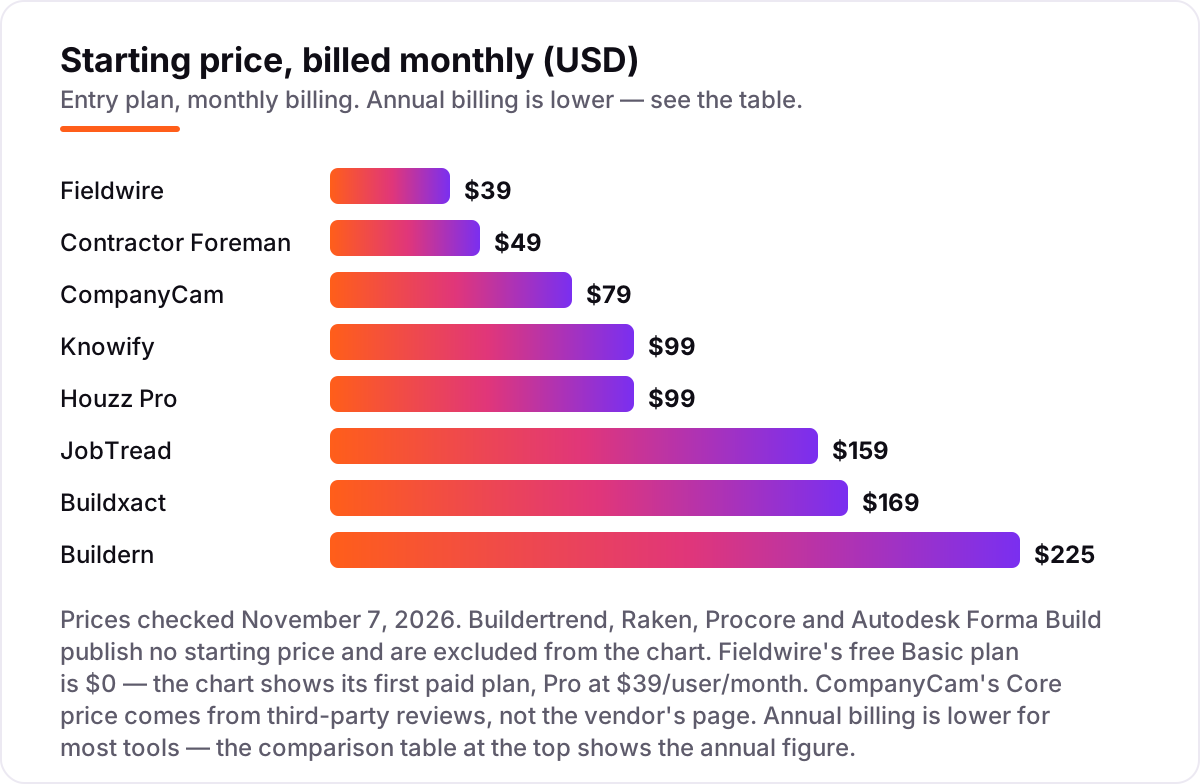
General contractor software pricing: what you will actually pay
Take a two-person office running three jobs at once, on annual billing. On list prices, the subscription costs $0 a month on Fieldwire Basic, $63 on CompanyCam Core, $105 on Contractor Foreman Standard, $128 on Knowify Core with one extra user, $149 on Houzz Pro Design with one extra user, $169 on Buildxact Foundation, $177 on JobTread with one extra user and $225 on Buildern Starter. Fieldwire Pro for the same two people would be $78 a month, so the free plan is the better buy until you need reports and exports.
Over a year, that is $0 on Fieldwire Basic, $756 on CompanyCam Core, $936 on Fieldwire Pro, $1,260 on Contractor Foreman Standard, $1,536 on Knowify Core, $1,788 on Houzz Pro Design, $2,028 on Buildxact Foundation, $2,124 on JobTread and $2,700 on Buildern Starter. The same two people and the same three jobs cost $0 at the cheap end and $2,700 at the dear end — a gap that comes entirely from pricing models and user counts, not from features.
Three costs sit outside every number above. First, the tiers that hide the feature you need: Knowify job costing means Advanced at $329 a month, Buildxact scheduling means Pro at $339, and Houzz Pro takeoffs mean the $199 plan. Second, the add-ons: CompanyCam extra users at about $29 a month each, Raken time tracking only on Performance, and Houzz Pro advertising from about $499 a month. Third, the quote-based tools — Buildertrend, Raken, Procore and Autodesk Forma Build — which cannot be compared on numbers at all until you have a quote in writing. If the firm also needs leads as well as software, compare the marketing side in our guide to marketing software for contractors.
Annual billing cuts the bill on most tools here: JobTread drops from $199 to $159 a month, Buildxact Foundation from $199 to $169, Knowify Core from $149 to $99, Contractor Foreman Basic is sold on yearly billing only, and Buildern takes 10% off the annual plan. One more cost to check before you commit: a second company is a second subscription on the flat-priced tools, while the per-user tools charge for every login. Price the second crew before you commit to a tool for the first.
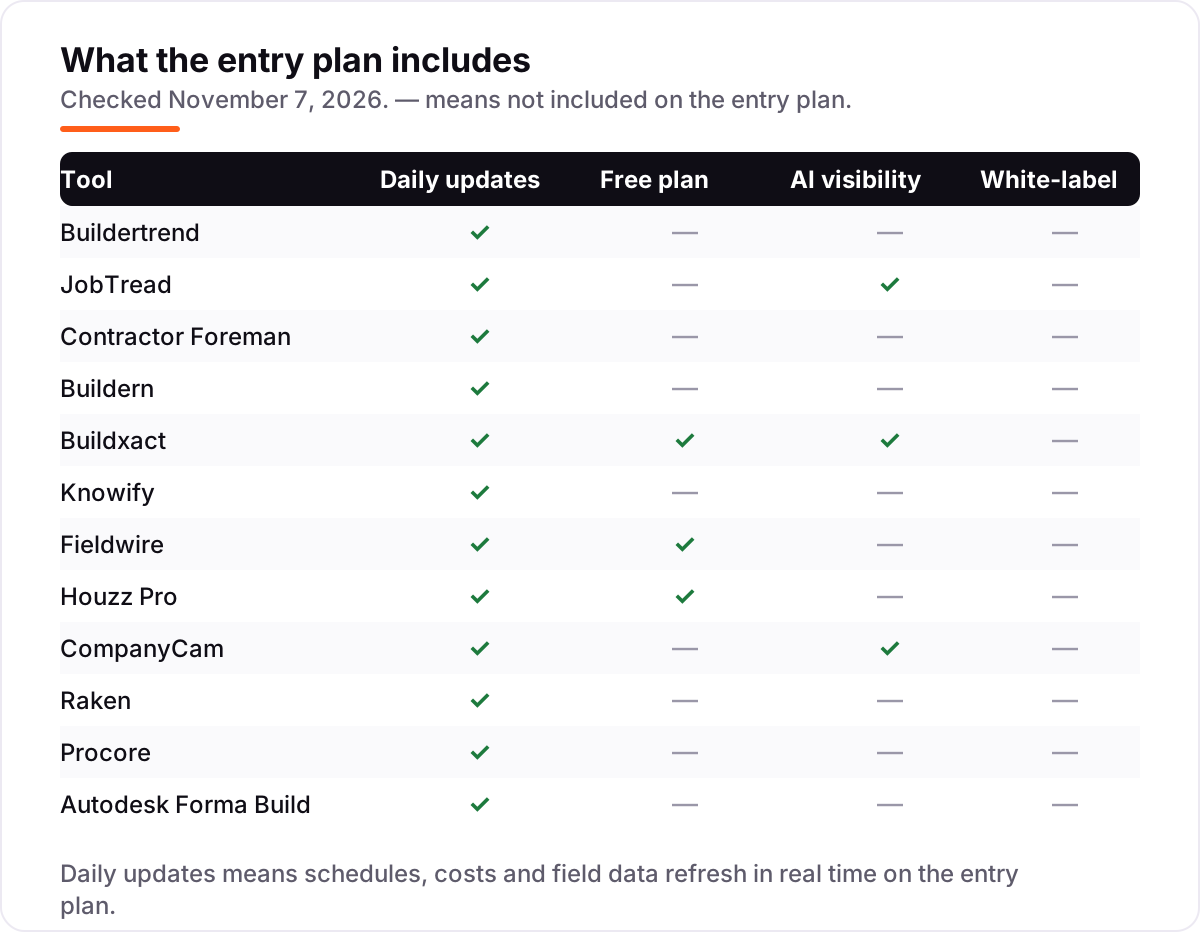
Know the difference: all-in-one platforms vs field tools
The confusion in this category is between a business system and a field tool. An all-in-one platform — Buildertrend, JobTread, Contractor Foreman, Buildern, Buildxact, Knowify, Houzz Pro, Procore, Autodesk Forma Build — runs the job from estimate to invoice, with budgets, schedules and accounting sync. A field tool — Fieldwire, Raken, CompanyCam — runs one part of the job brilliantly: drawings and punch lists, daily reports, or job photos. Buying a field tool and expecting it to invoice is the most common expensive mistake in this category.
There is a second, quieter confusion: per-user pricing versus flat pricing. Fieldwire, Raken and Autodesk Forma Build charge per user, so the bill grows with every login. Contractor Foreman, Buildern, Buildxact and Knowify charge a flat monthly rate for a set number of users, so the bill stays put until you cross a cap. Buildertrend and Procore charge by construction volume, so the bill grows with the size of your jobs rather than your headcount. Three tools can all cost "$99 a month" and mean three different things.
A third distinction worth knowing is the name change at Autodesk. Autodesk Construction Cloud became Autodesk Forma in March 2026, and the product most buyers want is now Forma Build, formerly Autodesk Build. Old reviews, old comparison pages and old pricing trackers still say Autodesk Build or Autodesk Construction Cloud — they are describing the same platform under its old name, and the G2 rating in this list covers the whole Forma platform rather than Forma Build alone.
Quick comparison: tool type by need
| Buyer | Best pick | Why |
|---|---|---|
| Most residential builders | Buildertrend | The most complete all-in-one, unlimited users, priced by quote |
| Builder who sells on the estimate | JobTread | Estimating to budget to invoice in one plan, from $159/month |
| Small contractor on a budget | Contractor Foreman | Flat $49/month for one user, full feature set included |
| Builder who prices from plans | Buildxact | Digital takeoff with live dealer pricing, from $169/month |
| Trade contractor on QuickBooks | Knowify | Deepest QuickBooks sync and AIA billing, from $99/month |
| Field crew that lives on drawings | Fieldwire | Free Basic plan, Pro is $39/user/month |
| Design-build firm that needs leads | Houzz Pro | Marketplace leads plus 3D plans, from $99/month |
| Large commercial GC | Procore | Volume-priced platform, quote-based, deepest toolkit |
Mistakes to avoid
- Comparing a per-user price to a flat price without multiplying. Fieldwire Pro at $39 a user is $195 a month for five people; Contractor Foreman Plus at $166 covers eight. The headline numbers are not comparable until headcount is in.
- Buying on the entry price when the feature you need sits a tier up. Knowify job costing needs Advanced at $329 a month, Buildxact scheduling needs Pro at $339, and Houzz Pro takeoffs need the $199 plan. Price the tier that has your feature.
- Ignoring the 12-month commitment. Houzz Pro subscriptions and Buildxact annual plans both need a year, and Contractor Foreman Basic is sold on yearly billing only. A monthly price you cannot buy monthly is not your price.
- Assuming a free trial means a free plan. JobTread has no trial at all, only a 30-day money-back guarantee, and Buildertrend and Procore sell through demos. Check the trial terms before you plan an evaluation around them.
- Budgeting a quote-based tool on a stale list price. Buildertrend's last published plans are from December 2024 and are not current, and Raken's reported prices disagree between sources. Get the quote in writing, including the renewal price, before you sign.
How we chose
We checked each vendor's own pricing page on November 7, 2026 and recorded the starting price exactly as shown, including the annual-billing figure where the page lists one, and we ranked the tools by fit for the most common buyer — a residential general contractor running a handful of jobs — not by brand size. Two prices could not be verified on the vendor's own page: CompanyCam's Core price ($79 a month, $63 billed annually) comes from third-party reviews of its pricing page from September and October 2026, corroborated by the $63 price shown on its G2 listing, and Raken's price is not published at all, so we list it as a custom quote with the reported range only. Buildertrend, Procore and Autodesk Forma Build also publish no starting price. Autodesk's G2 rating covers the whole Forma platform (formerly Autodesk Construction Cloud), of which Forma Build is one module. Buildern's own pages quote $225 a month with 10% off annual billing; we list $225 as the monthly figure. CoConstruct is not in this list because it is no longer sold to new customers — existing customers can add projects only through March 31, 2027. No vendor paid for a place in this list, and none of the links here are affiliate links.
What to do next
Start with the free plan or trial of your top pick and run one real job through it. Check that the field crew opens it every day, the estimate flows into the budget, and the numbers reach your accounting without re-typing before you commit to a year. If the jobs are sorted but new customers are not finding you, our monthly SEO service handles the visibility side — or compare providers in our guide to SEO companies for small business. Once your tools are in place, find out what's holding your rankings back.
Your stack only works if people find you
SerpAstra fixes what keeps your site off page one and makes it easy for AI assistants to recommend.
Get a free audit→Sources we checked (24)
- Buildertrend pricing — buildertrend.com/pricing (checked November 7, 2026)
- JobTread pricing — jobtread.com/pricing (checked November 7, 2026)
- Contractor Foreman pricing — contractorforeman.com/plans (checked November 7, 2026)
- Buildern pricing — buildern.com/pricing (checked November 7, 2026)
- Buildxact pricing — buildxact.com/pricing (checked November 7, 2026)
- Knowify pricing — knowify.com/pricing (checked November 7, 2026)
- Fieldwire pricing — fieldwire.com/pricing (checked November 7, 2026)
- Houzz Pro pricing — pro.houzz.com/pricing (checked November 7, 2026)
- CompanyCam pricing — companycam.com/pricing (checked November 7, 2026)
- Raken pricing — rakenapp.com/pricing (checked November 7, 2026)
- Procore pricing — procore.com/pricing (checked November 7, 2026)
- Autodesk Forma Build pricing — construction.autodesk.com/pricing (checked November 7, 2026)
- Buildertrend on G2 — g2.com/products/buildertrend/reviews (checked November 7, 2026)
- JobTread on G2 — g2.com/products/jobtread/reviews (checked November 7, 2026)
- Contractor Foreman on G2 — g2.com/products/contractor-foreman/reviews (checked November 7, 2026)
- Buildern on G2 — g2.com/products/buildern/reviews (checked November 7, 2026)
- Buildxact on G2 — g2.com/products/buildxact/reviews (checked November 7, 2026)
- Knowify on G2 — g2.com/products/knowify/reviews (checked November 7, 2026)
- Fieldwire on G2 — g2.com/products/fieldwire-by-hilti/reviews (checked November 7, 2026)
- Houzz Pro on G2 — g2.com/products/houzz-pro/reviews (checked November 7, 2026)
- CompanyCam on G2 — g2.com/products/companycam/reviews (checked November 7, 2026)
- Raken on G2 — g2.com/products/raken/reviews (checked November 7, 2026)
- Procore on G2 — g2.com/products/procore/reviews (checked November 7, 2026)
- Autodesk Forma on G2 — g2.com/products/autodesk-forma-formerly-autodesk-construction-cloud/reviews (checked November 7, 2026)
Shamim
Founder of SerpAstra
A full-stack SEO and digital marketer who spends most days on Local SEO for dental practices, AI search visibility and lead generation.
Frequently asked questions
What is the best general contractor software?
Buildertrend is the best fit for most residential builders: the widest all-in-one toolkit with unlimited users. JobTread is the better pick when estimating discipline matters most, from $159/month. Procore is the best choice for large commercial GCs, and Contractor Foreman is the best budget option at $49/month.
How much does general contractor software cost?
Published prices run from $0 to $225 a month. Fieldwire's Basic plan is free, Contractor Foreman starts at $49/month and Buildern at $225/month. Four tools in this list publish no price at all — Buildertrend, Raken, Procore and Autodesk Forma Build all need a sales quote, so budget time for that call.
Is there really free general contractor software?
Yes, with limits. Fieldwire Basic is free for up to 5 users, 3 projects and 100 sheets, and it runs a real job. Buildxact Go is free with five AI estimating credits, and Houzz Pro has a free plan with a 3D floor planner, estimates and invoicing. None of the three is a full business system on its own.
What is the difference between Buildertrend and Procore?
Buildertrend is built for residential builders and remodelers, with client portals, selections and warranty tracking; Procore is built for large commercial GCs, with deeper cost, quality and document control. Buildertrend charges a flat licence per company, while Procore prices per product by annual construction volume.
Do I still need separate estimating software?
Not with the all-in-one tools: JobTread, Buildern, Buildxact and Knowify all include estimating, and Buildertrend adds it on its higher tiers. Fieldwire, Raken and CompanyCam do not estimate at all — they are field tools that sit beside your estimating and accounting systems, so budget for both.
Can I switch general contractor software later?
Yes, but plan the move between jobs, not mid-project. Export your client and subcontractor lists, open estimates, budgets, schedules and cost history from the old tool, then import them into the new one and reconcile one job end to end before going live. Switching mid-job means running two systems through the busiest weeks.
Free SEO and AI visibility audit
Find out what is holding your rankings back
Send us your site. Within 2 business days you get a written audit, an AI visibility check and a short fix list ranked by impact. Free, with no contract attached.
Request my free audit→Related guides
 Digital Marketing & Ads7 Best Marketing Software for Contractors in 2026, ComparedCompare the 7 best marketing software for contractors on price, reviews and trade-specific features, with every price checked November 5, 2026.Read guide →
 SEO & AI SearchBest Local SEO Tools for 2026: 11 Picks Ranked by What You Need11 best local SEO tools with real prices checked November 1, 2026 — from $14/month trackers to quote-only enterprise platforms, sorted by what you need.Read guide →
 SEO & AI Search12 Best Marketing Platforms for Small Business SEO in 2026, ComparedThe 12 best marketing platforms for small business SEO, compared on real prices, SEO tools and AI visibility. Every price checked November 1, 2026.Read guide →