
9 Best Internal Newsletter Software in 2026, Compared
Compare the 9 best internal newsletter software tools on price, free plans, read analytics and Outlook integration, with prices checked November 6, 2026.
 Shamim Mia, Founder, SerpAstraLast verified November 6, 202614 min read
We compare pricing pages, documentation and public reviews. We never accept payment for rankings.

Key takeaways
- Staffbase leads for large employers, ContactMonkey is the best fit inside Outlook or Gmail, and Cerkl Broadcast is free forever — while Mailchimp starts at $13 a month and Constant Contact at $12.
- Five of the nine tools publish no price at all: Staffbase, ContactMonkey, Axios HQ, Poppulo and Firstup all quote by workforce size, so budget on a sales conversation, not a price page.
- The single most important buying factor is who reads without a desk: if frontline staff have no company email, you need an app or SMS channel, not just a better email template.
- Read analytics are the point of buying dedicated software — Outlook and Gmail cannot tell you who actually read a message, and every dedicated tool here can.
On this page
Quick comparison
| Tool | Best for | Starting price | Free plan |
|---|---|---|---|
| Staffbase | Large employers that want one platform for employee app, intranet, email and digital signage | Custom quote | No |
| ContactMonkey | Internal comms teams that live in Outlook or Gmail and want tracked employee email without a new inbox | Custom quote | No |
| Axios HQ | Executive and comms teams that want short, readable leadership updates written the Smart Brevity way | Custom quote | No |
| Cerkl Broadcast | Small and mid-size teams that want a purpose-built internal email tool at $0 before they spend anything | Free | Yes (free forever) |
| Poppulo | Large enterprises that want email, mobile app, intranet and digital signage on one platform | Custom quote | No |
| Firstup | Large employers with frontline and deskless staff who need email, app and intranet reach in one campaign | Custom quote | No |
| Mailchimp | Small teams that want the biggest template library and the easiest start for a staff newsletter | $13/mo | Yes (free plan) |
| Constant Contact | Small teams and nonprofits that want the simplest editor and event tools for a staff newsletter | $12/mo | No (30-day trial) |
| beehiiv | Teams that run one newsletter for staff and the public and want growth and monetization tools built in | $59/mo | Yes (free plan) |
Make one of these tools?
We re-check this list every quarter. Send a correction, request a review, or ask about a clearly labeled sponsored spot.
Request a listingThe best internal newsletter software

Staffbase
Best for: Large employers that want one platform for employee app, intranet, email and digital signage
Staffbase is the deepest dedicated platform in this list: an employee app, intranet, email, SMS and digital signage in one system, built for organizations with thousands of employees across sites and shifts. It is the only tool here that also serves workers with no desk and no company email, through a branded mobile app, and it reports 87% average app adoption among frontline customers in the first year.
The catch is the sales process. Staffbase publishes no prices and quotes every deal, annual billing only, and the vendor says a typical launch takes 90 days from signed contract. Buy Staffbase when internal comms is a company-wide program with a real budget; buy Cerkl Broadcast or ContactMonkey when you need a newsletter running this month.
What we like
- The most complete dedicated platform here: employee app, intranet, email, SMS and digital signage in one system
- Frontline-specific pricing means deskless staff cost less than full enterprise licences
- Staffbase reports 87% average app adoption among frontline customers in the first year
- Trusted by more than 1,500 enterprise customers, with 24/7 support and deep HRIS integrations
Watch out for
- No published price — you cannot budget without a sales conversation and a tailored proposal
- Enterprise pricing puts it out of reach for small teams; frontline-only pricing is a separate quote
- Typical go-live is 90 days from signed contract, so it is not a quick fix for next week's newsletter

ContactMonkey
Best for: Internal comms teams that live in Outlook or Gmail and want tracked employee email without a new inbox
ContactMonkey lives inside Outlook and Gmail instead of asking staff to open another app. You build the newsletter with a drag-and-drop editor, send it from your own inbox, and get individual open, click and read-time data back — including who never opened it, so you can resend to just those people. HRIS sync keeps lists accurate with nightly updates, and AI checks flag broken links and typos before sending.
The trade-off is price opacity. Launch, Grow and Enterprise are all request-a-quote, and the $600-a-month starting figure quoted in some roundups does not appear on the vendor's own pricing page, so do not budget on it. Pick ContactMonkey when email is the channel and Outlook is home; pick Staffbase when you also need an app and intranet.
What we like
- Sends tracked internal email directly from Outlook or Gmail, so staff need no new login and no new app
- Individual recipient tracking, click maps and segmented stats show exactly who opened and read
- HRIS sync keeps employee lists accurate with nightly updates instead of manual CSV uploads
- AI editorial checks flag broken links, typos and readability problems before you send
Watch out for
- No published price — Launch, Grow and Enterprise are all request-a-quote, and the $600 a month figure in some roundups is not on the vendor's page
- Advanced AI checks and the Analytics API are paid add-ons or higher tiers, not part of Launch
- Template editing feels restrictive to some reviewers, and image editing is a weak spot

Axios HQ
Best for: Executive and comms teams that want short, readable leadership updates written the Smart Brevity way
Axios HQ is built around Smart Brevity, the Axios method for short, scannable updates — and it is the only tool here that coaches the writing itself. An AI Assistant and Smart Brevity guidance come on every plan, including Essential, alongside a content library, segmentation and a custom domain. Pricing is by organization rather than per seat, so the whole comms team can use it, and each plan includes 5,000 messages a year.
The limits are volume and price transparency. There is no published price, and 5,000 messages a year is not much for a company sending daily updates to several audiences — extra messages are an add-on. Choose Axios HQ when leadership updates must actually be read; choose Cerkl Broadcast when the budget is zero and volume is the constraint.
What we like
- Smart Brevity guidance and an AI Assistant are included on every plan, including Essential
- Priced by organization, not per seat, so the whole comms team can use it without licence-counting
- Custom domain and branded formatting on the entry plan, with 5,000 messages a year included
- The highest reviewer score in this list, with ease of use the most-cited strength
Watch out for
- No published price — packages are quoted by organization size and message volume
- Every plan includes only 5,000 messages a year, so heavy senders pay for add-on messages
- No free plan and no published trial, so you evaluate on a demo rather than hands-on use

Cerkl Broadcast
Best for: Small and mid-size teams that want a purpose-built internal email tool at $0 before they spend anything
Cerkl Broadcast is the only dedicated internal email tool here with a forever-free plan, and it is a real product rather than a trial: a drag-and-drop builder, branded templates, audience segmentation, pulse surveys and read analytics, with 5,000 sends a month and 3 communicator seats at $0. Acknowledgements show who read a message, and retargeting re-sends to people who missed it.
The free plan has edges. Five thousand sends a month covers a weekly newsletter to about 1,000 staff, but a daily send to a large workforce outgrows it, and the Foundations+ upgrade has no published price. Start on Cerkl Broadcast when the budget is $0 and the list is small; move to a quoted platform when you need unlimited sending.
What we like
- The only forever-free dedicated tool here: full email builder, templates and analytics at $0
- Audience Manager segments by department, location or role, and retargeting re-sends to non-openers
- Acknowledgements show who actually read a message — the one thing Outlook and Gmail cannot tell you
- No contract, no credit card and no cap on how many employees you can reach
Watch out for
- The free plan caps at 5,000 sends a month and 3 communicator seats — a daily newsletter to a big staff outgrows it
- Foundations+ has no published price, so the upgrade cost is a sales conversation
- Translation and API access are paid, and some reviewers report bugs and an awkward mobile view

Poppulo
Best for: Large enterprises that want email, mobile app, intranet and digital signage on one platform
Poppulo is the enterprise multi-channel option: employee email, a mobile app, intranet, advocacy and digital signage on one platform, reaching a claimed 50 million employees and counting more than 40 of the Fortune 100 as customers. Audience targeting and engagement analytics are the features reviewers praise most, and the security list — SSO, ISO 27001, SOC 2 Type 2 — is the strongest here.
The price is the problem for everyone except large enterprises. Poppulo publishes no prices, and a competitor's alternatives page puts typical pricing at $90,000 to $150,000 a year — a figure the vendor does not confirm — while analytics and AI features often cost extra. A Forrester study commissioned by Poppulo put a composite enterprise's three-year costs at $1.12 million. Buy Poppulo at enterprise scale; look elsewhere below that.
What we like
- One platform across employee email, mobile app, intranet, advocacy and digital signage
- Reaches 50 million employees, and counts more than 40 of the Fortune 100 as customers
- Audience targeting and engagement analytics reviewers praise most
- Enterprise-grade security: SSO, ISO 27001, SOC 2 Type 2 and GDPR compliance
Watch out for
- No published price — a competitor's alternatives page puts typical pricing at $90,000 to $150,000 a year, and the vendor publishes no figure to check that against
- Analytics, AI capabilities and new features often cost extra on top of the base licence
- Support is based in Ireland, so coverage outside European hours is thinner

Firstup
Best for: Large employers with frontline and deskless staff who need email, app and intranet reach in one campaign
Firstup plans and targets campaigns across email, a mobile app, an intranet hub and digital signage, then re-targets the people who missed a message and tracks required acknowledgements. It is built for large employers with frontline staff, with integrations to Workday, ServiceNow and Microsoft 365, and SOC 2 Type 2 compliance for IT sign-off.
Like the other enterprise tools here, Firstup publishes no prices: Essential, Professional and Premier are all quoted by workforce size, and the full intranet is an add-on rather than a standard feature. AI content creation waits for the higher tiers. Pick Firstup when frontline reach across channels is the job; pick ContactMonkey when email alone will do.
What we like
- Campaign orchestration across email, mobile app, intranet hub and digital signage from one plan
- Re-targets employees who missed a message and tracks required acknowledgements
- Deep integrations with Workday, ServiceNow and Microsoft 365 keep audiences in sync
- SOC 2 Type 2 compliant, built for large, distributed workforces
Watch out for
- No published price — Essential, Professional and Premier are all quoted, so early budgeting is guesswork
- Full intranet capabilities are an add-on rather than part of the standard packages
- AI-powered content creation and hyper-personalized journeys wait for the higher tiers

Mailchimp
Best for: Small teams that want the biggest template library and the easiest start for a staff newsletter
Mailchimp is the easiest start in this list: the widest template library, a builder anyone can use, and integrations with almost everything. The free plan covers 250 contacts and 500 emails a month, and Essentials costs $13 a month for 500 contacts, adding A/B testing, scheduling and three seats. Support is 24/7 email and chat from the entry paid plan.
The billing model is the catch. Prices climb with every contact tier — Essentials is $75 a month at 5,000 contacts — and unsubscribed contacts still count toward the bill until you archive them. There is also no read-receipt tracking per employee and no HRIS list sync. Use Mailchimp for a small staff newsletter; use a dedicated tool once you need to prove who read it.
What we like
- The widest template and integration library here, so a first newsletter looks polished in an afternoon
- Free plan covers 250 contacts, and Essentials adds A/B testing, scheduling and 3 seats for $13 a month
- 24/7 email and chat support from the entry paid plan
- Connects to almost everything, from HR tools to Slack, without custom work
Watch out for
- The free plan covers only 250 contacts — a 500-person staff already needs the $13 a month Essentials plan
- Pricing climbs with every contact tier: Essentials is $75 a month at 5,000 contacts, not $13
- Unsubscribed contacts still count toward the bill until you archive them

Constant Contact
Best for: Small teams and nonprofits that want the simplest editor and event tools for a staff newsletter
Constant Contact is the simplest paid tool here: a plain drag-and-drop editor, templates, scheduling and event registration built in, which suits staff events and sign-ups as well as newsletters. Lite costs $12 a month for 500 contacts, or $10.20 prepaid for a year, and nonprofits get up to 30% off annual prepay. Unsubscribed contacts do not count toward the bill.
The trial is the trap. It runs 30 days but allows only 100 sends in total — not enough to send one newsletter to a 500-person staff — and Lite covers a single user with one automation template. A/B testing waits for Standard at $35 a month. Pick Constant Contact for the simplest start; pick Mailchimp when you need a free plan or more seats.
What we like
- The simplest editor in this list, with event registration built in — useful for staff events and sign-ups
- Lite starts at $12 a month for 500 contacts, or $10.20 a month prepaid for a year
- Nonprofits get 20% off at six months and 30% off at twelve months
- No charge for unsubscribed contacts, unlike Mailchimp
Watch out for
- No free plan — the 30-day trial allows only 100 sends in total, not even one newsletter to a 500-person staff
- Lite allows a single user and one automation template, and A/B testing waits for Standard at $35 a month
- The bill is set by the highest contact tier you ever reach, and deleting contacts does not lower it

beehiiv
Best for: Teams that run one newsletter for staff and the public and want growth and monetization tools built in
beehiiv is the newsletter platform for teams that run one newsletter for staff and the public: a website, custom domain and recommendation network come with it, and the free plan covers up to 2,500 subscribers with unlimited sends. Lite adds paid subscriptions at a 0% platform cut, the ad network, automations and A/B testing, starting at $59 a month for 1,000 subscribers.
The price is the highest here for a general tool, and it climbs with every subscriber tier — Lite is $139 a month at 10,000 subscribers. Paid subscriptions, ads and automations all wait for the paid plan, and reviewers call support slow. Use beehiiv when the newsletter also grows an audience or earns revenue; use Cerkl Broadcast when it is staff-only and free.
What we like
- Free plan covers up to 2,500 subscribers with unlimited sends — the most generous free tier here
- Lite takes 0% of paid subscription revenue, and adds the ad network and paid recommendations
- Referral program, surveys and polls, and A/B testing are built in rather than bolted on
- A website, custom domain and recommendation network come with the newsletter, not as extras
Watch out for
- Lite is $59 a month — nearly five times Constant Contact — and the price climbs with every subscriber tier
- Paid subscriptions, the ad network and automations all wait for the paid plan; the free plan is read-only growth
- Reviewers call support slow and the setup learning curve steep for a first newsletter
The best internal newsletter software does one job a general email tool cannot: it proves employees actually read the message. Outlook and Gmail can send a staff update, but neither can tell you who opened it, who read it, or who missed it entirely — and that gap is why dedicated internal comms tools exist. We ranked the nine tools below by fit for the most common buyer, an internal comms team at a company with a few hundred to a few thousand staff, and every price was checked on the vendor's own pricing page on November 6, 2026.
How to choose the best internal newsletter software
- Count your deskless staff first. If a third of the workforce has no company email, an email-only tool reaches two-thirds of the company by design. Staffbase and Firstup reach those people through a mobile app; ContactMonkey adds SMS for urgent updates.
- Decide whether email alone is enough. If the newsletter is the whole program, ContactMonkey or Cerkl Broadcast will do. If comms also means an intranet, an app and digital signage, Staffbase, Poppulo or Firstup cover the lot under one contract.
- Check the read data, not the send data. Every dedicated tool here reports opens, clicks and read time per employee, and most add acknowledgement buttons. That proof is the reason to pay for dedicated software instead of sending from Outlook.
- Count the senders, not just the readers. Cerkl Broadcast's free plan allows 3 communicator seats, Constant Contact Lite allows 1, and Mailchimp Essentials allows 3. A comms team of five needs a plan that covers five senders.
- Ask how the list stays accurate. HRIS sync, which ContactMonkey, Staffbase and Firstup all offer, keeps leavers off the list and joiners on it automatically. A tool that needs manual CSV uploads goes stale within a month.
Internal email is one system in your stack, not the whole stack. If the business also needs to be found online, our monthly SEO service handles the visibility side. And before you publish the newsletter archive as web pages, run your titles through the free SERP snippet preview tool — it shows exactly how the title and description will look in Google.
Whatever you shortlist, try it with a real send before you pay. The free plans and trials in this list are long enough to send one genuine newsletter — your staff list, your branding, your content — and that send tells you more than any review can. Check two things in the test: that the read report names the people who missed it, and that the list syncs from your HR system without a manual upload. Every dedicated tool here offers a demo or a free start, so there is no reason to buy before you have sent one real newsletter.
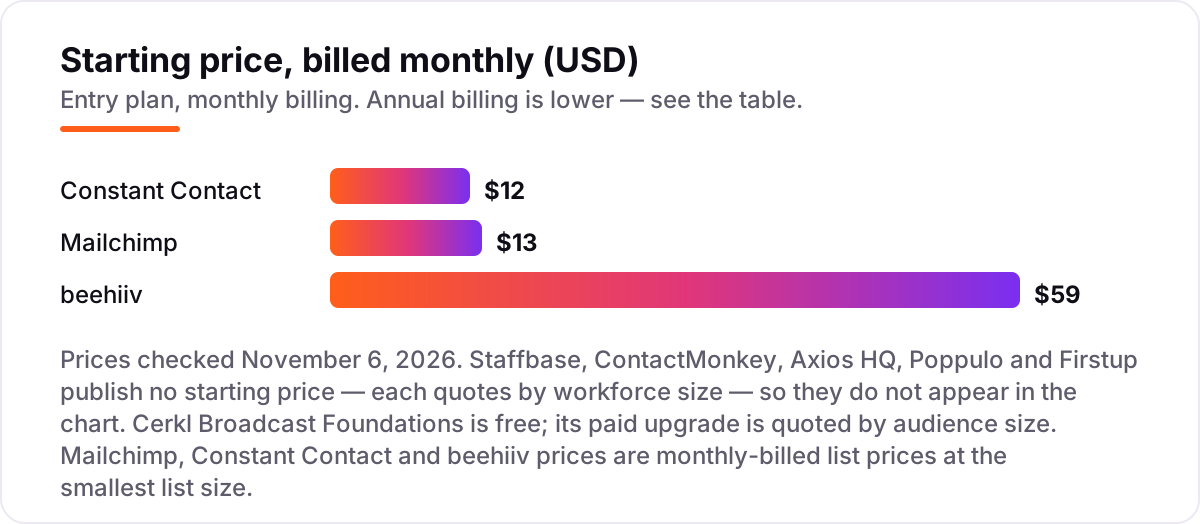
Internal newsletter software pricing: what you will actually pay
Take a 500-person company sending one staff newsletter a week. On list prices, the software costs $0 on Cerkl Broadcast Foundations — a weekly send to 500 staff is about 2,200 sends a month, inside the 5,000-send free allowance — and $0 on beehiiv's free plan, which covers up to 2,500 subscribers. Mailchimp Essentials costs $13 a month, or $156 a year, because the free plan stops at 250 contacts. Constant Contact Lite costs $12 a month, or $144 a year, and $122.40 a year prepaid for twelve months.
The paid step-ups change the picture. beehiiv Lite is $59 a month, or $708 a year, and it is the only paid plan here you would buy for growth features rather than capacity: the free plan already covers the list. At 5,000 staff, Mailchimp Essentials climbs to $75 a month, or $900 a year, while Cerkl's free plan still works if you send weekly — 5,000 staff means about 22,000 sends a month, which breaks the 5,000-send cap and forces the Foundations+ upgrade, whose price is quoted by audience size.
Two traps sit outside every number above. First, the Constant Contact trial: it runs 30 days but allows only 100 sends in total, so it cannot even send one newsletter to a 500-person staff — treat it as a look around, not a test. Second, the five dedicated enterprise tools publish no price at all, and enterprise pricing is a different world: a Forrester study commissioned by Poppulo put a composite enterprise's three-year costs at $1.12 million. If the budget is four figures a year, the honest shortlist is Cerkl Broadcast, Mailchimp, Constant Contact and beehiiv; the quoted tools belong on a separate enterprise track. For a general comparison of the priced platforms, see our guide to the best email marketing platforms for newsletters.
Annual billing cuts the bill on the priced tools: Constant Contact Lite drops from $144 to $122.40 a year prepaid, beehiiv Lite from $708 to $588, and Mailchimp publishes no annual discount on its marketing plans, so $13 a month is the price either way. One more cost to check before you commit: a second audience is a second bill on the contact-priced tools. Mailchimp and Constant Contact both bill on total contacts, so adding a separate external list on the same account raises the tier — keep internal and external audiences on separate plans if the budgets are separate.
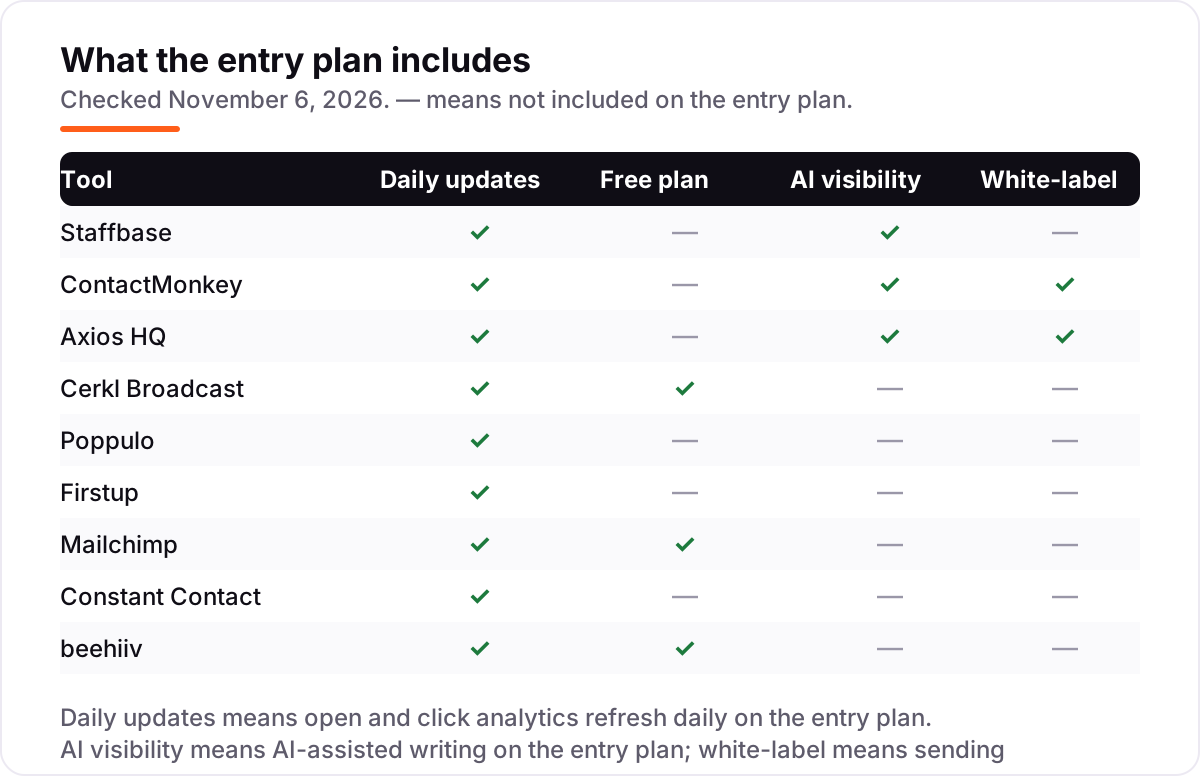
Know the difference: dedicated internal tools vs general email platforms
The confusion in this category is between a tool built for employees and a tool built for subscribers. A dedicated internal tool — Staffbase, ContactMonkey, Axios HQ, Cerkl Broadcast, Poppulo and Firstup — is built around one question: did every employee see this? It tracks reads per named employee, syncs lists from the HR system, collects acknowledgements, and re-sends to the people who missed a message. A general email platform — Mailchimp, Constant Contact and beehiiv — is built around a different question: did the list grow? It tracks opens per contact, bills by list size, and optimizes for sign-ups and revenue.
The billing unit follows the audience. Dedicated tools quote by workforce size, because the buyer is the employer and every employee must be reached. General tools bill by contacts or subscribers, because the buyer is a marketer and the list is the asset. That is why the same 500-person staff costs $0 on Cerkl Broadcast and $13 a month on Mailchimp: one vendor charges for the workforce, the other for the list.
A third distinction is what "free" means. Cerkl Broadcast Foundations is free because the vendor sells the upgrade to bigger senders; Mailchimp and beehiiv are free because the vendor sells the paid plan to bigger lists. Both kinds of free are real, but only the dedicated one is designed for the job: per-employee read tracking and HRIS sync do not exist on a free marketing plan. If the newsletter carries policy changes, safety notices or compliance messages, that difference is the whole buying decision.
Quick comparison: tool type by need
| Buyer | Best pick | Why |
|---|---|---|
| Large employer, whole workforce | Staffbase | App, intranet and email in one platform, priced by quote |
| Team that lives in Outlook or Gmail | ContactMonkey | Tracked email without leaving the inbox, priced by quote |
| Leadership updates that must be read | Axios HQ | Smart Brevity writing help on every plan, priced by quote |
| Small team, zero budget | Cerkl Broadcast | Free forever, 5,000 sends a month, full read analytics |
| Small team, simplest paid start | Constant Contact | Lite from $12 a month, easiest editor here |
| One newsletter for staff and the public | beehiiv | Free to 2,500 subscribers, Lite $59 a month |
Mistakes to avoid
- Budgeting on a price that does not exist. Five tools here publish no price. A roundup figure — $600 a month for ContactMonkey, $15,000 a year for Axios HQ, $90,000 to $150,000 a year for Poppulo — is a directory estimate, not a vendor price, so never put it in a budget.
- Buying on the free plan, then hitting the send cap. Cerkl Broadcast's free plan stops at 5,000 sends a month and Mailchimp's at 250 contacts. Count your staff and your send frequency before you commit to $0.
- Testing with a trial that cannot send. Constant Contact's 30-day trial allows 100 sends in total. One newsletter to a 500-person staff needs 500 sends, so the trial cannot test a real send — use the demo instead.
- Judging by open rate alone. An open is recorded when images load, not when a person reads. Read time, click maps and acknowledgement buttons are the numbers that show whether the message landed.
- Forgetting the deskless staff. A newsletter that only goes to company email never reaches warehouse, retail or field staff. If a third of the workforce has no inbox, the tool needs an app or SMS channel, not a prettier template.
How we chose
We checked each vendor's own pricing page on November 6, 2026 and recorded the starting price exactly as shown. Five vendors publish no price — Staffbase, ContactMonkey, Axios HQ, Poppulo and Firstup — so we recorded them as custom quote and did not import directory figures: the $0.01 Staffbase price and the $15,000-a-year Axios HQ price on review directories are not on the vendors' pages, and the $600-a-month ContactMonkey figure in some roundups is not either. We ranked the tools by fit for the most common buyer, an internal comms team at a company with a few hundred to a few thousand staff, not by brand size. This list carries no rating for Poppulo because G2 shows conflicting figures across its Poppulo listings, and we would rather show no rating than pick one. No vendor paid for a place in this list, and none of the links here are affiliate links.
What to do next
Start with the free plan or demo of your top pick and send one real newsletter to your actual staff list. Check that the read report names the people who missed it and that the list syncs from your HR system before you commit to a year. If the shortlist is the priced tools, the choice is simple: free Cerkl Broadcast for a staff-only send, Constant Contact for the simplest paid start, Mailchimp for the biggest template library. If the business is sorted but new customers are not finding you, our monthly SEO service handles the visibility side — or compare automation options in our guide to email automation tools. Once your tools are in place, find out what's holding your rankings back.
Your stack only works if people find you
SerpAstra fixes what keeps your site off page one and makes it easy for AI assistants to recommend.
Get a free audit→Sources we checked (17)
- Staffbase pricing — staffbase.com/pricing (checked November 6, 2026)
- ContactMonkey pricing — contactmonkey.com/pricing (checked November 6, 2026)
- Axios HQ pricing — axioshq.com/pricing (checked November 6, 2026)
- Cerkl Broadcast pricing — cerkl.com/broadcast/plans-and-pricing (checked November 6, 2026)
- Poppulo pricing — poppulo.com/pricing (checked November 6, 2026)
- Firstup pricing — firstup.io/pricing (checked November 6, 2026)
- Mailchimp pricing — mailchimp.com/pricing/marketing (checked November 6, 2026)
- Constant Contact pricing — constantcontact.com/pricing (checked November 6, 2026)
- beehiiv pricing — beehiiv.com/pricing (checked November 6, 2026)
- Staffbase reviews — g2.com/products/staffbase/reviews (checked November 6, 2026)
- ContactMonkey reviews — g2.com/products/contactmonkey-inc-contactmonkey/reviews (checked November 6, 2026)
- Axios HQ reviews — g2.com/products/axios-hq/reviews (checked November 6, 2026)
- Cerkl Broadcast reviews — g2.com/products/cerkl-broadcast/reviews (checked November 6, 2026)
- Firstup reviews — g2.com/products/firstup/reviews (checked November 6, 2026)
- Mailchimp reviews — g2.com/products/mailchimp/reviews (checked November 6, 2026)
- Constant Contact reviews — g2.com/products/constant-contact/reviews (checked November 6, 2026)
- beehiiv reviews — g2.com/products/beehiiv/reviews (checked November 6, 2026)
Shamim
Founder of SerpAstra
A full-stack SEO and digital marketer who spends most days on Local SEO for dental practices, AI search visibility and lead generation.
Frequently asked questions
What is the best internal newsletter software?
Staffbase is the best fit for most large employers, with an employee app, intranet and email in one platform. ContactMonkey is the better pick for teams that live in Outlook or Gmail. Cerkl Broadcast is the best free option, with a forever-free plan that covers 5,000 sends a month.
How much does internal newsletter software cost?
The three tools with published prices cost $0 to $59 a month: Cerkl Broadcast is free, Constant Contact Lite is $12 a month and Mailchimp Essentials is $13, while beehiiv Lite is $59. The five dedicated enterprise tools publish no price and quote by workforce size, so expect a sales conversation.
Is there really free internal newsletter software?
Yes. Cerkl Broadcast Foundations is free forever, with 5,000 sends a month, 3 communicator seats and full read analytics. Mailchimp is free to 250 contacts and beehiiv to 2,500 subscribers, but neither is built for internal comms, so they lack per-employee read tracking and HRIS list sync.
What is the difference between internal newsletter software and Mailchimp?
Dedicated internal tools track reads per named employee, sync lists from your HR system, collect acknowledgements and re-send to non-openers. Mailchimp tracks opens per contact and bills by list size, which suits marketing lists. For a staff newsletter where you must prove everyone saw a policy change, the dedicated tools win.
Can I send an internal newsletter from Outlook?
Yes, and ContactMonkey is built for exactly that: it sends tracked newsletters from your Outlook or Gmail inbox, with open, click and read-time data per recipient. Plain Outlook can send the same email, but it cannot tell you who opened it, who read it, or who missed it.
How do I measure whether employees read the newsletter?
Use read receipts, read time and click maps rather than open rate alone: an open is recorded when images load, not when a person reads. Dedicated tools add acknowledgement buttons, so staff confirm they saw a message, and segment reports show read rates by department, location or role.
Free SEO and AI visibility audit
Find out what is holding your rankings back
Send us your site. Within 2 business days you get a written audit, an AI visibility check and a short fix list ranked by impact. Free, with no contract attached.
Request my free audit→Related guides
 Digital Marketing & Ads7 Best Email Marketing Platforms for Newsletters in 2026, Compared7 best email marketing platforms for newsletters compared on price, free plans and monetization. Prices checked on vendor pricing pages, November 4, 2026.Read guide →
 Digital Marketing & Ads10 Best Email Automation Tools in 2026 (Free and Paid, Compared)Compare the 10 best email automation tools on price, free plans and automation depth, with every starting price checked on November 5, 2026.Read guide →
 Digital Marketing & Ads11 Best Email Marketing Software for Small Business in 2026, ComparedThe 11 best email marketing software for small business, compared on real 2026 prices, free plans and automation — Brevo starts at $9/month.Read guide →