
8 Best Invoice Software for Landscaping in 2026, Compared
Compare the 8 best invoice software for landscaping on price, free plans, field tools and payment fees, with every price checked November 8, 2026.
 Shamim Mia, Founder, SerpAstraLast verified November 8, 202613 min read
We compare pricing pages, documentation and public reviews. We never accept payment for rankings.

Key takeaways
- Jobber is the best fit for most landscaping crews at $49/month; Housecall Pro follows at $79/month for growing crews, and Yardbook is free for solo operators just starting out.
- Three tools here cost $0 to start — Yardbook, Square Invoices and Zoho Invoice — but only Yardbook also schedules the crew.
- The single most important buying factor is whether the tool runs the job or just the invoice: field-service tools schedule, route and bill, while pure invoicers only bill.
- Card processing is billed on top of every subscription here, so budget 2.9–3.3% plus $0.30 on every card payment you collect.
On this page
Quick comparison
| Tool | Best for | Starting price | Free plan |
|---|---|---|---|
| Jobber | Landscaping crews of 1–15 that want quotes, scheduling, invoicing and payments in one app | $49/mo | No (14-day trial) |
| Housecall Pro | Growing landscaping crews that want GPS tracking, routes and QuickBooks sync as they scale | $79/mo | No (14-day trial) |
| Yardbook | Solo operators and new landscaping businesses that want a free, landscaping-specific starting point | Free; $34.99/mo | Yes (free plan) |
| FieldPulse | Established landscaping crews of 7–50 technicians that want one all-in-one system with strong support | Custom quote | No (demo) |
| FreshBooks | Small landscapers who bill by the job and want chasing, late fees and time tracking built in | $23/mo | No (30-day trial) |
| QuickBooks Online | Landscapers who want invoicing and the books in one place, on the software most accountants already know | $38/mo | Yes (Free plan) |
| Square Invoices | Landscapers who already take card payments with Square and invoice from the same account | Free; $49/mo | Yes (free plan) |
| Zoho Invoice | Solo landscapers and two-person crews that send under 500 invoices a year and want to pay $0 | Free | Yes (free) |
Make one of these tools?
We re-check this list every quarter. Send a correction, request a review, or ask about a clearly labeled sponsored spot.
Request a listingThe best invoice software for landscaping

Jobber
Best for: Landscaping crews of 1–15 that want quotes, scheduling, invoicing and payments in one app
Jobber is the tool most landscaping crews land on, because it covers the whole job rather than just the bill. Core costs $49 a month for one user and includes quoting, invoicing, scheduling, a client hub and online booking, so a job goes from estimate to paid invoice without retyping anything. Crews quote and invoice from the phone on site, and clients pay online through Jobber Payments.
The catch is the user cap. Core covers one person, so a two-person crew needs Connect at $139 a month, which also adds QuickBooks Online sync, automated follow-ups and GPS tracking. Grow at $199 adds job costing and two-way texting. Card payments cost 2.9% plus $0.30 per transaction on top. Buy Jobber when you want one system for crew and billing; buy FreshBooks or Zoho Invoice when invoicing alone is enough.
What we like
- Quotes, scheduling, invoicing and payments live in one app, so a job goes from estimate to paid without retyping
- Transparent published pricing — Core at $49 a month — with no sales call needed to get a number
- Mobile app lets crews quote, invoice and collect payment from the job site
- 14-day free trial with no credit card, on the Grow plan
Watch out for
- Core covers 1 user only — a second crew member means Connect, from $139 a month billed monthly
- QuickBooks Online sync, job costing and two-way texting all wait for Connect or Grow
- Card payments cost 2.9% plus $0.30 per transaction on top of the subscription

Housecall Pro
Best for: Growing landscaping crews that want GPS tracking, routes and QuickBooks sync as they scale
Housecall Pro suits crews that have outgrown a solo setup and need the office to keep up with the field. Basic costs $79 a month for one user and covers online booking, scheduling, estimates, invoicing, a price book and job costing, so estimates are built on real costs from the start. Clients book online, pay by card or ACH from the invoice, and the office sees every job on one board.
Most crews land one tier up. Essentials costs $189 a month for five users and adds routes, flat-rate pricing, employee GPS tracking and QuickBooks Online sync; MAX at $329 covers eight users and adds sales proposals and an open API. Extra users are only sold on MAX, at $35 a month each. Pick Housecall Pro when routes and GPS matter; pick Jobber when the lower entry price matters more.
What we like
- Basic includes job costing and a price book, so estimates are built on real costs from day one
- Essentials adds routes, flat-rate pricing, employee GPS tracking and QuickBooks Online sync for $189 a month
- Built-in card, ACH and consumer-financing payments, so clients can pay from the invoice
- 14-day trial of the top MAX plan with no credit card
Watch out for
- Basic covers 1 user and no QuickBooks sync — most crews land on Essentials at $189 a month
- Extra users are only sold on MAX, at $35 a month each, so growing past 5 users gets expensive
- Add-ons and payment processing sit on top of the subscription, and reviewers report price rises on renewal

Yardbook
Best for: Solo operators and new landscaping businesses that want a free, landscaping-specific starting point
Yardbook is the only landscaping-built tool here that costs nothing to start. The free Starter plan covers customer records, scheduling, estimates, invoicing, routing, a time clock and card payments, with no user cap, so a five-person crew pays the same as a solo operator. Chemical tracking, lot measurement and route sheets are included, which is why so many small lawn companies start here.
Free has two costs. The plan shows ads while you work, and Yardbook adds a 1% fee on top of card processing for free accounts. Business at $34.99 a month removes the card fee and adds GPS tracking, bulk texting and invoice reminders; Enterprise at $49.99 adds QuickBooks sync and a branded app. Start on Yardbook when the budget is $0 and the work is residential lawn care; move on when you need integrations.
What we like
- The only genuinely free full system here: scheduling, estimates, invoicing and routing at $0 with no user cap
- Built for lawn care and landscaping — chemical tracking, lot measurement and route sheets included
- Paid plans are cheap: Business at $34.99 a month adds GPS tracking, bulk texting and invoice reminders
- No per-user pricing, so a five-person crew pays the same as a solo operator
Watch out for
- The free plan shows ads while you work, and adds a 1% fee on top of card processing
- QuickBooks sync and a branded app wait for Enterprise at $49.99 a month
- The iPhone app has been in beta for years, and there is no public API for integrations

FieldPulse
Best for: Established landscaping crews of 7–50 technicians that want one all-in-one system with strong support
FieldPulse is built for established crews that want one system for the whole job lifecycle: CRM, scheduling and dispatch, quoting, invoicing, payments and a customer portal. It fits crews of roughly 7 to 50 technicians, and reviewers rate its support among the best, with a 4.7 customer-service score on Capterra. It syncs with QuickBooks Online and Xero, and Zapier covers the rest.
The price is the problem: none is published. Pricing is seat-based and quoted per business, and there is no free trial — you book a demo and wait for a quote. Third-party sites publish estimated FieldPulse prices, but the vendor says those numbers are not accurate, so do not budget on them. Add-ons cover AI dispatching, VoIP phone lines, fleet tracking and a price book. Shortlist it when the crew is big enough to justify a quote.
What we like
- Covers the full job lifecycle — CRM, scheduling, quoting, invoicing and payments — in one system
- Highest-rated support in this list, with a 4.7 customer-service score on Capterra
- Syncs with QuickBooks Online and Xero, plus Zapier for the rest of the stack
- Add-ons cover the gaps: AI dispatching, VoIP phone lines, fleet tracking and a price book
Watch out for
- No published price and no free trial — you must book a demo and wait for a quote
- Seat-based pricing means the bill grows with every technician you add
- Third-party sites publish estimated FieldPulse prices; the vendor says those numbers are not accurate

FreshBooks
Best for: Small landscapers who bill by the job and want chasing, late fees and time tracking built in
FreshBooks is the invoicing-first choice for landscapers who bill by the job and want the chasing done for them. Lite costs $23 a month and covers five billable clients, with automated payment reminders and late fees on every plan, plus estimates, recurring billing and expense tracking. Time tracking and mileage feed straight onto invoices, so billable hours and driving between sites never get lost.
The client cap decides the bill. A sixth client moves you to Plus at $43 a month for 50 clients, which also adds double-entry reports, bank reconciliation and free accountant access; Premium at $70 removes the cap. Every extra team member costs $11 a month on top. There is no scheduling or routing, so FreshBooks suits a small crew that already runs the field another way. Pick it when getting paid on time is the job.
What we like
- Automated payment reminders and late fees run on every plan, including Lite at $23 a month
- Time tracking and expenses feed straight onto invoices, so billable hours never get lost
- Clean, professional invoices with estimates, recurring billing and client retainers
- Mileage tracking included, useful for crews driving between job sites
Watch out for
- Lite covers only 5 billable clients — a sixth client forces Plus at $43 a month
- No scheduling, routing or job management — it invoices, it does not run the crew
- Every extra team member costs $11 a month on top of the plan price

QuickBooks Online
Best for: Landscapers who want invoicing and the books in one place, on the software most accountants already know
QuickBooks Online is the accounting choice: invoicing sits on a double-entry ledger with bank feeds, bills and reporting, so the invoice and the books are the same system. Simple Start costs $38 a month for one user and includes invoicing, payments, bank feeds and Intuit Intelligence. It is the software most US accountants already know, which makes tax help easy to find.
The limits are headcount and field work. Simple Start covers one user, so a second person means Essentials at $85 a month, and there is no scheduling, routing or crew management at any tier — pair it with a field app. Prices have risen most years, including for renewals from August 1, 2026. A limited QuickBooks Free tier covers one user and two invoices a month. Buy it when the books matter as much as the billing.
What we like
- The software most US accountants already use, so year-end and tax help is easy to find
- Invoicing sits on a full double-entry ledger with bank feeds, bills and reporting
- Intuit Intelligence AI features are included on Simple Start, not held for the top tier
- More than 800 integrations cover payroll, payments and field-service tools
Watch out for
- Price rises most years — Essentials, Plus and Advanced all went up again for renewals from August 1, 2026
- Simple Start covers 1 user and no bill management — a second user means Essentials at $85 a month
- No scheduling, routing or crew management — it is accounting software, not field-service software

Square Invoices
Best for: Landscapers who already take card payments with Square and invoice from the same account
Square Invoices fits landscapers who already take card payments with Square, because invoicing lives in the same account as the card reader. The free plan includes unlimited invoices, estimates, contracts with e-signature, recurring invoices, automatic payment reminders and deposits at $0. Milestone and progress billing suits landscaping jobs paid in stages, and clients pay by card fast.
The money is in the processing, not the subscription. Card payments cost 3.3% plus $0.30 per invoice on the free plan — the highest rate here — and Plus at $49 a month per location only cuts it to 2.9%, while capping the ACH fee at $10. There is no scheduling, routing or job costing. Pick Square Invoices when the crew already runs on Square; pick a field-service tool when the job itself needs managing.
What we like
- Free plan includes unlimited invoices, estimates, contracts and recurring billing at $0
- Invoices, in-person card sales and deposits all run through one Square account
- Milestone and progress billing suits landscaping jobs paid in stages
- Clients pay by card fast, and deposits land quickly
Watch out for
- Card payments cost 3.3% plus $0.30 per invoice on the free plan — the highest rate here
- Plus at $49 a month per location is steep for invoicing alone, and it only cuts the card rate to 2.9%
- No scheduling, routing or job costing — it is a payments tool with invoicing, not a field-service system

Zoho Invoice
Best for: Solo landscapers and two-person crews that send under 500 invoices a year and want to pay $0
Zoho Invoice is the rare tool that charges nothing and means it: a single free plan with no paid tier, no trial clock and no card required. It covers quotes, invoices, credit notes, recurring invoices, automated reminders, expenses, time tracking and a client portal, with free email and voice support on weekdays. For a solo landscaper or a two-person crew, it is invoicing at $0.
The ceiling is the catch. The free plan caps at 500 invoices a year, two users and three projects, and there is no paid tier to grow into — outgrowing it means moving to Zoho Billing, from $25 a month per organization billed annually, or to Zoho Books. Zoho branding rides along on every invoice, and there are no field tools. Use it while the volume fits; switch before the cap turns work away.
What we like
- Completely free with no paid tier, no trial clock and no card required
- Automated payment reminders, recurring invoices and a client portal included at $0
- Expense and time tracking feed straight onto invoices
- Free email and voice support, 24/5, on the free plan
Watch out for
- Caps at 500 invoices a year, 2 users and 3 projects — a busy crew hits the ceiling fast
- No paid Zoho Invoice tier to grow into; outgrowing it means moving to Zoho Billing or Zoho Books
- No scheduling, routing or field tools, and Zoho branding rides along on every invoice
The best invoice software for landscaping does more than send bills: it turns a finished job into paid money without a second trip to the office. We ranked the eight tools below by fit for the most common buyer — a US landscaping owner billing residential clients — starting with the field-service systems that schedule the crew and ending with the free invoicers, and every price was checked on the vendor's own pricing page on November 8, 2026.
How to choose the best invoice software for landscaping
- Count your crew first. Jobber Core, Housecall Pro Basic and QuickBooks Online Simple Start all cover one user — a second person means the next tier up, so price the plan your crew actually needs.
- Decide whether it must schedule the job. Field-service tools run the route, the dispatch and the invoice; pure invoicers only bill, so a crew that schedules on paper still needs a scheduler.
- Count your invoices and clients. Zoho Invoice stops at 500 invoices a year, FreshBooks Lite at 5 billable clients, and QuickBooks Free at 2 invoices a month. The cap you hit first is your real starting price.
- Check how clients pay. Card payments cost 2.9% plus $0.30 per transaction on most tools and 3.3% on Square's free plan, so the processing fee often costs more than the subscription.
- Think about the books. If your accountant already lives in QuickBooks Online, a tool that syncs with it — Jobber Connect, Housecall Pro Essentials — saves a second set of books.
Landscaping is a local business, so the software is only half the job — customers still have to find you. Our local SEO service covers the visibility side, and the free Google review link generator makes it easy to ask every happy client for a review right after the job. Before you publish new service pages, run your titles through the free SERP snippet preview tool too.
Whatever you shortlist, try it with real jobs before you pay. The free plans and trials in this list are long enough to run one genuine month — your routes, your clients, your invoices — and that month tells you more than any review can. Check two things in the trial: that an invoice goes out from the job site in under a minute, and that the payment lands without a phone call to chase it.
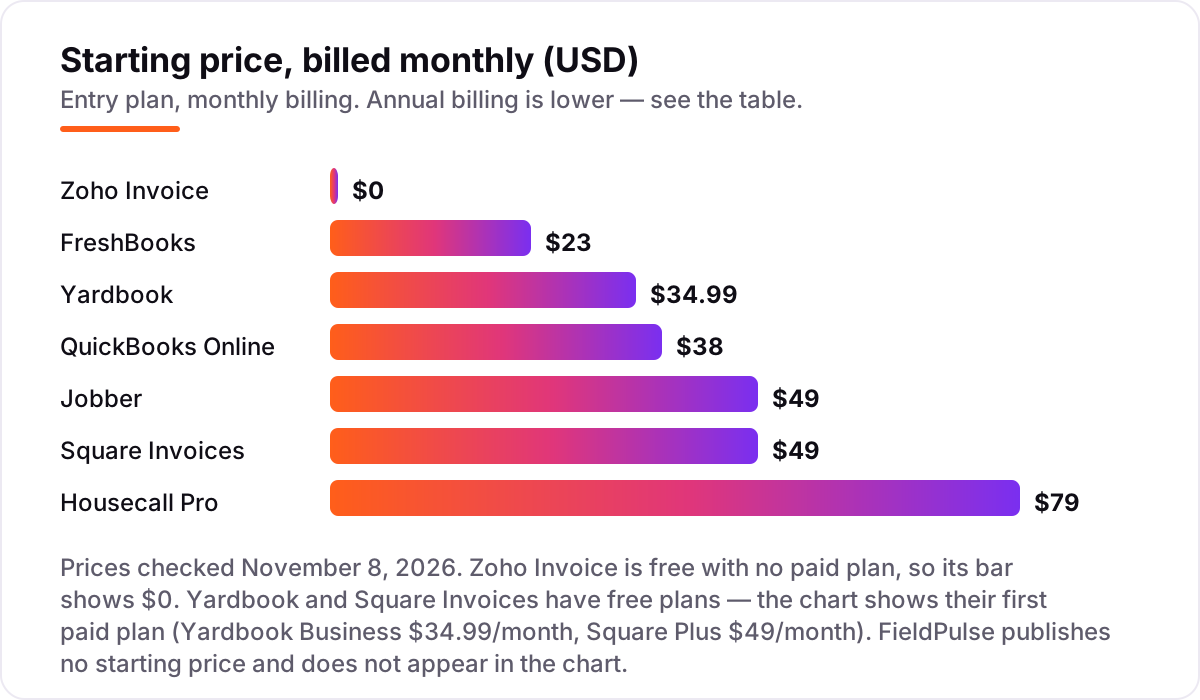
Invoice software for landscaping pricing: what you will actually pay
Take a three-person landscaping crew that sends about 60 invoices a month. On list prices, the subscription costs $0 a month on Yardbook Starter or Square Free, $43 on FreshBooks Plus, $85 on QuickBooks Online Essentials, $189 on Housecall Pro Essentials and $199 on Jobber Connect. Two of those numbers need adjusting before they are real: FreshBooks Plus covers one user, so two extra team members at $11 each bring it to $65 a month, and Zoho Invoice is $0 but caps at 500 invoices a year — a 60-invoice month is 720 a year, so this crew has already outgrown it.
Over a year on annual billing, that is $0 on Yardbook Starter or Square Free, $780 on FreshBooks Plus with two extra seats, $1,020 on QuickBooks Online Essentials, and $1,788 each on Jobber Connect and Housecall Pro Essentials. FieldPulse is a custom quote, so it cannot be priced here at all. The same three people and the same 60 invoices cost $0 a year at the cheap end and $1,788 at the dear end — a gap that comes entirely from whether the tool also schedules the crew.
Three costs sit outside every number above. First, the introductory discounts — 50% off for three months on QuickBooks Online, 80% off for four months on FreshBooks — end, so budget on the list price. Second, card processing: 60 invoices averaging $150 is $9,000 a month, and at 2.9% plus $0.30 a payment that is about $279 a month, or $3,348 a year — more than the dearest subscription in this list. Third, the per-location charge: Square Plus is $49 a month per location, so a crew with two yards pays twice. If the books also need sorting, see our guide to the best accounting software for lawn care business.
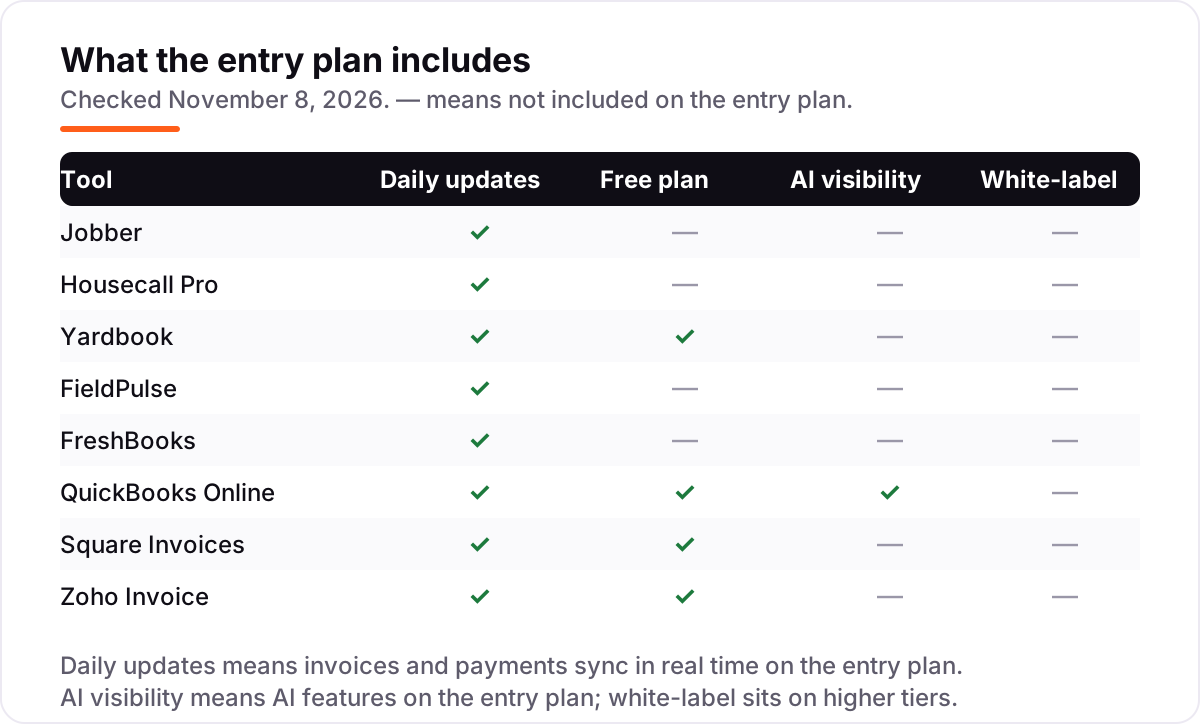
Know the difference: invoicing software vs field-service software
The confusion in this category is between a billing tool and a business system. Invoicing software sends bills, tracks payments and chases late payers; that is the whole job. Field-service software runs the job as well: scheduling, dispatch, routing, quotes, customer records and job costing, with invoicing built in. Jobber, Housecall Pro, Yardbook and FieldPulse are field-service tools; FreshBooks, QuickBooks Online, Square Invoices and Zoho Invoice are not.
The price gap follows the scope. A pure invoicer costs $0–$38 a month, while a field-service system costs $49–$79 a month for one user and far more for a crew — because it replaces the whiteboard, the group chat and the paper route sheet as well as the invoice pad. A solo landscaper who already runs the field from memory can save the difference with Zoho Invoice or Square Invoices; a three-person crew that loses jobs to double-booking cannot.
There is a second, quieter confusion: accounting software is not invoicing software either. QuickBooks Online keeps the ledger, files the taxes and pays the bills; its invoicing is one feature among many. FreshBooks and Zoho Invoice do not keep a full ledger in the same way, and none of the field-service tools replace an accountant. Pick the tool that matches the job you actually do every day, not the one with the longest feature list.
Quick comparison: tool type by need
| Buyer | Best pick | Why |
|---|---|---|
| Solo operator on a budget | Yardbook | Free Starter plan with scheduling and invoicing, paid plans from $34.99/month |
| Most landscaping crews | Jobber | Quotes, scheduling, invoicing and payments in one app, from $49/month |
| Growing crew that needs routes | Housecall Pro | GPS tracking, routes and QuickBooks sync, from $79/month |
| Crew that wants invoicing only | FreshBooks | Automated reminders and late fees, Lite is $23/month for 5 clients |
| Books and billing in one place | QuickBooks Online | Full accounting with invoicing, from $38/month |
| Crew already taking Square payments | Square Invoices | Free invoicing in the same account as the card reader |
Mistakes to avoid
- Budgeting on the promo price. The 50% and 80% introductory discounts in this list last three to four months. The list price is what you pay in month five, so compare tools on that number.
- Buying on the free plan, then finding the invoice cap. Zoho Invoice stops at 500 invoices a year and FreshBooks Lite at 5 clients. A busy crew hits both ceilings in the first season, so count clients before you count dollars.
- Paying for a field-service system when you only need invoices. Jobber Connect at $199 a month is a fine system and a waste of money if all you do is bill clients you already have — Zoho Invoice does that for $0.
- Ignoring the card fee. At 2.9% plus $0.30, a $150 invoice costs $4.65 to collect by card, and Square's free plan charges $5.25. On 60 invoices a month, the processing fee is bigger than most subscriptions here.
- Forgetting the second user. Jobber Core, Housecall Pro Basic and QuickBooks Online Simple Start all cover one person. Price the plan your crew actually needs, not the headline plan for a solo operator.
How we chose
We checked each vendor's own pricing page on November 8, 2026 and recorded the starting price exactly as shown, including the annual-billing figure where the page lists one, and we ranked the tools by fit for the most common buyer — a US landscaping owner billing residential clients — not by brand size. Jobber, Housecall Pro and Yardbook prices were verified against fresh search-index copies of the vendors' own pricing pages, since those pages timed out on direct load today; the figures match multiple independent October and November reads. FieldPulse publishes no starting price — its own pricing page says pricing is seat-based and quoted — so we list it as a custom quote and it does not appear in the price chart. Ratings come from the G2 and Capterra pages checked November 8, 2026; Square Invoices has no standalone G2 listing, so no rating is shown for it rather than a borrowed one from another Square product. No vendor paid for a place in this list, and none of the links here are affiliate links.
What to do next
Start with the free plan or trial of your top pick and run one real month of jobs through it. Check that an invoice goes out from the job site in under a minute, that the payment lands without a chase call, and that your accountant can read the books it produces before you commit to a year. If the billing is sorted but new customers are not finding you, our monthly SEO service handles the visibility side — or compare providers in our guide to billing software for small business. Once your tools are in place, find out what's holding your rankings back.
Your stack only works if people find you
SerpAstra fixes what keeps your site off page one and makes it easy for AI assistants to recommend.
Get a free audit→Sources we checked (15)
- Jobber pricing — getjobber.com/pricing (checked November 8, 2026)
- Housecall Pro pricing — housecallpro.com/pricing (checked November 8, 2026)
- Yardbook pricing — yardbook.com/pricing (checked November 8, 2026)
- FieldPulse pricing — fieldpulse.com/pricing (checked November 8, 2026)
- FreshBooks pricing — freshbooks.com/pricing (checked November 8, 2026)
- QuickBooks Online pricing — quickbooks.intuit.com/pricing (checked November 8, 2026)
- Square Invoices pricing — squareup.com/us/en/invoices/pricing (checked November 8, 2026)
- Zoho Invoice pricing — zoho.com/invoice/pricing (checked November 8, 2026)
- Jobber reviews — g2.com/products/jobber/reviews (checked November 8, 2026)
- Housecall Pro reviews — g2.com/products/housecall-pro/reviews (checked November 8, 2026)
- Yardbook reviews — capterra.com/p/207272/Yardbook/reviews (checked November 8, 2026)
- FieldPulse reviews — g2.com/products/fieldpulse-fieldpulse/reviews (checked November 8, 2026)
- FreshBooks reviews — g2.com/products/freshbooks/reviews (checked November 8, 2026)
- QuickBooks Online reviews — g2.com/products/quickbooks-online/reviews (checked November 8, 2026)
- Zoho Invoice reviews — g2.com/products/zoho-invoice/reviews (checked November 8, 2026)
Shamim
Founder of SerpAstra
A full-stack SEO and digital marketer who spends most days on Local SEO for dental practices, AI search visibility and lead generation.
Frequently asked questions
What is the best invoice software for landscaping?
Jobber is the best fit for most landscaping crews: quotes, scheduling, invoicing and payments in one app from $49 a month. Housecall Pro is the better pick for growing crews that need GPS tracking and routes. Yardbook is the best free option, and Zoho Invoice is the best free pure invoicer for solo operators sending under 500 invoices a year.
How much does invoice software for landscaping cost?
Entry prices run from $0 to $79 a month. Yardbook, Square Invoices and Zoho Invoice all start free, FreshBooks Lite is $23 a month, QuickBooks Online is $38, Jobber is $49 and Housecall Pro is $79. A three-person crew typically pays $0–$2,388 a year for the subscription alone, before card processing fees.
Is there really free invoice software for landscaping?
Yes, with limits. Yardbook Starter is free with scheduling, estimates, invoicing and routing, but shows ads and adds a 1% card fee. Square Invoices is free with unlimited invoices. Zoho Invoice is free forever but caps at 500 invoices a year and 2 users. All three are real products, not trials.
What is the difference between invoice software and field-service software?
Invoice software sends bills and tracks payments; that is all it does. Field-service software runs the job too: scheduling, routing, dispatch, quotes and customer records, with invoicing built in. Landscapers who schedule crews need the second kind. If you only need to bill clients you already have, a pure invoicer like FreshBooks or Zoho Invoice costs far less.
Do I still need QuickBooks if I use invoice software?
It depends on the tool. QuickBooks Online is accounting software with invoicing built in, so it can replace a separate ledger. Jobber and Housecall Pro sync with QuickBooks Online from their second tier, so the books stay in QuickBooks while the crew runs on the field app. Pure invoicers like Zoho Invoice and Square Invoices do not replace a ledger.
Can clients pay by card from an invoice?
Yes, on every tool here. Card payments cost 2.9% plus $0.30 per transaction on most tools, and 3.3% plus $0.30 on Square's free plan. ACH bank payments cost about 1% where offered. On 60 invoices averaging $150, card fees run about $279 a month, which is often more than the subscription itself.
Can I switch invoice software later?
Yes, but plan the move for the off-season. Export your customer list, open invoices, payment history and price book from the old tool, then import them into the new one and send a test invoice before going live. Switching mid-season means running two systems while crews are in the field, so winter is the better window.
Free SEO and AI visibility audit
Find out what is holding your rankings back
Send us your site. Within 2 business days you get a written audit, an AI visibility check and a short fix list ranked by impact. Free, with no contract attached.
Request my free audit→Related guides
 Local Business & Vertical Software9 Best Accounting Software for Lawn Care Business in 2026, ComparedCompare the 9 best accounting software for lawn care business options on price, free plans and field tools, with every price checked November 7, 2026.Read guide →
 Accounting, Tax & Finance11 Best Billing Software for Small Business in 2026, Compared11 best billing software for small business picks compared on price, free plans and payment fees, with real starting prices checked November 2, 2026.Read guide →
 Local Business & Vertical Software8 Best Estimating Software for Contractors in 2026, ComparedCompare the 8 best estimating software for contractors on price, takeoff, cost databases and free trials, with every price checked November 7, 2026.Read guide →