
12 Best Invoicing Software for Contractors in 2026, Compared
Compare the 12 best invoicing software for contractors on price, invoice caps, free plans and payment fees — every price checked November 8, 2026.
 Shamim Mia, Founder, SerpAstraLast verified November 8, 202615 min read
We compare pricing pages, documentation and public reviews. We never accept payment for rankings.

Key takeaways
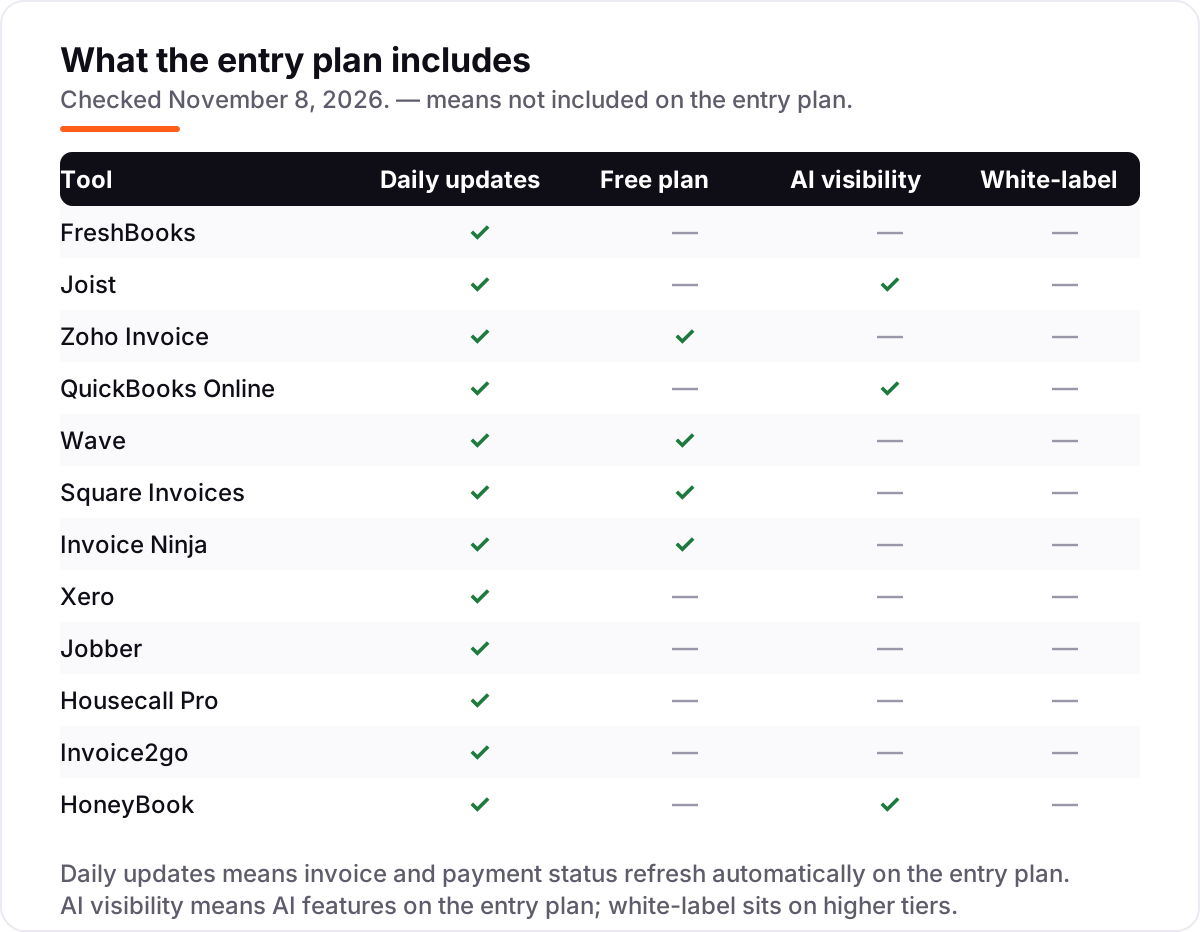
- FreshBooks leads for invoicing-first contractors at $23/month, Joist follows at $10/month for solo trade work, and Zoho Invoice costs $0 with no paid tier at all.
- Four tools cost nothing to start — Zoho Invoice, Wave, Square Invoices and Invoice Ninja all have free plans — but each caps something: invoices, clients or features.
- The cap that bites first decides the real price: Xero Early stops at 20 invoices a month, Joist Basics at 5 documents, and Invoice2go Starter at 30 invoices a year.
- Card processing sits outside every subscription here — about 2.9% plus 30 cents per card payment — so a contractor who takes cards pays a fee on every invoice.
On this page
Quick comparison
| Tool | Best for | Starting price | Free plan |
|---|---|---|---|
| FreshBooks | Service businesses that bill clients for time and projects and want invoicing to lead | $23/mo | No (30-day trial) |
| Joist | Solo contractors who want estimates, invoices and payments in one phone-first app | $10/mo | No (14-day trial) |
| Zoho Invoice | Solo contractors and pairs who send under 500 invoices a year and want to pay nothing | Free | Yes (free) |
| QuickBooks Online | Contractors who want invoicing inside full accounting their accountant already knows | $38/mo | No (30-day trial) |
| Wave | Sole traders who want free invoicing plus real bookkeeping in the same login | Free; Pro $19/mo | Yes (free) |
| Square Invoices | Contractors who already take card payments and want invoicing inside the same Square account | Free; Plus $49/mo | Yes (free) |
| Invoice Ninja | Freelancers and small contractors who want free invoicing with an open-source option | Free; Pro $14/mo | Yes (free) |
| Xero | Growing firms that want several people in the books without paying per user | $27/mo | No (one month free) |
| Jobber | Home service contractors who want scheduling, invoicing and payments in one system | $49/mo | No (14-day trial) |
| Housecall Pro | Small home service crews that want dispatch, invoicing and a price book in one app | $79/mo | No (14-day trial) |
| Invoice2go | Mobile invoicers who send a few invoices a month and want free bank transfers | $5.99/mo | No (30-day trial) |
| HoneyBook | Contractors who sell on experience and want proposals, contracts and invoices in one file | $36/mo | No (free trial) |
Make one of these tools?
We re-check this list every quarter. Send a correction, request a review, or ask about a clearly labeled sponsored spot.
Request a listingThe best invoicing software for contractors

FreshBooks
Best for: Service businesses that bill clients for time and projects and want invoicing to lead
FreshBooks is the invoicing-first tool in this list: the invoice, the estimate and the time tracker are the product, and the accounting sits behind them. Lite costs $23 a month for 5 billable clients, with estimates, recurring billing, payment reminders and expense tracking included; Plus at $43 covers 50 clients and adds double-entry reports, bank reconciliation and free accountant access.
The client cap is what decides the bill. A sixth client forces the jump to Plus, and every extra team member adds $11 a month, so a three-person crew billing twenty clients pays $65 a month, not $23. There is no free plan, only a 30-day trial, and no inventory tracking at any tier. Pick FreshBooks when time billing leads the work; pick QuickBooks Online when the ledger matters more, or Wave when the budget is zero.
What we like
- Invoices, estimates and recurring billing sit next to time tracking, so billable hours flow onto the invoice without retyping
- Plus at $43 a month adds double-entry reports, bank reconciliation and free accountant access for your bookkeeper
- G2 reviewers score its ease of setup 9.2 out of 10, the strongest setup score in this list
- Payment reminders and late fees run automatically, so chasing overdue invoices is not a weekly chore
Watch out for
- Lite covers only 5 billable clients — a sixth client moves you to Plus at $43 a month
- Each extra team member costs $11 a month on top of the plan price
- No free plan and no inventory tracking; bank reconciliation waits for Plus

Joist
Best for: Solo contractors who want estimates, invoices and payments in one phone-first app
Joist is the only tool here built for the trade from the ground up: you price a job on your phone, the client signs the estimate, and that document becomes the invoice with deposits and milestone payments attached. Basics costs $10 a month and covers five documents a month, which suits a contractor sending one or two quotes a week.
Pro at $17 a month removes the document cap and adds your logo, work orders, expense tracking and QuickBooks Online sync; Elite at $32 adds change orders and business reports, and Run at $70 (introductory, $100 list) adds jobs and scheduling. Buy Joist when estimates and invoices are the whole job; buy Jobber when dispatch and crew scheduling matter too.
What we like
- Estimates turn into invoices on the phone, with deposits, milestone payments and client signatures built in
- Basics at $10 a month is the cheapest contractor-first entry here, with online payments and homeowner financing included
- Pro at $17 removes the 5-document cap and adds work orders, expense tracking and QuickBooks Online sync
- Fourteen-day trial runs the top Run plan, so you test every feature before paying
Watch out for
- Basics allows 5 documents a month — most working contractors outgrow it within weeks
- One login per account, so a second person on the crew needs a separate account
- No offline mode; the app needs a connection on the jobsite

Zoho Invoice
Best for: Solo contractors and pairs who send under 500 invoices a year and want to pay nothing
Zoho Invoice is the only tool here that is free without an asterisk: one plan, $0 forever, no paid tier, no trial clock and no card required. It covers quotes, recurring invoices, automated payment reminders, online payments, expense tracking, time logging and a client portal — the full invoicing job — for 2 users and 500 invoices a year.
The limits are the whole story. There is no paid Zoho Invoice tier, so outgrowing the caps means migrating to Zoho Billing at $25 a month or Zoho Books, and multi-currency sits behind that upgrade. Zoho branding rides along on every invoice. Choose Zoho Invoice when the volume fits under 500 invoices a year and free matters more than anything else.
What we like
- A single free plan with no paid tier, no trial clock and no card required — the price never changes
- Recurring invoices, automated reminders and a client portal at $0, features most rivals charge for
- Expense and time tracking included, so billable hours flow straight onto invoices
- G2 reviewers rate it 4.7 out of 5 across 365 reviews, the highest score in this list
Watch out for
- Hard caps at 2 users, 500 invoices a year and 3 projects, with no paid Zoho Invoice tier to grow into
- Outgrowing it means migrating to Zoho Billing, a separate product starting at $25 a month
- Multi-currency support is locked behind the upgrade, which frustrates reviewers

QuickBooks Online
Best for: Contractors who want invoicing inside full accounting their accountant already knows
QuickBooks Online is the default for a reason: it is the ledger most American accountants already use, and it covers invoicing, bills, bank feeds and reporting in one subscription. Simple Start costs $38 a month for one user; the price climbs with headcount, not features — Essentials is $85 for three users, Plus is $140 for five, and Advanced is $340 for 25.
Intuit raised Essentials, Plus and Advanced for renewals from August 1, 2026, and the user caps mean a growing team pays for the next tier, not for extra seats. Payroll is a separate add-on on every plan. Buy QuickBooks Online when invoicing must sit inside full accounting your accountant knows; buy Wave when the budget is $0, or FreshBooks when time billing leads.
What we like
- The accounting software most American accountants already know, so switching accountants or finding help is easy
- Full double-entry accounting with invoicing, bills, bank feeds and reporting on every paid plan
- Intuit Intelligence AI features are included on Simple Start, not held for the top tier
- More than 800 integrations cover payroll, payments, inventory and trade-specific tools
Watch out for
- Essentials, Plus and Advanced all rose again for renewals from August 1, 2026 — the price climbs most years
- Simple Start covers one user; a second user forces Essentials at $85 a month
- G2 reviewers rate it 4.0 out of 5 and frequently cite price rises and slow support

Wave
Best for: Sole traders who want free invoicing plus real bookkeeping in the same login
Wave gives you a full set of books for nothing: the Starter plan is free and covers unlimited estimates, invoices, bills and accounting records, with a proper double-entry ledger underneath the invoicing. No other free plan in this list pairs unlimited billing with real bookkeeping, and there is no revenue cap to outgrow.
The catch is manual work. Starter has no automatic bank imports, no receipt scanning and no extra users — all of those need Pro at $19 a month or $190 a year. Wave also serves the US and Canada only, and free-plan support is help articles and community answers. Choose Wave when the books matter as much as the invoices and the budget is $0; choose Zoho Invoice when you only need billing.
What we like
- Starter is free with unlimited invoices, bills and bookkeeping records — no revenue cap and no invoice cap
- Real double-entry accounting underneath, not just an invoicing tool
- Pro is a single $19 a month upgrade that adds automatic bank imports, receipt scanning and unlimited users
- Payments and payroll are pay-as-you-go add-ons, so a business that only invoices pays nothing at all
Watch out for
- Automatic bank imports, receipt scanning and extra users all need Pro — Starter means manual entry
- No inventory tracking and no multi-currency invoicing at any price
- US and Canada only, and free-plan support is limited to help articles and community answers

Square Invoices
Best for: Contractors who already take card payments and want invoicing inside the same Square account
Square Invoices fits contractors who already take cards: the free plan sends unlimited invoices, estimates and recurring bills by text, email or QR code, and clients pay straight from the invoice. Because it lives inside the same Square account as point of sale, there is one payout, one dashboard and nothing new to learn.
Plus costs $49 a month per location and adds multi-location support, custom templates, project tracking and milestone invoices. The catch is the processing fee on every payment — 3.3% plus 30 cents per card invoice on Free, 2.9% plus 30 cents on Plus — so a contractor billing $10,000 a month by card pays roughly $330 plus 30 cents per invoice. Choose Square when payments already run through it; choose Joist when the estimate-to-invoice workflow matters more.
What we like
- Free plan with unlimited invoices, estimates, recurring invoices and payment reminders
- Invoices go out by text, email or QR code, and clients pay from the invoice itself
- Plus at $49 a month per location adds multi-location support, custom templates and milestone invoices
- Payments, point of sale and invoicing share one Square account and one payout
Watch out for
- Plus costs $49 a month per location, so two locations pay $98 a month
- Card fees sit on top: 3.3% plus 30 cents per invoice on Free, 2.9% plus 30 cents on Plus
- No estimates-to-invoice workflow as polished as Joist, and no real bookkeeping underneath

Invoice Ninja
Best for: Freelancers and small contractors who want free invoicing with an open-source option
Invoice Ninja is the pick for contractors who like owning their tools: the free plan covers unlimited invoices for up to 5 clients, with recurring billing, auto-billing, deposits and partial payments included from the start. There is no trial clock and no card required, and a self-hosted open-source version exists for anyone who wants the data on their own server.
Ninja Pro costs $14 a month, or $140 a year, and removes the 5-client cap and the Invoice Ninja branding while adding API access and automatic reminders. Enterprise from $18 a month adds bank sync and team users. The interface feels more technical than Joist or FreshBooks, and support is a smaller team. Pick Invoice Ninja when free billing with an open-source option matters; pick Zoho Invoice when 500 invoices a year beats a 5-client cap.
What we like
- Free plan with unlimited invoicing for up to 5 clients — no trial clock, no card required
- Recurring invoices, auto-billing, deposits and partial payments on every plan, including free
- Ninja Pro is a single $14 a month upgrade that removes the client cap and the Invoice Ninja branding
- Native apps for macOS, Windows, Linux, iOS and Android, plus a self-hosted open-source option
Watch out for
- Free plan caps at 5 clients — a sixth client forces Ninja Pro at $14 a month
- Bank account sync and team users wait for Enterprise, which starts at $18 a month
- Smaller support team than the big suites, and the interface feels more technical than Joist or FreshBooks
Xero
Best for: Growing firms that want several people in the books without paying per user
Xero is the multi-user pick: every plan includes unlimited users, so a bookkeeper, an apprentice and the owner all work in the same books without per-seat fees. Early costs $27 a month after the October 1, 2026 price rise, and covers quotes, 20 invoices and 5 bills a month, bank reconciliation, Hubdoc capture and real-time reports.
The invoice cap is the catch. Early stops at 20 invoices a month, so a contractor sending 40 needs Growing at $59, which also lifts the bill cap and includes automatic bank reconciliation — a $5 a month add-on on Early. Payroll is separate at $36 a month plus $6 per person. Pick Xero when several people share the books; pick QuickBooks Online when your accountant already lives there.
What we like
- Unlimited users on every plan — adding a bookkeeper or apprentice costs nothing extra
- Early at $27 a month undercuts QuickBooks Online Simple Start by $11 a month
- More than 1,000 app integrations, with bank feeds, Hubdoc capture and real-time reports on every plan
- New customers get 80% off the first three months — $5.40 a month on Early
Watch out for
- Early caps at 20 invoices and 5 bills a month — a contractor sending 40 invoices a month needs Growing at $59
- Automatic bank reconciliation costs $5 a month extra on Early; it is only included from Growing up
- Payroll is a separate Gusto-powered add-on at $36 a month plus $6 per person

Jobber
Best for: Home service contractors who want scheduling, invoicing and payments in one system
Jobber runs the whole job, not just the bill: quotes, scheduling, dispatch, invoicing, payments and a client database in one login, with online booking so customers can book without calling. Core costs $49 a month for one user, or $29 a month billed annually, and covers quoting, invoicing, scheduling and the client hub.
The price climbs with headcount and features. Connect at $139 a month for one user adds automated reminders, QuickBooks sync and time tracking; Grow at $199 adds job costing and two-way texting. Extra users cost $29 a month each, so three people on Core pay $107 a month. Choose Jobber when one system must run the whole pipeline; choose Joist when invoicing alone is enough and $49 a month feels steep.
What we like
- The most complete field service system here: quotes, scheduling, invoicing, payments and CRM in one login
- Strongest reviewer scores in this list, at 4.6 out of 5 on G2 across 533 reviews
- Client hub lets customers approve quotes, book jobs and pay online without phone calls
- Annual billing drops Core from $49 to $29 a month — the steepest annual saving in this list
Watch out for
- Core covers one user — a second user costs $29 a month, so a three-person crew pays $107 a month
- QuickBooks sync and automated reminders wait for Connect at $139 a month
- No free plan; the 14-day trial is the only way to try it before paying

Housecall Pro
Best for: Small home service crews that want dispatch, invoicing and a price book in one app
Housecall Pro is the dispatch-first system in this list: online booking, scheduling, estimates, invoicing and payments in one mobile app, with a price book and job costing included from the entry plan. Basic costs $79 a month for one user, or $59 a month billed annually, and the 14-day trial runs the top MAX plan so you can test everything before paying.
Essentials at $189 a month ($149 annual) covers five users and adds QuickBooks sync, routes and GPS tracking; MAX at $329 ($299 annual) covers eight users and adds sales proposals and route optimization. The add-ons are the catch: CSR AI, payroll, VoIP and vehicle GPS are quoted separately. Pick Housecall Pro when dispatch and the price book matter most; pick Jobber when you want the higher reviewer scores and a lower entry price.
What we like
- Estimates, invoicing, scheduling, dispatch and payments in one mobile-first app
- Price book and job costing on the entry plan, which most rivals hold for higher tiers
- Review management built in, so customer feedback is collected without a separate tool
- Online booking and consumer financing help turn estimate requests into booked jobs
Watch out for
- Basic is one user and lacks QuickBooks sync — that starts on Essentials at $189 a month
- Add-ons for CSR AI, payroll, VoIP and vehicle GPS are quoted separately and push the real bill up
- The pricing page shows different prices after its trade-and-team-size quiz, so confirm your own figures

Invoice2go
Best for: Mobile invoicers who send a few invoices a month and want free bank transfers
Invoice2go is the lightest tool here: a polished phone-first invoicing app for a contractor who sends a handful of invoices a month and wants to get paid without learning accounting. Starter costs $5.99 a month, or $59.99 a year, and covers estimates, expense tracking, payment reminders and free bank transfers, with card payments at 3.5%.
The cap is the whole story. Starter allows 30 invoices a year, so a contractor sending 30 a month outgrows it in a month and needs Professional at $9.99 a month (100 invoices a year) or Premium at $39.99 a month for unlimited invoices and recurring billing. The iOS App Store lists Starter at $7.99 a month, above the web price. Buy Invoice2go for light, phone-first invoicing; buy Zoho Invoice or Wave when the invoice count is higher and the budget is zero.
What we like
- The cheapest paid entry here at $5.99 a month, with free bank transfers (ACH) on every plan
- Polished mobile invoicing with estimates, expense tracking and payment reminders
- Professional at $9.99 a month adds QuickBooks and Xero sync plus lower card fees
- Website builder and client communications included even on Starter
Watch out for
- Starter caps at 30 invoices a year — most active contractors hit that ceiling within months
- No free plan and no recurring invoices below Premium at $39.99 a month
- The iOS App Store lists Starter at $7.99 a month, above the $5.99 a month web price

HoneyBook
Best for: Contractors who sell on experience and want proposals, contracts and invoices in one file
HoneyBook is the sales-flow tool in this list: proposals, contracts, invoices and payments combine into one file the client signs and pays from, with a portal, scheduler and lead forms around it. Starter costs $36 a month, or $29 a month billed annually, and includes unlimited clients and projects, templates, basic reports and HoneyBook AI for email drafts and meeting notes.
Essentials at $59 a month ($49 annual) adds automations, QuickBooks sync and two team members; Premium at $129 ($109 annual) adds unlimited team members and priority support. There is no free plan, and a crew pays the higher tier from day one. Pick HoneyBook when proposals and contracts are part of the sale; pick Joist or FreshBooks when invoicing alone is the job and the budget is tighter.
What we like
- Proposals, contracts, invoices and payments combine into one client-facing file
- HoneyBook AI is included on Starter: email drafts, meeting notes and follow-up suggestions
- Unlimited clients and projects on every plan, with templates for the whole sales flow
- Client portal, scheduler and lead forms keep the sales side tidy without extra tools
Watch out for
- Starter is $36 a month with no free plan — the dearest entry for invoicing alone
- QuickBooks sync and automations wait for Essentials at $59 a month
- Team members wait for Essentials too, so a crew pays the higher tier from day one
The best invoicing software for contractors turns a finished job into money in the bank without a second trip to the office. We ranked the 12 tools below by fit for the most common buyer — a solo contractor or small crew that quotes on site, sends the invoice from the truck and needs paying fast — and every price was checked on November 8, 2026.
How to choose the best invoicing software for contractors
- Count your invoices first. Xero Early stops at 20 invoices a month, Joist Basics at 5 documents a month, and Invoice2go Starter at 30 invoices a year. The cap you hit first is your real starting price.
- Count your users next. Joist, Jobber Basic and Housecall Pro Basic are all single-user plans, while Xero, Wave Pro and Square Invoices cover a small team at no extra charge.
- Decide whether you need a ledger or just billing. QuickBooks Online, Wave and Xero are full accounting systems; Zoho Invoice, Invoice2go and Joist only bill. Paying for a ledger you never open is the most expensive mistake in this list.
- Check how clients pay. Card payments cost about 2.9% plus 30 cents per transaction on most tools, while bank transfers are free on Invoice2go and cost 1% on Jobber. If most clients pay by card, the processing fee matters more than the subscription.
- Try it on a real job before you pay. The free plans and trials here are long enough to run one genuine week — your estimate, your invoice, your client — and that week tells you more than any review can.
Invoicing is one system in your stack, not the whole stack. If the business also needs to be found online, our AI search optimization service handles the visibility side, and before you publish new pages for the services you sell, run your titles through the free title tag checker — it shows whether a title fits Google's display limits.
Whatever you shortlist, check two things in the trial: that an invoice goes out in under a minute from the jobsite, and that a client can pay from the invoice without calling you. Every tool here sends invoices by text or email, so there is no reason to buy before a real client has paid through one.
Invoicing software for contractors pricing: what you will actually pay
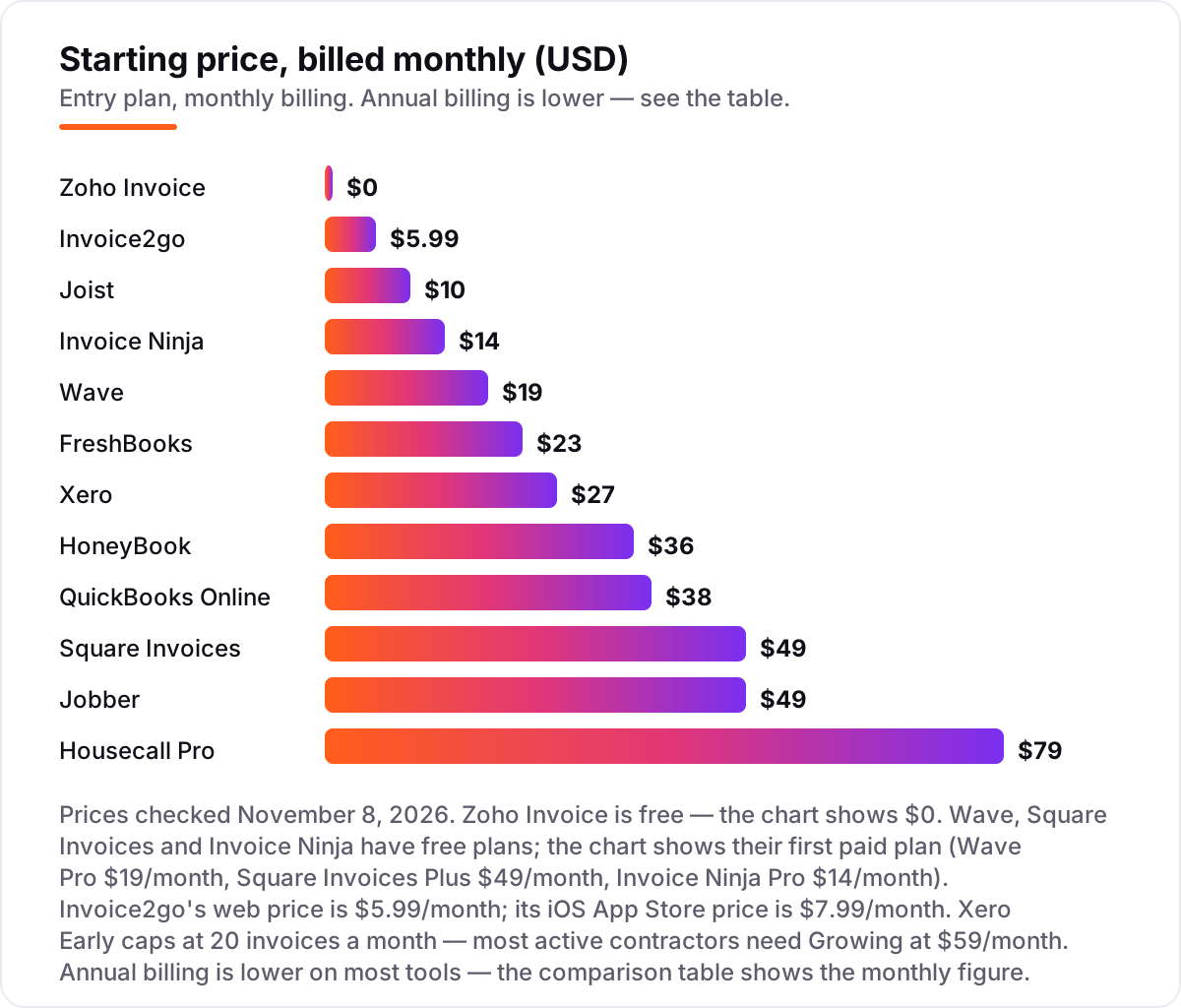
Take a three-person contracting crew that sends about 40 invoices a month — 480 a year. On list prices, the subscription costs $0 a month on Zoho Invoice, Wave Starter or Square Invoices Free, $10 on Joist Basics, $14 on Invoice Ninja Pro, $17 on Joist Pro, $23 on FreshBooks Lite, $27 on Xero Early, $36 on HoneyBook Starter, $38 on QuickBooks Online Simple Start, $49 on Jobber Core or Square Plus, and $79 on Housecall Pro Basic. Three of those numbers need adjusting before they are real.
First, the caps. Xero Early allows 20 invoices a month, so 40 a month needs Growing at $59. Joist Basics allows 5 documents a month, so this crew needs Pro at $17. Invoice2go Starter allows 30 invoices a year, so this crew needs Premium at $39.99 a month for unlimited invoices. Second, the users. FreshBooks Lite covers one user and 5 clients, so three users and more clients means Plus at $43 plus two extra members at $11 each — $65 a month. QuickBooks Online Simple Start covers one user, so three users means Essentials at $85 a month. Jobber Core covers one user, so three users means $49 plus two extra seats at $29 each — $107 a month. Housecall Pro Basic covers one user, so three users means Essentials at $189 a month. Third, the billing term: paying annually drops Jobber Core from $49 to $29 a month, Housecall Pro Basic from $79 to $59, and HoneyBook Starter from $36 to $29.
Over a year, that is $0 on Zoho Invoice, Wave Starter or Square Invoices Free, $168 on Invoice Ninja Pro, $204 on Joist Pro, $432 on HoneyBook Starter, $480 on Invoice2go Premium, $708 on Xero Growing, $780 on FreshBooks Plus with three users, $1,020 on QuickBooks Online Essentials for three users, $1,284 on Jobber Core for three users billed monthly, and $2,268 on Housecall Pro Essentials for three users. The same three people and the same 40 invoices cost $0 at the free end and $2,268 at the dear end — a gap that comes entirely from caps, users and billing choices, not from features. Card processing sits outside every number above: about 2.9% plus 30 cents per card payment, or 1% for bank payments on Jobber and free on Invoice2go. If the business also needs estimates, our guide to the best estimating software for contractors covers the quoting side.
Know the difference: invoicing software vs accounting software
The confusion in this category is between a tool that bills and a system that keeps the books. Invoicing software sends estimates and invoices, tracks payments and reminds late clients; that is the whole job for Joist, Invoice2go, Zoho Invoice, Square Invoices, FreshBooks, Invoice Ninja and HoneyBook. Accounting software does all of that and also runs the ledger — bank reconciliation, bills, a balance sheet and tax-ready reports — which is what QuickBooks Online, Wave and Xero sell.
The price gap follows the scope gap. The invoicing tools here run $0 to $36 a month at entry, while the accounting systems start at $19 to $38 a month and climb with users, because you are paying for the books as well as the billing. A contractor who only needs to send invoices and get paid rarely needs a ledger; a business with a bookkeeper or an accountant usually does, because the tax return comes from the ledger, not the invoice app.
There is a second, quieter confusion: field service software is neither. Jobber and Housecall Pro run scheduling, dispatch and crew tracking on top of invoicing, which is why they start at $49 and $79 a month. Buy the tool that matches the job — billing, books or dispatch — and the price follows.
Quick comparison: tool type by need
| Buyer | Best pick | Why |
|---|---|---|
| Solo contractor, cheapest start | Joist | Contractor-first estimates and invoices, Basics is $10/month |
| Free forever, no paid tier | Zoho Invoice | Full invoicing at $0 for 2 users and 500 invoices a year |
| Free invoicing plus books | Wave | Free Starter with unlimited invoices and a real ledger behind it |
| Invoicing and time billing | FreshBooks | Invoicing-first design with time tracking, Lite is $23/month |
| Several people in the books | Xero | Unlimited users on every plan, Early is $27/month |
| Full job management | Jobber | Quotes, scheduling, invoicing and payments in one system, from $49/month |
Mistakes to avoid
- Budgeting on the annual price while paying monthly. Jobber Core is $29 a month billed annually but $49 month to month, and Housecall Pro Basic is $59 annual but $79 monthly. Compare tools on the billing term you will actually use.
- Ignoring the invoice cap. Xero Early stops at 20 invoices a month, Joist Basics at 5 documents, and Invoice2go Starter at 30 invoices a year. Count your invoices before you count the price.
- Paying for a ledger you never open. QuickBooks Online, Wave and Xero are accounting systems, not just invoicing apps. If the books are a shoebox and the accountant is a spreadsheet, Zoho Invoice or Joist does the billing for a tenth of the price.
- Forgetting card processing fees. The subscription is not the whole bill: about 2.9% plus 30 cents leaves with every card payment, so a contractor who takes $10,000 a month by card pays roughly $290 a month in fees alone.
- Buying for one user when the crew is three. Jobber Core, Housecall Pro Basic and QuickBooks Online Simple Start are all single-user plans, while Xero covers unlimited users at no extra charge. Price the crew, not the owner.
How we chose
We checked each vendor's own pricing page on November 8, 2026 and recorded the starting price exactly as shown, including the annual-billing figure where the page lists one, and we ranked the tools by fit for the most common buyer — a solo contractor or small crew that quotes on site and invoices from the truck — not by brand size. Three prices carry a note worth stating plainly: Invoice2go's pricing page renders in JavaScript, so its $5.99 a month web price is taken from the vendor-supplied G2 listing and corroborated by independent October 2026 reads of the vendor page, and the iOS App Store lists the same plan at $7.99 a month. Jobber and Housecall Pro were verified from fresh November 8, 2026 crawls of their pricing pages and corroborating reads, rather than a direct page open. Xero's trial terms are not spelled out on its pricing page — it advertises one month free, while some guides describe a 30-day trial and others list no trial at all. Nine tools carry a review rating, all verified from fresh crawls of the exact G2 pages: FreshBooks 4.5/5 from 981 reviews, Joist 4.1/5 from 31, Zoho Invoice 4.7/5 from 365, QuickBooks Online 4.0/5 from 3,908, Wave 4.3/5 from 328, Xero 4.4/5 from 1,739, Jobber 4.6/5 from 533, Housecall Pro 4.3/5 from 205 and HoneyBook 4.5/5 from 248. Xero's review count moved between recent crawls (1,736 to 1,845), so we use the freshest count-bearing crawl. The other three carry none: Square Invoices has no standalone G2 listing, Invoice Ninja's only recent crawl is five days old with 22 reviews, and Invoice2go's only rating figure rests on a crawl more than seven months old — and we would rather show no rating than a stale or estimated one. No vendor paid for a place in this list, and none of the links here are affiliate links.
What to do next
Start with the free plan or trial of your top pick and run one real week of estimates and invoices through it. Check that an invoice goes out in under a minute from the jobsite, that the client can pay from the invoice, and that the payment lands in your account without a phone call. If the billing is sorted but new customers are not finding you, our local SEO service handles the visibility side — or compare providers in our guide to accounting software for contractors. Once your tools are in place, find out what's holding your rankings back.
Your stack only works if people find you
SerpAstra fixes what keeps your site off page one and makes it easy for AI assistants to recommend.
Get a free audit→Sources we checked (21)
- FreshBooks pricing — freshbooks.com/pricing (checked November 8, 2026)
- Joist pricing — joist.com/pricing (checked November 8, 2026)
- Zoho Invoice pricing — zoho.com/invoice/pricing (checked November 8, 2026)
- QuickBooks Online pricing — quickbooks.intuit.com/pricing (checked November 8, 2026)
- Wave pricing — waveapps.com/pricing (checked November 8, 2026)
- Square Invoices — squareup.com/invoices (checked November 8, 2026)
- Invoice Ninja pricing — invoiceninja.com/pricing (checked November 8, 2026)
- Xero pricing — xero.com/us/pricing-plans (checked November 8, 2026)
- Jobber pricing — getjobber.com/pricing (checked November 8, 2026)
- Housecall Pro pricing — housecallpro.com/pricing (checked November 8, 2026)
- Invoice2go pricing — invoice.2go.com/pricing (checked November 8, 2026)
- HoneyBook pricing — honeybook.com/pricing (checked November 8, 2026)
- FreshBooks on G2 — g2.com/compare/freshbooks-vs-honeybook (checked November 8, 2026)
- Joist on G2 — g2.com/products/evercommerce-joist/reviews (checked November 8, 2026)
- Zoho Invoice on G2 — g2.com/compare/wave-vs-zoho-invoice (checked November 8, 2026)
- QuickBooks Online on G2 — g2.com/products/quickbooks-online/reviews (checked November 8, 2026)
- Wave on G2 — g2.com/compare/freshbooks-vs-wave (checked November 8, 2026)
- Xero on G2 — g2.com/compare/custombooks-vs-xero (checked November 8, 2026)
- Jobber on G2 — g2.com/sellers/jobber (checked November 8, 2026)
- Housecall Pro on G2 — g2.com/products/housecall-pro/reviews (checked November 8, 2026)
- HoneyBook on G2 — g2.com/compare/freshbooks-vs-honeybook (checked November 8, 2026)
Shamim
Founder of SerpAstra
A full-stack SEO and digital marketer who spends most days on Local SEO for dental practices, AI search visibility and lead generation.
Frequently asked questions
What is the best invoicing software for contractors?
FreshBooks is the best fit for most contractors: it is built around invoicing and time billing, starts at $23 a month, and reviewers rate its setup 9.2 out of 10 on G2. Joist is the better pick for a solo trade contractor at $10 a month, and Zoho Invoice is the best free option at $0.
How much does invoicing software for contractors cost?
Entry prices run from $0 to $79 a month. Zoho Invoice, Wave, Square Invoices and Invoice Ninja all have free plans. The first paid plans cost $5.99 to $36 a month, and full accounting or field service systems run $27 to $79 a month before card processing fees.
Is there really free invoicing software for contractors?
Yes, with limits. Zoho Invoice is free forever for 2 users and 500 invoices a year. Wave Starter is free with unlimited invoices, Square Invoices is free with unlimited invoices, and Invoice Ninja is free for up to 5 clients. All four are real products, not trials.
FreshBooks vs QuickBooks Online: which is better for a contractor?
FreshBooks is better when invoicing and time billing are the job: it is simpler, cheaper at entry, and built for service businesses. QuickBooks Online is better when the business needs full accounting, bank reconciliation and a ledger the accountant already knows. Most solo contractors start on FreshBooks; most firms with a bookkeeper run QuickBooks.
Do invoicing tools charge extra for card payments?
Yes, on top of the subscription. Card payments typically cost about 2.9% plus 30 cents per transaction, and some plans charge more — Invoice2go Starter charges 3.5%. Bank transfers are cheaper: Invoice2go offers free ACH, and Jobber charges 1% for ACH payments.
What is the difference between invoicing software and accounting software?
Invoicing software sends bills and tracks payments; accounting software also runs the ledger — bank reconciliation, bills, a balance sheet and tax-ready reports. QuickBooks Online, Wave and Xero are accounting systems with invoicing built in. Zoho Invoice, Joist and Invoice2go only invoice, with lighter bookkeeping at most.
Free SEO and AI visibility audit
Find out what is holding your rankings back
Send us your site. Within 2 business days you get a written audit, an AI visibility check and a short fix list ranked by impact. Free, with no contract attached.
Request my free audit→Related guides
 Local Business & Vertical Software10 Best Accounting Software for Contractors in 2026, ComparedCompare the 10 best accounting software for contractors on price, job costing, AIA billing and free plans, with every price checked November 7, 2026.Read guide →
 Local Business & Vertical Software8 Best Estimating Software for Contractors in 2026, ComparedCompare the 8 best estimating software for contractors on price, takeoff, cost databases and free trials, with every price checked November 7, 2026.Read guide →
 Local Business & Vertical Software10 Best Contractor Management Software in 2026, ComparedCompare the 10 best contractor management software platforms on price, compliance and global payments, with every price checked November 7, 2026.Read guide →