
11 Best Invoicing Software for Small Business in 2026, Compared
11 best invoicing software for small business compared on price, free plans and payment fees. Prices checked on vendor pricing pages, November 2, 2026.
 Shamim Mia, Founder, SerpAstraLast verified November 2, 202611 min read
We compare pricing pages, documentation and public reviews. We never accept payment for rankings.
Key takeaways
- FreshBooks is the best invoicing-first pick at $23/month, QuickBooks Online is the accounting-led pick at $38/month, and Zoho Invoice is the best free option at $0.
- The single most important buying factor is the total cost per paid invoice — the subscription is often smaller than the payment-processing fees.
- Free plans are real: Zoho Invoice is free forever, Wave's Starter plan is free with unlimited invoices, and Square sends unlimited invoices for $0.
- Every price below was checked on the vendor's own pricing page on November 2, 2026. Ratings are G2, where shown.
On this page
Quick comparison
| Tool | Best for | Starting price | Free plan |
|---|---|---|---|
| FreshBooks | Service businesses with up to 50 clients that want invoicing, time tracking and expenses in one subscription | $23/mo | No (30-day trial) |
| QuickBooks Online | Small businesses that want invoicing inside full double-entry accounting | $38/mo | Yes (2 invoices/mo) |
| Zoho Invoice | Freelancers and two-person businesses sending under 500 invoices a year | Free | Yes (free forever) |
| Wave | Sole proprietors and freelancers who want free invoicing plus bookkeeping | $19/mo | Yes (free Starter) |
| Square Invoices | Businesses that invoice online and also take payments in person | $49/mo/location | Yes (free plan) |
| Xero | Growing businesses that need unlimited users and clean bank reconciliation | $27/mo | No (30-day trial) |
| HoneyBook | Photographers, coaches and consultants who manage clients from inquiry to invoice | $29/mo (annual) | No (30-day trial) |
| Invoice Ninja | Freelancers with a small client list who want a free plan and control over their data | $14/mo | Yes (5 clients) |
| Bonsai | Freelancers who want proposals, contracts and invoices in one tool | $19/user/mo (annual) | No (7-day trial) |
| Stripe Invoicing | Online businesses already taking payments through Stripe | 0.4% per invoice | Yes (pay per invoice) |
| PayPal Invoicing | Sellers whose clients already pay with PayPal or Venmo | Free (per-payment fees) | Yes (pay per payment) |
Make one of these tools?
We re-check this list every quarter. Send a correction, request a review, or ask about a clearly labeled sponsored spot.
Request a listingThe best invoicing software for small business

FreshBooks
Best for: Service businesses with up to 50 clients that want invoicing, time tracking and expenses in one subscription
FreshBooks is built around the invoice, and it shows: every plan includes unlimited invoicing, recurring invoices and automatic payment reminders, plus estimates, time tracking and expense tracking that feed straight into the bill. The Lite plan costs $23 a month, but it only covers 5 billable clients, so most working businesses land on Plus at $43 a month for 50 clients.
The real cost is the payment fee, not the subscription: standard cards cost 2.9% plus 30 cents and bank transfers cost 1% through FreshBooks Payments. Clients can also pay by Apple Pay, Google Pay or buy now, pay later. FreshBooks is the right pick when invoicing is the core of the business and you want the billing workflow, not a full accounting department.
What we like
- Unlimited invoicing on every plan, with recurring invoices and automatic payment reminders from Lite
- Clients pay by card, ACH (1%), Apple Pay, Google Pay or buy now, pay later through FreshBooks Payments
- Time tracking and expenses feed straight into invoices, so billable hours never need retyping
Watch out for
- Lite caps at 5 billable clients — most working businesses need Plus at $43/month
- Only one user included; extra team members cost $11/month each
- No free plan, only a 30-day trial, and Amex and commercial cards cost 3.5% + $0.30

QuickBooks Online
Best for: Small businesses that want invoicing inside full double-entry accounting
QuickBooks Online is the accounting-led choice: invoicing sits inside full double-entry books, with bank feeds, bills, expense tracking and tax-ready reports in the same subscription. Simple Start costs $38 a month for one user, and it covers invoicing, payments and bank feeds. A free plan covers 2 invoices a month, which is enough to test the workflow before paying.
The price has moved up: Essentials, Plus and Advanced all rose on August 1, 2026, and a second user forces the jump from Simple Start to Essentials at $85 a month. The AI agents are a genuine help, sorting transactions and drafting invoices from your data. Buy QuickBooks when the books matter as much as the invoices; buy an invoicing-only tool when they do not.
What we like
- Full double-entry accounting behind the invoicing: bank feeds, bills, reports and tax-ready books
- Free plan covers 2 invoices a month, and new customers get 50% off for 3 months
- AI agents categorize expenses and draft invoices and estimates from the data
Watch out for
- Simple Start allows 1 user; a second person forces Essentials at $85/month
- Prices rose in August 2026 — Essentials, Plus and Advanced all cost more than a year ago
- Invoice card payments cost 2.99% through QuickBooks Payments, with payroll sold separately

Zoho Invoice
Best for: Freelancers and two-person businesses sending under 500 invoices a year
Zoho Invoice is the only tool here with no paid tier at all: the whole product is free, including recurring invoices, automated payment reminders, quotes, a customer portal, time tracking and expense reports. The limits are the price: 2 users, 3 projects and 500 invoices a year, with 'Powered by Zoho Invoice' branding on your documents.
Zoho does not process payments itself, so your gateway sets the fee — Stripe or PayPal at their normal rates. That keeps the product free, but it also means there is no paid upgrade when you outgrow the caps: the next step is Zoho Billing or Zoho Books. For a freelancer or a two-person business under 500 invoices a year, nothing else here costs less.
What we like
- Every feature is free: recurring invoices, automated reminders, quotes and a customer portal
- Time tracking and expense reports are included, with no paid tier to upsell you into
- Connects to Stripe, PayPal and other gateways, so you keep your existing processor
Watch out for
- Caps at 500 invoices a year, 2 users and 3 projects — growing businesses outgrow it
- Invoices carry 'Powered by Zoho Invoice' branding with no paid way to remove it
- No paid upgrade inside the product; outgrowing it means switching to Zoho Billing or Books

Wave
Best for: Sole proprietors and freelancers who want free invoicing plus bookkeeping
Wave's Starter plan is free forever and has no invoice cap: unlimited invoices, estimates, bills and a full double-entry ledger for $0. That makes it the cheapest way to invoice and keep books at the same time. The catch is manual work — automatic bank imports, receipt scanning and extra user roles all sit on Pro at $19 a month.
Wave earns its money from payment processing: card payments cost 2.9% plus 60 cents on Starter, and 3.4% plus 60 cents for Amex. On Pro the 60-cent fixed fee is waived on the first 10 card payments each month. Wave works in the US and Canada only. Pick it when free matters more than automation, and upgrade to Pro when bank feeds save you an hour a week.
What we like
- Starter is free with unlimited invoices, estimates, bills and bookkeeping — no invoice cap
- Pro adds automatic bank import, receipt scanning and multi-user roles for $19/month
- Card payments at 2.9% + $0.60, with the 60¢ waived on the first 10 card payments a month on Pro
Watch out for
- Automatic bank imports need Pro; Starter users enter transactions by hand
- No client portal — clients pay from an emailed link, not a branded account page
- US and Canada only, with support limited to paying or payments-approved businesses

Square Invoices
Best for: Businesses that invoice online and also take payments in person
Square Invoices is free to start and has no invoice limit: send unlimited invoices and estimates, and take card payments in person through the same account. That combination suits shops, trades and market stalls that invoice some customers and take cards from others. Invoice card payments cost 3.3% plus 30 cents on the Free plan, and bank transfers cost 1% with a $1 minimum.
Square changed its pricing in October 2025, and the old $20-a-month Invoices Plus is gone: the upgrade is now Square Plus at $49 a month per location, which drops invoice card payments to 2.9% plus 30 cents. You must use Square as the processor, so there is no way to route payments through Stripe or PayPal. It is the right pick when the counter and the invoice book are the same business.
What we like
- Free plan sends unlimited invoices and estimates with no monthly fee
- One system for online invoices and in-person card payments, with ACH at 1% ($1 minimum)
- Clients pay by card, Apple Pay, Google Pay or bank transfer from the invoice
Watch out for
- Invoice card payments cost 3.3% + 30¢ on the Free plan — the highest card rate here
- The old $20 Invoices Plus is gone in the US; the upgrade is now Square Plus at $49/month per location
- You must use Square as the payment processor — no Stripe or PayPal option
Xero
Best for: Growing businesses that need unlimited users and clean bank reconciliation
Xero's strongest card is unlimited users: every plan includes as many users as you need, including your accountant, at no extra cost. Early costs $27 a month and covers quotes, 20 invoices and 5 bills a month with bank reconciliation. Growing at $59 a month removes the invoice and bill caps and adds bulk reconciliation.
Xero raised its US prices on October 1, 2026 — Early went from $25 to $27, Growing from $55 to $59 and Established from $90 to $97 — and there is no annual-billing discount. New customers get 80% off for the first 3 months. Payroll is not built in for US businesses; it comes through a partner such as Gusto. Pick Xero when several people touch the books and nobody should pay per seat.
What we like
- Unlimited users on every plan, including your accountant, at no extra cost
- Bank reconciliation and 20 invoices a month on Early, with unlimited invoices from Growing
- New customers get 80% off the base plan for the first 3 months
Watch out for
- Early caps at 20 invoices and 5 bills a month — most active businesses need Growing at $59
- US prices rose on October 1, 2026, and Xero offers no annual-billing discount
- Payroll is not native in the US; it comes through a partner such as Gusto

HoneyBook
Best for: Photographers, coaches and consultants who manage clients from inquiry to invoice
HoneyBook manages the whole client relationship, not just the invoice: proposals, contracts, scheduling, files and payments run in one clientflow, with unlimited clients and projects on every plan. Starter costs $36 a month billed monthly, or $29 a month billed annually. The AI features are on every plan too — email drafts, meeting notes and follow-up suggestions.
The plan lines matter: the scheduler, workflow automations, SMS reminders and the QuickBooks Online integration all need Essentials at $59 a month, and unlimited team members need Premium at $129. There is no free plan, only a 30-day trial. HoneyBook is the right pick for photographers, coaches and consultants whose work starts with a proposal and ends with an invoice.
What we like
- Proposals, contracts, invoices and payments run in one clientflow, with unlimited clients and projects
- AI features on every plan: email drafts, meeting notes, follow-up suggestions and project recaps
- Clients get a portal with scheduling, files and payments in one place
Watch out for
- Scheduler, workflow automations and QuickBooks sync need Essentials at $59/month
- No free plan, only a 30-day trial, and the pricing page quotes card fees two ways (2.7% + 10¢ and 2.9% + 25¢)
- Available only in the US, Canada, the UK and Australia

Invoice Ninja
Best for: Freelancers with a small client list who want a free plan and control over their data
Invoice Ninja is the cheapest professional option here: the free plan covers up to 5 clients with unlimited invoices, quotes, a client portal and online payments. Pro costs $14 a month and removes the client limit, adding custom invoice designs, a branded portal URL, automatic reminders and API access. It is open-source, and you can self-host it if you want full control of your data.
Invoice Ninja does not process payments itself: you connect your own gateway — Stripe, PayPal, Square or GoCardless — and the gateway sets the fee. That keeps the subscription cheap, but it also means there is no built-in accounting and no hand-holding on setup. It is the right pick for a freelancer with a small client list who likes control and does not need a suite.
What we like
- Free plan covers up to 5 clients with unlimited invoices, quotes and a client portal
- Open-source with a self-hosted option, plus 40-plus payment gateways — your gateway sets the fee
- Pro at $14/month adds unlimited clients, custom invoice designs, auto reminders and API access
Watch out for
- Free plan stops at 5 clients; a sixth client means paying for Pro
- No built-in accounting — it invoices and tracks payments, it does not keep your books
- Smaller team and fewer native integrations than the big suites

Bonsai
Best for: Freelancers who want proposals, contracts and invoices in one tool
Bonsai is a freelancer suite, not just an invoicing tool: proposals, contracts, time tracking, tasks and a CRM sit alongside invoicing, with a client portal from Essentials. The catch is the plan line — Basic at $15 a user a month has no invoicing at all, so billing starts on Essentials at $25 a user a month, or $19 billed annually.
Pricing is per user, so a two-person team pays twice the headline price and a three-person team pays three times. Card payments cost 2.9% plus 30 cents and ACH starts at 1%, handled through Stripe. Removing Bonsai branding needs Premium at $39 a user a month. Bonsai fits a solo freelancer who wants the proposal-to-invoice flow in one place, not a team that will multiply the bill.
What we like
- Proposals, contracts, invoices and time tracking in one flow, with a client portal from Essentials
- Card payments at 2.9% + $0.30 and ACH from 1%, handled through Stripe
- Time tracking, tasks and a CRM on every plan, including Basic
Watch out for
- Basic ($15/user/month) has no invoicing — billing starts on Essentials at $25/user/month
- Per-user pricing: every extra seat doubles the bill for a two-person team
- Removing Bonsai branding needs Premium ($39/user/month), and there is no free plan — only a 7-day trial

Stripe Invoicing
Best for: Online businesses already taking payments through Stripe
Stripe Invoicing has no monthly fee and no setup cost: you pay 0.4% of each paid invoice on the Starter plan, and 0.5% on Plus, which adds quotes. Invoices go out as hosted pages with a customer portal, automatic collection and Smart Retries for failed payments. That makes it the cheapest way to invoice if your volume is low and you already take payments through Stripe.
The 0.4% fee sits on top of payment processing, so a card-paid invoice also costs 2.9% plus 30 cents, and an ACH payment costs 0.8% capped at $5. There is no accounting, no time tracking and no project management — Stripe is a payments add-on, not a business suite. Pick it when Stripe already runs your checkout and you want invoicing without another subscription.
What we like
- No monthly fee and no setup cost — you pay 0.4% only when an invoice is paid
- Hosted invoice pages and a customer portal, with Smart Retries recovering failed payments
- Card payments at 2.9% + 30¢ and ACH Direct Debit at 0.8%, capped at $5
Watch out for
- The 0.4% fee sits on top of processing, so a card-paid invoice costs 2.9% + 30¢ plus 0.4%
- No accounting, time tracking or estimates on Starter — quotes need Plus at 0.5%
- Built for businesses already on Stripe; it is a payments add-on, not a business suite

PayPal Invoicing
Best for: Sellers whose clients already pay with PayPal or Venmo
PayPal Invoicing costs nothing to set up and nothing per month: creating and sending invoices is free with a PayPal Business account. Clients pay with PayPal, Venmo, cards, Apple Pay or bank transfer, and they do not need a PayPal account to pay. You can send invoices by email, SMS, messaging apps, a QR code or a payment link.
The cost is the fee on each payment: cards cost 2.99% plus 49 cents, PayPal or Venmo payments cost 3.49% plus 49 cents, and Pay Later costs 4.99% plus 49 cents. Bank payments cost 1%, capped at $10. PayPal also lists a $14.99-a-month Invoicing Subscription without explaining what it adds. It is the right pick when your clients already pay with PayPal and you invoice occasionally.
What we like
- No setup or monthly fee — creating and sending invoices costs nothing
- Clients pay with PayPal, Venmo, cards, Apple Pay or bank transfer, without a PayPal account
- Send invoices by email, SMS, messaging apps, QR code or a payment link
Watch out for
- Card payments cost 2.99% + $0.49, and PayPal or Venmo payments cost 3.49% + $0.49
- Fees add up fast at volume, and PayPal also lists an unexplained $14.99/month Invoicing Subscription
- No client portal and PayPal branding on checkout — it is not white-label
This guide compares the best invoicing software for small business on the numbers that decide the bill: the monthly subscription, the free-plan limits, and the fee on every payment your clients make. The 11 tools below are ranked by fit for the most common buyer — a small business owner who sends invoices every week and wants to get paid without chasing clients.
How to choose the best invoicing software for small business
Start with these five checks, in this order:
- Count your clients and invoices first. FreshBooks Lite stops at 5 billable clients, Xero Early at 20 invoices a month, and Zoho Invoice at 500 invoices a year. The cap, not the headline price, usually picks the plan.
- Work out the fee per payment. A $23-a-month plan that charges 3.3% plus 30 cents per card payment can cost more than a $38 plan at 2.9% once volume grows.
- Check reminders and recurring invoices. Automatic reminders and recurring billing are included on most entry plans — but Wave keeps late-payment reminders on Pro, and Bonsai's Basic plan has no invoicing at all.
- Decide whether you need the books too. If you need bank reconciliation and reports, QuickBooks Online, Xero or Wave cover both jobs; if you only send invoices, a focused tool costs less.
- Try the free plan or trial first. Every tool here has a free plan or a free trial. Send a real invoice to a real client and check the payment flow before you commit.
Once the tool is picked, the next job is getting found: the free SERP snippet preview tool shows exactly how your pages will look in Google search results.
Know the difference: invoicing-only tools vs full accounting suites
An invoicing-only tool does one job: it creates and sends invoices, tracks who has paid, and reminds clients who have not. FreshBooks, Zoho Invoice, Invoice Ninja, Stripe Invoicing and PayPal Invoicing all sit in this camp, and they are usually cheaper and faster to learn. A full accounting suite does that plus the books: bank reconciliation, bills, expenses, reports and tax preparation. QuickBooks Online, Xero and Wave sit here, and they cost more because they replace a second subscription.
HoneyBook, Bonsai and Square sit in between — they bundle invoicing with client management or payments rather than with accounting. Pick the camp by the job: if you already have a bookkeeper or an accountant, buy the invoicing tool; if the books are yours too, buy the suite. For the marketing side of the same business, see the best marketing platforms for small business SEO.
Invoicing software for small business pricing: what you will actually pay
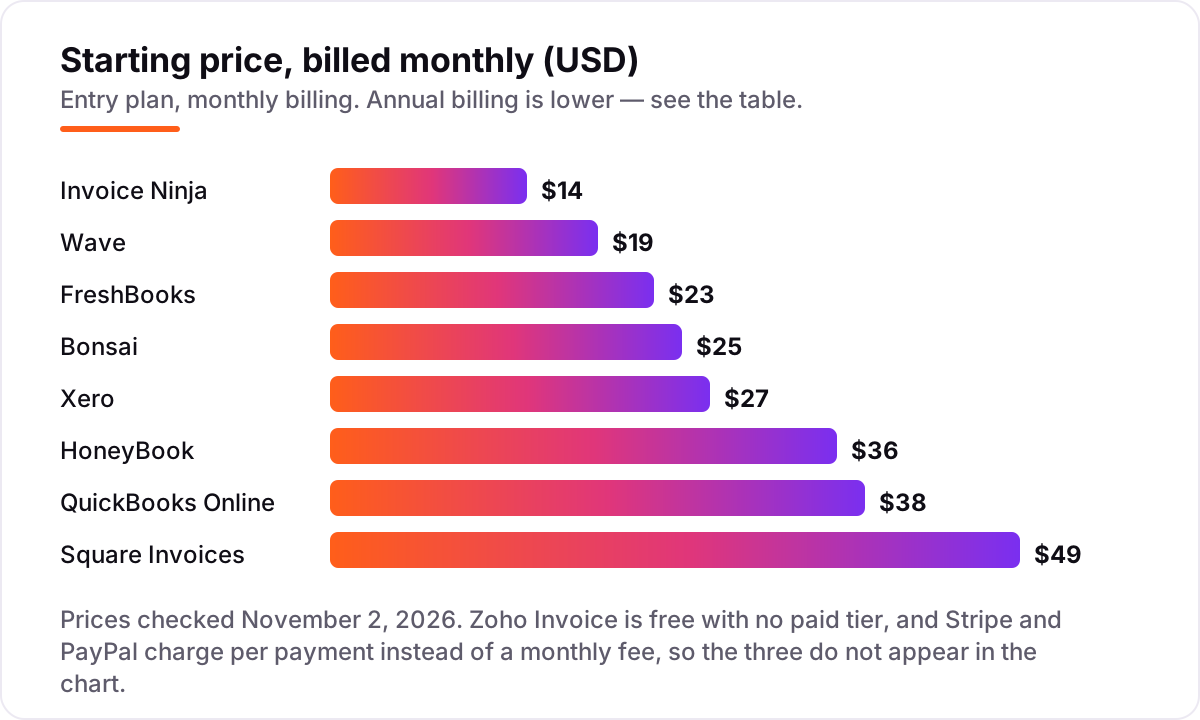
Take a service business that sends 10 invoices of $500 each month — $5,000 in billings. On FreshBooks Plus at $43 a month, with every client paying by a standard card, the processing fee is 2.9% plus 30 cents per invoice: $14.80 per invoice, or $148 for the month. The total bill is $43 plus $148, or $191 a month — and the processing fees are more than three times the subscription. If the same clients pay by bank transfer at 1%, the fee is $5 per invoice, or $50 for the month, and the total falls to $93.
The lesson holds across this list: the subscription is the small number, and the per-payment fee is the big one. A free plan does not escape it either — Wave's Starter plan costs $0, but card payments still cost 2.9% plus 60 cents each, or $151 on the same $5,000 month. Square's free plan is the priciest way to take a card at 3.3% plus 30 cents, or $16.80 on a $500 invoice, while Stripe's 0.4% invoicing fee adds just $2 to the same invoice before its own 2.9% plus 30-cent processing charge. Before you compare subscriptions, add up a month of your own invoices at each tool's published processing rate; the cheapest plan on paper is rarely the cheapest bill in practice.
Quick comparison: tool type by need
| Buyer | Best pick | Why |
|---|---|---|
| Solo freelancer, under 5 clients | Invoice Ninja | Free plan covers 5 clients, Pro $14/month |
| Service business billing weekly | FreshBooks | Invoicing-first workflow from $23/month |
| Business that also needs the books | QuickBooks Online | Full accounting plus invoicing from $38/month |
| Tightest budget, no monthly fee | Zoho Invoice | Free forever, 500 invoices a year |
| Free invoicing plus bookkeeping | Wave | Unlimited invoices free, Pro $19/month |
| In-person sales plus invoicing | Square Invoices | Free unlimited invoices, cards at the counter |
| Growing team, many users | Xero | Unlimited users from $27/month |
| Client-based creative work | HoneyBook | Proposals, contracts and invoices in one flow |
| Freelancer who wants it all in one | Bonsai | Invoicing from Essentials at $25/user/month |
| Online business already on Stripe | Stripe Invoicing | No monthly fee, 0.4% per paid invoice |
| Clients who already use PayPal | PayPal Invoicing | Free to send, pay only when a client pays |
How we chose
We checked each vendor's own pricing page on November 2, 2026 and recorded the starting price exactly as shown, including the annual-billing figure where the page lists one. Ratings come from G2, where shown — we opened the FreshBooks and QuickBooks Online pages today, and G2 rate-limited further rating checks, so the other tools show no rating rather than a figure we could not verify. We ranked the tools by fit for the most common buyer — a small business owner who invoices every week — not by brand size. No vendor paid for a place in this list, and none of the links here are affiliate links.
What to do next
Start with the checks above: count your clients and invoices, work out the fee per payment, and decide whether you need the books too. Then take the free plan or trial of your top pick and send a real invoice to a real client. If the payment flow is smooth and the reminders go out on their own, you have your tool. If getting found is the harder half of the job, our monthly SEO service handles the rankings while the invoicing tool handles the billing. Once your tools are in place, find out what's holding your rankings back.
Your stack only works if people find you
SerpAstra fixes what keeps your site off page one and makes it easy for AI assistants to recommend.
Get a free audit→Sources we checked (14)
- FreshBooks pricing — freshbooks.com/pricing (checked November 2, 2026)
- FreshBooks on G2 — 4.5/5, 981 reviews (checked November 2, 2026)
- FreshBooks Payments transaction fees — support.freshbooks.com (checked November 2, 2026)
- QuickBooks Online pricing — quickbooks.intuit.com/pricing (checked November 2, 2026)
- QuickBooks Online on G2 — 4.0/5, 3,901 reviews (checked November 2, 2026)
- Zoho Invoice pricing — zoho.com/us/invoice/pricing (checked November 2, 2026)
- Wave pricing — waveapps.com/pricing (checked November 2, 2026)
- Square Invoices pricing — squareup.com/us/en/invoices/pricing (checked November 2, 2026)
- Xero pricing — xero.com/us/pricing (checked November 2, 2026)
- HoneyBook pricing — honeybook.com/pricing (checked November 2, 2026)
- Invoice Ninja pricing — invoiceninja.com/pricing (checked November 2, 2026)
- Bonsai pricing — hellobonsai.com/pricing (checked November 2, 2026)
- Stripe pricing — stripe.com/pricing (checked November 2, 2026)
- PayPal merchant fees — paypal.com/us/webapps/mpp/merchant-fees (checked November 2, 2026)
Shamim
Founder of SerpAstra
A full-stack SEO and digital marketer who spends most days on Local SEO for dental practices, AI search visibility and lead generation.
Frequently asked questions
What is the best invoicing software for small business in 2026?
FreshBooks is the best invoicing-first pick for most service businesses at $23 a month, with recurring invoices and reminders on every plan. QuickBooks Online is better if you also need full accounting, and Zoho Invoice is the best free option. The right choice depends on whether you need accounting, a client portal, or just invoices and payments.
How much does invoicing software cost?
Between $0 and $49 a month at the entry level. Zoho Invoice is free, Wave's Starter plan is free, and Square sends unlimited invoices for $0. Paid plans start at $14 a month for Invoice Ninja, $23 for FreshBooks and $38 for QuickBooks Online. Payment-processing fees add more: card payments typically cost 2.9% plus 30 cents per invoice.
Is there free invoicing software for small business?
Yes. Zoho Invoice is free forever with 500 invoices a year, Wave's Starter plan is free with unlimited invoices and bookkeeping, and Square Invoices is free with unlimited invoices. Invoice Ninja is free for up to 5 clients. Free plans work well for freelancers and very small businesses; the limits that matter are invoice caps, user counts and branding.
What is the difference between invoicing software and accounting software?
Invoicing software does one job: it creates and sends invoices, tracks who has paid, and reminds clients who have not. Accounting software does that plus the books — bank reconciliation, bills, expenses, reports and tax preparation. If you only send invoices, an invoicing tool costs less; if you need the books too, QuickBooks Online, Xero or Wave cover both.
Do I pay extra when a client pays an invoice by card?
Yes, on almost every tool here. Card payments usually cost 2.9% plus 30 cents per payment — FreshBooks, Stripe and Bonsai all charge that rate — while Square charges 3.3% plus 30 cents on its free plan and PayPal charges 2.99% plus 49 cents. Bank transfers are cheaper at about 1%. Steering clients to bank payment is the easiest way to cut the fee.
Can I switch invoicing software later?
Yes, and it is easier than switching accounting software. Export your client list and unpaid invoices as a CSV, set up the new tool, and send future invoices from there. Keep the old tool open until the last outstanding invoice is paid. Most tools here import clients from a CSV, so the move takes an afternoon, not a week.
What should I check before paying for invoicing software?
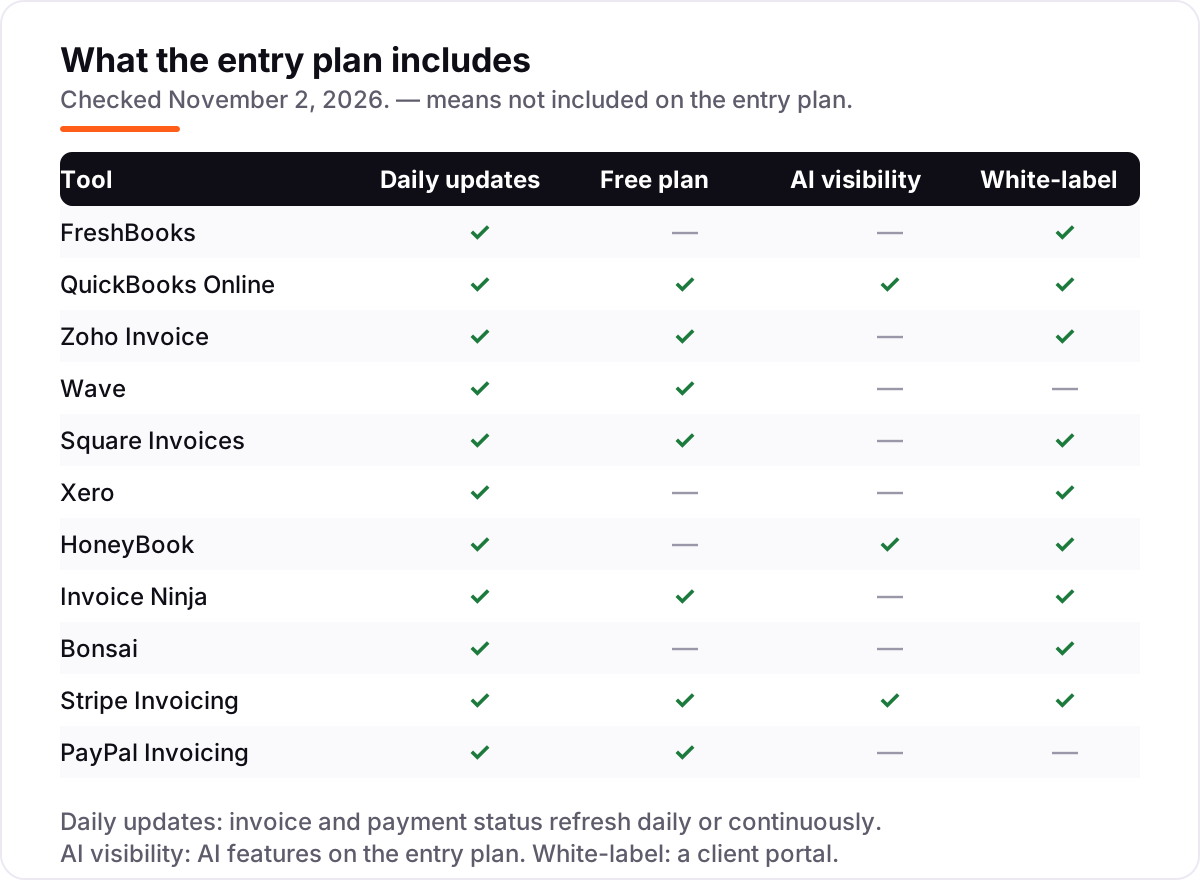
Four things: whether the plan caps clients or invoices, what payment-processing fees cost per payment, whether reminders and a client portal are included, and whether the price is monthly or annual billing. All four vary widely — the comparison table at the top of this guide shows the starting price and free plan for each tool.
Free SEO and AI visibility audit
Find out what is holding your rankings back
Send us your site. Within 2 business days you get a written audit, an AI visibility check and a short fix list ranked by impact. Free, with no contract attached.
Request my free audit→Related guides
 SEO & AI Search12 Best Marketing Platforms for Small Business SEO in 2026, ComparedThe 12 best marketing platforms for small business SEO, compared on real prices, SEO tools and AI visibility. Every price checked November 1, 2026.Read guide →
 SEO & AI Search8 Best SEO Companies for Small Business in 20268 best SEO companies for small business compared on price, contracts and AI visibility, with prices checked on each agency's own site on November 1, 2026.Read guide →
 SEO & AI SearchBest Local SEO Tools for 2026: 11 Picks Ranked by What You Need11 best local SEO tools with real prices checked November 1, 2026 — from $14/month trackers to quote-only enterprise platforms, sorted by what you need.Read guide →