
10 Best Janitorial Software with Payroll Management in 2026, Compared
Compare the 10 best janitorial software with payroll management on price, payroll type and crew size, with every price checked November 8, 2026.
 Shamim Mia, Founder, SerpAstraLast verified November 8, 202614 min read
We compare pricing pages, documentation and public reviews. We never accept payment for rankings.

Key takeaways
- ZenMaid leads for cleaning firms at $19/month, Jobber follows at $49/month for general field service, and Homebase starts free — the only native-payroll option that costs $0 to start.
- Payroll comes in three kinds here: native processing (ZenMaid Pro, Homebase), a paid add-on (Housecall Pro), and timesheet exports to Gusto or QuickBooks (Jobber, Connecteam, Swept).
- The single most important buying factor is which kind of payroll you get: native payroll files taxes for you, an integration still needs a separate payroll subscription, and a report still needs someone to run pay by hand.
- Watch the pricing unit, not just the headline: per cleaner (ZenMaid), per user (Jobber, Housecall Pro), per location (Swept), per completed job (MaidCentral) or per hub (Connecteam).
On this page
Quick comparison
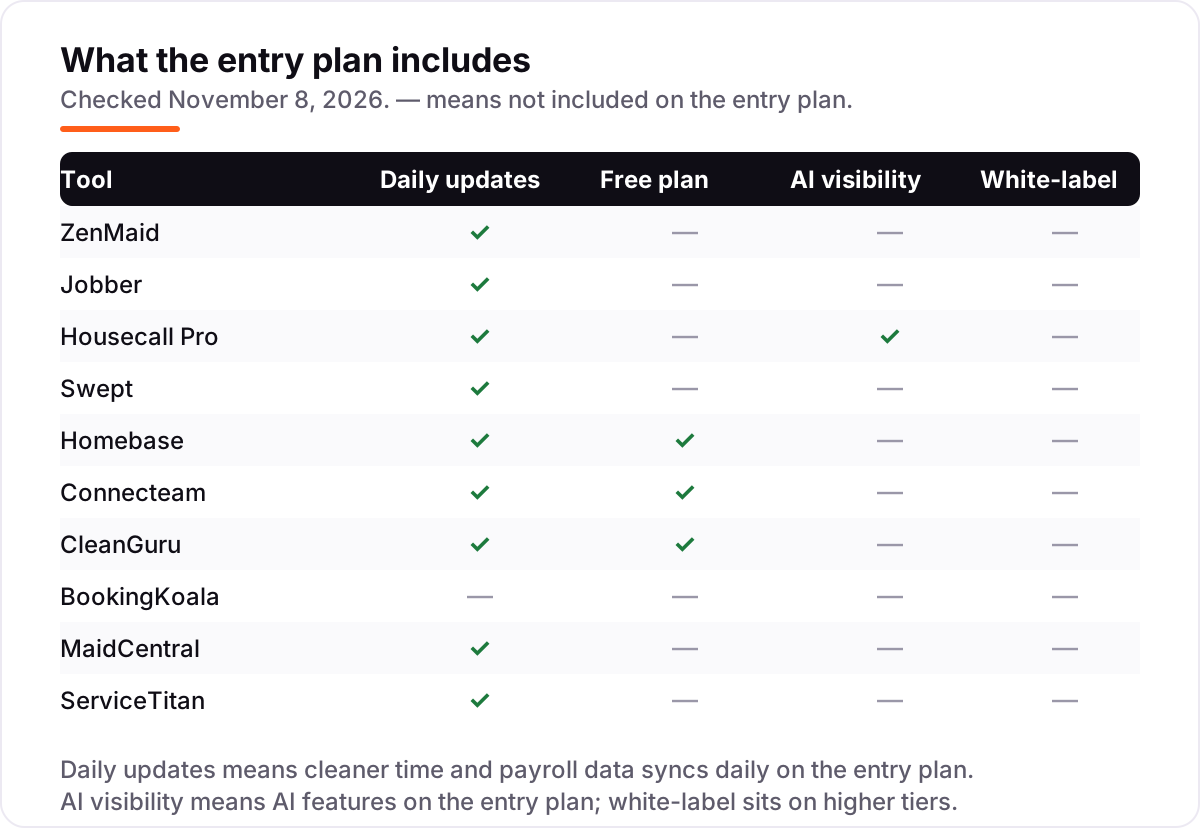
| Tool | Best for | Starting price | Free plan |
|---|---|---|---|
| ZenMaid | Maid services and residential cleaners that want payroll built into the cleaning software itself | $19/mo | No (14-day trial) |
| Jobber | Growing cleaning crews that want scheduling, invoicing and payroll reporting in one general field-service platform | $49/mo | No (14-day trial) |
| Housecall Pro | Small cleaning crews that want a payroll add-on inside the same app that schedules the jobs | $79/mo | No (14-day trial) |
| Swept | Commercial janitorial firms that pay cleaners across many client sites and need proof of service for payroll | $30/mo | No (demo) |
| Homebase | Hourly cleaning crews that want free scheduling plus native payroll in one app | Free; Essentials $30/mo | Yes (free) |
| Connecteam | Deskless cleaning teams that want a free start and payroll-ready timesheets on a mobile-first app | $35/mo | Yes (free ≤10) |
| CleanGuru | Janitorial firms that win work on bids and want payroll and timekeeping in the same cleaning-only system | $79/mo | Yes (free features) |
| BookingKoala | Residential cleaning firms that take online bookings and want payroll reporting from the booking system | $27/mo | No (free trial) |
| MaidCentral | Scaling maid services that want deep payroll reporting and performance pay for a large crew | $450/mo | No (demo) |
| ServiceTitan | Large home-service operations that need configurable payroll across many technicians and locations | Custom quote | No (demo) |
Make one of these tools?
We re-check this list every quarter. Send a correction, request a review, or ask about a clearly labeled sponsored spot.
Request a listingThe best janitorial software with payroll management

ZenMaid
Best for: Maid services and residential cleaners that want payroll built into the cleaning software itself
ZenMaid is the only tool in this list built specifically for maid services that also runs payroll inside the app. Starter costs $19 a month for the owner alone, covers up to 40 appointments a month, and handles scheduling, dispatch and invoicing. Pro costs $39 a month plus $14 for each extra cleaner, removes the appointment cap, and adds digital checklists, GPS tracking, booking forms and payroll.
The catch is the per-cleaner maths. A five-person crew on Pro pays $39 plus four times $14, or $95 a month, and text messages cost extra on every plan. There is no annual discount, so the monthly figure is the whole story. Pick ZenMaid when payroll is the priority and the crew is small; pick Jobber or Housecall Pro when the work is commercial and the crew is larger.
What we like
- Payroll is built in on Pro at $39/month — no separate payroll subscription to buy
- Built for recurring home cleaning: scheduling, reminders, checklists and GPS check-ins
- Cheapest entry here at $19/month, with a 14-day trial on every plan
- Unlimited appointments on Pro, with no annual-billing maze — every month is full price
Watch out for
- Payroll waits for Pro at $39/month — Starter at $19/month has no payroll features
- Every extra cleaner costs $14/month on Pro, so a 5-person crew pays $95/month, not $39
- QuickBooks integration was still listed as coming soon on the pricing page

Jobber
Best for: Growing cleaning crews that want scheduling, invoicing and payroll reporting in one general field-service platform
Jobber is the most complete field-service platform in this list, and the best fit when a janitorial firm also does other trade work. Core costs $49 a month for one user, or $29 a month billed annually, and covers quoting, invoicing, scheduling and online booking. Connect starts at $139 a month and adds automated reminders, routing, GPS and QuickBooks Online sync; Grow starts at $199 and adds job costing and two-way texting.
Payroll here is reporting, not processing: tracked hours and job costs flow into QuickBooks or Gusto, and that payroll subscription bills separately. The user bands matter too — a five-person crew pays Connect at $199 a month, not the $49 headline. Choose Jobber when you want one platform for the whole operation; choose ZenMaid or Homebase when payroll must be processed inside the same app.
What we like
- Time tracking and job costing feed payroll: hours, expenses and job costs flow to QuickBooks or Gusto
- Scheduling, quoting, invoicing and payments in one app, with a strong mobile app for cleaners
- Annual billing cuts Core from $49 to $29/month — the biggest annual discount here
- More than 100 integrations, including QuickBooks Online sync from Connect at $139/month
Watch out for
- Core at $49/month covers one user — a crew needs Connect or Grow, which cost far more
- No native payroll processing; pay runs through QuickBooks or Gusto, which bill separately
- Per-user bands mean the bill jumps in steps as the crew grows past 1, 5, 10 or 15 users

Housecall Pro
Best for: Small cleaning crews that want a payroll add-on inside the same app that schedules the jobs
Housecall Pro sells scheduling plus a payroll add-on in one app, which suits a small crew that wants hours to flow straight from the schedule to the pay run. Basic costs $79 a month for one user, or $59 billed annually, and covers booking, scheduling, estimates, invoicing and payments. Essentials costs $189 a month, or $149 billed annually, for five users and adds routes, GPS, commissions and QuickBooks Online sync.
One warning: the payroll add-on was last shown at $40 a month plus $6 per employee, but that price no longer appears on the live pricing page, so get it in writing. Basic has no way to add a second user, so hiring one helper jumps the bill to Essentials. Pick Housecall Pro when you want payroll inside the scheduling app; pick Homebase when you want a free start.
What we like
- Payroll add-on sits inside the app, so hours flow from the schedule to the pay run
- AI Team features — analyst, coach, marketing and CSR chat — are on every plan
- Essentials bundles 5 users for $149/month billed annually, with GPS, commissions and QuickBooks sync
- No long-term contract on any plan, and a 14-day free trial
Watch out for
- The payroll add-on price ($40/month + $6/employee) no longer appears on the live pricing page — confirm it with sales
- Basic covers one user and has no GPS tracking or QuickBooks sync; a second user forces Essentials at $189/month
- Add-ons stack up: sales proposals, vehicle GPS and price book all cost extra

Swept
Best for: Commercial janitorial firms that pay cleaners across many client sites and need proof of service for payroll
Swept is the only tool here built for commercial janitorial work, and its pricing matches how janitorial contracts scale: by location, not by headcount. Launch costs $30 a month for 1 to 15 locations and covers scheduling, time tracking, multilingual instructions and no-show alerts. Optimize costs $150 a month and adds inspections, geofencing and break compliance; Scale costs $225 and adds supply tracking and a client portal.
Payroll here means reporting, not processing: geofenced clock-ins and approved timesheets feed the pay run, but the pay run itself happens in a payroll tool. There is no free trial, only a demo, so test the cleaner app with a real crew before signing. Choose Swept when cleaners work across many sites; choose ZenMaid when the work is residential and recurring.
What we like
- Priced by location, not by headcount — a 30-site portfolio with rotating part-timers pays for sites, not cleaners
- Geofenced time tracking and payroll reporting cut payroll leakage across distributed crews
- Multilingual instructions in 100+ languages, plus lunch and break tracking on Launch
- Built only for commercial cleaning, so inspections and site messaging fit janitorial work
Watch out for
- No free trial — getting started means booking a demo with sales
- Inspections and break-compliance tracking wait for Optimize at $150/month, not Launch
- Per-location bands raise the bill as the site portfolio grows, even if headcount stays flat

Homebase
Best for: Hourly cleaning crews that want free scheduling plus native payroll in one app
Homebase is the cheapest way to get native payroll in this list, because the scheduling itself starts free. Basic costs $0 for one location with up to 10 employees and covers scheduling, time tracking, team messaging and POS integration. Essentials costs $30 a month, or $24 billed annually, and adds GPS time tracking and late-arrival alerts. Payroll is an add-on on every plan at $49 a month plus $6 per employee paid.
A five-person crew on Basic with payroll pays $49 plus five times $6, or $79 a month. The gaps are cleaning-specific: there are no inspections, no bidding tools and no client-site checklists, so pair it with a cleaning tool if you need those. Pick Homebase when payroll is the priority and the budget is tight; pick Swept when the crew works across many sites.
What we like
- Native payroll with tax filing, direct deposit, W-2s and 1099s — no third-party payroll tool needed
- Basic scheduling and time tracking are free for one location with up to 10 employees
- Unlimited employees on paid plans, so hiring more cleaners never raises the subscription
- Payroll runs are unlimited and charged only for employees paid that month
Watch out for
- Payroll is an add-on on every plan — $49/month + $6 per employee on top of the subscription
- Priced per location, so a second office or depot doubles the subscription
- No cleaning-specific features: no inspections, bidding or client-site checklists

Connecteam
Best for: Deskless cleaning teams that want a free start and payroll-ready timesheets on a mobile-first app
Connecteam is a mobile-first workforce app that fits deskless cleaning crews, and its free plan is the most generous here: up to 10 users with all hubs included. Operations Basic costs $35 a month, or $29 billed annually, covers the first 30 users, and adds a GPS time clock, basic scheduling, payroll integration and checklists. Advanced costs $59 a month and adds geofencing sites and repeating shifts.
The payroll story is integration, not processing: approved timesheets export to Gusto or QuickBooks, and that payroll tool bills separately. The hub pricing also matters — each hub (Operations, Communications, HR and Skills) carries its own price, so turning on all three triples the bill. Pick Connecteam when the crew lives on phones; pick Homebase when payroll must be processed in the same app.
What we like
- Free for teams of up to 10 users, with all hubs included — the only free plan this generous here
- GPS time clock with geofencing feeds payroll-ready timesheets and exports
- Flat price covers the first 30 users per hub, so a 20-cleaner crew pays the same as a 5-cleaner one
- Strong mobile app for cleaners, with scheduling, chat, checklists and forms in one place
Watch out for
- No native payroll — hours export to Gusto or QuickBooks, which bill separately
- Each hub is priced separately, so Operations plus HR and Communications triples the base price
- Payroll integration is not included on the free Small Business plan

CleanGuru
Best for: Janitorial firms that win work on bids and want payroll and timekeeping in the same cleaning-only system
CleanGuru started as janitorial bidding software and is still the sharpest proposal tool in this list, with over 500,000 cleaning proposals created on the platform. Basic costs $79 a month for one module and five users; Guru costs $129 a month for all modules and ten users; Guru Plus costs $159 for all modules and fifteen users. Extra cleaners cost $5 a month each, and new members get a 30-day free trial.
Payroll here is timekeeping that feeds the pay run: mobile clock-ins, job-linked hours and inspections sit in the same system as the bid that won the work. The modular pricing is the trap — Basic covers one module, so the full platform costs $129 or more. Pick CleanGuru when bids win the work; pick Swept when inspections and multi-site payroll reporting matter more.
What we like
- The bidding specialist: over 500,000 cleaning proposals created on the platform
- Scheduling, mobile timekeeping, inspections and invoicing in one cleaning-only system
- Free scheduling and timekeeping features for teams of up to 10 cleaners
- 30-day free trial — the longest trial in this list
Watch out for
- Modular pricing: Basic at $79/month covers one module only — the full platform costs $129–$159/month
- No verified G2 or Capterra rating could be found, so there is no public review score to lean on
- Older directories still list a $59/month Basic price — that figure is stale, not the current $79

BookingKoala
Best for: Residential cleaning firms that take online bookings and want payroll reporting from the booking system
BookingKoala is built around the booking itself: customers book from your website, pay by card at booking, and recurring cleans charge automatically. Starter costs $27 a month for five providers or 5 GB of storage; Growing costs $57 for fifteen providers; Premium costs $197 for fifty providers. There is no per-user fee, so the bill stays flat as bookings grow within a tier.
Payroll here is reporting: staff tip tracking and payroll reports live in the same dashboard as the bookings, but the pay run happens in a separate payroll tool. The tier jumps matter — a sixth provider doubles the bill from $27 to $57. Pick BookingKoala when online booking drives the business; pick ZenMaid when payroll must be processed inside the cleaning software.
What we like
- Online booking with card-at-booking and automatic recurring charges, built for cleaning firms
- Payroll reporting and staff tip tracking inside the same dashboard as bookings
- Flat tiers with no per-user fee — a 5-provider team pays the same $27 whether it has 5 or 50 bookings
- High reviewer satisfaction: 4.8/5 on G2 across 36 reviews
Watch out for
- No native payroll processing — payroll reporting and tip tracking only, so pay runs elsewhere
- Flat tiers jump in steps: a sixth provider moves you from Starter at $27 to Growing at $57
- A two-week outage in March 2025 is still cited by reviewers as a reliability warning

MaidCentral
Best for: Scaling maid services that want deep payroll reporting and performance pay for a large crew
MaidCentral is the premium operations platform for maid services past the startup phase, and its pricing matches that: $450 a month includes up to 100 completed jobs, then $1.20 per job up to 500 and $1.00 beyond, with $250 per additional branch and a one-time onboarding fee. The platform combines scheduling and dispatch with job costing, profitability reporting, automated rate increases and batch invoicing.
Payroll here is reporting with a twist: performance pay ties compensation to productivity and quality scores, and timesheets feed QuickBooks for the actual pay run — though they do not sync directly, so hours are exported by hand. There is no free trial, only a live demo. Pick MaidCentral when the firm is scaling and financial control matters; pick ZenMaid or BookingKoala when the budget is under $100 a month.
What we like
- Payroll reporting with performance pay tied to productivity and quality scores
- Priced per completed job, so the bill scales with revenue-generating work, not headcount
- Deep financial toolkit: job costing, profitability reporting and automated rate increases
- Highest review score here: 5.0/5 on Capterra across 48 reviews
Watch out for
- The priciest entry here at $450/month, before the per-job charges and onboarding fee
- No free trial — buy on the strength of the live demo
- Timesheets do not sync directly to payroll systems, so hours are exported by hand

ServiceTitan
Best for: Large home-service operations that need configurable payroll across many technicians and locations
ServiceTitan is the enterprise platform in this list, built for large home-service operations with many technicians and locations. It does not publish prices: the pricing page lists three per-technician packages — Starter, Essentials and The Works — each behind a request-pricing button. Payroll management arrives on Essentials, and configurable payroll with commission tracking arrives on The Works, alongside live timesheet tracking and job costing.
Third-party analyses put the cost at roughly $245 to $500 per technician a month, plus implementation fees commonly reported at $5,000 to $50,000 or more — but those are reported estimates, not ServiceTitan's published prices, so get a written quote. Choose ServiceTitan when the operation is large enough to need it; a small janitorial firm will pay far less on ZenMaid, Homebase or Swept.
What we like
- Payroll management on Essentials and configurable payroll on The Works, with commission tracking
- Live timesheet tracking with performance-based pay and job costing exports
- The deepest platform here: dispatch, marketing attribution, memberships and reporting in one place
- Rated 4.5/5 on G2 across 371 reviews, the largest review base for an enterprise pick
Watch out for
- No published price — every quote needs a sales demo, and third-party estimates run $245–$500 per technician a month
- Implementation fees are commonly reported at $5,000–$50,000+, with a 12-month contract minimum
- Far more platform than a small janitorial firm needs, with a steep learning curve
The best janitorial software with payroll management does two jobs at once: it schedules cleaners across client sites and turns their tracked hours into pay, without a second subscription or a spreadsheet in between. We ranked the ten tools below by fit for the most common buyer — a US cleaning firm with a small crew that pays hourly — starting with the cleaning-specific tools that run payroll inside the app, and every price was checked on the vendor's own pricing page on November 8, 2026.
How to choose the best janitorial software with payroll management
- Ask which kind of payroll it is. Native payroll (ZenMaid Pro, Homebase) files taxes and runs pay inside the app; an add-on (Housecall Pro) does the same for a fee; an integration (Jobber, Connecteam) only exports hours to Gusto or QuickBooks, which bill separately.
- Count what the price counts. ZenMaid charges per cleaner, Jobber and Housecall Pro per user, Swept per location, MaidCentral per completed job and Connecteam per hub — the cheapest headline can be the dearest bill for your crew shape.
- Check the payroll tier, not the entry tier. ZenMaid's $19 Starter has no payroll at all; payroll starts on Pro at $39 a month. Housecall Pro's payroll is an add-on, and ServiceTitan's payroll starts on Essentials, not Starter.
- Test the cleaner app with a real crew. GPS check-ins, geofencing and offline clock-ins decide whether the hours that reach payroll are accurate — a trial with one crew for one pay period tells you more than any demo.
- Confirm tax filing is included. Native payroll should cover tax filing, direct deposit, W-2s and 1099s; if any of those is missing, budget for the provider that supplies it.
Payroll is one system in your stack, not the whole stack. If the business also needs to be found online, our guide to payroll software for small business covers the standalone payroll side, and our local SEO service handles the visibility side. And before you publish new pages for the cleaning services you sell, run your titles through the free SERP snippet preview tool — it shows exactly how the title and description will look in Google.
Whatever you shortlist, run one real pay period through it before you pay for a year. The free plans and trials in this list are long enough to schedule one genuine week — your cleaners, your sites, your pay rates — and that week tells you more than any review can. Check two things in the trial: that clock-ins match the hours that reach the pay run, and that the payroll report your accountant needs comes out clean. Every tool here exports hours in some form, so there is no reason to buy before your payroll process has been tested on it.
Janitorial software with payroll management pricing: what you will actually pay
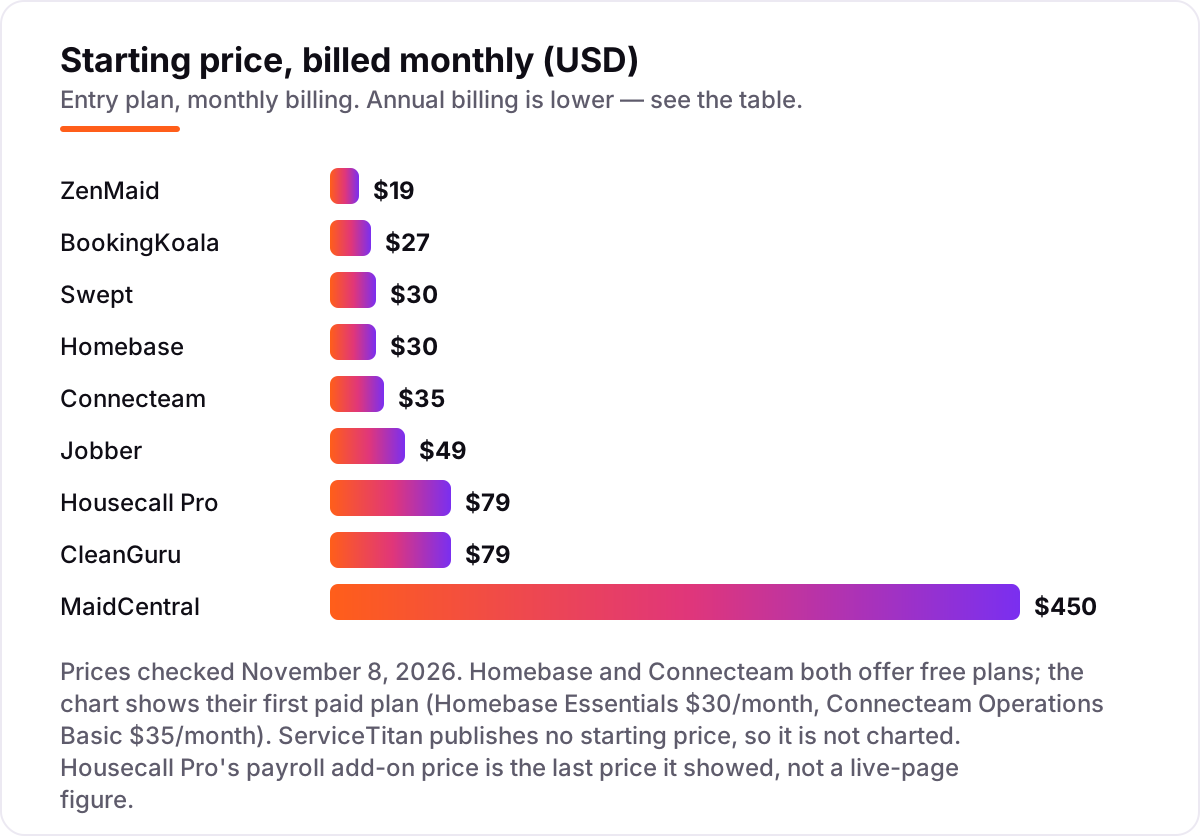
Take a five-person cleaning crew — an owner plus four cleaners — working one location on monthly billing. On list prices, the subscription costs $27 a month on BookingKoala Starter, $30 on Swept Launch, $35 on Connecteam Operations Basic, $79 on CleanGuru Basic, $95 on ZenMaid Pro, $189 on Housecall Pro Essentials, $199 on Jobber Connect for five users and $450 on MaidCentral. Homebase Basic is free for scheduling, so its subscription costs $0.
Three of those numbers need adjusting before they are real. First, payroll: Homebase adds $49 a month plus $6 per employee paid, so the free plan plus payroll is $79 a month for five people. ZenMaid Pro already includes payroll in its $95, and Housecall Pro's payroll add-on — last shown at $40 a month plus $6 per employee — would add about $70 to Essentials if that price still holds. Second, Jobber Connect at $199 covers five users, but Core at $49 covers only one, so a crew cannot buy the headline price. Third, MaidCentral's $450 covers up to 100 completed jobs, so a crew doing fewer jobs still pays the full $450.
Over a year, that five-person crew pays $324 on BookingKoala, $360 on Swept, $420 on Connecteam, $948 on Homebase with payroll or CleanGuru, $1,140 on ZenMaid Pro, $1,788 on Housecall Pro Essentials billed annually, $1,788 on Jobber Connect for five users billed annually, and $5,400 on MaidCentral. The same five people cost $324 a year at the cheap end and $5,400 at the dear end — a gap that comes entirely from the pricing unit and the payroll model, not from features. If the crew grows to ten cleaners, the maths changes again: ZenMaid Pro rises to $165 a month, Jobber needs Grow for ten users, and Swept stays at $30 because it charges per location, not per cleaner.
Know the difference: native payroll vs payroll integration vs payroll reporting
The confusion in this category is that three different things all get called "payroll management". Native payroll means the software runs pay itself: it calculates wages, files taxes, pays by direct deposit and issues W-2s and 1099s. Only ZenMaid Pro and Homebase do that in this list, and Homebase charges $49 a month plus $6 per employee for it. If that is what you need, those two are the shortlist.
Payroll integration means the software tracks hours and hands them to a payroll provider — Gusto or QuickBooks Payroll — which runs pay and bills separately. Jobber, Connecteam and Swept work this way, and BookingKoala sits nearby with payroll reporting and tip tracking. The integration is useful, but the payroll subscription is a second bill, so price both together before you compare.
Payroll reporting means the software produces the reports a pay run needs — hours by cleaner, by job or by site — and someone still runs pay by hand or in another tool. MaidCentral and CleanGuru sit here, with performance pay and timekeeping feeding the reports. Reporting is the weakest of the three, and it is also the most common claim in this category, so ask every vendor which of the three they actually sell.
Quick comparison: tool type by need
| Buyer | Best pick | Why |
|---|---|---|
| Maid service that wants payroll inside the app | ZenMaid | Payroll built into Pro at $39/month, entry at $19/month |
| Growing crew that does other trade work too | Jobber | Full field-service platform from $49/month, payroll via QuickBooks or Gusto |
| Commercial firm with many client sites | Swept | Priced per location from $30/month, geofenced time tracking feeds payroll |
| Hourly crew on a tight budget | Homebase | Free scheduling, native payroll at $49/month plus $6 per employee |
| Deskless team that lives on phones | Connecteam | Free up to 10 users, payroll integration from $35/month |
| Firm that wins work on bids | CleanGuru | Proposals plus timekeeping from $79/month, 30-day trial |
| Scaling maid service with deep financials | MaidCentral | Payroll reporting and performance pay from $450/month |
Mistakes to avoid
- Budgeting on the entry price when payroll lives on a higher tier. ZenMaid Starter at $19 has no payroll, Housecall Pro payroll is an add-on, and ServiceTitan payroll starts on Essentials — price the tier that actually runs pay.
- Comparing a native payroll price with an integration price. A $35 Connecteam plan plus a separate Gusto subscription costs more than a $79 Homebase plan with payroll included, once both bills are counted.
- Ignoring the pricing unit. Per-cleaner, per-user, per-location and per-job pricing punish different crew shapes: a 20-cleaner crew is cheap on Swept and dear on ZenMaid, while a 50-site portfolio is the reverse.
- Buying on the free plan, then finding payroll costs extra. Connecteam's free plan excludes payroll integration, and Homebase's free plan excludes payroll entirely — count the add-on in the price from day one.
- Trusting a payroll price that is no longer published. Housecall Pro's $40-a-month payroll add-on no longer appears on its live pricing page; get any add-on price in writing before you sign.
How we chose
We checked each vendor's own pricing page on November 8, 2026 and recorded the starting price exactly as shown, including the annual-billing figure where the page lists one, and we ranked the tools by fit for the most common buyer — a US janitorial firm with a small hourly crew — not by brand size. Two prices in this list are not live-page figures and are disclosed as such: Housecall Pro's payroll add-on price ($40/month + $6/employee) is the last price it showed, since the live page no longer lists it, and ServiceTitan's per-technician range ($245–$500) is a third-party estimate, so ServiceTitan is listed as a custom quote. CleanGuru carries no review rating because no verified G2 or Capterra rating page could be found for it on November 8, 2026, and we would rather show no rating than a stale or estimated one. No vendor paid for a place in this list, and none of the links here are affiliate links.
What to do next
Start with the free plan or trial of your top pick and run one real pay period through it. Check that clock-ins match the hours that reach the pay run, and that the payroll report matches what your accountant expects, before you commit to a year. If scheduling is sorted but the books need work, compare standalone options in our guide to bookkeeping and payroll software for small business, or check the cleaning schedule app guide for scheduling-only picks. Once your tools are in place, find out what's holding your rankings back.
Your stack only works if people find you
SerpAstra fixes what keeps your site off page one and makes it easy for AI assistants to recommend.
Get a free audit→Sources we checked (19)
- ZenMaid pricing — get.zenmaid.com/pricing (checked November 8, 2026)
- Jobber pricing — getjobber.com/pricing (checked November 8, 2026)
- Housecall Pro pricing — housecallpro.com/pricing (checked November 8, 2026)
- Swept pricing — sweptworks.com/pricing (checked November 8, 2026)
- Homebase pricing — joinhomebase.com/pricing (checked November 8, 2026)
- Connecteam pricing — connecteam.com/pricing (checked November 8, 2026)
- CleanGuru pricing — cleanguru.com/pricing (checked November 8, 2026)
- BookingKoala pricing — bookingkoala.com/pricing (checked November 8, 2026)
- MaidCentral pricing — maidcentral.com/pricing (checked November 8, 2026)
- ServiceTitan pricing — servicetitan.com/pricing (checked November 8, 2026)
- ZenMaid reviews — g2.com/products/zenmaid-software/reviews (checked November 8, 2026)
- Jobber reviews — g2.com/products/jobber/reviews (checked November 8, 2026)
- Housecall Pro reviews — g2.com/compare/housecall-pro-vs-mhelpdesk (checked November 8, 2026)
- Swept reviews — g2.com/products/swept/reviews (checked November 8, 2026)
- Homebase reviews — g2.com/products/homebase/reviews (checked November 8, 2026)
- Connecteam reviews — g2.com/compare/connecteam-vs-homebase (checked November 8, 2026)
- BookingKoala reviews — g2.com/products/bookingkoala/reviews (checked November 8, 2026)
- MaidCentral reviews — capterra.ca/software/189582/maid-central (checked November 8, 2026)
- ServiceTitan reviews — g2.com/products/field-nation/competitors/alternatives (checked November 8, 2026)
Shamim
Founder of SerpAstra
A full-stack SEO and digital marketer who spends most days on Local SEO for dental practices, AI search visibility and lead generation.
Frequently asked questions
What is the best janitorial software with payroll management?
ZenMaid is the best fit for most cleaning firms: payroll is built into Pro at $39/month, and entry starts at $19/month. Homebase is the best free start, with native payroll as a $49/month add-on. Jobber is the best general platform when the firm also does other trade work.
How much does janitorial software with payroll management cost?
Entry prices run from $0 to $450 a month. Homebase and Connecteam both start free, ZenMaid starts at $19/month and BookingKoala at $27/month. A five-person crew typically pays $79–$199 a month for the subscription plus payroll, before card processing fees.
Does janitorial software include payroll, or just track hours?
It depends on the tool. ZenMaid Pro and Homebase process payroll inside the app, Housecall Pro sells it as an add-on, and Jobber, Connecteam, Swept and BookingKoala only track hours and export them to Gusto or QuickBooks. Check which kind a tool offers before you buy.
What is the cheapest janitorial software with payroll?
Homebase is cheapest to start: scheduling is free for one location with up to 10 employees, and payroll adds $49/month plus $6 per employee. ZenMaid Pro is the cheapest cleaning-specific option with payroll built in, at $39/month plus $14 per extra cleaner.
Can I switch janitorial software later without losing payroll history?
Yes, but plan the move at a pay-period boundary. Export employee lists, pay rates, timesheets and payroll reports from the old tool, run one final pay cycle there, then start the new tool with the next period. Keep the old payroll records for at least a year for tax purposes.
Do I still need a separate payroll provider if my janitorial software has payroll?
Not with ZenMaid Pro or Homebase, which process payroll and file taxes inside the app. With Jobber, Connecteam, Swept, BookingKoala or MaidCentral, you still need Gusto, QuickBooks Payroll or another provider to run pay, file taxes and issue W-2s at year end.
Free SEO and AI visibility audit
Find out what is holding your rankings back
Send us your site. Within 2 business days you get a written audit, an AI visibility check and a short fix list ranked by impact. Free, with no contract attached.
Request my free audit→Related guides
 Accounting, Tax & Finance10 Best Payroll Software for Small Business in 2026, ComparedCompare the 10 best payroll software for small business on base price, tax filing and free trials, with every price checked November 4, 2026.Read guide →
 Accounting, Tax & Finance10 Best Bookkeeping and Payroll Software for Small Business in 2026, ComparedThe 10 best bookkeeping and payroll software for small business, compared on real 2026 prices, per-employee payroll fees and free plans at your headcount.Read guide →
 Local Business & Vertical SoftwareBest Cleaning Schedule Apps (2026): 7 Apps Worth DownloadingCompare the 7 best cleaning schedule app options for 2026 on price, free plans and household sharing, with every price checked November 7, 2026.Read guide →