
10 Best Payroll Software for Small Business in 2026, Compared
Compare the 10 best payroll software for small business on base price, tax filing and free trials, with every price checked November 4, 2026.
 Shamim Mia, Founder, SerpAstraLast verified November 4, 202615 min read
We compare pricing pages, documentation and public reviews. We never accept payment for rankings.

Key takeaways
- Gusto is the best fit for most small businesses at $49/month + $6 per person; OnPay ties it at $49/month + $6 per worker with multi-state payroll included, and Square Payroll undercuts both at $35/month + $6 for businesses already using Square.
- The single most important buying factor is whether the entry plan files your payroll taxes: Patriot Basic at $17/month and SurePayroll No Tax Filing at $20/month do not, so their low headline prices hide the tax work.
- Every tool here charges a base fee plus a per-person fee, so a 10-person team pays $95–$120 a month on the published plans — compare on that total, not the base fee.
- ADP RUN publishes no price at all, and Paychex Flex's $39 entry price comes with tax filing as a possible extra — get both quotes in writing before you budget.
On this page
Quick comparison
| Tool | Best for | Starting price | Free plan |
|---|---|---|---|
| Gusto | Small businesses that want full-service payroll with benefits and HR in one place, run in a single state | $49/mo + $6/person | No |
| OnPay | Small businesses that want one flat full-service price with multi-state payroll included | $49/mo + $6/worker | No (first month free) |
| QuickBooks Payroll | Businesses already running QuickBooks Online that want payroll inside the same login | $50/mo + $6.50/employee | No (30-day trial) |
| Square Payroll | Shops, restaurants and cafés already taking payments with Square | $35/mo + $6/person | No |
| Patriot Payroll | US small businesses that want the cheapest honest payroll and are happy to file taxes themselves | $17/mo + $4/worker | No (30-day trial) |
| Wave Payroll | Freelancers and tiny teams already doing the books in free Wave | $40/mo + $6/person | No |
| Rippling | Growing teams that want payroll, HR, IT and finance on one employee record | $8/user/mo + $40 base | No |
| SurePayroll | Very small teams of 1–10 that operate in several states and want the lowest base fee | $20/mo + $4/employee | No (1-month trial) |
| Paychex Flex | Small businesses that want a large, established provider with 24/7 support | $39/mo + $5/employee | No |
| ADP RUN | Small businesses that want the largest payroll provider with HR add-ons and a dedicated rep | Custom quote | No |
Make one of these tools?
We re-check this list every quarter. Send a correction, request a review, or ask about a clearly labeled sponsored spot.
Request a listingThe best payroll software for small business

Gusto
Best for: Small businesses that want full-service payroll with benefits and HR in one place, run in a single state
Gusto is the payroll software most small businesses end up comparing everything else against, and the reason is the breadth of what the Simple plan covers: full-service payroll with federal, state and local tax filings and payments, unlimited pay runs, contractor payments in more than 120 countries, and health insurance administration in the same login. Simple costs $49 a month plus $6 per person, and it covers payroll in one state.
The catch is geography and headcount. A second state means Plus at $80 a month plus $12 per person, and the per-person fee means a 25-person team pays $199 a month before any add-on. Time tracking and priority support cost extra. Buy Gusto when you want one login for payroll, benefits and HR and your team sits in one state; buy OnPay when multi-state payroll matters from day one.
What we like
- Full-service payroll with federal, state and local tax filings and payments on every plan
- Unlimited pay runs and contractor payments in more than 120 countries included on Simple
- Health insurance administration and 401(k) options without leaving the payroll login
- Highest review volume here: 4.6 out of 5 on G2 from more than 13,900 reviews
Watch out for
- Simple covers payroll in one state only — a second state means Plus at $80/month plus $12 per person
- Per-person fees add up fast: a 25-person team pays $199/month on Simple before any add-on
- Time tracking and priority support are paid add-ons on Simple, not included

OnPay
Best for: Small businesses that want one flat full-service price with multi-state payroll included
OnPay sells one plan and nothing else, and that simplicity is the whole pitch: Payroll Essentials costs $49 a month plus $6 per worker and includes everything a small business needs — full-service payroll, all federal, state and local tax filings and payments, unlimited pay runs, multi-state payroll, and year-end W-2s and 1099s. There are no tiers to compare and no feature locked behind an upgrade.
There is no cheaper tier for a one-person business, and PTO tracking and advanced onboarding need the HR add-on at $15 a month plus $2 per worker. The first month is free, setup help is free, and its 4.8 out of 5 G2 rating is the highest here. Pick OnPay for a single flat price and employees in more than one state; pick Gusto when you want benefits and HR in the same login.
What we like
- One plan at $49/month plus $6 per worker — no tiers, no upgrade decisions
- Multi-state payroll, year-end W-2s and 1099s included at no extra charge
- Highest rating here: 4.8 out of 5 on G2, with reviewers praising support and setup
- Free data migration and setup help, with no implementation fee listed
Watch out for
- No cheaper tier: a one-person business pays the same $49 base as a 20-person team
- PTO tracking and advanced onboarding need the HR add-on at $15/month plus $2 per worker
- No built-in time tracking on the base plan — the Time Tracking add-on is $15/month plus $4 per worker

QuickBooks Payroll
Best for: Businesses already running QuickBooks Online that want payroll inside the same login
QuickBooks Payroll, now sold as Workforce Payroll, is the obvious pick for the millions of businesses already running QuickBooks Online: the payroll journals flow straight into the ledger, so the books and the pay run never drift apart. Core costs $50 a month plus $6.50 per employee as a standalone add-on, or $88 a month plus $6.50 bundled with Simple Start, and it includes next-day direct deposit, automatic payroll and Payroll AI.
The limits are the bundle and the fine print. Payroll only makes sense with a QuickBooks Online plan, local tax filing is not included on Core, and same-day direct deposit needs a higher tier. New customers get 50% off the base fee for three months. Buy it when QuickBooks Online is already your ledger; buy Gusto or OnPay when the accounting lives somewhere else.
What we like
- Payroll journals flow straight into QuickBooks Online, so the books and the pay run stay in sync
- Payroll AI collects time and attendance data and flags inconsistencies before the run
- Next-day direct deposit and automatic payroll on the entry plan
- 50% off the base fee for 3 months for new customers
Watch out for
- Payroll only makes sense with a QuickBooks Online plan — the bundle with Simple Start is $88/month plus $6.50 per employee
- Local tax filing is not included on Core, and same-day direct deposit needs a higher tier
- Support reviews are mixed: some users report issues taking months to resolve

Square Payroll
Best for: Shops, restaurants and cafés already taking payments with Square
Square Payroll is the cheapest full-service plan in this list, and it is built for the businesses Square already serves: shops, restaurants and cafés with hourly teams. It costs $35 a month plus $6 per person paid, and timecards import straight from Square POS and the Square Team App, with overtime calculated automatically. Contractor-only payroll costs $6 per person with no monthly base fee at all.
The weakness is everything outside the till. There are no built-in HR tools, no PTO tracking and no benefits administration on the base plan, and the only accounting sync is QuickBooks Online. Seasonal businesses get free inactivity in the off months. Pick Square Payroll when your team already clocks in on Square; pick OnPay or Gusto when you need HR tools as well as payroll.
What we like
- Cheapest full-service base fee here at $35/month plus $6 per person paid
- Timecards import straight from Square POS and the Square Team App, with overtime calculated
- Contractor-only payroll is $6 per person with no monthly base fee at all
- Free seasonal inactivity, so a seasonal business pays nothing in the off months
Watch out for
- No built-in HR tools — no PTO tracking, onboarding workflows or benefits administration on the base plan
- Only integrates with QuickBooks Online for accounting; no Xero or other ledger sync
- Smallest review base here: 4.2 out of 5 on G2 from only 31 reviews

Patriot Payroll
Best for: US small businesses that want the cheapest honest payroll and are happy to file taxes themselves
Patriot Payroll keeps things plain: two plans, flat prices, and no caps to trip over. Basic Payroll costs $17 a month plus $4 per worker paid and covers unlimited pay runs, free direct deposit, an employee portal and 1099 creation. Full Service costs $37 a month plus $5 per worker and adds federal, state and local tax filings and deposits, with year-end filings at no extra charge.
The catch is what Basic does not do: it does not file your taxes, so a business that wants filings handled pays for Full Service, and each extra state filing costs $12 a month. Standard direct deposit takes four days unless you pay to speed it up. Pick Patriot when you want the cheapest honest payroll from a US company and your tax needs are straightforward.
What we like
- Cheapest entry price here: Basic Payroll is $17/month plus $4 per worker paid
- Unlimited pay runs and free direct deposit, with no charge for extra runs
- US-based support by phone, email and chat, with a reputation for answering quickly
- 1099 creation included, and payroll imports into Patriot accounting or QuickBooks Online
Watch out for
- Basic Payroll does not file taxes — federal and state filings wait for Full Service at $37/month plus $5 per worker
- Each extra state filing costs $12/month on top of the plan price
- Standard direct deposit takes 4 days unless you pay to speed it up

Wave Payroll
Best for: Freelancers and tiny teams already doing the books in free Wave
Wave Payroll is the only payroll in this list that sits on a genuinely free accounting plan: Wave Starter costs $0 and covers unlimited invoicing and bookkeeping, and the payroll add-on costs $40 a month plus $6 per active employee and $6 per contractor paid. The tax service now covers all 50 states at the same price, with unlimited free direct deposits and payroll journals flowing into the Wave ledger.
The limits are scope, not price. Payroll only exists inside a Wave accounting login, there is no inventory tracking or multi-currency invoicing, and Wave serves the US and Canada only. Human support needs a paid plan or add-on. Start on Wave Payroll when the business is tiny and the books already live in Wave; move to Gusto or OnPay when you need HR tools or multi-state scale.
What we like
- The only payroll here that sits on a genuinely free accounting plan — Wave Starter costs $0
- Tax service now covers all 50 states at the same $40/month plus $6 per person price
- Unlimited free direct deposits, with payroll journals flowing into the Wave ledger
- Simple enough for an owner with no accounting background to run alone
Watch out for
- Payroll is an add-on, not a standalone product — you run it inside a Wave accounting login
- No inventory tracking or multi-currency invoicing in Wave, so growing sellers outgrow it
- US and Canada only, and human support needs a paid plan or add-on

Rippling
Best for: Growing teams that want payroll, HR, IT and finance on one employee record
Rippling is the all-in-one play: one employee record drives payroll, HR, IT and finance, so a new hire's laptop, app access, benefits and first paycheck are all set up from the same profile. The advertised starting price is $8 per user per month plus a $40 monthly base fee, and US payroll adds $8 per employee per month on annual billing, with automatic tax filing and more than 650 integrations.
The catch is that almost everything beyond payroll is a separate quoted module, so the $8 starting price is a floor, not a budget — reviewers report costs stacking up quickly once modules are added, and implementation takes about a month. Buy Rippling when you want one system for the whole employee lifecycle; buy Gusto when payroll plus benefits is enough.
What we like
- One employee record drives payroll, HR, IT and finance, so a new hire's laptop, apps and pay are set up together
- US payroll from $8 per employee per month on annual billing, with automatic tax filing
- More than 650 integrations, the widest in this list
- Highest rating here alongside OnPay: 4.7 out of 5 on G2 from nearly 15,000 reviews
Watch out for
- Almost everything beyond payroll is a separate quoted module, so the $8 starting price is a floor, not a budget
- Implementation takes about a month on average, and setup is largely on the buyer
- Reviewers report costs stacking up quickly once modules are added

SurePayroll
Best for: Very small teams of 1–10 that operate in several states and want the lowest base fee
SurePayroll, backed by Paychex, is the quiet specialist for very small teams that cross state lines. No Tax Filing costs $20 a month plus $4 per employee for businesses that file taxes themselves, and Full Service costs $29 a month plus $7 per employee with federal and state tax filing and deposits included. The standout is the flat $9.99 a month multi-state add-on, whatever the number of states.
The edges are the extras. Year-end W-2s and 1099s cost $50 plus $5 per form every year, you are billed per employee whether or not they were paid that month, and support wait times are the most common complaint in reviews. Pick SurePayroll when the team is under ten people in several states; pick OnPay when year-end forms and support matter more.
What we like
- Lowest base fee here after Patriot: No Tax Filing is $20/month plus $4 per employee
- Flat $9.99/month multi-state add-on regardless of how many states you pay in
- Backed by Paychex, with unlimited payroll runs and free 2-day direct deposit
- Household payroll plan for nannies and caregivers from $39/month
Watch out for
- Year-end W-2s and 1099s cost extra: $50 plus $5 per form, every year
- You are billed per employee whether or not they were paid that month
- Support wait times are the most common complaint in reviews

Paychex Flex
Best for: Small businesses that want a large, established provider with 24/7 support
Paychex Flex is the established-provider pick: Paychex has run payroll for more than 50 years and serves over 745,000 clients, and Flex Essentials costs $39 a month plus $5 per employee for teams up to 19 people. Every plan includes 24/7 live support by phone, chat and email, and Paychex Promise lets you delay the payroll debit up to seven days, free for the first three months.
The fine print matters. Tax administration and W-2s and 1099s may cost extra on Essentials, and everything above Essentials is a custom quote, so the real price only appears after a sales call. Reviewers also report frequent changes in assigned contacts. Pick Paychex Flex when you want a big-name provider with round-the-clock support; pick ADP RUN when you want the largest provider of all.
What we like
- More than 50 years in payroll and over 745,000 clients, the largest provider here
- 24/7 live support by phone, chat and email on every plan
- Paychex Promise lets you delay the payroll debit up to 7 days, free for the first 3 months
- Scales from a single employee to a mid-size team without switching platforms
Watch out for
- Tax administration and W-2s and 1099s may cost extra on Essentials, the cheapest tier
- Everything above Essentials is a custom quote, so the real price only appears after a sales call
- Reviewers report frequent changes in assigned contacts and uneven follow-through

ADP RUN
Best for: Small businesses that want the largest payroll provider with HR add-ons and a dedicated rep
ADP RUN is the largest payroll provider in the US, sold in four packages from payroll-only Essential to HR Pro, which adds enhanced HR support and staff perks. Payroll previews and liability reports let you check the full cost of a run before submitting it, and the mobile app handles payroll and time approvals on the go. It scores 4.7 out of 5 on G2 from more than 6,700 reviews.
The catch is the price: ADP publishes no price anywhere, so budgeting means a sales call and a written quote, and ADP bills per pay run, so weekly payroll costs more than monthly payroll at the same headcount. Year-two increases are common. Get quotes from ADP and Paychex Flex for the same headcount and pay frequency, and compare them in writing before you sign.
What we like
- The largest payroll provider in the US, with four RUN packages from payroll-only to payroll plus HR
- Payroll previews and liability reports let you check the full cost before submitting a run
- Mobile app for running payroll and approving time on the go
- New-hire reporting, garnishment processing and state unemployment insurance management on higher tiers
Watch out for
- No published price anywhere — budgeting means a sales call and a written quote
- ADP bills per pay run, so weekly payroll costs more than monthly payroll at the same headcount
- Year-two price increases are common, so get the renewal terms in writing
The best payroll software for small business does three jobs at once: it pays people on time, calculates and files the payroll taxes, and keeps the records a year-end return needs, without the owner becoming a tax expert. We ranked the ten tools below by fit for the most common buyer — a US owner with 1 to 25 employees — starting with the best all-round pick and ending with the two quote-only providers, and every price was checked on November 4, 2026.
How to choose the best payroll software for small business
- Count the people you actually pay. Every tool here charges a base fee plus a per-person fee, so a 10-person team costs two to three times the headline base fee. Price the whole team, not the base.
- Decide who files the taxes. Full-service plans file and deposit federal, state and local taxes for you; self-service plans leave the filing to you. Patriot Basic and SurePayroll No Tax Filing are self-service — that is why they look cheap.
- Check the states. If employees sit in more than one state, you need multi-state payroll: OnPay includes it, Gusto Simple covers one state only, and SurePayroll charges a flat $9.99 a month after the first state.
- Mind the pay frequency. ADP bills per pay run, so weekly payroll costs more than monthly payroll at the same headcount. The others charge a flat monthly fee whatever the schedule.
- Try it with a real pay run before you commit. OnPay's first month is free, Patriot and QuickBooks Payroll offer 30-day trials, and SurePayroll offers a one-month trial. Run one genuine pay period — your employees, your tax IDs — and check the filings land correctly.
Payroll is one system in your stack, not the whole stack. If the business also needs to be found online, our guide to marketing platforms for small business SEO covers the visibility side. And before you publish new pages for the services you sell, run your titles through the free SERP snippet preview tool — it shows exactly how the title and description will look in Google.
Whatever you shortlist, check two things before you pay: that the tool files taxes in every state where you have employees, and that your accountant can see the payroll journals without a second login. Every tool here exports or syncs payroll to an accounting ledger, so there is no reason to buy before your accountant has looked at it.
Payroll software for small business pricing: what you will actually pay
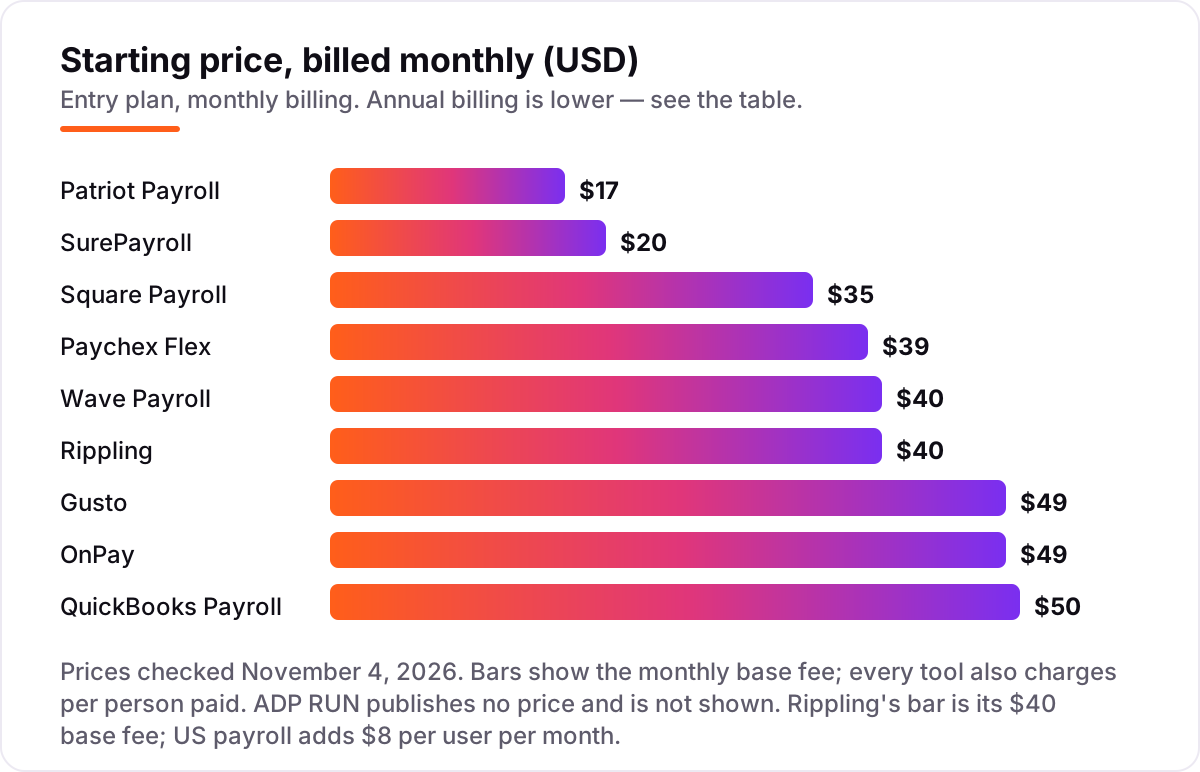
Take a ten-person business paying staff twice a month. On list prices, the payroll subscription costs $57 a month on Patriot Basic, $60 on SurePayroll No Tax Filing, $89 on Paychex Flex Essentials, $95 on Square Payroll, $99 on SurePayroll Full Service, $100 on Wave Payroll, $109 on Gusto Simple or OnPay, $115 on QuickBooks Payroll Core, and $120 on Rippling's advertised starting price. Paychex Flex Essentials is the one number with an asterisk: tax administration may cost extra on that tier.
Over a year, that is $684 on Patriot Basic, $720 on SurePayroll No Tax Filing, $1,068 on Paychex Flex Essentials, $1,140 on Square Payroll, $1,188 on SurePayroll Full Service, $1,200 on Wave Payroll, $1,308 on Gusto Simple or OnPay, $1,380 on QuickBooks Payroll Core, and $1,440 on Rippling's advertised starting price. The same ten people cost $684 a year at the cheap end and $1,440 at the dear end — and the cheap end does not file your taxes.
Three costs sit outside every number above. First, the per-person fee is charged for every active employee, so hiring moves the bill even when the base fee stays flat. Second, the add-ons: time tracking on Gusto Simple, HR on OnPay at $15 a month plus $2 per worker, and multi-state payroll on SurePayroll at $9.99 a month. Third, year-end forms: included on Gusto, OnPay, Square Payroll and Wave Payroll, but $50 plus $5 per form on SurePayroll. ADP RUN publishes no price, so its ten-person cost is whatever the quote says — reported quotes put a ten-person biweekly payroll at roughly $200 to $350 a month once common add-ons are included, but that is a reported range, not a list price.
One more cost to check before you commit: the introductory discounts — 50% off for three months on QuickBooks Payroll and Patriot, the first month free on OnPay — end, so budget on the list price. And a second business is a second subscription on every tool in this list, while contractors are billed per person too — Square Payroll charges $6 per contractor with no base fee, which makes it the cheapest contractor-only option here. If you run payroll for a second company, price that subscription before you commit to a tool for the first.
Know the difference: full-service payroll vs self-service payroll
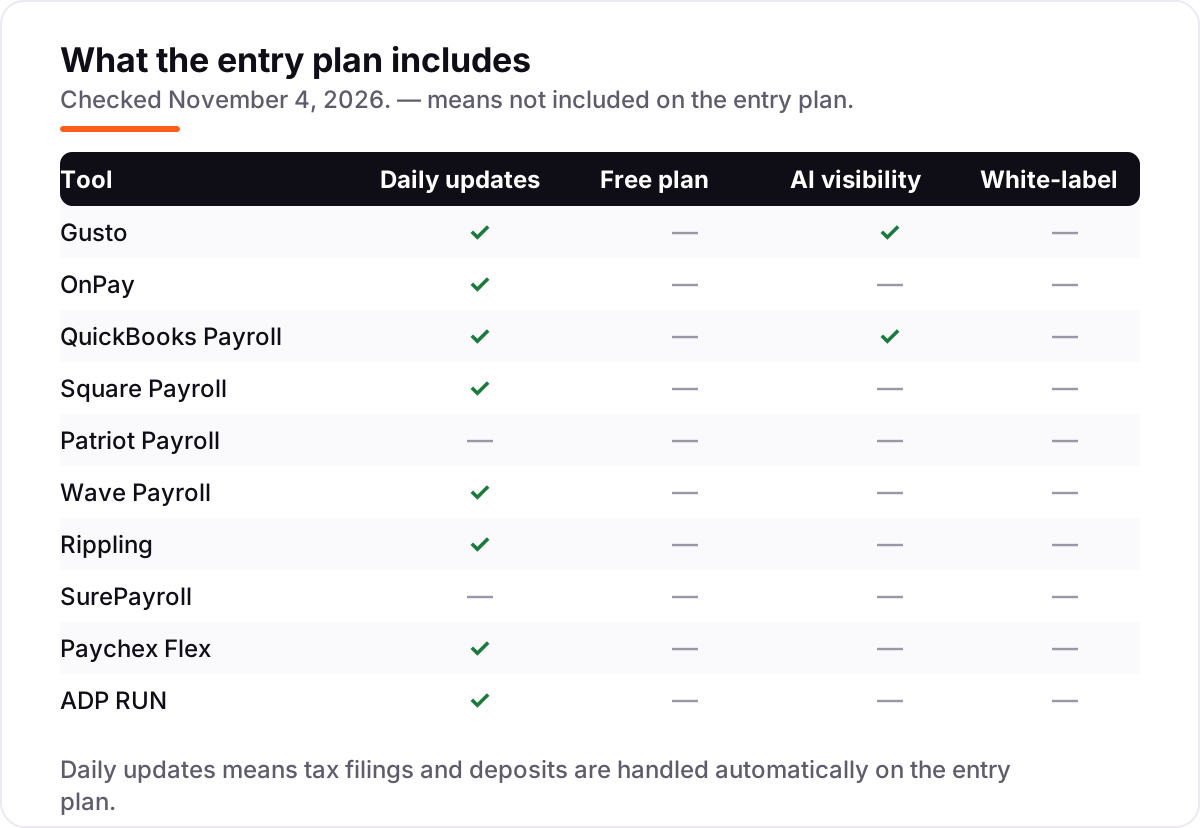
The confusion in this category is between a price and a job. A payroll subscription can mean two different things: software that calculates the pay and leaves the tax filing to you, or a service that calculates, files and deposits the taxes as well. The first is self-service payroll; the second is full-service payroll. Patriot Basic at $17 a month and SurePayroll No Tax Filing at $20 a month are self-service: they run the pay, and you file the taxes yourself. Everything else in this list files the taxes on its entry plan.
The gap matters because the penalty for a missed or late payroll tax deposit is real money — the IRS charges a failure-to-deposit penalty that starts at 2% of the unpaid deposit and rises the longer it sits. A self-service plan saves about $20 a month against its full-service sibling; one late deposit wipes out years of that saving. Buy self-service only when you already file payroll taxes yourself and will keep doing it.
There is a second, quieter confusion: paying contractors is not the same job as paying employees. Contractors need 1099s at year-end, not W-2s, and no payroll tax is withheld from their pay. Every tool here handles both, but the pricing differs — Square Payroll charges $6 per contractor with no base fee, Gusto's Contractor Only plan is $35 a month plus $6 per contractor, and OnPay charges the same $6 per worker for contractors and employees alike.
Quick comparison: tool type by need
| Buyer | Best pick | Why |
|---|---|---|
| Solo owner with 1–2 employees | Patriot Payroll | Basic is $17/month + $4 per worker, the cheapest entry here |
| Most small businesses | Gusto | Full-service payroll, benefits and HR from $49/month + $6 per person |
| Team spread across states | OnPay | Multi-state payroll included at $49/month + $6 per worker |
| Business already on Square | Square Payroll | Timecards flow from Square POS, from $35/month + $6 per person |
| Business already on QuickBooks | QuickBooks Payroll | Payroll inside the ledger, Core is $50/month + $6.50 per employee |
| Growing team that wants one system | Rippling | Payroll, HR and IT on one record, from $8/user/month + a $40 base fee |
Mistakes to avoid
- Budgeting on the base fee. The base fee is the smaller half of the bill: a 10-person team pays $57–$120 a month on the published plans, not $17–$50. Price the whole team before you compare tools.
- Buying self-service by accident. Patriot Basic and SurePayroll No Tax Filing look cheapest because they do not file your taxes. If you will not file them yourself, the real starting price is Full Service — $37 on Patriot, $29 on SurePayroll.
- Ignoring the second state. Gusto Simple covers one state; the day you hire in a second state you move to Plus at $80 a month plus $12 per person. OnPay and Square Payroll include multi-state payroll in the entry price.
- Paying for modules before you need them. Rippling's $8 starting price covers payroll only; HR, IT, benefits and time tracking are separate quoted modules. Get the quote for the whole stack, not the first module.
- Signing a quote-only deal without a second quote. ADP RUN and Paychex Flex price by quote, and year-two increases are common. Get both quotes for the same headcount and pay frequency, and get the renewal terms in writing.
How we chose
We checked each vendor's own pricing page on November 4, 2026 and recorded the starting price exactly as shown, including the per-person fee and the base fee, and we ranked the tools by fit for the most common buyer — a US small business owner with 1 to 25 employees — not by brand size. Three prices in this list are third-party-sourced rather than read on the vendor's own page: QuickBooks Payroll's page did not render its plan prices in our check, so the $50 base comes from Intuit's vendor-supplied pricing on G2 and the $6.50 per-employee fee from November 2026 reads of Intuit's page; Paychex Flex's $39 plus $5 figure comes from a November 3, 2026 read of Paychex's own Essentials page, and Paychex's main pricing page now routes to a quote form; and Rippling's $8 plus $40 starting price comes from Rippling's own small-business page as read in October 2026, since its pricing page lists no rates. OnPay's price was $40 a month in older listings, including our own November 2 check, and is $49 a month on its current pricing page — we used $49. ADP RUN publishes no price anywhere on its site, so we list it as a custom quote and report only what buyers say they were quoted. Ratings come from G2 pages opened on November 4, 2026. No vendor paid for a place in this list, and none of the links here are affiliate links.
What to do next
Start with the free month or trial of your top pick and run one real pay period through it. Check that the tax filings land in every state where you have employees and that the pay stubs match what your accountant expects before you commit to a year. If the payroll is sorted but new customers are not finding you, our monthly SEO service handles the visibility side — or compare providers in our guide to SEO companies for small business. Once your tools are in place, find out what's holding your rankings back.
Your stack only works if people find you
SerpAstra fixes what keeps your site off page one and makes it easy for AI assistants to recommend.
Get a free audit→Sources we checked (20)
- Gusto pricing — gusto.com/pricing (checked November 4, 2026)
- Gusto on G2 — g2.com/products/gusto/reviews (checked November 4, 2026)
- OnPay pricing — onpay.com/payroll/software/costs-pricing (checked November 4, 2026)
- OnPay on G2 — g2.com/products/onpay/reviews (checked November 4, 2026)
- QuickBooks Payroll pricing — quickbooks.intuit.com/payroll/pricing (checked November 4, 2026)
- QuickBooks Workforce on G2 — g2.com/products/quickbooks-online-payroll/reviews (checked November 4, 2026)
- Square Payroll pricing — squareup.com/us/en/payroll/pricing (checked November 4, 2026)
- Square Payroll on G2 — g2.com/products/square-payroll/reviews (checked November 4, 2026)
- Patriot Payroll pricing — patriotsoftware.com/payroll/pricing (checked November 4, 2026)
- Patriot Software on G2 — g2.com/products/patriot-software/reviews (checked November 4, 2026)
- Wave Payroll pricing — waveapps.com/payroll (checked November 4, 2026)
- Wave on G2 — g2.com/products/wave/reviews (checked November 4, 2026)
- Rippling pricing — rippling.com/pricing (checked November 4, 2026)
- Rippling on G2 — g2.com/products/rippling/reviews (checked November 4, 2026)
- SurePayroll pricing — surepayroll.com/payroll (checked November 4, 2026)
- SurePayroll on G2 — g2.com/products/surepayroll/reviews (checked November 4, 2026)
- Paychex Flex Essentials pricing — paychex.com/payroll/paychex-flex-essentials (checked November 4, 2026)
- Paychex on G2 — g2.com/products/paychex-flex/reviews (checked November 4, 2026)
- ADP RUN pricing — adp.com/small-business/payroll (checked November 4, 2026)
- RUN Powered by ADP on G2 — g2.com/products/adp-run/reviews (checked November 4, 2026)
Shamim
Founder of SerpAstra
A full-stack SEO and digital marketer who spends most days on Local SEO for dental practices, AI search visibility and lead generation.
Frequently asked questions
What is the best payroll software for small business?
Gusto is the best fit for most small businesses: full-service payroll, benefits and HR from $49 a month plus $6 per person, with the most reviews in this list. OnPay ties it at $49 plus $6 and adds multi-state payroll at no extra charge. Square Payroll is the cheapest full-service option at $35 plus $6 for businesses already using Square.
How much does payroll software cost for a small business?
Published entry prices run from $17 to $50 a month in base fees, plus $4 to $8 per person paid. A 10-person team pays $95 a month on Square Payroll, $109 on Gusto or OnPay, and $115 on QuickBooks Payroll Core, before add-ons. ADP RUN and Paychex Flex's higher tiers are quoted, so their totals only appear after a sales call.
Is there free payroll software for small business?
No tool in this list offers a free payroll plan, and that is normal: payroll involves tax filings and deposits, which cost the provider money on every run. The closest thing to free is Wave Payroll, which sits on Wave's $0 accounting plan and costs $40 a month plus $6 per person. OnPay's first month is free, and SurePayroll offers a one-month free trial.
What is the difference between full-service payroll and self-service payroll?
Full-service payroll calculates, files and deposits your federal, state and local payroll taxes for you; self-service payroll calculates the numbers and leaves the filing to you. Patriot Basic at $17 and SurePayroll No Tax Filing at $20 are self-service. Most small businesses should buy full-service: one missed deposit costs more than the upgrade.
Does payroll software file my taxes for me?
Most of the tools in this list do, on their full-service plans: Gusto, OnPay, QuickBooks Payroll, Square Payroll, Wave Payroll, Rippling, Paychex Flex and ADP RUN all file and deposit federal, state and local payroll taxes. The exceptions are the cheapest entry plans — Patriot Basic and SurePayroll No Tax Filing — which leave the filing to you.
Can I switch payroll software mid-year?
Yes, but plan the move carefully. Export year-to-date pay, tax filings and employee records from the old provider, then give the new one your EIN, state tax IDs and quarter-to-date totals so filings stay correct. Most providers, including OnPay and Patriot, offer free setup help and data migration. Switching at year-end is simpler, if you can wait.
Do I need payroll software if I only pay contractors?
You need less of it, but you still need records. Contractor-only plans are cheaper: Square Payroll charges $6 per contractor with no base fee, and Gusto's Contractor Only plan is $35 a month plus $6 per contractor. Either way, the software should produce 1099s at year-end — paying contractors by bank transfer and tracking it in a spreadsheet is how 1099 season goes wrong.
Free SEO and AI visibility audit
Find out what is holding your rankings back
Send us your site. Within 2 business days you get a written audit, an AI visibility check and a short fix list ranked by impact. Free, with no contract attached.
Request my free audit→Related guides
 Accounting, Tax & Finance10 Best Bookkeeping and Payroll Software for Small Business in 2026, ComparedThe 10 best bookkeeping and payroll software for small business, compared on real 2026 prices, per-employee payroll fees and free plans at your headcount.Read guide →
 Accounting, Tax & Finance7 Best Accounting Software for Small Businesses in 2026, ComparedCompare the 7 best accounting software for small businesses on price, free plans, bank feeds and AI features, with every price checked November 2, 2026.Read guide →
 Accounting, Tax & Finance11 Best Billing Software for Small Business in 2026, Compared11 best billing software for small business picks compared on price, free plans and payment fees, with real starting prices checked November 2, 2026.Read guide →