
9 Best Landscape Software with Accounting Integration in 2026, Compared
Compare the 9 best landscape software with accounting integration on price, QuickBooks sync and free plans, with every price checked November 8, 2026.
 Shamim Mia, Founder, SerpAstraLast verified November 8, 202614 min read
We compare pricing pages, documentation and public reviews. We never accept payment for rankings.

Key takeaways
- Jobber is the best fit for most small crews at $49/month, Housecall Pro follows at $79/month with marketing built in, and Yardbook is free to start — the only free plan here.
- The headline price is rarely the accounting price: QuickBooks sync usually sits one tier up, so Jobber needs Connect at $99/month and Housecall Pro needs Essentials at $149/month billed annually.
- Three tools publish no price at all — Workiz, Aspire and ServiceTitan are quote-only — so get the number in writing before you compare them with the priced tools.
- The single most important buying factor is where the sync lives: a tool that only exports CSV files is not an integration, and your bookkeeper will feel the difference every week.
On this page
Quick comparison
| Tool | Best for | Starting price | Free plan |
|---|---|---|---|
| Jobber | Small landscape crews that want the simplest setup and a QuickBooks sync their accountant already knows | $49/mo | No (14-day trial) |
| Housecall Pro | Growing landscape teams that want marketing, reviews and repeat bookings alongside the books | $79/mo | No (14-day trial) |
| Service Autopilot | Route-based lawn and landscape companies with hundreds of recurring accounts that want deep automation | $49/mo | No (demo only) |
| Yardbook | Solo operators and new lawn care businesses that need a capable free starting point | Free; paid $34.99/mo | Yes (free) |
| LMN | Maintenance and design-build companies that want budgeting and estimating to drive every job | $297/mo | No (demo only) |
| SingleOps | Tree care and arborist companies that want estimates, scheduling and QuickBooks in one system | $220/mo | No (demo only) |
| Workiz | Field service teams that want a built-in phone system and QuickBooks sync in one platform | Custom quote | No (7-day trial) |
| Aspire | Large commercial landscape companies with $1M+ revenue that need real-time job costing at scale | Custom quote | No (demo only) |
| ServiceTitan | Large multi-crew operations that want the deepest reporting and dispatch tooling in the category | Custom quote | No (demo only) |
Make one of these tools?
We re-check this list every quarter. Send a correction, request a review, or ask about a clearly labeled sponsored spot.
Request a listingThe best landscape software with accounting integration

Jobber
Best for: Small landscape crews that want the simplest setup and a QuickBooks sync their accountant already knows
Jobber is the easiest starting point for a small landscape crew that wants scheduling, quoting and invoicing in one place, with QuickBooks Online or Xero at the other end of a sync. Core costs $49 a month for one user, or $29 a month billed annually, and covers quoting, invoicing, scheduling and a client hub. The catch is the tier: QuickBooks sync lives on Connect at $99 a month billed annually for one user, or $149 for five.
That tier jump is the real price of accounting integration, and still the cheapest path to a live sync. Job costing arrives on Grow at $149 a month billed annually, and card processing runs 2.9% plus 30 cents. Buy Jobber when a small crew wants the simplest setup; buy LMN or Aspire when budgeting and job costing come first.
What we like
- Clear published pricing with a 14-day free trial and no sales call to start
- Syncs with QuickBooks Online and Xero, plus Zapier for 7,000+ apps
- Client hub lets customers approve quotes, check appointments and pay online
- Strong mobile app for crews working away from the office
Watch out for
- QuickBooks sync needs Connect at $99/month for one user billed annually, not the $49 Core plan
- Job costing waits for Grow at $149/month for one user billed annually
- Card processing at 2.9% + 30 cents sits on top of the subscription

Housecall Pro
Best for: Growing landscape teams that want marketing, reviews and repeat bookings alongside the books
Housecall Pro suits a landscape team that is past the solo stage and wants the phone to keep ringing as well as the books to stay straight. Basic costs $79 a month for one user, or $59 a month billed annually, and covers online booking, scheduling, estimates, invoicing and job costing. QuickBooks Online sync arrives on Essentials at $149 a month billed annually for five users, with routes, flat-rate pricing and GPS tracking.
The extras are the reason to pick it over Jobber: review requests, financing and marketing tools are built in, and there is no long-term contract. The trade-off is that payroll, CSR AI and vehicle GPS are separate add-ons, and Basic buyers get chat and email support only. Buy Housecall Pro when repeat bookings drive revenue; buy Jobber when the crew is smaller and the budget tighter.
What we like
- QuickBooks Online sync on Essentials, with routes, flat-rate pricing and GPS tracking
- Built-in review requests and marketing tools that smaller tools charge extra for
- No long-term contract, and plans can be downgraded at the end of a billing period
- 14-day free trial of the full Max plan with no credit card required
Watch out for
- QuickBooks Online sync needs Essentials at $149/month billed annually, not Basic
- Phone support is limited on Basic; Essentials and Max get phone support
- Add-ons for payroll, CSR AI and vehicle GPS are priced separately

Service Autopilot
Best for: Route-based lawn and landscape companies with hundreds of recurring accounts that want deep automation
Service Autopilot is built for route businesses — lawn care, landscaping, snow and cleaning — that live on recurring weekly accounts and want scheduling, routing and follow-up to run themselves. Startup costs $49 a month on the annual-billing rate and covers scheduling, estimates, invoicing, payments and online booking for one business user and one mobile license. Pro costs $199 a month and adds route optimization and job costing; Pro Plus costs $499 and adds automations.
The accounting catch is the biggest one in this list: QuickBooks integration sits on the quote-only Elite tier, so the $49 headline buys invoicing, not a sync. Every plan carries an unpublished sign-up fee, and setup is involved. Buy Service Autopilot when route density and automation justify the learning curve; buy Jobber or Housecall Pro when you need a QuickBooks sync on a published plan.
What we like
- Built for recurring route work: scheduling, routing, invoicing and marketing automations in one place
- Flat per-company pricing, not per user, so adding crew does not raise the plan price
- Mobile licenses are included on every plan, starting with one on Startup
- Strong dispatch board and waiting-list tools for dense residential routes
Watch out for
- QuickBooks integration is gated to the quote-only Elite tier, not the $49 Startup plan
- Every plan carries a sign-up fee whose amount the vendor does not publish
- Setup is complex, and automations can take hours to configure without paid help

Yardbook
Best for: Solo operators and new lawn care businesses that need a capable free starting point
Yardbook is the outlier in this list: its Starter plan is free, with no time limit and no user cap, and it covers scheduling, customer records, estimates, invoicing, routing and lot measurement. Business costs $34.99 a month and adds GPS tracking, bulk text and email and invoice reminders. Enterprise costs $49.99 a month and adds the QuickBooks sync, a branded company portal and no ads.
The free plan is ad-supported and adds about a 1% fee on card payments on top of the card rate, and the iOS app is in beta, so crews work from the browser or Android. There is no public API, so nothing else can be bolted on later. Start on Yardbook when the business is new and the budget is $0; move to Jobber or Housecall Pro when the accounting sync starts to matter.
What we like
- The only genuinely free plan here: scheduling, CRM, estimates, invoicing and routing at $0
- Unlimited users on the free plan, so a small crew pays the same as a solo operator
- Chemical tracking with GPS and weather records, useful for licensed applicators
- Paid plans are cheap: Business $34.99/month and Enterprise $49.99/month
Watch out for
- QuickBooks sync needs Enterprise at $49.99/month; the free plan has no accounting sync
- The free plan is ad-supported and adds about a 1% fee on card payments
- The iOS app has stayed in beta for years, and there is no public API

LMN
Best for: Maintenance and design-build companies that want budgeting and estimating to drive every job
LMN is the landscape-native option in this list: it starts with the budget, not the calendar, and every estimate, schedule and invoice flows from it. Starter costs $297 a month billed monthly and includes one office license and five crew licenses, with budgeting, estimating, scheduling, the crew app and invoicing. Professional costs $648 a month and adds real-time job costing, Zapier, equipment costing and material tracking.
QuickBooks integration is listed on every plan, which is rare here, but reviewers report the sync needs manual batching rather than running fully automatically — test it on your own books before you commit. A one-time onboarding fee also applies on top of the monthly price, and the amount is not published. Buy LMN when the numbers decide the work; buy Jobber when the schedule decides it and the budget can wait.
What we like
- Budgeting and estimating are built for landscapers, with overhead recovery and price lists
- QuickBooks integration on every plan, with client lists importable from QuickBooks or CSV
- Crew app with route optimization, offline access and GPS location verification
- Professional adds real-time job costing, Zapier and equipment costing at $648/month
Watch out for
- QuickBooks sync needs manual batching rather than fully automatic sync, reviewers report
- A one-time onboarding fee applies and its amount is not published on the pricing page
- Real-time job costing waits for Professional at $648/month

SingleOps
Best for: Tree care and arborist companies that want estimates, scheduling and QuickBooks in one system
SingleOps is the tree-care specialist of the Granum family, built for arborists who estimate, schedule and invoice from the same system. Essential costs $220 a month billed monthly, or $200 a month billed annually, and covers estimating, scheduling, client management, invoicing and integrated payments. Crew users are free on every plan; only office and sales users cost extra, at $55 a month each on Essential.
The accounting detail matters: the two-way QuickBooks Online sync arrives with Plus at $385 a month, not on Essential, so the real starting price for an integrated setup is $385. Plus also adds tree inventory, a client portal and options-based proposals. Buy SingleOps when tree work is the core business; buy LMN when the work is maintenance and design-build and the estimating needs are broader.
What we like
- Two-way QuickBooks Online sync keeps invoices and payments matched without double entry
- Crew users are free on every plan; only office and sales users cost extra
- Dedicated implementation specialist is included on every plan
- Tree inventory and map-based scheduling fit arborist work better than generic tools
Watch out for
- QuickBooks sync needs Plus at $385/month; Essential at $220/month has no accounting sync
- Extra office or sales users cost $55/month each on Essential
- Built for tree care first, so pure lawn and landscape crews pay for arborist features

Workiz
Best for: Field service teams that want a built-in phone system and QuickBooks sync in one platform
Workiz is the communications-first pick here: a built-in phone system with call tracking, recording and masking sits on every plan, alongside scheduling, estimates, invoices and payments. QuickBooks Online sync is included on Standard, the entry tier, which is a genuine advantage — most tools in this list gate the sync a tier up. Each paid tier covers the first five users, with extra members at $55 to $65 a month.
The problem is price transparency: Workiz stopped publishing plan prices in 2026, and Standard, Pro and the top tier all show Request pricing, so the only way to budget is a sales call. The free Lite plan is gone too, leaving a 7-day trial. Get the quote in writing, with the Genius phone and answering add-ons priced separately, before you compare Workiz with a published-price tool.
What we like
- QuickBooks Online sync is included on Standard, the entry tier
- Built-in phone system with call tracking, recording and masking on every plan
- Each paid tier covers the first 5 users, with extra members at $55-$65/month
- Strong automations: 5 on Standard, 10 on Pro and 30 on the top tier
Watch out for
- No published plan prices since 2026: every tier is quote-only, so budgeting needs a sales call
- The free Lite plan is gone from the pricing page; only a 7-day trial remains
- Genius phone and AI answering add-ons are sold separately with no published price

Aspire
Best for: Large commercial landscape companies with $1M+ revenue that need real-time job costing at scale
Aspire is the enterprise end of landscape software, built for commercial maintenance, construction and snow companies doing $1M or more a year. It charges one flat monthly license fee with no limit on users, and the fee includes implementation, training, support and upgrades. Plans are sized by company revenue — Growth, Corporate and Enterprise — and the platform covers estimating, scheduling, job costing, invoicing, budgets, purchasing and inventory.
Accounting integration is a named feature, and payments, payroll and GPS fleet tracking are quoted on top of the license. The contract deserves a careful read: the terms make three years the default committed term when an order does not state one. Buy Aspire when the operation is big enough that per-user pricing hurts; buy LMN or SingleOps while the company is still under that size.
What we like
- One flat monthly license fee with unlimited users, so headcount never raises the bill
- Real-time job costing, dashboards and KPIs built for commercial maintenance and construction
- Accounting integration plus invoicing, budgets, purchasing and inventory in one system
- Implementation, training and lifetime support are included in the license fee
Watch out for
- Quote-only pricing with a three-year default term if the order does not state one
- No free trial, only a guided demo, and setup takes weeks to months
- Ease of use is the lowest Capterra sub-score at 4.1, with reviewers calling navigation cumbersome

ServiceTitan
Best for: Large multi-crew operations that want the deepest reporting and dispatch tooling in the category
ServiceTitan is the heavyweight in this list: dispatch boards, call booking, estimates, invoicing, payments, memberships and marketing on one platform, with the deepest reporting of any tool here. Pricing is per technician and quote-only across three tiers — Starter, Essentials and The Works — and third-party estimates run roughly $245 to $500 per technician a month, plus implementation fees and a 12-month minimum. Those figures are user-reported, not published by the vendor.
The accounting coverage is the widest here, syncing with QuickBooks Online, QuickBooks Desktop and Sage Intacct, but reviewers say the sync can take real work to configure. Implementation commonly takes one to three months. Buy ServiceTitan when the operation runs ten or more technicians across several service lines; buy Jobber or Housecall Pro while a single landscape crew is the whole business.
What we like
- The deepest reporting in this list, with technician scorecards and marketing attribution
- Syncs with QuickBooks Online, QuickBooks Desktop and Sage Intacct
- Good-better-best proposals and a supplier-integrated pricebook with margin controls
- Payroll management and membership programs on the higher tiers
Watch out for
- No published pricing: per-technician quotes only, with implementation fees and annual contracts
- Implementation commonly takes 1-3 months, the longest here
- Accounting sync can take real work to configure and troubleshoot, reviewers report
The best landscape software with accounting integration does two jobs at once: it runs the crews, the routes and the invoices in the field, and it keeps the books straight without anyone retyping numbers at night. We ranked the nine tools below by fit for the most common buyer — a US landscape company that already runs QuickBooks or Xero — starting with the simplest published-price options and ending with the quote-only enterprise platforms, and every price was checked on the vendor's own pricing page on November 8, 2026.
How to choose the best landscape software with accounting integration
- Find the sync tier first. QuickBooks sync sits one tier above the entry price on Jobber, Housecall Pro, SingleOps and Service Autopilot, and only Yardbook and Workiz put it on the cheapest paid tier. Price the sync tier, not the headline.
- Ask whether the sync is two-way and automatic. A two-way sync matches invoices and payments back into the field tool; a one-way export or a manual batch means someone still reconciles by hand every week.
- Count the billing unit. Jobber and Housecall Pro charge by user, LMN by office and crew license, Service Autopilot flat per company, and Aspire one flat fee for unlimited users. The cheapest tool for a solo operator is rarely the cheapest for a five-person crew.
- Check what the accounting system costs on top. The field tool feeds QuickBooks or Xero; it does not replace it. QuickBooks Online Simple Start costs $38 a month, so add that to every number in this list unless the business already pays it.
- Test the sync in the trial. Run one real billing cycle — estimate to invoice to payment — and check that the numbers land in the accounting system without fixes. A sync that needs daily babysitting is not a sync.
Choosing the software is only half the job; customers still have to find the business. Our local SEO service covers the visibility side for landscape companies, and before you publish new service pages, run your titles through the free local business schema generator so Google reads the business details correctly.
Whatever you shortlist, try the sync before you pay for a year. The trials in this list run 7 to 14 days, which is enough to push one real job from estimate to paid invoice and watch it land in QuickBooks. Check two things in that week: that payments match without manual fixes, and that your accountant can read the result without asking for a spreadsheet. If either fails, the tool is not integrated — it is just invoicing with extra steps.
Landscape software with accounting integration pricing: what you will actually pay
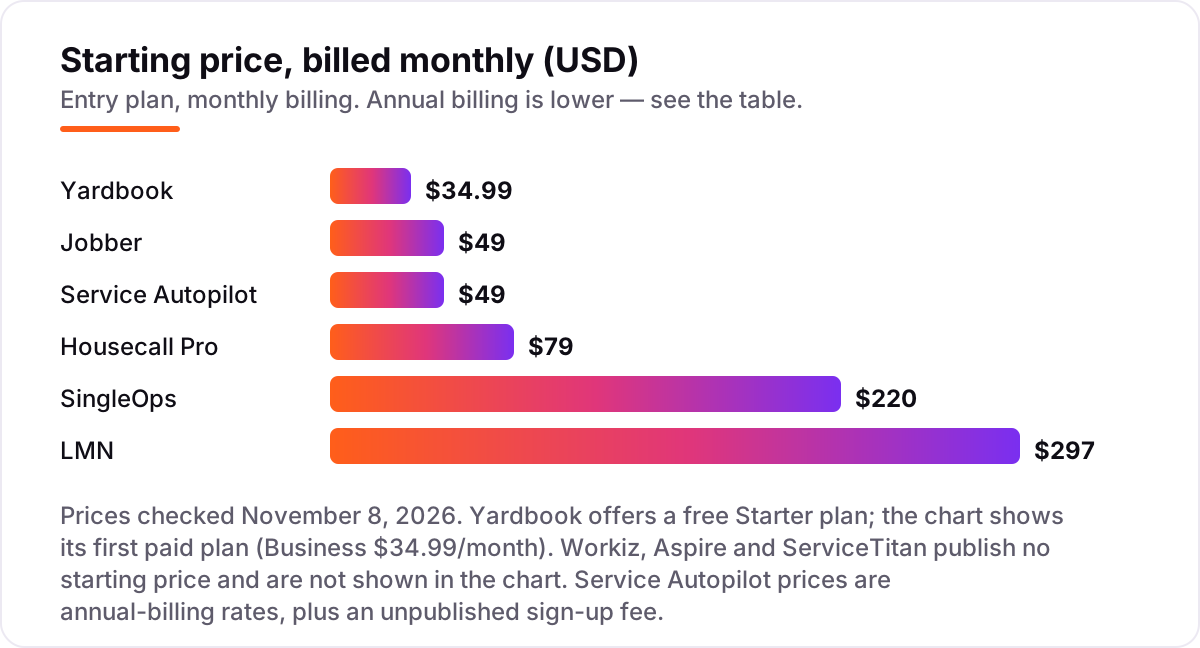
Take a five-person landscape crew that needs a working QuickBooks sync. On annual-billing list prices, the software costs $49 a month on Service Autopilot Startup, $49.99 on Yardbook Enterprise, $149 on Jobber Connect for five users, $149 on Housecall Pro Essentials for five users, $297 on LMN Starter, and $385 on SingleOps Plus. Two of those numbers need adjusting before they are real: Service Autopilot's $49 buys invoicing, not the sync — the sync sits on the quote-only Elite tier — so a crew that needs the sync cannot budget $49 for it at all.
Over a year, that is $588 on Service Autopilot Startup without the sync, $600 on Yardbook Enterprise with it, $1,788 on Jobber Connect or Housecall Pro Essentials, $3,564 on LMN Starter, and $4,620 on SingleOps Plus. Add QuickBooks Online Simple Start at $38 a month, or $456 a year, to every one of those figures, since none of these tools replaces the accounting system. The same five people and the same sync cost $1,056 a year at the cheap end and $5,076 at the dear end — and the gap comes from which tier carries the sync, not from the headline price.
Three costs sit outside every number above. First, the one-time fees: LMN charges an onboarding fee whose amount is not published, Service Autopilot charges a sign-up fee whose amount is not published, and ServiceTitan charges implementation fees that third parties report at $5,000 to $50,000. Second, card processing on the invoices you send, which runs about 2.9% plus 30 cents per transaction on Jobber and Housecall Pro. Third, the add-ons: payroll, GPS tracking and marketing tools are separate line items on most tools here. If the business is still choosing its accounting system, our guide to the best accounting software for lawn care businesses covers the ledger side.
Annual billing cuts the bill on most priced tools here: Jobber Core drops from $49 to $29 a month, Housecall Pro Basic from $79 to $59, and SingleOps Essential from $220 to $200. LMN and Yardbook publish no annual discount, so the monthly figure is the whole story. One more cost to check before you commit: a second crew is not always a second subscription — Aspire charges one flat fee for unlimited users, while Jobber, Housecall Pro and LMN all charge more as headcount grows.
Know the difference: an accounting sync vs built-in accounting
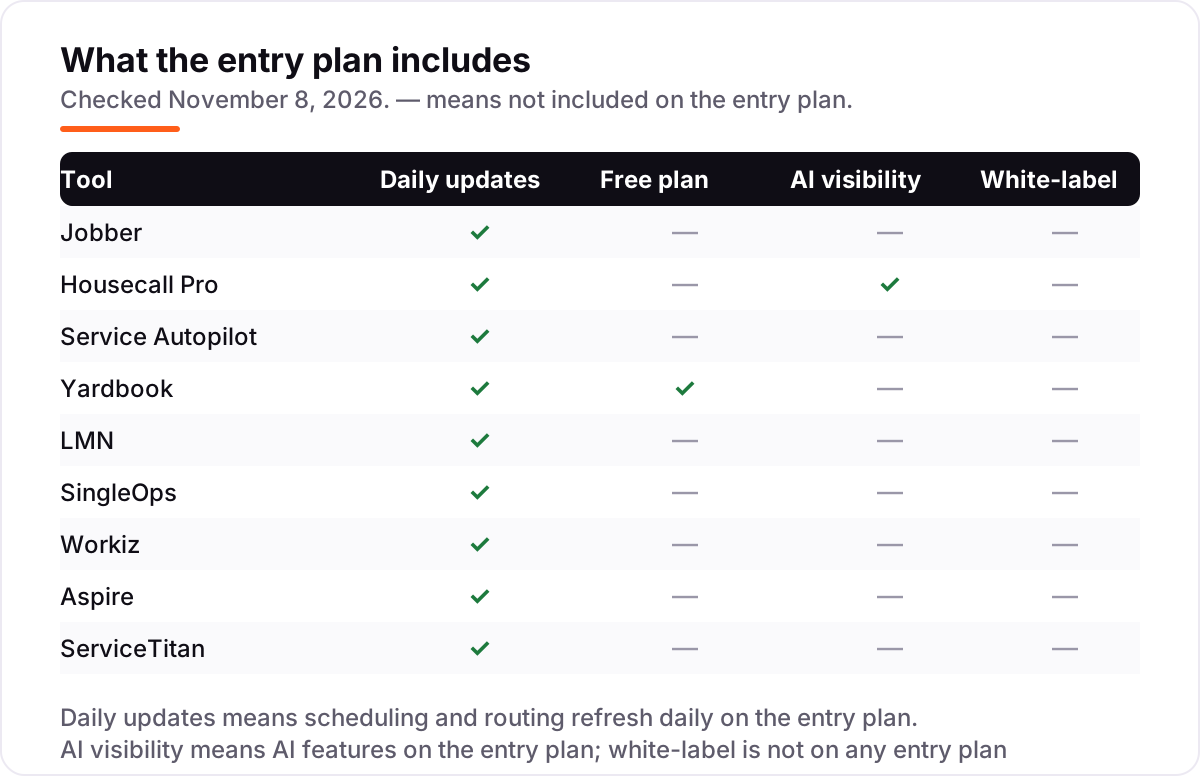
The confusion in this category is between a sync and a ledger. An accounting sync connects the field tool to QuickBooks or Xero, so estimates, invoices and payments flow into the books without retyping. Built-in accounting would mean the field tool keeps the ledger itself — the chart of accounts, the tax reports, the year-end position. None of the nine tools here does that. They all invoice; only the sync makes the invoice land in the books.
There is a second, quieter confusion: an export is not a sync. A CSV export means someone downloads a file, fixes the columns and uploads it into QuickBooks, which is the manual work the buyer is trying to escape. A real sync moves the data on its own, matches payments to invoices, and flags the mismatches. When a vendor says "QuickBooks compatible", ask whether that means a live two-way sync, a one-way push, or a CSV file — the three are priced very differently in staff time.
A third distinction worth knowing is which QuickBooks the tool talks to. Jobber, Housecall Pro and SingleOps sync with QuickBooks Online; LMN and SingleOps also cover QuickBooks Desktop; ServiceTitan adds Sage Intacct; and FieldEdge-style Desktop-first tools are a different list entirely. If the business still runs QuickBooks Desktop, check the Desktop column before the price column, because an Online-only sync is no sync at all for that business.
Quick comparison: tool type by need
| Buyer | Best pick | Why |
|---|---|---|
| Small crew, simplest setup | Jobber | Published pricing from $49/month, QuickBooks sync on Connect at $99/month billed annually |
| Growing team that wants marketing too | Housecall Pro | Reviews and marketing built in, QuickBooks sync on Essentials at $149/month billed annually |
| Route-heavy lawn company | Service Autopilot | Flat $49/month per company with deep route automation, but the sync is Elite-only |
| Solo operator on a $0 budget | Yardbook | Free Starter plan, QuickBooks sync on Enterprise at $49.99/month |
| Company that budgets every job | LMN | Landscape-native budgeting and estimating from $297/month, QuickBooks on every plan |
| Tree care company | SingleOps | Two-way QuickBooks sync on Plus at $385/month, entry plan at $220/month |
| Team that lives on the phone | Workiz | Built-in phone system and QuickBooks sync on the entry tier, priced by quote |
| Large commercial landscaper | Aspire | One flat fee, unlimited users, real-time job costing, quote-only |
| Large multi-crew operation | ServiceTitan | Deepest reporting and widest accounting coverage, per-technician quote |
Mistakes to avoid
- Budgeting on the entry price instead of the sync tier. The sync sits a tier up on most tools here. Price the tier that carries the sync, or the first invoice will cost more than the quote suggested.
- Calling a CSV export an integration. If the data only moves when someone downloads and uploads a file, the business bought invoicing, not integration — and the bookkeeper pays the difference in hours.
- Ignoring the billing unit. A per-user price looks cheap for one person and doubles with a crew; a flat per-company price looks dear for one person and cheap for ten. Run the math at your actual headcount.
- Forgetting the accounting subscription. QuickBooks Online Simple Start costs $38 a month on top of every tool here. Budget it from day one, not as a surprise in month two.
- Signing a quote-only contract without the add-ons in writing. Implementation, onboarding, payroll and GPS tracking are separate line items on the enterprise tools. Get the full number, add-ons included, before you sign.
How we chose
We checked each vendor's own pricing page on November 8, 2026 and recorded the starting price exactly as shown, including the annual-billing figure where the page lists one, and we ranked the tools by fit for the most common buyer — a US landscape company that already runs QuickBooks or Xero — not by brand size. Two prices need a note. Yardbook's paid tiers ($34.99 and $49.99 a month) could not be read on the vendor's own site — its pricing page returns a 404 and the site blocks automated readers — so those figures are third-party-sourced from several independent 2026 reads of Yardbook's own pricing and billing pages, while the free Starter plan was confirmed on yardbook.com itself. Service Autopilot's pricing chart did not render in our text fetch, so its $49 Startup figure is as published on the vendor's pricing page per recent independent reads dated September 29 and October 9, 2026; G2 still shows the stale $47 figure, and the vendor page wins. Ratings come from G2 or Capterra pages opened or freshly crawled on November 8, 2026, except that SingleOps has no G2 rating shown because its G2 page carries another product's content and only three reviews. No vendor paid for a place in this list, and none of the links here are affiliate links.
What to do next
Start with the trial or demo of your top pick and run one real billing cycle through it: estimate to invoice to payment, then open QuickBooks and check that the numbers landed without fixes. If the sync needs daily babysitting, cross the tool off and try the next one — the trial is the cheapest test you will ever run. If the tools are sorted but new customers are not finding you, our monthly SEO service handles the visibility side — or compare the wider field in our guide to landscape business management software. Once your tools are in place, find out what's holding your rankings back.
Your stack only works if people find you
SerpAstra fixes what keeps your site off page one and makes it easy for AI assistants to recommend.
Get a free audit→Sources we checked (18)
- Jobber pricing — getjobber.com/pricing (checked November 8, 2026)
- Housecall Pro pricing — housecallpro.com/pricing (checked November 8, 2026)
- Service Autopilot pricing — serviceautopilot.com/pricing (checked November 8, 2026)
- Yardbook — yardbook.com (checked November 8, 2026)
- LMN pricing — granum.com/lmn/pricing (checked November 8, 2026)
- SingleOps pricing — granum.com/singleops/pricing (checked November 8, 2026)
- Workiz pricing — workiz.com/pricing-plans (checked November 8, 2026)
- Aspire plans — youraspire.com/aspire-plans (checked November 8, 2026)
- ServiceTitan pricing — servicetitan.com/pricing (checked November 8, 2026)
- Jobber on G2 — g2.com/products/jobber/reviews (checked November 8, 2026)
- Housecall Pro on G2 — g2.com/products/housecall-pro/reviews (checked November 8, 2026)
- Service Autopilot on G2 — g2.com/products/service-autopilot/reviews (checked November 8, 2026)
- Yardbook on Capterra — capterra.com.au/software/207272/yardbook (checked November 8, 2026)
- LMN on G2 — g2.com/products/lmn/reviews (checked November 8, 2026)
- SingleOps on Capterra — capterra.com.au/software/176935/singleops (checked November 8, 2026)
- Workiz on G2 — g2.com/products/workiz/reviews (checked November 8, 2026)
- Aspire on Capterra — capterra.ca/software/161544/aspire (checked November 8, 2026)
- ServiceTitan on G2 — g2.com/products/servicetitan/reviews (checked November 8, 2026)
Shamim
Founder of SerpAstra
A full-stack SEO and digital marketer who spends most days on Local SEO for dental practices, AI search visibility and lead generation.
Frequently asked questions
What is the best landscape software with accounting integration?
Jobber is the best fit for most small crews: the simplest setup, published pricing from $49/month, and QuickBooks sync on Connect at $99/month billed annually. Housecall Pro is the better pick when marketing and reviews matter, and Yardbook is the best free starting point for a solo operator.
How much does landscape software with accounting integration cost?
Published entry prices run from $0 on Yardbook to $297/month on LMN, with Jobber at $49/month and Housecall Pro at $79/month. The accounting sync usually costs more than the entry price, since it sits a tier up on most tools. Workiz, Aspire and ServiceTitan publish no price and are quote-only.
Is there really free landscape software with accounting integration?
Only partly. Yardbook is free, but its QuickBooks sync needs Enterprise at $49.99/month — the free plan has no accounting sync. Every other tool here charges for the sync, either as a higher tier or as part of a quote-only package, so budget for the sync tier, not the entry tier.
Does QuickBooks sync mean the same thing on every tool?
No. Jobber, Housecall Pro and SingleOps run a two-way sync that matches invoices and payments, while LMN reviewers report manual batching, and Service Autopilot gates its sync to the quote-only Elite tier. Ask each vendor whether the sync is automatic, two-way, and included on the tier you are buying.
Can I switch landscape software later without losing my books?
Yes, if the books live in QuickBooks or Xero rather than in the field tool. Keep the accounting system as the record of truth, export customers, open invoices and job history before you cancel, and run both systems in parallel for one billing cycle so nothing is lost in the move.
Do I still need QuickBooks if the landscape software has invoicing?
Usually yes. Invoicing in the field tool creates the bill, but QuickBooks or Xero keeps the ledger, the tax reports and the accountant's view of the business. The tools in this list are built to feed the accounting system, not replace it, which is why the sync matters more than the invoice screen.
What should a small crew check before buying?
Check four things: which tier carries the accounting sync, whether the sync is two-way and automatic, what the per-user or per-crew cost does at your headcount, and whether the trial covers the sync. A tool that is cheap without the sync is not cheap once the sync is switched on.
Free SEO and AI visibility audit
Find out what is holding your rankings back
Send us your site. Within 2 business days you get a written audit, an AI visibility check and a short fix list ranked by impact. Free, with no contract attached.
Request my free audit→Related guides
 Local Business & Vertical Software7 Best Landscape Business Management Software in 2026, ComparedCompare the 7 best landscape business management software options on price, free plans, routing and job costing, with every price checked November 8, 2026.Read guide →
 Local Business & Vertical Software9 Best Software for Landscape Business in 2026, ComparedCompare the 9 best software for landscape business options on price, free plans, routing and job costing, with every price checked November 8, 2026.Read guide →
 Local Business & Vertical Software9 Best Accounting Software for Lawn Care Business in 2026, ComparedCompare the 9 best accounting software for lawn care business options on price, free plans and field tools, with every price checked November 7, 2026.Read guide →