
9 Best Software for Landscape Business in 2026, Compared
Compare the 9 best software for landscape business options on price, free plans, routing and job costing, with every price checked November 8, 2026.
 Shamim Mia, Founder, SerpAstraLast verified November 8, 202613 min read
We compare pricing pages, documentation and public reviews. We never accept payment for rankings.

Key takeaways
- Jobber is the best fit for most landscape businesses at $49/month; Housecall Pro follows at $79/month with job costing included, and Yardbook is free to start with paid plans from $34.99/month.
- The single most important buying factor is the limit that forces your next upgrade: user caps, crew licenses and the plan that unlocks job costing decide what you actually pay, not the headline price.
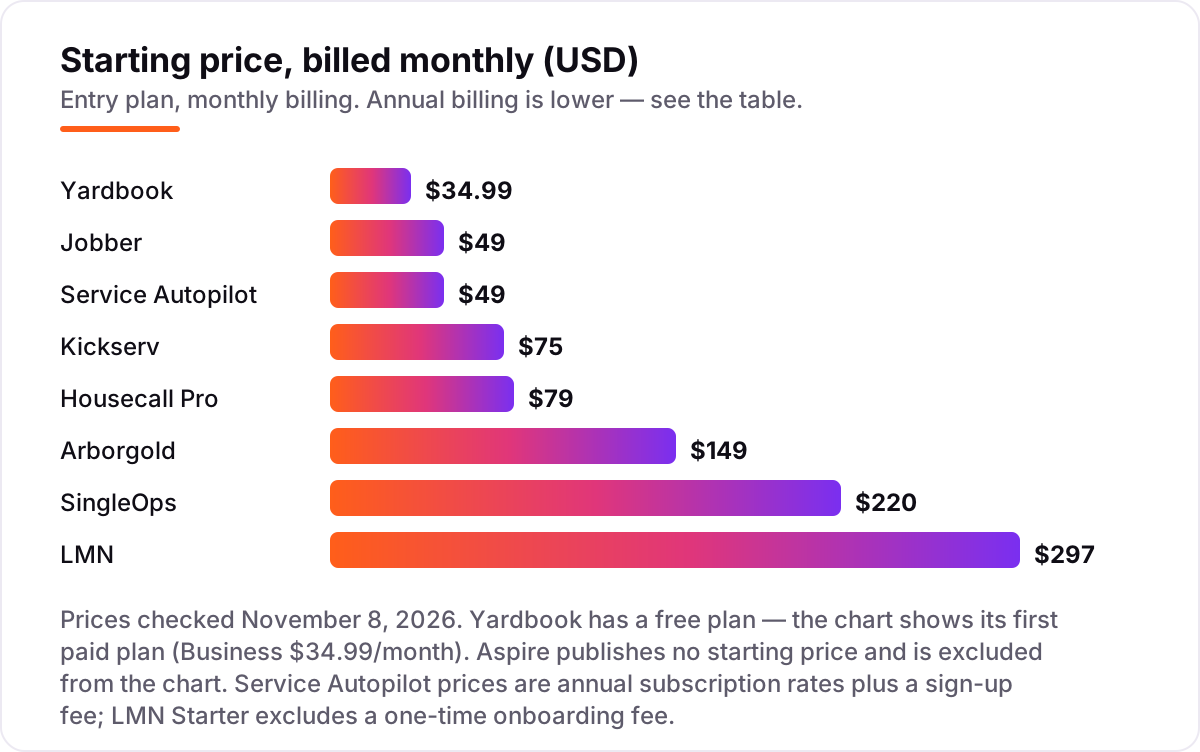
- Aspire is the only enterprise pick here and publishes no price — everything else lists a starting price, and the chart shows the monthly-billed figure.
- Route density and recurring billing matter more than feature lists: the tools built for lawn and landscape routes save more time than generic field-service apps.
On this page
Quick comparison
| Tool | Best for | Starting price | Free plan |
|---|---|---|---|
| Jobber | Solo operators and small landscape crews that want one easy system for quotes, scheduling, invoices and payments | $49/mo | No (14-day trial) |
| Housecall Pro | Small landscape and lawn crews that want job costing and a price book from the entry plan | $79/mo | No (14-day trial) |
| Yardbook | Solo operators and new landscape businesses that need scheduling, estimates and invoicing free | Free; Business $34.99/mo | Yes (free) |
| Service Autopilot | Lawn and landscape companies running recurring routes that want automation to do the follow-up work | $49/mo | No (demo only) |
| LMN | Design-build and maintenance firms that price jobs from production rates and need real job costing | $297/mo | No (30-day trial) |
| Arborgold | Tree, lawn and landscape companies that need chemical tracking and renewals in one system | $149/mo | No (demo only) |
| SingleOps | Tree care and landscape companies with field crews that live on estimates and proposals | $220/mo | No (demo only) |
| Kickserv | Small office-led teams that want five user seats for one low flat price | $75/mo | No (30-day trial) |
| Aspire | Commercial landscape companies over $1M in revenue that need enterprise job costing and multi-branch control | Custom quote | No (demo only) |
Make one of these tools?
We re-check this list every quarter. Send a correction, request a review, or ask about a clearly labeled sponsored spot.
Request a listingThe best software for landscape business

Jobber
Best for: Solo operators and small landscape crews that want one easy system for quotes, scheduling, invoices and payments
Jobber is the default pick for a reason: it covers the whole job — quoting, scheduling, dispatch, invoicing and payments — in one subscription, and its mobile app leads this list. Core costs $49 a month for one user, or $29 a month billed annually, and the price climbs with headcount: Connect is $99 a month for one user and adds QuickBooks sync and GPS tracking, while Grow is $149 and adds job costing and two-way texting.
The catch is the user math. Core covers one person, so a five-person crew pays for Connect at $149 a month billed annually, or $199 month to month, and card payments cost 2.9% plus 30 cents. Buy Jobber for the easiest system your crew will actually use; buy Housecall Pro when job costing on the entry plan matters more than simplicity.
What we like
- The easiest setup in this list: quotes, scheduling, invoicing and payments in one subscription from $49/month
- Client hub, automated reminders and online payments are included, so fewer no-shows and faster payment
- QuickBooks Online sync starts on Connect, and GPS crew tracking comes with it
- More than 250,000 home service professionals use Jobber, so hiring help who already know it is easy
Watch out for
- Core covers one user — a five-person crew needs Connect at $149/month billed annually, or $199 month to month
- Job costing and two-way texting wait for Grow at $149/month billed annually for one user
- No free plan, only a 14-day trial of the Grow plan

Housecall Pro
Best for: Small landscape and lawn crews that want job costing and a price book from the entry plan
Housecall Pro's pitch is that the entry plan does more of the money work: Basic costs $79 a month for one user, or $59 billed annually, and includes job costing and a price book that Jobber only unlocks on Grow. Scheduling, estimates, invoicing, online booking and review management are all in the same subscription, and card processing starts at 2.59%.
The limits are the user cap and the add-ons. Basic covers one user, so a five-person crew needs Essentials at $149 a month billed annually, and CSR AI, campaigns, payroll, VoIP and vehicle GPS are all quoted separately with no published price. The pricing page also shows different prices after its industry quiz, so confirm your own figures. Choose Housecall Pro when job costing from day one beats the cheapest entry price.
What we like
- Job costing and a price book are included on Basic at $79/month — Jobber charges more for job costing
- Online booking, scheduling and dispatch, estimates and invoicing in one login
- Essentials adds routes, flat-rate pricing, employee GPS tracking and QuickBooks Online sync
- Card processing starts at 2.59%, lower than Jobber's 2.9% plus 30 cents
Watch out for
- Basic covers one user — a five-person crew needs Essentials at $149/month billed annually, or $189 month to month
- Most add-ons (CSR AI, campaigns, payroll, VoIP, vehicle GPS) are quoted separately with no published price
- The pricing page shows different prices once you answer its industry and team-size quiz, so confirm your own figures

Yardbook
Best for: Solo operators and new landscape businesses that need scheduling, estimates and invoicing free
Yardbook is the only tool here that is genuinely free: the Starter plan costs $0 and covers customer management, scheduling, estimates, invoices, routing, expenses and lot measurement, with no per-user charge and no client cap. Business costs $34.99 a month and adds GPS tracking, bulk messaging and invoice reminders; Enterprise costs $49.99 and adds QuickBooks sync and a branded portal.
Free has a price. The Starter plan shows ads while you work and adds a 1% surcharge on online payments on top of card fees, and there is no public API or self-scheduling calendar. Reviewers say the same thing every time: a great place to start, and a ceiling you will hit as the crew grows. Start on Yardbook when the budget is $0; move on when GPS, QuickBooks sync or automation start costing you hours.
What we like
- The only genuinely free full system here: scheduling, CRM, estimates, invoicing, routing and lot measurement at $0
- No per-user charge on any plan, so a five-person crew pays the same as a solo operator
- Paid plans are flat and cheap — Business $34.99/month, Enterprise $49.99/month
- Built only for lawn care and landscaping, with chemical tracking and multi-step programs included
Watch out for
- The free plan shows ads and adds a 1% surcharge on online payments on top of card fees
- GPS tracking needs Business at $34.99/month and QuickBooks sync needs Enterprise at $49.99/month
- No public API and no native self-scheduling calendar, so growing firms eventually outgrow it

Service Autopilot
Best for: Lawn and landscape companies running recurring routes that want automation to do the follow-up work
Service Autopilot is built for one kind of business — lawn and landscape companies running recurring routes — and it shows: scheduling, dispatch, invoicing and payments sit on top of a route engine, and the Automations feature chases renewals and payments once it is set up. Startup costs $49 a month on annual subscription rates, Pro is $199 and adds route optimization and job costing, and Pro Plus is $499.
The catches are the sign-up fee on every plan (about $97 on Startup), the annual rates with no published monthly option, and the fact that Automations — the headline feature — waits for the $499 tier. The interface feels dated and the mobile app is rated 2.4/5. Buy it when recurring routes and automation are the job; buy Jobber when ease of use matters more.
What we like
- Built for route businesses: recurring routes, multi-day jobs and dispatch calendars from Pro
- The deepest automation engine in lawn care — once built, it chases payments and renewals hands-off
- Flat price per company, not per user, so adding office staff does not raise the subscription
- Pro adds route optimization, job costing and reporting for $199/month
Watch out for
- Every plan adds a sign-up fee (about $97 on Startup) that is not in the headline price
- The Automations engine — the main reason to buy it — waits for Pro Plus at $499/month
- Dated interface and a 2.4/5 mobile app rating, with support reviews trending down since the Xplor acquisition

LMN
Best for: Design-build and maintenance firms that price jobs from production rates and need real job costing
LMN is the tool most design-build and maintenance firms graduate to once guessing at prices starts costing them jobs. It is built around budgets: the company budget sets overhead recovery, production rates turn that into estimates, and scheduling, timesheets and invoicing follow from the same numbers. Starter costs $297 a month for one office user plus five crew, and Professional is $648 and adds real-time job costing.
The price is the commitment. Starter carries a one-time onboarding fee on top of the subscription, and setup takes real work — budgets, production rates and cost codes must be built before estimating pays off. There is no free plan and no client messaging. Choose LMN when knowing whether each job made money matters more than a low monthly bill.
What we like
- Budget-first estimating: company budgets drive production-rate estimates, so bids reflect true costs
- Real-time job costing on Professional shows whether each job is making money while it runs
- Built by landscapers for landscapers — scheduling, timesheets, crew app and invoicing in one system
- Rated 4.6/5 on Capterra across 92 reviews, the joint-highest score in this list
Watch out for
- Starter costs $297/month plus a one-time onboarding fee, so the first year costs far more than the headline
- Setup takes real work: budgets, production rates and cost codes must be built before estimating pays off
- No marketing email or text messaging for client communication, and no free plan

Arborgold
Best for: Tree, lawn and landscape companies that need chemical tracking and renewals in one system
Arborgold has served tree, lawn and landscape companies for more than 25 years, and it shows in the feature list: CRM, estimating, scheduling, invoicing, routing, inventory and the deepest chemical and plant-health-care tracking in this list, with automated renewals on Professional. Starter costs $149 a month, or $129 billed annually; Professional is $299 billed annually and adds job costing and material tracking.
The billing is the friction. User licenses are sold separately on top of the plan price, a 12-month contract is required with 60 days' notice, and the page's own $119-a-month headline does not match the $129 plan price printed below it. Reviewers also describe a dated interface and mixed support. Pick Arborgold when chemical tracking and renewals are the job; pick SingleOps when proposals matter more.
What we like
- The deepest chemical and plant-health-care tracking in this list, with renewals built in
- More than 25 years serving tree, lawn and landscape companies, with routing and inventory included
- Professional adds job costing, material tracking and automated renewals for $299/month billed annually
- Marketing features are available as a Growth add-on from $299/month for firms that want them
Watch out for
- Users are sold separately on top of the plan price, so the real bill depends on headcount
- A 12-month contract is required, with 60 days' cancellation notice — there is no month-to-month option
- Reviewers describe a dated interface and mixed support, and the page's own $119/month headline does not match its $129/month plan price

SingleOps
Best for: Tree care and landscape companies with field crews that live on estimates and proposals
SingleOps is built for green-industry companies that run crews: proposals, estimating, scheduling, client management, invoicing and timesheets in one system, with route optimization on the top tier. Essential costs $220 a month, or $200 billed annually, and covers a single crew with crew users included; Plus is $385 and adds tree inventory, a client portal and QuickBooks integration.
The limits are crew-based, not user-based. A second crew means Plus, extra office and sales users cost $55 a month each on Essential, and route optimization waits for Premier at $550 a month. It is now positioned for tree care rather than general landscaping, and QuickBooks sync breaks are the top reviewer complaint. Choose SingleOps when estimates and proposals are the bottleneck.
What we like
- Proposals, estimating, scheduling, invoicing and timesheets in one system built for green-industry crews
- Crew users are included in the plan price — only extra office and sales users cost more
- Plus adds tree inventory, a client portal and QuickBooks integration for $385/month
- Implementation help from a dedicated specialist is included on every plan
Watch out for
- Essential covers a single crew — a second crew means Plus at $385/month, and office users cost $55/month extra
- Route optimization waits for Premier at $550/month, the top tier
- Now positioned for tree care rather than general landscaping, and QuickBooks sync breaks are the top reviewer complaint

Kickserv
Best for: Small office-led teams that want five user seats for one low flat price
Kickserv's pitch is more for less: one flat plan covers scheduling, dispatch, estimates, invoicing, CRM and QuickBooks Online sync, and the price is set by team size rather than features. Start costs $75 a month for five users, or $60 billed annually; Run is $149 for ten users and adds dispatch mapping and GPS check-ins; Scale is $249 for twenty.
The trade-offs are the field app and the seat bands. There is no single-user plan, so a solo operator pays for five seats, and the mobile app is rated 2.8/5 on Google Play and 3.2/5 on the App Store, with no offline mode. A 5% Kickback discount applies when you process enough online payments. Pick Kickserv when five seats for $75 a month beats every other number on this page.
What we like
- Five user seats for $75/month — the cheapest per-seat price in this list by a wide margin
- Flat plans priced by team size: Start $75, Run $149 and Scale $249 a month, with 20% off annual billing
- Scheduling, dispatch, estimates, invoicing and QuickBooks Online sync are all in the entry plan
- A 30-day free trial and a 5% Kickback discount when you process enough online payments
Watch out for
- No single-user plan — the cheapest tier covers five users, so a solo operator pays for seats they will not use
- Mobile app ratings of 2.8/5 on Google Play and 3.2/5 on the App Store are well below the category standard
- No offline mode in the field app, and no two-way texting on any plan

Aspire
Best for: Commercial landscape companies over $1M in revenue that need enterprise job costing and multi-branch control
Aspire is the commercial-end standard for landscape companies: estimating from production rates, crew scheduling, per-contract job costing, contract and time-and-materials billing, equipment tracking and snow operations, run as a standalone product inside ServiceTitan. Pricing is a single monthly license fee with unlimited users, sized by revenue — Growth for $1M–$3M, Corporate for $3M–$15M, Enterprise above that — and implementation, training, support and upgrades are included.
The price is the barrier. There is no published figure, so you book a demo and negotiate, and an order that does not state a term defaults to a three-year commitment with a separation fee equal to the remaining fees if you leave early. Payments, payroll and GPS fleet tracking are quoted on top. Buy Aspire when the company is big enough to need it; everyone else should start further up this list.
What we like
- The commercial-end standard: estimating from production rates, per-contract job costing and snow operations
- One flat monthly license with unlimited users — adding staff never raises the subscription
- Implementation, training, support and upgrades are included in the license fee
- Rated 4.4/5 on Capterra across 362 reviews, the largest review base in this list
Watch out for
- No published price — you book a demo and negotiate, so budgeting before the sales call is guesswork
- Built for enterprise firms: solo operators and small crews should look elsewhere
- An order that does not state a term defaults to a three-year commitment, with a separation fee equal to the remaining fees if you leave early
The best software for landscape business owners does three jobs at once: it books the work, routes the crews and gets the invoice paid, without the owner retyping the same job three times. We ranked the nine tools below by fit for the most common buyer — a US landscape business with one to ten people doing residential maintenance and small design-build jobs — starting with the easiest all-round picks and ending with the enterprise option, and every price was checked on November 8, 2026.
How to choose the best software for landscape business
- Count your users and crews first. Jobber Core covers one user and Housecall Pro Basic covers one, while Kickserv Start covers five, LMN Starter covers one office user plus five crew, and SingleOps Essential covers one crew. The seat count decides the real price.
- Decide whether routes or jobs are the unit. Recurring mowing routes point to Service Autopilot or Yardbook; one-off design-build jobs point to LMN or Jobber.
- Check job costing. If you do not know whether each job made money, you need job costing — Housecall Pro includes it on Basic, LMN adds it on Professional, and Service Autopilot on Pro. Invoicing alone will not tell you.
- Check the accounting sync. Every tool here syncs or exports to QuickBooks, except Yardbook's free plan, where sync needs Enterprise at $49.99/month.
- Think about who runs it in the field. A crew that hates phones needs the simplest mobile app — Jobber's is the best-rated here, while Service Autopilot's mobile app is rated 2.4/5.
Software is only half the job: the crews still need to find you. Our local SEO service handles the visibility side, and the free local business schema generator builds the structured data that helps a landscape business show up in local search and AI answers.
Whatever you shortlist, try it with real jobs before you pay. The free plans and trials in this list are long enough to run one genuine week — your routes, your crews, your invoices — and that week tells you more than any review can. Check two things in the trial: that the crew can close a job from the field without calling the office, and that the invoice matches the estimate. Every tool here offers a trial, a demo or a free plan, so there is no reason to buy before the crew has tried it.
Software for landscape business pricing: what you will actually pay
Take a five-person crew: one person in the office and four in the field. On monthly-billed list prices, the subscription costs $34.99 a month on Yardbook Business, $75 on Kickserv Start, $199 on Jobber Connect for five users, $189 on Housecall Pro Essentials for five users, $220 on SingleOps Essential, and $297 on LMN Starter. Service Autopilot needs Pro at $199 for a crew this size, because Startup only covers one business user and one mobile license, and Arborgold Starter is $149 before the user licenses that are sold separately.
Over a year, that is $419.88 on Yardbook Business, $900 on Kickserv Start billed monthly ($720 billed annually), $1,788 on Jobber Connect or Housecall Pro Essentials billed annually ($2,388 and $2,268 month to month), $2,400 on SingleOps Essential billed annually ($2,640 month to month), and $3,564 on LMN Starter before its one-time onboarding fee. The same five people and the same routes cost $420 a year at the cheap end and $3,564 at the dear end — a $3,144 gap that comes entirely from seat counts, billing choices and job-costing depth, not from features.
Three costs sit outside every number above. First, the sign-up and onboarding fees: about $97 on Service Autopilot Startup, an unpublished one-time fee on LMN, and setup fees on Arborgold — the first year always costs more than twelve times the monthly price. Second, payment processing on the invoices you send: Jobber charges 2.9% plus 30 cents per card payment, Housecall Pro from 2.59%, and Yardbook's free plan adds a 1% surcharge on top of card fees. Third, the add-ons: QuickBooks Desktop sync costs $50 a month on Kickserv Run, and Service Autopilot's Automations engine waits for Pro Plus at $499 a month.
A solo operator pays far less, and the order changes. Yardbook is $0, Jobber Core is $49 a month ($29 billed annually), Housecall Pro Basic is $79 ($59 annually), and Service Autopilot Startup is $49 plus the $97 sign-up fee. If the business also needs design help for client presentations, see our guide to the best AI landscape design software — it covers a different job from the operations tools on this page.
Know the difference: landscape software vs generic field-service software
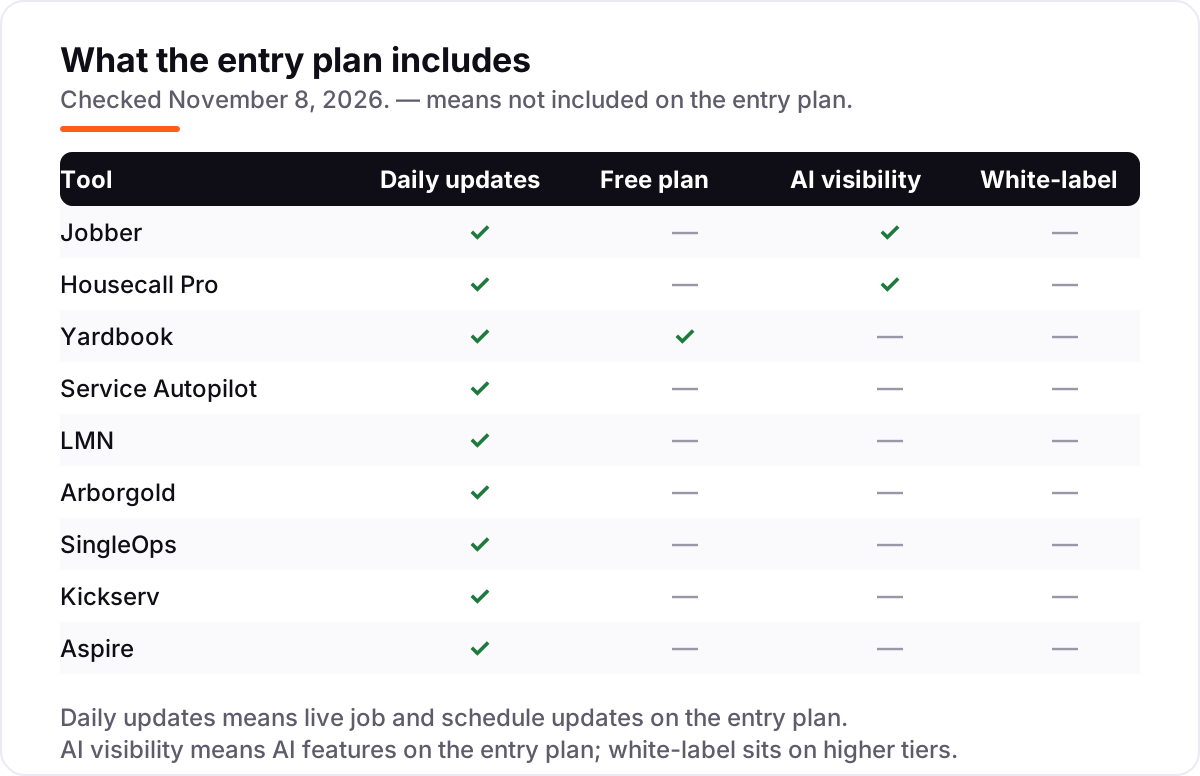
The confusion in this category is between software built for the green industry and software built for any trade with a van. Landscape software is built around recurring routes, production-rate estimating, chemical tracking and seasonal contracts. Generic field-service software covers scheduling, dispatch and invoicing for plumbers, electricians, cleaners and landscapers alike, and it does the common jobs well — but it does not estimate from production rates, run multi-step chemical programs, or manage snow operations.
Jobber, Housecall Pro and Kickserv are the generic picks here, and that is not a criticism: they are cheaper, easier to set up, and their mobile apps are better. LMN, Service Autopilot, Arborgold, SingleOps and Aspire are the landscape-built picks, and Yardbook sits with them — it only serves lawn care and landscaping. The trade-off is real: the landscape-built tools cost more, take longer to set up, and their interfaces are older, but they know what a route, a renewal and a chemical application are.
A second distinction worth knowing is routes versus jobs. A mowing business sells the same route every week, so route density — how many stops fit in one tight loop — decides profit. A design-build firm sells one-off projects, so estimating accuracy decides profit. Service Autopilot and Yardbook are route tools; LMN and Aspire are job tools; Jobber and Housecall Pro sit in the middle and handle both adequately.
Quick comparison: tool type by need
| Buyer | Best pick | Why |
|---|---|---|
| Solo operator on a budget | Yardbook | Free Starter plan, paid from $34.99/month |
| Most landscape businesses | Jobber | Easiest all-round setup, from $49/month |
| Crew that wants job costing early | Housecall Pro | Price book and job costing on Basic, $79/month |
| Recurring-route lawn company | Service Autopilot | Route automations built for lawn care, $49/month |
| Design-build firm pricing by production rates | LMN | Budget-first estimating, $297/month |
| Tree and plant-health-care work | Arborgold | Chemical tracking and renewals, $149/month |
| Small team, five seats, low price | Kickserv | Five users for $75/month |
| Commercial firm over $1M revenue | Aspire | Enterprise job costing, custom quote |
Mistakes to avoid
- Budgeting on the annual price when you pay monthly. Jobber Core is $29 a month billed annually but $49 month to month, and Housecall Pro Basic is $59 against $79 — a 69% and 34% gap. Compare tools on the billing term you will actually use.
- Buying a one-user plan for a five-person crew. Jobber Core, Housecall Pro Basic and Service Autopilot Startup each cover one user. Price the plan that fits the whole crew, not the headline tier.
- Ignoring the sign-up and onboarding fees. Service Autopilot charges about $97 to start, LMN charges a one-time onboarding fee, and Arborgold charges setup fees. The first-year cost is always higher than twelve times the monthly price.
- Picking a generic tool when routes or chemical tracking are the job. Jobber will not run a multi-step chemical program or estimate from production rates. If routes and renewals are the business, buy a tool that knows what they are.
- Forgetting payment processing. Card payments cost 2.59–2.9% plus 30 cents per transaction on most tools here, and Yardbook's free plan adds another 1%. On $20,000 of monthly card payments, that is $518–$600 a month — more than most subscriptions on this page.
How we chose
We checked each vendor's own pricing page and recorded the starting price exactly as shown, including the annual-billing figure where the page lists one, and we ranked the tools by fit for the most common buyer — a US landscape business with one to ten people — not by brand size. Direct fetches of the vendor pages were blocked from our machine, so prices were verified against fresh search-index copies of each vendor's own pricing page, crawled between October 29 and November 7, 2026, and corroborated by multiple independent October and November 2026 reads; the Jobber, Housecall Pro and Kickserv figures also match the batch-45 sibling posts checked the same day. Ratings come from fresh crawls of the G2 and Capterra review pages. Aspire publishes no starting price, so it is listed as a custom quote and left out of the price chart. No vendor paid for a place in this list, and none of the links here are affiliate links.
What to do next
Start with the free plan or trial of your top pick and run one real week of routes through it. Check that the crew can close jobs from the field, that the invoice matches the estimate, and that the route view actually saves drive time before you commit to a year. If the software is sorted but new customers are not finding you, our local SEO service handles the visibility side — or compare providers in our guide to marketing software for contractors. Once your tools are in place, find out what's holding your rankings back.
Your stack only works if people find you
SerpAstra fixes what keeps your site off page one and makes it easy for AI assistants to recommend.
Get a free audit→Sources we checked (18)
- Jobber pricing — getjobber.com/pricing (checked November 8, 2026)
- Housecall Pro pricing — housecallpro.com/pricing (checked November 8, 2026)
- Yardbook pricing — yardbook.com/pages/pricing (checked November 8, 2026)
- Service Autopilot pricing — serviceautopilot.com/pricing (checked November 8, 2026)
- LMN pricing — granum.com/lmn/pricing (checked November 8, 2026)
- Arborgold pricing — arborgold.com/pricing (checked November 8, 2026)
- SingleOps pricing — granum.com/singleops/pricing (checked November 8, 2026)
- Kickserv pricing — kickserv.com/pricing (checked November 8, 2026)
- Aspire plans — youraspire.com/aspire-plans (checked November 8, 2026)
- Jobber reviews — g2.com/products/jobber/reviews (checked November 8, 2026)
- Housecall Pro reviews — g2.com/products/housecall-pro/reviews (checked November 8, 2026)
- Yardbook reviews — capterra.com/software/207272/yardbook (checked November 8, 2026)
- Service Autopilot reviews — capterra.com/software/122075/service-autopilot (checked November 8, 2026)
- LMN reviews — capterra.com/software/142064/lmn (checked November 8, 2026)
- Arborgold reviews — capterra.com/software/12741/arborgold (checked November 8, 2026)
- SingleOps reviews — capterra.com/software/176935/singleops (checked November 8, 2026)
- Kickserv reviews — g2.com/products/kickserv/reviews (checked November 8, 2026)
- Aspire reviews — capterra.com/software/161544/aspire (checked November 8, 2026)
Shamim
Founder of SerpAstra
A full-stack SEO and digital marketer who spends most days on Local SEO for dental practices, AI search visibility and lead generation.
Frequently asked questions
What is the best software for a landscape business?
Jobber is the best fit for most landscape businesses: the easiest setup, quotes, scheduling, invoicing and payments from $49/month. Housecall Pro is the better pick when job costing matters from day one, at $79/month. Yardbook is the best free option, and LMN or Aspire suit larger firms that price by production rates.
How much does software for a landscape business cost?
Entry prices run from $0 to $297 a month. Yardbook is free, Jobber starts at $49/month and Housecall Pro at $79/month. A five-person crew typically pays $35–$297 a month for the subscription alone, before payment processing, sign-up fees and add-ons such as GPS tracking or payroll.
Is there really free software for a landscape business?
Yes, with limits. Yardbook Starter is free with scheduling, estimates, invoicing and routing, but it shows ads, adds a 1% surcharge on online payments, and keeps GPS tracking and QuickBooks sync for the $34.99 and $49.99 plans. It is a real system, not a trial.
What is the difference between landscape software and generic field-service software?
Landscape software is built around recurring routes, production-rate estimating, chemical tracking and seasonal contracts. Generic field-service tools such as Jobber, Housecall Pro and Kickserv cover scheduling and invoicing for any trade, but they do not estimate from production rates or track chemical applications.
Do I need job costing, or is invoicing enough?
Invoicing tells you what you billed; job costing tells you whether the job made money. If crews, materials and drive time vary by job, you need it — Housecall Pro includes it on Basic, LMN adds it on Professional, and Service Autopilot on Pro. Solo mowing routes can start without it.
Can I switch landscape software later?
Yes, but plan the move for the off-season. Export your client list, open jobs, recurring routes and price lists from the old tool, then import them into the new one and run both systems for two weeks before cutting over. Switching mid-season means retraining crews while jobs are live.
Does landscape software include accounting?
No. Every tool in this list handles the operational side — estimates, jobs, invoices — and syncs or exports to QuickBooks for the ledger. Yardbook's free plan is the exception: QuickBooks sync needs Enterprise at $49.99/month. Payroll is a separate product or add-on everywhere here.
Free SEO and AI visibility audit
Find out what is holding your rankings back
Send us your site. Within 2 business days you get a written audit, an AI visibility check and a short fix list ranked by impact. Free, with no contract attached.
Request my free audit→Related guides
 Local Business & Vertical Software12 Best AI Landscape Design Software in 2026, ComparedCompare the 12 best ai landscape design software tools on price, free plans, AR previews and AI restyles, with every price checked November 7, 2026.Read guide →
 Local Business & Vertical Software12 Best General Contractor Software in 2026, ComparedCompare the 12 best general contractor software tools on price, free plans, estimating and field features, with every price checked November 7, 2026.Read guide →
 Digital Marketing & Ads7 Best Marketing Software for Contractors in 2026, ComparedCompare the 7 best marketing software for contractors on price, reviews and trade-specific features, with every price checked November 5, 2026.Read guide →