
8 Best Landscaping Business Software in 2026, Compared
Compare the 8 best landscaping business software tools on price, scheduling, estimating and free plans, with every price checked November 8, 2026.
 Shamim Mia, Founder, SerpAstraLast verified November 8, 202613 min read
We compare pricing pages, documentation and public reviews. We never accept payment for rankings.

Key takeaways
- Jobber is the best fit for most landscaping companies at $49/month; Housecall Pro follows at $79/month, and Yardbook starts free for solo operators.
- The cheapest real start is free: Yardbook's Starter plan covers scheduling, estimates and invoicing at $0, though it shows ads and adds about 1% to card payments.
- The single most important buying factor is how the price scales with your crew: per-user, flat-rate and per-technician plans produce very different bills for the same five-person crew.
- Aspire and ServiceTitan publish no price, so get the full number in writing, add-ons and implementation included, before you compare them with the published plans here.
On this page
Quick comparison
| Tool | Best for | Starting price | Free plan |
|---|---|---|---|
| Jobber | Landscaping companies of one to fifteen people that want quoting, scheduling, invoicing and payments in one polished app | $49/mo | No (14-day trial) |
| Housecall Pro | Landscaping and home service crews that want scheduling, dispatch, a price book and review management in one app | $79/mo | No (14-day trial) |
| Yardbook | Solo operators and new landscaping businesses that want a genuinely free plan with scheduling, estimates and invoicing | Free; $34.99/mo | Yes (free) |
| Service Autopilot | Growing lawn and landscaping companies that want deep automation for recurring programs and routes | $49/mo | No (demo only) |
| Arborgold | Established tree, lawn and plant health care companies that need inventory, chemical tracking and GPS tree mapping | $149/mo | No (demo only) |
| LMN | Landscape and lawn companies that want budget-first estimating and job costing to protect margins | $297/mo | No (demo only) |
| Aspire | Large commercial landscape companies above $1M in revenue that need enterprise estimating and job costing | Custom quote | No (demo only) |
| ServiceTitan | Large multi-crew home service companies that need dispatch, sales tracking and marketing attribution at scale | Custom quote | No (demo only) |
Make one of these tools?
We re-check this list every quarter. Send a correction, request a review, or ask about a clearly labeled sponsored spot.
Request a listingThe best landscaping business software

Jobber
Best for: Landscaping companies of one to fifteen people that want quoting, scheduling, invoicing and payments in one polished app
Jobber is the default choice for a reason: it covers the whole job — quoting, scheduling, invoicing and payments — in one app your crew can learn in a day. Core costs $49 a month for one user, or $29 a month billed annually, and it includes online booking, a client hub and reporting. Connect costs $139 a month and adds automated reminders, routing, GPS tracking and QuickBooks sync.
The catch is the step from Core to Connect. Most landscaping companies need the reminders and the accounting sync, so the real starting price is $139 a month, not $49. Extra users cost $29 a month each on any plan, and card payments add 2.9% plus 30 cents per transaction. Buy Jobber when you want the polished standard your next hire already knows; buy Yardbook when the budget is $0.
What we like
- The most polished scheduling and quoting flow here, with online booking, automated reminders and a client hub
- QuickBooks Online and Xero sync start on Connect, so the books stay in step without manual re-entry
- Extra users cost a flat $29 a month each, so the bill grows predictably as the crew grows
- A large user base means new hires often already know the tool
Watch out for
- Core covers one user and leaves out automated reminders, routing and QuickBooks sync — most companies need Connect at $139 a month
- Route optimization is basic compared with lawn-specific tools, and reviewers call routing the weakest part
- Payment processing fees of 2.9% plus 30 cents sit on top of the subscription on every plan

Housecall Pro
Best for: Landscaping and home service crews that want scheduling, dispatch, a price book and review management in one app
Housecall Pro leads with the working tools: a price book and job costing sit on Basic, so the first plan already prices jobs consistently. Basic costs $79 a month for one user, or $59 a month billed annually. Essentials costs $149 a month billed annually for five users and adds QuickBooks Online sync, GPS tracking, routes and flat-rate pricing.
The price to watch is the step up for a crew. One user on Basic is cheap, but a three-person crew needs Essentials, and the add-ons — marketing, payroll, VoIP, vehicle GPS — are quoted separately with no published numbers. The 14-day trial runs on MAX, so test the top plan first and decide whether the extras are worth paying for.
What we like
- Job costing and a price book included on Basic, so estimates stay consistent from the first plan
- Essentials covers five users on one flat price, with QuickBooks Online sync and GPS tracking
- Built-in review management and consumer financing help turn finished jobs into repeat work
- A 14-day trial runs on the top MAX plan, so you test the full feature set before paying
Watch out for
- Basic covers one user — a crew needs Essentials at $149 a month billed annually for five users
- Marketing, payroll, VoIP and GPS add-ons sit outside the plan price and most have no published number
- Support and billing draw the most complaints in reviews, with add-on charges a recurring theme

Yardbook
Best for: Solo operators and new landscaping businesses that want a genuinely free plan with scheduling, estimates and invoicing
Yardbook is the outlier that makes this list honest: it is actually free. The Starter plan handles customers, jobs and scheduling, estimates, invoices, routing, expenses and lot measurement at no cost, with unlimited users. Business costs $34.99 a month and adds bulk messaging, GPS tracking and invoice reminders; Enterprise costs $49.99 and adds QuickBooks sync and a branded portal.
The honest catch is the ceiling. Ads run on the free plan, card payments carry about a 1% surcharge on top of the processor's fees, and there is no native iPhone app for crews. The paid tiers are cheap, but even they lack the automation depth of Service Autopilot or the polish of Jobber. Start on Yardbook when the business is small and the budget is $0.
What we like
- The only free plan here: scheduling, estimates, invoicing, routing and lot measurement at $0
- Unlimited users on every plan, including the free Starter plan
- Business at $34.99 a month adds GPS tracking, bulk text and email, and invoice reminders
- Simple enough for an owner with no software background to run the business alone
Watch out for
- The free plan shows ads and adds about a 1% surcharge on card payments on top of the processor's fees
- QuickBooks sync and the branded company portal wait for Enterprise at $49.99 a month
- No native iPhone app in the App Store; field crews use the Android app or the mobile website

Service Autopilot
Best for: Growing lawn and landscaping companies that want deep automation for recurring programs and routes
Service Autopilot is built for route businesses: lawn care, landscaping, snow removal and cleaning. Startup costs $49 a month on annual-subscription rates, with one office user and one mobile license, and covers scheduling, dispatch, invoicing and payments. Pro costs $199 a month and adds route optimization, a dispatch calendar and job costing; Pro Plus costs $499 and unlocks the Automations engine.
The catch is that the feature most buyers want — automation — lives only on the $499 tier, and every plan adds a sign-up fee the page does not price. There is no free trial, only a demo, and the interface feels older than the competition. Buy it when recurring programs and routes are the business; buy Jobber when the crew is small and polish matters more.
What we like
- The deepest recurring-program engine here: routes, chemical tracking and multi-day jobs
- Flat per-company pricing, not per user, so adding crew does not raise the subscription
- Pro adds route optimization, a dispatch calendar and job costing for $199 a month
- Built for lawn and landscape work first, not adapted from a generic field service app
Watch out for
- Every plan adds a sign-up fee whose amount the pricing page does not publish
- The Automations engine waits for Pro Plus at $499 a month — Startup and Pro cannot automate
- The interface feels dated and the mobile app rates far below the desktop product in reviews

Arborgold
Best for: Established tree, lawn and plant health care companies that need inventory, chemical tracking and GPS tree mapping
Arborgold is the specialist here: tree, lawn and plant health care companies get GPS tree mapping, plant inventory and chemical tracking in one system. Starter costs $149 a month, or $129 a month billed annually, and covers CRM, estimating, scheduling, invoicing and route optimization. Professional costs $299 a month billed annually and adds job costing, material tracking, renewals and chemical tracking.
The catch is the contract. Every plan needs a 12-month commitment with 60 days' notice to cancel, and user licenses are sold separately from the plan price, so the real bill depends on headcount. There is no free trial, only a demo. Buy Arborgold when tree mapping and chemical programs are core to the business; buy Jobber when the work is mostly mowing and maintenance.
What we like
- GPS tree mapping and plant inventory, built for arborists rather than bolted on
- Chemical tracking and renewals help plant health care programs bill on schedule
- Professional adds job costing, material tracking and inventory for $299 a month billed annually
- More than 25 years in tree and lawn care, with a deep feature set for the trade
Watch out for
- Every plan requires a 12-month contract, with a 60-day cancellation notice
- User licenses are sold separately from the plan price, so the bill rises with headcount
- Support and slow performance are the most common complaints in recent reviews

LMN
Best for: Landscape and lawn companies that want budget-first estimating and job costing to protect margins
LMN is built for one thing: knowing whether a job makes money before you bid it. Production-rate estimating and budgeting show the margin on every job, and real-time job costing tracks labor, materials and subcontractors against that budget. Starter costs $297 a month for one office or crew-lead license plus five crew licenses, with a one-time onboarding fee on top.
The catch is the weight of it. Setup is heavy, the work is split across separate apps for crews, time and CRM, and reviewers describe a steep learning curve with rushed onboarding. Professional costs $648 a month and adds real-time costing and integrations. Buy LMN when margins are the problem; buy Jobber when the problem is simply getting organized.
What we like
- Production-rate estimating and budgeting show the margin on every job before you bid it
- Real-time job costing tracks labor, materials and subcontractors against the budget
- A dedicated crew app keeps field teams on the schedule without office phone calls
- The highest Capterra score in this list at 4.6 out of 5 across 92 reviews
Watch out for
- Starter costs $297 a month and still adds a one-time onboarding fee on top
- The platform is split across separate apps for crews, time and CRM, which takes learning
- Setup is heavy: reviewers call onboarding rushed and the learning curve steep

Aspire
Best for: Large commercial landscape companies above $1M in revenue that need enterprise estimating and job costing
Aspire aims at the large end of the market: commercial crews doing maintenance, construction and snow work at scale. It charges one flat monthly license fee with no per-user cost and no cap on users, and that fee includes implementation, training, support and upgrades. The three tiers — Growth, Corporate and Enterprise — are sized to company revenue, with Growth aimed at companies between $1M and $3M a year.
The catch is the opacity. Aspire publishes no price, so the only number is the one in your quote — get payments, payroll and GPS fleet management priced in writing too, since they are quoted separately. There is no free trial, only a guided demo. Buy Aspire when the operation is big enough to need it; smaller companies will pay enterprise prices for features they never use.
What we like
- One flat monthly license fee with no per-user charge and no limit on users
- Real-time job costing across maintenance, enhancements, construction and snow work
- Implementation, training, support and upgrades are included in the license fee
- Three tiers — Growth, Corporate and Enterprise — sized to company revenue, not headcount
Watch out for
- No published price — every deal is a custom quote, so comparison shopping is impossible
- Built for companies above $1M in revenue; smaller operations will not get a right-sized price
- Implementation is heavy and the interface draws complaints about navigation and setup

ServiceTitan
Best for: Large multi-crew home service companies that need dispatch, sales tracking and marketing attribution at scale
ServiceTitan is the heavyweight in this list: dispatch, scheduling, call booking, invoicing, a pricebook and reporting in one system, with Pro modules for marketing, phones, pricebook, fleet and dispatch on top. It prices per technician across three tiers — Starter, Essentials and The Works — and publishes no dollar figure anywhere on its pricing page, so every deal starts with a sales demo.
The catch is the total cost, not just the quote. User reports put licenses around $245–$500 per technician a month, with implementation fees reported at $5,000–$15,000 for small companies and a 12-month contract minimum. Those figures are reported by users, not published by the vendor. Buy it when the operation is large enough to use it; smaller crews will drown in it.
What we like
- The deepest dispatch, pricebook and reporting set in this list, built for scale
- Per-technician pricing means the bill follows the crew that earns the revenue
- Marketing Pro and the other Pro modules add call tracking and attribution on top
- The highest G2 score among the enterprise tools here at 4.5 out of 5
Watch out for
- No published price and no free trial — a sales demo is the only way to get a number
- Implementation fees are reported at $5,000–$15,000 for small companies, on top of the subscription
- The learning curve is steep: setup is rated the weakest part of the product on G2
The best landscaping business software does three jobs in one place: it schedules the crews, prices the work, and gets the invoices paid, without making the owner run the business from spreadsheets. We ranked the eight tools below by fit for the most common buyer — a US landscaping company with one to five crews — starting with the polished all-rounder and ending with the enterprise platforms, and every price was checked on the vendor's own pricing page on November 8, 2026.
How to choose the best landscaping business software
- Count the crew first. Jobber charges per user, Housecall Pro covers five users on one Essentials price, and Yardbook and Service Autopilot charge flat rates — the same five-person crew costs very different amounts on each.
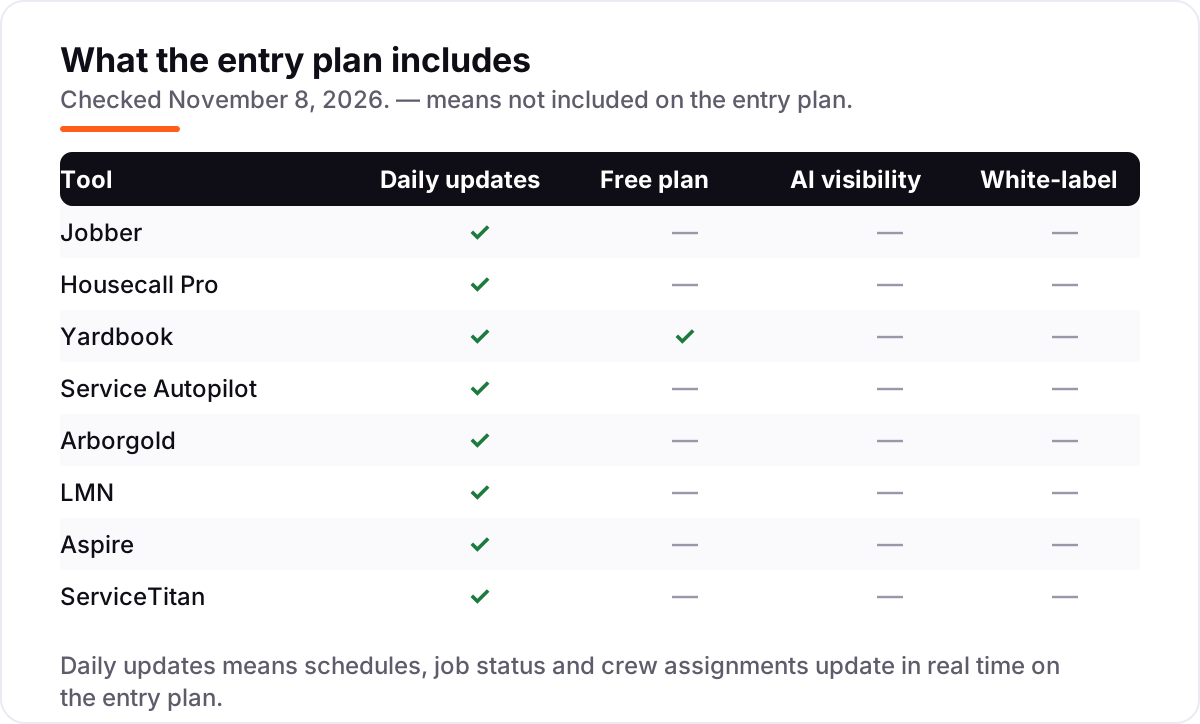
- Check what the entry plan actually includes. Jobber Core leaves out reminders and QuickBooks sync, while Housecall Pro Basic includes a price book and job costing from the first plan.
- Ask about the quote-only tools early. Aspire and ServiceTitan publish no price, so get the full number — license, implementation, add-ons and contract length — in writing before you shortlist them.
- Match the tool to the work. Tree and plant health care need Arborgold's mapping and chemical tracking; recurring lawn programs need Service Autopilot's automation; tight margins need LMN's job costing.
- Test the crew app where the signal is weakest. The office sees the desktop product; the crew lives in the mobile app, and a weak app costs hours every week.
Choosing software is one part of running the business; getting found is the other. Our local SEO service covers the visibility side for landscaping companies, and before you publish new service pages, run your titles through the free SERP snippet preview tool — it shows exactly how the title and description will look in Google.
Whatever you shortlist, try it with real routes before you pay. The free plans and trials in this list are long enough to run two genuine weeks — your customers, your routes, your crews — and those two weeks tell you more than any review can. Check two things in the trial: that a full day's route builds without manual fixing, and that the invoice matches the work done. Every tool here is built for field work, so there is no reason to buy before the crew has used it on a real job.
Landscaping business software pricing: what you will actually pay
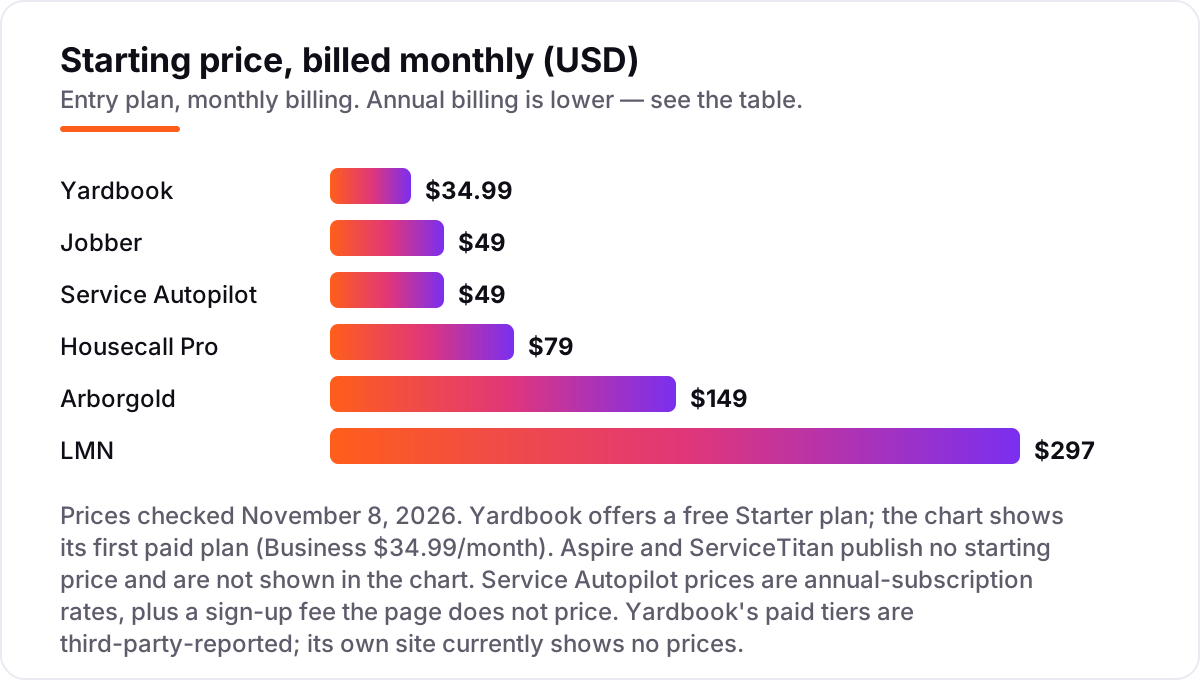
Take a five-person crew — one office user and four in the field — on annual billing. On list prices, the subscription costs $34.99 a month on Yardbook Business, $49 on Service Autopilot Startup, $149 on Jobber Connect or Housecall Pro Essentials, $199 on Service Autopilot Pro, and $297 on LMN Starter. Two of those numbers need adjusting before they are real: Service Autopilot Startup covers one office user and one mobile license, so a five-person crew needs Pro at $199 a month, and LMN Starter adds a one-time onboarding fee on top of the $297.
Over a year, that is $419.88 on Yardbook Business, $588 on Service Autopilot Startup for a crew it does not cover, $1,788 on Jobber Connect or Housecall Pro Essentials, $2,388 on Service Autopilot Pro, and $3,564 on LMN Starter before the onboarding fee. The same five people cost $419.88 a year at the cheap end and $3,564 at the dear end — a $3,144 gap that comes entirely from the pricing model, not from features.
Three costs sit outside every number above. First, the quote-only tools: Aspire and ServiceTitan publish no price, and ServiceTitan adds reported implementation fees of $5,000–$15,000 for small companies, so neither can be compared on the chart. Second, user licenses sold separately: Arborgold Starter is $129 a month billed annually before user licenses, so price the seats before you compare it. Third, card processing on the invoices you send, which is charged per transaction rather than per month — and about 1% extra on Yardbook's free plan. If invoicing itself is the bottleneck, our guide to the best invoice software for landscaping covers that side separately.
Annual billing cuts the bill on most tools here: Jobber Core drops from $49 to $29 a month, Housecall Pro Basic from $79 to $59, and Arborgold Starter from $149 to $129. Yardbook and Service Autopilot publish no annual discount, so the monthly figure is the whole story. One more cost to check before you commit: a second branch is a second subscription on most tools here. ServiceTitan prices per technician, so a second crew costs a second set of licenses — price the whole operation, not one crew, before you sign.
Know the difference: per-user, per-route and flat-rate pricing
The confusion in this category is the pricing model, not the feature list. Per-user plans charge for every seat, so the bill grows with the crew: Jobber charges $29 a month for each extra user, and Housecall Pro Basic covers one user before Essentials covers five. Flat-rate plans charge one price whatever the headcount: Yardbook Business is $34.99 a month for unlimited users, and Service Autopilot Startup is $49 a month per company, not per user.
There is a third model hiding in the enterprise tools. ServiceTitan prices per technician, so office staff do not count the same way field staff do, and Aspire charges one flat license fee with no user limit at all. Arborgold sits between the models: the plan price is flat, but user licenses are sold separately, so the bill still rises with headcount. The model matters more than the headline price — a $49 plan that covers one user is dearer than a $149 plan that covers five, once the crew is counted.
A second distinction worth knowing is scheduling software versus business software. A scheduling tool books jobs and routes crews; business software adds estimating, job costing, invoicing and payments. All eight tools in this list are business software, including the free one, which is what the phrase "landscaping business software" means here. If a tool only schedules, it belongs in a different list.
Quick comparison: tool type by need
| Buyer | Best pick | Why |
|---|---|---|
| Solo operator on a budget | Yardbook | Free Starter plan, unlimited users, paid plans from $34.99/month |
| Most landscaping companies | Jobber | The polished all-rounder, Core from $49/month |
| Crew that wants five users on one price | Housecall Pro | Essentials is $149/month billed annually for 5 users |
| Growing route business that wants automation | Service Autopilot | Automations on Pro Plus at $499/month |
| Tree and plant health care | Arborgold | GPS mapping and chemical tracking, from $149/month |
| Company that budgets by the job | LMN | Production-rate estimating, from $297/month |
| Large commercial operation | Aspire | Flat license, unlimited users, custom quote |
| Biggest multi-crew operation | ServiceTitan | Per-technician platform, custom quote |
Mistakes to avoid
- Budgeting on the entry price for a one-person crew. Jobber Core at $49 and Housecall Pro Basic at $79 cover one user each. A five-person crew pays $149 a month on either tool's next tier, so price the crew, not the headline.
- Buying a quote-only tool without the full number in writing. Aspire and ServiceTitan publish no price, and ServiceTitan adds reported implementation fees of $5,000–$15,000. Get license, implementation, add-ons and contract length in one written quote.
- Ignoring the sign-up and onboarding fees. Service Autopilot adds a sign-up fee to every plan and LMN adds a one-time onboarding fee, and neither amount is on the plan card. Ask for the first-year total, not the monthly rate.
- Picking on the desktop and forgetting the crew app. The crew lives in the mobile app, and the weakest app here rates far below its desktop product. Test the app on a real route before you commit.
- Forgetting the second crew or branch. ServiceTitan prices per technician and Arborgold sells user licenses separately, so a second crew raises the bill. Price the whole operation before you sign.
How we chose
We checked each vendor's own pricing page on November 8, 2026 and recorded the starting price exactly as shown, including the annual-billing figure where the page lists one. Two prices need a note: Yardbook's paid tiers ($34.99 and $49.99 a month) are third-party-reported — Yardbook's own site currently shows no prices, only the free Starter plan — and ServiceTitan's per-technician ranges and implementation fees are user-reported, not published by the vendor, so we say so wherever they appear. Aspire and ServiceTitan publish no starting price, so they are listed as custom quote. Ratings come only from G2 and Capterra pages with the score and review count shown. We ranked the tools by fit for the most common buyer — a US landscaping company with one to five crews — not by brand size. No vendor paid for a place in this list, and none of the links here are affiliate links.
What to do next
Start with the free plan or trial of your top pick and run two real weeks of routes through it. Check that a full day's route builds without manual fixing, that the invoice matches the work done, and that the crew app works where your signal is weakest before you commit to a year. If the software is sorted but new customers are not finding you, our local SEO service handles the visibility side — or compare providers in our guide to contractor management software. Once your tools are in place, find out what's holding your rankings back.
Your stack only works if people find you
SerpAstra fixes what keeps your site off page one and makes it easy for AI assistants to recommend.
Get a free audit→Sources we checked (16)
- Jobber pricing — getjobber.com/pricing (checked November 8, 2026)
- Housecall Pro pricing — housecallpro.com/pricing (checked November 8, 2026)
- Yardbook pricing — yardbook.com/pricing (checked November 8, 2026)
- Service Autopilot pricing — serviceautopilot.com/pricing (checked November 8, 2026)
- Arborgold pricing — arborgold.com/pricing (checked November 8, 2026)
- LMN pricing — granum.com/lmn/pricing (checked November 8, 2026)
- Aspire plans — youraspire.com/aspire-plans (checked November 8, 2026)
- ServiceTitan pricing — servicetitan.com/pricing (checked November 8, 2026)
- Jobber reviews — g2.com/products/jobber/reviews (checked November 8, 2026)
- Housecall Pro reviews — g2.com/products/housecall-pro/reviews (checked November 8, 2026)
- Yardbook reviews — capterra.com/software/207272/yardbook (checked November 8, 2026)
- Service Autopilot reviews — capterra.com/software/122075/service-autopilot (checked November 8, 2026)
- Arborgold reviews — capterra.com/software/12741/arborgold (checked November 8, 2026)
- LMN reviews — capterra.com/software/142064/lmn (checked November 8, 2026)
- Aspire reviews — capterra.com/software/161544/aspire (checked November 8, 2026)
- ServiceTitan reviews — g2.com/products/servicetitan/reviews (checked November 8, 2026)
Shamim
Founder of SerpAstra
A full-stack SEO and digital marketer who spends most days on Local SEO for dental practices, AI search visibility and lead generation.
Frequently asked questions
What is the best landscaping business software?
Jobber is the best fit for most landscaping companies: the most polished quoting, scheduling and invoicing flow, from $49/month. Housecall Pro is the better pick when five users share one flat price, and Yardbook is the best free option for solo operators starting out.
How much does landscaping business software cost?
Published prices run from $0 to $297 a month. Yardbook starts free, Jobber starts at $49/month, Housecall Pro at $79/month and LMN at $297/month. Aspire and ServiceTitan publish no price, so budget only after a written quote that includes add-ons and implementation.
Is there really free landscaping business software?
Yes, with limits. Yardbook Starter is free and covers scheduling, estimates, invoicing and routing with unlimited users, but it shows ads and adds about 1% to card payments. QuickBooks sync and the branded portal need the paid $49.99/month Enterprise plan.
What is the difference between Jobber and Housecall Pro?
Jobber is the more polished app and starts cheaper at $49/month for one user, but most companies need Connect at $139/month. Housecall Pro starts at $79/month and puts a price book and job costing on the first plan, with five users covered on Essentials at $149/month billed annually.
Should I buy a quote-only tool like Aspire or ServiceTitan?
Only when the operation is big enough to need it. Both publish no price, so get the full number in writing — license, implementation, add-ons and contract length — before you compare them with published plans. A company under $1M in revenue will usually get more value from Jobber or Housecall Pro.
What is the difference between per-user and flat-rate pricing?
Per-user plans charge for every seat, so the bill grows with the crew; Jobber charges $29 a month per extra user. Flat-rate plans charge one price whatever the headcount, like Service Autopilot at $49 a month. Per-technician plans, like ServiceTitan, charge for each field technician only.
Can I switch landscaping software later?
Yes, but plan the move for the off-season. Export your customer list, open estimates, recurring jobs and payment history from the old tool, then import them into the new one and run both systems for two weeks. Switching mid-season means retraining crews while jobs are live.
Free SEO and AI visibility audit
Find out what is holding your rankings back
Send us your site. Within 2 business days you get a written audit, an AI visibility check and a short fix list ranked by impact. Free, with no contract attached.
Request my free audit→Related guides
 Local Business & Vertical Software7 Best HVAC Software for Small Business in 2026, ComparedCompare the 7 best hvac software for small business options on price, dispatch, invoicing and free trials, with every price checked November 8, 2026.Read guide →
 Local Business & Vertical Software8 Best Invoice Software for Landscaping in 2026, ComparedCompare the 8 best invoice software for landscaping on price, free plans, field tools and payment fees, with every price checked November 8, 2026.Read guide →
 Local Business & Vertical Software10 Best Contractor Management Software in 2026, ComparedCompare the 10 best contractor management software platforms on price, compliance and global payments, with every price checked November 7, 2026.Read guide →