
10 Best Landscaping Reporting Apps in 2026: Free and Paid Apps Ranked
Compare the 10 best landscaping reporting apps on price, job reports, job costing and scheduling, with every price checked November 8, 2026.
 Shamim Mia, Founder, SerpAstraLast verified November 8, 202614 min read
We compare pricing pages, documentation and public reviews. We never accept payment for rankings.

Key takeaways
- Jobber is the best fit for most small landscaping crews at $49/month; Housecall Pro follows at $79/month with photo reports, and Yardbook is the only genuinely free option.
- The single most important buying factor is the pricing unit: per user, per route, per crew or per technician decides what a growing team actually pays.
- Aspire and ServiceTitan publish no price, so get the full number in writing, add-ons included, before comparing them with the published plans here.
- Reporting depth is tiered everywhere: job costing, photo reports and real-time costing sit one or two plans above the entry price on most tools.
On this page
Quick comparison
| Tool | Best for | Starting price | Free plan |
|---|---|---|---|
| Jobber | Small landscaping crews of one to five people that want quotes, scheduling, invoicing and reports in one app | $49/mo | No (14-day trial) |
| Housecall Pro | Landscaping companies that want photo reports and job costing alongside scheduling and dispatch | $79/mo | No (14-day trial) |
| Yardbook | Solo operators and small lawn care crews that want usable reports at $0 | Free; Business $34.99/mo | Yes (free) |
| GorillaDesk | Route-based lawn and landscape crews that bill by the route and want 20 built-in reports | $49/mo per route | No (14-day trial) |
| Service Autopilot | Route-based lawn and landscape companies that run high-volume recurring work and want route reporting | $49/mo (annual) | No (demo only) |
| SingleOps | Established tree and landscape companies that want job tracking and business insights in one system | $220/mo | No (demo on request) |
| Arborgold | Tree and landscape companies that need plant health care, inventory and GPS-mapped job reports | $149/mo | No (demo on request) |
| LMN | Landscaping companies with 5–10 employees that want budgeting, estimating and job-cost reporting in one place | $297/mo | No (demo on request) |
| Aspire | Landscape companies over $1M in revenue that want enterprise reporting across maintenance, construction and snow | Custom quote | No (demo only) |
| ServiceTitan | Large multi-crew landscaping and home-service companies that want deep reporting across every technician | Custom quote | No (demo on request) |
Make one of these tools?
We re-check this list every quarter. Send a correction, request a review, or ask about a clearly labeled sponsored spot.
Request a listingThe best landscaping reporting apps

Jobber
Best for: Small landscaping crews of one to five people that want quotes, scheduling, invoicing and reports in one app
Jobber is the best fit for most small landscaping crews because it covers the whole job — quoting, scheduling, invoicing and payments — and its reporting grows with you. Core costs $49 a month for one user, or $29 a month billed annually, and the dashboard shows open quotes, scheduled work and unpaid invoices at a glance. Connect adds automated reminders, QuickBooks Online sync and GPS tracking, and Grow adds job costing and two-way texting.
The catch is the pricing unit. Core is a one-user plan, so a three-person crew needs Connect for up to five users at $149 a month billed annually, and the reporting that matters most — job costing — waits for Grow. Do not compare Jobber's $49 headline with a flat-rate rival without counting your seats first.
What we like
- The most complete reporting for a small crew: job costing, quotes, scheduling and invoicing in one app
- Automated reminders and follow-ups keep clients informed without extra admin
- QuickBooks Online sync on Connect, plus GPS tracking and job forms
- 14-day free trial with no credit card required
Watch out for
- Job costing and two-way texting wait for Grow at $149/month billed annually
- Core covers one user only — a crew needs Connect, from $149/month for up to five users
- Prices climb with headcount, so a growing team pays for the next tier or extra seats

Housecall Pro
Best for: Landscaping companies that want photo reports and job costing alongside scheduling and dispatch
Housecall Pro earns its place on reporting alone: job costing and a price book come on the entry Basic plan, so every estimate is priced against real costs instead of a guess. Basic costs $79 a month, or $59 a month billed annually, for one user, and covers online booking, scheduling, dispatch, estimates, invoicing and payments. Essentials adds photo reports, routes, flat-rate pricing and employee GPS tracking.
The reporting you will actually show customers — the photo report — waits for Essentials at $149 a month billed annually for up to five users, and MAX at $299 adds sales proposals and route optimization. Prices on the page can also shift after the short quiz about your trade and team size, so read the figure for your own setup before you compare it with Jobber.
What we like
- Job costing and a price book on the entry plan, so every job is priced against real costs
- Photo reports on Essentials give customers proof of work after every visit
- Online booking, scheduling, dispatch, estimates and invoicing in one subscription
- 14-day free trial of the top MAX plan with no credit card required
Watch out for
- Photo reports and GPS tracking wait for Essentials at $149/month billed annually
- Prices shown after a short quiz can differ from the headline rates by trade and team size
- Payroll, CSR AI, campaigns and vehicle GPS are unpriced add-ons

Yardbook
Best for: Solo operators and small lawn care crews that want usable reports at $0
Yardbook is the only tool here whose free plan is a real working system: Starter costs $0 and includes customer management, jobs and scheduling, estimates, invoices, routing, expenses, reports and lot measurement. There is no trial clock and no invoice cap to hit — you run the business on it for as long as it fits. Business at $34.99 a month adds bulk emails and texts, GPS tracking and automatic invoice reminders.
The free plan has two costs. It shows ads, and it adds a 1% surcharge on online payments on top of the card processor's fees, which adds up as card volume grows. Advanced reporting and QuickBooks sync wait for the paid tiers. Start on Yardbook when the budget is $0; move to Business the month the ads and the surcharge start costing more than $34.99.
What we like
- The only genuinely free reporting option here: reports, scheduling, estimates and invoicing at $0
- Lot measurement is included on the free Starter plan
- Business at $34.99/month adds bulk emails and texts, GPS tracking and invoice reminders
- Simple enough for a solo operator to run without training
Watch out for
- The free plan shows ads and adds a 1% surcharge on online payments
- Advanced reporting and QuickBooks sync wait for the paid plans
- No published annual rate — the paid plans are listed month to month

GorillaDesk
Best for: Route-based lawn and landscape crews that bill by the route and want 20 built-in reports
GorillaDesk prices by the route — one technician's scheduled workday — which makes its reporting maths different from every per-user tool here. Basic costs $49 a month for one route, or $539 a year, and includes 20 standard dashboard reports, estimates, invoices, work orders, recurring jobs, scheduling, material tracking and GPS tracking. Admin, office and crew users are free on every plan.
Count your routes before you compare the price. Three routes on Basic cost $149 a month, and Pro at $99 a route adds automatic subscription charging, a customer portal, online booking and review requests. Basic routing is also limited to 25 stops and is not time-optimized. Pick GorillaDesk when your crews run fixed daily routes; pick a per-user tool when your headcount is small and your routes change daily.
What we like
- 20 standard dashboard reports on the entry plan, covering jobs, customers and revenue
- Priced per route, not per user — admin, office and crew users are free
- Recurring jobs and subscription billing with automatic card charging on Pro
- Month to month with no setup fees and no contracts
Watch out for
- The $49 covers one route only — three routes cost $149/month on Basic
- Basic routing is limited to 25 stops and is not time-optimized
- Texting is a paid add-on ($5/month for a number plus prepaid credits)

Service Autopilot
Best for: Route-based lawn and landscape companies that run high-volume recurring work and want route reporting
Service Autopilot is built for route businesses — lawn care, landscaping, snow removal and cleaning — and its reporting is built around recurring work. Startup costs $49 a month on annual subscription rates, with one business user and one mobile license, and covers scheduling and dispatch, invoicing with integrated payments, expense tracking and customer management. Pro at $199 a month adds route optimization, a dispatch calendar and job costing.
The price is not the whole bill. Every plan adds a sign-up fee whose amount is not published, and extra mobile users are priced separately, so a crew with several phones pays more than $49. There is no monthly billing rate — only annual subscription rates. Buy Service Autopilot when your routes repeat week after week; the reporting pays for itself on recurring work, not on one-off jobs.
What we like
- Built for recurring route work: scheduling, dispatch and bulk invoicing for lawn and landscape routes
- Productivity dashboard and job proposals on the entry Startup plan
- Route optimization and a dispatch calendar on Pro at $199/month
- Flat per-company pricing, not per-user pricing, on every tier
Watch out for
- Every plan adds a sign-up fee whose amount is not published on the pricing page
- Only annual subscription rates are published — there is no monthly billing rate
- Extra mobile users are priced separately, so the bill grows beyond the headline price

SingleOps
Best for: Established tree and landscape companies that want job tracking and business insights in one system
SingleOps is the green-industry specialist in this list: it covers tree care, landscaping, lawn and snow work in one platform, with estimating, scheduling, client management, invoicing and route optimization. Essential costs $220 a month, or $200 a month billed annually, for a single crew, and its business insights reporting shows job profitability without exporting to a spreadsheet. Plus at $385 and Premier at $550 add more crews and deeper reporting.
The price is the barrier. At $220 a month before extra office and sales users — $55 to $150 a month each — SingleOps is built for established companies, not for a solo operator. Implementation takes time and adds cost. Pick SingleOps when the company runs several crews and needs one system for estimating through invoicing; a smaller crew gets the same basics from Jobber for far less.
What we like
- Estimating, scheduling, client management and invoicing in one green-industry platform
- Business insights reporting shows job profitability without a spreadsheet
- Crew users are included in the plan price
- Now part of Granum, alongside LMN, with a shared product roadmap
Watch out for
- The entry price is steep for a small crew — $220/month before any extra users
- Office and sales users cost extra, $55 to $150 a month each depending on tier
- Implementation services add time and cost on top of the subscription

Arborgold
Best for: Tree and landscape companies that need plant health care, inventory and GPS-mapped job reports
Arborgold has sold into tree, lawn and landscape businesses longer than most tools here, and it shows in the reporting: inventory management and GPS mapping of job sites come on the entry plan, and plant health care tracking covers recurring treatment programs. Starter costs $149 a month, or $129 a month billed annually, and includes CRM, scheduling, invoicing, routing and inventory management.
The price on the page is not the whole bill, because users are sold separately and every tier needs an annual contract. Professional at $299 a month billed annually adds the deeper reporting a larger company wants. Pick Arborgold when tree work and plant health care are a real share of revenue; a pure lawn and landscape crew gets more for its money from Jobber or LMN.
What we like
- Built for tree and landscape work, not adapted from a generic field-service app
- Inventory management and GPS mapping of job sites on the entry plan
- Plant health care tracking for recurring treatment programs
- One of the longest-running tools in this list, with a deep feature set
Watch out for
- Users are sold separately, so the bill grows beyond the Starter price
- An annual contract is required on every tier
- Deeper reporting waits for Professional at $299/month billed annually

LMN
Best for: Landscaping companies with 5–10 employees that want budgeting, estimating and job-cost reporting in one place
LMN is the budgeting tool in this list: it starts with the numbers, not the schedule. Starter costs $297 a month billed monthly and includes budgeting, estimating, scheduling, the Crew app and invoicing and payments, with one office or crew lead license and five crew member licenses. Quotes are priced against real costs from the start, so the reporting shows profit per job instead of revenue per job.
It fits a company with five to ten employees, and a one-time onboarding fee applies to every plan, so ask for the amount in writing. Real-time job costing waits for Professional at $648 a month. A Black Friday offer of four months free runs until November 30, 2026. Pick LMN when knowing your numbers is the problem; pick Jobber when scheduling is.
What we like
- Budgeting and estimating are built in, so quotes are priced against real costs from the start
- The Crew app puts schedules and job reporting in every crew member's pocket
- Scheduling, invoicing and payments sit in the same system as the budget
- A Black Friday offer of four months free runs until November 30, 2026
Watch out for
- Starter at $297/month is steep for a solo operator or a two-person crew
- A one-time onboarding fee applies to every plan and its amount is not on the pricing page
- Real-time job costing waits for Professional at $648/month

Aspire
Best for: Landscape companies over $1M in revenue that want enterprise reporting across maintenance, construction and snow
Aspire is the enterprise platform in this list, built for landscape companies with more than $1 million in annual revenue. It covers maintenance, landscape construction and snow and ice work in one system, and its advanced reporting is the reason large companies buy it: job profitability, crew performance and revenue by service line, without stitching spreadsheets together. Pricing is a single flat monthly license fee with unlimited users, quoted per business.
There is no published price and no free trial — a guided demo is the only way in. Payments, payroll and GPS fleet tracking cost extra. The three tiers — Growth for $1M to $3M, Corporate for $3M to $15M, Enterprise above $15M — are sized by revenue, not by seats. Smaller companies should look at Crew Control, Aspire's lighter product, from $39 a month per crew.
What we like
- Advanced reporting across maintenance, construction and snow work in one platform
- One flat monthly license fee with unlimited users — headcount never raises the price
- Implementation, training, support and upgrades are included in the fee
- Crew Control, its lighter product, publishes prices from $39/month per crew
Watch out for
- No published price — every deal is quoted by the sales team
- Payments, payroll and GPS fleet tracking are quoted on top of the license fee
- No free trial — a guided demo is the only way in

ServiceTitan
Best for: Large multi-crew landscaping and home-service companies that want deep reporting across every technician
ServiceTitan is the heavyweight in this list: the reporting covers revenue, technician performance and job profitability in one dashboard, and it is the highest-rated tool here on G2 at 4.5 out of 5 from 371 reviews. The three tiers — Starter, Essentials and The Works — scale from growing teams to enterprises, with dispatch, scheduling, invoicing and payments alongside the reports. Pricing is per technician and quoted after a demo.
That depth comes with a price you cannot see. There is no published starting price, no free trial, and the per-technician model means the bill grows with every hire — a real cost for a landscaping company that adds seasonal crew. ServiceTitan fits a large multi-crew operation that will use the reporting every day; a small crew pays for depth it will never open.
What we like
- The deepest reporting here: revenue, technician performance and job profitability in one dashboard
- Three tiers — Starter, Essentials and The Works — scale from growing teams to enterprises
- Strong dispatch, scheduling, invoicing and payments alongside the reports
- The highest-rated tool in this list on G2 at 4.5 out of 5 from 371 reviews
Watch out for
- No published prices — a demo is required before any number is shown
- Per-technician pricing means the bill grows with every hire
- Built for larger companies — more than a solo operator or small crew needs
The best landscaping reporting apps do one job well: they show whether each job made money, which crews finished their routes, and which invoices are still unpaid — without making the owner export a spreadsheet every Friday. We ranked the ten tools below by fit for the most common buyer — a small US landscaping company that wants its numbers in one place — starting with the all-rounders and ending with the enterprise platforms, and every price was checked on the vendor's own pricing page on November 8, 2026.
How to choose the best landscaping reporting apps
- Count the pricing unit first. Jobber and Housecall Pro charge per user, GorillaDesk charges per route, Service Autopilot charges per company, and ServiceTitan charges per technician. The unit, not the headline price, decides what a growing team pays.
- Check which reports sit on the entry plan. Job costing, photo reports and real-time costing usually wait one or two tiers up — the entry plan often shows only revenue and scheduled work.
- Match the tool to the work. Recurring lawn routes suit GorillaDesk and Service Autopilot; design-build and maintenance work suits LMN and Aspire; tree work suits SingleOps and Arborgold.
- Ask what the free plan really costs. Yardbook is free, but the ads and the 1% payment surcharge are real costs that grow with card volume.
- Plan for the quote-only tools. Aspire and ServiceTitan publish no price, so get the full number in writing, add-ons included, before you compare them with a published plan.
Reporting is one system in your stack, not the whole stack. If the business also needs to be found online, our local SEO service covers the visibility side — and before you publish new pages for the services you sell, run your titles through the free SERP snippet preview tool so they read well in Google.
Whatever you shortlist, try it with real jobs before you pay. The free plans and trials in this list are long enough to run one genuine week — your routes, your crews, your invoices — and that week tells you more than any review can. Check two things in the trial: that the reports show profit per job without a spreadsheet, and that your crews will actually log their hours in the app. A reporting tool nobody fills in reports nothing.
Landscaping reporting app pricing: what you will actually pay
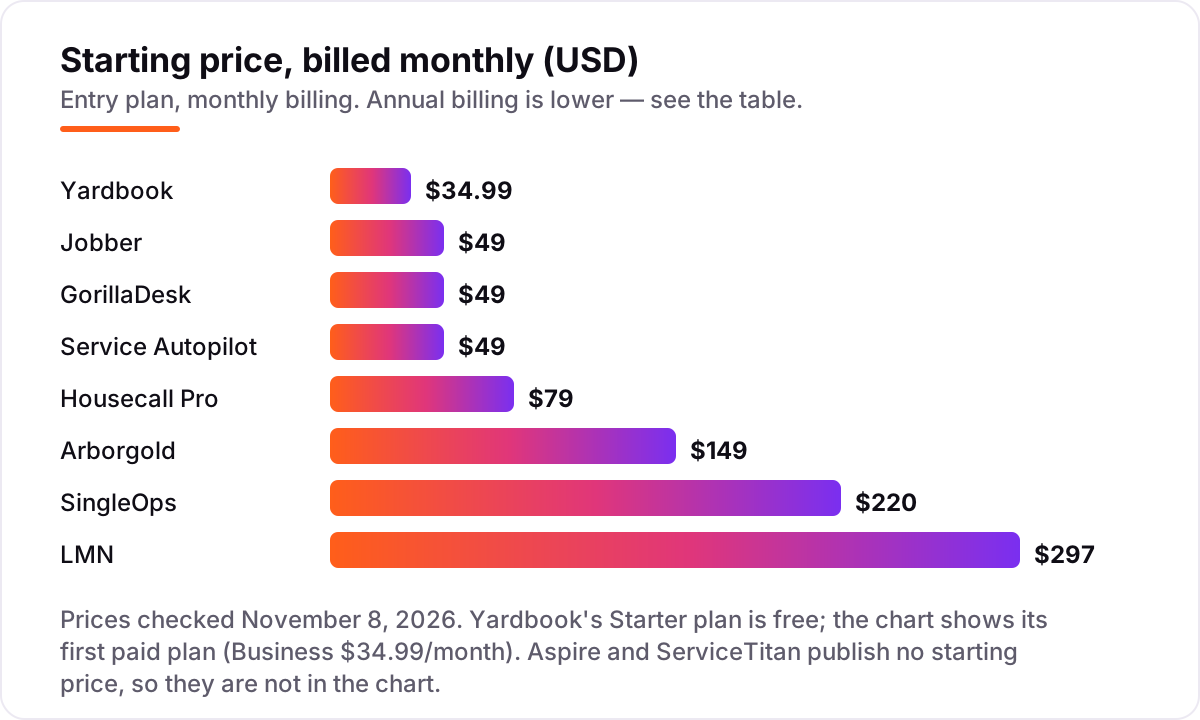
Take a solo operator running about 60 jobs a month. On list prices, the subscription costs $0 on Yardbook Starter, $29 a month on Jobber Core billed annually, $49 on Service Autopilot Startup, $49 on GorillaDesk Basic for one route, $59 on Housecall Pro Basic billed annually, $129 on Arborgold Starter billed annually, $200 on SingleOps Essential billed annually, and $297 on LMN Starter. Aspire and ServiceTitan publish no price, so a solo operator cannot even start the comparison without a sales call.
Over a year, that is $0 on Yardbook, $348 on Jobber Core, $539 on GorillaDesk Basic, $588 on Service Autopilot Startup before its unpublished sign-up fee, $708 on Housecall Pro Basic, $1,548 on Arborgold Starter, $2,400 on SingleOps Essential, and $3,564 on LMN Starter before its one-time onboarding fee. The same one person and the same 60 jobs cost $0 at the cheap end and $3,564 at the dear end — a gap that comes entirely from reporting depth and the pricing unit, not from the number of jobs.
Now put three people on the crew. Jobber Connect for up to five users is $149 a month billed annually, Housecall Pro Essentials for five users is also $149, and three routes on GorillaDesk Basic is $149 a month — three different tools, the same $149. Yardbook Business stays at $34.99 a month, Service Autopilot Pro is $199 plus extra mobile users, and LMN Starter still covers the whole crew at $297 because it bundles one office license with five crew licenses. If invoicing is the next thing to fix after reporting, see our guide to the best invoice software for landscaping.
Two costs sit outside every number above. First, the introductory offers — LMN is running four months free until November 30, 2026, and Housecall Pro discounts the first month — end, so budget on the list price. Second, card processing on the invoices you send, which is charged per transaction rather than per month, plus Yardbook's 1% surcharge on its free plan. If the quotes themselves are the weak point, our guide to the best estimating software for contractors covers that side.
Know the difference: reporting apps vs full business management software
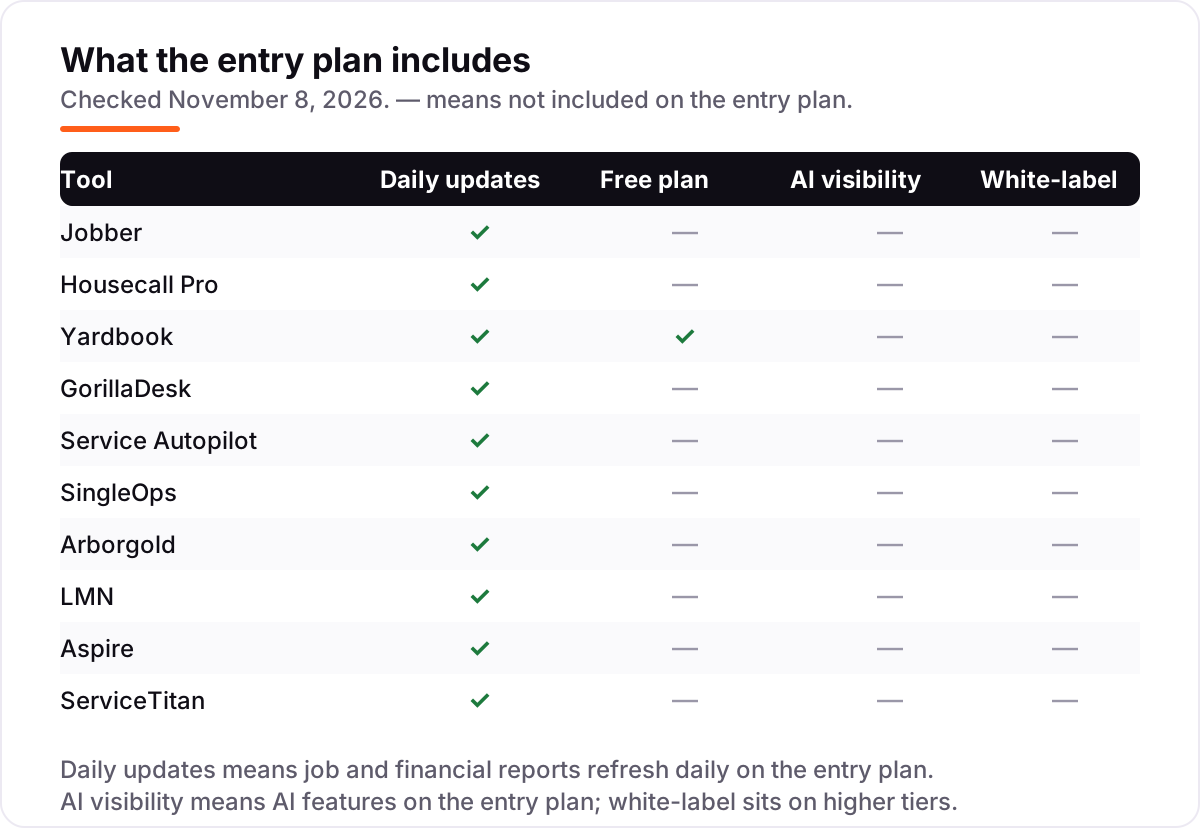
The confusion in this category is between a feature and a system. A reporting app shows what happened — revenue, job costs, crew hours, unpaid invoices. Full business management software also runs what happens next: budgeting, payroll, fleet tracking and multi-branch reporting. Every tool in this list does both to some degree, but the balance differs: Yardbook and GorillaDesk lean toward the daily job list with reports on top, while Aspire, ServiceTitan and LMN run the whole business and treat reporting as one module among many.
There is a second, quieter confusion: a dashboard is not a report. A dashboard shows today's numbers; a report shows whether a job, a crew or a service line made money over a month. The tools that charge the most in this list — LMN, Aspire, ServiceTitan — earn it on the second kind: real-time job costing, revenue by service line and technician performance over time. If you only need today's numbers, the cheaper tools show them just as well.
A third distinction worth knowing is the report you show the customer versus the report you keep. Photo reports, which Housecall Pro puts on Essentials, are for the customer — proof the work was done. Job costing, which Jobber puts on Grow and LMN puts on Professional, is for you — proof the job was worth doing. Buy the tier that has the report you actually need, not the tier with the most reports.
Quick comparison: tool type by need
| Buyer | Best pick | Why |
|---|---|---|
| Solo operator on a budget | Yardbook | Free Starter plan with real reports, Business is $34.99/month when you want more |
| Most small landscaping crews | Jobber | Quoting, scheduling, invoicing and reporting in one app, from $49/month |
| Company that needs photo proof | Housecall Pro | Photo reports on Essentials, job costing from $79/month |
| Route-based crews | GorillaDesk | Priced per route, 20 built-in reports, $49/month for one route |
| Recurring lawn routes | Service Autopilot | Built for repeat routes, Startup is $49/month on annual rates |
| Tree and landscape companies | SingleOps | Green-industry estimating and job tracking, from $220/month |
| Companies that budget first | LMN | Budgeting and estimating built in, Starter is $297/month |
| Large multi-crew companies | ServiceTitan | Deepest technician reporting here, custom quote per technician |
Mistakes to avoid
- Budgeting on the headline price. A $49 plan that covers one user or one route is not a $49 bill for a three-person crew — count seats, routes or technicians first, then compare.
- Buying on the entry plan, then finding the report costs extra. Job costing waits for Grow on Jobber, photo reports wait for Essentials on Housecall Pro, and real-time costing waits for Professional on LMN. Price the tier with the report you need.
- Comparing a quote-only tool with a published price. Aspire and ServiceTitan publish no number, so a comparison that puts them next to a $49 plan is guessing. Get the quote in writing first.
- Forgetting the sign-up and onboarding fees. Service Autopilot adds an unpublished sign-up fee to every plan, and LMN adds a one-time onboarding fee — neither amount is on the pricing page, so ask before you sign.
- Picking a tool your crews will not fill in. A reporting app is only as good as the hours, photos and job notes that go into it. If the crew app is hard to use in the field, the reports will be empty whatever the dashboard promises.
How we chose
We checked each vendor's own pricing page on November 8, 2026 and recorded the starting price exactly as shown, including the annual-billing figure where the page lists one, and we ranked the tools by fit for the most common buyer — a small US landscaping company that wants its job numbers in one place — not by brand size. Aspire and ServiceTitan publish no starting price, so we list them as custom quote rather than guessing a number. Ratings come from G2 and Capterra pages checked the same day; GorillaDesk and Aspire carry no rating because no G2 or Capterra rating page could be verified for them, and we would rather show no rating than a stale or estimated one. No vendor paid for a place in this list, and none of the links here are affiliate links.
What to do next
Start with the free plan or trial of your top pick and run one real week of jobs through it. Check that the reports show profit per job and that your crews will log their hours in the app before you commit to a year. If the books are sorted but new customers are not finding you, our monthly SEO service handles the visibility side — or compare providers in our guide to SEO companies for small business. Once your tools are in place, find out what's holding your rankings back.
Your stack only works if people find you
SerpAstra fixes what keeps your site off page one and makes it easy for AI assistants to recommend.
Get a free audit→Sources we checked (18)
- Jobber pricing — getjobber.com/pricing (checked November 8, 2026)
- Housecall Pro pricing — housecallpro.com/pricing (checked November 8, 2026)
- Yardbook pricing — yardbook.com/pricing (checked November 8, 2026)
- GorillaDesk pricing — gorilladesk.com/pricing (checked November 8, 2026)
- Service Autopilot pricing — serviceautopilot.com/pricing (checked November 8, 2026)
- SingleOps pricing — granum.com/singleops/pricing (checked November 8, 2026)
- Arborgold pricing — arborgold.com/pricing (checked November 8, 2026)
- LMN pricing — granum.com/lmn/pricing (checked November 8, 2026)
- Aspire plans — youraspire.com/aspire-plans (checked November 8, 2026)
- ServiceTitan pricing — servicetitan.com/pricing (checked November 8, 2026)
- Jobber reviews — g2.com/products/jobber/reviews (checked November 8, 2026)
- Housecall Pro reviews — g2.com/products/housecall-pro/reviews (checked November 8, 2026)
- Yardbook reviews — capterra.com/software/207272/yardbook (checked November 8, 2026)
- Service Autopilot reviews — capterra.com/software/122075/service-autopilot (checked November 8, 2026)
- SingleOps reviews — capterra.com/p/176935/SingleOps (checked November 8, 2026)
- Arborgold reviews — capterra.com/p/12741/Arborgold (checked November 8, 2026)
- LMN reviews — capterra.com.au/software/142064/lmn (checked November 8, 2026)
- ServiceTitan reviews — g2.com/products/servicetitan/reviews (checked November 8, 2026)
Shamim
Founder of SerpAstra
A full-stack SEO and digital marketer who spends most days on Local SEO for dental practices, AI search visibility and lead generation.
Frequently asked questions
What is the best landscaping reporting app?
Jobber is the best fit for most small landscaping crews: quoting, scheduling, invoicing and reporting in one app, from $49/month. Housecall Pro is the better pick when photo reports matter, and Yardbook is the best free option. Large companies should shortlist Aspire or ServiceTitan instead.
How much do landscaping reporting apps cost?
Entry prices run from $0 to $297 a month. Yardbook is free, Jobber starts at $49/month and Housecall Pro at $79/month, while LMN starts at $297/month and SingleOps at $220/month. Aspire and ServiceTitan publish no price, so budget on a quote, not a list price.
Is there a free landscaping reporting app?
Yes — Yardbook Starter is free and includes reports, scheduling, estimates and invoicing, with lot measurement included. The trade-offs are ads in the interface and a 1% surcharge on online payments. The first paid plan, Business, costs $34.99 a month.
What reports should a landscaping app include?
At minimum, look for job costing, revenue by service, crew hours, route completion and overdue invoices. Photo reports prove work was done, and real-time job costing shows whether a job made money while it is still running. Most tools here put the deeper reports one tier above the entry plan.
What is the difference between a reporting app and full business management software?
Reporting is a feature set; business management software is the whole system. Every tool here does both to some degree — scheduling, invoicing and reporting together — but the enterprise tools, Aspire and ServiceTitan, add budgeting, payroll and fleet tracking, while the lighter apps focus on the daily job list.
Can I switch landscaping software later?
Yes, but plan the move for the off-season. Export your customer list, open jobs, job history and invoices from the old tool, then import them into the new one and reconcile the books before going live. Switching mid-season means running two systems while crews are at their busiest.
Do these apps work for lawn care only, or landscaping too?
Both. Every tool here serves lawn care and landscaping, and most also cover tree care, snow removal and irrigation. The difference is emphasis: Yardbook and GorillaDesk lean toward recurring lawn routes, while LMN, Aspire and SingleOps are built for full landscaping and design-build work.
Free SEO and AI visibility audit
Find out what is holding your rankings back
Send us your site. Within 2 business days you get a written audit, an AI visibility check and a short fix list ranked by impact. Free, with no contract attached.
Request my free audit→Related guides
 Local Business & Vertical Software8 Best Invoice Software for Landscaping in 2026, ComparedCompare the 8 best invoice software for landscaping on price, free plans, field tools and payment fees, with every price checked November 8, 2026.Read guide →
 Local Business & Vertical Software8 Best Estimating Software for Contractors in 2026, ComparedCompare the 8 best estimating software for contractors on price, takeoff, cost databases and free trials, with every price checked November 7, 2026.Read guide →
 Accounting, Tax & Finance7 Best Accounting Software for Small Businesses in 2026, ComparedCompare the 7 best accounting software for small businesses on price, free plans, bank feeds and AI features, with every price checked November 2, 2026.Read guide →