
11 Best Law Firms Tools in 2026 (Free and Paid, Compared)
Compare the 11 best law firms tools on price, free plans, billing and AI features for small firms, with every price checked November 8, 2026.
 Shamim Mia, Founder, SerpAstraLast verified November 8, 202614 min read
We compare pricing pages, documentation and public reviews. We never accept payment for rankings.

Key takeaways
- Clio is the best fit for most firms at $49 per user a month; PracticePanther and CosmoLex follow at $59, and LawPay costs a flat $19 a month plus processing fees.
- CaseFox is the only tool here with a genuinely free plan — $0 for 2 users — while Smokeball, Filevine and Actionstep publish no price and quote by sales call.
- The single most important buying factor is the tier that holds the feature you need: intake, e-signature and trust accounting each sit on different tiers.
- Per-user pricing multiplies fast: a 5-user firm pays $245 to $300 a month on the published entry tiers, before add-ons and processing fees.
On this page
Quick comparison
| Tool | Best for | Starting price | Free plan |
|---|---|---|---|
| Clio | Small and mid-sized firms that want the most widely used practice management platform, with the largest integration list | $49/mo | No (7-day trial) |
| MyCase | Growing firms that want intake, CRM, e-signature and workflows in the same subscription as case management | $60/mo | No (14-day trial) |
| PracticePanther | Solo lawyers and small firms that want every tier published with no sales call and trust accounting on the top tier | $59/mo | No (7-day trial) |
| CosmoLex | Firms that want practice management and full legal accounting in one subscription, with no separate ledger | $59/mo | No (10-day trial) |
| Rocket Matter | Small firms that want strong billing and payment features at the lowest published per-user price here | $49/mo | No (free trial) |
| LawPay | Any firm that needs trust-compliant card, eCheck and financing payments without a per-user fee | $19/mo | No (no trial) |
| CaseFox | Solo lawyers and tiny firms that want real billing and case management free, then the cheapest paid upgrade | Free; Pro $45/mo | Yes (free) |
| TimeSolv | Firms that treat time and billing as the core system and need e-billing, LEDES invoices and offline capture | $58/mo | No (30-day trial) |
| Smokeball | Small firms that want automatic time capture and AI document help, and will take a sales call for pricing | Custom quote | No (free trial) |
| Filevine | Personal injury, mass tort and high-volume firms that need automation, analytics and AI drafting at scale | Custom quote | No (no trial) |
| Actionstep | Mid-sized firms that want deep workflow automation and optional legal accounting, with add-on AI time capture | Custom quote | No (free trial) |
Make one of these tools?
We re-check this list every quarter. Send a correction, request a review, or ask about a clearly labeled sponsored spot.
Request a listingThe best law firms tools

Clio
Best for: Small and mid-sized firms that want the most widely used practice management platform, with the largest integration list
Clio is the default choice in legal practice management, and the reason is scale: more firms run on it than on any other tool here, so new hires, outside counsel and accountants know it. EasyStart costs $49 per user a month and covers the core job — matter management, time tracking, billing and calendaring — with a client portal included. The integration list runs past 250 tools, covering payments, documents, accounting and intake.
The catch is transparency. Clio publishes only the EasyStart figure; Essentials, Advanced and Complete are priced by sales, and third-party estimates put them near $89 and $119 a user a month. AI features sit on Advanced and above, and accounting, intake and drafting are paid add-ons. Buy Clio when you want the standard platform everyone knows; buy PracticePanther when you want every tier published up front.
What we like
- The most widely used practice management platform in this list, so staff and outside counsel often already know it
- EasyStart covers matter management, time tracking, billing and calendaring from $49 per user a month
- More than 250 integrations cover payments, documents, accounting and intake
- Cloud access with a client portal and mobile apps on every plan
Watch out for
- Only the $49 EasyStart figure is published — Essentials, Advanced and Complete are priced by sales
- AI features (Clio Duo) sit on the Advanced tier and above, not the entry plan
- Add-on modules for accounting, intake and drafting each carry their own per-user fee

MyCase
Best for: Growing firms that want intake, CRM, e-signature and workflows in the same subscription as case management
MyCase is the all-rounder in this list: case management, billing, trust accounting, intake, CRM and e-signature in one subscription, with every tier published. Basic costs $50 per user a month billed annually, or $60 billed monthly, and covers cases, contacts, time, billing and trust accounting. Pro costs $100 billed annually and adds intake forms, legal CRM, unlimited e-signature, automated workflows and two-way texting; Advanced costs $130 and adds AI case and discovery tools.
The tier jump is the thing to price. Basic has no intake forms or e-signature, so a firm that wants those pays double for Pro, and MyCase Accounting adds $39 per user a month on top. Prices rose in 2026 from about $39, $89 and $109, so older roundups understate the bill. Pick MyCase when intake and e-signature matter as much as the case file itself.
What we like
- Every tier is published with both billing bases: Basic $50 a month billed annually, $60 billed monthly
- Pro adds intake forms, legal CRM, unlimited e-signature and two-way texting at $100 a month billed annually
- Trust accounting, time tracking and billing are included on every tier
- Rated 4.4 out of 5 on G2 across 400 reviews, with ease of use the most praised quality
Watch out for
- Basic at $60 a month has no intake forms, e-signature or workflows — those start on Pro at $120
- MyCase Accounting is a $39 per user a month add-on on Pro and Advanced, not part of the base price
- Prices rose in 2026 from about $39/$89/$109, so older comparisons understate the cost

PracticePanther
Best for: Solo lawyers and small firms that want every tier published with no sales call and trust accounting on the top tier
PracticePanther is the most transparent tool in this list: it publishes all four tiers with both billing bases, and no sales call is needed to learn the price. Solo costs $49 per user a month billed annually, or $59 billed monthly, and covers matter management, billing, a client portal, document templates and task workflows. Essential costs $69 billed annually, Business $89, and Business Pro $114, which adds full trust and operating accounting.
The limits sit in the tier ladder. Solo caps at one user, so a two-lawyer firm starts on Essential, and intake forms and native e-signature wait for Business. The trust account ledger is marked included on every tier, but the enhanced reconciliation process is a Business Pro feature. Choose PracticePanther when you want the price in writing before you talk to anyone.
What we like
- The only tool here that publishes all four tiers with both billing bases and no sales call
- Solo at $49 a month billed annually includes matter management, billing, client portal and document templates
- Trust account ledger and reconciliation are marked included on all four tiers
- Rated 4.3 out of 5 on G2, with ease of setup the highest-scored quality
Watch out for
- Solo caps at 1 user, so a two-lawyer firm starts on Essential at $79 a month billed monthly
- Intake forms and native e-signature start on Business at $99 a month billed monthly
- Full trust and operating accounting waits for Business Pro at $124 a month billed monthly

CosmoLex
Best for: Firms that want practice management and full legal accounting in one subscription, with no separate ledger
CosmoLex takes the opposite approach to most tools here: instead of bolting billing onto a general ledger, it built legal accounting into the core product. Trust accounting, operating accounting, billing and matter management share one cloud ledger, so a trust deposit, a fee transfer and the resulting journal entries are one continuous record. Launch costs $49 per user a month billed annually, or $59 billed monthly; Core is $99 and Pro $129 on annual billing.
The trade-off is depth at the entry tier. Launch is the leanest plan, and CRM and intake features grow on Core and Pro, so a firm that wants the full intake workflow pays more. Reviewers also note the interface can feel slow and prices rise between renewals. Pick CosmoLex when trust accounting is the job, not an add-on.
What we like
- Full legal accounting — trust and operating — is built into every tier, not bolted on
- Launch at $49 a month billed annually covers matters, billing, calendaring and trust accounting
- One subscription replaces a practice manager plus a separate accounting tool
- Rated 4.2 out of 5 on G2 across 335 reviews, with accounting management the most praised quality
Watch out for
- Launch at $59 a month billed monthly is the leanest tier — CRM and intake depth grow on Core and Pro
- Some reviewers report the interface feels slow at times and price rises between renewals
- No free plan, and the 10-day trial is shorter than the 14- and 30-day trials elsewhere here

Rocket Matter
Best for: Small firms that want strong billing and payment features at the lowest published per-user price here
Rocket Matter is the billing-first pick in this list. Essentials costs $49 per user a month and covers matter management, time tracking, billing, calendaring and document management, with batch billing, evergreen retainers and credit card payments at 2.95% processing. Pro is listed at $79 and Premier at $99, adding reporting and automation for growing firms. Reviewers rate it 4.3 out of 5 on G2, with billing ease the most praised quality.
One caution on the price: the $49 figure is vendor-provided through G2, and a November 2026 CostBench read lists Essentials at $59 billed annually, so confirm the figure in writing before budgeting. The CRM add-on also carries a $399 one-time onboarding fee and a 3-user minimum. Pick Rocket Matter when billing speed matters more than intake depth.
What we like
- Essentials at $49 per user a month is the joint-lowest published per-user price in this list
- Billing is the standout: batch billing, evergreen retainers and payments at 2.95% processing
- Rated 4.3 out of 5 on G2 across 173 reviews, with billing ease the most praised quality
- Free trial available, so the billing workflow can be tested with real matters before paying
Watch out for
- The $49 Essentials figure is vendor-provided through G2; a November 2026 CostBench read lists $59 billed annually
- Higher tiers (Pro $79, Premier $99 as listed by the vendor) add reporting and automation that small firms may need
- CRM features carry a $399 one-time onboarding fee and a 3-user minimum

LawPay
Best for: Any firm that needs trust-compliant card, eCheck and financing payments without a per-user fee
LawPay is not a practice manager — it is the payments layer most firms in this list plug into, and it is priced like one. The plan costs $19 a month flat, with no contract and no per-user fee, and it accepts cards, eCheck, Apple Pay and financing, with next-day deposits. The key feature is trust compliance: client funds stay separate from operating funds, which is what makes it legal-specific rather than a generic card processor.
The headline rate is not the whole bill. Card processing runs 2.99% plus $0.30 per transaction, American Express costs 3.90% plus $0.30, eCheck costs 1%, and card-brand pass-through fees add a $7.99 monthly allocation. Its Clio integration also ended in August 2026. Add LawPay when clients pay by card and trust compliance is non-negotiable.
What we like
- Flat $19 a month with no contract and no per-user fee — the cheapest entry price in this list
- Built for trust accounting: client funds stay separate from operating funds (IOLTA-compliant)
- Accepts cards, eCheck, Apple Pay and financing, with next-day deposits
- Rated 4.7 out of 5 on G2 across 227 reviews, the joint-highest score here
Watch out for
- The $19 monthly fee is only the start — card processing runs 2.99% plus $0.30 per transaction
- Card-brand pass-through fees apply on top, including a $7.99 monthly allocation
- Its Clio integration ended on August 31, 2026, so Clio firms now use Clio Payments for synced payments

CaseFox
Best for: Solo lawyers and tiny firms that want real billing and case management free, then the cheapest paid upgrade
CaseFox is the budget pick in this list, and the only tool here with a genuinely free plan: Solo costs $0 for 2 users and includes timekeeping, billing, case management, invoicing and expense tracking. Pro costs $45 per user a month billed monthly, or $39 billed annually, and Enterprise costs $99. The paid tiers add the full feature set, including an AI document template generator that larger tools charge extra for.
The limits are honest ones. Solo is deliberately capped, the mobile app draws complaints about slow screen switching, and the 4.0 G2 rating rests on only 11 reviews, so it is a weak signal next to the hundreds behind Clio and TimeSolv. Start on CaseFox when the firm is one or two people and the budget is $0.
What we like
- The only genuinely free plan here: Solo costs $0 for 2 users with timekeeping, billing and case management
- Pro at $39 a month billed annually is the cheapest paid per-user tier in this list
- Covers timekeeping, expenses, invoicing and case management in one login
- AI document template generator included, a feature larger tools charge extra for
Watch out for
- Only 11 G2 reviews, so the 4.0 rating rests on a small base — treat it as a weak signal
- Reviewers report the mobile app runs slowly when switching screens or making updates
- Pro at $45 a month is the first tier with the full feature set; Solo is deliberately limited

TimeSolv
Best for: Firms that treat time and billing as the core system and need e-billing, LEDES invoices and offline capture
TimeSolv is a specialist, not a suite: it does legal time and billing and little else, and it does that job well. Legal Billing starts at $58 per user a month for 1 to 9 users, falling to $55 for 10 to 24 and $52 for 25 or more, and covers time tracking, invoicing, budgeting, document management, trust accounting and LEDES e-billing. TimeSync desktop capture records time offline and without a browser open, which suits lawyers who work away from their desks.
The trade-off is scope. TimeSolv has no matter intake or client portal to match a full practice manager, so most firms pair it with another tool — often Clio or MyCase — and pay twice. Reviewers also note reporting could be stronger. Pick TimeSolv when billing accuracy is the core system and everything else is secondary.
What we like
- Dedicated legal time and billing with LEDES e-billing, trust accounting and payments
- TimeSync desktop capture records time offline and without a browser open
- Rated 4.5 out of 5 on G2 across 429 reviews, with ease of use the most praised quality
- 30-day free trial — the longest trial in this list — with support reviewers praise
Watch out for
- Per-user price falls with headcount ($58 for 1–9 users, $55 for 10–24, $52 for 25+), so small firms pay the most
- It is a billing specialist, not a full practice manager — matters and intake need another tool
- Reviewers note reporting could be stronger for the price

Smokeball
Best for: Small firms that want automatic time capture and AI document help, and will take a sales call for pricing
Smokeball is the highest-rated tool in this list on G2, at 4.7 out of 5 across 385 reviews, and the praise centers on ease of use and support. Its pitch is automation for small firms: matter workflows, document automation and billing in one place, with Archie AI drafting documents and summarizing matters and AutoTime capturing billable time without manual entry. The four tiers are Bill, Boost, Grow and Prosper+.
The price is the problem. Smokeball publishes no per-user rate — its own page lists plans from $149 a month with no per-user breakdown — and third-party feeds report Bill near $49 and Boost near $89. AutoTime also sits on the top tier or as a paid add-on. Take the sales call, but get the per-user figure and the contract term in writing first.
What we like
- Rated 4.7 out of 5 on G2 across 385 reviews, the joint-highest score in this list
- Archie AI drafts documents and summarizes matters, and AutoTime captures billable time automatically
- Reviewers praise ease of use and support more than any other tool here
- Built for small firms: matter workflows, document automation and billing in one place
Watch out for
- No published per-user price — the vendor's own page lists plans from $149 a month with no per-user breakdown
- AutoTime, the automatic time tracking the product is sold on, sits on the top Prosper+ tier or as a Grow add-on
- Reported implementation runs around $500 to $2,000 per user plus training, on 12- or 36-month contracts

Filevine
Best for: Personal injury, mass tort and high-volume firms that need automation, analytics and AI drafting at scale
Filevine is built for volume: personal injury, mass tort, immigration and public defense firms that run hundreds of matters at once. Its AI auto-tags documents, summarizes client interactions and drafts demand letters, and Periscope analytics surface caseload trends across the firm. The packages are Matters, Intake, Depositions and Signatures, each quoted per firm. Reviewers rate it 4.7 out of 5 on G2 across 290 reviews.
There is no published price and no free trial, so the buying process is a sales conversation and a written quote, with implementation through Certified Implementation Partners adding cost and time. Aggregators list a starting figure near $87 per user a month, but Filevine does not confirm it. Shortlist Filevine when caseload volume is the problem; skip it when the firm is small.
What we like
- Rated 4.7 out of 5 on G2 across 290 reviews, the joint-highest score in this list
- AI auto-tags documents, summarizes client interactions and drafts demand letters
- Periscope analytics surface caseload trends across the whole firm
- Strongest fit for personal injury, mass tort, immigration and public defense work
Watch out for
- No published price at all — every package is custom built and quoted per firm
- Sold in modules (Matters, Intake, Depositions, Signatures), so the quote depends on what is picked
- Implementation runs through Certified Implementation Partners, which adds cost and time before go-live

Actionstep
Best for: Mid-sized firms that want deep workflow automation and optional legal accounting, with add-on AI time capture
Actionstep is the workflow pick in this list. Its matter workflows and document builder run deeper than the practice managers above it, and optional legal accounting sits in the same system as matters and billing instead of in a separate ledger. Add-on modules cover document automation, capture, AI time capture and embedded analytics, so the firm buys only the pieces it needs. A free trial is available, which is rare among the quote-priced tools here.
The price is the gap: Actionstep publishes no price list, and marketplace listings show about $49 to $89 per user a month without vendor confirmation. Implementation is extra, estimated at $2,000 to $15,000 depending on firm size and complexity, and legal accounting is North America only. Take the trial first, then get the quote in writing.
What we like
- Workflow automation is the deepest in this list, with document building and matter workflows built in
- Optional legal accounting sits in the same system as matters and billing
- Add-on modules cover document automation, capture, AI time capture and embedded analytics
- Free trial available, so the workflow builder can be tested before a sales call
Watch out for
- No public price list — marketplace listings show about $49 to $89 per user a month, but the vendor does not confirm it
- Implementation fees are extra, estimated at $2,000 to $15,000 depending on firm size and complexity
- Legal accounting is available in North America only, and key AI modules are paid add-ons
The best law firms tools do three jobs at once: they run the matter, they bill the time, and they keep the trust account straight. We ranked the 11 tools below by fit for the most common buyer — a small US law firm of one to ten people — starting with the most widely used platforms and ending with the quote-priced specialists, and every price was checked on November 8, 2026.
How to choose the best law firms tools
- Count your users first. Per-user pricing multiplies fast: a $49 seat costs $245 a month for five people, and a $60 seat costs $300. PracticePanther Solo caps at one user, so a two-lawyer firm starts a tier higher.
- Find the tier that holds your must-have feature. Intake forms, e-signature and trust accounting each sit on different tiers: MyCase Basic has none of the first two, and PracticePanther's full accounting waits for Business Pro.
- Decide whether accounting lives inside the tool. CosmoLex and MyCase include trust accounting on every tier; Clio sells accounting as an add-on, and TimeSolv needs a practice manager beside it.
- Check the trial length. Trials run from 7 days (Clio, PracticePanther) to 30 days (TimeSolv), and Filevine offers no trial at all — a short trial means testing with real matters, not sample data.
- Ask for the quote in writing. Smokeball, Filevine and Actionstep publish no per-user price, and Clio quotes its higher tiers, so a verbal figure is not a budget.
A law firm also needs to be found online, and the tools above do not do that job. If new clients are not finding the firm, our guide to SEO companies for law firms covers the visibility side, and our local SEO service handles the map-pack and AI-answer work. Before publishing new pages for the practice areas you sell, run your titles through the free SERP snippet preview tool — it shows exactly how the title and description will look in Google.
Whatever you shortlist, try it with real matters before you pay. The trials in this list are long enough to run one genuine week of cases — your matters, your time entries, your trust balances — and that week tells you more than any review can. Check two things in the trial: that the trust ledger reconciles without daily fixing, and that billing produces an invoice your clients can actually pay. Every tool here either takes payments itself or plugs into LawPay, so there is no reason to buy before the money flow has been tested.
Law firms tools pricing: what you will actually pay
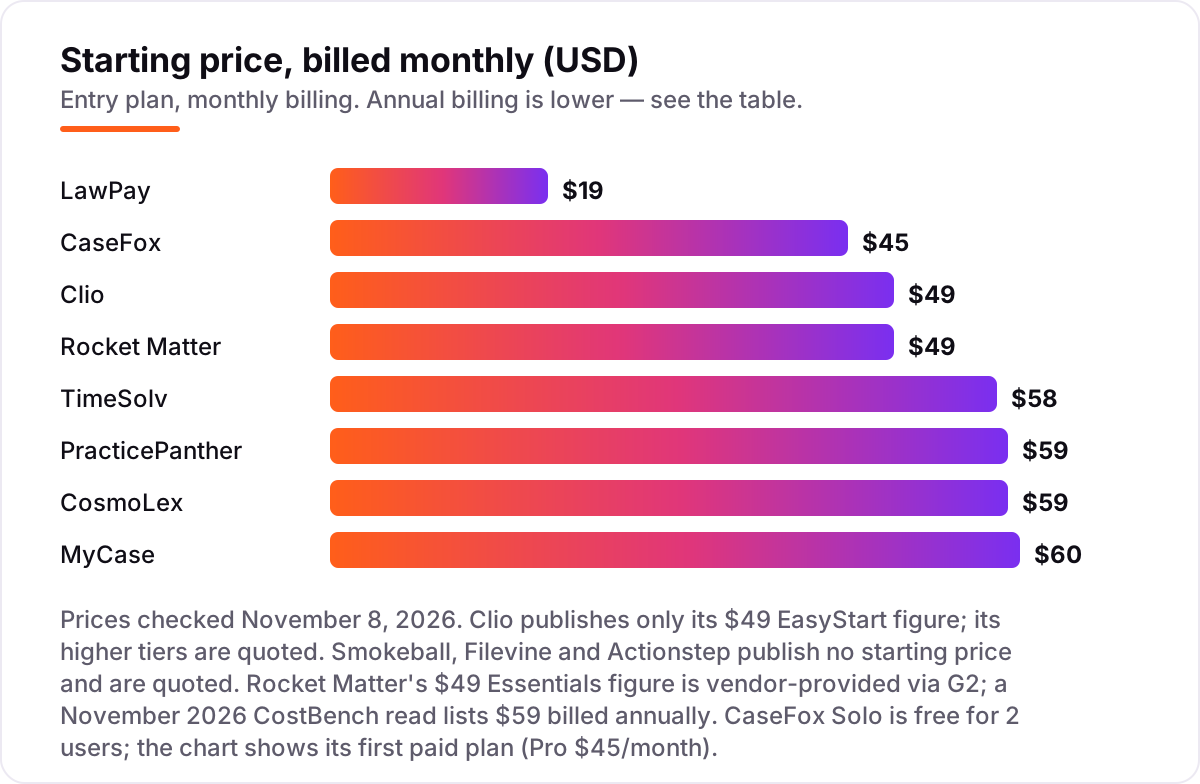
Take a five-person firm that needs matter management, billing and trust accounting. On monthly billing, the subscription costs $19 a month flat for LawPay, $225 for CaseFox Pro, $245 for Clio EasyStart or Rocket Matter Essentials, $290 for TimeSolv, $295 for PracticePanther Solo or CosmoLex Launch, and $300 for MyCase Basic. Two of those numbers need adjusting before they are real: PracticePanther Solo covers one user, so a five-person firm needs Essential at $79 a month billed monthly, or $395 a month — and MyCase Basic has no intake forms or e-signature, so a firm that wants those pays Pro at $120 a user, or $600 a month.
Over a year on annual billing, that same five-person firm pays $2,340 on CaseFox Pro, $2,940 on Clio EasyStart, PracticePanther Solo or CosmoLex Launch, and $3,000 on MyCase Basic — before the tier adjustments above. LawPay costs $228 a year plus processing: at 2.99% plus $0.30 per transaction, $20,000 of card payments a month costs about $598 in processing fees, so the payments layer dwarfs the subscription for a busy firm.
Three costs sit outside every number above. First, the quote-priced tools: Smokeball, Filevine and Actionstep publish no per-user price, so their cost is whatever the sales call produces — get it in writing. Second, implementation: Smokeball reports run $500 to $2,000 per user, and Actionstep estimates $2,000 to $15,000 per firm. Third, add-ons: MyCase Accounting is $39 per user a month, Clio's accounting and intake modules each carry their own fee, and Rocket Matter's CRM onboarding costs $399 once. If the firm also needs to be found online, the visibility tools differ too — see our guide to case management software for law firms.
Annual billing cuts the bill on most tools here: MyCase Basic drops from $60 to $50 a month per user, PracticePanther Solo from $59 to $49, CosmoLex Launch from $59 to $49, and CaseFox Pro from $45 to $39. Clio publishes only the $49 EasyStart figure with no billing basis stated, so there is no annual figure to quote. One more cost to check before you commit: a second office is not a second subscription on most tools here, but every new user is a new seat, so price the paralegals and billing staff too — not just the attorneys.
Know the difference: practice management vs billing-only tools
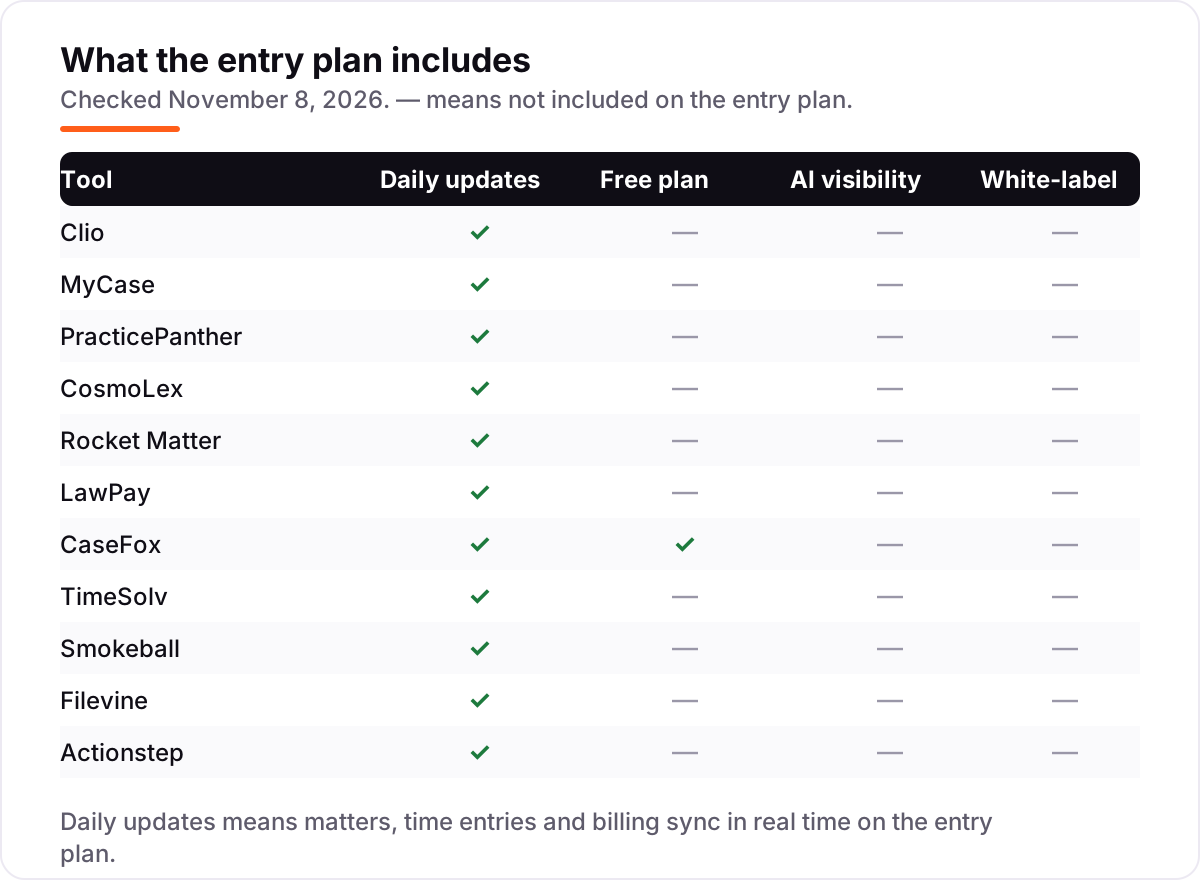
The confusion in this category is between a suite and a specialist. Practice management software runs the whole matter — cases, documents, calendar, intake, billing and trust accounting — while billing software only tracks time and sends invoices. Clio, MyCase, PracticePanther, CosmoLex, Rocket Matter, Smokeball, Filevine and Actionstep are practice managers; TimeSolv is a billing specialist, and LawPay is a payments specialist. A firm needs one practice manager, and it may add one billing or payments specialist beside it — it does not need two practice managers.
There is a second, quieter confusion: a free plan is not the same as a free trial. CaseFox Solo is a free plan — $0 for 2 users, with no expiry — while Clio, MyCase and PracticePanther offer trials of 7 to 14 days that end and start charging. A trial is a test drive; a free plan is a permanent home for a tiny firm. If the firm is one or two people, the free plan can carry the first year; if it is five people, the trial is the only free thing on offer.
A third distinction worth knowing is the published price versus the quoted price. PracticePanther, MyCase and CosmoLex publish every tier, so the number on the page is the number on the invoice. Clio publishes one tier, and Smokeball, Filevine and Actionstep publish none, so the number comes from a sales call and can vary by firm size, contract term and negotiation. A quoted price is not a worse price — it is a price you cannot compare without getting it in writing first.
Quick comparison: tool type by need
| Buyer | Best pick | Why |
|---|---|---|
| Solo lawyer on a budget | CaseFox | Free Solo plan for 2 users, Pro is $45/month when you outgrow it |
| Most small firms | Clio | The standard choice everyone knows, from $49/user/month |
| Firm that needs accounting built in | CosmoLex | Full legal ledger in one subscription, from $59/user/month |
| Firm that lives on billing | Rocket Matter | Billing-first design, from $49/user/month |
| Firm that needs payments | LawPay | Trust-compliant card and eCheck payments, $19/month flat |
| High-volume firm | Filevine | Automation and AI at scale, priced by custom quote |
Mistakes to avoid
- Budgeting on the entry tier when you need a higher one. MyCase Basic has no intake forms or e-signature, and PracticePanther Solo covers one user — the tier you actually need can cost double the headline price.
- Treating a quoted price as a list price. Smokeball, Filevine and Actionstep publish no per-user figure, and Clio quotes its higher tiers, so compare written quotes, not roundup figures.
- Forgetting the payments layer. LawPay costs $19 a month, but processing at 2.99% plus $0.30 per transaction is the real cost — on $20,000 of monthly card payments, that is about $598.
- Ignoring implementation. Smokeball and Actionstep charge for setup on top of the subscription, and Filevine implements through partners — budget the first year, not the first month.
- Buying two practice managers. One suite plus one payments tool is the right shape; two suites means paying twice for the same matter file.
How we chose
We checked each vendor's own pricing page on November 8, 2026 and recorded the starting price exactly as shown, including the annual-billing figure where the page lists one, and we ranked the tools by fit for the most common buyer — a small US law firm of one to ten people — not by brand size. Three prices in this list are not vendor-verified: Rocket Matter's $49 Essentials figure is vendor-provided through G2 and conflicts with a November 2026 CostBench read of $59 billed annually, and TimeSolv's $58 figure is vendor-provided through G2. Smokeball, Filevine and Actionstep publish no starting price, so we list them as custom quote rather than repeating a marketplace estimate. Ratings come from fresh G2 pages checked November 8, 2026, except Actionstep, whose G2 page carries no usable rating, so we show none. No vendor paid for a place in this list, and none of the links here are affiliate links.
What to do next
Start with the free plan or trial of your top pick and run one real week of matters through it. Check that the trust ledger reconciles and the invoices your clients receive can actually be paid before you commit to a year. If the firm is sorted but new clients are not finding it, our monthly SEO service handles the visibility side — or compare providers in our guide to document management software for law firms. Once your tools are in place, find out what's holding your rankings back.
Your stack only works if people find you
SerpAstra fixes what keeps your site off page one and makes it easy for AI assistants to recommend.
Get a free audit→Sources we checked (21)
- Clio pricing — clio.com/pricing (checked November 8, 2026)
- MyCase pricing — mycase.com/pricing (checked November 8, 2026)
- PracticePanther pricing — practicepanther.com/pricing (checked November 8, 2026)
- CosmoLex pricing — cosmolex.com/pricing (checked November 8, 2026)
- Rocket Matter pricing — rocketmatter.com/pricing (checked November 8, 2026)
- LawPay pricing — lawpay.com/pricing (checked November 8, 2026)
- CaseFox pricing — casefox.com/pricing (checked November 8, 2026)
- TimeSolv pricing — timesolv.com/pricing (checked November 8, 2026)
- Smokeball pricing — smokeball.com/pricing (checked November 8, 2026)
- Filevine pricing — filevine.com/pricing (checked November 8, 2026)
- Actionstep pricing — actionstep.com/pricing (checked November 8, 2026)
- Clio Manage reviews — g2.com/products/clio-clio-manage/reviews (checked November 8, 2026)
- 8am MyCase reviews — g2.com/products/8am-mycase/reviews (checked November 8, 2026)
- PracticePanther reviews — g2.com/products/paradigm-practicepanther/reviews (checked November 8, 2026)
- CosmoLex reviews — g2.com/products/cosmolex/reviews (checked November 8, 2026)
- Rocket Matter reviews — g2.com/products/rocket-matter/reviews (checked November 8, 2026)
- 8am LawPay reviews — g2.com/products/8am-lawpay/reviews (checked November 8, 2026)
- CaseFox reviews — g2.com/products/casefox/reviews (checked November 8, 2026)
- TimeSolv reviews — g2.com/products/timesolv/reviews (checked November 8, 2026)
- Smokeball reviews — g2.com/products/smokeball/reviews (checked November 8, 2026)
- Filevine reviews — g2.com/products/filevine/reviews (checked November 8, 2026)
Shamim
Founder of SerpAstra
A full-stack SEO and digital marketer who spends most days on Local SEO for dental practices, AI search visibility and lead generation.
Frequently asked questions
What are the best law firms tools?
Clio is the best fit for most firms at $49 per user a month, with the widest integration list and the largest user base. PracticePanther is the better pick when you want every tier published up front, and CosmoLex wins when trust accounting must live in the same system. CaseFox is the best free option.
How much do law firm tools cost?
Published entry prices run from $19 a month flat for LawPay to $60 per user a month for MyCase Basic on monthly billing. A 5-user firm pays $245 to $300 a month on the published entry tiers. Smokeball, Filevine and Actionstep publish no price and quote by sales call, so budget on a written quote.
Is there a free law firm tool?
Yes, one: CaseFox Solo costs $0 for 2 users and includes timekeeping, billing, case management and invoicing. Every other tool here charges from the first user, though most offer a free trial of 7 to 30 days. The free plan is deliberately limited, so expect to move to Pro at $45 a month as the firm grows.
What is the difference between practice management and billing software?
Practice management software runs the whole matter — cases, documents, calendar, intake and billing — while billing software only tracks time and invoices. Clio, MyCase and PracticePanther are practice managers; TimeSolv and LawPay are specialists. Most firms need one practice manager plus a payments tool, not two practice managers.
Do law firm tools include trust accounting?
Most do, but the tier matters. MyCase and CosmoLex include trust accounting on every tier, PracticePanther marks its trust ledger included on all four tiers, and Clio includes it from Essentials. On PracticePanther and Smokeball, the deeper reconciliation features sit on the top tier, so check which tier your state bar rules require.
Can I switch law firm software later?
Yes, but plan the move carefully. Export matters, contacts, time entries, trust balances and open invoices from the old tool, then import them and reconcile the trust account before going live. Switching mid-year means running two systems through billing season, so most firms move at year-end or between cases.
Free SEO and AI visibility audit
Find out what is holding your rankings back
Send us your site. Within 2 business days you get a written audit, an AI visibility check and a short fix list ranked by impact. Free, with no contract attached.
Request my free audit→Related guides
 Local Business & Vertical Software8 Best Case Management Software for Law Firms in 2026, ComparedCompare the 8 best case management software for law firms on published prices, trust accounting and free trials, with prices checked November 7, 2026.Read guide →
 Local Business & Vertical Software8 Best Document Management Software for Law Firms in 2026, ComparedCompare the 8 best document management software for law firms on price, security and matter filing, with every price checked November 7, 2026.Read guide →
 SEO & AI Search9 Best SEO Companies for Law Firms in 20269 best SEO companies for law firms compared on price, focus and fit, with starting prices checked November 1, 2026 and ranked by fit for your firm.Read guide →