
10 Best LinkedIn Analytics Tools in 2026 (Free and Paid, Compared)
Compare the 10 best LinkedIn analytics tools on price, free plans, personal-profile coverage and reporting, with every price checked November 6, 2026.
 Shamim Mia, Founder, SerpAstraLast verified November 6, 202613 min read
We compare pricing pages, documentation and public reviews. We never accept payment for rankings.

Key takeaways
- LinkedIn Analytics is free and covers the basics; Buffer is the cheapest paid step at $6 per channel a month, and Zoho Social follows at $15 a month with a LinkedIn profile and page included.
- The single most important buying factor is whether the tool covers personal profiles: most suites only report on company pages, while LinkedIn-only tools track your personal posts too.
- Per-user pricing is the trap: Hootsuite, Agorapulse and Sprout Social all multiply the headline price by every seat, so a 3-person team pays $237–$297 a month on annual billing.
- Four tools here have free plans — LinkedIn Analytics, Buffer, Zoho Social and Metricool — so you can test real LinkedIn reporting before paying anything.
On this page
Quick comparison
| Tool | Best for | Starting price | Free plan |
|---|---|---|---|
| LinkedIn Analytics | Anyone who wants the baseline LinkedIn numbers free before paying for a third-party tool | Free | Yes (free) |
| Buffer | Solo creators and small brands who want cheap, simple LinkedIn analytics across a few channels | $6/mo | Yes (free plan) |
| Zoho Social | Small businesses already on Zoho who want the cheapest LinkedIn analytics with CRM links | $15/mo | Yes (free plan) |
| Metricool | Freelancers and small teams who manage up to 5 brands and want analytics plus scheduling | $25/mo | Yes (free plan) |
| Later | Visual-first brands that plan LinkedIn alongside Instagram and TikTok from one calendar | $25/mo | Yes (free plan) |
| SocialPilot | Small teams that manage several LinkedIn accounts and want analytics without per-seat pricing | $20/mo | No (14-day trial) |
| Sendible | Agencies that want LinkedIn analytics with unlimited users and a workspace per client | $35/mo | No (14-day trial) |
| Agorapulse | Small agencies that want LinkedIn analytics plus a shared inbox and client-ready reports | $99/mo | Yes (Archie plan) |
| Hootsuite | Mid-size teams that run many LinkedIn profiles and want scheduled reports and listening | $99/mo | No (14-day trial) |
| Sprout Social | Teams that need the deepest LinkedIn reporting, a shared inbox and review management | $99/mo | No (30-day trial) |
Make one of these tools?
We re-check this list every quarter. Send a correction, request a review, or ask about a clearly labeled sponsored spot.
Request a listingThe best linkedin analytics tools

LinkedIn Analytics
Best for: Anyone who wants the baseline LinkedIn numbers free before paying for a third-party tool
LinkedIn Analytics is the free baseline every other tool in this list is measured against, and it costs nothing to use. It lives inside LinkedIn itself, so there is no setup, no connection to break and no data to import. For a company page it shows impressions, reactions, comments, reposts and follower growth, plus visitor and follower demographics by job title, industry, location and seniority.
The limits are what push people to a paid tool. There is no competitor benchmarking, no cross-platform reporting and no way to schedule a report to a client. History is short and exports are basic. Start here anyway: run the native dashboard for a month, learn which post types earn reach, and only pay for a third-party tool once you know which gap you are paying to close.
What we like
- Free with any LinkedIn account — no subscription, no trial, no card
- Built-in audience demographics: job title, industry, location and seniority
- Post-level impressions, reactions, comments and reposts for pages and profiles
- Follower growth and visitor data for company pages, updated daily
Watch out for
- No competitor benchmarking and no cross-platform reporting
- Personal-profile data is limited and history is short
- No exports or scheduled reports without a paid tool

Buffer
Best for: Solo creators and small brands who want cheap, simple LinkedIn analytics across a few channels
Buffer is the cheapest paid way into LinkedIn analytics, and it is the simplest tool in this list to learn. Essentials costs $6 per LinkedIn channel a month, or $5 on annual billing, and covers scheduling plus post analytics with reach, engagement rate and best-time suggestions. The free plan connects 3 channels, so a solo creator can run LinkedIn reporting at $0 until the limits bite.
The trade-off is depth. Buffer tells you how your own posts performed, not how you stack up against competitors, and the per-channel price climbs as you add accounts: three LinkedIn accounts cost $18 a month, not $6. Buy Buffer when you post a few times a week and want clean numbers without a learning curve; buy a dedicated analytics tool when benchmarking and reporting are the job.
What we like
- Cheapest paid entry here at $6 per channel a month, $5 on annual billing
- Clean post analytics with reach, engagement rate and best-time suggestions
- Free plan covers 3 channels, so you can test LinkedIn reporting at $0
- AI Assistant drafts and rewrites posts on the entry plan
Watch out for
- Analytics are basic next to dedicated tools — no competitor benchmarking
- Per-channel pricing adds up fast once you connect many accounts
- Deeper reporting and engagement tools wait for the $12/channel Team plan

Zoho Social
Best for: Small businesses already on Zoho who want the cheapest LinkedIn analytics with CRM links
Zoho Social is the value pick for small businesses that already live in the Zoho world. Standard costs $15 a month, or $10 on annual billing, and covers one brand with a LinkedIn profile and a LinkedIn company page, plus scheduling, 40 AI credits a month and summary reports. The free plan connects 6 channels, so you can check the LinkedIn reporting before spending anything.
The ceiling is the 15-day report window on Standard: anything older needs Professional at $40 a month. One brand and one user are included, so a second teammate or a second brand is an add-on. Pick Zoho Social when the budget is tight and the CRM connection matters; pick Metricool or SocialPilot when you need longer history or more brands in the same price range.
What we like
- Standard covers a LinkedIn profile and a LinkedIn company page for $15 a month
- Free plan connects 6 channels, so LinkedIn reporting can be tested at $0
- 40 AI credits a month on Standard for captions and post ideas
- Connects to Zoho CRM and Desk, so LinkedIn leads flow into the sales tools
Watch out for
- Standard keeps only 15 days of report data — longer history needs Professional
- One brand and one user on Standard; extra members and brands are add-ons
- Reports are summaries, not the deep benchmarking a specialist tool gives

Metricool
Best for: Freelancers and small teams who manage up to 5 brands and want analytics plus scheduling
Metricool is the budget suite in this list: Starter costs $25 a month, or $20 on annual billing, and covers up to 5 brands with scheduling, LinkedIn analytics, competitor tracking and best-time suggestions in one dashboard. The free plan covers 1 brand, so a freelancer can test the full analytics view before paying. It is the cheapest way to get competitor data on LinkedIn.
The price is stepped by brand count, so growing from 5 brands to 10 jumps the bill from $25 to $45 a month on monthly billing. The AI assistant is a paid add-on rather than part of Starter, and approvals and advanced reporting wait for Advanced. Choose Metricool when you manage several brands and want benchmarking on a budget; choose SocialPilot when the team is bigger than the brand count.
What we like
- Strong LinkedIn analytics with competitor tracking and best-time suggestions
- Free plan covers 1 brand, so the analytics can be tested at $0
- Covers scheduling, ads reporting and analytics in one dashboard
- White-label reports available on higher plans for client work
Watch out for
- Price climbs in steps as you add brands — 10 brands costs $45 a month monthly
- AI assistant is a paid add-on, not included on Starter
- Advanced reporting and approvals wait for the Advanced plan

Later
Best for: Visual-first brands that plan LinkedIn alongside Instagram and TikTok from one calendar
Later is built for visual planning, and its LinkedIn analytics ride along with that calendar. Starter costs $25 a month, or $18.75 on annual billing, and one social set covers a LinkedIn profile plus seven other networks, with 30 scheduled posts per profile a month and 3 months of stored analytics. AI captions are included, and the Link in Bio page turns LinkedIn traffic into clicks.
The analytics are the weak spot next to dedicated tools: history stops at 3 months on Starter, and heavy publishers hit the 30-post cap. There is no free plan, only a 14-day trial. Pick Later when LinkedIn is one of several visual channels planned from a single calendar; pick Metricool or Buffer when LinkedIn analytics, not planning, is the reason you are buying.
What we like
- One social set covers a LinkedIn profile plus 7 other networks for $25 a month
- Drag-and-drop calendar with best-time-to-post data for LinkedIn
- AI captions included on Starter, with 5 AI credits a month
- Link in Bio page included for driving LinkedIn traffic to offers
Watch out for
- Starter stores only 3 months of analytics history
- 30 scheduled posts per profile a month caps heavy publishers
- No free plan — only a 14-day trial, and X support ended in 2025

SocialPilot
Best for: Small teams that manage several LinkedIn accounts and want analytics without per-seat pricing
SocialPilot is the flat-rate pick in this list: Essentials costs $20 a month, or $17 on annual billing, and covers 5 social accounts with scheduling, LinkedIn post analytics, bulk scheduling, a content library and the AI Pilot caption writer. Because the price is per account, not per seat, adding a teammate does not raise the bill the way it does on Hootsuite or Sprout Social.
The cap to watch is the 7-account limit: an eighth account forces the next tier, and white-label reports and approvals wait for higher plans too. The analytics are solid for owned posts but not a benchmarking tool. Choose SocialPilot when a small team runs several LinkedIn accounts on a flat budget; choose Sendible when the team keeps growing and unlimited users matter more.
What we like
- Flat $20 a month for 5 accounts — no per-seat multiplier as the team grows
- Post analytics with engagement, reach and best-time data for LinkedIn
- AI Pilot drafts captions and suggests hashtags on the entry plan
- Bulk scheduling and a content library included from Essentials
Watch out for
- Entry plan covers 5 accounts — a sixth account means a higher tier
- White-label reports and approvals wait for higher plans
- LinkedIn analytics sit inside a general suite, not a LinkedIn-only dashboard

Sendible
Best for: Agencies that want LinkedIn analytics with unlimited users and a workspace per client
Sendible attacks the per-seat problem from the opposite side to Hootsuite: every plan includes unlimited users, so the whole team and the clients themselves can log in without the bill moving. Core costs $35 a month, or $29.75 on annual billing, and covers 6 social profiles, one workspace, scheduling, AI credits and standard LinkedIn reports, with a separate workspace per client.
The limit is the profile count: a sixth profile means Standard at $40 a month, and white-labeling is a paid add-on on higher plans. The analytics are standard reports rather than deep benchmarking. Pick Sendible when the team is large and the client count is growing; pick SocialPilot when 5 accounts and a $20 flat price cover the whole job.
What we like
- Unlimited users on every plan — the whole team and clients log in at no extra cost
- LinkedIn analytics with standard reports you can schedule and share
- AI credits included on Core for captions and post ideas
- Client workspaces keep each brand's LinkedIn data separate
Watch out for
- Core covers only 6 social profiles — more profiles need Plus at $99 a month
- White-labeling is a paid add-on on higher plans, not included on Core
- No native mobile app is stated, so on-the-go reporting is limited

Agorapulse
Best for: Small agencies that want LinkedIn analytics plus a shared inbox and client-ready reports
Agorapulse pairs LinkedIn analytics with the shared inbox agencies actually live in: comments and messages sit next to the numbers, and reports can be labeled and exported for clients. Standard costs $99 per user a month, or $79 on annual billing, and covers 10 social profiles, publishing, the unified inbox, basic reports and an AI writing assistant, with a 30-day trial and no card required.
The bill multiplies by every user, so a two-person team pays $198 a month on monthly billing before adding a single profile past the included ten. The old free plan ended on July 6, 2026, leaving only the limited free Archie plan. Choose Agorapulse when inbox plus analytics in one login is worth the per-seat price; choose Sendible when unlimited users matter more than the inbox.
What we like
- LinkedIn analytics with labeled reports you can export for clients
- Unified inbox for LinkedIn comments and messages alongside analytics
- AI writing assistant included on the Standard plan
- 30-day free trial with no credit card required
Watch out for
- Per-user pricing: a second person doubles the $99 monthly bill
- Only 10 social profiles included — extras cost $15 a month each
- The free plan ended July 6, 2026; only the limited free Archie plan remains

Hootsuite
Best for: Mid-size teams that run many LinkedIn profiles and want scheduled reports and listening
Hootsuite is the established suite in this list, and its LinkedIn reporting is built for teams that manage many profiles. Standard costs $149 per user a month, or $99 on annual billing, and covers up to 10 social accounts with scheduling, analytics, streams and the OwlyWriter AI writer. Professional adds unlimited accounts, automation and custom reports with 90-day trend forecasts.
The price is per user, so a 3-person team pays $297 a month on annual billing for Standard, and approvals wait for Advanced at $399 a user. There is no free plan, only a 14-day trial. Buy Hootsuite when the team is big enough to need streams, listening and scheduled reports in one place; buy Sprout Social when reporting quality matters more than account count.
What we like
- LinkedIn analytics with custom reports and 90-day trend forecasts on Professional
- Streams and listening track LinkedIn mentions alongside your own posts
- OwlyWriter AI drafts posts and suggests captions on the entry plan
- Largest review base here — 7,413 G2 reviews at 4.3 out of 5
Watch out for
- Per-user pricing makes a 3-person team $297 a month on annual billing
- Approvals and advanced reporting wait for Advanced at $399 a user
- No free plan — only a 14-day trial

Sprout Social
Best for: Teams that need the deepest LinkedIn reporting, a shared inbox and review management
Sprout Social has the strongest reporting in this list, and that is why teams pay its per-seat price. Essentials costs $99 a seat a month, or $79 on annual billing, and covers 5 social profiles with scheduling, LinkedIn reporting, the Smart Inbox and AI Assist. The reports export ready to present, which matters when the numbers go to a client or a boss rather than staying in the marketing team.
The caps are the thing to price before you buy: a sixth profile forces Professional at $299 a seat, and listening, Premium Analytics and Advocacy are all quoted add-ons. A 3-seat team pays $237 a month on annual billing for Essentials. Choose Sprout Social when the report itself is the deliverable; choose Hootsuite when the team needs more accounts per seat.
What we like
- Strongest reporting in this list, with presentation-ready LinkedIn reports
- Smart Inbox brings LinkedIn comments and messages into the analytics view
- AI Assist drafts replies and summarizes reports on every plan
- 30-day free trial with no credit card required
Watch out for
- Per-seat pricing: a 3-seat team pays $237 a month on annual billing
- Only 5 social profiles on Essentials — a sixth profile forces Professional
- Listening, Premium Analytics and Advocacy are quoted add-ons, not included
The best linkedin analytics tools answer one question: which of your LinkedIn posts actually earned attention, and why. LinkedIn's own dashboard answers it for free, and the nine paid tools below add the things it cannot do — competitor benchmarking, longer history, scheduled reports and analytics for personal profiles. We ranked them by fit for the most common buyer, a marketer or creator who posts a few times a week, and every price was checked on November 6, 2026.
How to choose the best linkedin analytics tools
- Start with personal profiles vs company pages. Most suites report mainly on company pages; if your personal posts are the audience, you need a tool that tracks them.
- Count the seats before you count the features. Hootsuite, Agorapulse and Sprout Social charge per user or seat, so the headline price multiplies with the team.
- Check the history window. Later keeps 3 months on Starter and Zoho Social keeps 15 days of reports; if you need year-on-year comparisons, that limit decides the plan.
- Decide whether benchmarking matters. Only the dedicated analytics tools compare you against competitors; the suites mostly report on your own accounts.
- Use the free plan first. Four tools here cost $0 to test, which is enough to learn whether the reporting is worth paying for.
LinkedIn is one channel in a wider stack, not the whole strategy. If the business also needs to be found on Google, our monthly SEO service handles the visibility side. And when LinkedIn posts link out to your site, tag them with the free UTM builder tool so the clicks show up properly in your analytics instead of arriving as unattributed traffic.
Whatever you shortlist, try it with your real account before you pay. The free plans and trials in this list are long enough to connect a genuine LinkedIn page, publish a few posts and read the reports — and that week tells you more than any review can. Check two things in the trial: that the numbers match LinkedIn's own dashboard, and that the report you would send a client is actually readable.
LinkedIn analytics pricing: what you will actually pay
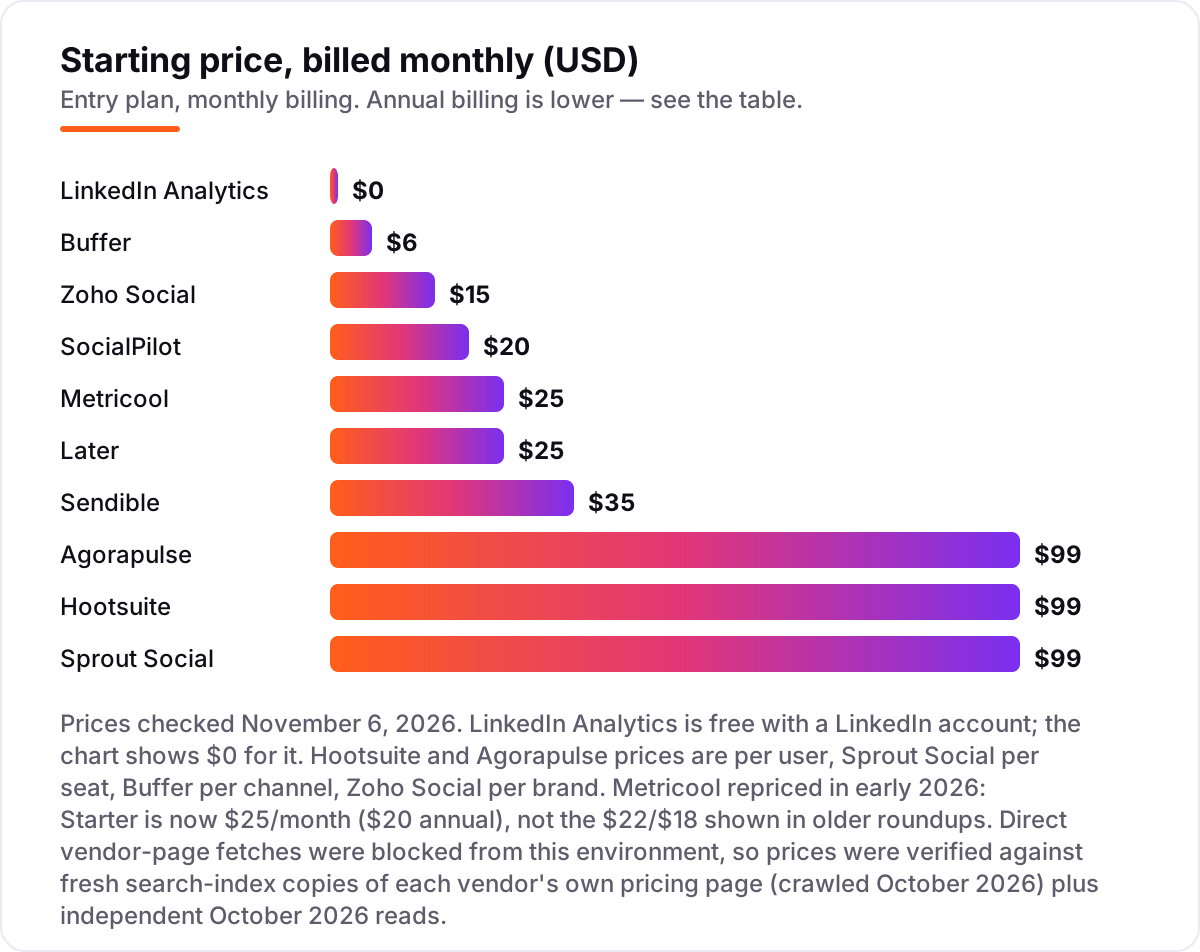
Take one person managing a single LinkedIn company page and a personal profile. On list prices, the subscription costs $0 on LinkedIn Analytics, $12 a month on Buffer (two channels at $6 each), $15 on Zoho Social Standard, $25 on Metricool Starter or Later Starter, $20 on SocialPilot Essentials, $35 on Sendible Core, $99 on Agorapulse Standard or Sprout Social Essentials, and $149 on Hootsuite Standard. Two of those numbers need adjusting before they are real: Buffer charges per channel, so the personal profile and the page are two channels, and Zoho Social Standard covers both in one brand at $15.
Over a year on annual billing, that is $0 on LinkedIn Analytics, $120 on Buffer, $120 on Zoho Social, $240 on Metricool, $225 on Later, $204 on SocialPilot, $357 on Sendible, $948 on Agorapulse or Sprout Social, and $1,188 on Hootsuite. The same one person and the same two LinkedIn accounts cost $120 a year at the cheap end and $1,188 at the dear end — a $1,068 gap that comes from per-seat pricing and reporting depth, not from the LinkedIn data itself.
A team changes the math completely. Three people on Hootsuite Standard pay $297 a month on annual billing (3 users at $99), and three seats on Sprout Social Essentials cost $237 a month (3 seats at $79). The same three people on Sendible Core pay $35 a month flat, because Sendible charges by profile, not by user, and on SocialPilot Essentials they pay $20. If the team is bigger than the account count, flat pricing wins by a wide margin; if the account count is bigger than the team, per-channel pricing wins instead.
Know the difference: personal profiles vs company pages
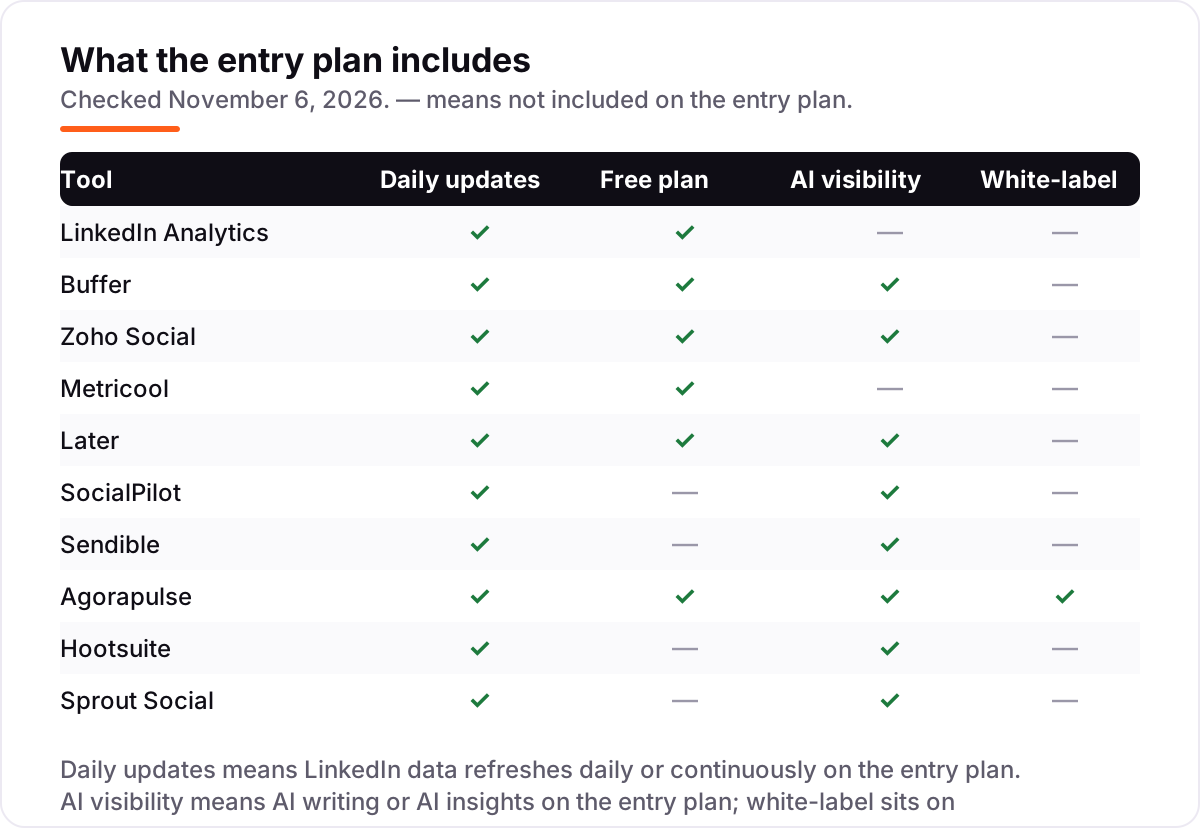
The biggest confusion in this category is which LinkedIn presence a tool actually measures. Most suites were built for company pages: they connect the page, report its impressions and follower growth, and stop there. Personal profiles are a different data source, and many tools either skip them or charge per profile to include them. If your audience follows you rather than your company page, a company-page-only tool will show you almost nothing useful.
There is a second, quieter confusion: scheduling tools are not analytics tools. A scheduler tells you when a post went out and how it performed afterwards; an analytics tool tells you why it performed that way, how it compares with competitors and which post types to repeat. All ten tools in this list report on performance, but only the dedicated analytics tools benchmark you against anyone else — the suites mostly report on your own accounts.
A third distinction worth knowing is the connection method. Tools that connect through LinkedIn's official API, such as Buffer, Hootsuite and Sprout Social, are the safest choice for an account you depend on. Some LinkedIn-only tools connect through a browser extension and your own login session instead, which LinkedIn has flagged in the past — Shield Analytics wound down in May 2026 after LinkedIn made clear its session-based setup could not continue. Check how a tool connects before you hand it your account.
Quick comparison: tool type by need
| Buyer | Best pick | Why |
|---|---|---|
| Just starting out, no budget | LinkedIn Analytics | Free, built in, covers post and audience data |
| Solo creator on a tight budget | Buffer | LinkedIn analytics from $6 per channel a month |
| Small business already on Zoho | Zoho Social | Profile and page analytics for $15 a month |
| Freelancer with several brands | Metricool | Competitor tracking for up to 5 brands at $25 a month |
| Team that hates per-seat pricing | Sendible | Unlimited users, Core is $35 a month flat |
| Team that needs the best reports | Sprout Social | Presentation-ready LinkedIn reports from $99 a seat a month |
Mistakes to avoid
- Paying before checking the free dashboard. LinkedIn Analytics covers post performance and audience data at $0. If it answers your question, a paid tool adds nothing.
- Budgeting on the headline price, not the seat count. Hootsuite Standard is $99 a user a month on annual billing, so a 3-person team pays $297, not $99.
- Buying a company-page tool for a personal brand. Most suites report mainly on pages. If your personal posts are the audience, confirm personal-profile coverage before you pay.
- Ignoring the history window. Later keeps 3 months of analytics on Starter and Zoho Social keeps 15 days of reports. If you need year-on-year numbers, that limit decides the plan.
- Connecting through an extension without checking the method. API-connected tools are the safe default; session-based tools carry account risk, so read the connection method first.
How we chose
We checked each vendor's own pricing page and recorded the starting price exactly as shown, including the annual-billing figure where the page lists one, and we ranked the tools by fit for the most common buyer — a marketer or creator who posts on LinkedIn a few times a week — not by brand size. Direct fetches of the vendor pages were blocked from this environment, so prices were verified against fresh search-index copies of each vendor's own pricing page, crawled in October 2026, plus independent October 2026 reads; the comparison-table caption states the check date only. Ratings come from fresh search-index copies of the exact G2 pages, crawled October 28 to November 4, 2026. LinkedIn Analytics carries no rating because there is no G2 listing for LinkedIn's built-in analytics. Shield Analytics and Inlytics were left out because they no longer exist as standalone products — Shield wound down in May 2026 and Inlytics was acquired and shut down. No vendor paid for a place in this list, and none of the links here are affiliate links.
What to do next
Start with LinkedIn Analytics for a month and learn which of your posts actually earn reach. Then trial the paid tool that matches the gap you found — Buffer or Zoho Social for cheap reporting, Metricool for competitor tracking, Sendible when the team is growing, Sprout Social when the report is the deliverable. If the LinkedIn numbers are sorted but new customers are not finding you on Google, our monthly SEO service handles the visibility side — or compare providers in our guide to B2B social media platforms. Once your tools are in place, find out what's holding your rankings back.
Your stack only works if people find you
SerpAstra fixes what keeps your site off page one and makes it easy for AI assistants to recommend.
Get a free audit→Sources we checked (19)
- LinkedIn — linkedin.com (checked November 6, 2026)
- Buffer pricing — buffer.com/pricing (checked November 6, 2026)
- Zoho Social pricing — zoho.com/social/pricing.html (checked November 6, 2026)
- Metricool pricing — metricool.com/pricing (checked November 6, 2026)
- Later pricing — later.com/pricing (checked November 6, 2026)
- SocialPilot pricing — socialpilot.co/pricing (checked November 6, 2026)
- Sendible pricing — sendible.com/pricing (checked November 6, 2026)
- Agorapulse pricing — agorapulse.com/pricing (checked November 6, 2026)
- Hootsuite pricing — hootsuite.com/pricing (checked November 6, 2026)
- Sprout Social pricing — sproutsocial.com/pricing (checked November 6, 2026)
- Buffer on G2 — g2.com/products/buffer/reviews (checked November 6, 2026)
- Zoho Social on G2 — g2.com/products/zoho-social/reviews (checked November 6, 2026)
- Metricool on G2 — g2.com/products/metricool/reviews (checked November 6, 2026)
- Later on G2 — g2.com/products/later/reviews (checked November 6, 2026)
- SocialPilot on G2 — g2.com/products/socialpilot/reviews (checked November 6, 2026)
- Sendible on G2 — g2.com/products/sendible/reviews (checked November 6, 2026)
- Agorapulse on G2 — g2.com/products/agorapulse/reviews (checked November 6, 2026)
- Hootsuite on G2 — g2.com/products/hootsuite/reviews (checked November 6, 2026)
- Sprout Social on G2 — g2.com/products/sprout-social/reviews (checked November 6, 2026)
Shamim
Founder of SerpAstra
A full-stack SEO and digital marketer who spends most days on Local SEO for dental practices, AI search visibility and lead generation.
Frequently asked questions
What is the best LinkedIn analytics tool?
LinkedIn Analytics is the best starting point because it is free and shows real post and audience data. Buffer is the best cheap paid step at $6 per channel a month. Sprout Social has the strongest reporting for teams, while Metricool is the best budget pick for competitor tracking across up to 5 brands.
Is there a free LinkedIn analytics tool?
Yes. LinkedIn Analytics is free with any LinkedIn account and covers post impressions, engagement and audience demographics. Buffer, Zoho Social and Metricool also have free plans with limited LinkedIn reporting. The free plans are enough to learn what works before paying for benchmarking or scheduled reports.
How much do LinkedIn analytics tools cost?
Entry prices run from $0 to $149 a month. Buffer starts at $6 per channel, Zoho Social at $15, Metricool and Later at $25, SocialPilot at $20 and Sendible at $35. Agorapulse and Sprout Social start at $99 a month per user or seat, and Hootsuite at $149 monthly or $99 on annual billing.
Can LinkedIn analytics tools track personal profiles?
It depends on the tool. LinkedIn Analytics shows basic data for personal profiles, and LinkedIn-only tools track personal posts in depth. Most general suites report mainly on company pages, so check the plan page before you buy if personal-profile analytics are the reason you need the tool.
What is the difference between LinkedIn native analytics and a third-party tool?
LinkedIn Analytics shows your own posts, audience and follower growth for free, with no competitor data and no scheduled reports. Third-party tools add competitor benchmarking, cross-platform reporting, longer history, exports and scheduling. Pay for one only when you need a feature the free dashboard does not have.
Do LinkedIn analytics tools work for company pages?
Yes, every tool in this list covers LinkedIn company pages. LinkedIn Analytics, Buffer, Zoho Social, Metricool, Later, SocialPilot, Sendible, Agorapulse, Hootsuite and Sprout Social all report page impressions, engagement and follower growth. Check the profile limit on your plan, since most suites cap how many pages you can connect.
Are third-party LinkedIn analytics tools safe to use?
Tools that connect through LinkedIn's official API, such as Buffer, Hootsuite and Sprout Social, are the safest choice. Some LinkedIn-only tools use browser extensions and cookie-based logins, which LinkedIn has flagged in the past. Read the vendor's connection method before you connect an account you depend on.
Free SEO and AI visibility audit
Find out what is holding your rankings back
Send us your site. Within 2 business days you get a written audit, an AI visibility check and a short fix list ranked by impact. Free, with no contract attached.
Request my free audit→Related guides
 Email, SMS & Social Media9 Best AI Social Media Management Tools in 2026, ComparedCompare the 9 best ai social media management tools on price, AI writing, scheduling and analytics, with every price checked November 5, 2026.Read guide →
 Digital Marketing & Ads10 Best B2B Social Media Platforms for 2026 (Pros, Cons and Pricing)Compare the 10 best b2b social media platforms for B2B teams on price, free plans, approvals and CRM attribution, with every price checked November 5, 2026.Read guide →
 Digital Marketing & Ads10 Best Instagram Marketing Tools in 2026 (Free and Paid, Compared)Compare the 10 best instagram marketing tools in 2026 on price, scheduling, analytics and free plans, with real prices checked on November 4, 2026.Read guide →