
9 Best AI Social Media Management Tools in 2026, Compared
Compare the 9 best ai social media management tools on price, AI writing, scheduling and analytics, with every price checked November 5, 2026.
 Shamim Mia, Founder, SerpAstraLast verified November 5, 202613 min read
We compare pricing pages, documentation and public reviews. We never accept payment for rankings.

Key takeaways
- Hootsuite is the most established AI-assisted suite at $99/user/month billed annually, while Buffer is the cheapest way in at $6 per channel a month, with a free plan that already includes its AI Assistant.
- The AI that matters most is the AI on the plan you actually buy: Sprout Social's AI Assist starts on Professional, while Agorapulse, Loomly and Buffer include AI writing on their entry plans.
- The billing unit decides the real price more than the headline does: per-user tools double with a second teammate, per-channel tools grow with every profile, and flat plans stay flat until you add users.
- Free plans are real but narrow: Buffer covers 3 channels, Metricool covers 50 posts a month, and Agorapulse's free Archie plan covers AI repurposing on three networks only.
On this page
Quick comparison
| Tool | Best for | Starting price | Free plan |
|---|---|---|---|
| Hootsuite | Teams that want the most established AI-assisted social suite, with scheduling, inbox, listening and reporting in one place | $99/mo | No (14-day trial) |
| Sprout Social | Small teams that want the strongest reporting and Smart Inbox in this list and can pay per seat | $99/mo | No (30-day trial) |
| Agorapulse | Teams that want AI writing on every paid plan plus a unified inbox and ROI reporting | $99/mo | Yes (Archie plan) |
| Later | Visual brands built around Instagram, TikTok and Pinterest that plan by how the feed will look | $25/mo | Yes (free plan) |
| Buffer | Solo creators and small businesses that want the cheapest honest AI-assisted scheduler and pay only for channels used | $6/mo/channel | Yes (free plan) |
| Metricool | Data-driven freelancers and small teams that want deep analytics, competitor tracking and AI help at a low flat price | $25/mo | Yes (free plan) |
| SocialPilot | Agencies and multi-client teams that want flat pricing that does not climb per seat or per brand | $20/mo | No (14-day trial) |
| Sendible | Individuals and small teams that want a unified inbox, AI writing help and six profiles for one flat price | $35/mo | No (14-day trial) |
| Loomly | Small teams that need approval workflows, social listening and AI analytics in one calendar-first workspace | $65/mo | No (free trial) |
Make one of these tools?
We re-check this list every quarter. Send a correction, request a review, or ask about a clearly labeled sponsored spot.
Request a listingThe best ai social media management tools

Hootsuite
Best for: Teams that want the most established AI-assisted social suite, with scheduling, inbox, listening and reporting in one place
Hootsuite is the established name in this list, and Standard covers the whole job in one subscription: scheduling, a unified inbox, benchmarking and OwlyWriter AI, which drafts captions and hashtags inside the composer instead of in a separate app. Standard costs $99 per user a month billed annually and covers 10 social accounts, so a solo manager with a handful of profiles gets the full suite at one price.
The trade-off is the billing unit. Every extra teammate costs another $99 a month billed annually, so a three-person team pays three times the headline price, and approval workflows wait for the Advanced plan. Buy Hootsuite when one person runs many profiles and wants the deepest network coverage; buy Agorapulse or Buffer when the team is bigger or the budget is smaller.
What we like
- OwlyWriter AI writes captions and hashtags inside the composer, so drafting is part of scheduling rather than a separate app
- The widest network coverage here, with a unified inbox and social listening in the same workspace
- Benchmarking against competitors and scheduled reporting come standard on the entry plan
- A deep integration library connects the suite to CRM, design and analytics tools
Watch out for
- Per-user pricing doubles the bill for a second teammate, with no discount for extra seats
- No free plan, only a 14-day trial, so the cheapest way in is $99/user/month billed annually
- Advanced analytics and approval workflows wait for the higher-priced Professional and Advanced plans

Sprout Social
Best for: Small teams that want the strongest reporting and Smart Inbox in this list and can pay per seat
Sprout Social is the reporting pick in this list. Essentials costs $99 per seat a month billed monthly, or $79 billed annually, and covers 5 social profiles with a publishing calendar, Optimal Send Times and profile and post-level reporting that exports ready to present. The Smart Inbox is the other reason to buy it: messages and comments from every network land in one queue instead of five apps.
The catch is the AI gating. AI Assist, the tool that actually writes captions, starts on Professional, so Essentials buyers get data-driven timing but not AI drafting. Listening is a paid add-on too. Buy Sprout Social when reporting quality justifies per-seat pricing; buy Agorapulse when AI writing on the entry plan matters more.
What we like
- The strongest reporting in this list, with profile and post-level reports that export ready to present
- Smart Inbox pulls messages and comments from every network into one queue
- Optimal Send Times uses audience data to suggest when each profile's followers are active
- 30-day free trial with no credit card required, the longest trial here
Watch out for
- AI Assist, the caption-writing assistant, starts on Professional, not on Essentials
- Per-seat pricing makes a three-person team cost three times the headline price
- Social listening is a paid add-on, not part of the entry plan

Agorapulse
Best for: Teams that want AI writing on every paid plan plus a unified inbox and ROI reporting
Agorapulse is the AI-everywhere pick in this list. Standard costs $99 per user a month billed monthly, or $79 billed annually, and covers 10 social profiles with unlimited scheduling, a unified inbox, basic reports and AI Sidekick, the writing assistant that is included on every paid plan rather than held for a higher tier. The free Archie plan goes further, giving solo users AI repurposing and scheduling at $0.
The limits are the usual per-seat ones. A second teammate doubles the bill, listening starts on Professional, and the ROI and competitor reports that agencies want wait for Advanced. Buy Agorapulse when you want AI writing from the first paid dollar; buy Sprout Social when reporting depth outranks AI drafting.
What we like
- AI Sidekick is included on every paid plan, not gated to a higher tier
- The free Archie plan gives solo users AI repurposing and scheduling at $0
- Unified inbox and Google Analytics reporting tie social activity to website traffic
- 30-day free trial with no credit card required
Watch out for
- Per-user pricing means each extra teammate costs another $99/month billed monthly
- Social listening starts on Professional, and ROI and competitor reports wait for Advanced
- White-label reporting is a higher-tier feature, not part of Standard

Later
Best for: Visual brands built around Instagram, TikTok and Pinterest that plan by how the feed will look
Later is built for brands that plan visually. Starter costs $25 a month billed monthly, or $18.75 billed annually, and covers one social set of up to 8 profiles with a drag-and-drop grid planner that shows how posts will look on the feed before they go out. AI caption and hashtag suggestions sit inside the composer, and Link in Bio turns the bio link into a landing page.
The caps are what to watch. Starter allows 30 posts per profile a month, analytics history covers only three months, and X scheduling is not offered at all, so a team active on X needs a second tool. Buy Later when Instagram, TikTok and Pinterest are the business; buy Buffer or Metricool when X is in the mix.
What we like
- The visual planner shows how posts will look on the grid before anything is scheduled
- AI caption and hashtag suggestions sit inside the composer on every paid plan
- Link in Bio turns the Instagram bio link into a shoppable landing page
- Strongest visual-first coverage for Instagram, TikTok and Pinterest in this list
Watch out for
- No free plan remains, and the Starter post cap of 30 per profile a month binds busy accounts
- X scheduling is not offered, so teams active on X need a second tool
- Analytics history on Starter covers only three months

Buffer
Best for: Solo creators and small businesses that want the cheapest honest AI-assisted scheduler and pay only for channels used
Buffer is the budget pick, and the maths is honest: Essentials costs $6 per channel a month billed monthly, or $5 billed annually, with unlimited posts, the AI Assistant, advanced analytics and exports. The free plan is the only one here that includes AI help at $0, covering 3 channels with 10 scheduled posts each, which is enough for a creator starting out.
The catch is the unit. Five channels cost $30 a month, ten cost $60, and the analytics stay shallower than Sprout Social or Agorapulse, with no listening built in. Approval workflows wait for Team at $12 per channel. Buy Buffer when the channel count is small and the budget is smaller; buy Metricool when analytics depth matters more.
What we like
- The only free plan here that includes the AI Assistant, on up to 3 channels at $0
- Per-channel pricing means a creator with few channels pays very little
- The cleanest composer in this list, with AI replies and first-comment scheduling
- No per-seat charge on Team, which covers unlimited team members
Watch out for
- The bill grows with every channel, so a ten-channel setup costs $60/month on Essentials
- Analytics are shallower than Sprout Social or Agorapulse, with no listening built in
- Approval workflows wait for the Team plan at $12 per channel a month

Metricool
Best for: Data-driven freelancers and small teams that want deep analytics, competitor tracking and AI help at a low flat price
Metricool is the analytics-value pick. Starter costs $25 a month billed monthly, or $20 billed annually, and covers up to 10 brands with unlimited scheduling, full analytics history, competitor tracking for up to 100 profiles and AI credits for captions and ideas. Per-brand pricing with unlimited users means adding a teammate costs nothing extra, which is rare in this list.
The add-ons are the thing to price. X access costs $10 per account a month on top, LinkedIn is excluded from the free plan, and approvals and custom report templates wait for Advanced. Buy Metricool when analytics and competitor tracking drive the decision; buy Buffer when the feed is small and simplicity wins.
What we like
- Deep native analytics with competitor tracking for up to 100 profiles on the entry plan
- A genuinely free plan covers 50 posts a month, with no credit card required
- Per-brand pricing with unlimited users, so adding teammates costs nothing extra
- AI credits for captions and content ideas are included on Starter
Watch out for
- X access costs $10 per account a month on top of the plan, and LinkedIn needs Starter or above
- Team approvals and custom report templates wait for the Advanced plan at $53 a month billed annually
- White-label reporting is reserved for the Custom plan

SocialPilot
Best for: Agencies and multi-client teams that want flat pricing that does not climb per seat or per brand
SocialPilot is the flat-price agency pick. Essentials costs $20 a month billed monthly, or $17 billed annually, and covers 5 social accounts with bulk scheduling, AI Pilot for captions and ideas and analytics in the same plan. The flat price is the point: unlike per-seat tools, the bill does not climb with every client or profile added.
The gaps are the free tier and the AI depth. There is no free plan, only a 14-day trial, extra team members cost $5 a month each, and there is no listening or advanced AI analytics on Essentials. Buy SocialPilot when post volume across clients is the job; buy Agorapulse when AI writing quality matters more.
What we like
- Flat per-plan pricing, so the bill does not climb with every seat or client added
- Bulk scheduling and AI Pilot handle high post volumes without manual entry
- White-label client reports are available from the Premium plan upward
- A social inbox and analytics sit in the same plan as publishing
Watch out for
- No free plan, only a 14-day trial, so there is no $0 way to test it long-term
- Extra team members cost $5 a month each on top of the plan price
- AI features are practical rather than deep, with no listening or advanced AI analytics on Essentials

Sendible
Best for: Individuals and small teams that want a unified inbox, AI writing help and six profiles for one flat price
Sendible is the small-team flat-price pick. Core costs $35 a month billed monthly, or $29.75 billed annually, and covers 6 social profiles with unlimited scheduling, a unified inbox, AI Content Assist and reports, all for one price with no per-channel or per-seat arithmetic to do. Smart queues recycle evergreen content, which suits teams that post the same offers on a loop.
The cost cliff is the team. Adding users costs extra, so a three-person setup raises the bill, and white-label dashboards start at $299 a month. Buy Sendible when one or two people run up to six profiles; buy SocialPilot when the client list keeps growing.
What we like
- Six profiles for one flat $35 a month, with no per-channel or per-seat arithmetic
- AI Content Assist and a unified inbox are included on the entry plan
- Unlimited scheduling with smart queues that recycle evergreen content
- Client dashboards and white-label options scale the same account into agency work
Watch out for
- No free plan, only a 14-day trial, so the cheapest way in is the full $35 a month
- Adding users costs extra, which adds up for teams
- White-label dashboards start at $299 a month, far above the entry plan

Loomly
Best for: Small teams that need approval workflows, social listening and AI analytics in one calendar-first workspace
Loomly is the approval-workflow pick. Starter costs $65 a month billed monthly, or $49 billed annually, and covers 3 users and 12 social accounts with unlimited calendars, approval workflows, AI Assistant and social listening on every plan, with no add-on to buy. The calendar-first workspace keeps drafts, approvals and published posts in one view, which is what small teams actually argue about.
The price is the objection: $65 a month billed monthly is the highest entry price here, and reviewers note Instagram limits around pre-scheduling tags and music. Buy Loomly when approvals and listening must sit in the entry plan; buy Later or Buffer when the team is one person and the budget is tight.
What we like
- AI Assistant and social listening are included on every plan, with no add-on to buy
- Approval workflows with comments and role permissions are built into the entry plan
- Three users and 12 accounts on Starter suit a small team without per-seat billing
- The calendar-first workspace keeps drafts, approvals and published posts in one view
Watch out for
- The highest entry price in this list at $65 a month billed monthly
- Reviewers note Instagram limits, including pre-scheduling tags and music
- Analytics are solid but shallower than Sprout Social for campaign-level reporting
The best ai social media management tools do one job well: they turn a week's worth of posting into an afternoon's work, with AI drafting the captions, the calendar holding the plan, and analytics showing what worked. We ranked the nine tools below by fit for the most common buyer — a small team or solo creator posting across several networks — starting with the established suites and ending with the approval-first option, and every price was checked on the vendor's own pricing page on November 5, 2026.
How to choose the best ai social media management tools
- Check the AI on the plan you will buy, not the flagship plan. Sprout Social holds AI Assist for Professional, while Agorapulse, Loomly and Buffer include AI writing on their entry plans. The demo always shows the top tier.
- Count the billing unit, not just the price. Per-user tools double with a second teammate, per-channel tools grow with every profile, and flat plans stay flat until you add users. Price your real team and profile count.
- Match the tool to your busiest network. Later is strongest on Instagram, TikTok and Pinterest but does not schedule to X, while Metricool charges extra for X and Hootsuite covers the widest range.
- Decide who approves posts. If a client or manager must sign off, Loomly and Agorapulse build approvals in; Buffer and Later assume one person posts.
- Start on the free plan or trial with real posts. Run one genuine week — your captions, your images, your networks — and check that AI drafts sound like you and that posts actually publish on time.
Social management is one system in your stack, not the whole stack. If the business also needs to be found in search, our guide to AI search optimization covers the visibility side, and our guide to AI tools for social media content creation covers the content side. And before you publish new pages for the services you sell, run your titles through the free SERP snippet preview tool — it shows exactly how the title and description will look in Google.
Whatever you shortlist, try it with real content before you pay. The free plans and trials in this list are long enough to run one genuine week — your captions, your images, your networks — and that week tells you more than any review can. Check two things in the trial: that AI drafts sound like your brand after light editing, and that scheduled posts publish without manual fixes. Every tool here lets you cancel monthly, so there is no reason to commit to a year before the trial has proven itself.
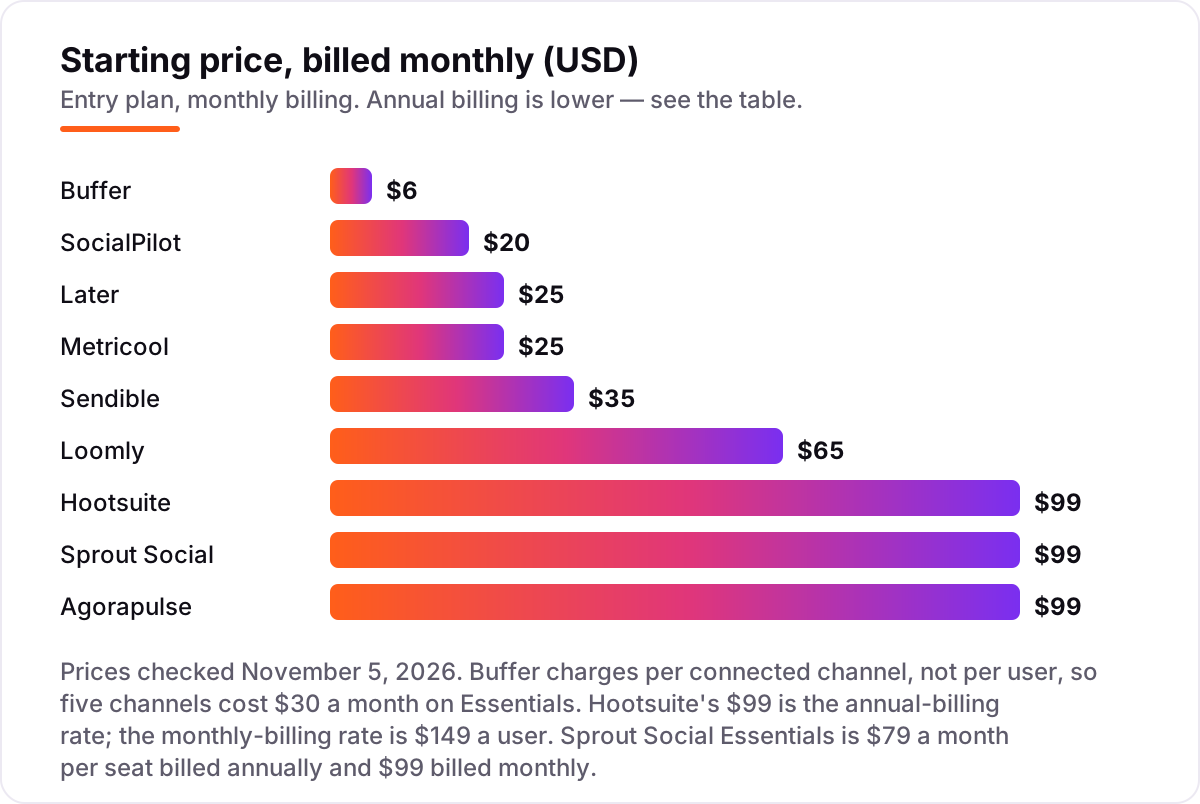
Social media management pricing: what you will actually pay
Take a solo creator with five profiles posting daily. On list prices, the subscription costs $25 a month on Later or Metricool, $35 on Sendible, $30 on Buffer at $6 per channel or $20 on SocialPilot flat, $65 on Loomly, and $99 on Hootsuite billed annually, Sprout Social or Agorapulse billed monthly. Two of those numbers need adjusting before they are real: Metricool charges $10 a month extra per X account, so a creator active on X pays $35, and Hootsuite's $99 is the annual-billing rate, paid upfront as $1,188 a year.
Over a year, that is $225 on Later billed annually, $240 on Metricool billed annually, $300 on Buffer at $5 per channel or Sendible billed annually, $204 on SocialPilot billed annually, $588 on Loomly billed annually, $948 on Sprout Social or Agorapulse billed annually, and $1,188 on Hootsuite billed annually. The same solo creator and the same five profiles cost $225 a year at the cheap end and $1,188 at the dear end — a $963 gap that comes entirely from billing units and annual discounts, not from features.
Three costs sit outside every number above. First, the team: a second seat doubles Hootsuite, Sprout Social and Agorapulse, while Buffer Team and Metricool add users far more cheaply. Second, the add-ons: listening on Sprout Social, X accounts on Metricool and white-label on Sendible all cost extra. Third, the AI limits: credit allowances and gated assistants mean the AI you demoed may not be the AI on the plan you bought, so check the entry plan's AI features before paying.
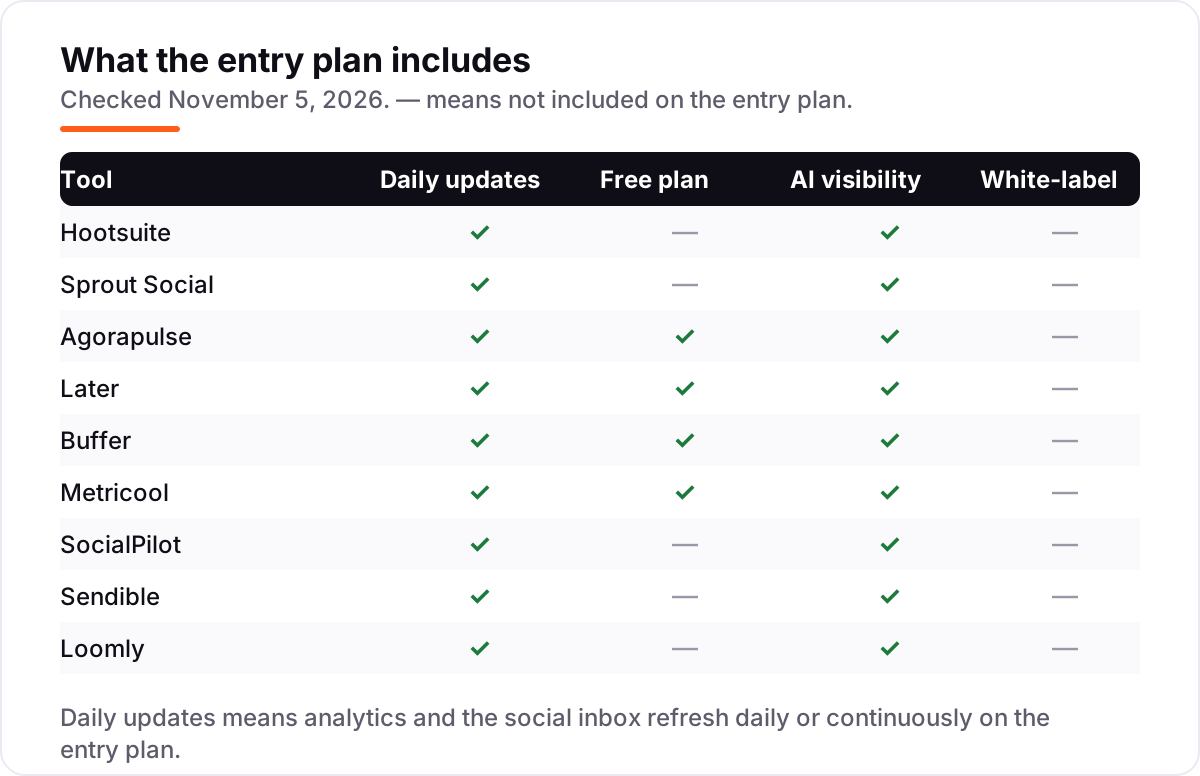
Know the difference: AI-assisted scheduling vs AI-automated posting
The confusion in this category is between a tool that helps you write and a tool that posts without you. Every tool in this list is AI-assisted: the AI drafts captions, suggests hashtags and picks send times, and a human approves before anything publishes. None of them publishes blindly by default, and that is a feature, not a gap — an unreviewed AI post is how brands end up apologizing on a Friday night.
There is a second, quieter confusion: an AI caption writer is not a content strategy. The AI can reword your idea ten ways, but it cannot decide what your audience wants to hear, which offer to push this week, or which network deserves the effort. The tools that save the most time are the ones that pair AI drafting with a calendar you actually review — Later's visual planner, Loomly's approval queue, Buffer's clean composer — because the review step is where the strategy lives.
A third distinction worth knowing is AI credits versus AI features. Some tools include the feature but cap the usage: a monthly credit allowance means the twentieth caption costs extra or waits until next month. Check whether the entry plan's AI is unlimited, capped, or gated to a higher tier before you build a workflow around it, and budget for the tier that covers your real weekly post count.
Quick comparison: tool type by need
| Buyer | Best pick | Why |
|---|---|---|
| Most established suite | Hootsuite | OwlyWriter AI, inbox, listening and reporting, from $99/user/month billed annually |
| Best reporting | Sprout Social | Deepest analytics and Smart Inbox, from $99/seat/month billed monthly |
| AI writing on the entry plan | Agorapulse | AI Sidekick on every paid plan, plus a free Archie plan, from $99/user/month |
| Visual-first brands | Later | Grid planner for Instagram, TikTok and Pinterest, from $25/month |
| Smallest budget | Buffer | Free plan with AI Assistant, Essentials from $6 per channel a month |
| Best analytics value | Metricool | Competitor tracking and deep analytics, from $25/month |
| Agencies at volume | SocialPilot | Flat pricing with bulk scheduling, from $20/month |
| Small team, flat price | Sendible | Six profiles, inbox and AI Assist for $35/month flat |
| Approvals and listening included | Loomly | Workflows, listening and AI on every plan, from $65/month |
Mistakes to avoid
- Buying on the flagship AI demo. The AI you see in the demo may sit on a higher tier — Sprout Social's AI Assist is the clearest case. Check the entry plan's AI features, not the homepage video.
- Pricing one seat when three people post. Per-user tools triple the headline price for a three-person team. Price the real team, not the solo rate.
- Ignoring the billing unit. Per-channel, per-user, per-brand and flat plans punish different growth patterns. A tool can be cheap at five profiles and dear at fifteen.
- Forgetting the add-ons. Listening, X accounts, extra users and white-label reports all sit outside the headline price on at least one tool here. Add them before comparing totals.
- Skipping the trial week. AI drafts that sound generic in the trial will sound generic in month six. Run real posts through the trial and check publish reliability before committing to a year.
How we chose
We checked each vendor's own pricing page on November 5, 2026 and recorded the starting price exactly as shown, including the annual-billing figure where the page lists one, and we ranked the tools by fit for the most common buyer — a small team or solo creator posting across several networks — not by brand size. Hootsuite's $99 figure is the annual-billing rate; the monthly-billing rate is $149 a user. Ratings come from G2 review pages, verified via fresh search-index copies of the G2 pages in early November 2026. No vendor paid for a place in this list, and none of the links here are affiliate links.
What to do next
Start with the free plan or trial of your top pick and run one real week of posts through it. Check that AI drafts sound like your brand after light editing and that scheduled posts publish cleanly before you commit to a year. If the content is sorted but new customers are not finding you, our AI search optimization service handles the visibility side — or compare platforms in our guide to B2B social media platforms. Once your tools are in place, find out what's holding your rankings back.
Your stack only works if people find you
SerpAstra fixes what keeps your site off page one and makes it easy for AI assistants to recommend.
Get a free audit→Sources we checked (10)
- Hootsuite plans — hootsuite.com/plans (checked November 5, 2026)
- Sprout Social pricing — sproutsocial.com/plans-and-pricing (checked November 5, 2026)
- Agorapulse pricing — agorapulse.com/pricing (checked November 5, 2026)
- Later pricing — later.com/pricing (checked November 5, 2026)
- Buffer pricing — buffer.com/pricing (checked November 5, 2026)
- Metricool plans — metricool.com/premium-vs-free-metricool-plans (checked November 5, 2026)
- SocialPilot pricing — socialpilot.co/pricing (checked November 5, 2026)
- Sendible pricing — sendible.com/pricing-all-plans (checked November 5, 2026)
- Loomly pricing — loomly.com/pricing (checked November 5, 2026)
- G2 review pages for all nine tools (checked November 5, 2026)
Shamim
Founder of SerpAstra
A full-stack SEO and digital marketer who spends most days on Local SEO for dental practices, AI search visibility and lead generation.
Frequently asked questions
What is the best ai social media management tool?
Hootsuite is the best fit for most teams that want everything in one suite, with OwlyWriter AI, inbox, listening and reporting from $99/user/month billed annually. Buffer is the better pick on a tight budget at $6 per channel a month, and Agorapulse is the better pick when AI writing must be on the entry plan.
How much do AI social media management tools cost?
Entry prices run from $0 to $99 a month. Buffer, Metricool and Agorapulse all have free plans, and the first paid plans cost $25 to $30 a month for most solo users. A solo creator with five profiles pays about $25 to $30 a month on Later, Metricool, Sendible or Buffer, and $99 on Hootsuite or Sprout Social.
Do these tools really write posts with AI?
Yes, with limits. Every tool here drafts captions or hashtags with AI, but the depth differs: Hootsuite, Agorapulse, Loomly and Buffer include AI writing on their entry plans, while Sprout Social holds AI Assist for Professional. Treat AI output as a first draft, and always check facts, tone and hashtags before scheduling.
What is the difference between AI-assisted and AI-automated posting?
AI-assisted tools draft and suggest while a human approves every post, which is what all nine tools here do. Fully automated posting would publish without review, and none of these tools does that by default. The practical difference is approval: Loomly and Agorapulse build approvals into the workflow, while Buffer and Later assume one person posts.
Is there a free AI social media management tool?
Yes, with limits. Buffer's free plan covers 3 channels and includes its AI Assistant, Metricool's free plan covers 50 posts a month with AI credits on paid plans only, and Agorapulse's free Archie plan covers AI repurposing on Facebook, Instagram and LinkedIn. All three are real free plans, not trials, but none covers every network.
Can I switch social media management tools later?
Yes, and switching is easier than switching accounting software. Export your scheduled posts and media library, disconnect the old tool from each network, then connect the new one and re-schedule. Do the move at a quiet point in the calendar, and keep the old account live until the first week of posts has published cleanly.
Free SEO and AI visibility audit
Find out what is holding your rankings back
Send us your site. Within 2 business days you get a written audit, an AI visibility check and a short fix list ranked by impact. Free, with no contract attached.
Request my free audit→Related guides
 Digital Marketing & Ads10 Best AI Tools for Social Media Content Creation in 2026, ComparedCompare the 10 best ai tools for social media content creation on price, free plans and AI features, with every price checked November 5, 2026.Read guide →
 Digital Marketing & Ads10 Best B2B Social Media Platforms for 2026 (Pros, Cons and Pricing)Compare the 10 best b2b social media platforms for B2B teams on price, free plans, approvals and CRM attribution, with every price checked November 5, 2026.Read guide →
 Digital Marketing & Ads10 Best AI Marketing Automation Tools in 2026, Compared10 best AI marketing automation tools compared on price, AI features and free plans — real starting prices checked November 4, 2026, sorted by use case.Read guide →