
10 Best LinkedIn Automation Tools in 2026 (Free and Paid, Compared)
Compare the 10 best LinkedIn automation tools on price, free plans, safety limits and daily caps, with every price checked November 6, 2026.
 Shamim Mia, Founder, SerpAstraLast verified November 6, 202613 min read
We compare pricing pages, documentation and public reviews. We never accept payment for rankings.

Key takeaways
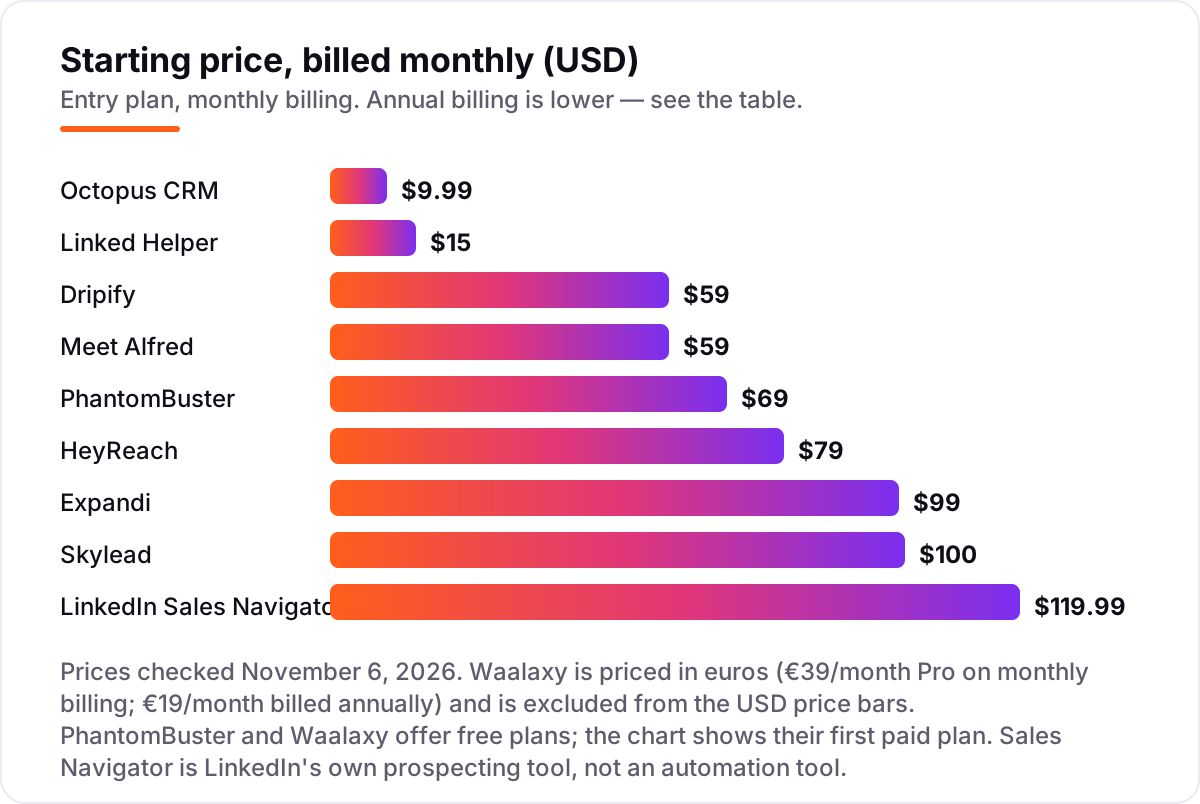
- Expandi is the best all-round pick at $99/month per account; Dripify follows at $59/month for guided campaigns, and Linked Helper is the budget pick at $15/month. Octopus CRM is cheapest at $9.99/month, while Sales Navigator costs $119.99/month per licence.
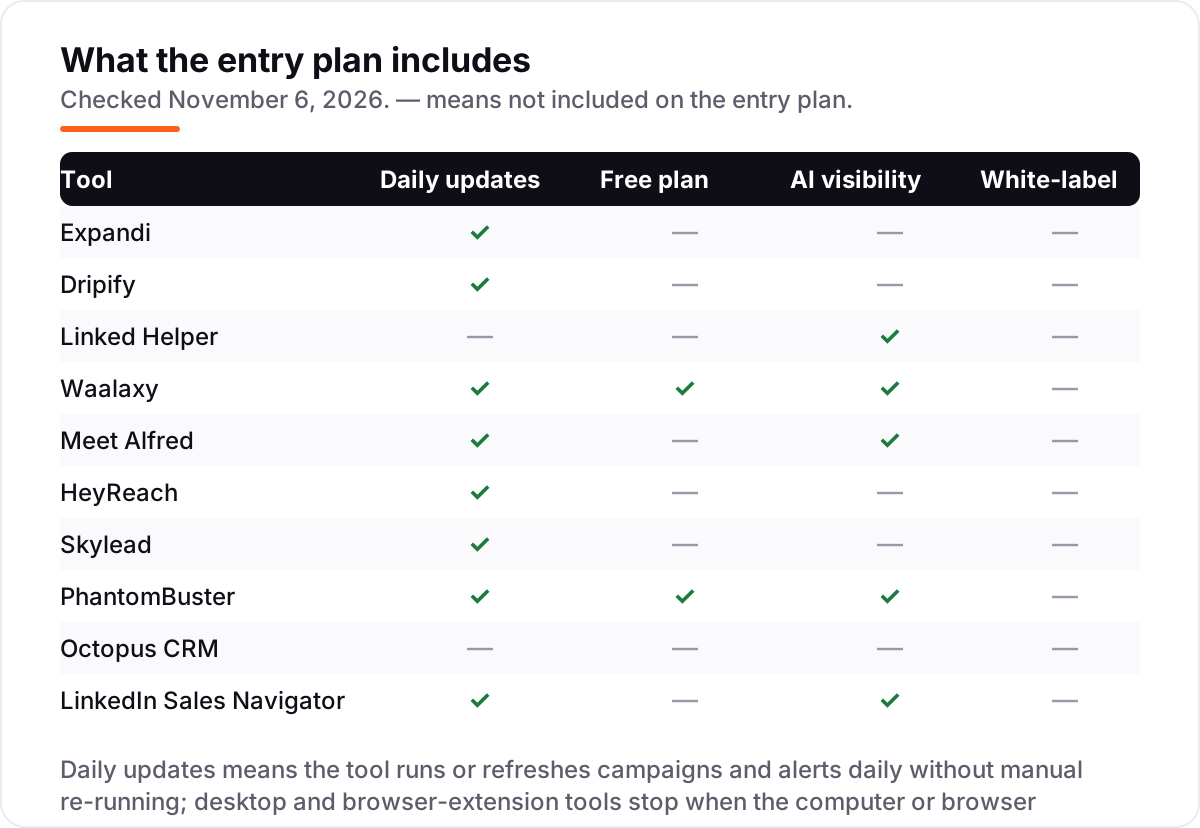
- Only Waalaxy and PhantomBuster offer free plans here — Waalaxy with 80 invitations a month, PhantomBuster with 30 minutes of execution a month.
- The single most important buying factor is the billing unit: per seat, per sender, per workspace, or per licence decides what a team actually pays, not the headline price.
- LinkedIn's rules ban automation, so every tool here carries account risk; keep daily volumes low and never automate your main account aggressively.
On this page
Quick comparison
| Tool | Best for | Starting price | Free plan |
|---|---|---|---|
| Expandi | Sales teams that live on LinkedIn and want branching campaigns with a dedicated IP per seat | $99/mo | No (7-day trial) |
| Dripify | Solo reps and small teams that want guided LinkedIn and email drip campaigns without a steep learning curve | $59/mo | No (7-day trial) |
| Linked Helper | Solo operators on a tight budget who want full campaign automation from their own computer | $15/mo | No (14-day trial) |
| Waalaxy | First-time automators who want LinkedIn-only outreach with the gentlest learning curve | €39/mo | Yes (free plan) |
| Meet Alfred | Reps who prospect across LinkedIn, email, and X from a single campaign builder | $59/mo | No (free trial) |
| HeyReach | Agencies and sales teams running outreach from many LinkedIn accounts at once | $79/mo | No (14-day trial) |
| Skylead | Teams that want prospecting, enrichment, and LinkedIn-plus-email outreach in one subscription | $100/mo | No (7-day trial) |
| PhantomBuster | Growth teams whose bottleneck is list-building and enrichment, not writing messages | $69/mo | Yes (free plan) |
| Octopus CRM | Solo users on a budget under $10 a month who send LinkedIn messages from their own browser | $9.99/mo | No (7-day trial) |
| LinkedIn Sales Navigator | Sellers whose lists are the bottleneck and who want LinkedIn's own search and alerts | $119.99/mo | No (free trial) |
Make one of these tools?
We re-check this list every quarter. Send a correction, request a review, or ask about a clearly labeled sponsored spot.
Request a listingThe best linkedin automation tools

Expandi
Best for: Sales teams that live on LinkedIn and want branching campaigns with a dedicated IP per seat
Expandi is the strongest all-round pick for a sales team that lives on LinkedIn. It runs cloud-based campaigns with branching logic, so a connection request can trigger a different follow-up depending on whether the lead accepts, replies, or visits your profile. The Business plan costs $99 a month per account, or $79 on annual billing, and each seat runs from its own dedicated IP address.
The trade-off is price and the add-ons. Image, GIF, and video personalization cost extra, and Expandi works best when paired with Sales Navigator, which is another $119.99 a month per seat. Buy it when one rep owns LinkedIn outreach full-time; buy Dripify or Linked Helper when the budget is tighter.
What we like
- Branching campaigns that change the next step based on whether a lead accepts, replies, or visits your profile
- Cloud-based running from a dedicated IP address per seat, so campaigns continue without your computer on
- Native email steps plus HubSpot, Pipedrive, and Salesforce connectors on the Business plan
- Strong reviewer praise for customer support, the most-cited strength on G2
Watch out for
- The highest per-seat price here for a single rep, at $99/month on monthly billing
- Image, GIF, and video personalization are paid add-ons, not included in Business
- Works best with Sales Navigator, which adds $119.99/month per seat on top

Dripify
Best for: Solo reps and small teams that want guided LinkedIn and email drip campaigns without a steep learning curve
Dripify is the easiest of the full-featured tools to run day to day. Its drip campaigns combine LinkedIn steps with email follow-ups, and the interface makes it simple to see where every lead sits in a sequence. Basic costs $59 a month per user, or $39 on annual billing, and covers one campaign with 20 connection requests a day. Pro costs $79 a month and removes the campaign cap.
The limits are the thing to check before you buy. Basic allows a single campaign and modest daily quotas, so a team running several audiences at once needs Pro at $59 a month on annual billing or Advanced at $79. Email-finder credits are capped at 100 a month on every plan, with top-up packs from $29. Pick Dripify when you want guided campaigns without a steep learning curve.
What we like
- The easiest full-featured tool here to run day to day, with a clear view of where every lead sits
- Drip campaigns combine LinkedIn steps with email follow-ups in one sequence
- Pro adds unlimited campaigns, a dedicated inbox, CSV export, webhooks, and HubSpot integration
- Rated 4.5/5 on G2 from 354 reviews, the largest review base in this list after Sales Navigator
Watch out for
- Basic allows only one campaign with modest daily quotas, so real prospecting usually needs Pro
- Email-finder credits cap at 100 a month on every plan, with top-up packs from $29
- Fewer integrations than Expandi or Skylead, and no built-in prospect database

Linked Helper
Best for: Solo operators on a tight budget who want full campaign automation from their own computer
Linked Helper is the cheapest serious tool in this list, and the only one that runs as a desktop app on your own computer. Standard costs $15 a month per account, or $8.25 a month on a 12-month licence, and includes sequences, profile visits, messages, and a built-in CRM with tags and notes. Teammates can join a shared workspace without paying for extra seats.
The desktop design is both the strength and the weakness. Your computer must stay on for campaigns to run, and the interface takes longer to learn than the cloud tools here. There is also no cloud sync on the local version unless you pay for the cloud edition at $29.90 a month. Choose Linked Helper when cost matters most and one person runs outreach from their own machine.
What we like
- The cheapest serious tool here at $15/month, with a 12-month licence at $8.25/month
- Built-in CRM with tags, notes, and a pipeline view, so no spreadsheet is needed to track leads
- Teammates join a shared workspace free; you pay per LinkedIn account, not per team member
- Daily allowance of AI and data credits included, plus direct CRM integrations with HubSpot and Pipedrive
Watch out for
- Desktop app: campaigns stop when your computer is off, and there is no cloud sync on the local version
- The interface takes longer to learn than the cloud tools in this list
- No unified inbox; replies are managed through the app's messaging hub or LinkedIn itself

Waalaxy
Best for: First-time automators who want LinkedIn-only outreach with the gentlest learning curve
Waalaxy is the friendliest starting point in this list, built for people who have never automated outreach before. Pro costs €39 a month per user on monthly billing, or €19 a month billed annually, and allows 300 LinkedIn invitations a month with unlimited campaigns and ready-made sequence templates. A limited free plan allows 80 invitations a month.
Watch the billing toggle before you compare prices: the €19 figure on the pricing page is the annual rate, and monthly billing doubles it. Email sequences need the Business plan at €139 a month, or €69 billed annually, and the inbox is a paid add-on. Pick Waalaxy when you want LinkedIn-only outreach with the gentlest learning curve in this list.
What we like
- Ready-made sequence templates make the first campaign a ten-minute job
- A limited free plan with 80 invitations a month, so you can try real outreach before paying
- Runs fully in the cloud since July 2026, with no Chrome extension to keep open
- AI message writing (Waami) included on Pro, plus 25 email-finder credits a month
Watch out for
- The €19 headline price is the annual rate; monthly billing doubles Pro to €39
- Cold email sequences need Business at €139/month, or €69 billed annually
- The inbox is a paid add-on on every plan, and Pro caps invitations at 300 a month

Meet Alfred
Best for: Reps who prospect across LinkedIn, email, and X from a single campaign builder
Meet Alfred runs LinkedIn, email, and X outreach from one campaign builder, which suits a rep who prospects across channels. Individual costs $59 a month per seat, or $35 on annual billing, and covers LinkedIn-only automation with three campaigns, a smart inbox, and a lead finder with 1,000 results. Business costs $99 and adds email, X, and Sales Navigator support.
The plan ladder is the awkward part: Individual caps you at three campaigns, and the cheaper Teams plan at $79 a seat needs three seats, so a solo buyer pays $99 for the full multichannel set. Reviewers also report slow support, with three-to-four-day replies a recurring complaint. Buy Meet Alfred when one workspace for LinkedIn, email, and X matters more than the lowest price.
What we like
- One campaign builder for LinkedIn, email, and X, with a shared smart inbox for replies
- Lead Finder with 1,000 results on Individual, rising to 10,000 on Teams
- Native Salesforce and HubSpot integrations on the Teams plan, plus white-label at 5+ seats
- Cloud-based, so campaigns run without your computer on
Watch out for
- Individual caps you at 3 campaigns, so real use usually means Business at $99/month
- Teams at $79 a seat needs 3 seats, so a solo buyer cannot get the cheaper team rate
- Slow customer support is the most repeated complaint, with three-to-four-day replies reported

HeyReach
Best for: Agencies and sales teams running outreach from many LinkedIn accounts at once
HeyReach is built for agencies and teams that run outreach from many LinkedIn accounts at once. Growth costs $79 a month per sender, or $64 on annual billing, and every sender gets a dedicated residential proxy, 100 enrichment credits a month, and access to the unified inbox where all replies land. Teammates and clients can be added without paying for extra seats.
The per-sender maths is what decides the bill: five accounts cost $395 a month before any email, because HeyReach sends no email itself and needs Instantly or Smartlead for that side. The Agency bundle at $999 a month for 25 senders cuts the per-sender cost to about $40. Choose HeyReach when volume across many accounts is the job, not a single rep's outreach.
What we like
- Built for volume: sender rotation across many LinkedIn accounts from one dashboard
- Every sender gets a dedicated residential proxy and 100 enrichment credits a month
- One unified inbox for all accounts, with API and webhook access on Growth
- Agency bundle at $999/month for 25 senders cuts the per-sender cost to about $40
Watch out for
- Per-sender pricing adds up fast: five accounts cost $395/month before email
- Sends no email itself; multichannel needs a separate Instantly or Smartlead subscription
- LinkedIn removed HeyReach's company page in March 2026, a reminder of the platform risk in this category

Skylead
Best for: Teams that want prospecting, enrichment, and LinkedIn-plus-email outreach in one subscription
Skylead combines prospecting, enrichment, and LinkedIn-plus-email outreach in one subscription, so a team can find leads and message them without a second tool. The All-in-one plan costs $100 a month per seat and includes smart sequences, a B2B database, account-based prospecting, post signals, and email warm-up. AI enrichment and AI SDR replies are paid add-ons priced by credits.
There is no cheaper tier, which is the main drawback: a solo rep pays the same $100 a seat as a team, and the learning curve is steeper than Dripify or Waalaxy. Agencies get a better deal at $999 a month for 25 seats. Pick Skylead when you want prospecting and outreach in one place and can use the database and email side enough to justify the flat price.
What we like
- Prospecting, enrichment, and outreach in one plan, with a built-in B2B database
- Smart sequences run LinkedIn and email together, with account-based prospecting and post signals
- Email warm-up included, plus unlimited email accounts and image and GIF personalization
- Agency plan at $999/month for 25 seats, with an unlimited-seat option at $1,999/month
Watch out for
- No cheaper tier: a solo rep pays the same $100 a seat as a team
- Steeper learning curve than Dripify or Waalaxy, with advanced workflows to configure
- AI data enrichment and AI SDR replies are paid add-ons priced by credits, not included

PhantomBuster
Best for: Growth teams whose bottleneck is list-building and enrichment, not writing messages
PhantomBuster is a toolbox rather than a campaign tool: more than 100 small automations, called Phantoms, extract data from LinkedIn, Sales Navigator, Google Maps, and other sites, then enrich it and feed it into outreach. Start costs $69 a month, or $56 on annual billing, with 5 Phantom slots, 20 execution hours a month, and 500 email credits. Pricing is per workspace, not per seat.
The trade-off is complexity and fragility. Execution hours and credits are hard to predict until you have run a few workflows, and Phantoms can break when LinkedIn changes its pages. There is a free plan with 30 minutes of execution a month after the 14-day trial. Choose PhantomBuster when list-building and enrichment are the bottleneck, not writing the messages.
What we like
- More than 100 pre-built automations for LinkedIn, Sales Navigator, Google Maps, Instagram, and X
- Per-workspace pricing with unlimited users, so a whole team shares one subscription
- 10,000 AI credits a month on Start, plus API access and native HubSpot and Salesforce integrations
- A free plan with 30 minutes of execution a month after the trial, for light testing
Watch out for
- Execution hours and credits are hard to predict until you have run a few workflows
- Phantoms can break when LinkedIn changes its pages, with a lag before fixes land
- No native outreach sequences; it feeds lists into other tools rather than sending campaigns itself

Octopus CRM
Best for: Solo users on a budget under $10 a month who send LinkedIn messages from their own browser
Octopus CRM is the cheapest way into LinkedIn automation: Starter costs $9.99 a month, or $6.99 on annual billing, and covers automated connection requests, bulk messages, profile visits, skill endorsements, and a personal CRM. It runs as a Chrome extension, so setup takes minutes and there is nothing to install on a server. The 7-day trial needs no card.
The low price buys a narrow tool. Octopus CRM works only in Chrome, stops when the browser closes, and has no email, no cloud running, and no real team features. Funnels and integrations wait for the higher plans, and reviewers report patchy support. Pick it when the budget is under $10 a month and one person sends LinkedIn messages from their own browser.
What we like
- The cheapest entry in this list at $9.99/month, or $6.99 on annual billing
- Setup takes minutes: install the Chrome extension, connect LinkedIn, and start a funnel
- Automated connection requests, bulk messages, profile visits, and skill endorsements in one place
- Personal CRM with stats included from the Starter plan
Watch out for
- Chrome extension only: it stops when the browser closes, with no cloud running
- No email, no real team features, and funnels and integrations wait for higher plans
- Reviewers report patchy support and a clunky extension experience

LinkedIn Sales Navigator
Best for: Sellers whose lists are the bottleneck and who want LinkedIn's own search and alerts
LinkedIn Sales Navigator is not an automation tool, and that is exactly why it belongs in this list: it is the prospecting layer most of the tools above are built on. Core costs $119.99 a month per licence, or $1,079.88 a year, and adds advanced lead search, saved lists, alerts, and 50 InMail credits a month. It is the only tool here that LinkedIn itself sells and supports.
Buy it for the targeting, not the sending: Sales Navigator cannot run sequences, send bulk messages, or automate follow-ups, so it needs an automation tool beside it. That pairing is expensive, at $119.99 a month per seat on top of the automation subscription. Choose it when your lists are the bottleneck and you want LinkedIn's own search and alerts without breaking its rules.
What we like
- Advanced lead search with filters LinkedIn's free search does not offer
- Saved lists and real-time alerts when a prospect changes jobs or posts
- 50 InMail credits a month per user, plus Premium Business features
- The only tool here LinkedIn itself sells and supports, with no automation risk from this product alone
Watch out for
- Cannot run sequences, send bulk messages, or automate follow-ups; it needs an automation tool beside it
- The most expensive entry here at $119.99/month per licence on monthly billing
- No bulk export of leads, a recurring complaint in G2 reviews
The best linkedin automation tools do one job: they send connection requests, follow-ups, and profile visits on a schedule, so a sales rep can hold hundreds of conversations without typing each message by hand. We ranked the ten tools below by fit for the most common buyer — a small sales team doing outbound on LinkedIn — and every price was checked against the vendor's own pricing page on November 6, 2026.
How to choose the best linkedin automation tools
- Start with the billing unit. Expandi, Dripify, and Skylead charge per seat; HeyReach charges per sender; PhantomBuster charges per workspace; Sales Navigator charges per licence. A $79 tool can cost more than a $99 tool once you multiply by seats.
- Decide whether you need email too. Dripify, Meet Alfred, and Skylead run email in the same sequence as LinkedIn. Expandi adds email steps, while HeyReach and Octopus CRM send no email at all.
- Check how it runs. Cloud tools keep working when your computer is off; Linked Helper runs on your desktop and Octopus CRM lives in Chrome, so both stop when you close them.
- Count the daily limits before you buy. Dripify Basic allows 20 connection requests a day, Waalaxy Pro allows 300 invitations a month, and PhantomBuster Start gives 20 execution hours a month. The cap you hit first is your real price.
- Weigh the account risk. LinkedIn's User Agreement bans automation, so no tool here is risk-free. Cloud tools with dedicated IPs and daily caps are safer than aggressive desktop tools, but a restricted account is always possible.
Outreach is one part of a sales stack, not the whole stack. If your site also needs to be found by the people you message, our AI search optimization service covers the visibility side. And before you publish the landing pages your sequences link to, run their titles through the free SERP snippet preview tool — it shows exactly how the title and description will look in Google.
Whatever you shortlist, trial it with a real list before you pay. The trials in this list run 7 to 14 days, which is long enough to send one genuine campaign — your prospects, your messages, your reply rate — and that week tells you more than any review can. Check two things in the trial: that replies land in one inbox you can actually work from, and that the daily caps fit the volume you need. Every tool here publishes its limits, so there is no reason to buy before you have tested them.
LinkedIn automation pricing: what you will actually pay
Take a three-person sales team, one LinkedIn account each, on monthly billing. The automation subscription alone costs $29.97 a month on Octopus CRM Starter, $45 on Linked Helper Standard, $69 on PhantomBuster Start (one workspace, not per seat), $177 on Dripify Basic or Meet Alfred Individual, $237 on HeyReach Growth, $297 on Expandi Business, $300 on Skylead All-in-one, and €117 on Waalaxy Pro. Sales Navigator Core adds $359.97 a month for three licences, so the common pairing of Expandi plus Sales Navigator costs $656.97 a month before any data or email tool.
Annual billing changes the picture. The same three seats cost $20.97 a month on Octopus CRM, $24.75 on Linked Helper, $56 on PhantomBuster, $105 on Meet Alfred, $117 on Dripify, $192 on HeyReach, $237 on Expandi, and €57 on Waalaxy Pro. Skylead has no monthly-equivalent annual rate; its annual deal is pay for 10 months and get 2 free. Over a year, three seats cost $251.64 on Octopus CRM, $297 on Linked Helper, $1,404 on Dripify, and $2,844 on Expandi — a gap of more than $2,500 that comes entirely from the billing unit and the plan tier, not from features.
Three costs sit outside every number above. First, Sales Navigator at $1,079.88 a year per licence, which most serious setups need for targeting. Second, email sending: HeyReach and Octopus CRM send no email, so a team that wants multichannel sequences pays for Instantly or Smartlead on top. Third, data and enrichment credits — Dripify caps email-finder credits at 100 a month, HeyReach gives 100 enrichment credits per sender, and Skylead charges $1 per 100 AI enrichment credits. If you run cold email beside LinkedIn, compare the email side too in our guide to cold email outreach tools for B2B.
Know the difference: automation, prospecting, and LinkedIn's rules
The biggest confusion in this category is between a tool that finds people and a tool that messages them. Sales Navigator finds people: advanced search, saved lists, alerts, and InMail credits, with no sequences and no bulk sending. Every other tool in this list messages people: it sends connection requests, follow-ups, and profile visits on a schedule. One targets, the other sends, and most serious setups need both — which is why the real monthly cost is the automation subscription plus $119.99 per Sales Navigator licence.
The second confusion is about safety. Vendors sell dedicated IPs, daily caps, and human-like delays as safety features, and those do reduce the risk, but none of them changes LinkedIn's rules: the User Agreement bans automation and scraping, and accounts using these tools can be restricted or shut down. In March 2026 LinkedIn removed HeyReach's company page and restricted its leaders' profiles, while the software kept running — a reminder that the risk applies to vendors as well as users. Treat every automation tool as a calculated risk, keep volumes low, and never automate your main account aggressively.
The third distinction is how the tool runs. Cloud tools such as Expandi, Dripify, and HeyReach keep campaigns going when your computer is off. Linked Helper runs on your desktop, so campaigns stop when the machine sleeps. Octopus CRM lives in a Chrome extension, so it stops when the browser closes. If nobody on the team keeps a machine running, a desktop or extension tool will quietly do nothing for half the week.
Quick comparison: tool type by need
| Buyer | Best pick | Why |
|---|---|---|
| Solo rep on a budget | Linked Helper | Full automation and a built-in CRM from $15/month |
| Most sales teams | Expandi | Branching campaigns with a dedicated IP, from $99/month |
| First-time automator | Waalaxy | Free plan with 80 invitations a month, Pro is €39/month |
| Agency running many accounts | HeyReach | Sender rotation and one inbox, $79/month per sender |
| List-building and enrichment | PhantomBuster | 100+ automations per workspace, from $69/month |
| Prospecting lists first | LinkedIn Sales Navigator | LinkedIn's own search and alerts, $119.99/month per licence |
Mistakes to avoid
- Comparing headline prices without the billing unit. A $69 workspace plan beats a $59 per-seat plan the moment you add a second rep, and a $79 per-sender plan beats a $99 per-seat plan only until the thirteenth sender.
- Reading Waalaxy's €19 as the monthly price. That figure is the annual rate; monthly billing doubles Pro to €39, Advanced to €99, and Business to €139. Always check which toggle the pricing page has selected.
- Buying on the free plan, then finding email costs extra. Waalaxy's free plan and Pro cover LinkedIn only; email sequences need Business. HeyReach and Octopus CRM send no email at any price.
- Automating at full volume on day one. New accounts and new tools should start with a handful of connection requests a day and build up over weeks. Reviewers report restrictions most often when daily volumes climb fast.
- Forgetting Sales Navigator in the budget. Most tools here work best from Sales Navigator lists, and $119.99 a month per licence is often the largest line in the stack. Price it in before you commit to the automation tool.
How we chose
We checked each vendor's own pricing page and recorded the starting price exactly as shown, including the annual-billing figure where the page lists one. Direct page fetches from this workspace were blocked on November 6, 2026, so prices were verified through fresh search-index copies of the vendors' own pricing pages, crawled in late October and early November 2026 and re-checked on November 6, 2026, with multiple independent reads agreeing on every figure; ratings come from fresh search-index copies of the exact G2 pages, crawled within the last few days, per the program's ratings ruling. Two figures need care: Waalaxy's pricing page opens with annual billing selected, so its €19 headline is the annual rate and €39 is the monthly price, and HeyReach's annual rate is $64 a month per sender. We ranked the tools by fit for the most common buyer — a small sales team doing outbound on LinkedIn — not by brand size. No vendor paid for a place in this list, and none of the links here are affiliate links.
What to do next
Start with the free plan or trial of your top pick and run one real campaign through it. Check that replies land in one inbox, the daily caps fit your volume, and the sequences stop cleanly when a lead replies. If the outreach is working but replies are not turning into meetings, the problem is usually the list or the message, not the tool — fix those before buying a bigger plan. For the email side of the same sequences, compare options in our guide to email automation tools. Once your tools are in place, find out what's holding your rankings back.
Your stack only works if people find you
SerpAstra fixes what keeps your site off page one and makes it easy for AI assistants to recommend.
Get a free audit→Sources we checked (20)
- Expandi pricing — expandi.io/pricing (checked November 6, 2026)
- Dripify pricing — dripify.com/pricing (checked November 6, 2026)
- Linked Helper pricing — linkedhelper.com/pricing (checked November 6, 2026)
- Waalaxy pricing — waalaxy.com/pricing (checked November 6, 2026)
- Meet Alfred pricing — meetalfred.com/pricing (checked November 6, 2026)
- HeyReach pricing — heyreach.io/pricing (checked November 6, 2026)
- Skylead pricing — skylead.io/pricing (checked November 6, 2026)
- PhantomBuster pricing — phantombuster.com/pricing (checked November 6, 2026)
- Octopus CRM pricing — octopuscrm.io/pricing (checked November 6, 2026)
- LinkedIn Sales Navigator plans and pricing — business.linkedin.com (checked November 6, 2026)
- Expandi on G2 — g2.com/products/expandi-io/reviews (checked November 6, 2026)
- Dripify on G2 — g2.com/products/dripify/reviews (checked November 6, 2026)
- Linked Helper on G2 — g2.com/products/linked-helper/reviews (checked November 6, 2026)
- Waalaxy on G2 — g2.com/products/waalaxy/reviews (checked November 6, 2026)
- Meet Alfred on G2 — g2.com/products/meet-alfred/reviews (checked November 6, 2026)
- HeyReach on G2 — g2.com/products/heyreach/reviews (checked November 6, 2026)
- Skylead on G2 — g2.com/products/skylead/reviews (checked November 6, 2026)
- PhantomBuster on G2 — g2.com/products/phantombuster/reviews (checked November 6, 2026)
- Octopus CRM on G2 — g2.com/products/octopus-crm/reviews (checked November 6, 2026)
- LinkedIn Sales Navigator on G2 — g2.com/products/linkedin-sales-navigator/reviews (checked November 6, 2026)
Shamim
Founder of SerpAstra
A full-stack SEO and digital marketer who spends most days on Local SEO for dental practices, AI search visibility and lead generation.
Frequently asked questions
What is the best LinkedIn automation tool?
Expandi is the best all-round pick for a team that lives on LinkedIn, at $99/month per account, with branching campaigns and a dedicated IP per seat. Dripify is the easier pick at $59/month, and Linked Helper is the budget pick at $15/month. The right choice depends on team size, volume, and whether you also need email.
How much does LinkedIn automation cost?
Entry prices run from $9.99 to $119.99 a month on monthly billing. Octopus CRM starts at $9.99, Linked Helper at $15, Waalaxy Pro at €39, Dripify at $59, and Expandi at $99. Annual billing cuts most prices by 20 to 45 percent, and Sales Navigator adds $119.99 a month per seat on top.
Is LinkedIn automation allowed?
No. LinkedIn's User Agreement bans automation and scraping, and accounts using these tools can be restricted or shut down. Every tool in this list carries that risk, and reviewers report warnings when daily volumes climb. Keep connection requests low, warm up new accounts slowly, and never automate your main account aggressively.
Is there a free LinkedIn automation tool?
Two tools here have free plans. Waalaxy's free plan allows 80 LinkedIn invitations a month with basic features, and PhantomBuster's free plan gives 30 minutes of execution a month after the trial. Both are limited, so treat them as a way to test real outreach before paying, not as a permanent free setup.
Do I still need Sales Navigator with an automation tool?
Usually yes, if targeting matters. Sales Navigator gives you advanced search, saved lists, and alerts that free LinkedIn search does not offer, and most automation tools are built to work from its lists. It costs $119.99 a month per licence, so budget it beside the automation subscription rather than instead of it.
What is the difference between LinkedIn automation and Sales Navigator?
Automation tools send the outreach: connection requests, messages, profile visits, and follow-ups, on a schedule. Sales Navigator finds the people: advanced search, lists, and alerts, with 50 InMail credits a month. One sends, the other targets, so most serious setups pair an automation tool with Sales Navigator.
Can I automate LinkedIn from a free LinkedIn account?
Yes, every automation tool here works with a free LinkedIn account, but the limits are tighter: fewer connection requests and no InMail credits. A free account also means weaker search, so your lists will be smaller and less precise. Most buyers start on a free account and add Sales Navigator once outreach is working.
Free SEO and AI visibility audit
Find out what is holding your rankings back
Send us your site. Within 2 business days you get a written audit, an AI visibility check and a short fix list ranked by impact. Free, with no contract attached.
Request my free audit→Related guides
 Digital Marketing & Ads7 Best Cold Email Outreach Tools B2B in 2026 (Free and Paid, Compared)Compare the 7 best cold email outreach tools b2b on price, warm-up, lead data and multichannel steps, with every price checked November 5, 2026.Read guide →
 Digital Marketing & Ads10 Best Email Automation Tools in 2026 (Free and Paid, Compared)Compare the 10 best email automation tools on price, free plans and automation depth, with every starting price checked on November 5, 2026.Read guide →
 Email, SMS & Social Media9 Best AI Social Media Management Tools in 2026, ComparedCompare the 9 best ai social media management tools on price, AI writing, scheduling and analytics, with every price checked November 5, 2026.Read guide →