
12 Best LinkedIn Scraping Tools for Recruiters in 2026, Compared
Compare the 12 best linkedin scraping tools for recruiters on price, free plans and data quality, with every price checked on November 6, 2026.
 Shamim Mia, Founder, SerpAstraLast verified November 6, 202615 min read
We compare pricing pages, documentation and public reviews. We never accept payment for rankings.

Key takeaways
- PhantomBuster is the best fit for most recruiters at $69/month; Evaboot follows at $9/month for Sales Navigator exports, and TexAu at $79/month for scraping plus enrichment in one credit pool.
- Six of the 12 tools have a free plan, but the free tiers are small — PhantomBuster gives 30 minutes of execution a month, RocketReach gives 5 lookups, and Juicebox gives 5 contact credits.
- The single most important buying factor is the limit that forces your next upgrade: credits, execution hours and export caps decide what you actually pay, not the headline price.
- Evaboot only works with a paid Sales Navigator subscription, so add about $100 a month to its $9 starting price before comparing it with tools that scrape regular LinkedIn search.
On this page
Quick comparison
| Tool | Best for | Starting price | Free plan |
|---|---|---|---|
| PhantomBuster | Recruiters who want one cloud tool that scrapes LinkedIn searches, profiles and post engagement into clean candidate lists | $69/mo | Yes (free plan) |
| Evaboot | Recruiters who already pay for Sales Navigator and want its search results exported, cleaned and email-enriched in one click | $9/mo | No (14-day trial) |
| TexAu | Small recruiting teams that want LinkedIn scraping plus enrichment, verification and AI lead scoring in one credit pool | $79/mo | No (14-day trial) |
| Linked Helper | Solo recruiters who want the cheapest full-featured LinkedIn automation licence and a built-in CRM for tracking candidates | $15/mo | No (14-day trial) |
| Dux-Soup | Recruiters who want LinkedIn automation that runs from their own machine or the cloud, with drip campaigns and CRM sync | $55/mo | No (14-day trial) |
| Octoparse | Recruiters who want a no-code visual scraper for LinkedIn and other sites, with cloud scheduling and 500-plus ready templates | $83/mo | Yes (free plan) |
| Lusha | Recruiters who want verified emails and phone numbers for LinkedIn profiles from a browser extension, with bulk enrichment | $49.90/mo | Yes (free plan) |
| Juicebox | Small agencies that want to describe a hire in plain language and get a ranked candidate list without writing Boolean search strings | $119/mo | Yes (free plan) |
| SeekOut | Solo sourcers and small teams that need deep technical and diversity search across more than a billion profiles | $179/mo | No (14-day trial) |
| HireEZ | Recruiters who want AI sourcing, ranking and outreach across LinkedIn and the wider web, with deep ATS integrations | $494/mo | No (7-day trial) |
| RocketReach | Recruiters who want a quick, verified email for a LinkedIn profile without buying a full sourcing platform | $69/mo | Yes (free plan) |
| Clay | Recruiting teams that want a spreadsheet-style enrichment workspace that pulls LinkedIn data through 75-plus providers | $185/mo | Yes (free plan) |
Make one of these tools?
We re-check this list every quarter. Send a correction, request a review, or ask about a clearly labeled sponsored spot.
Request a listingThe best linkedin scraping tools for recruiters

PhantomBuster
Best for: Recruiters who want one cloud tool that scrapes LinkedIn searches, profiles and post engagement into clean candidate lists
PhantomBuster is the most versatile scraper in this list because it covers the whole sourcing job, not one export: it pulls Sales Navigator searches, company employee lists, the people who liked or commented on a post, and full profile details, then chains those steps into scheduled workflows. Start costs $69 a month for 5 automation slots, 20 execution hours and 500 email credits, and every plan includes unlimited users and API access.
The catch is the metering. Execution hours, slots and credits are three separate limits, and a heavy month burns through all three at once — Grow at $159 a month quadruples the execution time for about twice the price. Buy PhantomBuster when one tool must do scraping, enrichment and scheduling; buy Evaboot when the only job is exporting Sales Navigator searches.
What we like
- More than 150 ready-made automations cover Sales Navigator searches, profile lists, post likers and commenters
- Runs in the cloud on a schedule, so lists refresh without keeping a browser open
- Unlimited users on every plan, and the whole workspace shares one subscription
- Full API access and native CRM integrations on every paid plan
Watch out for
- Credit and execution-hour limits add up fast: Start covers about 500 enriched contacts a month
- Setup takes longer than a one-click exporter, and broken Phantoms need fixing when LinkedIn changes its pages
- Scraping and automation breach LinkedIn's terms, so an account used aggressively can be restricted

Evaboot
Best for: Recruiters who already pay for Sales Navigator and want its search results exported, cleaned and email-enriched in one click
Evaboot does one job and does it well: it sits on top of LinkedIn Sales Navigator as a Chrome extension, adds an export button to your search results, and turns them into an email-ready list. The pricing is a single plan with everything included — you only pick the credit volume. The $9 plan covers 100 credits a month, and $29 covers 400, with each exported lead costing 1 credit and each email found costing 1 more.
The real price is higher than $9, because Evaboot cannot run without Sales Navigator, which costs roughly $80 to $100 a month on its own. For a recruiter who already pays for Sales Navigator, that is no extra cost at all, and Evaboot is the cheapest way to get clean exports with emails. Without Sales Navigator, start with PhantomBuster or Linked Helper instead.
What we like
- The cheapest entry here at $9 a month, with every feature included on every plan
- Exports Sales Navigator searches, cleans the data and finds and verifies emails in the same pass
- No per-seat pricing: unlimited seats and unlimited linked Sales Navigator accounts
- Unused credits roll over while the subscription stays active
Watch out for
- Useless without a Sales Navigator subscription, which costs about $80 to $100 a month on top
- Only works on Sales Navigator searches, not on regular LinkedIn search or company pages
- The $9 plan covers 100 credits a month, so a lead with a verified email costs 2 credits and the volume runs out fast

TexAu
Best for: Small recruiting teams that want LinkedIn scraping plus enrichment, verification and AI lead scoring in one credit pool
TexAu is a growth automation platform with more than 180 automations, and its LinkedIn set covers profile extraction, Sales Navigator searches, connection requests and messaging. Solo costs $79 a month for 2,500 credits a month — about 500 enriched leads — with waterfall enrichment across 12 sources, AI lead scoring and lead search all drawing from the same credit pool. Yearly billing saves about 17%.
The credit model is both the strength and the trap. Pay-on-match means a failed lookup costs nothing, which is fair, but a successful lookup on a poor-fit candidate still spends credits, so a sloppy search burns the monthly allowance fast. Buy TexAu when one tool must scrape, enrich and score; buy PhantomBuster when you want execution hours instead of a credit meter.
What we like
- More than 180 automations across LinkedIn, X, YouTube and 50-plus other sources
- Pay-on-match credits: a lookup that finds nothing costs zero credits
- Waterfall enrichment across 12 sources plus AI lead scoring on the entry plan
- Credits roll over up to twice the monthly balance, so a quiet month is not wasted
Watch out for
- Credits are the real budget: 2,500 credits cover about 500 enriched leads a month on Solo
- The old $79 Starter tier is gone; Solo is the new entry point and Teams jumps to $549 a month
- A failed lookup costs nothing, but a successful one still spends credits even if the lead is a poor fit

Linked Helper
Best for: Solo recruiters who want the cheapest full-featured LinkedIn automation licence and a built-in CRM for tracking candidates
Linked Helper is the budget pick for a solo recruiter: Standard costs $15 a month per LinkedIn account and includes sequences, CSV export of leads, reply-stop automation and a built-in CRM with tags, notes and a pipeline view. It sells licences for 1, 3, 6 or 12 months instead of an auto-renewing subscription, and a 12-month licence drops Standard to $8.25 a month.
The limits are per-account and per-machine. One licence covers one LinkedIn account, so a team pays per recruiter, and the desktop app keeps data on your own computer unless you pay for the cloud version at $29.90 a month. Buy Linked Helper when one recruiter needs cheap, full-featured automation; buy Dux-Soup when the team needs cloud execution and CRM sync.
What we like
- The lowest full-featured price here at $15 a month per account, with sequences and CSV export included
- Built-in CRM with tags, notes and a pipeline view, so tracking does not need a spreadsheet
- Licences, not subscriptions: no auto-renew, and 12-month licences drop Standard to $8.25 a month
- Teammates added to a shared workspace cost nothing extra
Watch out for
- Each licence covers one LinkedIn account, so a five-person team needs five licences
- The desktop app keeps campaign data on your own machine unless you pay more for cloud storage
- Email finder credits beyond the included quota cost extra, sold in packs from $15

Dux-Soup
Best for: Recruiters who want LinkedIn automation that runs from their own machine or the cloud, with drip campaigns and CRM sync
Dux-Soup is one of the longest-running LinkedIn automation tools, and in 2026 it relaunched as STACKED, powered by Dux-Soup. The entry plan is STACKED local at $55 a month per seat, or $41.25 a month billed annually, and it includes unlimited concurrent campaigns, AI personalization, campaign statistics, a lead dashboard and native CRM integrations. STACKED cloud costs $99 a month and keeps campaigns running without your computer on.
The rebrand matters for the price: the old Pro plan at $14.99 a month no longer exists, so old reviews quoting it are stale. The drip campaigns are the reason to pick it — unlimited sequences with up to 12 actions each, plus prospect deduplication across the team. Buy Dux-Soup for campaigns and CRM sync; buy Linked Helper when $15 a month is the budget.
What we like
- Unlimited drip campaigns with up to 12 actions per sequence, plus a lead management dashboard
- Native integrations with HubSpot, Pipedrive, Salesforce, Zapier and Make
- AI personalization and campaign statistics included on the entry plan
- Team plans deduplicate prospects, so two recruiters never contact the same candidate
Watch out for
- The old $14.99 Pro plan is gone: the product is now STACKED, and entry is $55 a month
- Local runs need your computer on; the cloud version that runs 24/7 costs $99 a month
- Per-seat pricing means every additional recruiter is another full $55 a month

Octoparse
Best for: Recruiters who want a no-code visual scraper for LinkedIn and other sites, with cloud scheduling and 500-plus ready templates
Octoparse is a general web scraper with a point-and-click builder, which makes it the pick when LinkedIn is only one of several sources — job boards, directories and company sites can all feed the same pipeline. Standard costs $83 a month billed monthly, or $69 a month billed annually, for 100 tasks, up to 3 concurrent cloud runs, scheduling, IP rotation, CAPTCHA solving and unlimited export. The free plan covers 10 tasks on local runs forever.
The add-ons are the hidden cost. Proxy use bills at $3 per gigabyte and CAPTCHA solving at $1 to $1.50 per 1,000 on top of the plan, so a heavy LinkedIn job costs more than the card price. Buy Octoparse when the team scrapes many sites and wants no code; buy PhantomBuster when LinkedIn is the only source.
What we like
- No-code point-and-click builder with 500-plus ready scraping templates
- Cloud extraction with scheduling, IP rotation and automatic CAPTCHA solving
- Unlimited data export and Data Export API access on the Standard plan
- The free plan is genuinely free forever for local runs, so the builder can be tested before paying
Watch out for
- Proxies cost $3 per gigabyte and CAPTCHA solving $1 to $1.50 per 1,000 on top of the plan fee
- Advanced workflows have a steep learning curve despite the point-and-click builder
- Cloud extraction can slow down on JavaScript-heavy pages, and only 3 cloud runs happen at once on Standard

Lusha
Best for: Recruiters who want verified emails and phone numbers for LinkedIn profiles from a browser extension, with bulk enrichment
Lusha is a contact database with a browser extension, not a scraper: you open a LinkedIn profile and reveal a verified email for 1 credit or a phone number for 5 credits, all from the same pool. Starter costs $49.90 a month billed monthly, or $37.45 a month billed annually, for 1 seat and 400 credits a month, with bulk CSV enrichment and an AI prospecting assistant included. The free plan covers 40 credits a month.
The credit math decides the value. Four hundred credits a month is 400 emails, but only 80 phone numbers if every credit goes to phones, and annual credits reset to zero at renewal. Buy Lusha when verified contact details are the bottleneck; buy RocketReach when the budget is $69 a month and email-only lookup is enough.
What we like
- The fastest, most intuitive browser extension in this list, with a 4.3 out of 5 G2 score across 1,665 reviews
- Bulk CSV enrichment and an AI prospecting assistant included on the Starter plan
- A look-up that finds nothing is free, so credits are only spent on real contacts
- CRM integrations with Salesforce, HubSpot and Pipedrive on paid plans
Watch out for
- Credits are shared between emails and phones, and a phone reveal costs 5 credits against 1 for an email
- Annual plans front-load all credits on day one and reset to zero at renewal, with no rollover
- Reviewers report weak coverage outside the US, UK and parts of Europe

Juicebox
Best for: Small agencies that want to describe a hire in plain language and get a ranked candidate list without writing Boolean search strings
Juicebox is built around PeopleGPT, a natural-language search engine that reads a job description in plain English and searches 800 million profiles across more than 30 data sources. Starter costs $119 a month per seat billed monthly, or $99 a month billed annually, and includes unlimited searches, 500 contact credits and 500 export credits a month, unlimited projects and email outreach with AI templates.
The trade-off is the seat model and the integration wall. Every recruiter is another $119 a month, and ATS and CRM integrations only come with the custom Business plan, so a team that lives in its ATS will pay for the top tier. Buy Juicebox when Boolean search is the bottleneck; buy SeekOut when the roles are technical and the budget is bigger.
What we like
- PeopleGPT turns a plain-language job brief into a search across 800 million profiles
- Unlimited searches on Starter, with 500 contact and 500 export credits a month
- Email outreach with AI templates is built in, so sourcing and first contact sit in one tool
- The highest G2 score here at 4.8 out of 5 across 88 reviews
Watch out for
- Priced per seat, so the bill grows with every recruiter added to the team
- ATS and CRM integrations wait for the custom Business plan, not Starter or Growth
- Phone numbers are only about 30% accurate according to one G2 reviewer, so verify before calling

SeekOut
Best for: Solo sourcers and small teams that need deep technical and diversity search across more than a billion profiles
SeekOut is an AI talent search platform, not a LinkedIn scraper: it searches more than a billion profiles from GitHub, patents, academic papers and the open web, with 30-plus filters for skills, experience and diversity. Recruit Core is the only self-serve plan at $179 a month billed monthly, or $149 a month billed annually, and it includes 3 seats sharing 500 contact credits and 1,000 exports a month.
The jump above Core is the shock. Team plans are custom-priced per seat, and buyer data puts the median SeekOut contract near $20,000 a year, so Core is the whole self-serve story. Buy SeekOut when the hire is technical or hard to find and LinkedIn alone is not enough; buy Juicebox when the budget is $119 a month and plain-language search is the need.
What we like
- AI search across more than a billion profiles from GitHub, patents, papers and the open web
- Recruit Core includes 3 seats sharing 500 contact credits and 1,000 exports a month
- Diversity and clearance filters that most general scrapers cannot offer
- Email sending and AI multi-step campaigns included on the self-serve plan
Watch out for
- The $149 plan is billed annually upfront, so the real commitment is $1,788, not $149
- The 500 contact credits a month do not roll over, and diversity filters sit on the custom tiers
- Team plans are custom-priced, and buyer data puts the median contract near $20,000 a year

HireEZ
Best for: Recruiters who want AI sourcing, ranking and outreach across LinkedIn and the wider web, with deep ATS integrations
HireEZ, formerly Hiretual, relaunched in August 2026 as an agent-native sourcing platform, and it now publishes exactly one price: Solo at $494 a month for a single recruiter seat on annual billing, or $549 a month month to month. It searches more than a billion profiles, ranks candidates with AI, finds contact details and runs drip campaigns, with more than 40 native ATS connections including Workday, Greenhouse and Lever.
Everything above Solo is a sales conversation, and buyer data puts the median HireEZ contract near $13,000 a year. The old $169 and $199 per-seat tiers that still appear in third-party roundups no longer exist on the vendor's pricing page. Buy HireEZ when one enterprise seat must replace several tools; buy SeekOut when $179 a month is the ceiling.
What we like
- AI sourcing and candidate ranking across more than a billion profiles, beyond LinkedIn alone
- More than 40 native ATS connections, including Workday, Greenhouse, Lever and iCIMS
- The highest ease-of-use scores among the enterprise sourcing tools here, at 4.6 out of 5 on G2
- Drip campaigns and email automation built into the sourcing workflow
Watch out for
- Solo is $494 a month on annual billing, paid $5,928 upfront after a 7-day trial
- Team and enterprise pricing is quote-only, with a median contract near $13,000 a year in buyer data
- Reviewers report email bounce rates as high as 30%, so verify contacts before a campaign

RocketReach
Best for: Recruiters who want a quick, verified email for a LinkedIn profile without buying a full sourcing platform
RocketReach is a contact database you search yourself: type a name or open a LinkedIn profile, and it returns a verified email, with phone numbers on the higher plans. Essentials costs $39 a month per seat billed monthly for 100 lookups and 100 exports a month, email only. Annual billing drops it to $19 a month and switches lookups to unlimited, with 1,200 exports a year.
The monthly plan is the expensive way to buy it, because the same $39 buys only 100 lookups while the annual plan gives unlimited lookups for $19 a month. The free plan covers 5 lookups a month with no exports, which is enough to test data quality on your own candidates. Buy RocketReach for quick email lookups; buy Lusha when bulk enrichment matters more.
What we like
- The cheapest contact lookup here after Evaboot, at $39 a month for 100 lookups and 100 exports
- Annual billing drops Essentials to $19 a month and switches lookups to unlimited
- A large database of 700 million-plus profiles with a fast Chrome extension
- Rated 4.4 out of 5 on G2 across 1,384 reviews, with ease of use the most praised quality
Watch out for
- Essentials is email-only: phone numbers wait for Pro at $79 a month
- Lookups and exports are separate credit pools on monthly billing, so both run out
- Reviewers flag inaccurate and outdated contact data, and Trustpilot scores it 1.2 out of 5 on billing and refunds

Clay
Best for: Recruiting teams that want a spreadsheet-style enrichment workspace that pulls LinkedIn data through 75-plus providers
Clay is a data orchestration platform that looks like a spreadsheet: a candidate list becomes a table, and each column runs a lookup, an enrichment or an AI step through 75-plus data providers. Launch costs $185 a month billed monthly, or $167 a month billed annually, for about 2,500 data credits and 15,000 actions a month, with unlimited users and a free plan of 100 data credits and 500 actions.
The March 2026 rebuild changed the deal for new customers: the old Starter plan at $149 a month is retired, Launch at $185 is the new entry point, and usage now runs on two meters — data credits and actions — instead of one. Buy Clay when enrichment needs a waterfall across many providers; buy TexAu when a single credit pool and a lower entry price matter more.
What we like
- A spreadsheet canvas that waterfalls 75-plus data providers to fill gaps in a candidate list
- AI agents and Claygent automate enrichment and outreach steps inside the same table
- Unlimited users on every plan, so the whole recruiting team shares one subscription
- Rated 4.6 out of 5 on G2 across 234 reviews, with integrations the most praised strength
Watch out for
- Two meters now bill at once: data credits for lookups and actions for workflow steps
- The cheapest paid entry rose from $149 to $185 in the March 2026 rebuild, and heavy use gets expensive fast
- The learning curve is the top G2 complaint, with 16 reviewers flagging how hard it is to learn
The best linkedin scraping tools for recruiters turn LinkedIn from a place you browse one profile at a time into a pipeline: they pull candidate lists from searches, company pages and post engagement, find verified emails, and push the results into a spreadsheet or ATS. We ranked the 12 tools below by fit for the most common buyer — a recruiter building candidate lists every week — starting with the versatile cloud scrapers and ending with the specialist enrichment tools, and every price was checked on the vendor's own pricing page on November 6, 2026.
How to choose the best linkedin scraping tools for recruiters
- Start with where your candidates live. If they come from Sales Navigator searches, Evaboot at $9 a month is the cheapest export. If they come from regular LinkedIn search, company pages or post engagement, PhantomBuster or Linked Helper fits better.
- Count the meter that runs out first. Credits, execution hours, lookups and exports are four different limits, and each tool meters a different one. A tool can be cheap and still be the wrong buy once the meter runs out mid-month.
- Check whether Sales Navigator is required. Evaboot only works with it, which adds about $80 to $100 a month. The other scrapers here work without it, though Sales Navigator gives them better targeting.
- Decide how much automation you actually want. A one-click exporter is enough for a weekly list; drip campaigns, scheduling and AI ranking only pay off when sourcing runs every day.
- Check the export path before you pay. Every tool here exports to CSV, but API access and ATS integrations sit on different tiers — Juicebox, SeekOut and HireEZ all hold ATS sync for higher plans.
Recruiting is one system in your stack, not the whole stack. If the business also needs candidates to find it online, our guide to recruitment marketing platforms covers the visibility side. And before you publish new job pages, run your titles through the free SERP snippet preview tool — it shows exactly how the title and description will look in Google.
Whatever you shortlist, try it with real searches before you pay. The free plans and trials in this list are long enough to run one genuine sourcing week — your searches, your roles, your candidates — and that week tells you more than any review can. Check two things in the trial: that the exported emails verify at a rate you can use, and that the export lands in your ATS without manual reformatting. Every tool here exports to CSV, so there is no reason to buy before you have tested a real list.
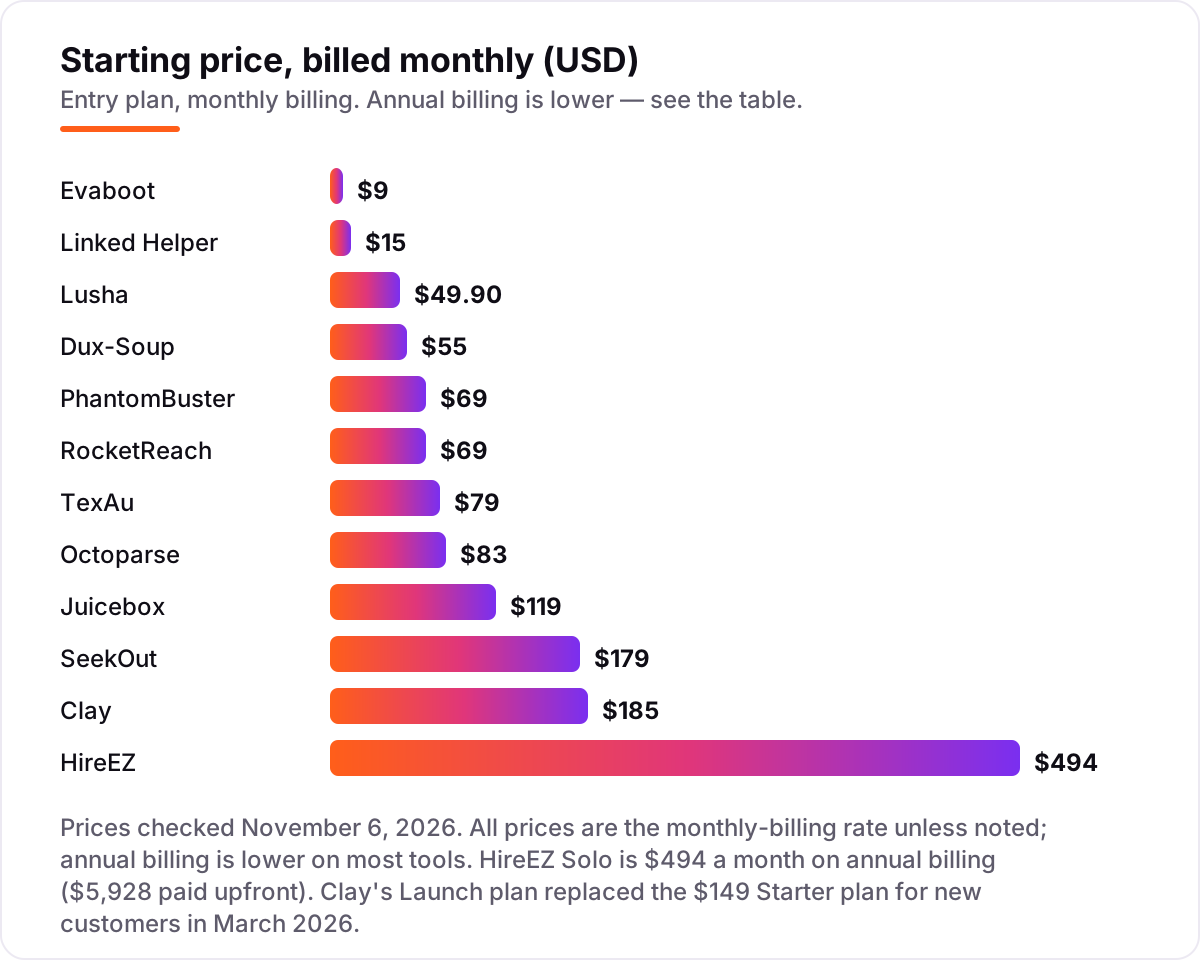
LinkedIn scraping tools for recruiters pricing: what you will actually pay
Take a solo recruiter who needs 200 candidates a month with verified emails. On list prices, the subscription costs $15 a month on Linked Helper, $29 on Evaboot at 400 credits, $69 on RocketReach Essentials, $49.90 on Lusha Starter, $69 on PhantomBuster Start, $79 on TexAu Solo and $119 on Juicebox Starter. Two of those numbers need adjusting before they are real: RocketReach Essentials covers only 100 lookups a month, so 200 candidates need Pro at $79 a month, and Evaboot needs Sales Navigator at about $99.99 a month on top, which brings its real cost to about $129 a month.
Over a year, that is $180 on Linked Helper, $348 on Evaboot before Sales Navigator, $468 on RocketReach Essentials billed monthly, $598.80 on Lusha Starter billed monthly, $828 on PhantomBuster Start billed monthly and $1,428 on Juicebox Starter billed monthly. Annual billing cuts most of those: Linked Helper drops to $99 a year on a 12-month licence, RocketReach Essentials to $229, Lusha Starter to $449.10, PhantomBuster Start to $672 and Juicebox Starter to $1,188. The same 200 candidates cost $180 a year at the cheap end and $1,428 at the dear end before the Sales Navigator adjustment — a gap that comes entirely from credits, seats and billing choices, not from features.
Two costs sit outside every number above. First, the contact data itself: a phone number costs 5 Lusha credits against 1 for an email, so a list that needs phones costs five times as much on the same plan. Second, the seat math: Linked Helper, Dux-Soup, Lusha, Juicebox and RocketReach all price per seat or per account, so a five-person team pays five times the card price, while PhantomBuster and Clay charge per workspace with unlimited users. If the team is growing, price the fifth seat before you commit to a tool for the first.
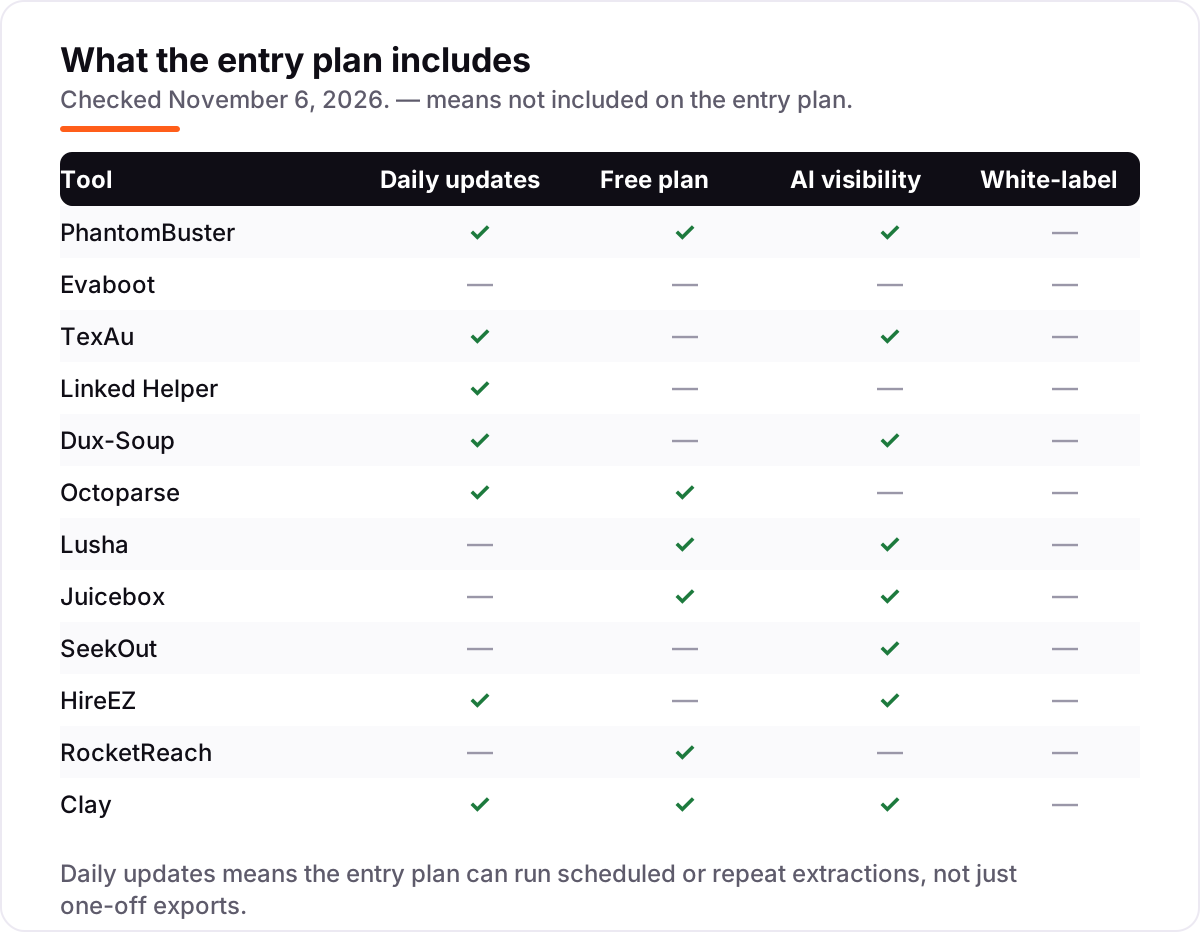
Know the difference: scraping LinkedIn vs searching a candidate database
The confusion in this category is between extracting data from LinkedIn and searching a database that already holds it. A scraper like PhantomBuster, Evaboot or Octoparse pulls data from LinkedIn pages you already found — a search result, a company page, a post's likers — and turns it into a list. A sourcing platform like SeekOut, HireEZ or Juicebox searches its own index of a billion-plus profiles from GitHub, patents, papers and the open web, and LinkedIn is only one of its sources.
The distinction matters for two practical reasons. First, the rules: scraping LinkedIn breaks LinkedIn's User Agreement, which bans automated access, and an account used aggressively can be restricted or banned, however good the tool is. Searching a candidate database does not touch LinkedIn at all, so it carries none of that account risk. Second, the coverage: a scraper can only return people LinkedIn search already shows you, while a database can surface candidates who never appear in your LinkedIn results — engineers on GitHub, researchers on published papers, people who changed jobs last month.
A third distinction is the price shape. Scrapers are cheap — $9 to $83 a month for the entry plans here — because they sell extraction. Sourcing platforms cost $119 to $494 a month because they sell the database, the AI ranking and the outreach on top. If LinkedIn search already finds your candidates and you only need the list out, a scraper is the right buy. If LinkedIn search keeps missing the people you need, pay for the database.
Quick comparison: tool type by need
| Buyer | Best pick | Why |
|---|---|---|
| Solo recruiter on a budget | Linked Helper | Full-featured licence at $15/month, with a built-in CRM |
| Sales Navigator user who only needs exports | Evaboot | Clean, email-ready exports from $9/month, plus Sales Navigator |
| Most recruiters, one versatile tool | PhantomBuster | 150+ LinkedIn automations in the cloud, from $69/month |
| Team that needs verified contact details | Lusha | Verified emails and phones from a browser extension, from $49.90/month |
| Agency that hates Boolean search | Juicebox | Plain-language AI search across 800M profiles, from $119/month |
| Enterprise sourcing desk | HireEZ | AI sourcing across 1B+ profiles with deep ATS sync, from $494/month |
Mistakes to avoid
- Budgeting on the card price alone. Evaboot at $9 a month needs Sales Navigator at about $100 a month, RocketReach Essentials covers only 100 lookups, and Octoparse adds proxy and CAPTCHA fees on top of the plan. The card price is rarely the real cost.
- Buying on credits, then finding the meter runs out. A lead with a verified email costs 2 Evaboot credits, a phone costs 5 Lusha credits, and a failed lookup still costs credits on most tools. Model one real month of volume before you commit.
- Ignoring the seat math. PhantomBuster and Clay charge per workspace with unlimited users; Linked Helper, Dux-Soup, Juicebox and RocketReach charge per seat or account. A five-person team pays five times the card price on the second group.
- Scraping aggressively from your main LinkedIn account. LinkedIn bans automated access, and a restricted account stops your whole sourcing desk. Use a dedicated account, throttle the volume, and never run two automation tools on the same account at once.
- Paying for a database when a scraper would do. If LinkedIn search already finds your candidates, SeekOut at $179 or HireEZ at $494 a month buys reach you do not need. Start with a $9 to $69 scraper and upgrade only when LinkedIn search keeps missing people.
How we chose
We checked each vendor's own pricing page on November 6, 2026 and recorded the monthly-billing starting price exactly as shown, including the annual-billing figure where the page lists one, and we ranked the tools by fit for the most common buyer — a recruiter building candidate lists every week — not by brand size. Ratings come from fresh crawls of the G2 review pages, checked November 6, 2026; Evaboot, Linked Helper and Dux-Soup carry no rating because no G2 review page could be verified for them, and we would rather show no rating than a stale or estimated one. We left Apify out because its entry price is disputed between $19 and $49 a month in third-party sources and its pricing page could not be opened to settle it, and we left Captain Data out because its no-code scraping product was sunset on December 31, 2025. No vendor paid for a place in this list, and none of the links here are affiliate links.
What to do next
Start with the free plan or trial of your top pick and run one real sourcing week through it — your searches, your roles, your candidates. Check that the exported emails verify at a usable rate and that the export lands in your ATS without manual reformatting before you commit to a year. If the lists are sorted but new candidates are not finding you, our monthly SEO service handles the visibility side — or compare outreach tools in our guide to cold email software. Once your tools are in place, find out what's holding your rankings back.
Your stack only works if people find you
SerpAstra fixes what keeps your site off page one and makes it easy for AI assistants to recommend.
Get a free audit→Sources we checked (21)
- PhantomBuster pricing — phantombuster.com/pricing (checked November 6, 2026)
- Evaboot pricing — evaboot.com/pricing (checked November 6, 2026)
- TexAu pricing — texau.com/pricing (checked November 6, 2026)
- Linked Helper pricing — linkedhelper.com/pricing (checked November 6, 2026)
- Dux-Soup pricing — dux-soup.com/pricing/plans (checked November 6, 2026)
- Octoparse pricing — octoparse.com/pricing (checked November 6, 2026)
- Lusha pricing — lusha.com/pricing (checked November 6, 2026)
- Juicebox pricing — juicebox.ai/pricing (checked November 6, 2026)
- SeekOut pricing — seekout.com/pricing (checked November 6, 2026)
- HireEZ pricing — hireez.com/pricing (checked November 6, 2026)
- RocketReach pricing — rocketreach.co/pricing (checked November 6, 2026)
- Clay pricing — clay.com/pricing (checked November 6, 2026)
- PhantomBuster reviews — g2.com/products/phantombuster/reviews (checked November 6, 2026)
- TexAu reviews — g2.com/products/texau/reviews (checked November 6, 2026)
- Octoparse reviews — g2.com/products/octoparse/reviews (checked November 6, 2026)
- Lusha reviews — g2.com/products/lusha/reviews (checked November 6, 2026)
- Juicebox reviews — g2.com/products/juicebox-ai/reviews (checked November 6, 2026)
- SeekOut reviews — g2.com/products/seekout/reviews (checked November 6, 2026)
- HireEZ reviews — g2.com/products/hireez/reviews (checked November 6, 2026)
- RocketReach reviews — g2.com/products/rocketreach/reviews (checked November 6, 2026)
- Clay reviews — g2.com/products/clay-com-clay/reviews (checked November 6, 2026)
Shamim
Founder of SerpAstra
A full-stack SEO and digital marketer who spends most days on Local SEO for dental practices, AI search visibility and lead generation.
Frequently asked questions
What is the best LinkedIn scraping tool for recruiters?
PhantomBuster is the best fit for most recruiters: 150-plus LinkedIn automations, cloud scheduling and unlimited users from $69 a month. Evaboot is better when the only job is exporting Sales Navigator searches, at $9 a month plus a Sales Navigator subscription.
How much do LinkedIn scraping tools for recruiters cost?
Entry prices run from $9 to $494 a month. Evaboot starts at $9, Linked Helper at $15 and RocketReach at $69, while the sourcing platforms cost more: Juicebox at $119, SeekOut at $179 and HireEZ at $494 a month for a solo seat.
Is scraping LinkedIn legal?
Scraping LinkedIn breaks LinkedIn's User Agreement, which bans automated access and data extraction, and LinkedIn has sued scrapers in the past. Public-profile data has been ruled fair game in some US court cases, but an account used aggressively can still be restricted or banned.
Is there a free LinkedIn scraper for recruiters?
Six tools here have a free plan: PhantomBuster, Octoparse, Lusha, Juicebox, RocketReach and Clay. The free tiers are small — RocketReach gives 5 lookups a month and Juicebox gives 5 contact credits — so they test data quality rather than run a full sourcing desk.
Do I need LinkedIn Sales Navigator to scrape LinkedIn?
It depends on the tool. Evaboot only works with Sales Navigator, so it needs a subscription costing about $80 to $100 a month. PhantomBuster, TexAu, Linked Helper and Dux-Soup can scrape regular LinkedIn search and profile lists, though Sales Navigator gives them better targeting.
What is the difference between a LinkedIn scraper and a sourcing platform?
A scraper extracts data from LinkedIn pages you already found, while a sourcing platform searches its own candidate database of a billion-plus profiles. Scrapers are cheaper and LinkedIn-specific; sourcing platforms like SeekOut and HireEZ cost more but find candidates LinkedIn search misses.
Can I export LinkedIn profiles to a spreadsheet or ATS?
Yes, every tool here exports to CSV or Excel, and most push straight into an ATS or CRM. PhantomBuster, Octoparse and Clay offer API access on their entry plans, while Juicebox, SeekOut and HireEZ need a higher tier for ATS and CRM integrations.
Free SEO and AI visibility audit
Find out what is holding your rankings back
Send us your site. Within 2 business days you get a written audit, an AI visibility check and a short fix list ranked by impact. Free, with no contract attached.
Request my free audit→Related guides
 Digital Marketing & Ads9 Best Recruitment Marketing Platforms in 2026, ComparedCompare the 9 best recruitment marketing platforms on price, career sites, campaigns and CRM and trial options, with every price checked November 5, 2026.Read guide →
 Digital Marketing & Ads7 Best Cold Email Outreach Tools B2B in 2026 (Free and Paid, Compared)Compare the 7 best cold email outreach tools b2b on price, warm-up, lead data and multichannel steps, with every price checked November 5, 2026.Read guide →
 Digital Marketing & Ads10 Best Cold Email Software in 2026: Pricing, Features and Pros & ConsCompare the 10 best cold email software tools on price, free plans, warm-up and AI features, with every price checked November 5, 2026, before you buy.Read guide →