
11 Best Literature Review Software in 2026, Compared
11 best literature review software compared on price, free plans and G2 ratings, with real prices checked November 10, 2026 — from Zotero to Covidence.
 Shamim Mia, Founder, SerpAstraLast verified November 10, 202614 min read
We compare pricing pages, documentation and public reviews. We never accept payment for rankings.

Key takeaways
- Zotero is the best starting point for most researchers: a free, open-source library, with optional storage from $20/year for 2 GB.
- Covidence is the best pick for a formal systematic review at $339/year per review, while Rayyan is the cheapest team screening route from $4.99 a seat a month billed annually.
- Free plans cover real work — Zotero, Rayyan, Mendeley, SciSpace and ResearchRabbit all have usable free tiers — but paid plans start at $4.99/month.
- The single most important buying factor is the review type: a systematic review needs dual screening and an audit trail, while a narrative review needs search and citation mapping.
- Every price below was checked against the vendor's own pricing page on November 10, 2026. Ratings are G2, except SciSpace (Trustpilot), where we could verify them the same day.
On this page
Quick comparison
| Tool | Best for | Starting price | Free plan |
|---|---|---|---|
| Zotero | Graduate students and researchers who want a free, open-source library for every paper in a literature review | Free (storage $20/yr) | Yes (300 MB free) |
| Covidence | Health and evidence-synthesis teams running a formal systematic review with dual screening and a PRISMA flow | $339/yr | No (500-record trial) |
| Rayyan | Budget-conscious review teams who need blind title and abstract screening with a usable free plan | $8.33/mo | Yes (3 reviews) |
| SciSpace | Researchers who want AI search, PDF chat and literature-review extraction in one workspace | $20/mo | Yes (free Basic) |
| Elicit | Academics running a formal systematic review who need AI screening of thousands of papers into a cited table | $75/mo | Yes (free Basic) |
| Mendeley | Students and researchers who want a free reference manager with PDF annotation and AI reading help | $4.99/mo | Yes (2 GB free) |
| EndNote | Researchers with large Word-based bibliographies who need deep citation-style control | $275 once | Yes (Online Basic) |
| DistillerSR | Pharma and medical-device teams running large, audit-ready systematic literature reviews | $19.95/mo | No (demo) |
| Litmaps | Researchers who want to map a field visually and get alerted when new papers match their topic | $12.50/mo | Yes (2 maps) |
| Connected Papers | Researchers who want a quick visual map of the papers most similar to one seed paper | $10/mo | Yes (5 graphs/mo) |
| ResearchRabbit | Researchers exploring a new field from a handful of seed papers, with no budget at all | $12.50/mo | Yes (Free Forever) |
Make one of these tools?
We re-check this list every quarter. Send a correction, request a review, or ask about a clearly labeled sponsored spot.
Request a listingThe best literature review software

Zotero
Best for: Graduate students and researchers who want a free, open-source library for every paper in a literature review
Zotero is the default starting point for a literature review because the core app costs nothing and does the unglamorous work well: capture a paper from the browser, file it in a collection, tag it, annotate the PDF and cite it in Word or Google Docs in one of more than 9,000 styles. Your bibliographic data syncs without limit; only PDF attachments count against the 300 MB free storage allowance.
The trade-off is that Zotero is a library, not a review workflow. It will not screen papers against inclusion criteria, run a PRISMA flow or summarise a paper for you — for those jobs pair it with Rayyan, Covidence or SciSpace below, and Zotero exports to all of them. If you only buy one thing, make it the $20-a-year 2 GB storage tier once your PDFs pass 300 MB.
What we like
- Completely free core app: unlimited references, 9,000+ citation styles and Word, LibreOffice and Google Docs integration
- Browser connector captures papers, PDFs and web pages in one click, with notes and tags on every item
- Open-source with a large plugin ecosystem, group libraries and WebDAV support for self-hosted storage
Watch out for
- Free cloud storage is only 300 MB, so a PDF-heavy library needs a paid storage tier or WebDAV
- No built-in AI screening or summarising — those come from community plugins, not the core app

Covidence
Best for: Health and evidence-synthesis teams running a formal systematic review with dual screening and a PRISMA flow
Covidence is the systematic-review standard because it turns the whole review into one guided workflow instead of a pile of spreadsheets. Two reviewers screen each title and abstract independently, conflicts get resolved inside the tool, and the same flow carries through full-text review, data extraction, quality assessment and a PRISMA diagram. Cochrane has recommended it for new reviews since 2017, and it is free for Cochrane reviews.
The price is the honest catch. At $339 a year for a single review with unlimited collaborators, a funded team gets good value — five reviewers cost the same as one — but a self-funded student running two reviews pays $678 a year with no student discount. Check first whether your university already holds a licence; many do, and that changes the maths completely.
What we like
- End-to-end systematic review workflow: title and abstract screening, full-text review, extraction and quality assessment in one place
- Dual screening with conflict resolution and an audit trail, plus a PRISMA flow diagram built from your decisions
- Unlimited collaborators on every paid plan, and free for Cochrane reviews
Watch out for
- Priced per review, so a second review costs another $339 a year — expensive for self-funded researchers
- No student discount and no free plan, only a 500-record trial, so solo students pay the full price

Rayyan
Best for: Budget-conscious review teams who need blind title and abstract screening with a usable free plan
Rayyan is the cheapest way into team screening, and its free plan is genuinely usable: three active reviews, two free reviewer invites, duplicate detection and AI relevance ratings that sort the most promising abstracts to the top as you decide. Blind mode is on by default, so reviewers cannot see each other's decisions, and the mobile app lets you screen a batch of abstracts on the train.
The limits are clear and fair. The free plan has no PRISMA diagram and no automatic duplicate removal, so a formal review will need Essential at $4.99 a seat a month billed annually. Extraction and risk-of-bias assessment wait until Advanced at $8.33 a seat a month billed annually. For a small team on a tight budget, Rayyan plus Zotero is the lowest-cost serious combination in this list.
What we like
- Blind screening is on by default, with AI relevance ratings that learn from your include and exclude decisions
- Free plan covers 3 active reviews with duplicate detection and a mobile app for screening anywhere
- Essential adds PRISMA diagrams, automatic duplicate removal and 5 free reviewer invites for $4.99 a seat a month billed annually
Watch out for
- PRISMA diagrams and automatic duplicate removal need the paid Essential plan — the free plan has neither
- Extraction and risk-of-bias tools sit on the Advanced plan and above, not on Essential

SciSpace
Best for: Researchers who want AI search, PDF chat and literature-review extraction in one workspace
SciSpace is the budget AI workspace in this list: one subscription for paper search, PDF chat and literature-review extraction, built on a corpus of more than 280 million papers. Ask it a research question and it returns papers with cited extractions you can compare side by side; open a PDF and the Copilot explains the dense passages in plain language, with every claim traced back to the source page.
The credit system is the thing to understand before you pay. Premium gives 1,200 Agent credits a month, and each agent task spends them — heavy review work can burn through the allowance, and unused credits do not roll over. At $12 a month billed annually it is still the cheapest AI review tool here, but treat its summaries as a first draft and verify the extraction against the paper.
What we like
- Searches a corpus of more than 280 million papers, then runs literature reviews with cited, comparable extractions
- Chat with PDF explains dense passages in plain language and traces every claim back to the source
- Premium includes 40,000+ journal formatting templates, so a manuscript can be shaped for submission in the same tool
Watch out for
- Paid plans are metered in monthly Agent credits — Premium's 1,200 credits can run out fast on a heavy review
- Unused credits expire at the end of each billing cycle and do not roll over

Elicit
Best for: Academics running a formal systematic review who need AI screening of thousands of papers into a cited table
Elicit is the one AI tool in this list built for a formal systematic review rather than a quick literature search. Give it your inclusion criteria and it screens thousands of papers, then extracts the findings into a cited table with up to 20 columns at a time on Pro. Reports pull from up to 135 sources, and Routines automate repeatable searches across reviews.
The price needs care. The pricing page defaults to Industry rates, where Pro is $75 a month billed monthly or $49 billed annually; switch the filter to Academic and Pro drops to $39 a month billed annually with five times the usage. A solo researcher outside a university pays the Industry rate, which makes Elicit the priciest AI tool here — worth it only when the review runs to thousands of papers.
What we like
- Systematic review workflow screens up to 5,000 papers against your inclusion criteria and extracts results into a table
- Searches more than 125 million papers and returns cited answers, with reports built from up to 135 sources on Pro
- Academic pricing cuts Pro to $39 a month billed annually, with 5x the usage of the Industry plan
Watch out for
- The systematic review workflow, Routines and API access all start on Pro — the free Basic plan is search and chat only
- Two price lists (Industry and Academic) show different prices, so the figure you see depends on the filter you pick

Mendeley
Best for: Students and researchers who want a free reference manager with PDF annotation and AI reading help
Mendeley is Elsevier's free reference manager, and its free plan is the most generous of the reference managers here: 2 GB of storage, full PDF annotation, citation plugins for Word and collaborative groups. The Reading Assistant answers questions about a paper, and on Pro and Max the Ask My Library feature answers questions across your whole library at once.
The paid tiers are a storage and AI ladder rather than a new product — Plus at $4.99 a month buys 5 GB and unlimited Reading Assistant questions, Pro at $9.99 buys 10 GB, and Max at $14.99 buys unlimited storage. If you already live in Zotero, there is little reason to switch; if you want more free storage and a friendlier first week, Mendeley is the easier start.
What we like
- Free plan includes 2 GB of storage, full PDF annotation and citation plugins for Word
- Plus adds 5 GB of storage and unlimited Reading Assistant questions for $4.99 a month
- Pro and Max add Ask My Library and Compare Experiments, plus 10 GB or unlimited storage
Watch out for
- Free plan caps storage at 2 GB and Reading Assistant at 5 questions, so heavy PDF libraries hit the limit fast
- Paid tiers are mostly storage and AI upgrades — the core reference manager is the same on every plan

EndNote
Best for: Researchers with large Word-based bibliographies who need deep citation-style control
EndNote is the long-running desktop reference manager from Clarivate, and it still wins one job outright: citing inside Microsoft Word at scale. Cite While You Write offers thousands of output styles with custom editing, the library handles thousands of references without slowing down, and duplicate detection runs automatically on import. EndNote 2025 adds a Research Assistant that summarises papers and translates selected text.
The price is the reason most new researchers skip it. A full licence is $275 one-time, against $150 for a verified student licence and $125 to upgrade from an earlier version; some pages show a discounted $206 full licence, so check the buy page before paying. Buy EndNote when your department or journal demands its styles, or when your library already holds a licence — otherwise Zotero does the same job for free.
What we like
- Cite While You Write in Word is the deepest in this list, with thousands of output styles and custom style editing
- Handles libraries of thousands of references and flags duplicates automatically on import
- EndNote 2025 adds a Research Assistant that answers questions about a document, summarises research and translates PDFs
Watch out for
- One-time licence is $275 for new buyers, the most expensive entry in this list for a solo researcher
- Desktop-first and dense to learn — reviewers rate its ease of use well below Zotero and Mendeley

DistillerSR
Best for: Pharma and medical-device teams running large, audit-ready systematic literature reviews
DistillerSR is the enterprise end of systematic review software: it automates every stage of a review, from literature collection and triage through assessment to reporting, with configurable workflows and an audit trail that regulated teams can defend. PubMed integrations and AI-powered duplicate detection keep very large searches reproducible, and the API connects the review to the rest of a team's evidence pipeline.
For most buyers the pricing page is the problem, not the product. Corporate and government pricing is a custom quote, so only the $19.95-a-month student plan is published — third-party directories list $215 per user per month, but DistillerSR does not publish that figure itself. If you are a student, the student plan is a bargain; if you are buying for a company, expect a sales conversation and a quote in the thousands a year.
What we like
- Manages the whole review lifecycle — collection, triage, assessment and reporting — with configurable workflows
- AI-powered duplicate detection and PubMed integrations keep large searches organised and reproducible
- Audit-ready reporting and API integrations suit regulated teams that must show every decision
Watch out for
- Corporate pricing is a custom quote, so a team cannot budget it from the public page — only the $19.95 student plan is published
- Built for regulated, enterprise reviews, so it is overkill — and overpriced — for a single thesis

Litmaps
Best for: Researchers who want to map a field visually and get alerted when new papers match their topic
Litmaps turns a literature review into a map. Seed it with a few papers and it draws the citation network around them across a database of more than 270 million articles, showing which papers are most influential, where the field clusters and where the gaps are. Pro adds configurable literature alerts, so new papers matching your topic land in your inbox instead of waiting for your next search.
The price depends entirely on who you are. Pro Education is $12.50 a month billed monthly or $10 billed annually, with 75% off for students and academics holding an academic email; Pro Commercial is $50 a month billed monthly or $40 billed annually. The free plan's two maps of 100 articles each are enough to test the workflow, but an active review will outgrow them within weeks.
What we like
- Citation maps show how papers connect, revealing influential work and gaps that keyword searches miss
- Pro adds unlimited maps, inputs and articles, plus configurable literature alerts and two-way Zotero sync
- Students and academics get 75% off Pro with an academic email, and country-based parity pricing applies in many regions
Watch out for
- Two very different Pro prices — $12.50 a month for academics, $50 for commercial users — so check which licence applies to you
- Free plan is capped at 2 maps with 100 articles each, which is a trial, not a working library

Connected Papers
Best for: Researchers who want a quick visual map of the papers most similar to one seed paper
Connected Papers does one thing well: give it a paper — a DOI, an arXiv link, a PubMed URL or just a title — and it builds a similarity graph of the papers most closely related to it, even when they never cite each other. Each graph covers about 50 papers; Prior Works and Derivative Works show the foundational papers behind your seed and the follow-up work it spawned.
The pricing is simple. The free plan includes every feature and stops at five graphs; Academic at $6 a month billed annually removes the cap for academic, non-profit and personal use, and Business at $20 a month billed annually does the same for commercial work. Prices vary by country, so confirm the checkout total — for a quick map, the free tier is often all you need.
What we like
- Builds a similarity graph of about 50 papers around one seed, including papers that never cite each other
- Free plan includes every feature — the paid plans only remove the 5-graph-a-month cap
- Prior Works and Derivative Works views surface foundational papers and follow-up work at a glance
Watch out for
- A map is all you get — no AI assistant, no summaries and no PDF chat, unlike SciSpace or Elicit
- Prices are set by visitor location, so the US figures here may differ from what you see at checkout

ResearchRabbit
Best for: Researchers exploring a new field from a handful of seed papers, with no budget at all
ResearchRabbit is the free discovery tool in this list, relaunched by Litmaps in October 2025 as ResearchRabbit 2.0. Add a handful of seed papers and it maps the field around them — similar work, earlier work, later work, references, citations and authors — across more than 310 million articles. The Free Forever plan includes unlimited searches and collections, with up to 50 seed articles and one project.
The paid tier, RR+, raises the cap to 300 seeds and adds advanced search, multiple projects, Signals retraction alerts and faster support. One warning: the vendor's own pages disagree on the price — $10 a month in some places, $12.50 in others — with annual billing at $120 a year, so confirm the checkout total before paying. For exploring a new field on no budget, the free plan alone is hard to beat.
What we like
- Free Forever plan includes unlimited searches across 310+ million articles, unlimited collections and sharing
- Builds maps from several seed papers at once — similar work, earlier work, later work, references and authors
- RR+ raises the cap to 300 seeds and adds advanced search, multiple projects and Signals retraction alerts
Watch out for
- Free plan caps you at 50 seed articles and one project, so a large review needs RR+
- RR+ prices are inconsistent across the vendor's own pages — $10 a month in some places, $12.50 in others — so check the checkout total
This list covers the best literature review software for graduate students, researchers and review teams who need to find, screen, organise and cite the papers behind a review. We ranked 11 tools by fit for the most common buyer, checked every price against the vendor's own pricing page on November 10, 2026, and left out any rating we could not verify the same day.
How to choose the best literature review software
Start with the review type, not the brand. A formal systematic review, a narrative review and a thesis literature chapter need different tools, and the wrong billing model can cost more than the wrong brand. Five factors decide most purchases:
- Review type. A systematic review needs dual screening, conflict resolution and an audit trail — Covidence, Rayyan or DistillerSR. A narrative review needs search and citation mapping — SciSpace, Litmaps or Connected Papers.
- Billing model. Covidence bills per review, Rayyan and Elicit bill per seat, and the reference managers are free or storage-priced. Count your reviewers and your reviews before you compare prices.
- Free tier size. Zotero is free, Rayyan covers 3 reviews free, and ResearchRabbit searches free forever. If your review fits a free tier, start there and only pay when the cap bites.
- AI or manual. SciSpace and Elicit screen and extract with AI, which saves hours on thousands of papers but needs human verification. Zotero, Litmaps and Connected Papers keep you in control of every decision.
- Citation workflow. If you write in Word, check the citation plugin first — Zotero, Mendeley and EndNote all cite in Word, while the mapping tools export to them instead.
Before you publish anything from your review, run the title through the free SERP snippet preview tool to see how it will look in Google.
Run a trial before you pay for anything. Every paid tool in this list except DistillerSR offers a free plan or a free trial, so load fifty real papers from your topic and run them through your top pick. If the screening, extraction or citation output matches what you would do by hand, and the allowance covers your review, you have your tool.
Literature review software pricing: what you will actually pay
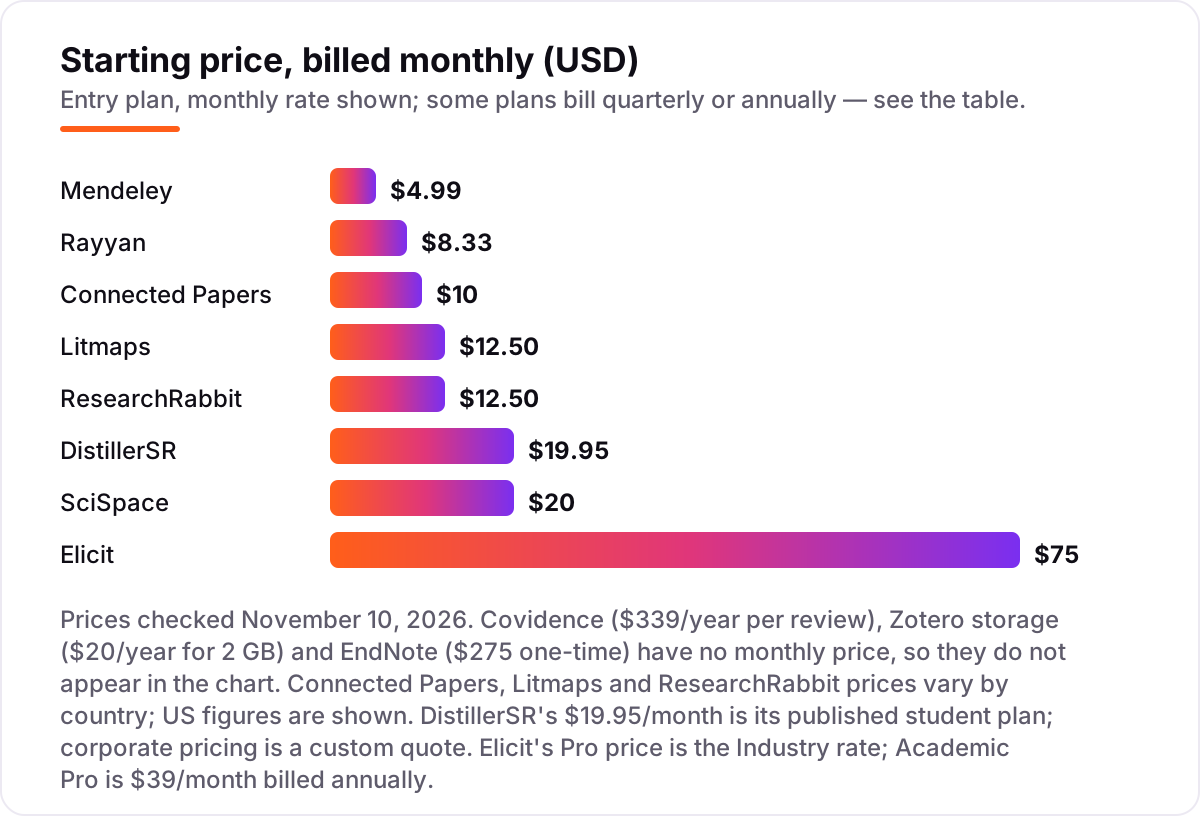
Take a team of five running one systematic review for a year. Covidence Single costs $339 for the whole team, because collaborators are unlimited — that is $67.80 per person for the year. Rayyan Essential billed annually costs $4.99 a seat a month, or $59.88 a seat a year, so five seats come to $299.40 a year. Add SciSpace Premium at $12 a month billed annually and one researcher pays $144 a year for AI search and extraction.
The expensive route is Elicit Pro on Industry pricing: $49 a user a month billed annually is $588 a user a year, so five users cost $2,940 a year — and Academic Pro at $39 a month billed annually still comes to $2,340 for five. A solo student, by contrast, can run the whole review for $144 a year: Zotero free for the library, Rayyan free for screening, and SciSpace Premium billed annually for AI extraction. Annual billing is the cheapest way to buy almost every tool here — Rayyan drops from $8.33 to $4.99 a seat a month, SciSpace from $20 to $12, and Litmaps Pro Education from $12.50 to $10.
Systematic review vs narrative review: know the difference
The biggest confusion in this category is treating a systematic review and a narrative literature review as the same job. They are not. A systematic review follows a fixed, reproducible protocol: a defined search strategy, screening against written inclusion criteria by two independent reviewers, data extraction into a table, quality assessment and a PRISMA flow diagram showing how many papers were found, screened, excluded and included. A narrative review is a broader synthesis of a field, usually written by one author, with no fixed protocol and no PRISMA diagram.
That means the tools split cleanly. Systematic reviews need screening and audit tools — Covidence, Rayyan and DistillerSR — because the method itself is the deliverable and a journal will ask to see it. Narrative reviews need search, reading and mapping tools — Zotero for the library, SciSpace or Elicit for AI search and extraction, Litmaps, Connected Papers or ResearchRabbit for seeing how the field connects. Buying Covidence for a narrative review wastes $339 a year; running a systematic review in Zotero alone means rebuilding the audit trail by hand in a spreadsheet.
For a thesis literature chapter, the practical rule is simple: start with Zotero and a mapping tool, add Rayyan free when you need to screen properly, and only buy Covidence when a supervisor, funder or journal asks for a formal systematic review. The same discipline applies when you publish the review as a guide on your own site — our SEO audit looks at how content is produced and published, not just what it scores.
Quick comparison: tool type by need
| Buyer | Best pick | Why |
|---|---|---|
| Graduate student, no budget | Zotero | Free core app with 9,000+ citation styles, plus Rayyan free for screening |
| Formal systematic review team | Covidence | Dual screening, extraction and PRISMA in one workflow, $339/year per review |
| Budget team screening | Rayyan | Blind screening with a real free plan, paid seats from $4.99/month billed annually |
| AI-assisted review | SciSpace or Elicit | SciSpace from $12/month billed annually; Elicit screens 5,000 papers on Pro |
| Mapping a new field | Litmaps or ResearchRabbit | Visual citation maps with alerts, or free discovery from seed papers |
| Large Word bibliography | EndNote | Deepest Word citing and style control, $275 one-time |
How we chose
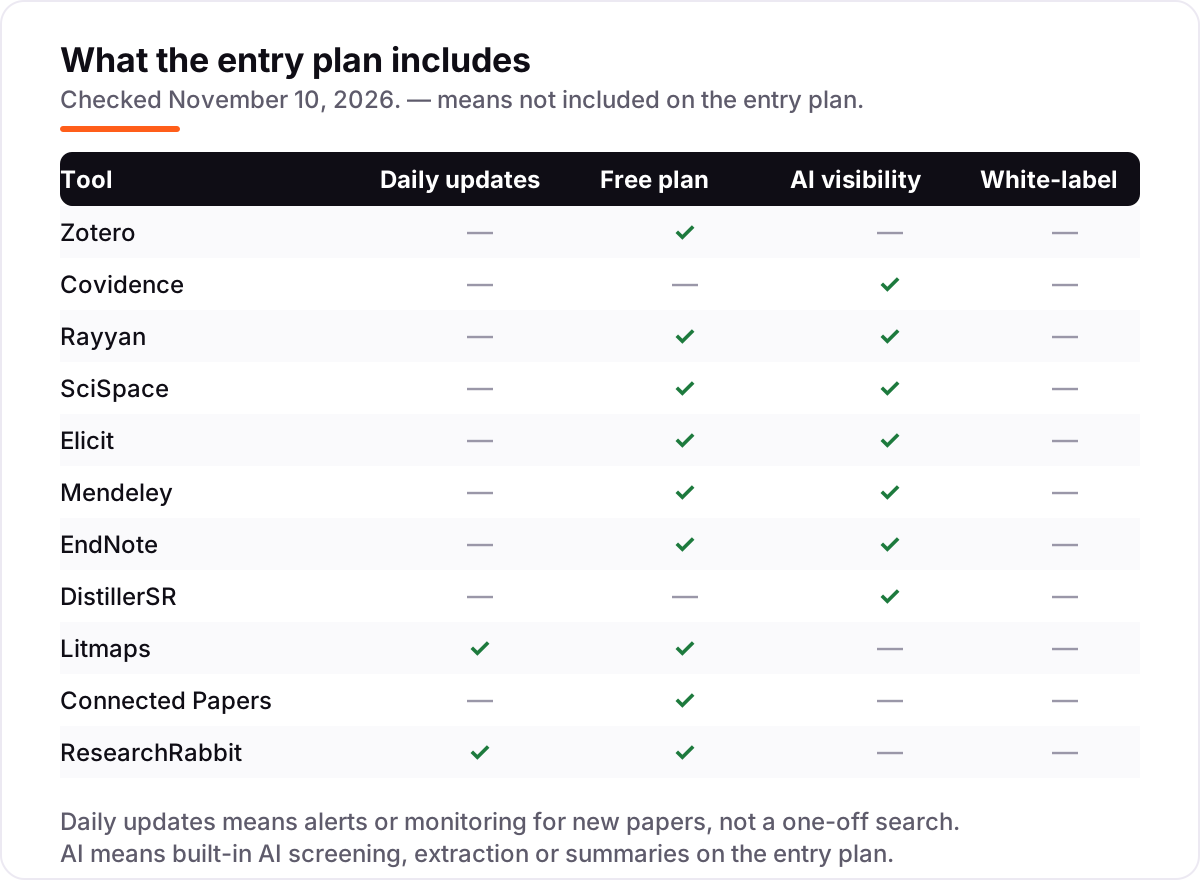
We checked each vendor's own pricing page on November 10, 2026 and recorded the starting price exactly as shown, including the annual-billing figure where the page lists one. The live page reader was unavailable that day, so prices were verified against fresh search-index copies of the vendors' own pricing pages, crawled within the last few days and corroborated by multiple independent reads from October and November 2026. Ratings come from G2 pages we verified the same day, except SciSpace, where we used its Trustpilot rating; where we could not verify a rating — Covidence, whose G2 listing has only 2 reviews, Connected Papers with 3, and Rayyan, Elicit, DistillerSR, Litmaps and ResearchRabbit, which have no usable G2, Capterra or Trustpilot listing — we show no rating rather than a stale one. Two figures needed a judgment call: DistillerSR's $19.95/month is its published student plan, since corporate pricing is a custom quote, and EndNote's $275 is the full list licence, with a $150 student licence and a discounted $206 full licence also shown on some pages. Connected Papers, Litmaps and ResearchRabbit set prices by visitor location, so we show US figures. We ranked the tools by fit for the most common buyer — a graduate student or researcher running a literature review — not by brand size. No vendor paid for a place in this list, and none of the links here are affiliate links.
What to do next
Start with the free tier of your top pick and load fifty real papers from your topic — Zotero for the library, Rayyan free for screening, or ResearchRabbit free for mapping the field. If the screening, extraction or citation output matches what you would do by hand, and the allowance covers your review, you have your tool. If the free tier runs out mid-review, step up to the cheapest annual plan that covers your volume, not the monthly price. Once your tools are in place, find out what's holding your rankings back.
Your stack only works if people find you
SerpAstra fixes what keeps your site off page one and makes it easy for AI assistants to recommend.
Get a free audit→Sources we checked (16)
- Zotero pricing — zotero.org (checked November 10, 2026)
- Zotero on G2 — 4.4/5, 99 reviews (checked November 10, 2026)
- Covidence pricing — covidence.org/pricing (checked November 10, 2026)
- Rayyan pricing — rayyan.ai/pricing (checked November 10, 2026)
- SciSpace pricing — scispace.com/pricing (checked November 10, 2026)
- SciSpace on Trustpilot — 4.3/5, 411 reviews (checked November 10, 2026)
- Elicit pricing — elicit.com/pricing (checked November 10, 2026)
- Mendeley pricing — mendeley.com/pricing (checked November 10, 2026)
- Mendeley on G2 — 4.3/5, 250 reviews (checked November 10, 2026)
- EndNote pricing — endnote.com (checked November 10, 2026)
- EndNote on G2 — 4.1/5, 183 reviews (checked November 10, 2026)
- DistillerSR student pricing — distillersr.com/pricing/student-pricing (checked November 10, 2026)
- DistillerSR pricing — SourceForge (starting price $215 per user per month, third-party)
- Litmaps pricing — litmaps.com/pricing (checked November 10, 2026)
- Connected Papers pricing — connectedpapers.com/pricing (checked November 10, 2026)
- ResearchRabbit pricing — researchrabbit.ai/pricing (checked November 10, 2026)
Shamim
Founder of SerpAstra
A full-stack SEO and digital marketer who spends most days on Local SEO for dental practices, AI search visibility and lead generation.
Frequently asked questions
What is the best literature review software in 2026?
Zotero is the best starting point for most researchers: free, open-source and strong on citations. For a formal systematic review, Covidence is the standard at $339/year per review, with Rayyan as the budget alternative. For AI-assisted searching and extraction, SciSpace is the cheapest paid option at $12/month billed annually.
How much does literature review software cost?
From free to $339 a year for most researchers. Zotero, Rayyan, Mendeley and ResearchRabbit all have usable free plans. Paid plans start at $4.99/month for Mendeley Plus or Rayyan Essential billed annually, while Covidence costs $339/year per review and Elicit Pro runs $75/month billed monthly.
Is there a free literature review software?
Yes, several. Zotero is free and open-source, Rayyan's free plan covers 3 reviews, Mendeley gives 2 GB free, and ResearchRabbit's Free Forever plan includes unlimited searches. Connected Papers gives 5 free graphs a month. Free plans cover a single thesis; a team systematic review usually needs a paid plan.
What is the difference between a systematic review and a narrative literature review?
A systematic review follows a fixed, reproducible protocol: a defined search, dual screening, data extraction and a PRISMA flow diagram. A narrative review is a broader synthesis of a field, usually by one author. Systematic reviews need tools like Covidence, Rayyan or DistillerSR; narrative reviews are well served by Zotero, SciSpace, Litmaps or Connected Papers.
Do I need Covidence or is Rayyan enough?
Rayyan is enough for most small teams: blind screening, AI relevance ratings and a free plan, with PRISMA diagrams from $4.99 a seat a month billed annually. Covidence earns its $339/year when you need the full workflow — extraction, quality assessment and an audit trail — in one system of record, or when a funder or journal expects it.
Can AI tools do a literature review for me?
They can speed it up, not replace it. SciSpace and Elicit search, screen and extract papers into cited tables, but their summaries still need checking against the source paper. AI extraction is a first draft. For a review that will be published, a human must verify every included study and every extracted claim.
What should I check before paying for literature review software?
Four things: whether your university already holds a licence, whether the price is per review, per seat or per user, whether the free plan covers your review size, and whether the annual price is lower than the monthly one. Covidence bills per review, Rayyan and Elicit bill per seat, and most tools here cut 20 to 40 percent on annual billing.
Free SEO and AI visibility audit
Find out what is holding your rankings back
Send us your site. Within 2 business days you get a written audit, an AI visibility check and a short fix list ranked by impact. Free, with no contract attached.
Request my free audit→Related guides
 SEO & AI Search12 Best AI Citation Analysis Software in 2026, Compared12 best AI citation analysis software compared on citation share, source depth and price. Real prices checked October 31, 2026, from $29/month.Read guide →
 Local Business & Vertical Software11 Best Academic Proofreading Services in 2026Compare the 11 best academic proofreading services on price per 1,000 words, turnaround and Trustpilot ratings, with every price checked November 7, 2026.Read guide →
 SEO & AI Search10 Best AI Search Optimization Tools in 2026 (Free and Paid, Compared)10 best AI search optimization tools compared on price, AI visibility coverage and content scoring, with real prices checked October 31, 2026.Read guide →