
Best Live Chat Software for 2026: 9 Options Compared by Use Case
Compare the 9 best live chat software options on price, free plans, AI chatbots and per-seat costs, with every price checked November 4, 2026.
 Shamim Mia, Founder, SerpAstraLast verified November 4, 202614 min read
We compare pricing pages, documentation and public reviews. We never accept payment for rankings.

Key takeaways
- Tidio leads for most small businesses at $29/month, LiveChat follows at $25/user/month with an AI agent included, and Zoho SalesIQ is the cheapest per seat at $10/operator/month.
- Five of the nine tools have genuinely free plans — Tidio, Crisp, HubSpot, Freshchat and Help Scout — so you can run live chat at $0 before you pay anything.
- The single most important buying factor is what the price is actually per: a flat workspace price, a per-seat price, or a per-conversation price decides your real bill.
- Watch the AI meter: most tools here charge for AI resolutions or sessions on top of the seat price, so a busy month costs more than the headline figure.
On this page
Quick comparison
| Tool | Best for | Starting price | Free plan |
|---|---|---|---|
| Tidio | Small online stores that want live chat, ticketing and an AI agent in one inbox without per-seat pricing | $29/mo | Yes (free plan) |
| LiveChat | Teams that want a dedicated live chat tool with an AI agent included, not a full help desk | $25/user/mo | No (14-day trial) |
| Crisp | Small teams that want one flat price per workspace instead of paying per agent | $45/mo | Yes (free plan) |
| Intercom | Growing support teams that want an AI agent resolving chats before a human ever sees them | $39/seat/mo | No (14-day trial) |
| HubSpot | Businesses already running HubSpot CRM that want chat tied to contact records at no extra cost | Free; Starter $20/seat/mo | Yes (free) |
| Freshchat | Teams in the Freshworks ecosystem that want chat plus WhatsApp, Instagram and SMS in one inbox | $23/agent/mo | Yes (free plan) |
| Help Scout | Email-first support teams that want to add live chat without losing the personal, human feel | $30/user/mo | Yes (free plan) |
| Zoho SalesIQ | Zoho CRM users and budget buyers who want visitor tracking plus chat for the lowest per-seat price here | $10/operator/mo | Yes (free plan) |
| Zendesk | Support teams that will grow from live chat into ticketing, AI agents and voice on one platform | $69/agent/mo | No (free trial) |
Make one of these tools?
We re-check this list every quarter. Send a correction, request a review, or ask about a clearly labeled sponsored spot.
Request a listingThe best live chat software

Tidio
Best for: Small online stores that want live chat, ticketing and an AI agent in one inbox without per-seat pricing
Tidio is the easiest way for a small store to add live chat without hiring a support team first. Starter costs $29 a month for 100 billable conversations, and the free plan covers 50 conversations a month, so a new store can answer real customers before paying. The widget installs in minutes on Shopify, WordPress and WooCommerce, and the same inbox handles chat, email, Messenger and Instagram.
The catch is the conversation meter. Starter's 100 billable conversations run out fast on a busy store, and Growth starts at $59 a month for 250. Lyro, the AI agent, is a separate add-on from $39 a month for 50 AI conversations, so the AI that answers while you sleep is not part of the $29 headline price. Pick Tidio when you sell online and want chat plus AI in one cheap package.
What we like
- Free plan covers 50 billable conversations a month, so a new store answers real customers before paying
- No per-seat pricing — Starter includes up to 10 agents for one flat $29/month
- Lyro AI agent resolves up to 67% of tickets, according to Tidio's G2 demo page
- One inbox for live chat, email, Messenger and Instagram, with Shopify and WordPress plugins
Watch out for
- Lyro AI is a separate add-on from $39/month ($32.50 billed annually) — Starter's 50 Lyro conversations are a one-off allowance, not monthly
- Starter covers only 100 billable conversations a month, so a busy store outgrows it fast
- Removing Tidio branding needs a paid add-on or the Plus plan

LiveChat
Best for: Teams that want a dedicated live chat tool with an AI agent included, not a full help desk
LiveChat is the dedicated live chat tool in this list: it does chat and nothing else, and does it well. Essential costs $25 per user a month, or $19 billed annually, and it is the only entry plan here that includes an AI Agent: one agent with 10 AI resolutions a month, which answers common questions and hands the rest to your team. There is no conversation cap, so busy months cost the same as quiet ones.
The trade-off: there is no free plan, only a 14-day trial, and new sign-ups buy the rebranded Text plans, while the classic LiveChat plans stay only for existing customers. Extra AI resolutions cost $49.50 per 50-pack, so heavy AI use costs more than the seat price. Pick LiveChat when chat is a sales channel, not a side job.
What we like
- An AI Agent is included on Essential, with 10 AI resolutions a month — most rivals charge extra for AI
- No conversation caps: the price is per user, so a busy month costs the same as a quiet one
- Live Shopify catalog and a large app marketplace connect chat to the store
- 24/7 support on every plan, including the entry tier
Watch out for
- No free plan — only a 14-day trial
- New sign-ups buy the rebranded Text plans; the classic LiveChat plans stay only for existing customers
- AI resolutions beyond the included 10 a month cost $49.50 per 50-pack

Crisp
Best for: Small teams that want one flat price per workspace instead of paying per agent
Crisp is the only tool here that charges per workspace instead of per person: Mini costs $45 a month flat, covers 4 seats and unlimited conversations, and a fifth agent costs nothing extra. That makes it the cheapest honest price for a team of three or four, and the free plan covers 2 seats and 100 customer profiles. The shared email inbox, chat triggers and canned responses come with Mini, not a higher tier.
The catches sit on the higher tiers. Removing the Crisp watermark needs Plus at $295 a month, the knowledge base waits for Essentials at $95, and the omnichannel inbox — WhatsApp, Instagram, SMS — is an Essentials feature too. The AI credits on Mini are small: $5 covers about 90 automated conversations a month. Pick Crisp when your team is small and steady.
What we like
- Flat $45/month per workspace with unlimited conversations — adding a fifth agent costs nothing extra
- $5 of AI credits included on Mini, about 90 automated conversations a month
- Shared email inbox, chat triggers and canned responses included from Mini
- Mobile and desktop apps with real-time visitor geolocation on every plan
Watch out for
- Removing the Crisp watermark needs Plus at $295/month
- Free plan caps at 100 customer profiles and 2 seats
- Knowledge base and omnichannel inbox wait for Essentials at $95/month

Intercom
Best for: Growing support teams that want an AI agent resolving chats before a human ever sees them
Intercom is the AI-first choice: Fin, its AI agent, is included on every plan and resolves chats across chat, email and phone before a human sees them. Essential costs $39 per seat a month, $29 billed annually; the page today showed a $19 promotional annual price for new customers, with the $29 annual list price struck through. Every plan includes unlimited live chat, a shared inbox, ticketing and a help center.
The seat price is not the whole bill. Fin is charged on top at $0.99 per resolved conversation, so 100 resolutions add $99 a month, and Workflows, round-robin assignment and a private help center wait for Advanced at $85 a seat. Pick Intercom when AI resolution is the point; pick LiveChat when you want the AI included in the seat price.
What we like
- Fin AI Agent is included on every plan and resolves chats across chat, email and phone
- All plans include unlimited live chat, email, in-app chat, banners and tooltips
- Deepest automation and reporting in this list, with a public help center from Essential
- 14-day free trial with no credit card required, including Fin and add-ons
Watch out for
- Fin usage is billed on top at $0.99 per resolved conversation, so the seat price is not the whole bill
- The $19 annual price on the vendor page today is a new-customer promotion — the list price is $29/seat/month billed annually, $39 billed monthly
- Workflows, round-robin assignment and a private help center wait for Advanced at $85/seat/month

HubSpot
Best for: Businesses already running HubSpot CRM that want chat tied to contact records at no extra cost
HubSpot is the only tool here where live chat costs nothing: the free CRM includes a live chat widget, a shared inbox and contact records, so every chat lands on a real customer record that sales can see. There is no conversation cap stated on the free plan, and the widget installs with a code snippet or a WordPress plugin. It is the obvious pick for any business already running HubSpot.
The free plan has limits that matter. HubSpot branding stays on the widget until you pay for Starter, which costs $20 a seat a month — $7 on a new-customer annual promotion — and the AI Customer Agent and the full help desk workspace wait for Professional at $90 a seat. Pick HubSpot when the CRM is already home; pick Zoho SalesIQ when you want the cheapest paid seat.
What we like
- Live chat is genuinely free inside the CRM, with no conversation cap stated
- Every chat lands on a contact record, so sales and support see the same history
- Free plan includes a shared inbox, meeting scheduling and basic reporting
- Scales into a full service platform — ticketing, knowledge base and automation — without migrating data
Watch out for
- HubSpot branding stays on the free chat widget; removal needs Starter
- The AI Customer Agent and the full help desk workspace wait for Professional at $90/seat/month
- Starter's $7 annual price is a new-customer promotion; the standard price is $20/seat/month

Freshchat
Best for: Teams in the Freshworks ecosystem that want chat plus WhatsApp, Instagram and SMS in one inbox
Freshchat is the omnichannel pick: Growth costs $23 an agent a month, or $19 billed annually, and adds WhatsApp, Facebook, Instagram and SMS to the website chat, so one inbox covers every channel a customer might use. The free plan covers up to 10 agents — the most generous free tier here — and Freddy, the AI agent, comes with Growth, with 500 sessions free once per account.
The AI is metered, and that is the catch. After the 500 free sessions, every 100 Freddy sessions cost $49, so 2,000 Freddy sessions a month cost $980 once the free allowance is used. Copilot, the agent-assist tool, costs another $29 an agent a month on Pro. Pick Freshchat when your customers message you on social channels; pick Tidio when website chat is the whole job.
What we like
- Free plan covers up to 10 agents — the most generous free tier here
- Growth adds WhatsApp, Facebook, Instagram and SMS alongside website chat
- Freddy AI Agent included on Growth, with 500 sessions free once per account
- Day passes ($2 on Growth) let part-time agents work without a full seat
Watch out for
- Freddy AI is metered — after 500 free sessions, every 100 sessions cost $49
- WhatsApp, Facebook and Instagram need Growth; the free plan is website chat and email only
- Copilot agent-assist costs $29/agent/month extra on Pro

Help Scout
Best for: Email-first support teams that want to add live chat without losing the personal, human feel
Help Scout is the human-feel pick: Beacon, its chat widget, sits in the same shared inbox as email, so a customer gets one conversation thread and your team gets one place to work. Standard costs $30 a user a month, or $25 billed annually, and includes live chat, WhatsApp, Instagram and Messenger, plus AI Assist drafting that helps agents reply faster. The free plan covers 5 users with no time limit.
The AI that resolves chats costs extra: AI Answers is $0.75 per resolution on top of the seat price. Standard also stops at 25 users, so the 26th hire forces every seat onto Plus at $45 a user, and reporting stays basic until you upgrade. Pick Help Scout when email is still your main channel and chat is the second one; pick LiveChat when chat is the main channel.
What we like
- Beacon chat and a Docs help center sit in the same inbox as email, so nothing gets split across tools
- AI Assist drafting is included on Standard, so agents reply faster without a separate add-on
- Free plan covers 5 users with no time limit — the only free plan here with no expiry
- Cleanest interface in this list, with collision detection so two agents never answer the same chat
Watch out for
- AI Answers, the resolving AI agent, costs $0.75 per resolution on top
- Standard stops at 25 users — the 26th seat forces every seat onto Plus at $45/user/month
- Reporting is basic on Standard; deeper analytics wait for higher tiers

Zoho SalesIQ
Best for: Zoho CRM users and budget buyers who want visitor tracking plus chat for the lowest per-seat price here
Zoho SalesIQ is the cheapest paid seat in this list: Basic costs $10 an operator a month, or $7 billed annually, and the free plan covers 3 operators with 100 chat sessions a month. What sets it apart is visitor tracking: you see who is on your site, where they came from and how sales-ready they look. Zia AI Agents and a chatbot come with Basic, with 25,000 bot sessions a month.
The limits are the session caps. Basic covers 1,000 operator chat sessions a month, so a busy site needs Professional at $12.75 an operator a month, and deeper chatbot flows lean on Zoho's Deluge scripting, which non-technical teams find slow to learn. The widget design also looks dated next to newer tools. Pick SalesIQ when you run Zoho CRM or want the lowest per-seat price.
What we like
- Cheapest paid seat in this list at $7/operator/month billed annually
- Real-time visitor tracking with lead and company scoring built in, not bolted on
- Zia AI Agents and chatbot included on Basic, with 25,000 bot sessions a month
- Audio and video calls plus screen sharing work from inside the chat window
Watch out for
- Basic caps at 1,000 operator chat sessions a month — a busy site needs Professional
- Deeper chatbot flows lean on Zoho's Deluge scripting language
- The widget design looks dated next to newer chat tools

Zendesk
Best for: Support teams that will grow from live chat into ticketing, AI agents and voice on one platform
Zendesk is the scale pick: Suite Team costs $69 an agent a month, or $55 billed annually, and bundles live chat with email, social ticketing, a help center, voice and AI agents in one price. It is the most complete platform here, and the trial runs on Suite Professional features. The $19 Support Team plan is email and ticketing only — it has no live chat at all.
The price climbs fast once you add the extras. Copilot, the agent-assist tool, costs $50 an agent a month on top, and AI resolutions above the small monthly allowance cost $1.50 each. Setup and admin also take more work than the chat-only tools here, so a small team pays for platform it may never use. Pick Zendesk when chat is the first step toward a full support operation.
What we like
- Most complete platform here: chat, email, social, voice, help center and AI agents in one price
- AI agents included on Suite Team, with a small monthly resolution allowance per seat
- Largest integration marketplace in this list, with 1,000+ apps and deep Salesforce and Shopify links
- 14-day trial runs on Suite Professional features, so you test the real product
Watch out for
- The $19 Support Team plan is email and ticketing only — live chat starts at Suite Team $55/agent/month
- Copilot agent-assist costs $50/agent/month extra
- Setup and admin take more work than the simpler chat-only tools here
The best live chat software answers a website visitor in seconds, not hours, and turns a browsing question into a sale or a solved problem. The nine tools below are ranked by fit for the most common buyer — a small business that needs chat on its website without hiring a support department — and every price was verified on November 4, 2026.
Most of these tools now bundle an AI agent with the chat widget, and the AI is usually metered separately, so the headline price is rarely the whole bill. The cards below show the real starting price for each tool, what the free plan actually covers, and where the extra charges hide.
How to choose the best live chat software
- Count what you are actually charged for. Some tools charge per seat (Intercom, Zendesk), some per workspace (Crisp), some per conversation (Tidio). A $29 flat price beats a $19 per-seat price the moment a second person answers chats.
- Check the free plan's real limits. HubSpot and Freshchat let you run chat free with no expiry; Tidio's free plan stops at 50 conversations a month and Zoho SalesIQ's at 100 sessions.
- Price the AI separately. Fin, Lyro, Freddy and AI Answers are all metered or add-ons. Ask how many AI resolutions your month needs, then add that to the seat price.
- Match the tool to your CRM. HubSpot chat belongs with HubSpot CRM, SalesIQ with Zoho CRM, Freshchat with Freshworks. A chat tool that cannot see your customer records is a second inbox, not a system.
- Test the widget on your own site. Install the free plan or trial on a staging page and watch it on a phone. A widget that covers the checkout button or loads slowly costs more in lost sales than any subscription saves.
Live chat is one system in your stack, not the whole stack. If the business also needs to be found online, our guide to customer service chatbots covers the AI side, and our monthly SEO service handles the visibility side. Before you publish new pages for the services you sell, run your titles through the free SERP snippet preview tool — it shows exactly how the title and description will look in Google.
Whatever you shortlist, try it with real chats before you pay. The free plans and trials in this list are long enough to run one genuine week — your visitors, your questions, your team — and that week tells you more than any review can. Check two things in the trial: that the widget loads fast on mobile, and that the AI hands off cleanly to a human when it cannot answer.
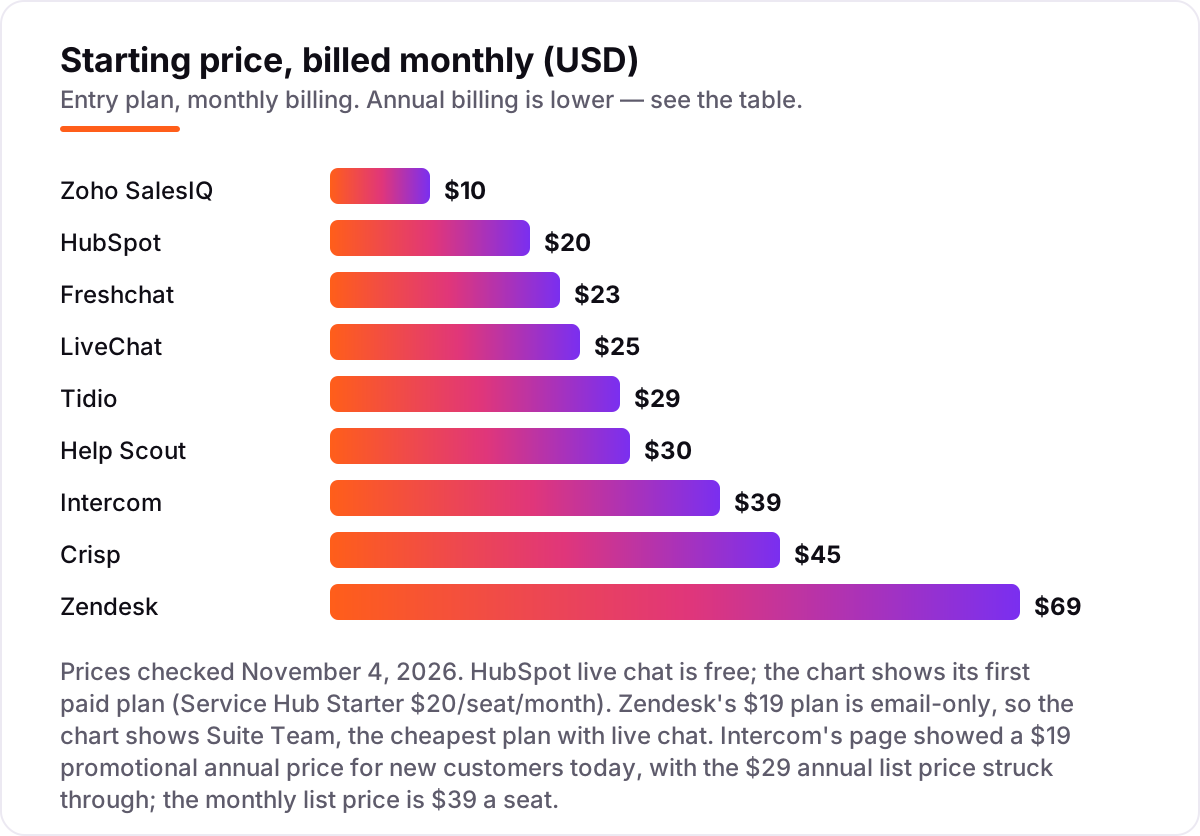
Live chat software pricing: what you will actually pay
Take a three-person team that answers about 400 chats a month. On monthly billing, the subscription costs $0 on HubSpot's free plan, $30 on Zoho SalesIQ Basic, $45 flat on Crisp Mini, $69 on Freshchat Growth, $75 on LiveChat Essential, $117 on Intercom Essential, $90 on Help Scout Standard and $207 on Zendesk Suite Team. Tidio Starter is $29 a month, but it covers only 100 billable conversations, so 400 chats need Growth from $59 a month.
Over a year on annual billing, that same team pays $252 on Zoho SalesIQ Basic, $252 on HubSpot Starter at the $7 promotional price ($720 at the $20 standard price), $540 on Crisp Mini, $684 on Freshchat Growth and LiveChat Essential, $684 on Intercom Essential at the $19 promotional price ($1,044 at the $29 list price), $900 on Help Scout Standard and $1,980 on Zendesk Suite Team. The same three people and the same 400 chats cost $252 a year at the cheap end and $1,980 at the dear end — and the gap comes from per-seat pricing and AI meters, not from features.
Three costs sit outside every number above. First, the AI meter: 100 Fin resolutions add $99 a month on Intercom, 1,500 Freddy sessions beyond the free allowance add $735 on Freshchat, and 50 Lyro conversations add $39 on Tidio. Second, the monthly-billing premium: paying monthly instead of annually costs 17–43% more on most tools here — Help Scout jumps from $25 to $30 a user, Intercom from $29 to $39 a seat. Third, the add-ons that feel mandatory once you are set up: removing the vendor's branding, adding a second brand or more seats, and Copilot-style agent assist tools that run $29–$50 a seat. If you run a store rather than a service business, the chat that converts best is the one tied to your catalog — see our guide to AI chatbots for customer service.
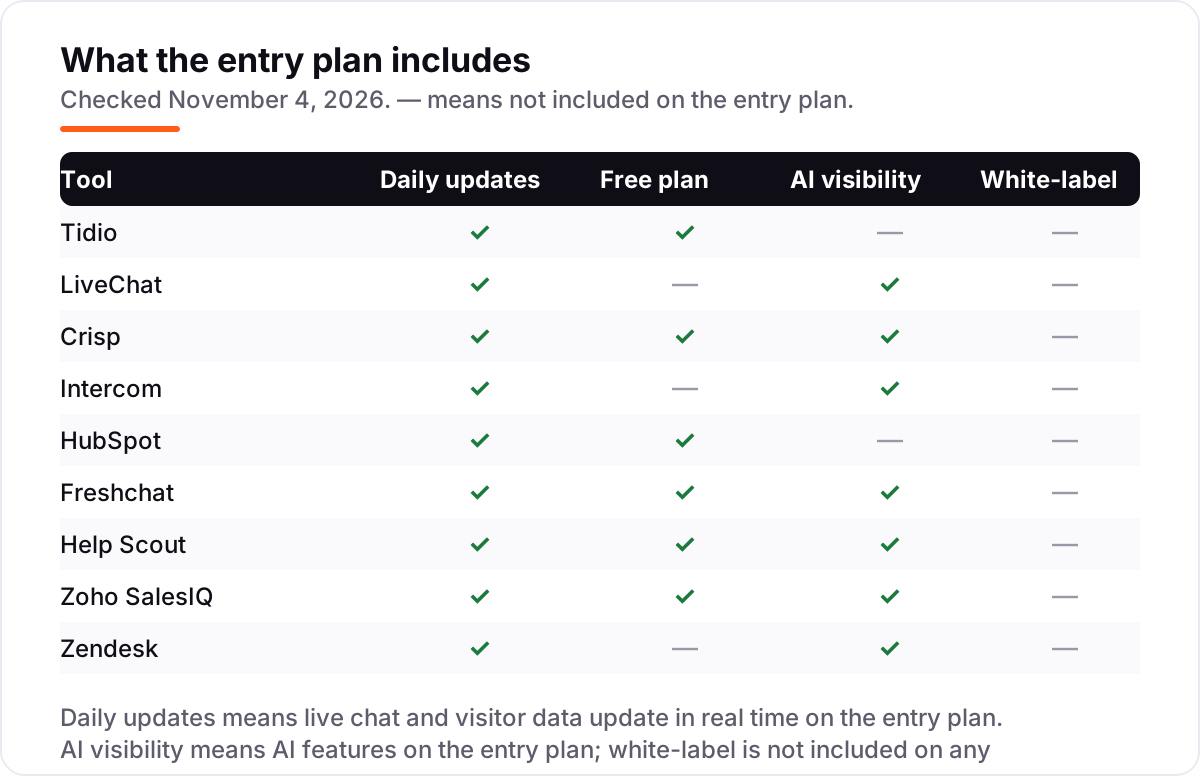
Know the difference: live chat vs chatbot
The confusion in this category is between a channel and a worker. Live chat is the channel: a real person answering a visitor in real time through a widget on your website. A chatbot is the worker: software that answers on its own, with rules or AI, whether or not a person is online. Every tool in this list sells live chat; most of them also sell a chatbot, and the chatbot is usually the part that costs extra.
That split is why the prices look inconsistent. Tidio's Lyro, Intercom's Fin and Freshchat's Freddy are chatbots sold as metered add-ons or usage-based features, while the live chat seat is the base price. A tool can look cheap on the seat and expensive on the bot, or the other way round — HubSpot's chat is free but its AI agent needs Professional, and Crisp's Mini includes a little AI credit but no real chatbot. Judge each tool on both halves: what the human seat costs, and what the bot costs at your volume.
A third distinction worth knowing is proactive chat versus reactive chat. Reactive chat waits for the visitor to click; proactive chat pops up with a message — a discount, a help offer, a nudge — based on what the visitor is doing. All nine tools here can send proactive messages, but the triggers and targeting sit on different tiers: Tidio's Flows and Crisp's chat triggers are the cheapest routes in, while Zendesk's proactive tools come with the Suite. If converting browsers is the goal, check the proactive rules before you check the price.
Quick comparison: tool type by need
| Buyer | Best pick | Why |
|---|---|---|
| Solo store owner on a budget | Zoho SalesIQ | Free for 3 operators, Basic is $10/operator/month |
| Most small businesses | Tidio | Free plan, Starter $29/month, Lyro AI as an add-on |
| Team that hates per-seat pricing | Crisp | Flat $45/month per workspace, 4 seats included |
| AI-first support team | Intercom | Fin AI Agent on every plan, from $39/seat/month |
| Business already on a CRM | HubSpot | Live chat free inside the CRM |
| Chat plus social and SMS | Freshchat | Growth $23/agent/month, social messengers included |
| Email-first team adding chat | Help Scout | Beacon chat on Standard, $30/user/month |
| Team that will outgrow chat alone | Zendesk | Suite Team $69/agent/month with ticketing, help center and AI |
Mistakes to avoid
- Budgeting on the annual price while paying monthly. Annual billing is 17–43% cheaper, but it means paying a year upfront. Help Scout is $25 a user billed annually and $30 billed monthly; Intercom's $19 is a new-customer annual promo; the $29 list price is the annual rate, $39 monthly. Compare tools on the billing term you will actually use.
- Buying on the $19 Zendesk headline. Support Team at $19 is email and ticketing only — it has no live chat. Live chat starts at Suite Team, $55 an agent a month billed annually. The headline is real, but it is not the price of chat.
- Forgetting the AI meter. Fin at $0.99 a resolution, Freddy at $49 per 100 sessions and Lyro at $39 a month are all charged on top of the seat price. A month with 500 AI resolutions adds $495 on Intercom before a human answers a single chat.
- Ignoring the conversation cap. Tidio Starter covers 100 billable conversations a month and Zoho SalesIQ Basic covers 1,000 chat sessions. A tool can be cheap and still be the wrong buy once the cap forces an upgrade mid-month.
- Picking chat that cannot see your customers. A widget with no CRM link is a second inbox. If the business already runs HubSpot or Zoho, the chat that shares the customer record is worth more than the cheapest standalone price.
How we chose
We checked each vendor's own pricing page on November 4, 2026 and recorded the starting price exactly as shown, including the annual-billing figure where the page lists one, and we ranked the tools by fit for the most common buyer — a small business adding chat to its website — not by brand size. Two prices needed a workaround: Help Scout's pricing page would not load when we tried it, so its $25/$30 figures were confirmed from several independent sources quoting the vendor's own pricing page in October 2026; Zoho SalesIQ's dollar prices were confirmed the same way, against the vendor's pricing page and G2's vendor-supplied pricing. Intercom's page showed a $19 promotional annual price for new customers today, with the $29 annual list price struck through; the monthly list price is $39 a seat, so we show all three. Ratings come from G2 pages opened on November 4, 2026; Intercom's G2 listing now carries the Fin name, and HubSpot's rating is for Service Hub, the product that includes its live chat. No vendor paid for a place in this list, and none of the links here are affiliate links.
What to do next
Start with the free plan or trial of your top pick and run one real week of chats through it. Check that the widget loads fast on mobile, that the AI hands off cleanly to a human, and that the reports show what you need before you commit to a year. If the chat is sorted but new customers are not finding you, our monthly SEO service handles the visibility side — or compare AI helpers in our guide to AI chatbots for customer service. Once your tools are in place, find out what's holding your rankings back.
Your stack only works if people find you
SerpAstra fixes what keeps your site off page one and makes it easy for AI assistants to recommend.
Get a free audit→Sources we checked (18)
- Tidio pricing — tidio.com/pricing (checked November 4, 2026)
- LiveChat pricing — livechat.com/pricing (checked November 4, 2026)
- Crisp pricing — crisp.chat/en/pricing (checked November 4, 2026)
- Intercom pricing — intercom.com/pricing (checked November 4, 2026)
- HubSpot Service Hub pricing — hubspot.com/pricing/service (checked November 4, 2026)
- Freshchat pricing — freshworks.com/live-chat-software/pricing (checked November 4, 2026)
- Help Scout pricing — helpscout.com/pricing (checked November 4, 2026)
- Zoho SalesIQ pricing — zoho.com/salesiq/pricing.html (checked November 4, 2026)
- Zendesk pricing — zendesk.com/pricing (checked November 4, 2026)
- Tidio on G2 — g2.com/products/tidio/reviews (checked November 4, 2026)
- LiveChat on G2 — g2.com/products/livechat/reviews (checked November 4, 2026)
- Crisp on G2 — g2.com/products/crisp/reviews (checked November 4, 2026)
- Intercom on G2 — g2.com/products/intercom/reviews (checked November 4, 2026)
- HubSpot Service Hub on G2 — g2.com/products/hubspot-service-hub/reviews (checked November 4, 2026)
- Freshchat on G2 — g2.com/products/freshworks-freshchat/reviews (checked November 4, 2026)
- Help Scout on G2 — g2.com/products/help-scout/reviews (checked November 4, 2026)
- Zoho SalesIQ on G2 — g2.com/products/zoho-salesiq/reviews (checked November 4, 2026)
- Zendesk on G2 — g2.com/products/zendesk/reviews (checked November 4, 2026)
Shamim
Founder of SerpAstra
A full-stack SEO and digital marketer who spends most days on Local SEO for dental practices, AI search visibility and lead generation.
Frequently asked questions
What is the best live chat software?
Tidio is the best fit for most small businesses: a free plan, Starter at $29/month and the Lyro AI agent as an add-on. LiveChat is the better pick when chat is a sales channel and you want an AI agent included in the seat price. HubSpot is the best free option when you already run its CRM.
How much does live chat software cost?
Entry prices run from $0 to $69 an agent a month. Five tools here have free plans, and the first paid plans cost $10–$45 a month. A three-person team typically pays $252–$1,980 a year for the subscription alone, before AI usage charges, which can add hundreds more a month.
Is there really free live chat software?
Yes, with limits. HubSpot live chat is free inside the CRM, Freshchat is free for up to 10 agents, and Tidio, Crisp and Help Scout all have free plans with conversation or seat caps. Zoho SalesIQ is free for 3 operators. All six are real chat tools, not trials.
What is the difference between live chat and a chatbot?
Live chat is a real person answering a visitor in real time; a chatbot is software answering on its own. Most tools here sell both: the seat price buys the human chat, and the AI chatbot is metered on top — Fin at $0.99 a resolution, Freddy at $49 per 100 sessions, Lyro from $39 a month.
Do I need a chatbot with my live chat?
Not at first. A chatbot earns its keep when the same questions repeat all day — order status, opening hours, returns — and it answers them while your team sleeps. Start with human chat, count the repeat questions for a month, and add the bot only when the volume justifies the meter.
Can I switch live chat software later?
Yes, and it is easier than switching a help desk. Export your canned responses, chat history and customer lists, then install the new widget and point it at the same pages. Switching mid-month is fine — there is no billing cycle to protect — but keep the old widget off the site the day the new one goes live.
Does live chat software work with my CRM?
It should, and the best match is the chat built for the CRM you already use: HubSpot chat with HubSpot CRM, SalesIQ with Zoho CRM, Freshchat with Freshworks. Standalone tools like LiveChat and Tidio connect to CRMs through integrations, but the data stays thinner than a native match.
Free SEO and AI visibility audit
Find out what is holding your rankings back
Send us your site. Within 2 business days you get a written audit, an AI visibility check and a short fix list ranked by impact. Free, with no contract attached.
Request my free audit→Related guides
 AI, Data & AnalyticsBest Customer Service Chatbots for 2026: 10 Providers Ranked by Value10 best customer service chatbots compared on price, AI resolution fees and free plans, with real starting prices checked on November 2, 2026.Read guide →
 AI, Data & Analytics8 Best AI Chatbot for Customer Service in 20268 best AI chatbot for customer service tools compared on price, AI resolution costs and free plans. Prices checked on vendor pricing pages, November 2, 2026.Read guide →
 AI, Data & AnalyticsBest AI Answering Services for 2026: 8 Providers Ranked by Value8 best ai answering services compared with real prices checked November 2, 2026 — from a $0 free plan and $24.95/month up to hybrid plans with live agents.Read guide →