
Best Load Balancer Software for 2026: 10 Options Compared by Use Case
Compare the 10 best load balancer software options for 2026 by use case, with real prices from $0 to $2,500 a year and hourly cloud rates explained.
 Shamim Mia, Founder, SerpAstraLast verified November 10, 202616 min read
We compare pricing pages, documentation and public reviews. We never accept payment for rankings.

Key takeaways
- Cloudflare is the best pick for most teams: global edge load balancing from $5/month, with health checks and failover included. DigitalOcean is the simplest managed option at $12/month per node.
- The three hyperscalers bill by the hour, not the month: AWS from $16.43 a month before traffic, Google Cloud and Azure from $18.25 — and data charges sit on top.
- The single most important buying factor is where your app already lives: a managed balancer inside your own cloud beats a cheaper standalone one that adds latency and a second bill.
- Every price below was checked November 10, 2026. Three tools publish no monthly price — NGINX Plus quotes per year, HAProxy Enterprise is custom quote, and Kemp's paid price is third-party sourced — and five ratings are omitted because the G2 pages were stale.
On this page
Quick comparison
| Tool | Best for | Starting price | Free plan |
|---|---|---|---|
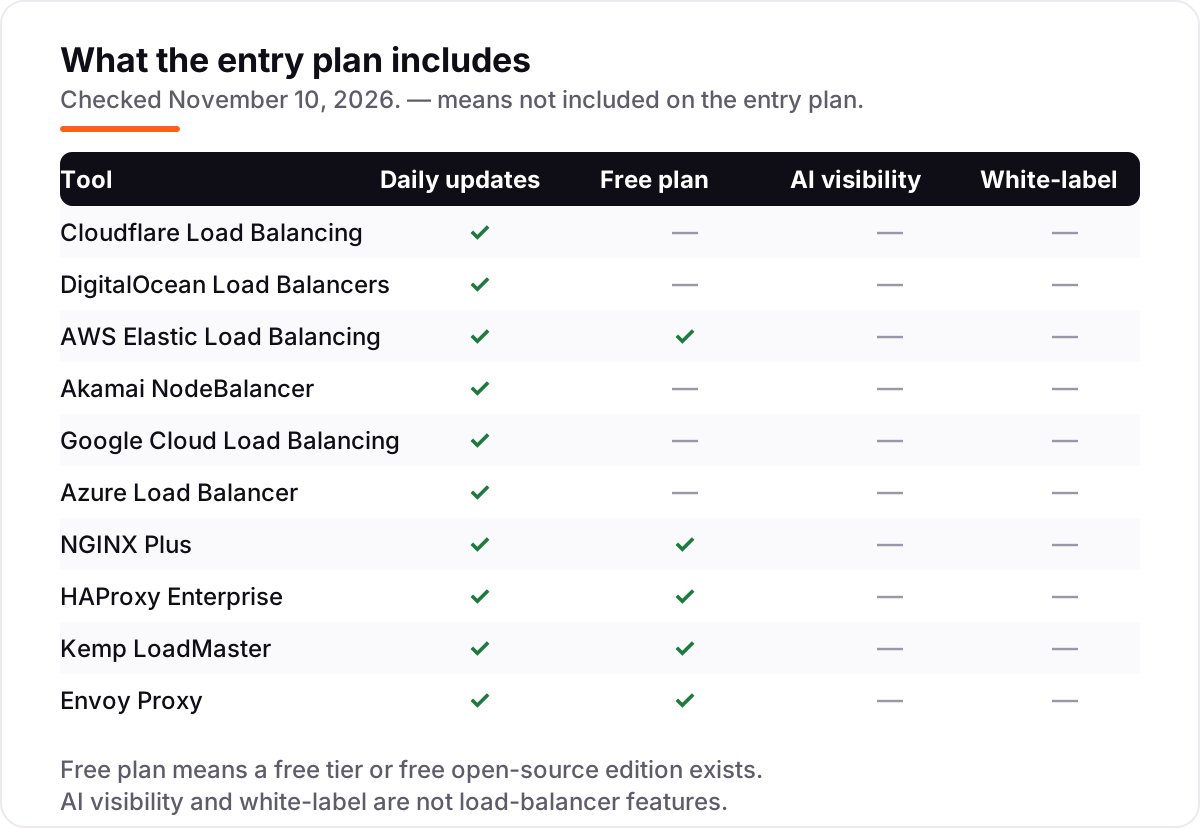
| Cloudflare Load Balancing | Small teams that want global load balancing with health checks and failover from $5/month | $5/mo | No (add-on $5/mo) |
| DigitalOcean Load Balancers | Small teams on DigitalOcean that want a managed load balancer with a flat monthly price | $12/mo | No |
| AWS Elastic Load Balancing | Teams already running on AWS that want the native Application Load Balancer for their EC2, ECS or EKS workloads | $16.43/mo floor | Yes (12-mo free tier) |
| Akamai NodeBalancer | Teams on Akamai Cloud (Linode) that want a managed balancer with a flat $10 monthly price | $10/mo | No |
| Google Cloud Load Balancing | Teams running on Google Cloud that want a global anycast load balancer with autoscaling backends | $18.25/mo floor | No ($300 credit) |
| Azure Load Balancer | Teams running virtual machines on Azure that need Layer 4 load balancing with zone redundancy | $18.25/mo floor | No |
| NGINX Plus | Ops teams that want a supported, high-performance software load balancer they run themselves | $2,500/yr | Yes (open source) |
| HAProxy Enterprise | Engineering teams that want the highest-rated software load balancer and full control over every request | Custom quote | Yes (open source) |
| Kemp LoadMaster | IT teams that want a point-and-click application delivery controller with a genuinely free edition | Free ($0) | Yes (free edition) |
| Envoy Proxy | Platform teams running Kubernetes or a service mesh that want a programmable, observable proxy | $0 | Yes (open source) |
Make one of these tools?
We re-check this list every quarter. Send a correction, request a review, or ask about a clearly labeled sponsored spot.
Request a listingThe best load balancer software

Cloudflare Load Balancing
Best for: Small teams that want global load balancing with health checks and failover from $5/month
Cloudflare Load Balancing is the cheapest way to get real managed load balancing, and it works wherever your servers already are. For $5 a month you get health checks, automatic failover and geographic routing on Cloudflare's edge network, which steers visitors to the nearest healthy origin before the request ever touches your infrastructure. Because it sits in front of any origin, it suits teams with servers spread across providers.
The catch is that the $5 covers the basics. More origins, more health checks and advanced steering cost extra, so a fleet of servers costs more than the headline suggests. The free Cloudflare plan does not include load balancing at all, so this is a paid add-on from day one. For a small team with two or three servers in different places, though, nothing else here matches the price.
What we like
- Cheapest managed entry here at $5/month, with health checks, failover and geographic routing included
- Runs on Cloudflare's global edge network, so traffic is steered before it reaches your origin servers
- Works with origins anywhere — AWS, Azure, a VPS or an on-premises rack — with no cloud lock-in
Watch out for
- Load Balancing is a paid add-on — the free Cloudflare plan does not include it
- Advanced steering and more origins cost extra, and per-origin pricing adds up past a handful of servers
- Support on the free and Pro plans is ticket-based, with slower responses than the enterprise tiers

DigitalOcean Load Balancers
Best for: Small teams on DigitalOcean that want a managed load balancer with a flat monthly price
DigitalOcean's load balancer is the simplest managed option in this list. One node costs $12 a month, flat, with no per-request or per-gigabyte metering to track, and it provisions in minutes from the same dashboard as your Droplets. Free SSL certificates with automatic renewal and built-in health checks come standard, so a small production app gets TLS termination and failover without extra services.
The limits are regional scope and routing depth. The $12 plan balances inside one region, with no global anycast front end, and its Layer 7 rules are thinner than AWS ALB or NGINX Plus. High-availability setups need extra nodes at $12 each. If your app already runs on DigitalOcean and your users sit in one region, this is the easiest $12 you will spend.
What we like
- Flat $12/month per node for a regional HTTP load balancer, with no per-request or per-GB metering
- Free SSL certificates with automatic renewal and built-in health checks on every balancer
- Provisions in minutes from the same dashboard as Droplets and Kubernetes, with no extra console to learn
Watch out for
- Regional only — there is no included global anycast front end on the $12 plan
- Each node costs $12/month, so high-availability setups with extra nodes cost more
- Fewer Layer 7 routing features than AWS ALB or NGINX Plus for complex rule sets

AWS Elastic Load Balancing
Best for: Teams already running on AWS that want the native Application Load Balancer for their EC2, ECS or EKS workloads
AWS Elastic Load Balancing is the default choice the moment your app lives on AWS, and the Application Load Balancer is the type most web apps need. It routes by path, host, header or query string, targets EC2 instances, containers, IP addresses and Lambda functions, and scales automatically as traffic grows. New accounts get a 12-month free tier covering 750 hours a month, so a small app can run its first year without a load-balancer charge.
The honest cost is the two-part bill. The $0.0225 hourly charge is only $16.43 a month, but every LCU-hour adds $0.008, and AWS's own worked example lands at $22.42 a month for modest traffic. It also only balances AWS targets, so hybrid setups need something else. If you are already on AWS, use it; if you are not, do not move for it.
What we like
- Deep AWS integration: path and host routing, Lambda and container targets, and automatic scaling
- Application Load Balancer handles HTTP, HTTPS, WebSocket and gRPC with content-based routing rules
- A 12-month free tier covers 750 hours a month, so small apps can start without a load-balancer bill
Watch out for
- The bill has two parts — $0.0225/hour plus $0.008 per LCU-hour — so busy apps cost far more than the $16.43 floor
- Tied to AWS: it cannot balance traffic to servers outside AWS
- The pricing model takes real study; LCU dimensions confuse first-time buyers

Akamai NodeBalancer
Best for: Teams on Akamai Cloud (Linode) that want a managed balancer with a flat $10 monthly price
Akamai's NodeBalancer is the quiet value pick for teams already running Linodes. It costs $10 a month per balancer, billed at $0.015 an hour up to a monthly cap, with no per-request or per-gigabyte metering on the basic tier. SSL termination, passive health checks and sticky sessions are included, and traffic between the balancer and your Linodes in the same data center does not count against your transfer allowance.
The ceiling is the 10,000 concurrent-connection cap on basic NodeBalancers; busy apps need the Premium tier, which adds a data-processing fee. It also only balances Linodes, so it is no use to anyone hosted elsewhere. For a small app on Akamai Cloud, though, it is the cheapest flat-rate managed balancer in this list.
What we like
- Flat $10/month per NodeBalancer ($0.015/hour, capped monthly), with no per-request charges
- SSL termination, passive health checks and sticky sessions included on the basic tier
- Data transfer between NodeBalancers and Linodes in the same data center is free
Watch out for
- Basic NodeBalancers cap at 10,000 concurrent connections — busy apps need the Premium tier
- Only useful if your servers run on Akamai Cloud; it cannot balance outside Linodes
- Smaller ecosystem than the hyperscalers, with fewer managed-service integrations

Google Cloud Load Balancing
Best for: Teams running on Google Cloud that want a global anycast load balancer with autoscaling backends
Google Cloud Load Balancing is the global option for teams already on Google Cloud. One anycast IP fronts backends in several regions, with automatic multi-region failover, and it needs no pre-warming: it scales from zero to full throttle as traffic arrives. It plugs into Cloud CDN, Cloud Armor and autoscaling instance groups, so the load balancer becomes one piece of a larger Google Cloud setup rather than a standalone box.
The bill is the familiar hyperscaler shape. The first five forwarding rules cost $0.025 an hour in total, about $18.25 a month, but data processing adds $0.008 per GiB and egress sits on top. New accounts get $300 in trial credit to learn with. Pick it when your backends are on Google Cloud and your users are spread across regions.
What we like
- A single global anycast IP fronts backends in multiple regions, with automatic multi-region failover
- No pre-warming needed — it scales from zero to full throttle as traffic arrives
- Integrates with Cloud CDN, Cloud Armor and autoscaling instance groups in one console
Watch out for
- Data processing adds $0.008 per GiB on top of the $0.025/hour forwarding-rule charge
- The product lineup is broad — external, internal, global, regional — and picking the right type takes study
- Egress pricing on top of load-balancer charges makes the real bill hard to predict

Azure Load Balancer
Best for: Teams running virtual machines on Azure that need Layer 4 load balancing with zone redundancy
Azure Load Balancer is the native Layer 4 balancer for virtual machines and scale sets on Azure. The Standard tier is zone-redundant with a 99.99% availability SLA, handles TCP and UDP traffic at very low latency, and covers millions of flows per second. Outbound rules, NAT and health probes are built in, and Microsoft charges nothing when no load-balancing rules are configured, so an idle balancer costs nothing until you use it.
The limitation is scope: this is Layer 4 only. HTTP routing, path-based rules and a web application firewall live in Application Gateway or Front Door, which are separate products with separate bills. The free Basic tier was retired in September 2025, so every Standard balancer starts at $0.025 an hour. Use it for VM workloads on Azure; use Front Door for global HTTP apps.
What we like
- Zone-redundant Standard tier with a 99.99% SLA for virtual machines and scale sets
- Handles TCP and UDP at Layer 4 with very low latency and millions of flows per second
- Outbound rules, NAT and health probes are built in, with no charge when no rules are configured
Watch out for
- Layer 4 only — HTTP routing, path rules and WAF need Application Gateway or Front Door instead
- Data processed costs $0.005 per GB on top of the $0.025/hour rule charge
- The Basic tier was retired in September 2025, so there is no free entry point anymore

NGINX Plus
Best for: Ops teams that want a supported, high-performance software load balancer they run themselves
NGINX Plus is the paid edition of the web server half the internet already runs. It adds what the open-source version lacks for production load balancing: a live activity dashboard, active health checks, session persistence and dynamic reconfiguration without reloads. Because you run it yourself, it works on-premises, on any cloud or in containers, with no per-request metering and no vendor deciding where your traffic goes.
The price needs care. F5 publishes no price list, so the $2,500 a year per instance figure is vendor-provided through G2, and Team bundles are quoted higher — one directory lists $849 a month. A redundant pair also costs twice the headline figure. If your team already knows NGINX and wants full control, it earns its place; if you want someone else to run it, pick a managed balancer.
What we like
- Built on open-source NGINX, the most widely deployed web server and reverse proxy in the world
- Adds a live activity dashboard, active health checks, session persistence and dynamic reconfiguration
- Runs anywhere — on-premises, any cloud or containers — with no per-request metering
Watch out for
- F5 publishes no price list — the $2,500/year figure is vendor-provided via G2, and Team bundles are quoted higher
- You run it yourself: servers, patching, monitoring and high availability are your job
- Per-instance licensing means a redundant pair costs twice the headline price

HAProxy Enterprise
Best for: Engineering teams that want the highest-rated software load balancer and full control over every request
HAProxy is the highest-rated load balancer in this list, and the open-source core costs nothing. The free edition already does serious work: TCP and HTTP load balancing, SSL termination, health checks and high availability, with a configuration language that can route on almost any request attribute. Enterprise adds a WAF, bot management, real-time analytics and a management console, plus support, for teams that need a vendor behind the proxy.
The buying process is the friction. Enterprise pricing is custom quote only, and the vendor's own FAQ sends buyers to sales, so budget planning needs a conversation first. Configuration is file-based, so new teams face a real learning curve. But the free core means you can run it in production for months before spending anything, which no managed balancer allows.
What we like
- The top-rated load balancer on G2 at 4.7/5, and number one in the G2 Load Balancing grid for fourteen straight quarters
- Open-source HAProxy is free, so you can prove the setup in production before paying for Enterprise
- Enterprise adds a WAF, bot management, real-time analytics and a management console on top of the free core
Watch out for
- Enterprise pricing is custom quote only — the vendor's own FAQ says to contact sales
- Configuration is file-based and powerful, which means a real learning curve for new teams
- No managed cloud option: you provision, patch and scale the servers yourself

Kemp LoadMaster
Best for: IT teams that want a point-and-click application delivery controller with a genuinely free edition
Kemp LoadMaster is the friendly face of self-hosted load balancing. Where NGINX and HAProxy hand you config files, LoadMaster gives you a graphical interface with application templates, so a first virtual service takes minutes rather than an afternoon of reading docs. The free edition is a full-featured virtual appliance at no cost, capped at 20 Mbps, which covers labs, development and low-volume sites honestly.
Production use means a paid VLM license, and that is where the price gets murky: Kemp publishes no price list, and third-party directories disagree, listing VLM-500 at $1,720 or $1,990 a year. The free cap also rules out busy production traffic. For an IT team that wants a GUI and a free way to learn, it is the easiest self-hosted start in this list.
What we like
- Free LoadMaster is a full-featured virtual appliance at no cost, capped at 20 Mbps for labs and low-volume use
- A graphical interface with application templates — no config files to learn before your first VIP
- Ships as virtual, hardware or cloud appliances, with GSLB, WAF, authentication and SSO on paid tiers
Watch out for
- Kemp publishes no price list — the $1,720/year VLM-500 figure is third-party sourced and conflicts with a $1,990 figure elsewhere
- The free edition is capped at 20 Mbps, so it suits labs and low-volume sites, not production traffic
- Smaller community than NGINX or HAProxy, so fewer public guides and forum answers

Envoy Proxy
Best for: Platform teams running Kubernetes or a service mesh that want a programmable, observable proxy
Envoy Proxy is the load balancer for teams building on Kubernetes and service meshes. It is free and open source under the Cloud Native Computing Foundation, and it is the data plane behind Istio and most modern meshes, which means the same proxy can serve as your edge gateway, your sidecar and your internal balancer. Circuit breaking, retries, outlier detection and deep observability are built in, not bolted on.
The cost is expertise, not money. Configuration runs through static files or the xDS APIs, there is no graphical setup, and support comes from the community unless you buy a commercial distribution. For a two-server website it is plain overkill. For a platform team running dozens of services, it is the most capable free proxy in this list.
What we like
- Free and open source under the CNCF, and the data plane behind Istio and most modern service meshes
- Advanced load balancing with circuit breaking, retries, outlier detection and deep observability built in
- Speaks HTTP/2, HTTP/3 and gRPC natively, with dynamic configuration through the xDS APIs
Watch out for
- Configuration is the hard part — static files or the xDS APIs, with no point-and-click setup
- No vendor to call: support comes from the community unless you buy a commercial distribution
- Overkill for a two-server website, where a managed balancer is cheaper in engineering time
The best load balancer software does one job well: it spreads incoming traffic across healthy servers, checks that each server is alive, and moves traffic away the moment one fails. We ranked the ten tools below by fit for the most common buyer, a small team running a web app on two or three servers, starting with the cheapest managed options and ending with the free self-hosted proxies, and every price was checked on November 10, 2026.
How to choose the best load balancer software
- Start with where your app already lives. A managed balancer inside your own cloud — AWS ALB on AWS, Azure Load Balancer on Azure, DigitalOcean's balancer on DigitalOcean — beats a cheaper standalone one that adds latency, a second bill and a second console.
- Decide managed or self-hosted first. Managed balancers cost $5–$18 a month and need no servers; self-hosted NGINX Plus, HAProxy and Envoy cost $0 in software but need your time for patching, monitoring and high availability.
- Count the real monthly cost, not the headline. The hyperscalers bill by the hour plus data: AWS from $16.43 a month before traffic, Google Cloud and Azure from $18.25, with per-GB charges on top. Flat-rate balancers cost the same every month.
- Check what counts as one unit. Cloudflare charges per origin, DigitalOcean per node, AWS per LCU-hour, and NGINX Plus per instance. A redundant pair doubles the per-instance and per-node prices.
- Test the failover, not the dashboard. Kill one backend during the trial and watch what happens: traffic should move in seconds with no errors. A balancer that fails slowly is worse than no balancer at all.
If your site is slow for another reason, run your pages through the free SERP snippet preview tool to check how they appear in search, and read our SEO audit service if rankings, not servers, are the bottleneck. Before you shortlist, read our guide to the best cloud infrastructure services to compare the clouds these balancers run on.
Whatever you shortlist, try it with real traffic before you pay. The free tiers and free editions in this list are long enough to run one genuine week: two backends, real health checks, and one deliberate failure to prove the failover works. Check two things in the trial: that a dead backend leaves the pool in seconds, and that the monthly bill matches the headline price. Every tool here balances traffic, so the difference is how much of the bill and the work you see coming.
Pricing: what you will actually pay
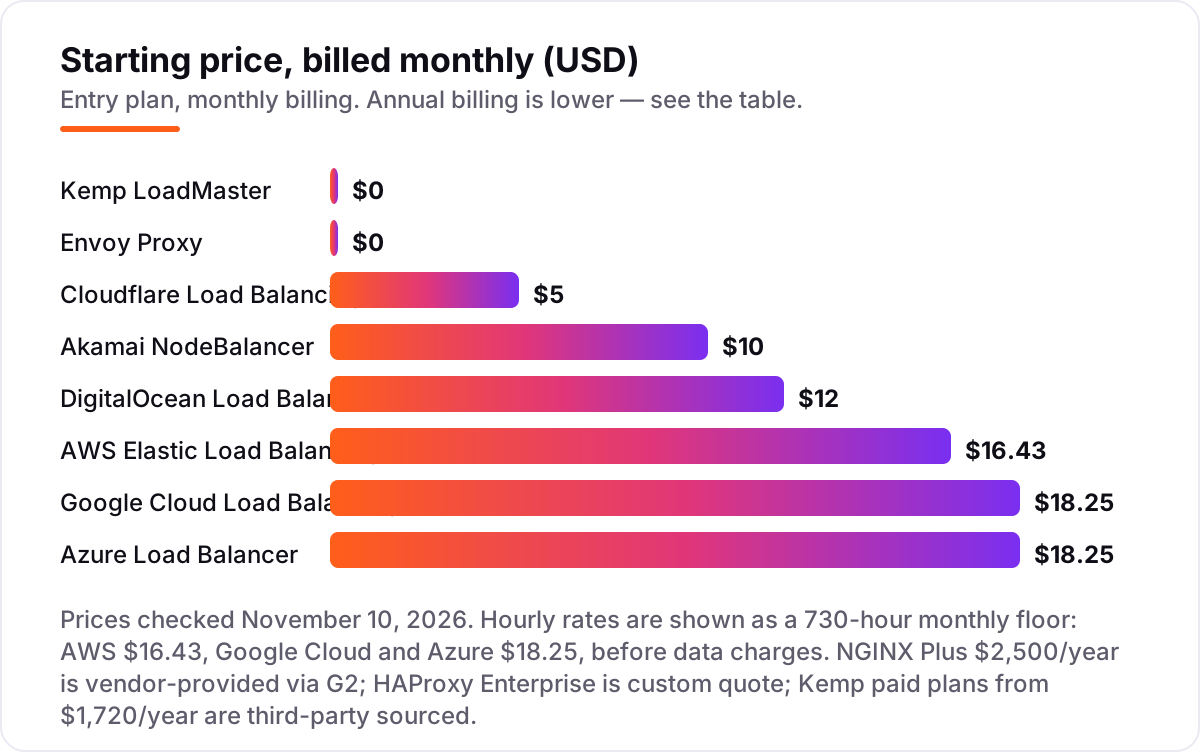
Take a small web app on two servers serving about 100 GB of traffic a month. On list prices, the load balancer itself costs $0 on Envoy, open-source HAProxy or open-source NGINX, $0 on Kemp's free edition, $5 a month on Cloudflare, $10 on Akamai NodeBalancer and $12 on DigitalOcean. The hourly clouds start higher: AWS at $0.0225 an hour is $16.43 a month before traffic, and Google Cloud and Azure at $0.025 an hour are $18.25 a month before data charges.
Add the usage charges and the picture changes. AWS's own worked example for modest traffic lands at $22.42 a month once LCU charges are included. Google Cloud adds $0.008 per GiB processed, so 100 GiB adds about $0.80, and Azure adds $0.005 per GB, about $0.50 for the same traffic. NGINX Plus is a different scale entirely: $2,500 a year per instance, so a redundant pair costs $5,000 a year before the servers themselves, while HAProxy Enterprise needs a custom quote.
Over a year, that is $0 on the free self-hosted proxies, $60 on Cloudflare, $120 on Akamai NodeBalancer, $144 on DigitalOcean, about $269 on AWS at its worked-example rate, and about $228 on Google Cloud or Azure before egress. The gap between $0 and $5,000 a year buys two things: someone else running the balancer, and a support contract when it breaks at 2 a.m. Price the tool at your real traffic, including data charges, before comparing any two of them.
Know the difference: managed cloud load balancing vs self-hosted software
The confusion in this category is between a managed load balancer and self-hosted load balancer software, and they solve different problems. A managed balancer — Cloudflare, DigitalOcean, AWS, Google Cloud, Azure, Akamai — is a service: you point it at your servers and the vendor runs the balancer, patches it, scales it and answers the pager. You pay a monthly or hourly fee and never see a server. A self-hosted balancer — NGINX Plus, HAProxy, Kemp, Envoy — is software you install on your own servers, and you own everything that follows: patching, monitoring, high availability and the 2 a.m. outage.
The cost shapes are opposite. Managed balancers look cheap at $5–$18 a month but scale with traffic, and the hourly clouds can surprise you. Self-hosted software looks free — Envoy, open-source HAProxy and open-source NGINX cost $0 — but the servers, the setup time and the on-call burden are the real price. NGINX Plus and HAProxy Enterprise sit in between: paid software with support, still self-hosted.
There is a second, quieter confusion: a load balancer is not a CDN, and it is not a reverse proxy either, though the products overlap. A CDN caches content near users; a reverse proxy handles requests for your servers; a load balancer spreads requests across them. Cloudflare bundles all three, which is part of why it tops this list, while AWS ALB balances but does not cache. If the goal is speed for global users, see our guide to the best cloud infrastructure services rather than buying a bigger balancer to fix a caching problem.
Quick comparison: tool type by need
| Buyer | Best pick | Why |
|---|---|---|
| Small team, cheapest managed option | Cloudflare Load Balancing | Global edge balancing from $5/month, any origin |
| App already on DigitalOcean | DigitalOcean Load Balancers | Flat $12/month per node, free SSL, no metering |
| App already on AWS | AWS Elastic Load Balancing | Native ALB from $0.0225/hour, 12-month free tier |
| App already on Google Cloud or Azure | Google Cloud or Azure Load Balancer | Native hourly billing from $0.025/hour |
| Full control, paid support | NGINX Plus or HAProxy Enterprise | Self-hosted software, no per-request metering |
| Free self-hosted start | Envoy Proxy or Kemp LoadMaster | $0 open source, or a free 20 Mbps edition |
Mistakes to avoid
- Budgeting on the hourly rate alone. AWS at $0.0225 an hour is $16.43 a month before traffic, but its own worked example lands at $22.42 with LCU charges. Add data processing before you compare prices.
- Paying for a managed balancer you do not need yet. A single server behind a CDN handles most small sites. Add a balancer when one server going down means the site goes down, not before.
- Forgetting the redundant pair doubles the price. NGINX Plus at $2,500 a year per instance costs $5,000 for a pair, and DigitalOcean at $12 a node costs $24 for two. Price the pair, not the instance.
- Choosing a balancer outside your cloud. An AWS-only balancer cannot balance Linodes, and a NodeBalancer cannot balance EC2 instances. The cheapest balancer in the wrong cloud costs more than the dearest one in the right cloud.
- Skipping the failover test. A balancer that keeps sending traffic to a dead backend is worse than no balancer. Kill one server in the trial and watch the pool drain before you trust it in production.
How we chose
We checked each vendor's own pricing page on November 10, 2026 and recorded the starting price exactly as shown, including the hourly rate where the page bills by the hour. Direct page fetches failed on November 10, 2026, so prices rest on fresh search-index copies of the vendors' own pages crawled within the last few days: Cloudflare's plans page, DigitalOcean's pricing docs, AWS's Elastic Load Balancing pricing page, Google Cloud's VPC pricing page and Azure's Load Balancer pricing page. Three prices are not vendor-verified: NGINX Plus at $2,500 a year per instance is vendor-provided through G2, since F5 publishes no price list, and Kemp's paid VLM-500 price from $1,720 a year is third-party sourced through TrustRadius, with a conflicting $1,990 figure in another directory. HAProxy Enterprise is custom quote per the vendor's own FAQ. Ratings appear only where a G2 page was crawled within the last few days: Cloudflare, DigitalOcean, Akamai Cloud Computing, F5 NGINX and HAProxy. The other five ratings are omitted rather than shown stale, including AWS, Google Cloud, Azure and Kemp. The Akamai rating is for Akamai Cloud Computing as a platform, since NodeBalancer has no separate G2 listing. We ranked the tools by fit for the most common buyer, a small team running a web app on two or three servers, not by brand size. No vendor paid for a place in this list, and none of the links here are affiliate links.
What to do next
Start with the decision path above: check where your app lives, pick managed or self-hosted, and price the pair at your real traffic. Then take the free plan, free tier or free edition of your top pick and run one real week through it, including a deliberate backend failure. If the failover is clean and the bill matches the headline, you have your balancer. If the servers are sorted but new customers are not finding the site, our SEO audit service handles the visibility side. Once your tools are in place, find out what's holding your rankings back.
Your stack only works if people find you
SerpAstra fixes what keeps your site off page one and makes it easy for AI assistants to recommend.
Get a free audit→Sources we checked (16)
- Cloudflare plans — cloudflare.com/plans (checked November 10, 2026)
- Cloudflare on G2 — 4.5/5, 783 reviews (checked November 10, 2026)
- DigitalOcean Load Balancers pricing — docs.digitalocean.com (checked November 10, 2026)
- DigitalOcean on G2 — 4.6/5, 749 reviews (checked November 10, 2026)
- AWS Elastic Load Balancing pricing — aws.amazon.com/elasticloadbalancing/pricing (checked November 10, 2026)
- Akamai Cloud pricing — akamai.com/cloud/pricing (checked November 10, 2026)
- Akamai Cloud Computing on G2 — 4.6/5, 406 reviews (platform rating; NodeBalancer has no separate G2 listing) (checked November 10, 2026)
- Google Cloud VPC pricing — cloud.google.com/vpc/pricing (checked November 10, 2026)
- Azure Load Balancer pricing — azure.microsoft.com/en-us/pricing/details/load-balancer (checked November 10, 2026)
- F5 NGINX pricing, vendor-provided via G2 — $2,500/year Single Instance (checked November 10, 2026)
- F5 NGINX on G2 — 4.6/5, 113 reviews (checked November 10, 2026)
- HAProxy Enterprise — haproxy.com (pricing by custom quote; vendor FAQ) (checked November 10, 2026)
- HAProxy on G2 — 4.7/5, 899 reviews (checked November 10, 2026)
- Kemp Free LoadMaster FAQ — kemptechnologies.com (checked November 10, 2026)
- Kemp LoadMaster pricing, third-party — TrustRadius VLM-500 $1,720/year (checked November 10, 2026)
- Envoy Proxy — envoyproxy.io (checked November 10, 2026)
Shamim
Founder of SerpAstra
A full-stack SEO and digital marketer who spends most days on Local SEO for dental practices, AI search visibility and lead generation.
Frequently asked questions
What is the best load balancer software in 2026?
Cloudflare Load Balancing is the best pick for most teams: global edge balancing from $5/month with health checks and failover. If your app runs on DigitalOcean, its $12/month balancer is simpler; if it runs on AWS, use the native Application Load Balancer. Teams that want full control should look at HAProxy or NGINX Plus.
How much does load balancer software cost?
From $0 to about $2,500 a year. Cloudflare starts at $5/month, DigitalOcean at $12, Akamai NodeBalancer at $10, and Envoy, open-source HAProxy and open-source NGINX are free. The hyperscalers bill hourly: AWS from $16.43 a month before traffic, Google Cloud and Azure from $18.25, with data charges on top. NGINX Plus starts at $2,500 a year per instance.
Is there a free load balancer?
Yes. Envoy Proxy, open-source HAProxy and open-source NGINX are free to run, and Kemp offers a free LoadMaster edition capped at 20 Mbps. AWS gives new accounts a 12-month free tier with 750 load-balancer hours a month. Free options cost engineering time instead of money: you run, patch and monitor the servers yourself.
What is the difference between a load balancer and a reverse proxy?
A reverse proxy sits in front of your servers and handles requests — TLS, caching, routing — while a load balancer distributes those requests across several servers so none is overloaded. Most products in this list do both: NGINX, HAProxy and Envoy are reverse proxies that also balance, and the cloud balancers add health checks and failover on top.
Should I pick AWS ALB, Cloudflare or NGINX Plus?
Pick the one that matches where your app lives. AWS ALB fits apps already on AWS, with deep integration and a free tier. Cloudflare fits apps spread across providers, since it balances any origin from the edge for $5/month. NGINX Plus fits teams that want to run the balancer themselves on any infrastructure, with support, for $2,500 a year per instance.
Do I need a load balancer for a small website?
Not always. A single server with a CDN in front handles most small sites, and a load balancer only pays off when you run two or more servers for availability or capacity. If one server going down means your site goes down, that is the moment to add one — Cloudflare at $5/month or DigitalOcean at $12 is the cheapest way to start.
Free SEO and AI visibility audit
Find out what is holding your rankings back
Send us your site. Within 2 business days you get a written audit, an AI visibility check and a short fix list ranked by impact. Free, with no contract attached.
Request my free audit→Related guides
 IT, Security & DevOps11 Best Cloud Infrastructure Services Reviews in 2026The 11 best cloud infrastructure services reviews compared on price, free tiers, egress and AI features, with every price checked November 6, 2026.Read guide →
 Email, SMS & Social MediaBest Email Hosting Services for 2026: 11 Providers Ranked by ValueCompare the 11 best email hosting service providers for small business on price, storage and free plans, with every price checked November 6, 2026.Read guide →
 IT, Security & DevOps9 Best Network Security Software for Small Business in 2026, ComparedCompare the 9 best network security software for small business options on price, free plans and firewalls, with every price checked November 7, 2026.Read guide →