
8 Best Macro Software in 2026: Pricing, Features and Pros & Cons
Compare the 8 best macro software tools in 2026 on price, recording, scripting and free plans, with prices checked on November 4, 2026, for Windows and Mac.
 Shamim Mia, Founder, SerpAstraLast verified November 4, 202612 min read
We compare pricing pages, documentation and public reviews. We never accept payment for rankings.
Key takeaways
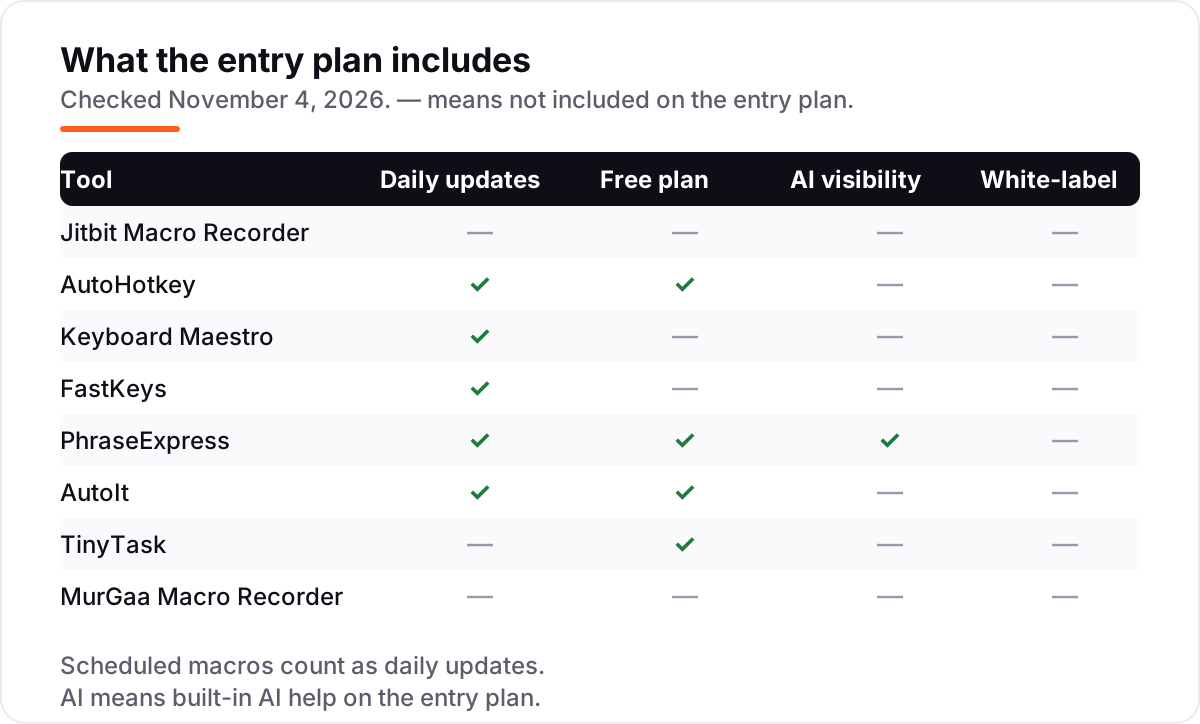
- Jitbit Macro Recorder leads for no-code Windows automation at $39 once, AutoHotkey is free for scripters, and Keyboard Maestro is the Mac pick at $36 once.
- Five of the eight tools cost $0 or under $40 once — macro software is one of the cheapest automation categories, with no subscriptions in this list.
- The single most important buying factor is how you want to build macros: record-and-replay suits non-coders, while scripting suits repeatable, conditional work.
- PhraseExpress is the most expensive at $99.95 once, and its G2 score is 3.3 out of 5 across 14 reviews — check the support complaints before buying.
On this page
Quick comparison
| Tool | Best for | Starting price | Free plan |
|---|---|---|---|
| Jitbit Macro Recorder | Windows users who want record-and-replay automation with an editor and no coding | $39 once | No (free trial) |
| AutoHotkey | Windows power users who want free scripting for hotkeys, text expansion and full automation | Free | Yes (free) |
| Keyboard Maestro | Mac users who want the deepest trigger-and-action automation on macOS | $36 once | No (free trial) |
| FastKeys | Windows users who want text expansion, shortcuts and a macro recorder in one cheap tool | $29 once | No (free trial) |
| PhraseExpress | Support, legal and medical teams that type the same text all day and need shared phrase libraries | $99.95 once | Yes (personal use) |
| AutoIt | IT admins and scripters who automate Windows rollouts, GUIs and system tasks for free | Free | Yes (free) |
| TinyTask | Anyone who needs one fixed sequence replayed exactly, with zero setup and zero cost | Free | Yes (free) |
| MurGaa Macro Recorder | Mac users who want the cheapest possible way to record and replay mouse and keyboard actions | $7.89 / 6 mo | No (free trial) |
Make one of these tools?
We re-check this list every quarter. Send a correction, request a review, or ask about a clearly labeled sponsored spot.
Request a listingThe best macro software

Jitbit Macro Recorder
Best for: Windows users who want record-and-replay automation with an editor and no coding
Jitbit Macro Recorder is the record-and-replay tool for Windows users who want automation without writing code: press record, do the task once, and play it back whenever the job repeats. The Basic licence costs $39 once and includes the advanced macro editor, so you can open a recording, fix a wrong click and reorder steps instead of starting over.
The pricing catch is the tier split. Scheduling and compiling macros to EXE files both need Pro at $69, and C# snippets and debugging need Premium at $99, so a team that schedules overnight jobs pays more than the headline. It is also Windows only. Buy Jitbit when you want the easiest no-code recorder on Windows; buy AutoHotkey when you would rather script the same work for free.
What we like
- Records mouse and keyboard actions and replays them with no coding required
- Advanced macro editor lets you edit, reorder and fine-tune recorded steps
- Perpetual licence: pay once and keep using the app forever
- Pro adds compiling macros to EXE files and macro scheduling
Watch out for
- Basic at $39 lacks macro scheduling and EXE compiling, so repeatable jobs need Pro at $69
- Windows only, so Mac users need a different tool from this list
- Free upgrades last one year, then upgrades are discounted rather than free

AutoHotkey
Best for: Windows power users who want free scripting for hotkeys, text expansion and full automation
AutoHotkey is a free, open-source scripting language for Windows, and it is the most capable free tool in this list. A few lines of script can remap a key, expand an abbreviation into a full paragraph, auto-click through a form, or build a small GUI, and scripts compile to standalone EXE files that run on any Windows PC without AutoHotkey installed.
The cost is learning, not money. There is no visual recorder, so a simple recorded task takes more setup than in Jitbit, and beginners face a real learning curve before scripts feel natural. The community library helps: thousands of ready-made scripts cover the common jobs. Choose AutoHotkey when you want the deepest free automation on Windows and can write a few lines of script.
What we like
- Completely free and open source under the GNU GPLv2, with no paid tier at all
- One language covers hotkeys, key remapping, text expansion, auto-clicking and GUIs
- Scripts compile to standalone EXE files that run on any Windows PC
- Huge community library of ready-made scripts for common tasks
Watch out for
- You write scripts by hand, so non-programmers face a real learning curve
- Windows only, with no official Mac or Linux version
- No visual recorder or drag-and-drop editor, so simple recordings take more setup

Keyboard Maestro
Best for: Mac users who want the deepest trigger-and-action automation on macOS
Keyboard Maestro is the Mac automation standard: you build macros from triggers, conditions and hundreds of built-in actions, so a macro can watch for a hotkey, a time of day, a USB device or a window appearing, then run a whole sequence. A licence costs $36 once for one user on up to five Macs, with no subscription, and the app also covers text expansion, clipboard history and window management.
The catch is depth. Hundreds of actions take time to learn, and major version upgrades cost $25, so the $36 licence is not the last payment you will ever make. It is also Mac only. Buy Keyboard Maestro when you live on a Mac and want the deepest automation there; buy MurGaa when you only need simple record-and-replay on a Mac.
What we like
- Hundreds of built-in actions with triggers, conditions and variables for complex macros
- One licence covers one user on up to five Macs
- One-time purchase with no subscription to keep paying
- Built-in text expansion, clipboard history and window management alongside macros
Watch out for
- Mac only, so it cannot help a mixed Windows and Mac setup
- Major version upgrades cost $25, so the $36 licence is not the last payment
- Hundreds of actions and triggers take time to learn before macros feel easy

FastKeys
Best for: Windows users who want text expansion, shortcuts and a macro recorder in one cheap tool
FastKeys packs five tools into one small Windows app: text expansion with auto-complete, keyboard shortcuts, mouse gestures, a customisable Start Menu and a macro recorder, plus a clipboard manager. The Personal licence costs $29 once, covers up to 3 computers per user, and is perpetual, so there is no subscription to keep paying. A fully featured trial lets you test everything first.
The pricing quirk is the edition split: Professional at $39 covers only one computer, while the cheaper Personal licence covers three, so most solo users should buy Personal. Advanced macros and team settings sharing need the higher editions. Pick FastKeys when you want one cheap app for typing shortcuts and macros; pick PhraseExpress when shared team libraries matter more.
What we like
- Text expansion, auto-complete, shortcuts, mouse gestures and a macro recorder in one app
- Perpetual licence with a single one-time payment and no recurring fees
- Personal licence covers up to 3 computers per user
- Lightweight and portable, with a fully featured trial to test first
Watch out for
- Windows only, with no Mac version for mixed setups
- Professional at $39 covers a single computer, while Personal at $29 covers up to 3
- Advanced macros and team settings sharing need the higher editions

PhraseExpress
Best for: Support, legal and medical teams that type the same text all day and need shared phrase libraries
PhraseExpress is a text expander first and a macro tool second: type a short abbreviation and it expands into a full reply, template or document section in any Windows or Mac program, and a built-in macro recorder plays back repetitive tasks too. Standard costs $99.95 once per user, and the team features go further, with shared phrase libraries, SQL Server support and a document generator.
The warning is the reviews. On G2 it scores 3.3 out of 5 across 14 reviews, with users reporting poor documentation and weak support, and the free version covers personal use only, so commercial use needs a paid licence after 30 days. Buy PhraseExpress for shared team text libraries; buy FastKeys when a solo user just needs expansion and macros for less.
What we like
- Expands abbreviations into full text in any Windows or Mac program
- Built-in macro recorder records and plays back repetitive tasks
- AI integration can summarise or rewrite phrases in different styles
- Shared phrase libraries, SQL Server support and a document generator for teams
Watch out for
- G2 reviewers report poor documentation and weak support, with a 3.3 out of 5 score across 14 reviews
- The free version is personal use only, and commercial use needs a paid licence after 30 days
- Separate licences are needed per platform, so Mac and Windows users pay twice

AutoIt
Best for: IT admins and scripters who automate Windows rollouts, GUIs and system tasks for free
AutoIt is a freeware BASIC-like scripting language built for automating the Windows GUI: it simulates keystrokes and mouse movement, manipulates windows and controls directly, and builds full GUIs, all in a small standalone package with no runtime to install. Scripts compile to standalone executables with the built-in Aut2Exe compiler, and the licence permits commercial use.
The trade-off is the interface. There is no visual recorder, so everything is written by hand, and AutoIt has been closed source since 2005, unlike open-source AutoHotkey. Choose AutoIt when you automate Windows rollouts and system tasks and want direct control manipulation; choose AutoHotkey when you want the larger open-source community and hotkey-first scripting.
What we like
- Freeware for personal and commercial use, with no licence fee at all
- BASIC-like syntax that is easy to learn for anyone who has scripted before
- Scripts compile to standalone executables with the built-in Aut2Exe compiler
- Strong window and control manipulation, plus GUI building and COM support
Watch out for
- A BASIC-like scripting language, so record-and-replay users get no visual recorder
- Freeware but closed source since 2005, unlike open-source AutoHotkey
- Windows only, with no Mac or Linux version

TinyTask
Best for: Anyone who needs one fixed sequence replayed exactly, with zero setup and zero cost
TinyTask is the smallest macro tool in this list: a single 36 KB portable EXE that records your mouse and keyboard input and replays it on demand or on a loop, with no installation, no account and no cost. Recordings save as .rec files and compile to standalone EXE files that run on any Windows PC without TinyTask installed.
The limits are the point. There is no editing, no conditional logic and no scheduling, so one missed click means re-recording the whole sequence, and fixed screen coordinates break when a window moves. Use TinyTask for one short, fixed task you repeat often; step up to Jitbit when you need to edit recordings or schedule them.
What we like
- Completely free freeware with no trial, no paid version and no feature gating
- A single 36 KB portable EXE with no installation and nothing left behind
- Records mouse and keyboard input and replays it on demand or on a loop
- Recordings compile to standalone EXE files that run without TinyTask installed
Watch out for
- No editing, no conditional logic and no scheduling, so one missed click means re-recording
- Replays fixed screen coordinates, so it breaks when a window moves or a layout changes
- Windows only and rarely updated, with no vendor support to call on

MurGaa Macro Recorder
Best for: Mac users who want the cheapest possible way to record and replay mouse and keyboard actions
MurGaa Macro Recorder is the cheapest paid way to record macros on a Mac: download it, try it free, then pay $7.89 to unlock it for 6 months on one Mac. It records mouse clicks, movements, scrolling, dragging and keystrokes, and configurable hotkeys start and stop recording and play the recording back, with a time delay before playback if you need it.
The catches are real. Recordings live in RAM only, so closing the app or starting a new recording wipes the one you just made, and there is no script editor or conditional logic. The $7.89 also buys 6 months, not a lifetime licence. Pick MurGaa for occasional simple Mac recordings; pick Keyboard Maestro when macros need to survive, branch and run on a schedule.
What we like
- Cheapest paid entry in this list at $7.89 for 6 months on 1 Mac
- Records mouse clicks, movements, scrolling, dragging and keystrokes on macOS
- Configurable hotkeys to start and stop recording and to play a recording
- Simple enough to run a first macro within minutes of downloading
Watch out for
- The $7.89 payment covers only 6 months on 1 Mac, so it is not a one-time licence
- Recordings live in RAM only, so closing the app or starting a new recording wipes them
- No script editor or conditional logic in the base recorder, and the interface is basic
The best macro software turns a repetitive job into one click: it records your mouse and keyboard actions, or runs a small script, so a task you do fifty times a day happens on its own. We ranked the eight tools below by fit for the most common buyer — someone automating everyday desktop work — and every price was checked on November 4, 2026.
How to choose the best macro software
- Decide record or script first. Recorders like Jitbit and TinyTask capture what you do; scripting tools like AutoHotkey and AutoIt let you write logic with conditions and loops. Record when the task never changes; script when it does.
- Check your operating system. Five tools here are Windows only, two are Mac only, and only PhraseExpress covers both — and it charges per platform.
- Count the real price, not the headline. Most tools here are one-time licences, not subscriptions, but MurGaa buys 6 months, not forever, and Jitbit scheduling needs the $69 Pro tier.
- Test the trial on your actual task. Every paid tool here offers a trial. Record your real job once and replay it three times before you pay.
- Mind the free tier limits. PhraseExpress is free for personal use only, and commercial use needs a licence after 30 days.
Macro software is one part of your stack, not the whole stack. If the business also needs to be found online, our guide to AI automation tools for small business covers the visibility side of automation. And before you publish new pages for the services you sell, run your titles through the free SERP snippet preview tool — it shows exactly how the title and description will look in Google.
Whatever you shortlist, try it with real work before you pay. The trials in this list are long enough to run one genuine job through — your form, your spreadsheet, your daily report — and that job tells you more than any review can. Check two things in the trial: that the macro replays correctly three times in a row, and that it survives the app being closed and reopened. If either fails, the price does not matter.
Macro software pricing: what you will actually pay
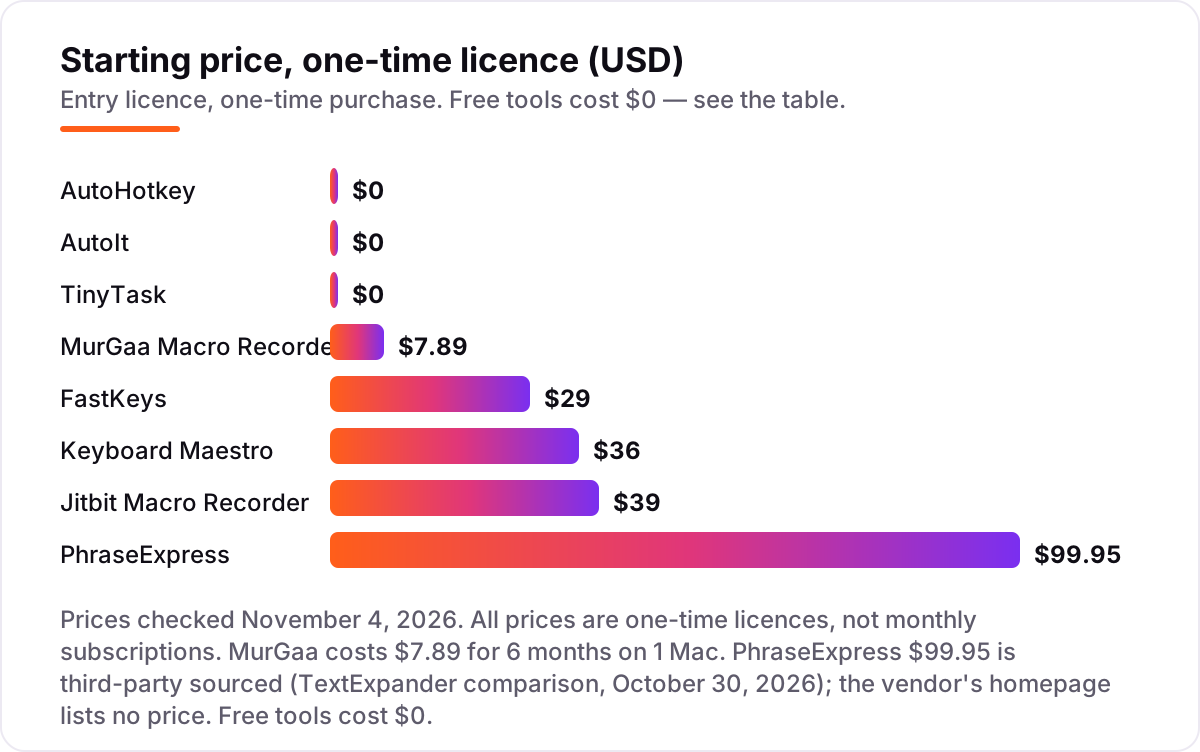
Take one person automating daily desktop work for a year. On list prices, the first-year cost is $0 on AutoHotkey, AutoIt and TinyTask, $7.89 on MurGaa Macro Recorder, $29 on FastKeys, $36 on Keyboard Maestro, $39 on Jitbit Macro Recorder and $99.95 on PhraseExpress. A five-person team pays five times each one-time licence, except where the licence already covers more than one machine: FastKeys Personal covers up to 3 computers per user, and Keyboard Maestro covers one user on up to 5 Macs.
Two of those numbers need adjusting before they are real. First, MurGaa is not a one-time licence: $7.89 buys 6 months on one Mac, so a full year costs $15.78, and the second year costs the same again. Second, Jitbit's $39 Basic tier lacks scheduling and EXE compiling, so a team that schedules overnight jobs pays $69 per seat for Pro, and a team that wants C# snippets and debugging pays $99 per seat for Premium.
Three costs sit outside every number above. First, the second tool: many buyers pair a recorder with a scripter, so budget for Jitbit plus AutoHotkey, or Keyboard Maestro plus a text expander. Second, the licence count: PhraseExpress charges per platform, so a user with a Mac at work and a Windows laptop at home pays twice. Third, the setup time: a scripted tool costs a day of learning per person before it saves time, and that day dwarfs the licence price. If you are choosing tools for a small business, our guide to automated marketing software shows how the paid end of automation compares.
Know the difference: macro recorder vs macro scripting language
The confusion in this category is between two different ways to build the same automation. A macro recorder — Jitbit, TinyTask and MurGaa — watches you do the task once and plays your exact mouse and keyboard actions back, in the same order, at the same screen positions. A macro scripting language — AutoHotkey and AutoIt — runs code you write, with conditions, loops and variables, so the macro can decide what to do next instead of replaying a fixed tape.
There is a second, quieter confusion: text expanders are not macro recorders. PhraseExpress and FastKeys both expand abbreviations into full text, and both also include a macro recorder, but their main job is typing, not clicking. If your repetitive work is mostly typing the same replies, an expander is the right tool; if it is mostly clicking through the same screens, a recorder is.
The practical rule is simple. If the task never changes and you want it done in five minutes, record it. If the task changes — different data, different files, different decisions — script it. If you are not sure which camp you are in, start with the free recorder, TinyTask, and move to AutoHotkey the first time you catch yourself re-recording the same macro because one click moved.
Quick comparison: tool type by need
| Buyer | Best pick | Why |
|---|---|---|
| Windows user who hates coding | Jitbit Macro Recorder | Record and edit macros with no code, from $39 once |
| Windows scripter on a $0 budget | AutoHotkey | Full scripting language for $0, from hotkeys to GUIs |
| Mac power user | Keyboard Maestro | Triggers, conditions and hundreds of actions for $36 once |
| Cheap all-in-one on Windows | FastKeys | Text expansion plus macro recording for $29 once |
| Team that types the same text daily | PhraseExpress | Shared phrase libraries plus a macro recorder, from $99.95 once |
| IT admin automating Windows | AutoIt | GUI automation and compiled executables for $0 |
| One fixed sequence, zero setup | TinyTask | A 36 KB free recorder that replays one sequence exactly |
| Mac user on the smallest budget | MurGaa Macro Recorder | Simple Mac recording for $7.89 per 6 months |
Mistakes to avoid
- Buying a recorder when the task changes. A recorded macro replays fixed coordinates, so a moved button breaks it. Script the jobs that change; record the ones that never do.
- Reading a one-time price as a forever price. MurGaa's $7.89 buys 6 months, not a lifetime licence, and Jitbit's free upgrades last one year. Check what the payment actually covers.
- Paying for the wrong tier. Jitbit scheduling and EXE compiling need Pro at $69, not Basic at $39. Check the feature table before checkout, not after.
- Forgetting the platform. Five tools here are Windows only and two are Mac only. A mixed setup needs either PhraseExpress or two different tools.
- Skipping the trial on your real task. A demo video hides the learning curve. Record your actual job once, replay it three times, and check it survives a restart before you pay.
How we chose
We checked each vendor's own pricing page on November 4, 2026 and recorded the starting price exactly as shown, and we ranked the tools by fit for the most common buyer — someone automating everyday desktop work — not by brand size. Two prices were confirmed from fresh search-index copies of the vendor's own pages rather than a direct read today: FastKeys ($29 once), whose order page did not render its prices in our text check, and the free status of TinyTask, whose publisher site lists it as freeware. One price is third-party sourced, not vendor-verified: PhraseExpress ($99.95 once), from a TextExpander comparison updated October 30, 2026, because the vendor's own homepage lists no price. The macrocreator.com site for Pulover's Macro Creator now shows unrelated content, so we did not list it. Only one tool has a usable G2 rating: PhraseExpress at 3.3 out of 5 across 14 reviews, read on November 4, 2026. No vendor paid for a place in this list, and none of the links here are affiliate links.
What to do next
Start with the free option that matches your platform — AutoHotkey on Windows, or TinyTask if you only need one fixed sequence replayed — and automate one real job this week. If it saves time, buy the paid tool that fits the gap: Jitbit for editable recordings, Keyboard Maestro for Mac depth, or PhraseExpress for shared team text. If the tools are sorted but new clients are not finding you, our monthly SEO service handles the visibility side — or compare providers in our guide to marketing automation platforms. Once your tools are in place, find out what's holding your rankings back.
Your stack only works if people find you
SerpAstra fixes what keeps your site off page one and makes it easy for AI assistants to recommend.
Get a free audit→Sources we checked (10)
- Jitbit Macro Recorder purchase page — jitbit.com (checked November 4, 2026)
- AutoHotkey home page — autohotkey.com (checked November 4, 2026)
- Keyboard Maestro purchase guide — wiki.keyboardmaestro.com (checked November 4, 2026)
- FastKeys order page — fastkeysautomation.com (checked November 4, 2026)
- PhraseExpress home page — phraseexpress.com (checked November 4, 2026)
- PhraseExpress vs PhraseExpander pricing — textexpander.com (checked November 4, 2026)
- PhraseExpress reviews on G2 — g2.com (checked November 4, 2026)
- AutoIt home page — autoitscript.com (checked November 4, 2026)
- TinyTask home page — thetinytask.com (checked November 4, 2026)
- MurGaa Macro Recorder for Mac — murgaa.com (checked November 4, 2026)
Shamim
Founder of SerpAstra
A full-stack SEO and digital marketer who spends most days on Local SEO for dental practices, AI search visibility and lead generation.
Frequently asked questions
What is the best macro software?
Jitbit Macro Recorder is the best pick for most buyers: no-code recording with an editor, from $39 once. AutoHotkey is the best free pick for scripters, and Keyboard Maestro is the best Mac pick at $36 once. The right choice depends on whether you want to record, script, or both.
How much does macro software cost?
Entry prices run from $0 to $99.95 once. AutoHotkey, AutoIt and TinyTask are free, MurGaa costs $7.89 for 6 months, FastKeys costs $29 once, Keyboard Maestro $36 once, Jitbit $39 once, and PhraseExpress $99.95 once. No tool in this list charges a monthly subscription.
Is there really free macro software?
Yes. AutoHotkey, AutoIt and TinyTask are all completely free, and they are real tools, not trials. AutoHotkey and AutoIt are scripting languages with no paid tier, while TinyTask is a free 36 KB recorder. PhraseExpress is also free for personal use, but commercial use needs a paid licence.
What is the difference between a macro recorder and a macro scripting language?
A macro recorder captures your mouse and keyboard actions and plays them back exactly, with no coding — Jitbit and TinyTask work this way. A scripting language lets you write the automation as code, with conditions, loops and variables — AutoHotkey and AutoIt work this way. Recorders are faster to start; scripts handle changing screens.
Is macro software safe to use at work?
Yes, for your own repetitive tasks, but check your employer's policy first: macros that replay keystrokes can trip security software, and some games and exam software ban automation outright. Buy a licensed copy for business use — Jitbit Pro, for example, is the tier that permits business use.
Can I use macro software on a Mac?
Yes. Keyboard Maestro at $36 once is the deepest Mac option, with triggers, conditions and hundreds of actions. MurGaa Macro Recorder is the cheapest Mac recorder at $7.89 for 6 months. PhraseExpress and FastKeys do not cover Mac the same way — PhraseExpress needs a separate Mac licence.
Do macros break when software updates?
Recorded macros can break when a button moves or a layout changes, because they replay fixed screen coordinates. Scripted macros that find windows and controls by name survive updates better. Re-test your most-used macros after any major app update, and keep a backup of the macro files.
Free SEO and AI visibility audit
Find out what is holding your rankings back
Send us your site. Within 2 business days you get a written audit, an AI visibility check and a short fix list ranked by impact. Free, with no contract attached.
Request my free audit→Related guides
 AI, Data & Analytics10 Best AI Automation Tools for Small Business in 2026, Compared10 best ai automation tools for small business compared on price, free plans and AI features, with real starting prices checked November 2, 2026.Read guide →
 Digital Marketing & Ads8 Best Automated Marketing Software in 2026, ComparedCompare the 8 best automated marketing software tools on price, automation depth and free plans, with every price cross-checked in November 2026.Read guide →
 Digital Marketing & Ads8 Best Marketing Automation Platforms in 2026, ComparedCompare the 8 best marketing automation platforms in 2026 on real starting prices, automation depth and free plans, with prices checked November 4, 2026.Read guide →