
11 Best Marketing Calendar Software in 2026, Compared
Compare the 11 best marketing calendar software tools in 2026 on price, calendar views and free plans, with prices checked November 4, 2026 for US teams.
 Shamim Mia, Founder, SerpAstraLast verified November 4, 202615 min read
We compare pricing pages, documentation and public reviews. We never accept payment for rankings.

Key takeaways
- CoSchedule leads for a purpose-built calendar at $29 a month billed annually, Monday.com follows at $9 a user a month, and Trello is the cheapest paid start at $5 a user a month.
- The single most important buying factor is whether you need a calendar that plans campaigns or a project board that happens to have a calendar view — the two look similar and work very differently.
- Eight of the eleven tools here have a free plan, but only CoSchedule, Later and Trello put a real calendar in front of a free or cheap user.
- Almost every price here is per seat, so a $9 tool is a $45-a-month decision for a five-person team — and CoSchedule's paid plans cap out at three users.
On this page
Quick comparison
| Tool | Best for | Starting price | Free plan |
|---|---|---|---|
| CoSchedule | Small marketing teams that want one purpose-built calendar for campaigns, blog and social in a single view | $29/mo | Yes (free plan) |
| Monday.com | Visual marketing teams that plan campaigns on colourful boards and need a calendar view plus automations | $9/user/mo | Yes (free, 2 seats) |
| Asana | Campaign teams that run structured projects with deadlines, owners and approvals and want a calendar on top | $10.99/user/mo | Yes (free, 2 users) |
| Trello | Solo marketers and tiny teams that want the cheapest, simplest board-to-calendar workflow | $5/user/mo | Yes (free) |
| ClickUp | Teams that want one app for tasks, docs, goals and the calendar instead of four separate tools | $9/user/mo | Yes (Free Forever) |
| Notion | Content teams that plan in databases and want the calendar to be one view of a much richer content system | $10/user/mo | Yes (free, solo) |
| Later | Creators and small brands that plan visually and want the calendar, grid preview and scheduling in one app | $18.75/mo | Yes (limited free) |
| Airtable | Ops-minded teams that plan campaigns as structured data and want calendar, kanban and gallery views of the same base | $20/user/mo | Yes (free) |
| HubSpot Marketing Hub | Small businesses that want the calendar inside a CRM, so campaigns, contacts and email live in one place | $20/seat/mo | Yes (free CRM) |
| Hootsuite | Social media managers running up to 10 accounts from one calendar with an inbox and listening included | $99/user/mo | No (14-day trial) |
| Sprout Social | Larger social teams that need a shared inbox, approvals and deep reporting on one calendar | $79/seat/mo | No (30-day trial) |
Make one of these tools?
We re-check this list every quarter. Send a correction, request a review, or ask about a clearly labeled sponsored spot.
Request a listingThe best marketing calendar software

CoSchedule
Best for: Small marketing teams that want one purpose-built calendar for campaigns, blog and social in a single view
CoSchedule is the only tool in this list built around the marketing calendar itself rather than around tasks or social accounts. Campaigns, blog posts and social posts all sit on one drag-and-drop calendar, so the team sees what goes out, on which channel and on what date, without opening three tools. Starter costs $29 a month billed annually, or $39 month to month, and covers one user and three social profiles.
The catch is the seat and profile maths. Starter covers one person, Professional covers two for $49 a month and a third seat costs another $29, so a team of four or more needs the custom-priced Suite. Posting to X costs $16 per profile a month extra, and extra profiles cost $5 each. Choose CoSchedule when the calendar is the product you are buying.
What we like
- The only purpose-built marketing calendar here: campaigns, blog posts and social posts share one drag-and-drop view
- Free plan covers 1 user, 1 profile and 15 scheduled posts, so a solo marketer can start at $0
- ReQueue automatically refills gaps in the schedule with evergreen posts
- WordPress and HubSpot integrations publish blog content straight from the calendar
Watch out for
- Starter covers only 1 user and 3 social profiles, so a team of three needs Professional at $49 a month
- Posting to X costs $16 per profile a month extra on every paid plan
- Extra social profiles cost $5 a month each, which adds up fast for multi-channel teams

Monday.com
Best for: Visual marketing teams that plan campaigns on colourful boards and need a calendar view plus automations
Monday.com is the most visual way to run a marketing calendar: the same campaign plan shows as a board, a timeline and a calendar, and the colour-coded status columns show what is drafted, approved and live. Basic costs $9 a seat a month billed annually, or $12 month to month, and the free plan covers up to two seats. Content calendar templates mean a new team can plan its first month fast.
The catch is that Basic is boards only. Automations, integrations, the timeline and the calendar view all start on Standard at $12 a seat a month, so that is the real entry price. Seats also come in buckets — a minimum of three, then five, ten and fifteen — so a four-person team pays for five seats. Pick Monday.com when the team thinks in boards.
What we like
- Boards, timeline and calendar views show the same campaign plan three ways, so the team always sees the dates
- Standard adds 250 automation and 250 integration actions a month, plus timeline and Gantt views
- Templates for content calendars and campaign planning get a team started in an afternoon
- Guest access on Standard lets clients and freelancers see the calendar without a paid seat
Watch out for
- Basic has no automations or integrations at all, so the calendar view and automations start on Standard at $12 a seat a month
- Paid plans need a minimum of 3 seats and sell in buckets of 5 above that, so a 4-person team pays for 5
- AI runs on a monthly credit allowance that new accounts must buy with their seats

Asana
Best for: Campaign teams that run structured projects with deadlines, owners and approvals and want a calendar on top
Asana is the structured pick for campaign work: every piece of content is a task with an owner, a due date and an approval step, and the calendar view turns that task list into a publish schedule the whole team can read. Starter costs $10.99 a user a month billed annually, or $13.49 month to month, and includes timeline and Gantt views, custom fields, forms, dashboards and unlimited automations. AI Studio Basic is included too.
The limits are scope and price. Asana plans content brilliantly but publishes nothing, so social posts still need a scheduler such as Later or Hootsuite alongside it. The free plan caps at two users, and timesheets and budgets cost $5.99 a user a month extra. Choose Asana when campaigns run as structured projects with approvals; choose CoSchedule when the calendar itself is the work.
What we like
- Timeline, Gantt and calendar views turn the same task list into a campaign schedule with owners and due dates
- Starter includes unlimited automations, custom fields, forms and dashboards
- AI Studio Basic is included on Starter, with 50,000 AI credits per billing account a month
- Unlimited free guests can comment on projects without a paid seat
Watch out for
- The free Personal plan is capped at 2 users, so almost any real team starts on Starter at $10.99 a user a month
- Timesheets and budgets cost $5.99 a user a month extra, even on Starter
- No native social publishing, so social posts still need a scheduler alongside Asana

Trello
Best for: Solo marketers and tiny teams that want the cheapest, simplest board-to-calendar workflow
Trello is the simplest calendar workflow in this list: a card for every piece of content, a checklist inside it, a due date on top, and a board that moves cards from idea to published. Standard costs $5 a user a month billed annually, or $6 month to month, with unlimited boards and collaborators. The free plan covers up to ten collaborators per Workspace, so a tiny team can run a content pipeline at $0.
The catch is the calendar itself. The calendar view is Premium only at $10 a user a month, so a team that buys Standard for the price gets boards without the calendar. Trello also publishes nothing and reports little, so social scheduling needs a second tool. Pick Trello when the budget is small and the workflow is simple.
What we like
- The cheapest paid start here: Standard is $5 a user a month billed annually, with unlimited boards
- Premium adds the calendar, timeline, table, dashboard and map views for $10 a user a month
- Cards, checklists and due dates make a content pipeline anyone can learn in an hour
- 1,000 automation runs a month on Standard, unlimited on Premium
Watch out for
- The calendar view is Premium only, so the $5 Standard plan shows boards but no calendar
- Free plan caps a Workspace at 10 collaborators and 10 boards
- No native social publishing or campaign reporting, so it pairs with a scheduler for social

ClickUp
Best for: Teams that want one app for tasks, docs, goals and the calendar instead of four separate tools
ClickUp is the all-in-one answer to the marketing calendar: tasks, docs, goals, time tracking and the calendar all live in one workspace, with calendar, Gantt, board and list views of the same work. Core costs $9 a user a month billed annually, or $12 month to month, and includes time tracking, Goals, custom fields and 1,000 automation actions a month. The Free Forever plan covers unlimited members, so a team can test the workflow before paying.
The catches are the pricing page and the setup time. ClickUp shows two plan line-ups at once — new Core and Business plans beside older Unlimited and Business plans — and which one you see depends on your workspace, so confirm the price at checkout. The depth also means setup takes longer than Trello. Choose ClickUp when one app should replace four.
What we like
- Calendar, Gantt, board, list and timeline views all show the same work, with native time tracking on Core
- Core includes Goals, custom fields and 1,000 automation actions a month
- Free Forever plan covers unlimited members, so a team can test the real workflow at $0
- Docs and whiteboards sit inside the same workspace as the calendar
Watch out for
- ClickUp shows two plan line-ups side by side, and the price you see depends on whether your workspace is new or existing
- Core includes Brain AI only as a trial, so full AI needs Business at $17 a user a month
- The feature depth that makes it powerful also makes the first setup slower than Trello or Notion

Notion
Best for: Content teams that plan in databases and want the calendar to be one view of a much richer content system
Notion is the flexible pick: the marketing calendar is one view of a content database, so the same posts show as a calendar, a board and a table. Plus costs $10 a member a month billed annually, or $12 month to month, and adds unlimited blocks for the team, unlimited file uploads, a 30-day page history, custom forms and sites. Guests are free and never count as members.
The limits are publishing and AI. Notion schedules nothing, so social posts still need a scheduler, and full Notion AI needs Business at $20 a member a month. The free plan is genuinely useful for one person but caps at 1,000 blocks the moment a second member joins. Choose Notion when the content system matters as much as the calendar.
What we like
- Calendar is one view of a database, so the same content shows as a table, board, timeline or calendar
- Plus adds unlimited blocks for the team, unlimited file uploads and a 30-day page history
- Guests are free on every plan and are never counted as members
- Charts, forms and sites are included on Plus, so briefs and reports live next to the plan
Watch out for
- Full Notion AI lives on Business at $20 a member a month, not on Plus
- No native social scheduling, so posts still go out through a scheduler
- The free plan is capped at 1,000 blocks once a second member joins, so teams move to Plus quickly

Later
Best for: Creators and small brands that plan visually and want the calendar, grid preview and scheduling in one app
Later is the visual pick for social-first teams: a drag-and-drop calendar with a feed preview, so you see how a scheduled post will sit next to the posts around it before it goes out. Starter costs $25 a month billed monthly, or $18.75 a month billed annually, and covers one user, one Social Set of up to eight profiles, 30 posts per profile a month and a Link in Bio page.
The catch is the cap. Starter allows one user and one Social Set, and neither can be extended on that plan — a second brand or a second person means Growth at $37.50 a month billed annually. Later also supports no X account and offers no publishing API. Choose Later when Instagram, TikTok and Pinterest are the calendar.
What we like
- The drag-and-drop visual calendar shows exactly how scheduled posts will sit in the feed
- One Social Set covers one profile on each of eight platforms, including Instagram, TikTok and Pinterest
- Starter includes best-time-to-post suggestions and a Link in Bio page
- Growth adds the social inbox, approval workflows and a year of analytics for $37.50 a month billed annually
Watch out for
- Starter covers 1 user and 1 Social Set, and extra sets or users cannot be added on Starter
- Starter caps each profile at 30 posts a month, so busy accounts outgrow it fast
- No X support, and no publishing API on any plan

Airtable
Best for: Ops-minded teams that plan campaigns as structured data and want calendar, kanban and gallery views of the same base
Airtable is the data pick: campaigns live as structured records in a base, and the calendar is one view of that base alongside kanban, gallery and timeline views. Team costs $20 a user a month billed annually, or $24 month to month, and includes 50,000 records per base, 20 GB of attachment space, 25,000 automation runs a month and 15,000 AI credits per paid user a month. Read-only collaborators are free.
The catch is who counts as billable. On Team, commenters count as paid seats, so a base shared with many stakeholders costs more than the headline suggests — Business makes commenters free but costs $45 a user a month. Airtable also publishes nothing, so the calendar plans the work and a scheduler posts it. Choose Airtable when campaigns are data; choose Notion when they are documents.
What we like
- Calendar, kanban, gallery and timeline views all read the same base, so one plan serves the whole team
- Team includes 50,000 records per base, 20 GB of attachment space and 25,000 automation runs a month
- 15,000 AI credits per paid user a month are included on Team
- Read-only collaborators are free on every plan
Watch out for
- Commenters count as billable seats on Team, so stakeholder-heavy bases cost more than the headline
- Team caps a base at 50,000 records, and the next step is Business at $45 a user a month
- No native social publishing, so the calendar plans content but does not post it

HubSpot Marketing Hub
Best for: Small businesses that want the calendar inside a CRM, so campaigns, contacts and email live in one place
HubSpot Marketing Hub is the CRM pick: the marketing calendar sits on top of contacts and deals, so a campaign is not just a date on a board but a send to a list you can measure. Starter costs $20 a seat a month, with a $7-a-seat annual promo for new customers, and includes 1,000 marketing contacts, email automation, landing pages, live chat and ad management. The free CRM tools cover 1,000 contacts.
The catch is the contact maths. Starter includes only 1,000 marketing contacts, and each extra 1,000 costs $50 a month, so a growing list moves the bill faster than the seat count does. Professional then jumps to $890 a month plus a $3,000 one-time onboarding fee. Choose HubSpot when the calendar must tie to contacts and revenue.
What we like
- The marketing calendar sits on top of the CRM, so every campaign links to real contacts and deals
- Starter removes HubSpot branding and adds email automation, landing pages and ad management
- Free CRM tools cover 1,000 contacts and 2 users, so a business can start at $0
- One seat unlocks the Starter tier across the HubSpot hubs on the Customer Platform bundle
Watch out for
- Starter covers only 1,000 marketing contacts, and extra contacts cost $50 a month per 1,000
- The jump to Professional is steep at $890 a month, with a $3,000 one-time onboarding fee
- The $7 a seat annual promo applies to new customers only, so the standard rate is $20 a seat a month

Hootsuite
Best for: Social media managers running up to 10 accounts from one calendar with an inbox and listening included
Hootsuite is the veteran social calendar: one calendar schedules across every connected account, a unified inbox handles the replies, and listening and competitive benchmarking start on the Standard plan. Standard costs $99 a user a month billed annually and covers up to ten social accounts with unlimited scheduled posts and an AI assistant. Professional lifts the account cap to unlimited for $199 a user a month.
The catch is the per-seat maths and the missing monthly rate. Every person costs a full seat, so three people on Standard cost $297 a month, and the plans page shows annual-billed rates only — the monthly-billing rate is not published anywhere on the page. Approval workflows need Advanced at $399 a user a month. Choose Hootsuite when one person runs many accounts; choose Sprout Social when the team and the reporting are bigger.
What we like
- One calendar schedules across all connected accounts, with a unified inbox for replies
- Standard covers up to 10 social accounts with unlimited scheduled posts and an AI assistant
- Built-in social listening and competitive benchmarking start on Standard
- Professional lifts the account cap to unlimited and adds inbox automation and custom reports
Watch out for
- Every plan is per seat, so three people on Standard cost $297 a month before any add-ons
- The plans page shows annual-billed rates only, so the monthly-billing rate is not published
- Approval workflows need Advanced at $399 a user a month

Sprout Social
Best for: Larger social teams that need a shared inbox, approvals and deep reporting on one calendar
Sprout Social is the enterprise pick in this list: the social content calendar sits next to a consolidated inbox, so the same screen that plans the week also answers the replies. Essentials costs $79 a seat a month billed annually, or $99 month to month, and covers five social profiles with optimal send-time suggestions and profile-level reporting. Standard adds the inbox, monitoring and review management for $199 a seat a month.
The catch is that Essentials has no inbox, so a team that needs one starts at Standard, and listening and premium analytics are paid add-ons on top of the seat price. Per-seat billing also scales hard: five people on Professional cost $1,495 a month. Choose Sprout Social when reporting and the inbox matter as much as the calendar; choose Hootsuite when one person runs the accounts.
What we like
- The social content calendar sits next to a consolidated inbox, so planning and replies share one screen
- Essentials covers 5 social profiles with optimal send-time suggestions and profile-level reporting
- Standard adds the inbox, keyword and location monitoring and review management
- Professional adds unlimited profiles, message tagging and competitor, tag and paid reporting
Watch out for
- Essentials is $79 a seat a month and has no inbox, so the real team price starts at Standard at $199
- Social listening and premium analytics are paid add-ons on top of the seat price
- Per-seat pricing makes a five-person team on Professional cost $1,495 a month before add-ons
The best marketing calendar software does one job well: it shows every campaign, post and deadline on a single calendar the whole team can read. We ranked the eleven tools below by fit for the most common buyer — a small marketing team planning content across blog and social — and every price was checked on November 4, 2026.
How to choose the best marketing calendar software
- Decide whether the calendar is the product or a view. CoSchedule and Later are built around the calendar; Monday.com, Asana, Trello, ClickUp, Notion and Airtable are project tools that happen to show a calendar view. The two kinds feel similar in a demo and work very differently in week three.
- Check whether the calendar publishes. CoSchedule, Later, Hootsuite and Sprout Social post to social channels themselves. The project tools plan content but publish nothing, so budget for a scheduler alongside them.
- Count the seats, then the profiles. Almost every price here is per seat, and the social tools also count profiles: CoSchedule charges $5 a month per extra profile, and Sprout Social caps Essentials at five.
- Read the plan gate, not the headline. Trello's calendar view needs Premium, Monday.com's automations need Standard, and Sprout Social's inbox needs Standard — the cheap plan often lacks the feature you came for.
- Test the trial on a real campaign. One genuine week — your posts, your approvals, your deadline — tells you more than any review can.
A calendar is one system in your stack, not the whole stack. If the team also needs to be found online, our guide to marketing automation for small business covers the tools that turn a plan into pipeline. And before you publish new pages for the services you sell, run your titles through the free SERP snippet preview tool — it shows exactly how the title and description will look in Google.
Whatever you shortlist, try it with real content before you pay. The free plans in this list are generous enough to run one genuine campaign through — your posts, your dates, your approver — and that campaign tells you more than any review can. Check two things in the trial: that the calendar view shows the dates your team actually needs, and that the approval step does not slow publishing down. If either fails, the price does not matter.
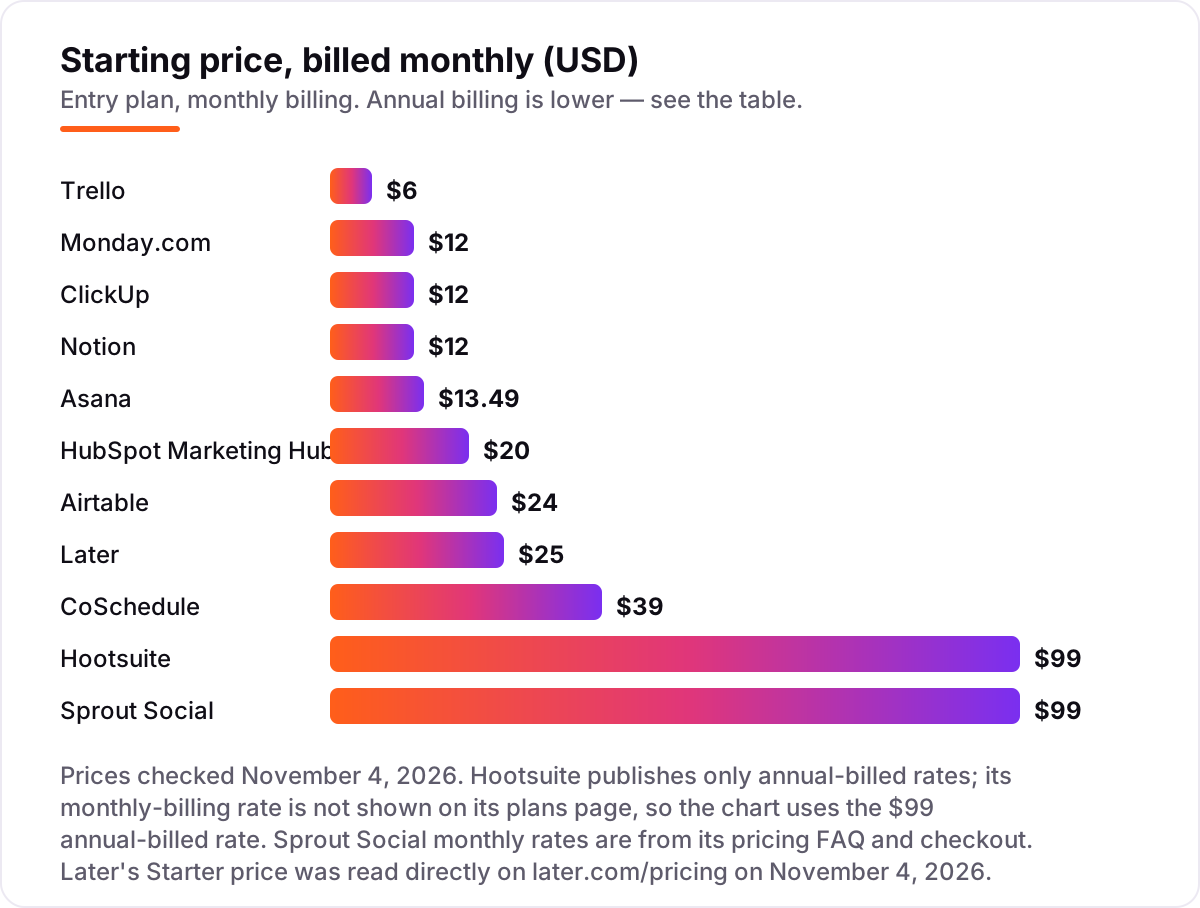
best marketing calendar software pricing: what you will actually pay
Take a five-person marketing team that needs one seat per person for a year, on annual billing where the vendor offers it. On list prices, the subscription costs $300 a year on Trello Standard, $540 on Monday.com Basic and ClickUp Core, $600 on Notion Plus, $659.40 on Asana Starter, $720 on Monday.com Standard, $1,200 on Airtable Team, $1,200 on HubSpot Starter at the standard $20 a seat, $4,740 on Sprout Social Essentials and $5,940 on Hootsuite Standard. Later Starter cannot cover this team at all: it allows one user, so the team needs Growth at $450 a year for two users and more seats on top.
Two of those numbers need adjusting before they are real. First, the calendar view is not always in the cheap plan: Trello's calendar needs Premium, so the five-person team that wants a calendar pays $600 a year, not $300. Monday.com's automations and calendar view need Standard, so the real figure is $720, not $540. Second, CoSchedule cannot cover five people on a published plan at all: Starter covers one user and Professional covers three at $78 a month, so a five-person team needs the custom-priced Suite.
Three costs sit outside every number above. First, the second tool: Asana, Trello, Notion, Monday.com, ClickUp and Airtable plan content but publish nothing, so add a scheduler such as Later at $225 a year for Starter. Second, the profile count: CoSchedule charges $5 a month per extra profile and $16 a month per X profile, and Sprout Social caps Essentials at five profiles. Third, the contact count: HubSpot Starter includes only 1,000 marketing contacts, and each extra 1,000 costs $50 a month, so a growing list moves the bill faster than the seat count does. If you are choosing tools for a small business, our guide to email marketing for local business shows how the sending side of the stack is priced.
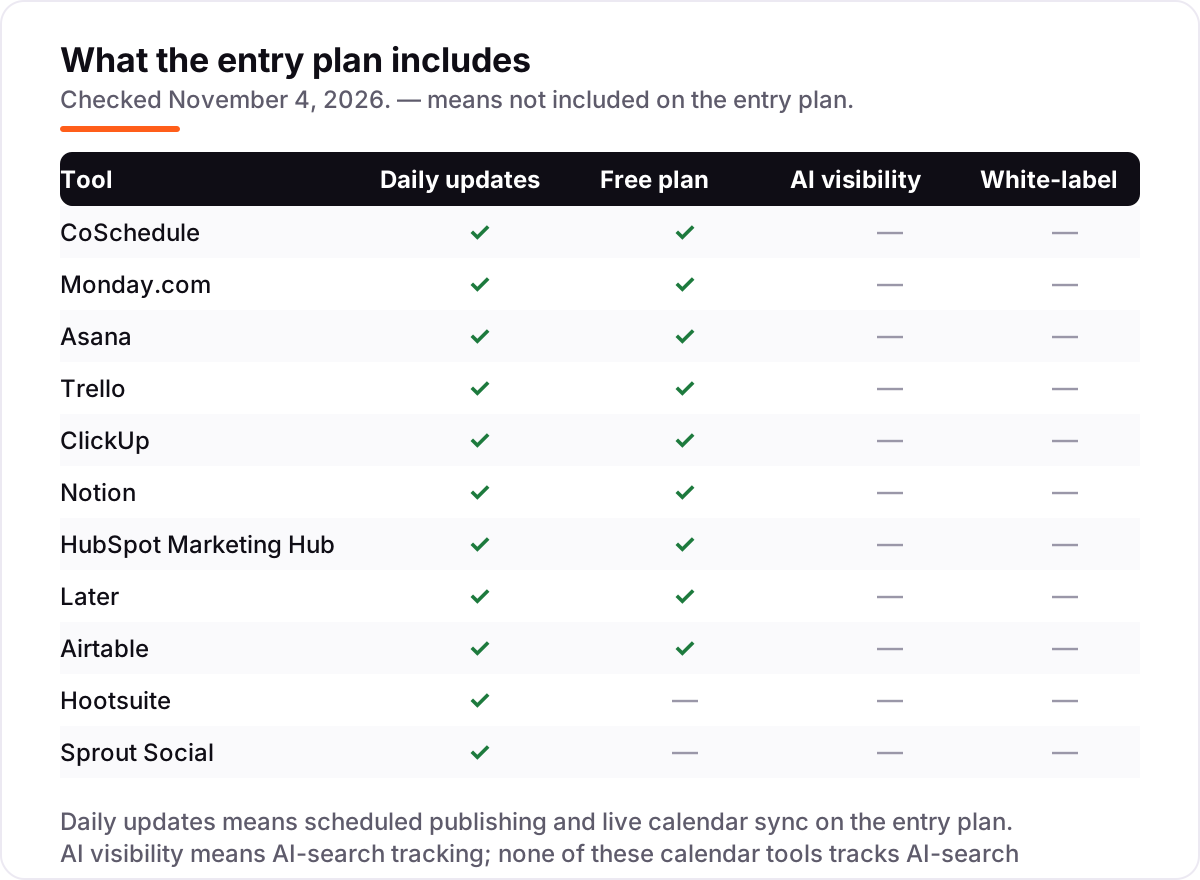
Know the difference: a marketing calendar vs a project board with a calendar view
The confusion in this category is between two different jobs that share the word calendar. A purpose-built marketing calendar — CoSchedule and Later — is organised around publish dates: campaigns, posts and channels are the rows, dates are the columns, and the tool itself sends the post out. A project board with a calendar view — Monday.com, Asana, Trello, ClickUp, Notion and Airtable — is organised around tasks: the calendar is one way of looking at a task list, and nothing leaves the tool on its own.
There is a second, quieter confusion: a social scheduler is not a marketing calendar either. Hootsuite, Sprout Social and Later schedule social posts brilliantly, but a blog post, an email and a launch event do not naturally live on their calendars. CoSchedule is the only tool here that puts blog, email and social on the same calendar and publishes the social part itself.
The practical rule is simple. If the deliverable is a publish schedule across blog and social, buy a marketing calendar. If the deliverable is a managed project with owners, approvals and dependencies, buy a project tool and accept that you still need a scheduler. If the deliverable is social posts only, buy a scheduler and do not pay for a marketing calendar you will not use. Buying a project board and expecting it to publish is the most common expensive mistake in this category.
Quick comparison: tool type by need
| Buyer | Best pick | Why |
|---|---|---|
| One calendar for blog, email and social | CoSchedule | The only purpose-built marketing calendar here, from $29 a month billed annually |
| Visual team that plans on boards | Monday.com | Boards, timeline and calendar views of one plan, from $9 a seat a month |
| Structured campaigns with approvals | Asana | Timeline, Gantt and calendar views with unlimited automations, from $10.99 a user a month |
| Cheapest simple workflow | Trello | Unlimited boards from $5 a user a month; the calendar view needs Premium at $10 |
| One app for tasks, docs and calendar | ClickUp | Calendar, docs, goals and time tracking in one workspace, from $9 a user a month |
| Content planned as a database | Notion | The calendar is one view of a content database, from $10 a member a month |
| Visual social planning with a feed preview | Later | Drag-and-drop calendar with a feed preview, from $18.75 a month billed annually |
| Campaigns planned as structured data | Airtable | Calendar, kanban and gallery views of one base, from $20 a user a month |
| Calendar inside a CRM | HubSpot Marketing Hub | Campaigns tied to real contacts and deals, from $20 a seat a month |
| One person running many social accounts | Hootsuite | One calendar, one inbox and listening for up to 10 accounts, from $99 a user a month |
| Larger social team needing inbox and reports | Sprout Social | Calendar plus inbox, monitoring and reporting, from $79 a seat a month |
Mistakes to avoid
- Budgeting on the monthly headline. Monthly billing costs more than annual billing here — Later Starter is $25 a month against $18.75 billed annually, and CoSchedule Starter is $39 against $29. Compare annual totals for a full year of seats.
- Buying a project board and expecting it to publish. Asana, Trello, Notion, Monday.com, ClickUp and Airtable plan content but post nothing. Budget for the scheduler too, or buy a tool that publishes.
- Paying for the cheap plan that lacks the calendar. Trello's calendar view is Premium only, Monday.com's automations start on Standard, and Sprout Social's inbox starts on Standard. Read the plan gate before you buy.
- Forgetting the second seat count. The price in the chart is per seat. A five-person team pays five times the headline, so a $99 tool is a $495-a-month decision — and CoSchedule's paid plans cap out at three users.
- Skipping the trial on a real campaign. A demo video hides the approval bottleneck. Run one genuine campaign through the trial and check that the calendar shows the dates your team needs and that approvals do not slow publishing down.
How we chose
We ranked the tools by fit for the most common buyer — a small marketing team planning content across blog and social — not by brand size. Prices were confirmed against each vendor's own pricing page, with fresh reads of those pages on November 4, 2026: Later's Starter price of $18.75 a month billed annually was read directly on later.com/pricing that day. Sprout Social's plans page was also opened on November 4, 2026, but it renders its plan cards in script, so its $79 Essentials figure is the figure Sprout's own pricing page shows in its October 2026 reads, cross-checked against Sprout's own comparison pages. Hootsuite publishes only annual-billed rates, so no monthly-billing figure is asserted for it. No G2 ratings are shown in this post: the G2 review pages could not be opened on November 4, 2026, because the browser reader hit its request limit, so every rating was omitted rather than estimated. No vendor paid for a place in this list, and none of the links here are affiliate links.
What to do next
Start with the free plan or trial of your top pick and run one real campaign through it. Check that the calendar view shows the dates your team needs, that the approval step does not slow publishing down, and that the tool publishes to the channels you actually use before you commit to a year. If the tools are sorted but new clients are not finding you, our monthly SEO service handles the visibility side — or compare providers in our guide to social media and SEO. Once your tools are in place, find out what's holding your rankings back.
Your stack only works if people find you
SerpAstra fixes what keeps your site off page one and makes it easy for AI assistants to recommend.
Get a free audit→Sources we checked (11)
- CoSchedule pricing — coschedule.com (checked November 4, 2026)
- Monday.com pricing — monday.com (checked November 4, 2026)
- Asana pricing — asana.com (checked November 4, 2026)
- Trello pricing — trello.com (checked November 4, 2026)
- ClickUp pricing — clickup.com (checked November 4, 2026)
- Notion pricing — notion.com (checked November 4, 2026)
- HubSpot Marketing Hub pricing — hubspot.com (checked November 4, 2026)
- Later pricing — later.com (checked November 4, 2026)
- Airtable pricing — airtable.com (checked November 4, 2026)
- Hootsuite plans — hootsuite.com (checked November 4, 2026)
- Sprout Social pricing — sproutsocial.com (checked November 4, 2026)
Shamim
Founder of SerpAstra
A full-stack SEO and digital marketer who spends most days on Local SEO for dental practices, AI search visibility and lead generation.
Frequently asked questions
What is the best marketing calendar software?
CoSchedule is the best fit for most marketing teams because it is built around the calendar itself, from $29 a month billed annually. Monday.com is the better pick for visual teams that plan on boards, and Asana is the better pick when campaigns run as structured projects with approvals.
How much does marketing calendar software cost?
Entry prices run from $0 to $99 a user a month. Trello Standard costs $5 a user a month billed annually, Monday.com Basic $9, ClickUp Core $9 and Asana Starter $10.99. At the top end, Hootsuite Standard costs $99 a user a month and Sprout Social Essentials $79 a seat a month.
Is there really free marketing calendar software?
Yes. Trello, Monday.com, Asana, ClickUp, Notion, Airtable and HubSpot all have free plans, and CoSchedule and Later have limited free plans too. The catch is that Trello's calendar view needs Premium at $10 a user a month, so a free calendar is not the same as a free plan.
What is the difference between CoSchedule and Monday.com?
CoSchedule is a purpose-built marketing calendar: campaigns, blog and social share one calendar view, and it publishes posts itself. Monday.com is a project platform with a calendar view: boards, timelines and automations plan the work, but it publishes nothing. Pick CoSchedule for the calendar, Monday.com for the project system around it.
Do I need a separate social media scheduler as well?
It depends on the tool. CoSchedule, Later, Hootsuite and Sprout Social publish social posts themselves, so no second tool is needed. Asana, Trello, Notion, Monday.com, ClickUp and Airtable plan content but publish nothing, so they pair with a scheduler such as Later or Hootsuite.
Can I switch marketing calendar software later?
Yes, but plan the move between campaigns, not mid-campaign. Export your content list and scheduled dates, then rebuild the board, templates and approval steps in the new tool before going live. The posts move; the templates, automations and team habits do not, so budget a week for the switch.
What should a small team start with?
Start on a free plan and pay only when the limit bites. Trello is the cheapest paid step at $5 a user a month, and CoSchedule's free plan covers a solo marketer. Move to a paid plan when you need the calendar view, more seats or automations — not before.
Free SEO and AI visibility audit
Find out what is holding your rankings back
Send us your site. Within 2 business days you get a written audit, an AI visibility check and a short fix list ranked by impact. Free, with no contract attached.
Request my free audit→Related guides
 MarketingMarketing automation for small businesses: what to automate (and what not to)Marketing automation for small businesses, explained: what to automate first, what to keep human, and the tools that save hours without losing customers.Read guide →
 MarketingEmail marketing for local businesses (that customers actually open)Email marketing for local businesses: build a list the right way, send emails customers open, and turn past customers into repeat bookings without spam.Read guide →
 ContentDoes social media help SEO? The honest answerDoes social media help SEO? The honest answer: likes are not a ranking factor, but social can earn links, traffic and brand searches. Here is how it helps.Read guide →