
8 Best Mobile Payment Apps for Small Business in 2026
8 best mobile payment app for small business options compared on in-person fees, hardware and free plans — real prices checked November 2, 2026.
 Shamim Mia, Founder, SerpAstraLast verified November 2, 202612 min read
We compare pricing pages, documentation and public reviews. We never accept payment for rankings.

Key takeaways
- Square is the best all-round pick for most small businesses: a free POS app with inventory and invoicing built in, at 2.6% + 15¢ per in-person sale.
- PayPal Point of Sale has the lowest in-person rate here at 2.29% + 9¢, and Stripe is cheapest on small tickets at 2.7% + 5¢.
- The single most important buying factor is your effective transaction cost at your volume: a lower percentage beats a lower fixed fee once tickets pass about $100.
- Every fee below was checked on the vendor's own pricing page on November 2, 2026. Ratings are G2, with review counts shown.
On this page
Quick comparison
| Tool | Best for | Starting price | Free plan |
|---|---|---|---|
| Square | Small retailers, food trucks and service businesses that want a free POS app with inventory and invoicing built in | 2.6% + 15¢ | Yes (pay per sale) |
| PayPal Point of Sale | Market stalls, pop-ups and solo sellers who want the lowest in-person rate and a $29 first reader | 2.29% + 9¢ | Yes (pay per sale) |
| Stripe | Businesses that sell online and in person and want one processor, strong APIs and Radar fraud detection | 2.7% + 5¢ | Yes (pay per sale) |
| Clover Go | Small retailers and service businesses that want a pocket reader plus a full countertop POS they can grow into | 2.6% + 10¢ | Yes (pay per sale) |
| SumUp | Market sellers and micro-businesses that want one flat rate with no per-transaction fee and no monthly cost | 2.75% | Yes (pay per sale) |
| Helcim | Businesses processing $3,000+ a month that want interchange-plus pricing and automatic volume discounts | IC + 0.40% + 8¢ | Yes (pay per sale) |
| Shopify POS | Shopify store owners who sell in person and want one inventory across online and physical sales | $89/mo (POS Pro) | No (needs a plan) |
| QuickBooks Payments | Businesses already running QuickBooks Online that want payments to land straight in their books | 2.5% | No (needs a plan) |
Make one of these tools?
We re-check this list every quarter. Send a correction, request a review, or ask about a clearly labeled sponsored spot.
Request a listingThe best mobile payment app for small business

Square
Best for: Small retailers, food trucks and service businesses that want a free POS app with inventory and invoicing built in
Square is the easiest starting point for a small business that takes cards in person. The free POS app runs on a phone, takes tap, chip and swipe payments, and bundles inventory, invoicing and sales reports with no monthly fee. The first magstripe reader is free, and Plus at $49 a month per location cuts the in-person rate to 2.5% + 15¢ and adds advanced inventory and loyalty.
The catch is the 15¢ fixed fee: on a $5 coffee it adds 3% to the cost, so very small tickets are pricier here than on Stripe or PayPal. Online sales on the Free plan cost 3.3% + 30¢, which is high if you also sell through a website. For a counter, a truck or a market stall with tickets above $20, Square is the most complete free option here.
What we like
- Free POS app with inventory, invoicing and sales reports, and no monthly fee on the Free plan
- First magstripe reader is free, and setup takes under a day for most small businesses
- Plus plan ($49/month per location) cuts the in-person rate to 2.5% + 15¢ and adds advanced inventory and loyalty tools
- Next-business-day deposits are included, with no monthly processing, setup or PCI fees
Watch out for
- The 15¢ fixed fee adds 3% to a $5 sale, so very small tickets cost more here than on Stripe or PayPal
- Online sales on the Free plan cost 3.3% + 30¢, which is high if you also sell through a website
- Some G2 reviewers report account holds and slow responses when a payment is flagged

PayPal Point of Sale
Best for: Market stalls, pop-ups and solo sellers who want the lowest in-person rate and a $29 first reader
PayPal Point of Sale, formerly Zettle, is the cheapest way to take cards in person on a percentage basis: 2.29% + 9¢ with no monthly fee, and the first card reader costs $29 for new users. The free app runs on iOS and Android, accepts contactless cards, Apple Pay, Google Pay and PayPal or Venmo QR codes at the same rate, and moves money into your PayPal balance in minutes.
The trade-off is depth. Inventory, staff management and reporting are thinner than Square's, there is no offline mode, and keyed-in cards jump to 3.49% + 9¢. It is the right pick for a market stall, pop-up or solo seller who wants the lowest in-person rate and a $29 reader, and the wrong pick for a shop that needs a full register.
What we like
- Lowest in-person percentage in this list at 2.29% + 9¢, with no monthly or setup fees
- Tap to Pay on a phone needs no hardware, and the first card reader costs $29 for new users
- Accepts contactless cards, Apple Pay, Google Pay and PayPal or Venmo QR codes at the same rate
- Money reaches your PayPal balance in minutes, and the app covers basic inventory and sales tracking
Watch out for
- No offline mode — the app needs a stable internet connection to take payments
- Inventory, staff management and reporting are thinner than Square's
- Keyed-in cards jump to 3.49% + 9¢, and the app has fewer third-party integrations

Stripe
Best for: Businesses that sell online and in person and want one processor, strong APIs and Radar fraud detection
Stripe is the best choice if you sell both online and in person and want one processor for everything. Terminal takes in-person cards at 2.7% + 5¢ with no monthly fee, and the same account handles online payments at 2.9% + 30¢, invoicing, subscriptions and payment links. Radar fraud detection is built in, and the Reader M2 costs $59.
Stripe is not a ready-made POS: there is no Square-style register app, so you either build on the Terminal API or pair a reader with a third-party POS. That makes it a poor fit for a shop that wants to open a box and start selling. It is a strong fit for businesses with a developer, an existing online store, or a custom checkout.
What we like
- Cheapest on small tickets: the 5¢ fixed fee beats Square's 15¢ on every sale under $100
- One account covers online payments at 2.9% + 30¢, invoicing, subscriptions and payment links
- Radar fraud detection is built in, and the Reader M2 costs $59 with Tap to Pay on phones
- No setup, monthly or minimum fees on standard pricing
Watch out for
- No ready-made POS app — you need Terminal hardware plus a third-party POS or a custom build
- Support is mostly chat and tickets, and some G2 reviewers report frozen funds with little explanation
- Fees add up across add-on products such as Billing, Tax and Radar for Fraud Teams

Clover Go
Best for: Small retailers and service businesses that want a pocket reader plus a full countertop POS they can grow into
Clover Go is a pocket-sized Bluetooth reader that turns a phone into a card terminal, running on Clover's Starter plan at $0 a month with 2.6% + 10¢ per in-person sale. The Go reader costs $199 outright, with no extra monthly device fee. The real draw is the upgrade path: the same account grows into a Flex handheld or a Station Duo countertop system.
The catch is that Clover's best features are paid extras. Advanced inventory, loyalty and gift cards arrive through the App Market, and each app adds a monthly charge. Prices also vary by reseller, so buy direct from Clover and get the rate in writing. For a business that will outgrow a phone reader, Clover is the most scalable pick here.
What we like
- Pocket-sized Bluetooth reader that turns a phone into a card terminal, with no extra monthly device fee
- Starter plan costs $0 a month at 2.6% + 10¢ in person, and Essentials ($29.95/month) drops it to 2.5% + 10¢
- Same account grows into a Flex handheld or a Station Duo countertop system
- App Market adds loyalty, gift cards, employee management and accounting integrations
Watch out for
- Advanced inventory, loyalty and gift cards arrive through the App Market, and each app adds a monthly charge
- Prices vary by reseller, so the published rate only applies when you buy direct from Clover
- G2 support scores lag Square and Stripe, and reviewers cite add-on costs and fee transparency

SumUp
Best for: Market sellers and micro-businesses that want one flat rate with no per-transaction fee and no monthly cost
SumUp keeps pricing to one number: a flat 2.75% on every in-person payment, with no fixed per-sale fee, no monthly fee and no contract. The 3-in-1 reader starts at $35, the app is free, and payouts land in one to two business days. There is nothing to configure and no plan to choose, which is the whole appeal for a market seller or a micro-business.
The flat rate is also the weakness. On a $500 sale SumUp costs $13.75, against $11.54 at PayPal and $13.15 at Square, so big-ticket sellers pay more here. Keyed-in cards cost 3.5% + 15¢, and the POS software is basic. Pick SumUp for simplicity on small tickets, not for volume.
What we like
- One flat rate of 2.75% on every in-person payment, with no fixed per-sale fee and no monthly fee
- The 3-in-1 card reader starts at $35, and the app is free with no contract or minimums
- Same rate for Visa, Mastercard and American Express, with payouts in 1-2 business days
- G2 reviewers praise the quick setup and the lightweight reader for market and outdoor selling
Watch out for
- At 2.75% it is the highest percentage in this list, so big-ticket sellers pay more than on PayPal or Square
- POS software is basic, with limited inventory and no deep reporting on the free tier
- Keyed-in cards cost 3.5% + 15¢, and phone support can be slow according to G2 reviewers

Helcim
Best for: Businesses processing $3,000+ a month that want interchange-plus pricing and automatic volume discounts
Helcim is the only interchange-plus processor in this list, which can make it the cheapest at real volume. You pay interchange at cost plus a published margin of 0.40% + 8¢ per in-person sale, and the margin drops automatically as volume grows, by up to 70%. There is no monthly, PCI or statement fee, and the POS app, invoicing, virtual terminal and recurring payments are all included.
The honest caveat is that your real rate depends on the cards your customers use, so the published average of 1.79% + 8¢ in person is a guide, not a promise. Onboarding is heavier than the flat-rate apps and asks for financial documents, and a few G2 reviewers report account problems. If you process $3,000 or more a month and can wait through setup, Helcim usually wins on cost.
What we like
- Interchange-plus pricing with a published margin of 0.40% + 8¢ in person, dropping automatically as volume grows
- No monthly, PCI, statement or cancellation fees, and the margin can fall by up to 70% at high volume
- Every tool is included: POS app, invoicing, virtual terminal, recurring payments and inventory
- Card reader costs $199 and the Smart Terminal $349, both bought outright with no rental
Watch out for
- Your real rate depends on the cards your customers use, so the published average is a guide, not a promise
- Onboarding is heavier than the flat-rate apps and asks for financial documents
- A few G2 reviewers report account closures and refunded payments with little warning

Shopify POS
Best for: Shopify store owners who sell in person and want one inventory across online and physical sales
Shopify POS is the obvious pick if you already sell on Shopify. POS Lite is included with every Shopify plan and takes in-person cards at 2.6% + 10¢ on Basic, while POS Pro costs $89 a month per location and adds staff roles, advanced inventory, omnichannel reports and buy-online-pickup-in-store. Inventory syncs in real time between your website and your counter, and Tap to Pay on iPhone needs no hardware.
The cost stacks up: a Shopify plan plus $89 a month per location for Pro, plus the card rate, plus hardware from $49 for a Tap & Chip reader. Advanced features sit behind Pro, and reviewers note that costs climb as apps pile on. It is the best mobile payment app for a Shopify store; it makes little sense if you do not already run Shopify.
What we like
- Real-time inventory sync between your online store and your counter, with one product catalog
- Tap to Pay on iPhone needs no hardware, and the Tap & Chip reader costs $49
- POS Pro adds staff roles, advanced inventory, omnichannel reports and buy-online-pickup-in-store
- Works offline at trade shows and markets, syncing sales once you are back online
Watch out for
- Needs a paid Shopify plan on top of the $89/month per-location Pro add-on
- Staff roles, advanced inventory and omnichannel reports sit behind the Pro plan, not Lite
- G2 reviewers note that costs climb fast once Pro, hardware and apps stack up

QuickBooks Payments
Best for: Businesses already running QuickBooks Online that want payments to land straight in their books
QuickBooks Payments is built for businesses that already live in QuickBooks Online. In-person cards cost a flat 2.5% through a card reader or Tap to Pay, with no fixed per-sale fee and no monthly processing fee, and payments land straight in your books with invoices, ACH, PayPal, Venmo and buy-now-pay-later options in the same flow.
The catch is the subscription: you need a paid QuickBooks Online plan to use it, so it is not a standalone mobile payment app. Online card payments cost 2.99%, and keyed-in cards cost 3.5%. Some G2 reviewers also report held funds and slow support. If your accounting already runs on QuickBooks, the reconciliation alone can justify it; otherwise, pick a standalone app.
What we like
- Flat 2.5% on in-person cards with no fixed per-sale fee, through a reader or Tap to Pay
- Payments reconcile inside QuickBooks, with invoices, ACH, PayPal, Venmo and buy-now-pay-later in one flow
- No monthly processing fee, and deposits arrive in one to two business days
- Card readers pair by Bluetooth with the GoPayment app for on-the-go sales
Watch out for
- Needs a paid QuickBooks Online plan, so it is not a standalone mobile payment app
- Online card payments cost 2.99% and keyed-in cards 3.5%, both higher than the in-person rate
- Some G2 reviewers report held funds, slow support and fees that are hard to see in reports
A small business does not need a monthly subscription to take card payments — it needs the right fee on every sale. This guide compares the 8 best mobile payment apps for small business on the in-person rate that decides most of your cost, plus the hardware, payouts and free plan behind each one.
How to choose the best mobile payment app for small business
- Start with your average ticket. The fixed fee matters more than the percentage on small sales: 15¢ on a $5 sale is 3%, while the same 15¢ on a $100 sale is 0.15%.
- Count the monthly cost behind the rate. Six apps here charge no monthly fee at all, while Shopify POS Pro adds $89 a month per location and QuickBooks Payments needs a paid QuickBooks Online plan.
- Match the app to where you sell. A market stall needs a phone and a pocket reader; a shop needs inventory, staff logins and a countertop terminal; an online store needs one processor for both channels.
- Check payouts and offline mode. Most apps pay out in one to two business days, but PayPal has no offline mode, so a dead signal at a market means no sale.
- Watch the keyed-in rate. Typing a card number costs far more than tapping one — 3.5% + 15¢ on Square, 3.49% + 9¢ on PayPal — so phone orders deserve their own math.
- Think about what you already pay for. If you run a Shopify store or keep your books in QuickBooks, the matching payment app can be cheaper overall than the cheapest rate on its own. Our guide to the best marketing platforms for small business SEO covers the wider stack around the till.
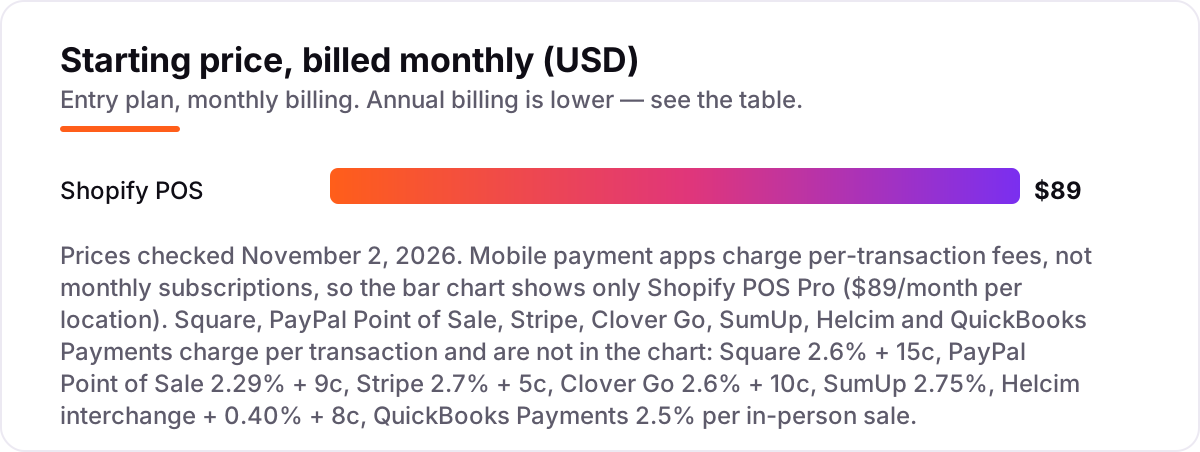
Mobile payment app for small business pricing: what you will actually pay
Take a shop doing $10,000 a month in person, with a $25 average ticket — 400 sales. The fee on those same sales, using each app's published in-person rate:
- Square: 2.6% of $10,000 is $260, plus 400 × 15¢ is $60 — $320 a month.
- PayPal Point of Sale: 2.29% is $229, plus 400 × 9¢ is $36 — $265 a month.
- Stripe: 2.7% is $270, plus 400 × 5¢ is $20 — $290 a month.
- Clover Go: 2.6% is $260, plus 400 × 10¢ is $40 — $300 a month.
- SumUp: a flat 2.75% with no fixed fee — $275 a month.
- Helcim: using its published average of 1.79% + 8¢, that is $179 plus $32 — about $211 a month. The real figure depends on your card mix, because Helcim charges interchange at cost plus 0.40% + 8¢.
- Shopify POS: 2.6% + 10¢ on Basic is $300 a month in fees, plus your Shopify plan — and POS Pro adds $89 a month per location.
- QuickBooks Payments: a flat 2.5% with no fixed fee — $250 a month, plus your QuickBooks Online plan.
The spread between Helcim at about $211 and Square at $320 is $109 a month — about $1,300 a year on the same sales. That is why the percentage matters more than the monthly fee here: only Shopify charges a meaningful monthly price, and even its $89 is smaller than the fee gap between the cheapest and priciest processors. Run the same math on your own average ticket before you sign up, because the ranking flips on small sales — Stripe's 5¢ fixed fee beats Square below $100, and PayPal wins on almost every ticket size.
Tap-to-pay apps vs card readers vs a full POS: know the difference
The three terms get mixed up, and buying the wrong tier is the most common mistake in this category. A tap-to-pay app takes contactless payments on the phone you already own — no hardware, no setup, just the app and an account. Square, PayPal, Stripe, Shopify and QuickBooks all offer it, and it is enough for a market stall, a food truck or a service business that visits customers.
A card reader is the next step up: a small Bluetooth device that takes chip cards as well as tap, and works where a phone alone cannot — weak signal, chip-only customers, or a queue that needs a dedicated terminal. Readers cost $29 to $199 here, bought once, and every app in this list sells or supports one.
A full POS adds the shop around the payment: inventory that falls when you sell, staff logins, receipts, returns, loyalty and reports. Square, Clover and Shopify POS are full POS systems; Stripe and SumUp stay closer to payments only. If you only need to take money, the app is enough. If you need to know what sold, who sold it and what is left on the shelf, you need the POS — and that is when the monthly plan behind the rate starts to matter. If you also sell online, our guide to the best ecommerce platform for SEO explains how the store side of that setup affects what customers find in search.
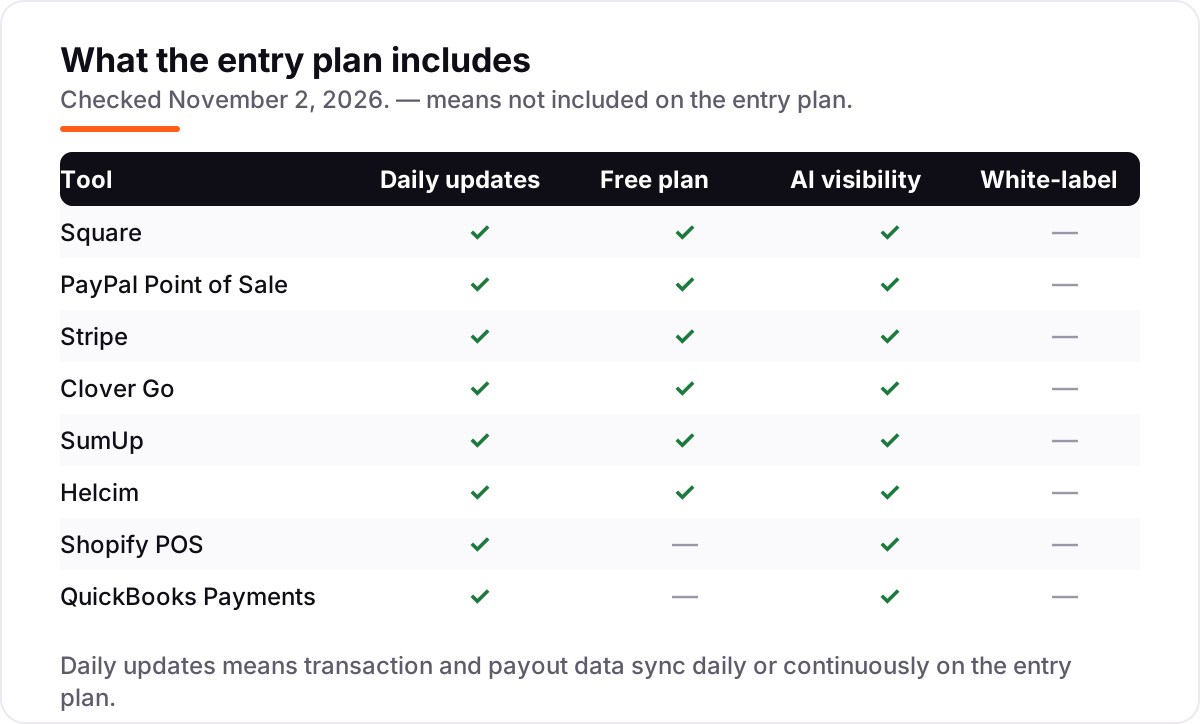
Quick comparison: tool type by need
| Buyer | Best pick | Why |
|---|---|---|
| Solo seller at markets and pop-ups | PayPal Point of Sale | Lowest in-person rate (2.29% + 9¢) and a $29 first reader |
| Small shop that wants a free POS | Square | Free app with inventory and invoicing, 2.6% + 15¢ |
| Online store that also sells in person | Stripe | One account for online and in-person, 2.7% + 5¢ |
| Business that will outgrow a phone reader | Clover Go | Upgrade path to Flex and Station Duo hardware |
| Simplest flat rate, no fixed fee | SumUp | One rate of 2.75%, nothing to configure |
| High volume, lowest effective cost | Helcim | Interchange-plus with automatic volume discounts |
| Already on Shopify | Shopify POS | One inventory across online and in-store sales |
| Already on QuickBooks | QuickBooks Payments | Payments reconcile inside QuickBooks at 2.5% |
How we chose
We checked each vendor's own pricing page on November 2, 2026 and recorded the in-person fee exactly as shown, including the plan it belongs to. Two figures deserve a note: Square's Free-plan in-person rate is now 2.6% + 15¢ — older guides still show the retired 2.6% + 10¢ — and QuickBooks now lists a flat 2.5% for in-person cards, replacing the older 2.4% + 25¢ figures still shown in directories. Clover's published rates apply when you buy direct from Clover; resellers set their own prices. Helcim's cost is interchange plus a published margin, so we used its published average of 1.79% + 8¢ for the worked example and said so. Ratings come from G2 pages opened the same day, with review counts shown. We ranked the apps by fit for the most common buyer — a small business taking most sales in person — not by brand size. No vendor paid for a place in this list, and none of the links here are affiliate links.
What to do next
Start with your average ticket: under $25, Stripe's 5¢ fixed fee and PayPal's low rate win; over $100, the percentage decides and Helcim pulls ahead at volume. Then take the free app of your top pick and run a week of real sales through it, checking the payout timing against your bank. If your website is not bringing in the customers to pay in the first place, our monthly SEO service can help — and if you also take payments through a website, run the page through the free SERP snippet preview tool to see how it looks in search. For the wider decision on who runs your search, see our guide to the best SEO companies for small business. Once your tools are in place, find out what's holding your rankings back.
Your stack only works if people find you
SerpAstra fixes what keeps your site off page one and makes it easy for AI assistants to recommend.
Get a free audit→Sources we checked (16)
- Square pricing — squareup.com/us/en/payments/our-fees (checked November 2, 2026)
- Square Point of Sale on G2 — 4.6/5, 1,219 reviews (checked November 2, 2026)
- PayPal Point of Sale pricing — paypal.com/us/business/pos-system/pricing (checked November 2, 2026)
- PayPal Point of Sale on G2 — 4.4/5, 34 reviews (checked November 2, 2026)
- Stripe pricing — stripe.com/pricing (checked November 2, 2026)
- Stripe Payments on G2 — 4.2/5, 465 reviews (checked November 2, 2026)
- Clover pricing — clover.com (checked November 2, 2026)
- Clover on G2 — 3.8/5, 109 reviews (checked November 2, 2026)
- SumUp pricing — sumup.com/en-us/fivestars (checked November 2, 2026)
- SumUp on G2 — 4.6/5, 24 reviews (checked November 2, 2026)
- Helcim pricing — helcim.com/pricing (checked November 2, 2026)
- Helcim on G2 — 3.9/5, 19 reviews (checked November 2, 2026)
- Shopify POS pricing — shopify.com (checked November 2, 2026)
- Shopify POS on G2 — 4.4/5, 373 reviews (checked November 2, 2026)
- QuickBooks Payments rates — quickbooks.intuit.com/payments/payment-rates (checked November 2, 2026)
- QuickBooks Payments on G2 — 4.1/5, 56 reviews (checked November 2, 2026)
Shamim
Founder of SerpAstra
A full-stack SEO and digital marketer who spends most days on Local SEO for dental practices, AI search visibility and lead generation.
Frequently asked questions
What is the best mobile payment app for a small business?
Square is the best all-round pick for most small businesses: a free POS app with inventory and invoicing at 2.6% + 15¢ per in-person sale. PayPal Point of Sale is cheaper per sale at 2.29% + 9¢, and Stripe wins if you also sell online. Pick by your average ticket and where you sell, not by brand size.
How much does a mobile payment app cost per transaction?
Between 2.29% and 2.75% per in-person sale on the flat-rate apps here, plus a fixed fee of 5¢ to 15¢ on most of them. PayPal charges 2.29% + 9¢, Square 2.6% + 15¢, Stripe 2.7% + 5¢ and SumUp a flat 2.75%. Helcim and QuickBooks work differently: Helcim adds 0.40% + 8¢ to interchange, and QuickBooks charges a flat 2.5%.
Is there a free mobile payment app for small business?
Yes. Square, PayPal Point of Sale, Stripe, Clover Go, SumUp and Helcim all offer a free app or plan with no monthly fee — you only pay the per-transaction fee when you sell. Shopify POS and QuickBooks Payments are the exceptions: both need a paid plan underneath, so they only make sense if you already run Shopify or QuickBooks.
Square vs PayPal Zettle: which is cheaper?
PayPal Point of Sale, formerly Zettle, is cheaper on almost every ticket: 2.29% + 9¢ against Square's 2.6% + 15¢. On a $50 sale PayPal costs $1.24 and Square costs $1.45. Square earns its higher rate with a fuller POS app — inventory, invoicing, staff tools and loyalty — while PayPal stays a simpler reader-and-app setup.
Do I need a card reader, or is tap to pay on my phone enough?
For most small sellers, tap to pay on a phone is enough to start: Square, PayPal, Stripe, Shopify and QuickBooks all accept contactless cards and wallets on a compatible phone with no hardware. A reader is worth buying when you take chip cards often, sell where phone signal is weak, or want a dedicated terminal at a counter.
What is the difference between a mobile payment app and a POS system?
A mobile payment app takes the payment on your phone, usually with a small reader, and tracks the sale. A POS system adds the shop around it: inventory, staff logins, receipts, returns, loyalty and reports. Square, Clover and Shopify POS are both, while Stripe and SumUp stay closer to payments only. Pick the app for taking money, the POS for running the shop.
Can I use a mobile payment app without a monthly fee?
Yes, with six of the eight apps here. Square, PayPal Point of Sale, Stripe, Clover Go, SumUp and Helcim charge no monthly fee — you pay only the per-transaction rate, plus any hardware you buy once. Shopify POS Pro costs $89 a month per location, and QuickBooks Payments needs a paid QuickBooks Online plan.
Free SEO and AI visibility audit
Find out what is holding your rankings back
Send us your site. Within 2 business days you get a written audit, an AI visibility check and a short fix list ranked by impact. Free, with no contract attached.
Request my free audit→Related guides
 SEO & AI Search7 Best Ecommerce Platforms for SEO in 2026 (Pros, Cons and Pricing)The 7 best ecommerce platform for SEO picks compared on price, SEO controls and ease of use, with real 2026 prices checked on each vendor's pricing page.Read guide →
 SEO & AI Search12 Best Marketing Platforms for Small Business SEO in 2026, ComparedThe 12 best marketing platforms for small business SEO, compared on real prices, SEO tools and AI visibility. Every price checked November 1, 2026.Read guide →
 SEO & AI Search8 Best SEO Companies for Small Business in 20268 best SEO companies for small business compared on price, contracts and AI visibility, with prices checked on each agency's own site on November 1, 2026.Read guide →