
7 Best Offline Accounting Software for Small Business in 2026, Compared
Compare the 7 best offline accounting software for small business on price, offline access and bank feeds, with every price checked November 4, 2026.
 Shamim Mia, Founder, SerpAstraLast verified November 4, 202613 min read
We compare pricing pages, documentation and public reviews. We never accept payment for rankings.

Key takeaways
- Manager is the best free pick at $0, Sage 50 is the most capable paid desktop ledger at $132.17/month, and AccountEdge Pro is the cheapest paid option at $20/month.
- Four of the seven tools are free at entry — Manager, GnuCash, Money Manager Ex and NCH Express Accounts — but only Manager and GnuCash are full double-entry ledgers.
- The single most important buying factor is how offline the tool really is: some 'desktop' tools need a monthly internet check-in or stop working when the subscription lapses.
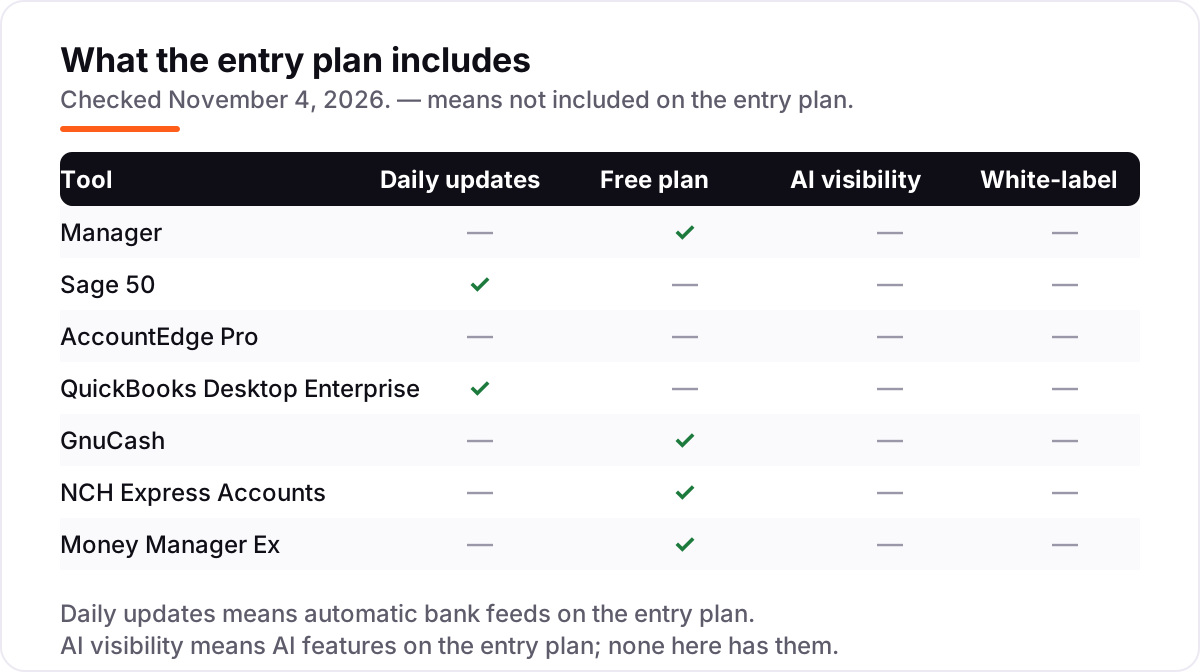
- Bank feeds are the hidden cost: the free tools need manual statement imports, and AccountEdge charges $5/month for feeds, so budget the time or the fee.
On this page
Quick comparison
| Tool | Best for | Starting price | Free plan |
|---|---|---|---|
| Manager | Solo owners and freelancers who want a full-featured offline ledger free, with no subscription | Free | Yes (free) |
| Sage 50 | Small businesses with inventory and job costing that want the most capable Windows desktop ledger | $132.17/mo | No (30-day demo) |
| AccountEdge Pro | Mac and Windows owners who want the cheapest paid desktop ledger with inventory and payroll options | $20/mo | No (30-day trial) |
| QuickBooks Desktop Enterprise | Larger small businesses with complex inventory, many users or multiple locations that need desktop power | From $1,873/yr | No (30-day trial) |
| GnuCash | Owners comfortable with double-entry bookkeeping who want a free, no-account ledger they fully control | Free | Yes (free) |
| NCH Express Accounts | Very small businesses with under 5 employees that want a simple free desktop ledger | Free; Basic $139 | Yes (free <5 staff) |
| Money Manager Ex | Solo owners and freelancers who want a simple free offline money tracker, not a full accounting suite | Free | Yes (free) |
Make one of these tools?
We re-check this list every quarter. Send a correction, request a review, or ask about a clearly labeled sponsored spot.
Request a listingThe best offline accounting software for small business

Manager
Best for: Solo owners and freelancers who want a full-featured offline ledger free, with no subscription
Manager is the strongest free option here because the desktop edition is the full program, not a cut-down trial: double-entry accounting, invoicing, inventory, multi-currency and reporting all come free, with no usage caps and no account to create. It runs on Windows, Mac and Linux, and your data lives in a file on your own computer, so the books open with no internet connection at all.
The trade-offs are the usual free-desktop ones. There are no automatic bank feeds, so statements are imported by hand, and the desktop edition covers one user — a team needs the paid Cloud edition. Backups are your job too. Pick Manager when the budget is $0 and one person runs the books.
What we like
- A genuinely free desktop edition with full features — invoicing, inventory, multi-currency and reporting included, not a cut-down trial
- Your data lives in a file on your own computer, so the books work with no internet connection at all
- Runs on Windows, Mac and Linux, and the same file opens in the paid Cloud edition if you later need multi-user access
- Modular design: switch on only the features you use, from inventory to payroll tabs
Watch out for
- No automatic bank feeds — statements must be imported by hand as CSV or OFX files
- Desktop edition is single-user, so a team needs the paid Cloud edition
- You handle backups yourself — lose the computer without a backup and the books are gone

Sage 50
Best for: Small businesses with inventory and job costing that want the most capable Windows desktop ledger
Sage 50 is the most capable desktop ledger in this list, and the price shows it: Pro costs $132.17 a month for one user, with a minimum one-year commitment. That buys inventory management, job costing, automated bank reconciliation and reporting, plus Microsoft 365 integration. Premium costs $182.50 a month for 1–5 users and adds audit trails and multi-entity accounting; Quantum costs $271.17 a month and runs up to 40 users.
The catches are price, platform and lock-in. Pro covers one user, so a second seat means Premium, payroll is a paid add-on, and Sage 50 runs on Windows only. The subscription stops working if you stop paying. Buy Sage 50 when the business needs inventory and job costing on a desktop and can carry a three-figure monthly bill.
What we like
- The deepest desktop feature set here: inventory, job costing, audit trails and serialized inventory as you move up the tiers
- Automated bank reconciliation included on Pro, not held for a higher plan
- Premium at $182.50/month adds 1–5 users, and Quantum at $271.17/month runs up to 40 users, so the same product grows with the business
- Sage Security Shield fraud protection is included on every plan
Watch out for
- The highest starting price in this list — $132.17 a month, with a minimum one-year commitment
- Pro covers one user only; a second user means Premium at $182.50/month
- Payroll is a paid add-on, and the subscription stops working if you stop paying — there is no perpetual license

AccountEdge Pro
Best for: Mac and Windows owners who want the cheapest paid desktop ledger with inventory and payroll options
AccountEdge Pro is the cheapest paid desktop ledger here at $20 a month for one user, and it still covers the whole job: invoicing, inventory, a general ledger with a full audit trail, bank reconciliation and recurring transactions. It runs on Mac and Windows, which is rare for desktop accounting at this price, and ten company files are included, so one subscription can hold several small businesses.
Two limits matter. First, the software must connect to AccountEdge servers at least once a month to confirm the subscription — miss the check and the file goes read-only after a 7-day grace period. Second, bank feeds cost $5 a month extra and payroll is an add-on. Pick AccountEdge when you want a cheap paid desktop ledger and can live with the monthly check-in.
What we like
- The lowest paid starting price here — $20 a month for a full desktop ledger with inventory
- Runs on Mac and Windows, rare for desktop accounting at this price
- Ten company files are included, so one subscription can hold several small businesses
- Payroll, bank feeds and telephone support are optional add-ons, so you only pay for what you use
Watch out for
- Must connect to AccountEdge servers at least once a month or the file goes read-only after a 7-day grace period
- Pro covers one user — a team needs Network Edition at $30/month for 2 users, plus $10/month per extra workstation
- Bank feeds cost $5/month extra, so reconciliation is manual on the base plan

QuickBooks Desktop Enterprise
Best for: Larger small businesses with complex inventory, many users or multiple locations that need desktop power
QuickBooks Desktop Enterprise is the only desktop QuickBooks still sold to new customers — Intuit stopped selling Desktop Pro and Premier after May 31, 2025. Silver starts at $1,873 a year for one user and covers advanced reporting, invoicing, bill pay and inventory; Gold adds Enhanced Payroll, and Platinum adds advanced inventory, advanced pricing and bill approvals. It handles up to 40 simultaneous users.
The price is the barrier: Silver alone costs more per year than every other tool here combined, and extra users cost more again. It is also an annual subscription, so the software stops working if you stop paying, and setup has a real learning curve. Buy Enterprise when the business has complex inventory, many users or multiple locations — and when a cloud tool would choke on the file size.
What we like
- The most powerful desktop accounting here: advanced inventory, advanced pricing, landed cost and bill approvals on Platinum
- Handles up to 40 simultaneous users and very large company files that choke smaller tools
- Enhanced Payroll is included from Gold up, so payroll and accounting share one login
- The largest review base of any desktop tool here — 4.3/5 on G2 from 1,069 reviews
Watch out for
- The most expensive tool in this list — Silver starts at $1,873 a year for one user, and extra users cost more
- Intuit no longer sells Desktop Pro or Premier to new customers, so Enterprise is the only desktop QuickBooks left
- Annual subscription only — stop paying and the software stops working

GnuCash
Best for: Owners comfortable with double-entry bookkeeping who want a free, no-account ledger they fully control
GnuCash is free, open-source accounting software under the GPL, and it has been maintained since 1998 — there is no subscription, no account and no feature locked behind a paywall. It is a real double-entry ledger with invoicing, budgets, scheduled transactions, investment accounts and multi-currency, and it runs on Windows, Mac and Linux. Your data is a file on your computer, readable and portable, with no vendor lock-in.
The trade-offs are age and effort. There are no automatic bank feeds, so transactions are typed in or imported as OFX or QIF files, and the interface looks dated next to modern tools. It is single-user only, and the learning curve is steep if you have never done double-entry bookkeeping. Pick GnuCash when you want a free professional ledger, know your debits from your credits, and value owning your data outright.
What we like
- Completely free under the GPL — no subscription, no account, no feature locked behind a paywall
- Real double-entry bookkeeping with budgets, scheduled transactions and investment tracking
- Your data is a file on your computer, readable and portable, with no vendor lock-in
- Runs on Windows, Mac and Linux, and the 5.x releases are actively maintained
Watch out for
- No automatic bank feeds — transactions are entered by hand or imported as OFX/QIF files
- Single-user only, with no built-in multi-user access or cloud sync
- The interface looks dated and the learning curve is steep if you have never done double-entry bookkeeping

NCH Express Accounts
Best for: Very small businesses with under 5 employees that want a simple free desktop ledger
NCH Express Accounts is the simplest free start in this list: businesses with fewer than 5 employees can use it free for invoicing, quotes, purchase orders and bank reconciliation. It runs on Windows and Mac, and the bank reconciliation even tracks timing differences — a feature many paid tools charge for. When the business grows past 5 employees, Basic costs $139 as a one-time license and Plus $195, so there is no monthly bill.
The limits are narrow. There are no bank feeds, so transactions are entered by hand or uploaded manually, and one license covers one installation — a second computer means a second license. NCH also shows paid prices only at checkout, so the $139 and $195 figures come from third-party sources. Pick Express Accounts when the business is tiny, the needs are simple, and free matters most.
What we like
- Free for businesses with fewer than 5 employees, with no time limit on the free version
- Bank reconciliation with timing-difference tracking is included free, which many paid tools charge for
- Simple invoicing, quotes and purchase orders without the clutter of a full ERP
- One-time licenses — Basic $139, Plus $195 — so there is no monthly bill once you buy
Watch out for
- No bank feeds — transactions are entered by hand or uploaded manually
- One license covers one installation, so a second computer means a second license
- NCH publishes paid prices only at checkout, so the $139/$195 figures are third-party sourced

Money Manager Ex
Best for: Solo owners and freelancers who want a simple free offline money tracker, not a full accounting suite
Money Manager Ex is a free, open-source money manager for Windows, Mac and Linux, and it is the lightest tool in this list. It tracks checking, savings, credit-card, stock and asset accounts, with budgets, scheduled-bill reminders and cash-flow forecasting, and your data sits in an AES-256 encrypted SQLite file you own. A portable build runs from a USB key, and Android and iOS companion apps cover the basics on the go.
Be clear about what it is not: a personal finance tool, not a business accounting suite. There is no payroll, no inventory and no tax reporting, no bank feeds, and no multi-user access or accountant seat. Pick Money Manager Ex when a solo owner or freelancer wants a simple offline money tracker — and pick Manager or GnuCash instead when the books need to be tax-ready.
What we like
- Completely free and open source, with no account, no ads and no subscription
- Data sits in an encrypted SQLite file you own, and a portable build runs from a USB key
- Budgets, scheduled-bill reminders and cash-flow forecasting cover the basics well
- Runs on Windows, Mac and Linux, with Android and iOS companion apps
Watch out for
- Built for personal finance, not business accounting — no payroll, no inventory and no tax reporting
- No bank feeds — every transaction is typed in or imported from CSV or QIF files
- No multi-user access and no accountant seat, so it suits a solo owner only
The best offline accounting software for small business keeps your books on your own computer, not on a vendor's server: the data file is yours, the software opens without an internet connection, and nobody can raise the price on the books you already own. We ranked the seven tools below by fit for the most common buyer — a US owner who wants the books to work during an outage, on a plane, or at a site with no wifi — starting with the free desktop ledgers and ending with the simplest money tracker, and every price was checked on the vendor's own pricing page on November 4, 2026.
How to choose the best offline accounting software for small business
- Ask how offline it really is. Manager, GnuCash and Money Manager Ex work with no connection at all once installed. AccountEdge needs a monthly check-in, and Sage 50 and QuickBooks Desktop Enterprise stop working when the subscription lapses.
- Count your users first. Manager, GnuCash and Money Manager Ex are single-user on the desktop. Sage 50 Pro covers one user, AccountEdge Pro covers one user, and only QuickBooks Desktop Enterprise is built for a team of up to 40.
- Check the bank feed. Automatic bank feeds save hours of manual entry. Sage 50 Pro and QuickBooks Desktop Enterprise include them; the free tools need manual statement imports, and AccountEdge charges $5 a month for feeds.
- Decide whether you need inventory and payroll. Manager and Sage 50 include inventory; GnuCash and Money Manager Ex do not. Payroll is a paid add-on on Sage 50 and AccountEdge, included from Gold up on QuickBooks Desktop Enterprise, and absent from the free tools.
- Think about who else touches the books. If your accountant already lives in QuickBooks Desktop, picking anything else means paying them to learn a new system — ask before you buy. The free tools have no accountant seat, so your accountant works from exported files instead.
Accounting is one system in your stack, not the whole stack. If the business also needs to be found online, our guide to desktop accounting software covers the wider desktop category, including cloud-connected options. And before you publish new pages for the services you sell, run your titles through the free SERP snippet preview tool — it shows exactly how the title and description will look in Google.
Whatever you shortlist, try it with real data before you pay. The free plans and trials in this list are long enough to run one genuine month — your invoices, your bank statements, your clients — and that month tells you more than any review can. Check two things in the trial: that the software opens and runs with the wifi off, and that you can export the data file to a format your accountant can open. Every tool here stores the books in a file you can copy, so there is no reason to buy before you have tested the offline claim yourself.
Offline accounting software pricing: what you will actually pay
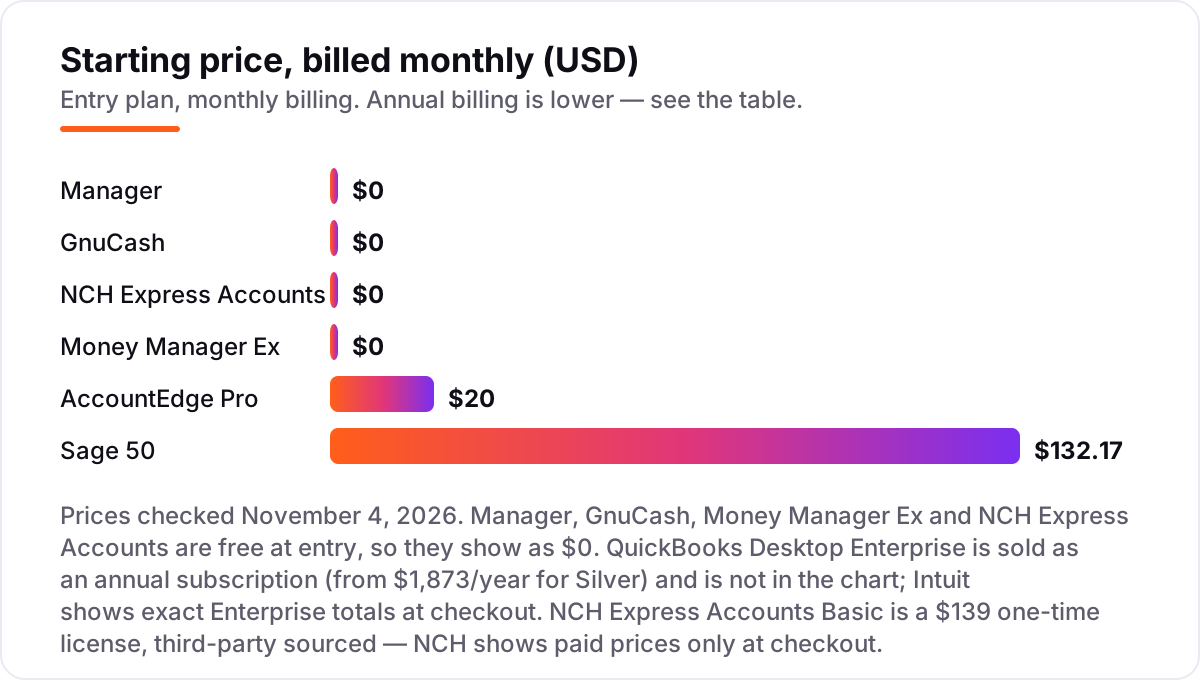
Take a sole trader who sends about 40 invoices a month and does the books alone. On list prices, the subscription costs $0 on Manager, GnuCash, Money Manager Ex or NCH Express Accounts (under 5 employees), $20 a month on AccountEdge Pro, $132.17 a month on Sage 50 Pro, and $1,873 a year on QuickBooks Desktop Enterprise Silver. Over 12 months that is $0, $240 on AccountEdge Pro, $1,586.04 on Sage 50 Pro, and $1,873 on QuickBooks Desktop Enterprise — the same one person and the same 40 invoices, with the gap coming entirely from how much desktop power the business needs, not from features the owner will use.
Now add two more people to the same business. The free desktop tools cannot stretch: Manager, GnuCash and Money Manager Ex are single-user, so a three-person team needs the paid Cloud edition of Manager or a different tool entirely. AccountEdge Pro covers one user, so the team needs Network Edition at $30 a month for 2 users plus a $10 monthly workstation license for the third — $40 a month, or $480 a year. Sage 50 Pro covers one user too, so the team needs Premium at $182.50 a month, or $2,190 a year. QuickBooks Desktop Enterprise handles up to 40 users in one subscription, but Intuit quotes multi-user totals at checkout, so there is no single list price to put here.
Three costs sit outside every number above. First, the subscription check-ins: AccountEdge goes read-only if it cannot reach the vendor's servers once a month, and Sage 50 and QuickBooks Desktop Enterprise stop working when the subscription lapses — the free tools have no such tripwire. Second, payroll: a paid add-on on Sage 50 and AccountEdge, included from Gold up on QuickBooks Desktop Enterprise, and absent from the free tools. Third, the time cost of manual bank imports on the free tools, which is free in money and paid in evenings. If you want the cheapest paid route instead, our guide to the cheapest accounting software for small business compares the low-cost options in one place.
Know the difference: offline, desktop and cloud accounting
The confusion in this category is between three words that sound the same: offline, desktop and cloud. Desktop means the software is installed on your computer. Offline means it works without an internet connection. Cloud means the data lives on the vendor's servers. A tool can be desktop without being offline: AccountEdge is installed on your machine but must connect to the vendor's servers at least once a month, and Sage 50 and QuickBooks Desktop Enterprise are installed locally yet stop working when the subscription lapses. Only Manager, GnuCash and Money Manager Ex are offline in the full sense — install once, then work with the wifi off forever.
There is a second, quieter confusion: cloud-connected desktop tools. Sage 50 is sold as Sage 50cloud, with cloud backup and Microsoft 365 integration, and QuickBooks Desktop Enterprise offers cloud hosting as an add-on. These features need a connection, but the ledger itself still runs on your machine. That is a reasonable middle ground for a business that wants local control plus an off-site backup — as long as you know which parts stop working when the connection drops.
A third distinction worth knowing is who owns the file. With the free tools, the data file is yours in the plainest sense: copy it, move it, open it on another machine, keep it for ten years. With the subscription tools, you rent access to your own books — stop paying and the file may become read-only or unreadable. That is the real price of offline software: not the monthly figure, but whether the books still open the day after you stop paying.
Quick comparison: tool type by need
| Buyer | Best pick | Why |
|---|---|---|
| Solo owner who wants $0 | Manager | Free desktop edition with full features, inventory included |
| Small business with inventory | Sage 50 | Deepest desktop features, Pro from $132.17/month |
| Cheapest paid desktop ledger | AccountEdge Pro | Full ledger with inventory from $20/month |
| Larger business, many users | QuickBooks Desktop Enterprise | Up to 40 users, advanced inventory, from $1,873/year |
| Free open-source double-entry | GnuCash | Professional ledger at $0, no account needed |
| Tiny business under 5 staff | NCH Express Accounts | Free version, then a $139 one-time license |
| Simplest free money tracker | Money Manager Ex | Lightweight budgets and forecasts at $0 |
Mistakes to avoid
- Assuming desktop means works forever offline. AccountEdge goes read-only after a missed monthly check-in, and Sage 50 and QuickBooks Desktop Enterprise stop when the subscription lapses. Test the offline claim with the wifi off before you buy.
- Buying on the starting price without the user cap. Sage 50 Pro and AccountEdge Pro both cover one user, so a second person doubles the bill or forces the next tier. Price the team, not the seat.
- Forgetting that offline means you are the backup. There is no vendor keeping a copy of your books. Set a weekly backup to an external drive and an off-site copy, and test the restore once.
- Choosing a personal finance tool for business books. Money Manager Ex is a fine money tracker, but it has no payroll, no inventory and no tax reporting. If the books need to be tax-ready, pick Manager or GnuCash instead.
- Ignoring the bank-feed gap. The free tools need manual statement imports, and AccountEdge charges $5 a month for feeds. If you process more than fifty transactions a month, count that time or that fee in the price from day one.
How we chose
We checked each vendor's own pricing page on November 4, 2026 and recorded the starting price exactly as shown, and we ranked the tools by fit for the most common buyer — a US small business owner who wants the books to work without an internet connection — not by brand size. Two prices are third-party sourced and disclosed as such: QuickBooks Desktop Enterprise, because Intuit shows exact totals only at checkout (from $1,873 a year for Silver), and NCH Express Accounts Basic, because NCH shows paid prices only at checkout ($139 one-time). Ratings come from G2 pages opened on November 4, 2026; Money Manager Ex has no G2 page, so no rating is shown for it. No vendor paid for a place in this list, and none of the links here are affiliate links.
What to do next
Start with the free desktop edition of your top pick and run one real month of invoices through it — with the wifi off for a day, to prove the offline claim. Check that the bank reconciliation works from imported statements and that the reports match what your accountant expects before you commit to a year. If the books are sorted but new customers are not finding you, our monthly SEO service handles the visibility side — or compare the wider category in our guide to accounting software for small businesses. Once your tools are in place, find out what's holding your rankings back.
Your stack only works if people find you
SerpAstra fixes what keeps your site off page one and makes it easy for AI assistants to recommend.
Get a free audit→Sources we checked (13)
- Sage 50 pricing — sage.com/en-us/products/sage-50/pricing (checked November 4, 2026)
- AccountEdge pricing — accountedge.com/pricing (checked November 4, 2026)
- QuickBooks Desktop Enterprise — quickbooks.intuit.com/desktop/enterprise (checked November 4, 2026)
- Manager pricing — manager.io/pricing (checked November 4, 2026)
- GnuCash — gnucash.org (checked November 4, 2026)
- Money Manager Ex — moneymanagerex.org (checked November 4, 2026)
- NCH Express Accounts — nchsoftware.com/accounting (checked November 4, 2026)
- Sage 50cloud Accounting reviews — g2.com (checked November 4, 2026)
- AccountEdge reviews — g2.com (checked November 4, 2026)
- QuickBooks Desktop Enterprise reviews — g2.com (checked November 4, 2026)
- Manager reviews — g2.com (checked November 4, 2026)
- GnuCash reviews — g2.com (checked November 4, 2026)
- Express Accounts reviews — g2.com (checked November 4, 2026)
Shamim
Founder of SerpAstra
A full-stack SEO and digital marketer who spends most days on Local SEO for dental practices, AI search visibility and lead generation.
Frequently asked questions
What is the best offline accounting software for small business?
Manager is the best free pick: a full double-entry ledger at $0 that runs entirely offline. Sage 50 is the best paid pick for businesses with inventory, from $132.17/month. AccountEdge Pro is the cheapest paid desktop ledger at $20/month. Pick the free tools when one person runs the books, and the paid ones when the business needs inventory, payroll or several users.
Is QuickBooks Desktop still available in 2026?
Only as Enterprise. Intuit stopped selling Desktop Pro, Premier and Mac Plus subscriptions to new customers after May 31, 2025, so QuickBooks Desktop Enterprise is the only desktop QuickBooks left to buy. It is an annual subscription starting at $1,873 a year for Silver, and Intuit shows exact totals at checkout.
Does offline accounting software need the internet at all?
Usually a little, but not for the daily work. You need a connection to download and activate the software, and for bank feeds, payroll tax tables and updates. Some tools also check in: AccountEdge must connect at least once a month or the file goes read-only. Manager, GnuCash and Money Manager Ex need no connection at all once installed.
Can I use free offline software for my business taxes?
Yes, if the books are complete. Manager and GnuCash are full double-entry ledgers that produce the profit and loss, balance sheet and tax reports an accountant needs. Money Manager Ex is a personal finance tracker, not a business ledger, so it is a poor fit for tax filing. Either way, have an accountant review the books before you file.
How do I back up offline accounting data?
Copy the data file on a schedule, because offline means you are the backup service. Keep one copy on an external drive and one copy somewhere off-site, such as a cloud folder or a second computer. Test the restore once: open the copied file on another machine and check the balances match before you trust the backup.
What is the difference between desktop and offline accounting software?
Desktop means the software is installed on your computer; offline means it works without an internet connection. The two overlap but are not the same: AccountEdge is desktop software that still needs a monthly internet check-in, and Sage 50 stops working if the subscription lapses. Only the free tools here — Manager, GnuCash and Money Manager Ex — work with no connection at all.
Is there really free offline accounting software for small business?
Yes — four tools in this list are free at entry. Manager and GnuCash are full double-entry ledgers at $0 with no usage caps. NCH Express Accounts is free for businesses with fewer than 5 employees. Money Manager Ex is free too, but it is a personal finance tracker rather than a business ledger, so check the fit before you commit.
Free SEO and AI visibility audit
Find out what is holding your rankings back
Send us your site. Within 2 business days you get a written audit, an AI visibility check and a short fix list ranked by impact. Free, with no contract attached.
Request my free audit→Related guides
 Accounting, Tax & Finance11 Best Desktop Accounting Software for Small Business in 2026, Compared11 best desktop accounting software for small business compared on price, license and features, with real 2026 prices checked November 2, 2026.Read guide →
 Accounting, Tax & Finance7 Best Accounting Software for Small Businesses in 2026, ComparedCompare the 7 best accounting software for small businesses on price, free plans, bank feeds and AI features, with every price checked November 2, 2026.Read guide →
 Accounting, Tax & Finance7 Best Cheap Accounting Software for Small Business in 2026, Compared7 best cheap accounting software for small business picks compared on real list prices, free plans and payroll add-ons, so you see the true monthly cost.Read guide →