
11 Best Open Source SEO Software in 2026, Compared
11 best open source seo software compared on price, features and what each one actually does. Every price checked on the vendor's own site, November 1, 2026.
 Shamim Mia, Founder, SerpAstraLast verified November 1, 202613 min read
We compare pricing pages, documentation and public reviews. We never accept payment for rankings.

Key takeaways
- Yoast SEO is the short-list pick for most WordPress sites: free core plugin, Premium $118.80/year for one site. Rank Math gives the deepest free toolkit, and SEOPress is the cheapest paid upgrade at $49/year.
- Every tool here is free to start: seven cost nothing at all, and the four paid options all have a free core or a free self-hosted edition.
- The single most important buying factor is where the tool runs: a WordPress plugin only helps WordPress sites, while analytics and crawlers work on any stack.
- Every price below was checked on the vendor's own site on November 1, 2026. G2 ratings are omitted because G2 rate-limited every review page we tried that day.
On this page
Quick comparison
| Tool | Best for | Starting price | Free plan |
|---|---|---|---|
| Yoast SEO | WordPress site owners and bloggers who want guided on-page SEO inside the editor | $118.80/yr (Premium) | Yes (free plugin) |
| Rank Math | WordPress site owners who want the deepest free on-page toolkit, including rank tracking | $95.88/yr (PRO, first year) | Yes (free plugin) |
| SEOPress | WordPress site owners who want a light, private plugin with the cheapest paid upgrade | $49/yr (PRO) | Yes (free plugin) |
| The SEO Framework | WordPress site owners who want a fast, ad-free plugin and will never pay for a single site | $7/mo (Pro, yearly) | Yes (free plugin) |
| Matomo | Privacy-focused teams that want a full Google Analytics replacement they fully own | €22/mo (Cloud) | Yes (self-hosted) |
| Plausible Analytics | Small blogs and content sites that want simple, cookieless stats without a consent banner | $9/mo (Starter) | Yes (self-hosted) |
| Umami | Developers and indie makers who want free, self-hosted analytics on a small server | Free (Hobby) | Yes (Hobby) |
| Serposcope | SEOs who want unlimited rank tracking for free and can run their own server or desktop | Free | Yes (free) |
| SEO Panel | Small businesses and agencies that want one self-hosted panel for rank, backlink and site checks | Free | Yes (free) |
| Lighthouse | Developers and site owners who want a fast, free audit of a single page before publishing | Free | Yes (free) |
| GoAccess | Technical SEOs who want to see exactly how Googlebot and visitors hit their server | Free | Yes (free) |
Make one of these tools?
We re-check this list every quarter. Send a correction, request a review, or ask about a clearly labeled sponsored spot.
Request a listingThe best open source seo software

Yoast SEO
Best for: WordPress site owners and bloggers who want guided on-page SEO inside the editor
Yoast SEO is the default WordPress SEO plugin for a reason: it puts the checks where the writing happens. As you draft a post, the traffic-light analysis scores your keyphrase use, readability, title and meta description, while the free plugin handles sitemaps, schema and social previews without a second tool.
With more than 10 million active installations, it is also the plugin most editors and developers already know, which makes hiring help and finding answers easy. The catch is the per-site Premium licence: one site costs $118.80 a year, and five sites cost five times that. If you run one site, start here; if you run many, compare Rank Math or SEOPress first.
What we like
- The most widely used WordPress SEO plugin, with more than 10 million active installations
- Traffic-light content analysis scores readability and keyphrase use as you write
- Premium bundles Local, Video, News and WooCommerce SEO with AI title and description drafting
Watch out for
- Premium is licensed per site, so five sites cost five subscriptions ($594/year)
- Advanced features, including the redirect manager and AI drafting, are locked behind Premium

Rank Math
Best for: WordPress site owners who want the deepest free on-page toolkit, including rank tracking
Rank Math packs more into its free version than any other plugin here: redirects, schema, a 404 monitor and Search Console data all work without paying. The editor checks read like Yoast's, but the free tier goes further, which is why it has become the first choice for site owners who want depth without a subscription.
PRO costs $95.88 for the first year and covers unlimited personal sites, with rank tracking for 500 keywords. Watch the renewal, though: the price rises to $107.88 a year after year one, and Content AI is a separate paid add-on. For a single blogger or a freelancer with several personal sites, it is the best value in this list.
What we like
- Free version includes redirects, schema, 404 monitor and analytics that rivals charge for
- PRO tracks 500 keywords and covers unlimited personal sites for one flat fee
- Built-in Google Search Console and Analytics data inside the WordPress dashboard
Watch out for
- PRO first-year pricing rises at renewal — $95.88/year first year, $107.88/year after
- The module list can overwhelm beginners; setup takes longer than Yoast

SEOPress
Best for: WordPress site owners who want a light, private plugin with the cheapest paid upgrade
SEOPress is the quiet plugin in this list: light, fast and private, with no ads or upsell banners in the dashboard. The free version covers titles, meta descriptions, sitemaps, redirects and schema, and PRO adds breadcrumbs, local SEO and Google News sitemaps for $49 a year on one site.
The detail that matters is the renewal policy: the price you pay first is the price you renew at, forever, so there is no first-year discount trap. The trade-off is a smaller community and fewer tutorials than Yoast or Rank Math, and rank tracking needs the separate Insights add-on. For a small business that wants a cheap, stable plugin, it is the sensible pick.
What we like
- Cheapest paid upgrade here: PRO is $49/year for one site, $149/year for unlimited sites
- Renewal price is locked at the price you first paid — no renewal jump
- Fully white-label and privacy-first, with no ads or upsell banners in the dashboard
Watch out for
- Smaller community than Yoast or Rank Math, so fewer tutorials and third-party integrations
- Rank tracking and backlink monitoring need the separate SEOPress Insights add-on ($99/year per site)

The SEO Framework
Best for: WordPress site owners who want a fast, ad-free plugin and will never pay for a single site
The SEO Framework takes the opposite approach to most plugins: the free core is the product, not a demo. There are no ads, no upsell banners and no nagging prompts, and the free version covers titles, descriptions, canonicals, schema, sitemaps and redirects for unlimited sites.
Paid plans start at $7 a month billed yearly, but there is a catch: Pro has a two-site minimum, so a single-site owner pays for a licence they may not need. Extensions for local SEO and content focus cost extra too. If you value a clean admin and a fast site over hand-holding, this is the lightest way to run WordPress SEO.
What we like
- The lightest plugin here — no ads, no upsell banners, no bloat in the admin
- Free core covers what most sites need: titles, descriptions, schema, sitemaps, redirects
- Pro unlocks every premium extension on 2 sites for $7/month paid yearly
Watch out for
- Pro has a 2-site minimum — there is no single-site paid licence
- Local SEO and content focus analysis need paid extensions

Matomo
Best for: Privacy-focused teams that want a full Google Analytics replacement they fully own
Matomo is the only tool here that replaces Google Analytics outright. The free On-Premise edition runs on your own server with no traffic cap, and the Cloud version adds heatmaps, session recordings, A/B testing, funnels and a tag manager. Every row of data stays yours, which is why privacy-focused teams and public-sector sites choose it.
The pricing catch is the hit. Cloud Business costs €22 a month for 50,000 hits, and a hit is any tracked request: a pageview, an event, a download. Busy sites with heavy event tracking climb the tiers faster than the pageview count suggests. Self-hosting is free, but the server, updates and backups are your job.
What we like
- The most complete open-source analytics platform: funnels, cohorts, heatmaps, session recordings, A/B testing, tag manager
- You own 100% of the data — self-hosted or stored in Frankfurt on Cloud
- Free On-Premise edition has no traffic cap; you pay only for the server and any premium plugins
Watch out for
- Cloud pricing is per hit, and a hit is any tracked request — pageviews, events, downloads — so busy months cost more
- Heatmaps, session recordings and A/B testing are paid extras on the self-hosted version

Plausible Analytics
Best for: Small blogs and content sites that want simple, cookieless stats without a consent banner
Plausible is the simplest analytics tool here, and that is the point. One page shows the numbers that matter — visitors, sources, top pages, goals — and the tracking script weighs under 1KB, sets no cookies and collects no personal data, so most sites need no consent banner.
Starter costs $9 a month for 10,000 pageviews on one site, with a 30-day trial and two months free on annual billing. The trade-off is depth: funnels, custom properties and the Stats API wait for the $19 Business plan, and there is no free Cloud tier. Self-host the Community Edition if $9 a month still feels like too much for a hobby site.
What we like
- One-page dashboard that answers the everyday questions without a menu maze
- Tracking script under 1KB, no cookies, no personal data — no consent banner needed in most regions
- Open-source Community Edition (AGPL) means no vendor lock-in if you self-host
Watch out for
- No free Cloud plan — the cheapest way in is $9/month, or free only if you self-host the Community Edition
- Funnels, custom properties and the Stats API are gated behind the $19/month Business plan

Umami
Best for: Developers and indie makers who want free, self-hosted analytics on a small server
Umami is the indie favourite among open-source analytics tools: MIT-licensed, cookieless and light enough to run on a small server with Docker Compose. The free Cloud Hobby tier covers 100,000 events a month on one site, and it includes goals, funnels, user journeys and revenue reports that other tools charge for.
Self-hosting gives you the same features with no event cap, which makes Umami the cheapest real analytics in this list. The limits are practical ones: Hobby keeps six months of data, session replays and heatmaps need the $200 a month Business plan, and you maintain your own server if you self-host. For a developer-run site, it is hard to beat.
What we like
- Free Cloud Hobby tier: 100,000 events a month on one site, with goals, funnels and journeys included
- MIT-licensed and self-hostable on a small VPS with Docker Compose — the same features as Cloud
- Cookieless, anonymized tracking with no consent banner, plus a live public demo dashboard
Watch out for
- Self-hosting needs Node.js and PostgreSQL, plus your own updates and backups
- Cloud Hobby covers only 1 site and 6 months of data; replays and heatmaps need the $200/month Business plan

Serposcope
Best for: SEOs who want unlimited rank tracking for free and can run their own server or desktop
Serposcope is the only rank tracker here with no bill and no limits. It is free, open-source software under the MIT licence, and it tracks as many keywords and websites as your machine can handle, storing the full SERP history for every keyword so competitor analysis costs nothing extra.
The catch is that you are the hosting provider. Serposcope runs on your desktop or server, needs Java, and Google can show CAPTCHAs during checks — solving those needs a paid third-party service. The interface is plain and the docs are thin. If you can run a server and want unlimited tracking for free, nothing else in this list comes close.
What we like
- Unlimited keywords and websites — no per-keyword metering at all
- Stores the full SERP history for every keyword, so competitor analysis costs nothing extra
- Runs on Windows, macOS and Linux, on a desktop or a server, with proxy support
Watch out for
- No hosted option — you install and maintain it yourself, and you need Java
- Google can show CAPTCHAs during checks; solving them needs a paid third-party service

SEO Panel
Best for: Small businesses and agencies that want one self-hosted panel for rank, backlink and site checks
SEO Panel is a whole SEO toolkit in one free install: rank checking, backlink checks, a site auditor, a sitemap generator and a meta-tag generator, all under the GPL and all running on your own server with unlimited websites. A plugin system lets you extend it as your needs grow.
It is also the oldest-feeling tool here. The interface looks dated, some of its checks no longer work — the old PageRank tool is dead — and rank checking can break when Google changes its results pages, with fixes depending on volunteers. Treat it as a free workbench for a small site, not as a managed service you can rely on for clients.
What we like
- One install covers rank checking, backlinks, site audit, sitemap and meta-tag generation
- Plugin system lets you extend it with new tools as your needs grow
- Free forever under the GPL, with unlimited websites on your own server
Watch out for
- The interface looks dated, and some of its checks (like the old PageRank tool) no longer work
- Rank checking can break when Google changes its results pages, and fixes depend on volunteers

Lighthouse
Best for: Developers and site owners who want a fast, free audit of a single page before publishing
Lighthouse is the fastest free audit in SEO. It is built into Chrome DevTools, so one click scores a page for performance, accessibility, best practices, SEO and PWA, then hands you a prioritised fix list with Core Web Vitals. No account, no install, no subscription — and the same engine powers PageSpeed Insights.
The limit is scope: Lighthouse audits one page at a time and reports lab data, so scores can shift between runs with network and server load. It checks technical factors only and cannot judge content quality or backlinks. Use it as the first check before publishing a page, and pair it with a crawler or a rank tracker for the site-wide view.
What we like
- Free and built into Chrome DevTools — no install, no account, no setup
- Scores performance, accessibility, best practices, SEO and PWA in one run, with a fix list
- CLI and CI integration let you gate deploys on the scores before anything ships
Watch out for
- Audits one page at a time — there is no site-wide crawl
- Scores are lab data and can vary between runs with network and server load

GoAccess
Best for: Technical SEOs who want to see exactly how Googlebot and visitors hit their server
GoAccess reads your server logs, which makes it the only tool here that shows the ground truth about crawling. One command turns an Apache or Nginx access log into a real-time dashboard of the pages bots request, the errors they hit and the traffic they bring — no tracking script, no cookies, no sampling.
That makes it the best tool in this list for crawl-budget work: you can see exactly which pages Googlebot visits and which it ignores. The trade-off is the terminal-first interface and the need for server access, and logs cannot show rankings or keywords. For a technical SEO who owns a server, it belongs in the toolbox next to Lighthouse.
What we like
- Turns raw server logs into a real-time dashboard in one command — no tracking script needed
- Shows exactly which pages bots crawl, which return errors, and where crawl budget goes
- Runs in the terminal or as a live HTML report, with JSON and CSV export
Watch out for
- Terminal-first — there is no friendly dashboard, and setup needs server access
- It reads logs, so it cannot show rankings, keywords or anything about pages Google never crawled
What the best open source seo software actually does
The best open source seo software does the same jobs as the paid suites — on-page checks, rank tracking, analytics, audits and log analysis — except the code is public and you can run it yourself. That is the whole difference, and it is a big one: no vendor can raise the price on a tool you host, lock your data behind an export limit, or shut the product down and leave you with nothing.
This list is organised by what you actually need: WordPress plugins first, because most buyers here run WordPress, then analytics, then the specialist tools for ranks, audits and logs. The 11 tools split into two camps. Seven cost nothing at all — Serposcope, SEO Panel, Lighthouse, GoAccess, plus the free tiers of Umami and the free plugins. The other four have paid hosted tiers or premium plugins, but every one of them has a free core or a free self-hosted edition.
One number shows how alive this category is: Umami's GitHub repository lists more than 39,000 stars, according to a 2026 comparison of cookieless analytics tools. Open-source SEO software is not a graveyard of abandoned projects — the popular ones are actively maintained, and the community around them is the support desk.
Free options in the best open source seo software
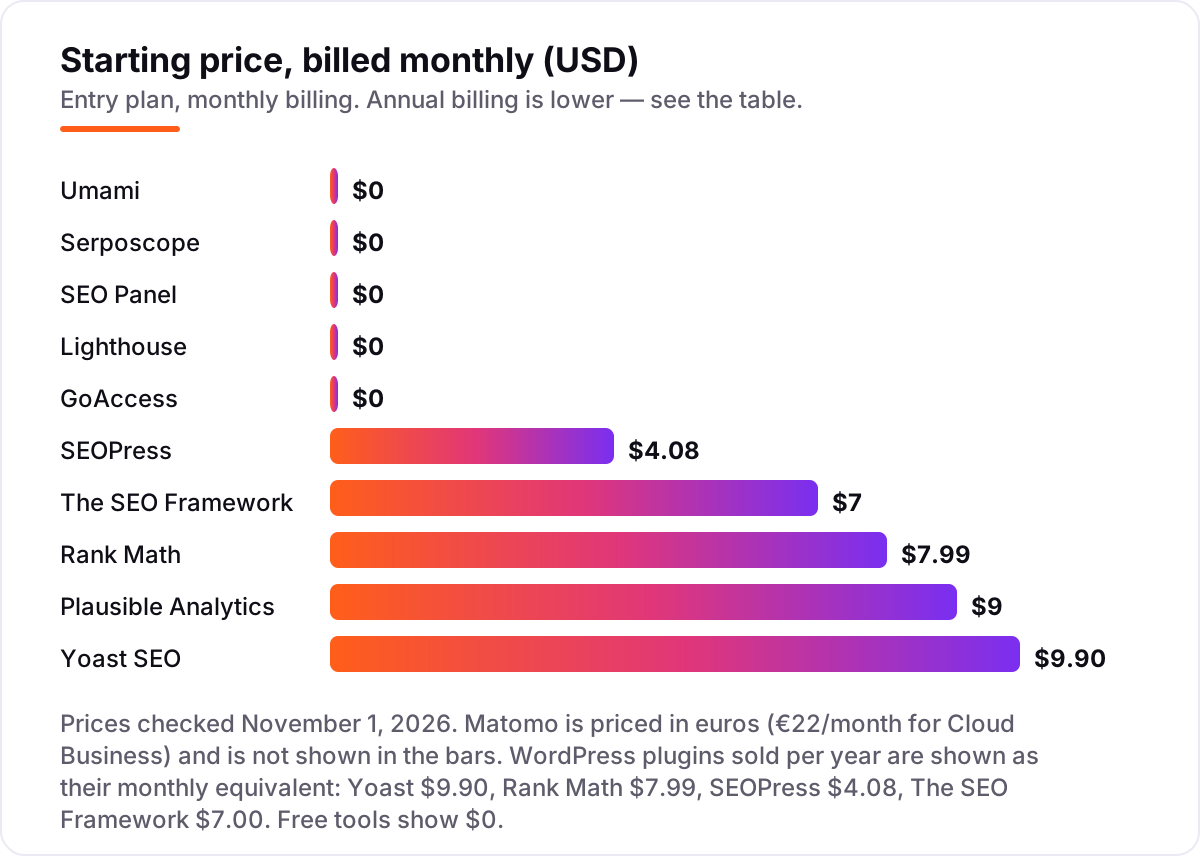
If you run one small site, you may never pay for SEO software at all. Lighthouse audits any page for free in Chrome, Serposcope tracks unlimited keywords for free, GoAccess reads your server logs for free, and Umami's Hobby tier covers 100,000 events a month on one site for free. The WordPress plugins are free to install too, and their free versions cover the on-page basics: titles, meta descriptions, sitemaps and schema.
The honest cost of "free" is your time. Self-hosted tools need a server, updates and backups, and that work lands on you. A free Cloud tier is the middle ground: Umami's Hobby plan and Plausible's trial need no server, but they cap what you can track. Start free, and pay only when a limit you actually hit — sites, events, keywords — forces the upgrade.
WordPress plugins in the best open source seo software
Four of the 11 tools are WordPress plugins, and they are the first four cards in this list for a reason: if your site runs on WordPress, a plugin does the on-page work inside the editor, where the content is written. Yoast is the default, Rank Math is the deepest free option, SEOPress is the cheapest paid upgrade, and The SEO Framework is the lightest.
The pricing math is worth doing before you buy. For five WordPress sites, Yoast Premium costs $594 a year — $118.80 per site. Rank Math PRO covers unlimited personal sites for $95.88 in the first year, and SEOPress PRO covers unlimited sites for $149 a year with the renewal price locked. The SEO Framework Pro costs $84 a year but covers only two sites. Same five sites, four very different bills, so count your sites before you count the features.
Analytics and log tools in the best open source seo software
The second half of this list answers a different question: what happens after you publish. Matomo, Plausible and Umami measure the traffic, GoAccess shows what the bots actually crawled, and Lighthouse scores the page itself. None of them writes your titles for you, and none of them tracks your keywords — that is Serposcope's job, and the WordPress plugins' job.
If you only pick one analytics tool, pick by your tolerance for maintenance. Matomo is the fullest replacement for Google Analytics and the most work to run yourself. Plausible is the simplest hosted option at $9 a month. Umami is the cheapest path: free in the Cloud up to 100,000 events a month, and free forever on your own server. Before you publish new pages for the keywords you track, run your titles through the free SERP snippet preview tool — it shows exactly how the title and description will look in Google.
Quick comparison: tool type by need for the best open source seo software
| Buyer | Best pick | Why |
|---|---|---|
| WordPress site owner, one site | Yoast SEO | Free core, most editors already know it, Premium $118.80/year |
| WordPress owner, several sites | Rank Math or SEOPress | PRO $95.88/year first year unlimited personal sites; SEOPress unlimited $149/year |
| Privacy-focused analytics | Matomo | Full Google Analytics replacement, free self-hosted, Cloud from €22/month |
| Simplest analytics | Plausible or Umami | Plausible $9/month; Umami free Hobby tier, 100,000 events/month |
| Free rank tracking | Serposcope | Unlimited keywords, no paid plan, self-hosted |
| Technical audit and crawl data | Lighthouse and GoAccess | Both free; Lighthouse scores pages, GoAccess reads server logs |
How to choose the best open source seo software: a short decision path
- Start with your stack. WordPress means a plugin first: Yoast, Rank Math, SEOPress or The SEO Framework. Any other stack means analytics and specialist tools — Matomo, Plausible, Umami, Lighthouse and GoAccess work anywhere.
- Decide hosted or self-hosted. Self-hosting costs $0 in licences and real time in maintenance. Hosted costs $9–$22 a month and no server work. Pick the one you will actually maintain.
- Count your sites, not your features. Yoast charges per site; Rank Math and SEOPress do not. Five sites change the answer completely.
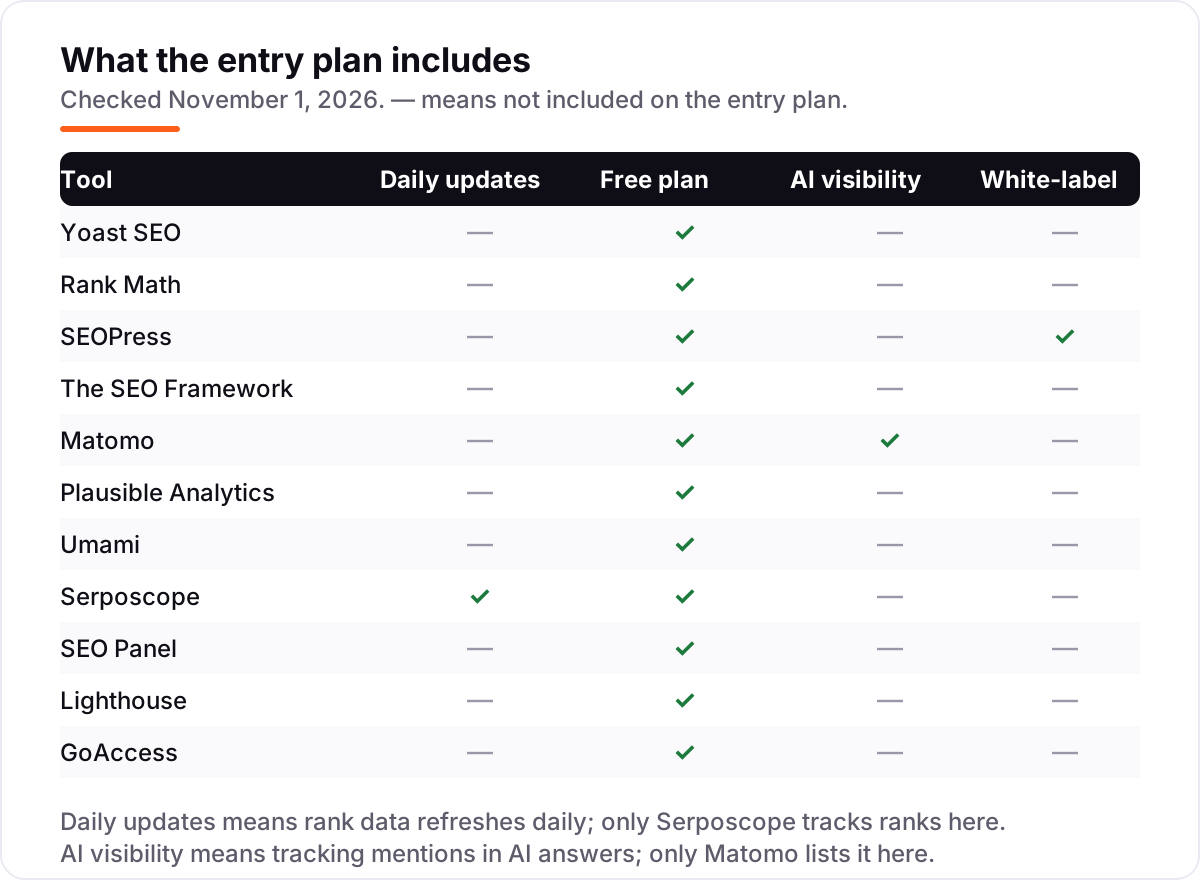
- Check what the free tier leaves out. Rank tracking, funnels, replays and white-label reports are the features most often held back — confirm they are in the tier you will use.
- Try it on a staging site first. Every tool here is free to install or trial. Run your real site through it for a week and compare the numbers against Search Console before committing.
Mistakes to avoid with the best open source seo software
- Calling a tool open source when it is only free. A free closed tool can still lock your data in; an open-source tool you host cannot. Check the licence, not the price tag.
- Self-hosting and then never updating. An unpatched Matomo, Umami or SEO Panel install is a security risk. If you will not update it, pay for the hosted version.
- Paying per site when you run many sites. Yoast Premium at $118.80 per site is $594 a year for five sites; Rank Math PRO and SEOPress unlimited cover the same five for far less.
- Expecting a backlink index. No open-source tool in this list has one. If backlinks are your daily work, budget for a paid suite alongside these tools.
- Judging a page by one Lighthouse run. Scores are lab data and vary between runs. Run it three times, and read our technical SEO audit checklist before treating a single score as a verdict.
How we chose the best open source seo software
We checked each vendor's own pricing page on November 1, 2026 and recorded the starting price exactly as shown, including the annual-billing figure where the page lists one. Three prices need a note. Matomo shows different currencies depending on visitor location, so we quote the euro figure published on Matomo's own site: Cloud Business €22 a month for 50,000 hits. Umami's pricing page renders its dollar figures dynamically, so its $20 a month Pro figure is the one published on that page and confirmed by October 2026 checks of it. Plausible's $9 a month Starter and Yoast's $118.80 a year Premium are the figures published on their pricing pages, confirmed by multiple independent October 2026 checks of those pages. G2 rate-limited every review page we tried on November 1, so this list carries no ratings rather than unverified ones. We ranked the tools by fit for the most common buyer — a WordPress site owner or a small team that wants to own its data — not by brand size. No vendor paid for a place in this list, and none of the links here are affiliate links.
What to do next with the best open source seo software
Start with the decision path above: check your stack, decide hosted or self-hosted, and count your sites. Then install the free version of your top pick and run your real site through it for a week. If the numbers match Search Console and the reports make sense, you have your tool — and if the gaps point to deeper technical work, our SEO audit service can read the same data for you. If you'd rather have this set up and read for you, request a free SEO + AI visibility audit and get a ranked fix list in 2 business days.
Rather not run the tools yourself?
Tools show you the data. SerpAstra turns it into higher rankings, more map-pack calls and citations in AI answers.
Get a free SEO + AI visibility audit→Sources we checked (12)
- Yoast SEO Premium pricing — yoast.com (checked November 1, 2026)
- Rank Math pricing — rankmath.com/pricing (checked November 1, 2026)
- SEOPress pricing — seopress.org/pricing (checked November 1, 2026)
- The SEO Framework pricing — theseoframework.com/pricing (checked November 1, 2026)
- Matomo pricing — matomo.org (checked November 1, 2026)
- Plausible pricing — plausible.io/pricing (checked November 1, 2026)
- Umami pricing — umami.is/pricing (checked November 1, 2026)
- Serposcope — serposcope.serphacker.com (checked November 1, 2026)
- SEO Panel — seopanel.org (checked November 1, 2026)
- Lighthouse — developers.google.com (checked November 1, 2026)
- GoAccess — goaccess.io (checked November 1, 2026)
- Umami GitHub stars — supermonitoring.com (checked November 1, 2026)
Shamim
Founder of SerpAstra
A full-stack SEO and digital marketer who spends most days on Local SEO for dental practices, AI search visibility and lead generation.
Frequently asked questions
What is the best open source seo software in 2026?
Yoast SEO is the best pick for most WordPress sites: a free core plugin everyone knows, with Premium at $118.80/year for one site. Rank Math gives the deepest free toolkit, and Matomo is the best open-source analytics replacement. The right pick depends on your stack — a WordPress plugin only helps WordPress sites, while analytics and crawlers work anywhere.
Is open source seo software really free?
Most of it is. Seven tools in this list cost nothing at all, including Serposcope, SEO Panel, Lighthouse and GoAccess. The other four have a free core or a free self-hosted edition, with paid hosted tiers or premium plugins. Free never means no cost, though: self-hosted tools need a server, updates and backups, which take time or money.
What is the difference between open source and free seo software?
Open source means the code is public and you can inspect, modify and host it yourself — Matomo, Umami and Serposcope are examples. Free software may be closed-source and hosted by the vendor, with limits you cannot remove. Open source gives you control and no lock-in; free closed tools give you convenience and a vendor who maintains the servers.
Can open source seo software replace Semrush or Ahrefs?
Partly. Matomo replaces Google Analytics, Serposcope tracks ranks, and the WordPress plugins cover on-page SEO. What no open-source tool in this list replaces is the big backlink index or the keyword database that Semrush and Ahrefs sell. If backlink research is your daily work, keep a paid suite; if it is occasional, the free tools cover the rest.
Which open source seo tool is best for WordPress?
Yoast SEO, for its guidance and the ecosystem around it. Rank Math is the better pick if you want the most free features, including rank tracking, and SEOPress is the cheapest paid upgrade at $49/year. The SEO Framework suits owners who want the lightest, ad-free plugin. All four are free to install, so try two on a staging site before choosing.
Do open source seo tools track rankings in AI search?
Almost none of them do. Serposcope tracks Google ranks only, and Matomo is the only tool here that lists AI visibility features. If you need to know how your brand shows up in ChatGPT, Perplexity or Google AI Overviews, you need a dedicated AI visibility tool — our guide to getting cited in ChatGPT explains what the AI engines actually quote.
Free SEO and AI visibility audit
Find out what is holding your rankings back
Send us your site. Within 2 business days you get a written audit, an AI visibility check and a short fix list ranked by impact. Free, with no contract attached.
Request my free audit→Related guides
 AI SearchBest AI SEO tools in 2026: honest picks by jobBest AI SEO tools in 2026, picked by job: Semrush and Ahrefs for research, Surfer and Clearscope for content, Otterly for AI tracking, with 2026 prices.Read guide →
 TechnicalTechnical SEO audit checklist: the 25 checks that matterRun a technical SEO audit that finds real problems: crawl, indexation, speed, mobile and structured data — 25 checks in priority order for business sites.Read guide →
 SEO & AI Search11 Best Free SEO Keyword Research Tools in 2026, Compared11 best free SEO keyword research tools compared with real prices and free limits — Google Keyword Planner, Ahrefs, Semrush, Moz and more, sorted by need.Read guide →