
9 Best Photo Editing Software for Real Estate in 2026, Compared
Compare the 9 best photo editing software for real estate on price, batch editing, sky swaps and AI retouching, with every price checked November 8, 2026.
 Shamim Mia, Founder, SerpAstraLast verified November 8, 202614 min read
We compare pricing pages, documentation and public reviews. We never accept payment for rankings.

Key takeaways
- Adobe Lightroom is the best fit for most real estate photographers at $11.99/month; Adobe Photoshop follows at $22.99/month for pixel-level retouching, and Canva Pro at $18/month for turning photos into flyers and social posts.
- Affinity is now completely free — the full professional editor at $0 — and Luminar Neo, DxO PhotoLab and ON1 Photo RAW are one-time purchases with no monthly bill.
- The single most important buying factor is how you pay: a subscription, a one-time license or a per-photo service decides what a year of editing actually costs, not the headline price.
- Batch editing matters more than any single filter: a listing has 25 or more photos, and the tool that keeps them consistent in minutes wins the job.
On this page
Quick comparison
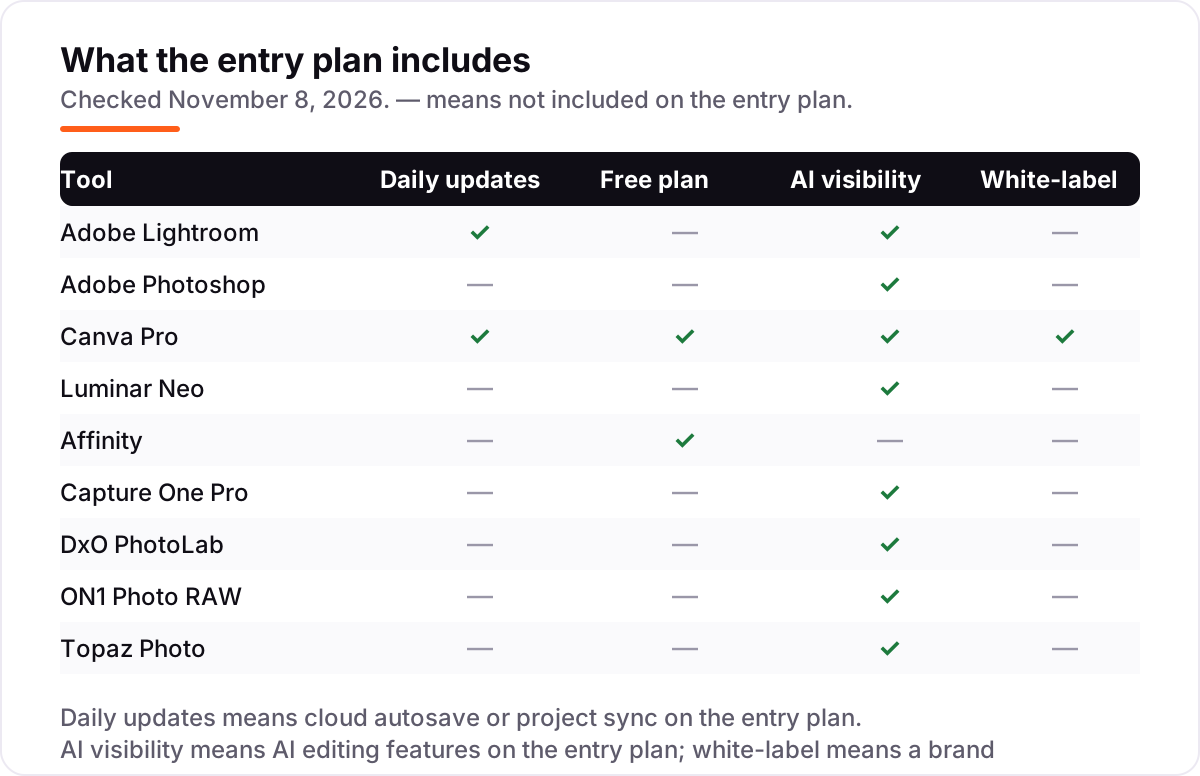
| Tool | Best for | Starting price | Free plan |
|---|---|---|---|
| Adobe Lightroom | Real estate photographers who shoot whole listings and need batch edits that stay consistent from room to room | $11.99/mo | No (7-day trial) |
| Adobe Photoshop | Agents and photographers who need pixel-level retouching: object removal, window views and twilight conversions | $22.99/mo | No (7-day trial) |
| Canva Pro | Agents who turn listing photos into flyers, social posts and just-listed graphics the same day | $18/mo | Yes (free plan) |
| Luminar Neo | Photographers who want one-click sky swaps and twilight looks without a monthly bill | $99 one-time | No (14-day trial) |
| Affinity | Agents and photographers who want professional retouching at $0 and never want a subscription | Free | Yes (free) |
| Capture One Pro | Photographers who shoot tethered on site and need the most accurate color straight out of camera | $26.25/mo | No (30-day trial) |
| DxO PhotoLab | Photographers shooting dim interiors at high ISO who need the cleanest files before anything else | $159.99 one-time | No (30-day trial) |
| ON1 Photo RAW | Photographers who want one app for organizing, editing and effects with no subscription at all | $99.99 one-time | No (30-day trial) |
| Topaz Photo | Photographers rescuing soft, noisy or small images from older shoots and phone cameras | $25/mo | No (free trial) |
Make one of these tools?
We re-check this list every quarter. Send a correction, request a review, or ask about a clearly labeled sponsored spot.
Request a listingThe best photo editing software for real estate

Adobe Lightroom
Best for: Real estate photographers who shoot whole listings and need batch edits that stay consistent from room to room
Adobe Lightroom is the workhorse of real estate photography: a listing is never one photo, it is 25 or more, and Lightroom edits the set. Apply a preset to the first room, sync it across the rest, then fix the odd exposure. The Lightroom plan costs $11.99 a month billed annually, or $119.88 a year prepaid, and includes Lightroom on desktop, mobile and web, Lightroom Classic and 1TB of storage.
The AI tools do the repetitive work. AI masking picks out skies, windows and interiors with no hand-drawn selections, Generative Remove erases bins and cars, and AI Denoise cleans dim interiors. The catch is the subscription and the storage cap: 1TB of RAW brackets disappears fast in a busy month. Buy Lightroom when you shoot whole listings weekly and need them consistent; add Photoshop when hero shots need pixel-level work.
What we like
- Batch editing with presets and sync keeps every room in a listing matched in minutes
- AI masking selects skies, windows and interiors automatically, and Generative Remove erases clutter
- Non-destructive edits with a catalog, so the original RAW files are never touched
- Lightroom Classic is included, which is the desktop catalog most working photographers already use
Watch out for
- Subscription only — stop paying and the app stops working, with no perpetual license to fall back on
- Cloud storage caps bite fast: 1TB fills quickly with RAW brackets from a busy week of shoots
- Lightroom Classic's catalog workflow takes real setup before batch editing feels fast

Adobe Photoshop
Best for: Agents and photographers who need pixel-level retouching: object removal, window views and twilight conversions
Adobe Photoshop is the tool for the shots that make the listing, the hero exterior and the living room that sells the showing. Generative Fill rebuilds a blown-out window view, removes a parked car or extends a sky from a short prompt, and layers and masks give full control when the automatic tools guess wrong. The single app costs $22.99 a month billed annually, or $34.49 a month billed monthly.
The pricing quirk matters. The Photography plan with 1TB costs $19.99 a month and includes Photoshop plus Lightroom and Lightroom Classic, which is $3 a month less than Photoshop alone, so almost nobody should buy it alone. The annual contract also carries an early-termination fee of half the remaining months. Buy Photoshop when hero shots need work Lightroom cannot do, and buy it inside the Photography plan.
What we like
- Generative Fill and Remove rebuild window views, skies and missing corners from a text prompt
- Layers, masks and frequency separation give full control over every pixel of a hero shot
- The largest plugin ecosystem here, including real estate presets, sky packs and virtual staging tools
- Runs as a Lightroom plugin, so the batch workflow and the retouching stay in one pipeline
Watch out for
- Costs more than the Photography plan while delivering less: $22.99 a month against $19.99 for Photoshop plus Lightroom and 1TB
- The annual contract carries an early-termination fee of 50% of the remaining months
- Steep learning curve — the full toolset takes weeks to learn, not an afternoon

Canva Pro
Best for: Agents who turn listing photos into flyers, social posts and just-listed graphics the same day
Canva Pro is not a photo editor, and that is exactly why agents use it. The listing photos arrive already edited, and Canva turns them into the marketing that follows: just-listed flyers, open-house signs, Instagram carousels and story graphics. Pro costs $18 a month billed monthly, or $144 a year billed annually, and the background remover and Magic Edit clean up small photo flaws without opening another app.
The Brand Kit is the feature that pays for itself, since every flyer stays on the brokerage colors, fonts and logo. Magic Resize turns one design into every social size in a click. The limits are real, though. There is no RAW processing and no batch color correction, so Canva sits after the photo editor, not instead of it. Buy it when the agent, not a photographer, does the marketing.
What we like
- Background remover and Magic Edit clean up listing photos without opening a photo editor
- Magic Resize turns one listing graphic into every social size in a click
- Brand Kit keeps every flyer on the brokerage colors, fonts and logo
- Thousands of real estate flyer and social templates, so a just-listed post takes minutes
Watch out for
- A design platform first: no RAW processing, no batch color correction and no layered retouching
- Background remover and Magic Edit sit behind Pro — the free plan cannot touch up photos
- Export quality and print control are weaker than a dedicated photo editor

Luminar Neo
Best for: Photographers who want one-click sky swaps and twilight looks without a monthly bill
Luminar Neo earns its place on real estate work with two one-click tools. Sky AI swaps a washed-out sky for blue with clouds, and Twilight Enhancer AI turns a flat midday exterior into a dusk hero shot, the two looks buyers click on first. The Desktop Only license costs $99 once, with All Platforms at $139 and Max at $159, and there is no monthly bill.
The catch sits in the fine print. The generative tools, GenErase, GenSwap and GenExpand, are included for only one year from purchase, then need the Luminar Prime subscription to keep working. The app is also heavy on older machines, and there is no catalog to match Lightroom for managing a large listing archive. Buy Luminar Neo when twilight and sky looks are the job and you would rather pay once than rent.
What we like
- Sky AI and Twilight Enhancer AI turn a flat midday exterior into a dusk hero shot in one click
- Relight AI and Atmosphere AI fix dim interiors without manual masking or layers
- One-time perpetual license — pay once and keep the app, with no subscription to maintain
- Preset and extension marketplace covers real estate looks, skies and LUTs
Watch out for
- The generative tools (GenErase, GenSwap, GenExpand) are included for only one year, then need Luminar Prime
- Heavy on system resources — it lags on older machines with stacked AI effects on high-resolution RAW files
- No catalog or library depth to match Lightroom, so large listing archives are harder to manage

Affinity
Best for: Agents and photographers who want professional retouching at $0 and never want a subscription
Affinity is the biggest pricing story in photo editing this year. Canva bought the maker, Serif, then merged Affinity Photo, Designer and Publisher into a single app called Affinity in October 2025 and made it completely free, forever, with no watermark and no stripped-back version. You sign in with a free Canva account and get the whole professional toolkit, including layers, masks, frequency separation and 32-bit HDR editing.
That means a real retouching tool at $0: straighten a crooked interior, remove a bin, balance a bright window against a dark room. The trade-offs are the missing pieces. The AI tools need a paid Canva plan, there is no cloud sync or catalog, and the community is smaller than Adobe's. Buy, or rather download, Affinity when the budget is $0 and the work is retouching, not batch editing.
What we like
- Completely free since October 2025: the full professional editor, no watermark, no feature gate
- Layers, masks, frequency separation and 32-bit HDR cover serious retouching work
- Fast on modest hardware, with live filters that preview without rendering delays
- Opens PSD files, so work can move between Affinity and Photoshop without starting over
Watch out for
- The AI tools (Generative Fill, background removal) need a paid Canva plan — the free app has none
- Smaller community and fewer real estate presets and tutorials than the Adobe apps
- No cloud sync or catalog: files live on the computer, and the iPad version is still to come

Capture One Pro
Best for: Photographers who shoot tethered on site and need the most accurate color straight out of camera
Capture One Pro is the choice when color has to be right on the day, not fixed later. Its camera profiles are built per body, so wood floors, white walls and skin tones render true, and tethered shooting with live view lets the agent see finished-looking shots while the photographer is still in the room. Pro costs $26.25 a month billed annually, or $40 a month billed monthly.
The price has moved. Older roundups quote $18 a month, but Capture One raised prices in mid-2026 and again after that, and the current figure is $26.25 on the annual plan. Sessions are the other reason to buy: each listing's files, selects and exports live in one folder. Buy Capture One Pro when you shoot tethered and color accuracy is the selling point; buy Lightroom when batch speed and catalog matter more.
What we like
- Color accuracy reviewers rate best in class, with camera profiles built per body
- Tethered shooting with live view, so the agent sees finished-looking shots on site
- Sessions keep each listing's files, selects and exports in one folder
- AI masking, AI Crop and Match Look speed up the repetitive parts of a listing edit
Watch out for
- The priciest subscription here, and the price has risen twice since 2025 — older $18/month figures are stale
- Steep learning curve: the interface and session workflow take real practice before a shoot day
- No cloud sync or mobile editing on the Pro plan — those need the All in One tier

DxO PhotoLab
Best for: Photographers shooting dim interiors at high ISO who need the cleanest files before anything else
DxO PhotoLab is the specialist for the hardest real estate problem: dim interiors shot at high ISO, where noise eats detail and wide-angle lenses bend the walls. DeepPRIME noise reduction recovers clean detail from those files better than anything else in this list, and the optical modules correct distortion, vignetting and soft corners for the exact camera-and-lens pair. PhotoLab 10 Essential costs $159.99 once, and Elite is $249.99.
It is a focused tool, not a suite. The library is thin next to Lightroom, there is no cloud sync or mobile app, and the one-time license covers one version only, so the next major release is a separate paid upgrade. Buy PhotoLab when image quality is the bottleneck and the rooms are dark; pair it with Lightroom when the archive and the batch workflow matter too.
What we like
- DeepPRIME noise reduction recovers clean detail from high-ISO interior shots better than anything else here
- Optical modules correct distortion, vignetting and soft corners per camera-and-lens pair
- AI masks and control points make local adjustments without layers
- No subscription: buy PhotoLab 10 once and keep using it
Watch out for
- One-time license covers one version only — the next major release is a separate paid upgrade
- Thin library and catalog tools next to Lightroom, so it suits editing more than organizing
- No cloud sync, mobile app or collaboration features at any price

ON1 Photo RAW
Best for: Photographers who want one app for organizing, editing and effects with no subscription at all
ON1 Photo RAW is the all-in-one answer for photographers who want a single app and no subscription. Photo RAW 2027 organizes the shoot, edits the RAW files, and adds layers, effects and retouching with no second tool needed. NoNoise AI cleans up dim interiors and Sky Swap AI fixes flat exteriors in the same pass. The standard edition costs $99.99 once, and MAX is $169.99 once or $89.99 a year.
Check the tier split before buying. The best extras, Restore AI, the AI Culling Assistant and the Photoshop and Lightroom plugins, wait for MAX, and the preset community is smaller than Lightroom's, so real estate looks take more setup. Buy ON1 Photo RAW when one app and one payment cover the whole job; buy the MAX edition when culling and plugins are part of the daily workflow.
What we like
- One app covers organizing, RAW editing, layers, effects and retouching — no second tool needed
- NoNoise AI and Sky Swap AI handle the two most common listing fixes in one pass
- One-time purchase with no subscription, and the license installs on 2 computers
- Brilliance AI and Portrait AI give one-slider starting points for whole rooms and exteriors
Watch out for
- The best extras (Restore AI, AI Culling Assistant, Photoshop and Lightroom plugins) wait for MAX at $169.99
- Smaller preset and tutorial community than Lightroom, so real estate looks take more setup
- Interface packs a lot in and feels crowded until the layout is learned

Topaz Photo
Best for: Photographers rescuing soft, noisy or small images from older shoots and phone cameras
Topaz Photo does one job better than anything else in this list: rescuing images. AI denoise, sharpening and upscaling recover detail from soft, noisy or small files, and Super Focus saves slightly missed shots that would otherwise be lost. For real estate that means older listings, phone-camera shots and tight crops become usable again. It costs $25 a month on an annual commitment, or $199 a year, with month-to-month at $39.
Two things changed recently. In October 2025 Topaz switched from a $199 one-time license to subscription only, so the old buy-once figure is stale, and the app needs a recent GPU with at least 4GB of VRAM. It is also not a full editor, only an enhancer, so it pairs with Lightroom or Luminar. Buy Topaz Photo when rescue work is a weekly job, not a one-off.
What we like
- AI denoise, sharpen and upscaling recover detail other editors cannot reach
- Super Focus rescues slightly soft shots that would otherwise be deleted
- Works standalone or as a plugin inside Lightroom and Photoshop
- Local processing keeps listing photos on the computer, not uploaded to a cloud
Watch out for
- Not a full editor — it only enhances, so it pairs with Lightroom or Luminar rather than replacing them
- Subscription only since October 2025: the old $199 one-time license is no longer sold
- Needs a recent GPU with at least 4GB of VRAM, and processing large batches is slow on older machines
The best photo editing software for real estate does one job well: it takes a full listing of 25 or more photos and makes them consistent, bright and honest, without turning the rooms into something the buyer will not find on the showing. We ranked the nine tools below by fit for the most common buyer — a real estate photographer or agent editing their own listings — starting with the batch editors and ending with the specialist rescue tool, and every price was checked on November 8, 2026.
How to choose the best photo editing software for real estate
- Count the photos per listing first. A 25-photo listing needs batch editing, presets and sync; a single hero shot needs layers and retouching. The tool that matches your volume is the right one.
- Decide how you want to pay. Subscriptions keep improving and sync to the cloud; one-time licenses cost $99 to $160 once and never bill again. The payment model decides the yearly cost more than the feature list.
- Check the RAW workflow. If you shoot RAW brackets for HDR interiors, the editor must handle RAW natively and keep exposures consistent across the bracket set.
- Look for sky and twilight tools. The exterior hero shot sells the click, and one-click sky swaps and twilight conversion are the fastest way to get it.
- Think about who else touches the photos. If an agent, a stager and a photographer all work on one listing, cloud sync and shared presets matter more than any single filter.
Photo editing is one system in your stack, not the whole stack. If the listings also need to be found online, our local SEO service covers the visibility side. And before you publish a new listing page, run its title through the free SERP snippet preview tool — it shows exactly how the title and description will look in Google.
Whatever you shortlist, try it with a real listing before you pay. The free plans and trials in this list are long enough to run one genuine shoot through — your rooms, your light, your camera — and that shoot tells you more than any review can. Check two things in the trial: that a preset synced across 25 photos looks consistent, and that the export quality holds up at full screen. Every tool here offers a free plan or a trial, so there is no reason to buy before a real listing has passed through it.
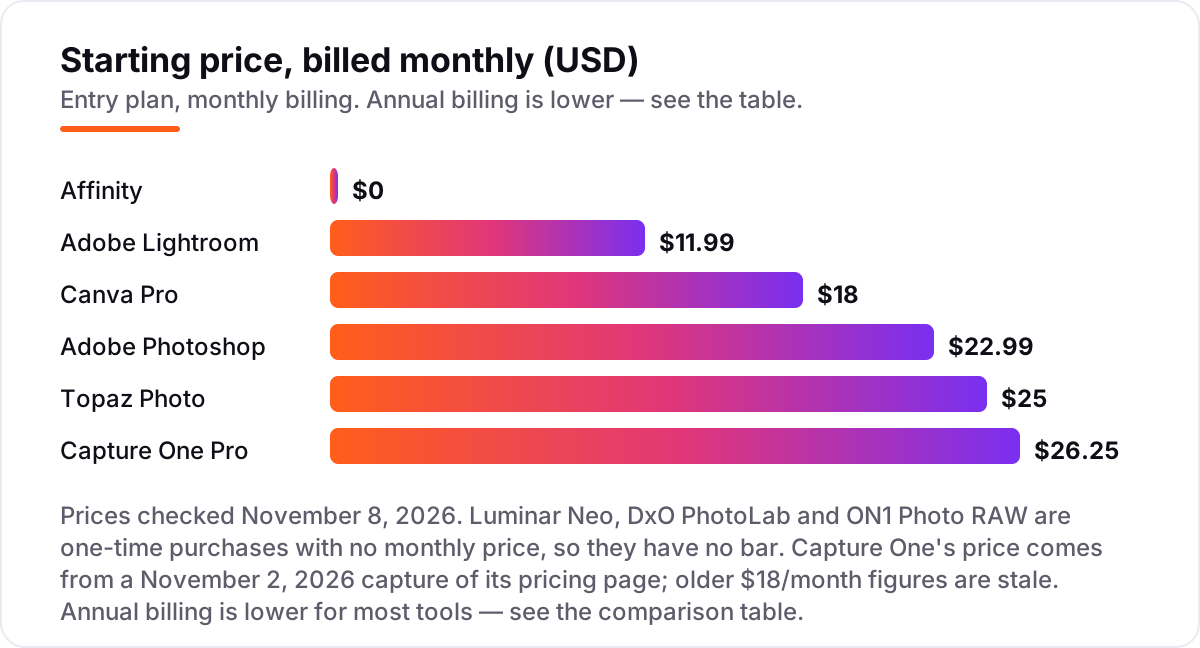
Photo editing software for real estate pricing: what you will actually pay
Take a photographer who edits four listings a month, about 25 photos each. On list prices, the subscription costs $11.99 a month on Lightroom, $18 on Canva Pro, $22.99 on Photoshop alone, $25 on Topaz Photo and $26.25 on Capture One Pro. Two of those numbers need adjusting before they are real: Photoshop alone at $22.99 is the wrong way to buy it, since the Photography plan with 1TB costs $19.99 a month and includes Photoshop plus Lightroom and Lightroom Classic, and Topaz Photo at $25 a month on an annual commitment is $199 a year prepaid.
Over a year, that is $143.88 on Lightroom billed annually, $144 on Canva Pro billed annually, $199 on Topaz Photo prepaid, $239.88 on the Photography plan with both Lightroom and Photoshop, and $315 on Capture One Pro billed annually. The one-time tools sit outside that math: Affinity is $0, ON1 Photo RAW is $99.99 once, Luminar Neo is $99 once and DxO PhotoLab is $159.99 once.
So a working pro stack, Lightroom plus Photoshop on the Photography plan at $239.88 a year with Topaz Photo at $199, costs $438.88 in the first year. A budget stack, Affinity at $0 plus Luminar Neo at $99 once, costs $99 in the first year and $0 after that except the Luminar Prime renewal for the generative tools. The same four listings a month cost $99 at the cheap end and $438.88 at the dear end in year one — a $339.88 gap that comes entirely from the payment model, not from features. If you run a real estate team rather than shooting alone, the visibility tools differ too — see our guide to the best social media platforms for real estate agents.
Annual billing cuts the bill on most tools here: Canva Pro drops from $216 to $144 a year, the Photography plan is $239.88 against $275.88 for Photoshop alone, and Topaz Photo drops from $300 to $199. Luminar Neo, DxO PhotoLab and ON1 Photo RAW have no annual bill at all, since the license is paid once. One more cost to check before you commit: a second editor is a second subscription on every tool in this list except Affinity, which is free, and ON1 Photo RAW, which installs on two computers — so a two-person team pays double whatever the chart shows.
Know the difference: editing software vs a photo editing service
The confusion in this category is between a tool and a service. Photo editing software is something you run yourself: you open the photos, apply the edits and export the results. A photo editing service takes your RAW files and sends finished photos back, usually priced per photo, and the best-known real estate services charge around $1 to $2 per photo for HDR blending, sky replacement and virtual staging. All nine tools in this list are software you run yourself, which is what the phrase "photo editing software" means here.
There is a second, quieter confusion: virtual staging is not photo editing. An editor can swap a sky, brighten a room or remove a bin, but it cannot furnish an empty room with a sofa and a rug. Virtual staging is a separate service, often sold per photo on top of editing, and it belongs in a different list. If a tool claims to stage rooms, check whether it places real furniture or only changes the wall color.
A third distinction worth knowing is batch editing versus retouching. Batch editing changes 25 photos at once: the same preset, the same white balance, the same exposure correction. Retouching changes one photo deeply: rebuilding a window view, removing an object, converting a daytime exterior to twilight. Lightroom, Capture One and ON1 Photo RAW are batch editors first; Photoshop, Affinity and Topaz Photo are retouching and rescue tools. Most working photographers use one of each.
Quick comparison: tool type by need
| Buyer | Best pick | Why |
|---|---|---|
| Most real estate photographers | Adobe Lightroom | Batch editing and presets across a full listing, from $11.99/month |
| Hero shots that need retouching | Adobe Photoshop | Generative Fill and layers for window views and object removal, $22.99/month alone or $19.99/month with Lightroom |
| Agents doing their own marketing | Canva Pro | Flyers and social posts from listing photos, $18/month |
| One-click sky and twilight looks | Luminar Neo | Sky AI and Twilight Enhancer AI in one click, $99 one-time |
| Best value with no budget at all | Affinity | The full professional editor free, with no watermark |
| Color accuracy on the shoot day | Capture One Pro | Tethered shooting and true color, $26.25/month |
| Dark interiors at high ISO | DxO PhotoLab | DeepPRIME noise reduction, $159.99 one-time |
Mistakes to avoid
- Budgeting on the promo price. The 10% discounts and first-year offers in this list end, and the list price is what you pay in year two, so compare tools on that number.
- Buying Photoshop alone. The single app costs $22.99 a month, while the Photography plan with 1TB costs $19.99 and adds Lightroom and Lightroom Classic. Buying the single app is paying more for less.
- Buying on the one-time price, then finding the AI tools expire. Luminar Neo's generative tools are included for only one year, then need Luminar Prime. If sky swaps are the job, count that renewal in the price from day one.
- Ignoring the storage cap. Lightroom's 1TB plan fills fast with RAW brackets, and extra storage costs $9.99 a month per terabyte. Price the storage before you commit to a cloud plan.
- Editing photos that mislead the buyer. Brightening a room is fine; removing a power line, a stain or a neighboring building is not. Keep edits honest, or the showing undoes the listing.
How we chose
We checked each vendor's own pricing page on November 8, 2026 and recorded the starting price exactly as shown, including the annual-billing figure where the page lists one, and we ranked the tools by fit for the most common buyer — a real estate photographer or agent editing their own listings — not by brand size. Two prices need a note. Capture One's page renders its prices in JavaScript, so the live text read returned no figures; its $26.25 a month comes from a November 2, 2026 capture of the vendor's own pricing page, and the older $18 a month figure in other roundups is stale after two price rises. Luminar Neo's $99 one-time price is corroborated by several October 2026 reads of Skylum's own pricing page. ON1 Photo RAW carries no review rating because we could not find a G2 page for it, and we would rather show no rating than a stale or estimated one. No vendor paid for a place in this list, and none of the links here are affiliate links.
What to do next
Start with the free plan or trial of your top pick and run one real listing through it. Check that a preset synced across 25 photos looks consistent and that the exports hold up at full screen before you commit to a year. If the photos are sorted but new clients are not finding you, our local SEO service handles the visibility side — or compare providers in our guide to accounting software for real estate agents. Once your tools are in place, find out what's holding your rankings back.
Your stack only works if people find you
SerpAstra fixes what keeps your site off page one and makes it easy for AI assistants to recommend.
Get a free audit→Sources we checked (17)
- Adobe Lightroom pricing — adobe.com/creativecloud/plans.html (checked November 8, 2026)
- Adobe Photoshop pricing — adobe.com/creativecloud/plans.html (checked November 8, 2026)
- Canva Pro pricing — canva.com/pricing (checked November 8, 2026)
- Luminar Neo pricing — skylum.com/luminar/pricing (checked November 8, 2026)
- Affinity pricing — affinity.studio (checked November 8, 2026)
- Capture One Pro pricing — captureone.com/en/pricing/capture-one-pro (checked November 8, 2026)
- DxO PhotoLab pricing — dxo.com/dxo-photolab (checked November 8, 2026)
- ON1 Photo RAW pricing — on1.com/products/photo-raw (checked November 8, 2026)
- Topaz Photo pricing — topazlabs.com/pricing (checked November 8, 2026)
- Adobe Photoshop Lightroom reviews — g2.com/products/adobe-photoshop-lightroom/reviews (checked November 8, 2026)
- Adobe Photoshop reviews — g2.com/products/adobe-photoshop/reviews (checked November 8, 2026)
- Canva reviews — g2.com/products/canva/reviews (checked November 8, 2026)
- Luminar Neo reviews — g2.com/products/luminar-neo/reviews (checked November 8, 2026)
- Affinity Photo reviews — g2.com/products/affinity-photo/reviews (checked November 8, 2026)
- Capture One Pro reviews — g2.com/products/capture-one-pro/reviews (checked November 8, 2026)
- DxO PhotoLab reviews — g2.com/products/photolab/reviews (checked November 8, 2026)
- Topaz Photo AI reviews — g2.com/products/topaz-photo-ai/reviews (checked November 8, 2026)
Shamim
Founder of SerpAstra
A full-stack SEO and digital marketer who spends most days on Local SEO for dental practices, AI search visibility and lead generation.
Frequently asked questions
What is the best photo editing software for real estate?
Adobe Lightroom is the best fit for most real estate photographers: batch editing, presets and a catalog from $11.99/month. Photoshop is the better pick when hero shots need pixel-level retouching, and Luminar Neo is the best one-click option for sky swaps and twilight looks at $99 once.
How much does photo editing software for real estate cost?
Entry prices run from $0 to $26.25 a month. Affinity is free, Luminar Neo and ON1 Photo RAW cost about $99 once, and the subscriptions run $11.99 to $26.25 a month. A working stack of Lightroom and Photoshop together costs $19.99 a month on the Photography plan.
Is there free photo editing software for real estate?
Yes. Affinity is completely free since October 2025 — the full professional editor, with no watermark and no feature gate. Canva also has a free plan for basic touch-ups and flyers. The free tools cover retouching and marketing, but batch RAW editing still needs a paid app like Lightroom.
Do I need Photoshop or Lightroom for real estate photos?
Lightroom first, Photoshop second. Lightroom handles the whole listing: batch color, exposure and presets across 25 or more photos. Photoshop is for the few hero shots that need object removal, window-view rebuilds or twilight conversion. Most photographers buy both together on the $19.99/month Photography plan.
What is the best software for virtual staging and sky replacement?
Luminar Neo is the fastest for sky swaps and twilight looks at $99 once, with Sky AI and Twilight Enhancer AI doing the work in one click. Photoshop's Generative Fill handles harder jobs like object removal and window rebuilds. Full virtual staging with furniture is a separate service, not an editor feature.
Should I buy a subscription or a one-time license?
Buy a subscription when you edit every week and want the newest AI tools and cloud sync — Lightroom and Photoshop keep improving. Buy a one-time license when the budget is fixed and the feature set is enough: Luminar Neo, DxO PhotoLab and ON1 Photo RAW cost $99 to $160 once and keep working with no monthly bill.
Can I edit real estate photos on my phone?
Yes, for light work. Lightroom mobile syncs edits from the desktop catalog, Canva's app handles flyers and quick touch-ups, and Affinity's iPad version is still to come. Phone editing suits social posts and quick fixes; batch RAW editing for a full listing still belongs on a desktop.
Free SEO and AI visibility audit
Find out what is holding your rankings back
Send us your site. Within 2 business days you get a written audit, an AI visibility check and a short fix list ranked by impact. Free, with no contract attached.
Request my free audit→Related guides
 Local Business & Vertical Software9 Best Accounting Software for Real Estate Agents in 2026, ComparedCompare the 9 best accounting software for real estate agents on price, commission tracking and Schedule E reporting, with prices checked November 7, 2026.Read guide →
 Email, SMS & Social Media10 Best Social Media Platforms for Real Estate Agents in 2026, ComparedCompare the 10 best social media platforms for real estate agents on audience, formats and cost — every platform free to join, checked Nov 6, 2026.Read guide →
 Local Business & Vertical Software10 Best E-Signature Software for Real Estate in 2026, ComparedCompare the 10 best e-signature software for real estate on price, free plans, forms and broker review, with every price checked November 7, 2026.Read guide →