
10 Best Platforms for SEO for Education in 2026, Compared
The best platform for seo for education, compared: 10 picks with 2026 prices, free plans and SEO controls. WordPress, Finalsite and HubSpot, ranked for schools.
 Shamim Mia, Founder, SerpAstraLast verified November 1, 202612 min read
We compare pricing pages, documentation and public reviews. We never accept payment for rankings.

Key takeaways
- WordPress is the best platform for SEO for education for most schools: free software, the largest plugin ecosystem, and hosted Personal from $4/month billed annually. Finalsite is the education-specific pick, and HubSpot Content Hub is the pick for schools already on HubSpot CRM.
- Free options are real: WordPress software costs nothing, Wix has a free plan, and Webflow and HubSpot both offer free starting tiers — but a custom domain and full SEO control need a paid plan.
- The single most important buying factor is control over the SEO basics: editable titles and meta descriptions, clean URLs, redirects, sitemaps and page speed.
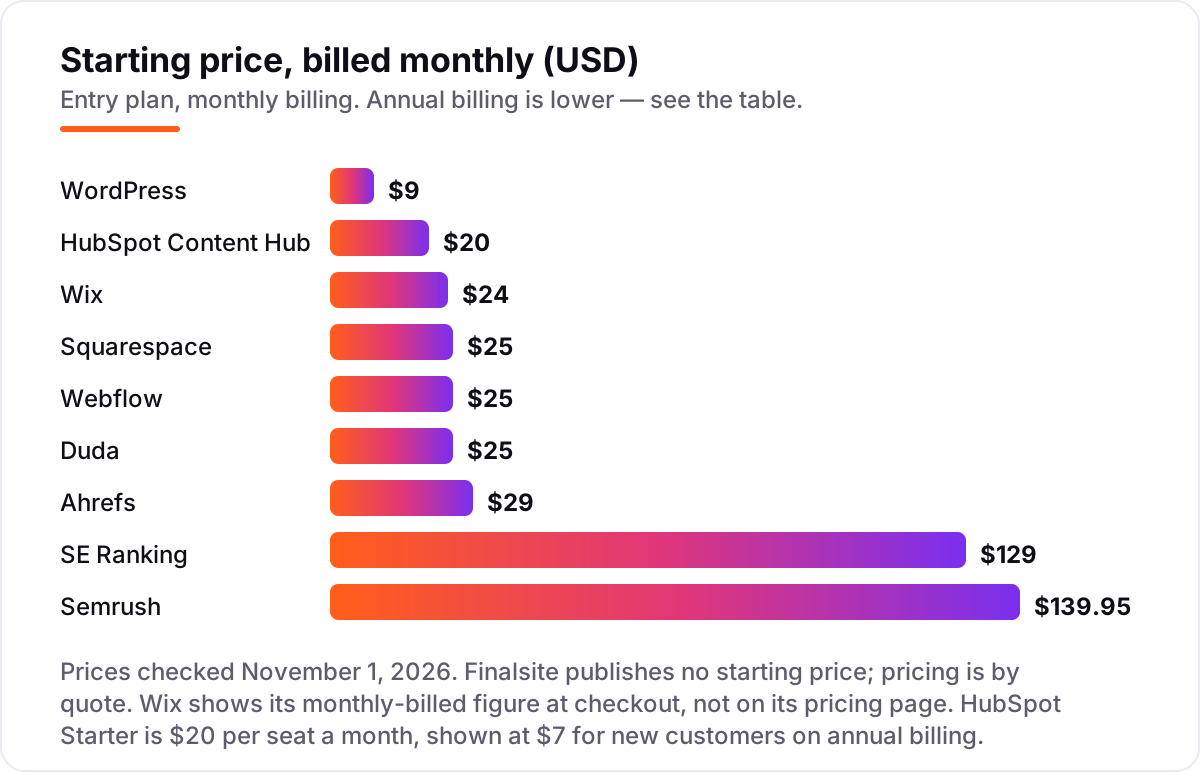
- Watch the billing: annual prices run 20-40% below monthly prices, Wix shows its monthly figure only at checkout, and Finalsite is priced by quote.
- Prices below are the vendor list prices verified on vendor pricing pages on October 31–November 1, 2026. No ratings are shown, because the review pages could not be opened on the day of checking and we never estimate a rating.
On this page
Quick comparison
| Tool | Best for | Starting price | Free plan |
|---|---|---|---|
| WordPress | Schools and universities that want the largest plugin ecosystem and full control over technical SEO | $9/mo | Yes (free plan) |
| Finalsite | K-12 schools and districts that want a CMS built for education, with admissions and communications in one place | Custom quote | No (demo by request) |
| HubSpot Content Hub | Schools and universities already running HubSpot CRM that want admissions, email and the website in one database | $20/mo per seat | Yes (free tools) |
| Squarespace | Small private schools and course creators that want a polished site live fast with no developer | $19/mo (annual) | No (14-day trial) |
| Wix | Small schools and tutoring centres that want the easiest start, including a free plan to try first | $17/mo (annual) | Yes (free plan) |
| Webflow | Design-led university and school marketing teams that want visual control and clean code | $25/mo (annual) | Yes (Starter) |
| Duda | School districts and agencies managing many school sites from one dashboard | $19/mo (annual) | No (14-day trial) |
| SE Ranking | School and university marketing teams tracking up to 2,000 keywords a day who want a full SEO suite | $103.20/mo (annual) | No (14-day trial) |
| Semrush | Universities and large schools that want rank tracking plus keyword research, audits and backlinks in one subscription | $117.33/mo (annual) | Yes (10 keywords) |
| Ahrefs | In-house SEOs at schools and universities already paying for Ahrefs who want tracking bundled with research | $29/mo | Yes (no Rank Tracker) |
Make one of these tools?
We re-check this list every quarter. Send a correction, request a review, or ask about a clearly labeled sponsored spot.
Request a listingThe best platform for SEO for education

WordPress
Best for: Schools and universities that want the largest plugin ecosystem and full control over technical SEO
WordPress is the default answer for education sites. The software is free and open source, and W3Techs puts it on about 40% of all websites as of October 2026. That scale means most SEO problems already have a free plugin solution. Titles, meta descriptions, schema, redirects and sitemaps are all editable, and plugins such as Rank Math or Yoast add the checks and bulk tools the core software leaves out.
The choice is hosted or self-hosted. WordPress.com Personal costs $4 a month billed annually and now allows plugin installs. Self-hosted WordPress costs nothing for the software, but you pay for hosting and you own the updates, backups and security. If you want the widest choice of themes and plugins, nothing else here matches it.
What we like
- Runs about 40% of all websites (W3Techs, October 2026), so themes, plugins and developers are easy to find
- Full technical control: edit titles, meta descriptions, schema, redirects, sitemaps and robots.txt, or add Rank Math or Yoast
- Every paid WordPress.com plan now allows plugin installs, and self-hosted WordPress has no plugin limits at all
Watch out for
- Self-hosted sites need you to manage updates, backups and security, or pay a host to do it
- Plugin quality varies, and a bad plugin can slow the site or break a page

Finalsite
Best for: K-12 schools and districts that want a CMS built for education, with admissions and communications in one place
Finalsite is the only platform in this list built for schools rather than adapted to them. Its Composer CMS ships with more than 30 responsive school templates, and the platform adds the tools a school actually runs: admissions forms, calendars, mass notifications, payments and accessibility checks, with SEO tools built into the same editor. A school does not need a separate plugin for every job.
The price is the honest catch. Finalsite publishes no starting price, so a school must request a quote, and implementation and design are separate services on top of the licence. That puts it well above the hosted builders here. Buy it when the school wants one vendor that understands K-12, not when the budget is the deciding factor.
What we like
- The only education-specific CMS here: Composer, 30+ responsive school templates and school workflows
- Accessibility and SEO tools built in, with forms, calendars, mass notifications and payments in one platform
- Create Once, Publish Everywhere keeps news and calendars consistent across district and school sites
Watch out for
- No published price, so comparing costs means requesting a quote from Finalsite
- Built for K-12 schools, so a university or course business pays for school-specific features it may not use

HubSpot Content Hub
Best for: Schools and universities already running HubSpot CRM that want admissions, email and the website in one database
HubSpot Content Hub is the website layer of a CRM. If a school already runs HubSpot for admissions and marketing, the website, contacts, email and forms share one database, so pages can personalize by lifecycle stage and the team can report on enquiries without stitching tools together. The free tools cover landing pages and an AI assistant, which is enough to try the editor before paying.
The pricing model is the catch. Starter costs $20 per seat a month, so the bill grows with every editor, and Professional jumps to $450 a month billed annually. The design system is also less flexible than Webflow or WordPress, so custom layouts take more work. Buy it when HubSpot is already your CRM; do not buy a CRM to get a CMS.
What we like
- Website, CRM, email and forms share one database, so admissions pages can personalize by lifecycle stage
- Built-in SEO recommendations and content tools, plus Breeze AI assistance on every tier
- Free tools cover landing pages and an AI assistant, so a team can try the editor before paying
Watch out for
- Per-seat billing, so the bill grows with every editor you add
- Professional jumps to $450/month billed annually, and A/B testing and smart content sit on that tier

Squarespace
Best for: Small private schools and course creators that want a polished site live fast with no developer
Squarespace is the pick for a small private school or a course creator that needs a polished site live this week. The templates are the best in this list, the editor is the simplest, and one bill covers hosting, SSL, blogging, analytics and a free custom domain for the first year on annual billing. A school can publish programme pages, news and a blog without touching code or a plugin.
The limits are price and depth. Basic rose to $19 a month billed annually in 2026, up from $16, and the SEO settings are shallower than WordPress or Webflow — titles, descriptions and sitemaps are covered, but advanced control is not. Basic also adds a 2% transaction fee on store sales. Buy Squarespace for speed and polish, not for the deepest SEO control.
What we like
- The easiest platform here to make look good, with the best templates and the simplest editor
- One bill covers hosting, SSL, templates, blogging and analytics, with a free custom domain for the first year on annual billing
- Built-in AI tools help with site setup, and Core adds advanced analytics and code injection
Watch out for
- Prices rose in 2026: Basic is now $19/month billed annually, up from $16
- SEO settings are shallower than WordPress or Webflow, and Basic adds a 2% transaction fee on store sales

Wix
Best for: Small schools and tutoring centres that want the easiest start, including a free plan to try first
Wix is the easiest way for a small school or tutoring centre to get online. The free plan is genuine, the AI builder and drag-and-drop editor get a basic site live in a day, and Light adds a custom domain and removes Wix ads for $17 a month billed annually. Booking tools, forms and events come from the app market, and payments start on Core.
The plan ladder matters more than the headline price. Light cannot take payments, so a school selling courses or tickets needs Core at $29 a month billed annually. Prices also vary by location, and the monthly-billed figure only appears at checkout. Wix is the right pick for a first site on a tight budget, and the wrong pick for a school that needs deep SEO control.
What we like
- A genuine free plan, so a school can build and test the site before paying anything
- AI builder and drag-and-drop editor get a basic site live in a day with no developer
- Built-in booking tools and payments from Core, plus an app market for forms and events
Watch out for
- Light cannot take payments, so selling courses or tickets needs Core at $29/month billed annually
- Prices vary by location, and the monthly-billed figure is shown at checkout, not on the pricing page

Webflow
Best for: Design-led university and school marketing teams that want visual control and clean code
Webflow is the pick for a university or school marketing team that cares how the site looks and how clean the code is. You design on a visual canvas and Webflow writes the HTML and CSS, hosted on its own CDN with SSL included. The built-in SEO controls cover titles, meta descriptions, canonical tags, sitemaps, robots.txt and redirects, and the Premium plan adds a real CMS with 20,000 items, site search and form file upload.
The catch is the plan ladder. Basic costs $15 a month billed annually but has no CMS, so any site with a blog needs Premium at $25 a month billed annually. Workspace seats are separate, and A/B testing sits in the Optimize add-on from $299 a month. Buy Webflow when design quality matters more than the lowest bill.
What we like
- Clean, semantic code and fast hosting with SSL and a CDN included on every site plan
- Built-in SEO controls for titles, meta descriptions, canonical tags, sitemaps, robots.txt and redirects
- Premium plan adds the full CMS with 20,000 items, site search and form file upload
Watch out for
- Basic ($15/month billed annually) has no CMS, so a blog needs Premium at $25/month billed annually
- A/B testing and localization are paid add-ons, and extra full editor seats cost extra on a Workspace plan

Duda
Best for: School districts and agencies managing many school sites from one dashboard
Duda is the only builder here designed around running many sites at once. A district or an agency gets one dashboard, client accounts that only reach their own school sites, and client billing built in. Sites load fast on AWS hosting with unlimited storage and bandwidth, and the pricing is transparent: Basic includes one published site at $19 a month billed annually, and each extra site costs $17 a month.
The maths changes at district scale. Ten extra school sites add $170 a month, so a large network should price the whole roster before committing. White-label branding needs the $149-a-month White Label plan, and the AI SEO Assistant sits on Agency at $52 a month billed annually. Buy Duda when one team runs many school sites; a single school will find a simpler builder cheaper.
What we like
- Built for managing many sites: one dashboard, client accounts scoped to their own school sites, and client billing
- Fast loading on AWS hosting with unlimited storage and bandwidth on every plan
- Transparent per-site pricing: Basic includes 1 published site and extra sites are $17/month each
Watch out for
- Every site beyond the included one costs $17/month, so a district network adds up fast
- White-label platform branding needs the $149/month billed annually White Label plan, and the AI SEO Assistant sits on Agency

SE Ranking
Best for: School and university marketing teams tracking up to 2,000 keywords a day who want a full SEO suite
SE Ranking is the value pick among the SEO suites in this list because the entry Core plan does not feel like an entry plan: 2,000 keywords tracked daily, 10 projects, a 250,000-page site audit allowance and AI visibility tracking across five engines, at 25 prompts a day. For a school or university marketing team, that is the whole SEO workflow in one subscription, and the per-keyword cost is the lowest of any tool here.
The trade-off is polish. The interface takes a few days to learn, and the price climbs with keyword volume, so a team tracking several campuses should price the next tier before committing. If you want the cheapest route to daily tracking at scale, start here; if you need the largest backlink index, look at Semrush or Ahrefs instead.
What we like
- Lowest cost per daily-tracked keyword here — 2,000 keywords a day from $103.20/month billed annually
- Full suite in one plan: rank tracking, site audit, keyword and backlink research, content and local marketing, plus AI visibility on 5 engines
- White-label reporting and guest links for client work, with an Agency Pack add-on from $69/month
Watch out for
- The interface takes a few days to learn, and complex reports need practice before they read cleanly for a client
- Price climbs with keyword volume, so a growing team should price the next tier before committing

Semrush
Best for: Universities and large schools that want rank tracking plus keyword research, audits and backlinks in one subscription
Semrush is the deepest bench in this list. The entry SEO plan tracks 500 keywords daily and pairs Position Tracking with a keyword database Semrush puts at more than 27 billion keywords, plus site audits, backlink analysis and PPC research. If a university team already lives in Semrush for research, the tracker is a natural extension rather than another subscription to manage.
It is also the priciest way in among the suites, and the extras add up: additional users start at $45 a month and white-label reports are paid add-ons. Dedicated AI prompt tracking needs the $99-a-month AI Visibility Toolkit add-on, so budget for it if AI answers matter. Buy Semrush when you need the research depth, not just the positions.
What we like
- 500 keywords tracked daily on the entry SEO plan, with tracking down to ZIP-code level and up to 20 competing domains per campaign
- Bundles rank tracking with a 27-billion-plus keyword database, site audits, backlink analysis and PPC research in one login
- Local listings and review management tools suit schools with several campuses or locations
Watch out for
- Highest entry price among the full suites here, and extra users start at $45/month with white-label reports as paid add-ons
- Dedicated AI prompt tracking needs the $99/month AI Visibility Toolkit add-on; the $139.95 SEO plan does not include it

Ahrefs
Best for: In-house SEOs at schools and universities already paying for Ahrefs who want tracking bundled with research
Ahrefs Rank Tracker is a module inside the full Ahrefs suite, not a standalone product. The $29 Starter plan is the cheapest way into this list, but it only tracks 50 keywords and updates weekly — serious tracking starts at Lite ($129 a month, 750 keywords). What you are really buying is the research behind the positions: the backlink index and the 110-billion-keyword database.
The weekly default is the honest limitation. If you need to see a ranking move the day after a change, you will pay extra for the Project Boost add-on. For a university team already paying for Ahrefs, the tracker is an easy yes; as a first rank tracker on its own, the cheaper dedicated tools give you daily updates for less.
What we like
- Rank Tracker sits on one of the largest backlink indexes and a 110-billion-keyword database, so tracking comes with deep research data
- Tracks positions across 190+ locations on desktop and mobile, with competitor tracking and SERP-feature visibility
- Lite ($129/month) jumps to 750 tracked keywords with 6 months of history, plus API and MCP access
Watch out for
- Rank Tracker updates weekly by default on every plan — daily updates need the paid Project Boost add-on
- No free trial, and metered report credits on Starter and Lite cap how much research you can do each month
This guide ranks the best platform for seo for education by fit for the most common buyer: a school or university marketing team that wants programme pages, admissions pages and news to rank without hiring a developer for every change. The list is organised by what you actually need — education-specific and free options first, then hosted builders, then the picks for districts and CRM teams, then the SEO suites — with real 2026 prices and the catch on each plan.
What the best platform for seo for education actually does
A platform for SEO for education is the software a school or university runs its website on, plus the tools that show whether the pages rank. For SEO, the platform matters because it controls the parts Google reads: the page title, the meta description, the URL, the headings, the structured data, the sitemap and how fast the page loads. A good platform makes all of those editable and fast by default; a bad one hides them behind a developer or a paid add-on.
The scale of the category is hard to overstate. W3Techs puts WordPress on about 40% of all websites, and about 59% of sites where it can identify the CMS, in data from October 2026. No other CMS comes close, which is why WordPress has the deepest plugin ecosystem and the most developers — and why every other platform in this list has to win on something other than size, such as school-specific features, design, or a built-in audience tool.
The honest way to judge any platform for a school is to check five things before you pay: can you edit the title and meta description on every page, can you set the URL slug, can you add redirects, does it generate a sitemap automatically, and does it load fast on a phone. Everything else — AI writers, templates, app markets — is secondary. The ten tools below pass those five checks in different ways, at very different prices.
Free and education-specific options first for the best platform for seo for education
WordPress and Finalsite sit at opposite ends of the same idea. WordPress is free software with the largest ecosystem in the world: a school can start on WordPress.com Personal for $4 a month billed annually, add Rank Math or Yoast for SEO, and hire from the largest pool of developers anywhere. Finalsite is the only platform here built for schools from the start, with admissions, calendars, notifications and accessibility tools in the same editor as the SEO settings.
The trade is maintenance against purpose. With WordPress.com, Automattic handles updates, backups and security; with self-hosted WordPress, that work is yours or your host's. Finalsite handles the hosting and the school workflows, but it publishes no price, so a school must request a quote and budget for implementation and design on top of the licence. If the budget is the deciding factor, start on WordPress. If the school wants one vendor that understands K-12, Finalsite is the only purpose-built option here.
Hosted builders for most schools: the best platform for seo for education without a developer
Most schools do not need the largest ecosystem; they need a site that looks good, loads fast and lets a teacher edit a page in five minutes. That is the hosted builders' pitch: Squarespace, Wix and Webflow bundle hosting, SSL, templates and SEO tools into one monthly bill, with no updates to run and no plugins to maintain. The price range is tight — $17 to $25 a month billed annually for the entry plans a school would actually buy — so the choice comes down to how you work, not how much you pay.
Squarespace is the easiest to make look good, with the best templates and the simplest editor, but its SEO settings are shallower and its prices rose in 2026. Wix is the easiest to start, with a real free plan and an AI builder, but selling courses needs the Core plan. Webflow is the strongest of the three for SEO control, with clean code and settings for canonical tags and robots.txt as well as titles and sitemaps, but its Basic plan has no CMS, so a blog needs Premium.
What you will actually pay for a year at the entry level, on annual billing: Squarespace Basic is $19 a month, or $228 a year, Wix Light is $17 a month, or $204 a year, and Webflow Premium, the plan a blog actually needs, is $25 a month, or $300 a year. WordPress.com Personal, the closest WordPress comparison, is $4 a month, or $48 a year. Add a domain renewal after the free first year, at about $15 to $20 a year, and the gap between the builders and WordPress stays roughly $150 to $250 a year — worth paying if the builder saves you that much time, and not worth paying if it does not.
The CRM-connected and multi-site picks: the best platform for seo for education for districts and admissions teams
HubSpot Content Hub and Duda solve two different scaling problems. HubSpot is the website layer of a CRM: if a school already runs HubSpot for admissions, the website, contacts, email and forms share one database, so pages can personalize by lifecycle stage and the team can report on enquiries without stitching tools together. Duda is the multi-site pick: one dashboard for a whole district, with client accounts scoped to each school site and per-site pricing.
The cost to watch is not the headline price. HubSpot Starter costs $20 per seat a month, so the bill grows with every editor, and Professional jumps to $450 a month billed annually. Duda Basic is $19 a month billed annually for one site, but every extra school site costs $17 a month, so a ten-site district pays about $170 a month on top of the base plan. Our guide to the best CMS for SEO covers the same HubSpot trade-off in more detail. Buy HubSpot when the CRM is already in place; buy Duda when one team runs many school sites.
SEO suites for teams that already have a site: the best platform for seo for education for tracking rankings
The last three tools are not website platforms at all: they are the SEO suites a school adds when the site already exists and the question becomes whether the pages rank. SE Ranking is the value pick, with 2,000 keywords tracked daily and AI visibility across five engines from $103.20 a month billed annually. Semrush is the deepest bench, with a 27-billion-keyword database behind the tracker. Ahrefs is the cheapest way in at $29 a month, but its tracker updates weekly and only gets serious at Lite.
The catch to check before buying any of them is what counts as a keyword and how often it updates. SE Ranking and Semrush update daily on their entry plans; Ahrefs updates weekly unless you pay for the Project Boost add-on. Semrush also charges extra for dedicated AI prompt tracking: the $99-a-month AI Visibility Toolkit add-on, not the $139.95 SEO plan. If AI answers matter to your school, check that before you buy — and read our guide to how to write SEO content that ranks before you pay for a tool to measure content that is not yet written to rank.
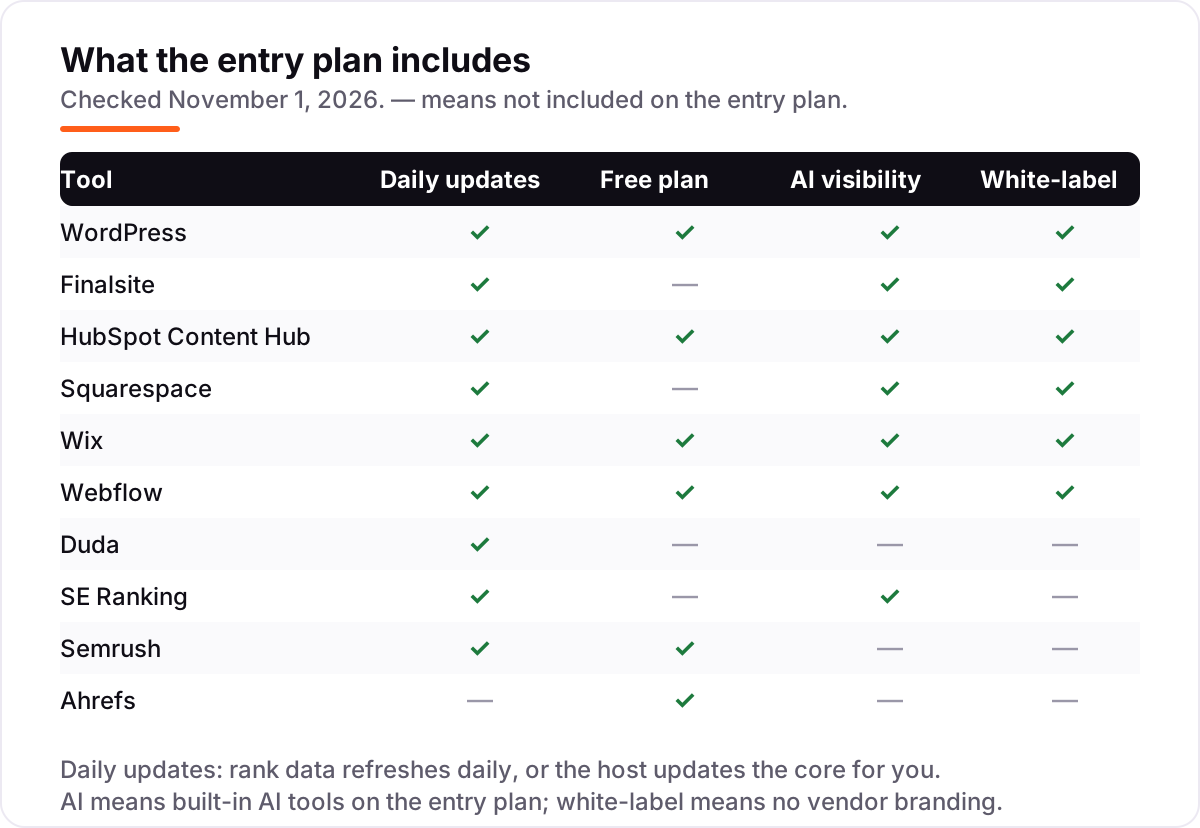
Quick comparison: tool type by need for the best platform for seo for education
| Buyer | Best pick | Why |
|---|---|---|
| Most schools and universities | WordPress | Free software, largest plugin ecosystem, full SEO control |
| K-12 school or district | Finalsite | Built for schools: admissions, calendars and accessibility in one place |
| School already on HubSpot CRM | HubSpot Content Hub | Website, CRM, email and forms in one database |
| Small private school, fast launch | Squarespace | Polished templates with hosting and selling included |
| First site on a tight budget | Wix | Real free plan and an AI builder; Light adds a custom domain |
| Design-led university team | Webflow | Visual editing with clean code; Premium adds the full CMS |
| District running many school sites | Duda | One dashboard, per-site pricing, client accounts per school |
| Best-value SEO suite | SE Ranking | 2,000 keywords a day plus a full suite from $103.20/month |
| Deepest research data | Semrush or Ahrefs | Largest keyword and backlink indexes in this list |
How to choose the best platform for seo for education: a short decision path
- Decide hosted or self-hosted first. If you never want to think about updates, pick a hosted builder, a hosted WordPress plan or Finalsite. If you want full control and the lowest long-term cost, pick self-hosted WordPress and budget for maintenance.
- Match the tool to the job. Single school site: WordPress or a hosted builder. K-12 with admissions workflows: Finalsite. Already on HubSpot: HubSpot Content Hub. District with many sites: Duda. Design-led university site: Webflow. Tracking rankings on an existing site: SE Ranking, Semrush or Ahrefs.
- Check the five SEO basics on the plan you would actually buy. Editable titles and meta descriptions, editable URL slugs, redirects, an automatic sitemap and fast mobile loading. The entry plan is the one that matters, not the top tier.
- Price the next tier, not just the first. The plan that fits today may not fit in a year. Check what the blog, the store or the extra editor costs on the next plan up, and whether the price jump is $10 or $200.
- Try it with real content. Every tool here has a free plan, a free tier or a free trial. Build three real pages — a programme page, a news post and an admissions page — and check the titles and the speed before committing.
Before you publish the first pages on the new platform, run your titles through the free title tag checker — it shows whether the title fits Google's display limits before the page goes live. And if the content itself needs work first, our guide to blogging platforms for SEO explains how the publishing workflow differs across the builders in this list.
Mistakes to avoid with the best platform for seo for education
- Comparing annual prices with monthly prices. The annual figure is usually 20-40% lower, and a few tools only show the annual rate on the pricing page. Compare monthly with monthly, or annual with annual.
- Trusting an old price in a guide. Squarespace raised Basic from $16 to $19 a month billed annually in 2026, and Webflow replaced its CMS and Business plans with Premium. Always check the vendor's own page.
- Buying the cheapest plan and finding the blog costs extra. Webflow Basic has no CMS, Wix Light cannot take payments, and HubSpot Starter charges per seat. The plan that fits is often one tier up.
- Ignoring the fees on top of the subscription. Squarespace transaction fees, Duda per-site charges and per-seat HubSpot pricing can each cost more than the plan itself. Add them up before you choose.
- Migrating without a redirect map. Keep URLs where possible, 301 every changed URL, and move titles and meta descriptions. Run a technical SEO audit after the move so missing redirects and broken pages show up before Google notices — or ask our local SEO service to check the new site before it goes live.
How we chose the best platform for seo for education
We recorded each starting price from the vendor's own pricing page as verified on October 31–November 1, 2026, including the annual-billing figure where the page lists one. Two prices carry a caveat: Finalsite publishes no starting price, so it is listed as a custom quote, and Wix shows its monthly-billed figure only at checkout, not on its pricing page, so the $24 monthly figure for Light rests on that checkout figure rather than the published page. No ratings are shown in this list: the review pages could not be opened on the day of checking, so no rating is claimed rather than estimated. We ranked the tools by fit for the most common buyer — a school or university marketing team that wants its programme and admissions pages to rank without a developer on every change — not by brand size. No vendor paid for a place in this list, and none of the links here are affiliate links.
What to do next with the best platform for seo for education
Start with the decision path above: hosted or self-hosted, match the tool to the job, check the five SEO basics on the plan you would actually buy, and price the next tier. Then take the free plan or trial of your top pick and build three real pages before you commit. If the titles, the speed and the editor all feel right, you have your platform. If you'd rather have this set up and read for you, request a free SEO + AI visibility audit and get a ranked fix list in 2 business days.
Rather not run the tools yourself?
Tools show you the data. SerpAstra turns it into higher rankings, more map-pack calls and citations in AI answers.
Get a free SEO + AI visibility audit→Sources we checked (11)
- WordPress.com pricing — wordpress.com/pricing (checked November 1, 2026)
- Finalsite — no published pricing; pricing by quote (finalsite.com, checked November 1, 2026)
- HubSpot Content Hub pricing — hubspot.com/pricing/content (checked November 1, 2026)
- Squarespace pricing — squarespace.com/pricing (checked November 1, 2026)
- Wix pricing — wix.com/plans (checked November 1, 2026)
- Webflow pricing — webflow.com/pricing (checked November 1, 2026)
- Duda pricing — duda.com/pricing (checked November 1, 2026)
- SE Ranking pricing — seranking.com/subscription.html (checked November 1, 2026)
- Semrush pricing — semrush.com/prices (checked November 1, 2026)
- Ahrefs pricing — ahrefs.com/pricing (checked November 1, 2026)
- W3Techs CMS market share — WordPress on about 40% of all websites (October 2026)
Shamim
Founder of SerpAstra
A full-stack SEO and digital marketer who spends most days on Local SEO for dental practices, AI search visibility and lead generation.
Frequently asked questions
What is the best platform for SEO for education?
WordPress is the best for most schools: free software, the largest plugin ecosystem and full SEO control from $4 a month billed annually on WordPress.com Personal. Finalsite is the pick for K-12 schools that want an education-specific CMS, and HubSpot Content Hub is the pick for schools already running HubSpot CRM.
How much does a platform for SEO for education cost?
Between $0 and $140 a month at the entry level. WordPress.com Personal is $9 a month billed monthly, Squarespace Basic is $25 and Webflow Premium is $25 a month billed annually, while Finalsite is priced by quote. A dedicated SEO suite costs $29 to $140 a month on top of the CMS, so most schools pay for one platform, not two.
Is there a free platform for SEO for education?
Yes. WordPress software is free, WordPress.com and Wix both have free plans, and Webflow and HubSpot offer free starting tiers. Free plans work for a single small school site, but they carry limits: a subdomain, platform branding or no plugin access on the free tier. Once the site needs a custom domain and full SEO control, a paid plan is cheaper than the time lost working around the limits.
WordPress or Finalsite for a school website?
Choose WordPress when you want the lowest cost and the widest choice of themes, plugins and developers. Choose Finalsite when you want a CMS built for schools, with admissions, calendars, notifications and accessibility tools in one place and a vendor that understands K-12. Finalsite is priced by quote and costs more, so the choice is control and cost against a purpose-built school platform.
Do I need a separate SEO tool if my CMS has SEO features?
Not at first. A good CMS covers the on-page basics: titles, meta descriptions, URLs, sitemaps and redirects. A separate suite such as SE Ranking or Semrush earns its keep when you track hundreds of keywords, watch competitors or report rankings to a board. Until then, the CMS plus a free rank check is enough for most schools.
What should a school check before choosing an SEO platform?
Five things: editable titles and meta descriptions on every page, editable URL slugs, redirects, an automatic sitemap and fast mobile loading. Then check the plan you would actually buy, not the top tier, and price the next tier up. Finally, build three real pages — a programme page, a news post and an admissions page — and check the titles and speed before committing.
Can a school district manage many school sites on one platform?
Yes. Duda is built for that job, with one dashboard, client accounts scoped to each school site and per-site pricing from $19 a month billed annually per site. Finalsite also serves districts, with a district site and individual school sites sharing news and calendars. WordPress Multisite is the self-hosted alternative, but it needs a developer to run.
Free SEO and AI visibility audit
Find out what is holding your rankings back
Send us your site. Within 2 business days you get a written audit, an AI visibility check and a short fix list ranked by impact. Free, with no contract attached.
Request my free audit→Related guides
 SEO & AI SearchBest CMS for SEO in 2026: 8 Options Ranked and Reviewed8 best CMS for SEO compared with real 2026 prices, free plans and SEO controls. WordPress, Webflow, Shopify and more, ranked by fit for a small business site.Read guide →
 SEO & AI Search12 Best Blogging Platforms for SEO in 2026 (Pros, Cons and Pricing)Compare the best blogging platform for SEO for your budget: 12 platforms ranked on price, SEO controls and ownership, from free WordPress to Ghost and Webflow.Read guide →
 ContentHow to write SEO content that ranks (and reads like a human wrote it)How to write SEO content that ranks: match search intent, structure before sentences, write like a person, and use AI honestly. A practical guide for 2026.Read guide →