
Best Plumbing Service Software for 2026: 7 Providers Ranked by Value
Compare the 7 best plumbing service software options on price, dispatch, invoicing and QuickBooks sync, with every price checked November 8, 2026.
 Shamim Mia, Founder, SerpAstraLast verified November 8, 202612 min read
We compare pricing pages, documentation and public reviews. We never accept payment for rankings.
Key takeaways
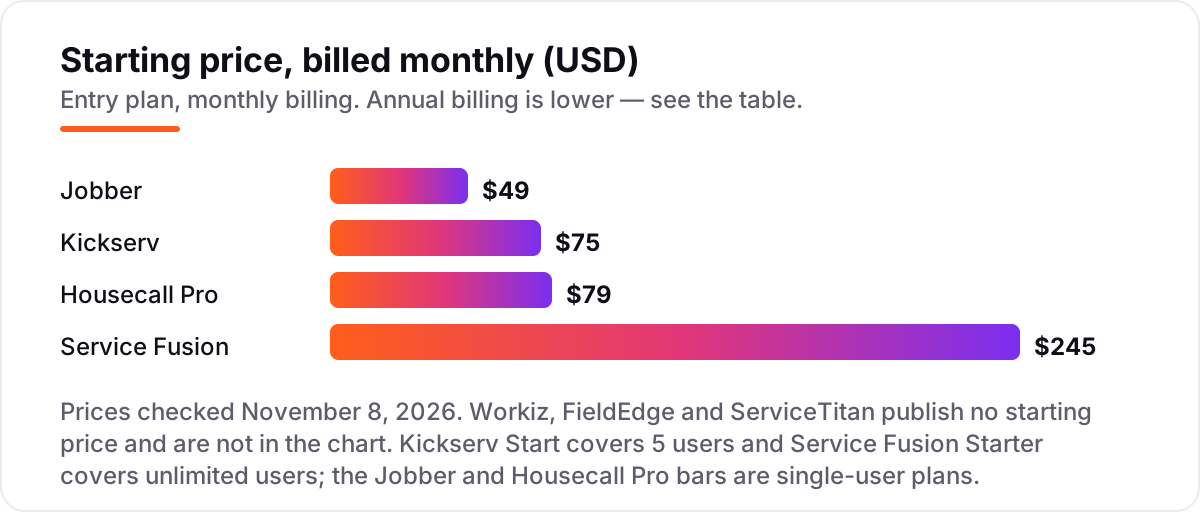
- Jobber is the cheapest start for a solo plumber at $49 a month, Kickserv covers a 5-person crew for $75, and Housecall Pro follows at $79 — while Service Fusion charges a flat $245 a month no matter how many techs you add.
- The single most important buying factor is how the price scales with headcount: per-user pricing punishes growth, while flat-rate plans stay fixed as you hire.
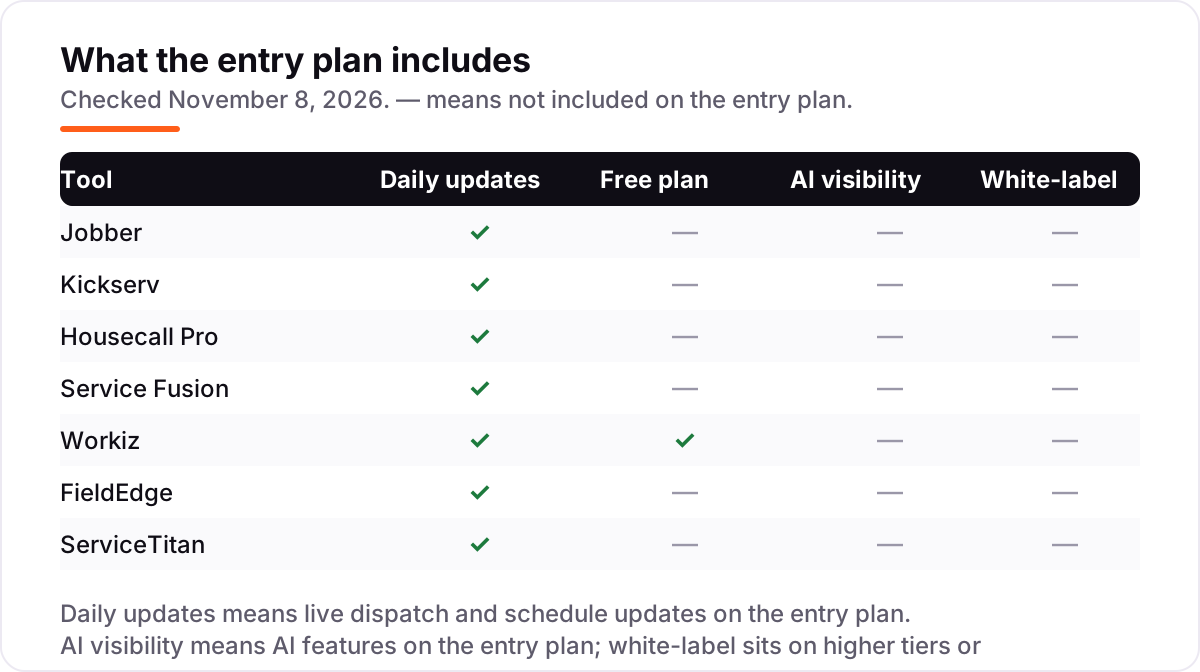
- Three of the seven tools publish no price at all — Workiz, FieldEdge and ServiceTitan are quote-only, so budget a sales call before you can compare them.
- Card processing runs 2.59–2.9% on every invoice you send, so at $20,000 a month in card payments it costs more than most subscriptions here.
On this page
Quick comparison
| Tool | Best for | Starting price | Free plan |
|---|---|---|---|
| Jobber | Solo plumbers and one-truck shops that want the cheapest honest start with room to grow | $49/mo | No (14-day trial) |
| Kickserv | Small plumbing crews of up to 5 who want the most seats for the least money | $75/mo | No (30-day trial) |
| Housecall Pro | Plumbing shops that want online booking, a price book and job costing from day one | $79/mo | No (14-day trial) |
| Service Fusion | Growing plumbing companies that want one flat price no matter how many techs they hire | $245/mo | No (demo only) |
| Workiz | Phone-first plumbing shops that live on inbound calls and want AI to catch the ones they miss | Custom quote | Yes (Lite free) |
| FieldEdge | Plumbing businesses that run QuickBooks Desktop and sell flat-rate jobs and service agreements | Custom quote | No (no trial) |
| ServiceTitan | Large multi-truck plumbing operations that need deep dispatch, marketing and reporting in one system | Custom quote | No (demo only) |
Make one of these tools?
We re-check this list every quarter. Send a correction, request a review, or ask about a clearly labeled sponsored spot.
Request a listingThe best plumbing service software

Jobber
Best for: Solo plumbers and one-truck shops that want the cheapest honest start with room to grow
Jobber is the cheapest way into plumbing software for a one-truck shop: Core costs $49 a month for a single user and covers quoting, scheduling, invoicing and a client hub where customers approve quotes and pay online. The mobile app is the part plumbers actually live in, with the day's jobs, customer history and payments in one place, and the 14-day trial needs no credit card.
The catch is that Core covers one user, so a second dispatcher means Connect, which starts at $99 a month for one user and adds QuickBooks sync, automated follow-ups and GPS tracking. Job costing waits for Grow at $149 a month. Buy Jobber when you work solo or with one helper and want the lowest honest starting price; buy Kickserv or Housecall Pro when the crew is already bigger than one.
What we like
- Core at $49 a month is the lowest published starting price in this list, and it already covers quoting, scheduling, invoicing and a client hub
- The mobile app puts the day's jobs, customer history and payments in one place for techs in the field
- 14-day free trial with no credit card required, and no annual contract on month-to-month billing
- Connect adds QuickBooks Online sync, automated follow-ups and GPS tracking without changing tools
Watch out for
- Core covers one user only — a second person means Connect at $99 a month or more
- Job costing and two-way texting wait for Grow at $149 a month
- The price climbs fast with headcount: Connect for 5 users is $149 a month, Plus for 15 is $529

Kickserv
Best for: Small plumbing crews of up to 5 who want the most seats for the least money
Kickserv is the value play for a small crew: Start costs $75 a month and covers five users, so a three-tech shop with an office dispatcher pays $15 per seat for scheduling, dispatch, estimates, invoicing and payments. Automated email and text reminders chase unconfirmed jobs, time and expense tracking runs on every plan, and QuickBooks Online sync is included from the start.
The catch is the seat band: a solo plumber pays for five seats whether they use them or not, and the next band, Run at $149 a month, is the first one with dispatch mapping, GPS check-ins and automated scheduling. QuickBooks Desktop sync costs $50 a month extra on Run. Buy Kickserv when the crew is three to five people and every seat needs the software; buy Jobber when it is just you.
What we like
- Start covers 5 users for $75 a month, the best per-seat value in this list at $15 per user
- Automated email and text reminders, time tracking and more than 20 business reports on the entry plan
- QuickBooks Online sync included on Start, with a 30-day free trial and no credit card required
- Kickback takes 5% off the monthly fee once online payments pass $1,000 a month on Start
Watch out for
- No single-user plan — a solo plumber pays for 5 seats whether they use them or not
- QuickBooks Desktop sync costs $50 a month extra, and it only arrives on the Run plan
- No two-way texting with customers, and only three integrations in total

Housecall Pro
Best for: Plumbing shops that want online booking, a price book and job costing from day one
Housecall Pro is the most complete tool a small shop can buy on the entry plan: Basic costs $79 a month for one user and already includes online booking, a flat-rate price book, job costing, review management and consumer financing, so a customer can book, approve and finance a job without calling. The 14-day trial runs on the full MAX plan, so you test the top tier before you pay.
The catch is the upgrade path. QuickBooks sync, GPS tracking, routes and photo reports all wait for Essentials at $149 a month, and recurring service plans plus route optimization wait for MAX at $299. Add-ons such as CSR AI, campaigns, payroll and VoIP carry no published price. Buy Housecall Pro when booking and the price book matter most; buy Jobber when the budget is tighter.
What we like
- Online booking, a price book and job costing are included on Basic at $79 a month
- Essentials adds QuickBooks Online sync, GPS tracking, routes and photo reports for up to 5 users
- Consumer financing is built in, so customers can finance big jobs at the quote
- 14-day free trial runs on the full MAX plan with no credit card required
Watch out for
- Basic has no QuickBooks sync — that waits for Essentials at $149 a month
- Recurring service plans and route optimization are MAX-only at $299 a month
- Add-ons such as CSR AI, campaigns, payroll and VoIP carry no published price, so the real bill is hard to model

Service Fusion
Best for: Growing plumbing companies that want one flat price no matter how many techs they hire
Service Fusion is the only tool here that never charges per user: Starter costs $245 a month and covers unlimited office staff and techs, with scheduling, dispatch, estimates, invoicing, payments, QuickBooks sync and text alerts included. A shop that hires its sixth tech pays what it paid for five, which is why growing companies forgive the high entry price.
The catch is that there is no free trial and no free plan — the first month costs $245 before you can try the dispatch board, so take the demo seriously and bring real jobs to it. Job costing and inventory wait for Plus at $382 a month, and GPS fleet tracking is a paid add-on with no published price. Buy Service Fusion when headcount is growing fast; buy Kickserv when the crew is small and the budget is fixed.
What we like
- One flat price covers unlimited users on every plan, so hiring a tech never raises the bill
- Starter includes scheduling, dispatch, estimates, invoicing, payments and QuickBooks sync for $245 a month
- Month-to-month billing with no long-term contract required
- Job costing and inventory start on Plus at $382 a month, still with unlimited users
Watch out for
- No free trial and no free plan — the first month costs $245 before you can try the dispatch board
- GPS fleet tracking and the ServiceCall.ai call tools are paid add-ons with no published price
- Annual billing takes the whole $2,496 at sign-up, not monthly

Workiz
Best for: Phone-first plumbing shops that live on inbound calls and want AI to catch the ones they miss
Workiz is built around the phone: paid plans include a built-in phone system with call tracking, two-way texting and a dispatch board, and Genius AI answering books jobs from missed calls around the clock. The free Lite plan covers two users and about 20 jobs a month, so a solo plumber can run jobs on it before spending anything.
The catch is the missing price tag. Every paid tier reads 'request pricing' on the vendor's own page, so you cannot compare Workiz with Jobber or Housecall Pro until sales quotes you — third-party roundups put the entry tier near $225 a month, but that figure is not on the vendor's page. The phone system is also a paid add-on on every plan. Buy Workiz when missed calls are your biggest leak; buy Jobber when you want a published price.
What we like
- A free Lite plan covers up to 2 users and about 20 jobs a month, the only free plan in this list
- Built-in phone system with call tracking and recording, plus two-way texting, on paid plans
- Genius AI answering books jobs from missed calls around the clock
- Rated 4.5 out of 5 on G2 across 247 reviews, one of the highest scores in this list
Watch out for
- No base price is published — every paid tier reads 'request pricing' until you talk to sales
- The phone system is a paid add-on on every plan, and the AI answering costs extra on top
- Service plans and inventory management are top-tier only, and the trial lasts just 7 days

FieldEdge
Best for: Plumbing businesses that run QuickBooks Desktop and sell flat-rate jobs and service agreements
FieldEdge is the old hand of this list, and its one unbeatable feature is Live Link, the sync that keeps QuickBooks Desktop and the dispatch board in step — the reason plumbing shops that never left Desktop stay put. The dispatch board, flat-rate price book and service-agreement tools fit shops that quote fixed prices and sell maintenance plans, and equipment tracking follows boilers and water heaters across repeat visits.
The catch is the sales process. There is no published price and no free trial, so every number comes from a sales call, and onboarding is a multi-week job with a separate fee reported by reviewers. G2 reviewers also flag slow load times and chargeable add-ons. Buy FieldEdge when QuickBooks Desktop is non-negotiable; buy Housecall Pro when you run QuickBooks Online and want a price today.
What we like
- Live Link syncs with QuickBooks Desktop and QuickBooks Online, the strongest Desktop link in this list
- A purpose-built price book and dispatch board fit plumbing crews that quote flat-rate jobs
- Service agreements and equipment tracking help shops that sell maintenance plans
Watch out for
- No published price and no free trial — you cannot compare it without a sales call
- Onboarding is a multi-week process, and G2 reviewers report a separate onboarding fee
- Add-ons and integrations cost extra, and reviewers flag slow load times on desktop and mobile

ServiceTitan
Best for: Large multi-truck plumbing operations that need deep dispatch, marketing and reporting in one system
ServiceTitan is the operating system for plumbing companies: Starter, Essentials and The Works cover dispatch, call booking, invoicing and a price book, and Pro modules add marketing attribution, phones, fleet tracking and dispatch automation. No other tool here follows a job from the first ring to the collected payment as deeply, and its 4.5 out of 5 on G2 across 371 reviews is the largest review base among the quote-only tools.
The catch is everything around the price. There is no published figure — user reports put it near $245 to $500 per technician a month, but that range is not on the vendor's page — plus a separate implementation fee and a twelve-month contract. Setup averages about three months. Buy ServiceTitan with five or more trucks, when the reporting pays for itself; buy anything else here with fewer.
What we like
- The deepest dispatch, call tracking and marketing-attribution toolset in this list
- Pro modules cover marketing, phones, pricebook and fleet without leaving the platform
- Rated 4.5 out of 5 on G2 across 371 reviews
Watch out for
- No published price — expect a per-technician quote after a demo, plus a separate implementation fee
- G2 reviewers give it the lowest ease-of-setup score in this list at 6.8 out of 10, with an average implementation of about 3 months
- Twelve-month contracts are standard, and buyers report renewal increases of 15–20%
The best plumbing service software does three jobs at once: it books the call, gets a tech to the door on time, and turns the finished job into a paid invoice without a second round of paperwork. We ranked the seven tools below by value for the most common buyer — a US plumbing shop with one to five techs — starting with the cheapest published prices and ending with the quote-only platforms, and every price was checked on the vendor's own pricing page on November 8, 2026.
How to choose the best plumbing service software
- Count heads before you count features. Jobber Core covers one user, Kickserv Start covers five and Service Fusion covers unlimited users, so the same $75 buys very different crews. Price the plan that fits your headcount, not the headline plan.
- Check the pricing model, not just the price. Per-user tools get dearer with every hire, flat-rate tools stay fixed, and per-technician tools charge for every tech on the road. The model decides your bill in year two more than the starting price does.
- Settle QuickBooks first. If the books live in QuickBooks Desktop, FieldEdge is the only tool here built around it; everyone else syncs with QuickBooks Online, and Jobber and Housecall Pro hold the sync for their second tier.
- Decide how customers reach you. Online booking suits shops that take jobs while the techs are out; a built-in phone system with AI answering suits shops that live on inbound calls, which is Workiz's whole pitch.
- Try it with real jobs before you pay. The trials run 7 to 30 days, and the quote-only tools offer a demo instead — bring a real week of jobs to either one and check the dispatch board, the price book and the invoice flow.
After every finished job, ask for a review while the customer is still happy — our free Google review link generator builds the one-tap link you can text from the truck. Reviews are the cheapest marketing a plumbing shop has, and every tool in this list has a review feature except that some charge extra for it, so check whether review requests are included on the plan you buy.
Plumbing service software pricing: what you will actually pay
Take a five-person plumbing shop — three techs, one dispatcher and the owner — on annual billing. Kickserv Start covers all five for $60 a month, or $720 a year. Jobber Connect for five users costs $149 a month, or $1,788 a year, and Housecall Pro Essentials for five users costs exactly the same $149 a month, or $1,788 a year. Service Fusion Starter costs $208 a month, or $2,496 a year, charged as one payment at sign-up. Workiz, FieldEdge and ServiceTitan cannot be priced this way at all, because none of them publishes a number.
A solo plumber pays less everywhere: Jobber Core is $29 a month billed annually, or $348 a year; Housecall Pro Basic is $59 a month, or $708 a year; Kickserv Start is $60 a month, or $720 a year, but buys five seats the solo plumber does not need; Service Fusion Starter is $208 a month, or $2,496 a year. The cheapest solo price and the cheapest five-person price belong to different tools, which is why headcount comes first in the decision.
Then comes the cost that dwarfs the subscription: card processing. At $20,000 a month in card payments, processing costs about $518 on Housecall Pro's 2.59% and about $580 on Jobber's or Service Fusion's 2.9%, before the 30-cent fee on each transaction. That is more than any monthly subscription in this list except Service Fusion's, and it repeats every month. If the visibility side matters as much as the software, our guide to SEO for plumbers covers how customers find a plumbing shop in the first place.
Know the difference: per-user, flat-rate and per-technician pricing
The confusion in this category is the pricing model, because three tools can all say "$149 a month" and mean three different bills. Per-user pricing, used by Jobber and Housecall Pro at the entry level, charges for each seat: Jobber Core is one user at $49 a month, and a second person means a new price. Flat-rate pricing, used by Service Fusion and in bands by Kickserv, charges one price for the whole company or the whole band: Service Fusion Starter is $245 a month whether you have two techs or twenty, and Kickserv Start is $75 a month for up to five users.
Per-technician pricing, used by ServiceTitan, charges for each active tech on the road, quoted after a demo — user reports put it near $245 to $500 per technician a month, but that range is not on the vendor's page, and buyers report a monthly minimum near $1,500 regardless of team size. A three-tech shop on a per-technician plan can therefore cost more than the same shop on a flat-rate plan, even when the per-tech figure looks small.
There is one more distinction worth knowing: annual billing. The annual figure on most pages is a monthly equivalent, so Jobber Core drops from $49 to $29 a month when you pay yearly — but Service Fusion collects the whole $2,496 at sign-up, so the "monthly" annual price is not a monthly payment. Always ask whether the annual price is billed monthly or taken in one payment before you compare it with a monthly price.
Quick comparison: tool type by need
| Buyer | Best pick | Why |
|---|---|---|
| Solo plumber, one truck | Jobber | Cheapest start, Core is $49 a month for one user |
| Crew of up to 5 on a budget | Kickserv | 5 seats for $75 a month, the best per-seat value here |
| Shop that wants online booking | Housecall Pro | Booking, price book and job costing from $79 a month |
| Growing crew that keeps hiring | Service Fusion | Flat $245 a month, unlimited users, the bill never moves |
| Phone-first shop | Workiz | Free Lite plan; paid tiers are quoted, phone and AI answering cost extra |
| QuickBooks Desktop shop | FieldEdge | Quote-only, with the strongest QuickBooks Desktop sync |
| Large multi-truck operation | ServiceTitan | Quote-only per technician, the deepest toolset here |
Mistakes to avoid
- Comparing the monthly price without counting seats. Jobber Core at $49 covers one user, Kickserv Start at $75 covers five, and Service Fusion Starter at $245 covers unlimited users — the cheapest headline is not the cheapest crew price.
- Budgeting on the annual figure while paying monthly. The annual price is a discount for paying yearly, and Service Fusion takes the whole $2,496 at sign-up. Compare tools on the billing rhythm you will actually use.
- Forgetting card processing. At 2.59–2.9% of every payment, processing on $20,000 a month costs $518–$580 — more than most subscriptions here — and it is charged on top of the plan, not inside it.
- Signing a quote-only tool without a written quote. Workiz, FieldEdge and ServiceTitan publish no price, and ServiceTitan adds a separate implementation fee and a twelve-month contract. Get the subscription, the implementation fee and the renewal terms in writing before you sign.
- Buying for features on the top tier. Job costing, recurring service plans, route optimization and inventory all sit one or two tiers above the entry plan on most tools here. Check that the feature you need is on the plan you are actually buying.
How we chose
We checked each vendor's own pricing page on November 8, 2026 and recorded the starting price exactly as shown, including the annual-billing figure where the page lists one, and we ranked the tools by fit for the most common buyer — a US plumbing shop with one to five techs — not by brand size. Browser page fetches were unavailable on November 8, 2026, so prices were verified from fresh search-index crawls of the vendors' own pricing pages dated November 2–8, 2026, plus independent October 2026 reads that agree on every figure used here. Workiz, FieldEdge and ServiceTitan publish no starting price, so they are shown as custom quote rather than estimated: the third-party Workiz figure near $225 a month and the user-reported FieldEdge and ServiceTitan per-user and per-technician ranges are mentioned in the text as reported figures, not used as prices. Ratings come from fresh search-index copies of the vendors' G2 pages, crawled within the last few days. No vendor paid for a place in this list, and none of the links here are affiliate links.
What to do next
Start with the free plan or trial of your top pick and run one real week of jobs through it: book the calls, dispatch the techs, send the invoices and check that the money lands. Confirm the QuickBooks sync works with your books and that the price book covers your common jobs before you commit to a year. If the software is sorted but new customers are not finding you, our local SEO service handles the visibility side — or compare providers in our guide to SEO companies for small business. Once your tools are in place, find out what's holding your rankings back.
Your stack only works if people find you
SerpAstra fixes what keeps your site off page one and makes it easy for AI assistants to recommend.
Get a free audit→Sources we checked (14)
- Jobber pricing — getjobber.com/pricing (checked November 8, 2026)
- Kickserv pricing — kickserv.com/pricing (checked November 8, 2026)
- Housecall Pro pricing — housecallpro.com/pricing (checked November 8, 2026)
- Service Fusion pricing — servicefusion.com/pricing (checked November 8, 2026)
- Workiz pricing — workiz.com/pricing-plans (checked November 8, 2026)
- FieldEdge — fieldedge.com, pricing by request (checked November 8, 2026)
- ServiceTitan pricing — servicetitan.com/pricing (checked November 8, 2026)
- Jobber reviews — g2.com/products/jobber/reviews (checked November 8, 2026)
- Kickserv reviews — g2.com/products/kickserv/reviews (checked November 8, 2026)
- Housecall Pro reviews — g2.com/products/housecall-pro/reviews (checked November 8, 2026)
- Service Fusion reviews — g2.com/products/service-fusion/reviews (checked November 8, 2026)
- Workiz reviews — g2.com/products/workiz/reviews (checked November 8, 2026)
- FieldEdge reviews — g2.com/products/fieldedge/reviews (checked November 8, 2026)
- ServiceTitan reviews — g2.com/products/servicetitan/reviews (checked November 8, 2026)
Shamim
Founder of SerpAstra
A full-stack SEO and digital marketer who spends most days on Local SEO for dental practices, AI search visibility and lead generation.
Frequently asked questions
What is the best plumbing service software?
Jobber is the best fit for most small plumbing shops: the lowest published starting price at $49 a month, with quoting, scheduling and invoicing included. Kickserv is the better value once the crew reaches three to five people, since $75 a month covers five users. ServiceTitan suits large multi-truck operations, but it is quote-only.
How much does plumbing service software cost?
Published prices run from $49 a month for Jobber Core to $245 a month for Service Fusion Starter, with Kickserv at $75 and Housecall Pro at $79 in between. Workiz, FieldEdge and ServiceTitan publish no price and quote per business. On top of the subscription, card processing takes 2.59–2.9% of every payment you collect.
Is there free plumbing service software?
Only one tool here has a free plan: Workiz Lite is free for up to 2 users and about 20 jobs a month. The rest offer trials instead — 30 days on Kickserv, 14 days on Jobber and Housecall Pro, and 7 days on Workiz paid plans. Service Fusion, FieldEdge and ServiceTitan offer a demo only, with no trial.
Jobber vs Housecall Pro: which is better for plumbers?
Jobber is cheaper for a solo plumber at $49 a month against $79 for Housecall Pro Basic, and its trial is just as long. Housecall Pro gives you more on the entry plan, though: online booking, a price book and job costing are included on Basic, while Jobber holds job costing for Grow at $149 a month. Pick Jobber on budget, Housecall Pro on features.
Does plumbing service software work with QuickBooks?
Yes, all seven tools connect with QuickBooks, but the details differ. FieldEdge has the strongest QuickBooks Desktop sync through Live Link, while the rest sync with QuickBooks Online. Jobber and Housecall Pro hold the sync for their second tier, and Kickserv includes Online sync on Start but charges $50 a month extra for Desktop.
Can I switch plumbing software later?
Yes, but plan the move for a quiet week. Export your customer list, open jobs, price book and unpaid invoices from the old tool, then import them into the new one and reconcile the bank before going live. Run both systems side by side for a week so no booked job falls through the gap, and retrain the techs on the mobile app first.
Do I need ServiceTitan for a small plumbing business?
No. ServiceTitan is built for multi-truck operations that need deep dispatch, marketing attribution and reporting, and it is priced per technician with a separate implementation fee. A shop with one to five techs gets the same daily jobs done on Jobber, Kickserv or Housecall Pro for a published monthly price. Revisit ServiceTitan once you pass five trucks.
Free SEO and AI visibility audit
Find out what is holding your rankings back
Send us your site. Within 2 business days you get a written audit, an AI visibility check and a short fix list ranked by impact. Free, with no contract attached.
Request my free audit→Related guides
 Local Business & Vertical Software9 Best Apps for Plumbers in 2026: Free and Paid Apps RankedCompare the 9 best apps for plumbers on price, scheduling, dispatch and payments, with every price checked November 7, 2026 and quotes explained.Read guide →
 Local SEOSEO for plumbers: rank in the map pack and get more callsSEO for plumbers: win the map pack and get more calls with emergency pages, service pages patients trust, reviews, and calls that become booked jobs today.Read guide →
 Local Business & Vertical Software10 Best Contractor Management Software in 2026, ComparedCompare the 10 best contractor management software platforms on price, compliance and global payments, with every price checked November 7, 2026.Read guide →