
10 Best Predictive Analytics Tools in 2026 (Free and Paid, Compared)
10 best predictive analytics tools compared with prices, free plans and AutoML depth — from free KNIME to enterprise DataRobot. Prices checked Nov 2, 2026.
 Shamim Mia, Founder, SerpAstraLast verified November 2, 202612 min read
We compare pricing pages, documentation and public reviews. We never accept payment for rankings.

Key takeaways
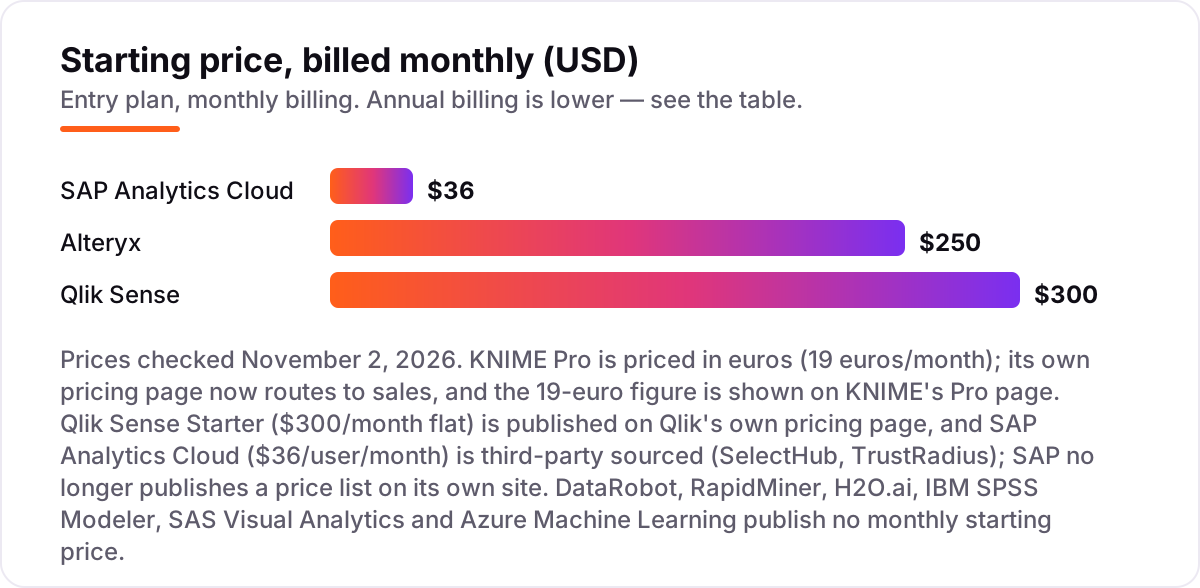
- KNIME is the best starting point: a free desktop workbench, with paid Pro plans from €19/month. Alteryx follows at $250/user/month (Starter, billed annually) and Qlik Sense at $300/month (Starter, flat, 10 users).
- Six of the ten tools publish no starting price at all — DataRobot, RapidMiner, H2O.ai, IBM SPSS Modeler, SAS Visual Analytics and Azure Machine Learning are quote-only or usage-priced, so budget for a sales conversation.
- The single most important buying factor is who will build the models: no-code AutoML suits business analysts, while cloud ML platforms need data-science skills.
- Free routes exist — KNIME's desktop, RapidMiner's free edition and open-source H2O-3 — but scheduled scoring and governance sit on paid plans.
- Every price below was checked on November 2, 2026; the KNIME, Qlik Sense and SAP Analytics Cloud figures are vendor-supplied or third-party sourced, as explained in How we chose.
On this page
Quick comparison
| Tool | Best for | Starting price | Free plan |
|---|---|---|---|
| KNIME | Solo analysts and small teams building their first predictive models without code | €19/mo | Yes (free desktop) |
| Alteryx | Business analysts in finance and operations teams who need governed, repeatable prep and modeling without code | $250/mo (annual) | No (30-day trial) |
| RapidMiner | Analysts and small data-science teams who want visual AutoML with a free edition | Custom quote | Yes (free edition) |
| Qlik Sense | BI teams that want predictive models (Qlik AutoML) inside the dashboards they already use | $300/mo | Yes (Desktop free) |
| SAP Analytics Cloud | SAP shops that want forecasting (Smart Predict) inside their planning and BI system | $36/mo | No (30-day trial) |
| DataRobot | Large enterprises that need governed AutoML, model monitoring and deployment in one platform | Custom quote | No (30-day trial) |
| H2O.ai | Data-science teams in regulated industries that need predictive AI on-premises or air-gapped | Custom quote | Yes (open source) |
| IBM SPSS Modeler | Statistics and research teams that want visual predictive modeling with decades of SPSS heritage | Custom quote | No |
| SAS Visual Analytics | Enterprises already on SAS Viya that want predictive modeling inside interactive dashboards | Custom quote | No |
| Azure Machine Learning | Data-science teams already on Microsoft 365 and Azure who want a full cloud ML lifecycle | Pay as you go | Yes ($200 credit) |
Make one of these tools?
We re-check this list every quarter. Send a correction, request a review, or ask about a clearly labeled sponsored spot.
Request a listingThe best predictive analytics tools

KNIME
Best for: Solo analysts and small teams building their first predictive models without code
KNIME is the cheapest way into real predictive modeling because the desktop workbench is free and open source: you build visual workflows from drag-and-drop nodes, connect more than 300 data sources, and train and score models without writing code or paying anything. The free Analytics Platform covers the whole modeling job for one person on one machine.
The catch is that free means local: scheduling, sharing and deployment need a Hub plan, and Pro starts at €19 a month with 120 runtime credits. For a solo analyst or a small team that can live with that, KNIME is the best value in this list — and the only tool here you can use seriously for $0.
What we like
- Free, open-source Analytics Platform desktop with 300+ connectors and unlimited local execution
- Visual drag-and-drop workflows cover prep, modeling, scoring and deployment without code
- Pro adds scheduling, data apps and REST services from €19/month — the cheapest paid tier here
Watch out for
- Desktop performance depends on your own machine; large data sets can run slowly without a Hub plan
- Business Hub for governance and SSO is quote-only, and runtime overages bill per vCore-minute
- Visualization is weaker than the BI tools in this list

Alteryx
Best for: Business analysts in finance and operations teams who need governed, repeatable prep and modeling without code
Alteryx is the tool business analysts ask for by name: a visual canvas with more than 300 drag-and-drop tools for preparing, blending and modeling data, plus scheduling and governance that finance and operations teams trust. It turns a spreadsheet workflow into a repeatable, auditable process without writing code.
The price is the problem. The only published tier, Starter at $250 per user per month billed annually, is cloud-only, flat-file-only and includes no automation runs — so most teams end up on the quote-only Professional edition. Buy Alteryx when the budget is real and the workflows must be governed; otherwise KNIME does the same job for far less.
What we like
- More than 300 drag-and-drop tools for prep, blending and modeling in one canvas
- Strong governance and repeatable workflows that finance and operations teams trust
- Ask Alteryx and Agent Studio add AI help on Professional and Enterprise
Watch out for
- Starter is cloud-only, flat-file-only and includes no automation runs — real work needs the quote-only Professional edition
- $250/user/month is the highest published entry price in this list
- Designer desktop needs 64-bit Windows; Mac users need the cloud edition

RapidMiner
Best for: Analysts and small data-science teams who want visual AutoML with a free edition
RapidMiner (now Altair AI Studio, sold by Siemens) is the friendliest AutoML tool in this list: Auto Model builds, compares and explains predictive models for you, and the visual workflow designer handles the rest. It carries the highest G2 rating here, 4.6 out of 5 from 533 reviews, with reviewers praising its ease of setup above all.
The free edition is genuinely useful for learning and small data sets, capped at 10,000 rows per process. Beyond that you are in quote-only territory, with third-party reports putting paid tiers around $2,500 per user per year. Confirm the current price with Siemens before budgeting, since the product has changed hands twice in four years.
What we like
- Auto Model builds and compares models automatically, so non-specialists get predictions fast
- Visual workflow designer with R and Python code reuse for experienced data scientists
- Highest G2 rating here (4.6/5 from 533 reviews) with strong ease-of-setup scores
Watch out for
- No public price list — paid tiers are quote-only, with third-party reports around $2,500/user/year
- Ownership changed twice (Altair, then Siemens), so buyers should confirm current terms directly
- Free edition caps at 10,000 rows, which rules out most production data sets

Qlik Sense
Best for: BI teams that want predictive models (Qlik AutoML) inside the dashboards they already use
Qlik Sense is a BI tool first and a predictive tool second — and for many teams that is the right order. Qlik AutoML builds models without code, and the predictions appear inside the same dashboards the business already reads. The associative engine lets users explore data relationships freely instead of following a fixed query path.
The entry Starter plan costs $300 a month flat for 10 users and 10GB, but AutoML sits on a higher tier, so budget for the step up if predictions are the point. Qlik publishes the Starter price on its own pricing page; get a written quote for the higher tiers.
What we like
- Qlik AutoML builds models without code, and predictions land directly in dashboards
- Associative engine lets users explore relationships without predefined queries
- Strongest review volume among the BI tools here, at 4.4/5 from 929 G2 reviews
Watch out for
- AutoML sits on a higher tier — Starter is dashboards first, predictions second
- Enterprise pricing is quote-only, so costs jump sharply as teams scale
- Reviewers cite a steep learning curve and extra costs for premium connectors

SAP Analytics Cloud
Best for: SAP shops that want forecasting (Smart Predict) inside their planning and BI system
SAP Analytics Cloud is the predictive pick for companies that already run SAP: Smart Predict forecasts future values and Key Driver Analysis explains what drives them, all inside the same tool that handles dashboards and financial planning. Data stays in the SAP world, with live S/4HANA connections and no extraction step.
The price needs care. SAP now quotes through sales, so the $36 per user per month Business Intelligence figure is third-party sourced, and Planning seats run several times higher. If your company is not already on SAP, this is the wrong tool; if it is, Smart Predict is the cheapest forecasting you will buy.
What we like
- Smart Predict and Key Driver Analysis add forecasting without a separate modeling tool
- Deep, live integration with S/4HANA and SAP data — no extraction step for SAP shops
- One tool for BI, planning and prediction, with 910 G2 reviews behind it
Watch out for
- SAP now quotes through sales, so the $36 figure is third-party sourced and may not match your quote
- Planning seats cost several times more (about $157/user/month in third-party lists)
- Reviewers say advanced modeling gets complex, and licensing feels expensive outside SAP

DataRobot
Best for: Large enterprises that need governed AutoML, model monitoring and deployment in one platform
DataRobot is the enterprise AutoML benchmark: it runs your data through hundreds of algorithms, ranks the candidates on a live leaderboard, and then deploys, monitors and governs the winner. The whole model lifecycle — build, deploy, monitor, retrain — lives in one platform with audit trails that regulated teams need.
Nothing here is self-serve: there is no public price, and enterprise agreements typically run into five or six figures a year. A 30-day free trial with full platform access is advertised, so a serious buyer can test the workflow first. Small teams should look elsewhere — reviewers call the cost prohibitive below enterprise scale.
What we like
- AutoML evaluates hundreds of algorithms and ranks them on a live leaderboard
- Full lifecycle in one place: build, deploy, monitor and govern models with audit trails
- Python and R SDKs plus a visual interface, so experts and business users share one platform
Watch out for
- No public pricing — enterprise agreements are typically five to six figures a year
- Overkill for small teams: reviewers call the cost prohibitive below enterprise scale
- Trial limits and post-trial costs are not published

H2O.ai
Best for: Data-science teams in regulated industries that need predictive AI on-premises or air-gapped
H2O.ai pairs an open-source core with enterprise AutoML: the free H2O-3 library handles modeling for teams that can self-host, while Driverless AI automates feature engineering and model tuning for production work. It runs in a managed cloud, a private cloud, on-premises or fully air-gapped, which suits banks, insurers and government teams.
Commercial pricing is not published: licenses are quoted annually on compute and memory, and the review base is thin at 24 G2 reviews. The open-source route makes H2O.ai the easiest enterprise tool here to try before buying — prototype on H2O-3, then talk to sales when a model needs production support.
What we like
- H2O-3 is open source and free — teams can prototype before ever talking to sales
- Driverless AI automates feature engineering and model tuning with strong iteration speed
- Runs managed cloud, private cloud, on-premises or fully air-gapped
Watch out for
- Commercial pricing is not published — annual licenses are quoted on compute and memory
- Only 24 G2 reviews, so the review base is thin next to the bigger names here
- Reviewers note Driverless AI can be expensive for early adoption

IBM SPSS Modeler
Best for: Statistics and research teams that want visual predictive modeling with decades of SPSS heritage
IBM SPSS Modeler is the statistics veteran of this list: visual modeling streams that researchers and analysts have used for decades, with in-database mining, champion/challenger testing and text analytics on the higher editions. It is built for teams that think in statistical terms and need results they can defend.
IBM publishes no Modeler price list — third-party directories list the Personal edition from $4,950 per user per year — and there is no free plan or free trial. The interface feels dated next to newer visual tools, and desktop-first design limits cloud-native work. Pick it when SPSS skills already exist in-house; otherwise start with KNIME.
What we like
- Visual stream-based modeling that statisticians already know, with strong text and entity analytics on Premium
- In-database mining and champion/challenger testing on Professional and above
- Deep SPSS ecosystem: Statistics, collaboration and deployment in one family
Watch out for
- IBM publishes no Modeler price list; third-party directories list Personal from $4,950/user/year
- Interface feels dated next to newer visual tools, per reviewers
- No free plan or free trial, and desktop-first design limits cloud-native work

SAS Visual Analytics
Best for: Enterprises already on SAS Viya that want predictive modeling inside interactive dashboards
SAS Visual Analytics puts predictive modeling inside the dashboards executives already use: the in-memory CAS engine crunches large data fast, forecasting and decision trees are built in, and AI-assisted analytics explain what drives a number. It is the visual front end of the wider SAS Viya platform, with the governance that banks, pharma and government buyers expect.
The cost is enterprise-only: quote-based licensing that typically starts in the tens of thousands of dollars a year, with no free tier and no free trial. Reviewers praise the support — 8.7 out of 10 on G2 — but call setup harder than the BI rivals. Only buy it inside a SAS commitment; as a standalone purchase it is hard to justify.
What we like
- In-memory CAS engine handles large data fast, with forecasting and decision trees built in
- AI-assisted analytics suggest insights and explain drivers without manual digging
- Highest support scores here (8.7 on G2) with deep banking, pharma and government adoption
Watch out for
- Quote-only licensing that typically starts in the tens of thousands of dollars a year
- Reviewers say setup is harder than the BI rivals, and small companies find it unaffordable
- No free tier, and most value unlocks only inside the wider SAS Viya platform

Azure Machine Learning
Best for: Data-science teams already on Microsoft 365 and Azure who want a full cloud ML lifecycle
Azure Machine Learning is the cloud-native pick for teams already on Microsoft: Automated ML builds models without code, a drag-and-drop designer covers the no-code path, and pipelines plus MLOps carry models into production. There is no platform fee at all — you pay only for the compute and storage your training and scoring actually use.
The honest warning is forecasting: usage-based billing is hard to predict, and an idle endpoint or a large GPU training run can surprise you. Reviewers also cite a steep learning curve and a complex interface. If your stack is Microsoft 365, Teams and Power BI, the integration is worth it; otherwise the learning tax is real.
What we like
- No platform fee — the service itself is free, and you pay only for compute and storage used
- Automated ML plus a drag-and-drop designer, so both coders and non-coders can build models
- Enterprise MLOps, responsible-AI tooling and deep Power BI and Microsoft 365 integration
Watch out for
- Usage-based billing is hard to forecast — an idle endpoint or large training run can surprise you
- Reviewers cite a steep learning curve and a complex, hard-to-navigate interface
- Full value needs Azure skills; teams outside the Microsoft stack pay a learning tax
What a predictive analytics tool actually does
This guide compares the 10 best predictive analytics tools you can buy in 2026, organized by what you actually need: free workbenches, visual workflows, AutoML platforms, BI tools with prediction built in, and cloud ML services. The list is sorted by fit for the most common buyer — a small team that wants forecasts without hiring a data-science department — not by brand size.
A predictive analytics tool takes your historical data, finds the patterns in it, and scores new rows against those patterns. Feed it past sales and it forecasts next quarter; feed it customer behavior and it flags who is likely to churn; feed it sensor readings and it predicts which machine will fail. The output is a prediction with a confidence level, not a certainty — and the quality of the prediction depends on the quality and completeness of the data you feed in.
One number shows how much ground the free tools cover: KNIME says its free Analytics Platform ships with more than 300 connectors, so the data you need is usually reachable without a paid plan. That is why the free tier matters here more than in most software categories — you can build a real model before you spend anything, and only pay when you need scheduling, sharing or governance.
Free options first
If you are starting out, you may not need to pay at all. KNIME's desktop workbench is free and open source with no row cap, RapidMiner's free edition covers data sets up to 10,000 rows, and H2O-3 is free to self-host. Qlik Sense Desktop is free for personal use, and Azure gives new accounts a $200 credit to experiment with. These are honest products, not demos — but they cap out fast, and the moment you need scheduled scoring, shared dashboards or team access, a paid plan is cheaper than the time you lose running models by hand.
For a single analyst learning the craft, start with KNIME's free desktop and build one real forecast end to end. For a small team, RapidMiner's free edition or H2O-3 will show whether AutoML fits your data. For anything client-facing or production, skip the free tier: scheduling, monitoring and governance start on the paid plans.
Visual workflows vs AutoML vs cloud platforms
The 10 tools in this list split into three camps. The visual workflow tools — KNIME, Alteryx, RapidMiner and IBM SPSS Modeler — let you build models by connecting boxes on a canvas, with no code required. They are the fastest way for a business analyst to go from a spreadsheet to a forecast, and they are the right pick when one person owns the whole job.
The AutoML platforms — DataRobot and H2O.ai — automate the modeling itself: they try hundreds of algorithms, tune them, and rank the results. You trade control for speed, and you pay enterprise prices for it. The cloud ML platforms — Azure Machine Learning above all — give data scientists the full lifecycle, from training to deployment, but expect real ML skills in return.
BI tools with prediction built in
Qlik Sense, SAP Analytics Cloud and SAS Visual Analytics take a different route: they add forecasting to the dashboards your business already reads. Qlik AutoML builds models without code, SAP's Smart Predict forecasts inside planning workflows, and SAS Visual Analytics pairs in-memory analytics with decision trees. If the people who need the forecast already live in these dashboards, prediction as a feature beats prediction as a separate tool.
The trade-off is depth. A BI tool's AutoML will not match a dedicated modeling platform on algorithm choice, tuning or monitoring — and the predictive features often sit on a higher tier than the entry plan. Check which tier actually includes AutoML before you buy: Qlik's Starter plan is dashboards first, and SAP's Planning seats cost several times the Business Intelligence rate.
Quick comparison: tool type by need
| Buyer | Best pick | Why |
|---|---|---|
| Solo analyst, first model | KNIME | Free desktop; Pro from €19/month |
| Business analyst team | Alteryx | 300+ drag-and-drop tools, governed workflows |
| No-code AutoML | RapidMiner | Auto Model builds and explains models; free edition |
| BI team that wants forecasts | Qlik Sense or SAP Analytics Cloud | AutoML and Smart Predict inside dashboards |
| Regulated enterprise | DataRobot or H2O.ai | Governed AutoML, on-premises and air-gapped deployment |
| Cloud ML team | Azure Machine Learning | No platform fee; pay only for compute |
How to choose the best predictive analytics tools
- Start with who builds the models. Business analysts should pick a visual or AutoML tool; data scientists can use a cloud ML platform. Buying a platform your team cannot operate is the most expensive mistake in this list.
- Count your data first. Free editions cap rows or credits — RapidMiner at 10,000 rows, KNIME Pro at 120 runtime credits a month — so check your data volume against the cap before comparing prices.
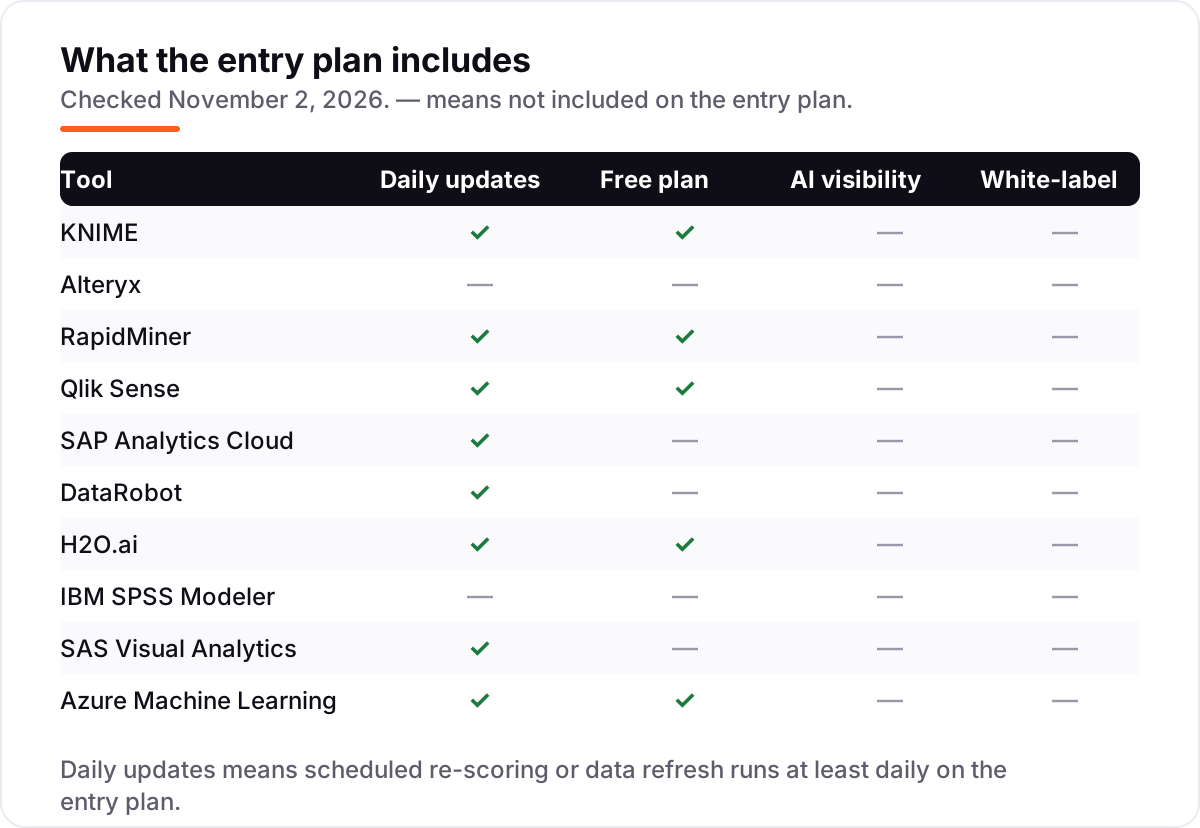
- Decide how models reach production. If scores must refresh daily, you need scheduling on the entry plan; Alteryx Starter includes no automation runs at all, so daily scoring forces the quote-only Professional tier.
- Check deployment rules. Regulated data may rule out cloud-only tools; H2O.ai and SAS run on-premises or air-gapped, while Alteryx Starter is cloud-only.
- Try before you pay. Every tool in this list has a free plan, a free trial or a free tier of some kind. Run your real data for a week and check the forecast against actuals before committing.
Before you publish pages built around your forecasts, run your titles through the free SERP snippet preview tool — it shows exactly how the title and description will look in Google.
Mistakes to avoid
- Comparing per-user prices without checking what the seat includes. Alteryx Starter at $250 a month is cloud-only and flat-file-only; the per-user price means little until you know the limits.
- Ignoring what counts toward the limit. Rows, runtime credits and compute hours all cap differently. A free edition that covers 10,000 rows will not cover a production data set.
- Buying a quote-only enterprise platform for a small-team job. DataRobot, SAS and H2O.ai are built for enterprise budgets; a small team will pay for governance it never uses.
- Trusting a directory price. SAP's $36 and the IBM SPSS Modeler Personal figure of $4,950 a year come from third-party listings, not the vendors' own pages. Always confirm with the vendor before budgeting.
- Forgetting usage billing. Azure Machine Learning has no platform fee, but an idle endpoint or a large GPU training run still bills by the second. Set a spending alert on day one.
How we chose
We checked each vendor's own pricing page on November 2, 2026 and recorded the starting price exactly as shown. Alteryx's $250 Starter price and Azure's pay-as-you-go model were verified on the vendors' own pricing pages; KNIME's €19 Pro price is shown on KNIME's own Pro page, since its pricing page now routes to sales. Qlik Sense's $300 Starter price is published on Qlik's own pricing page, and SAP Analytics Cloud's $36 figure is third-party sourced (SelectHub, TrustRadius) because SAP now quotes through sales. Six tools publish no monthly starting price and are listed as custom quote or pay as you go. Ratings come from G2 with review counts shown. We ranked the tools by fit for the most common buyer — a small team that wants forecasts without a data-science department — not by brand size. No vendor paid for a place in this list, and none of the links here are affiliate links.
What to do next
Start with the decision path above: pick the builder, count your data, and decide how models reach production. Then take the free plan or trial of your top pick and build one real forecast on your own data — a single product line or customer segment is enough to learn whether the tool fits. If the forecast beats your current guess and the reports make sense to a colleague, you have your tool. Predictions are only useful if the decisions they inform reach customers — if search visibility is part of that plan, an SEO audit shows where you stand first. If you'd rather have this set up and read for you, request a free SEO + AI visibility audit and get a ranked fix list in 2 business days.
Rather not run the tools yourself?
Tools show you the data. SerpAstra turns it into higher rankings, more map-pack calls and citations in AI answers.
Get a free SEO + AI visibility audit→Sources we checked (20)
- KNIME Pro — knime.com/knime-pro (checked November 2, 2026)
- KNIME on G2 — 4.5/5, 111 reviews (checked November 2, 2026)
- Alteryx pricing — alteryx.com/pricing (checked November 2, 2026)
- Alteryx on G2 — 4.6/5, 894 reviews (checked November 2, 2026)
- RapidMiner — rapidminer.com (no pricing page published; checked November 2, 2026)
- RapidMiner on G2 — 4.6/5, 533 reviews (checked November 2, 2026)
- Qlik Sense pricing — qlik.com/us/pricing (checked November 2, 2026)
- Qlik Sense on G2 — 4.4/5, 929 reviews (checked November 2, 2026)
- SAP Analytics Cloud pricing — SelectHub (third-party sourced, $36/user/month; checked November 2, 2026)
- SAP Analytics Cloud on G2 — 4.2/5, 910 reviews (checked November 2, 2026)
- DataRobot — datarobot.com (no pricing published; checked November 2, 2026)
- DataRobot on G2 — 4.4/5, 33 reviews (checked November 2, 2026)
- H2O.ai — h2o.ai (no commercial pricing published; checked November 2, 2026)
- H2O on G2 — 4.5/5, 24 reviews (checked November 2, 2026)
- IBM SPSS Modeler — ibm.com/products/spss-modeler (no price list published; checked November 2, 2026)
- IBM SPSS Modeler on G2 — 4.0/5, 148 reviews (checked November 2, 2026)
- SAS Visual Analytics — sas.com (no pricing published; checked November 2, 2026)
- SAS Visual Analytics on G2 — 4.4/5, 218 reviews (checked November 2, 2026)
- Azure Machine Learning pricing — azure.microsoft.com (checked November 2, 2026)
- Azure Machine Learning on G2 — 4.3/5, 90 reviews (checked November 2, 2026)
Shamim
Founder of SerpAstra
A full-stack SEO and digital marketer who spends most days on Local SEO for dental practices, AI search visibility and lead generation.
Frequently asked questions
What is the best predictive analytics tool in 2026?
KNIME is the best starting point for most buyers: the desktop workbench is free, and paid Pro plans start at €19 a month. If you want a polished commercial tool, Alteryx is the standard at $250 per user per month, while RapidMiner offers the friendliest AutoML with a free edition. Enterprises that need governance should look at DataRobot or H2O.ai.
How much do predictive analytics tools cost?
Entry prices run from free to $250 per user per month. KNIME's desktop is free and Pro starts at €19 a month; Qlik Sense Starter is $300 a month flat and SAP Analytics Cloud about $36, billed annually. Alteryx Starter is $250 per user per month. Six tools in this list publish no starting price and are quote-only or usage-priced, so expect a sales conversation.
Is there a free predictive analytics tool?
Yes, with limits. KNIME's Analytics Platform desktop is free and open source with no row cap, RapidMiner's free edition covers data sets up to 10,000 rows, and H2O-3 is free to self-host. Qlik Sense Desktop is free for personal use, and Azure offers a free account with a $200 credit. Free tiers work for learning and small projects; production scoring usually needs a paid plan.
What is the difference between predictive analytics and business intelligence?
Business intelligence describes what already happened: dashboards, reports and trends from past data. Predictive analytics forecasts what will happen next, using historical data to score future outcomes such as churn, demand or fraud. Many tools in this list do both — Qlik Sense, SAP Analytics Cloud and SAS Visual Analytics pair dashboards with forecasting — but the modeling depth differs widely.
Do I need a data scientist to use these tools?
Not for the no-code tools. KNIME, Alteryx, RapidMiner and the AutoML features in Qlik Sense and DataRobot are built for analysts without coding or statistics training. You will need data-science skills for Azure Machine Learning, H2O.ai at production scale, and the deeper parts of IBM SPSS Modeler and SAS Visual Analytics. Start with a visual tool and add specialists only when models go into production.
What should I check before paying for a predictive analytics tool?
Four things: whether the price is per user, per data volume or usage-based; what counts toward the limit, such as rows, credits or compute hours; whether scheduling and model monitoring are included on the entry plan; and whether deployment is cloud, on-premises or both. The comparison table at the top of this guide shows the starting price and free plan for each tool.
Can predictive analytics tools forecast sales?
Yes — sales forecasting is one of the most common uses. Feed the tool past sales, seasonality, promotions and pricing, and it predicts future demand by product, region or channel. The forecast is only as good as the history behind it, so clean, complete sales data matters more than the tool you pick. Start with one product line, check the forecast against actuals for a month, then expand.
Free SEO and AI visibility audit
Find out what is holding your rankings back
Send us your site. Within 2 business days you get a written audit, an AI visibility check and a short fix list ranked by impact. Free, with no contract attached.
Request my free audit→Related guides
 AI SearchBest AI SEO tools in 2026: honest picks by jobBest AI SEO tools in 2026, picked by job: Semrush and Ahrefs for research, Surfer and Clearscope for content, Otterly for AI tracking, with 2026 prices.Read guide →
 SEO & AI SearchBest SEO Audit Software for 2026: 10 Options Compared by Use Case10 best SEO audit software tools compared on price, crawl depth and AI visibility. Prices checked on vendor pricing pages, November 1, 2026.Read guide →
 SEO & AI Search7 Best AI Visibility Tools for AEO in 2026 (Free and Paid, Compared)7 best ai visibility tools for aeo compared on price, prompt limits and engines — from $29/month to custom enterprise plans. Prices checked November 1, 2026.Read guide →