
10 Best Project Management Software for Contractors in 2026, Compared
Compare the 10 best project management software for contractors on price, free plans, field tools and AI features, with every price checked November 8, 2026.
 Shamim Mia, Founder, SerpAstraLast verified November 8, 202614 min read
We compare pricing pages, documentation and public reviews. We never accept payment for rankings.

Key takeaways
- JobTread leads at $199 a month plus $20 per user, Buildertrend and Procore are custom quote only, and Contractor Foreman is the cheapest real platform at $49 a month flat.
- The billing model decides your real cost more than the headline price: JobTread and the general tools charge per user, while Buildertrend, Contractor Foreman and Procore charge one company-wide price.
- The single most important buying factor is whether the tool is built for construction: estimating, RFIs, daily logs and plan markup are missing from every general tool here.
- Three tools cost nothing to try properly: Fieldwire has a free Basic plan, monday.com and Asana have free plans for two seats, and Contractor Foreman and Smartsheet offer 30-day trials.
On this page
Quick comparison
| Tool | Best for | Starting price | Free plan |
|---|---|---|---|
| JobTread | Residential builders and remodelers who want estimating, budgets and job costing in one published-price platform | $199/mo | No (30-day guarantee) |
| Buildertrend | Custom home builders and remodelers who want one system from estimate to warranty | Custom quote | No (demo only) |
| Contractor Foreman | Small and mid-size contractors who want the widest feature list at the lowest flat price | $49/mo | No (30-day trial) |
| Procore | General contractors and owners running large, complex commercial projects | Custom quote | No (demo only) |
| Fieldwire | Field teams and superintendents who live on drawings, tasks and punch lists | Free; Pro $39/user/mo | Yes (free Basic) |
| Autodesk Forma Build | BIM-led commercial contractors already working in Revit and AutoCAD | Custom quote | No (30-day trial) |
| monday.com | Contractors who want a visual, flexible board they can shape around any workflow | $9/seat/mo (annual) | Yes (free, 2 seats) |
| ClickUp | Small contracting teams that want docs, tasks, chat and goals in one cheap workspace | $9/user/mo (annual) | Yes (free plan) |
| Asana | Contractors who need clean task coordination across office, subs and clients | $10.99/user/mo (annual) | Yes (free, 2 seats) |
| Smartsheet | Teams moving project plans off spreadsheets who want Gantt and critical path fast | $9/member/mo (annual) | No (30-day trial) |
Make one of these tools?
We re-check this list every quarter. Send a correction, request a review, or ask about a clearly labeled sponsored spot.
Request a listingThe best project management software for contractors

JobTread
Best for: Residential builders and remodelers who want estimating, budgets and job costing in one published-price platform
JobTread is built for the way a remodeling or custom-home job runs: the estimate becomes the budget, the budget becomes the schedule, and the schedule feeds the daily log. One plan covers all of it for $199 a month plus $20 per internal user, with every feature included — estimating, proposals, budgets, job costing, scheduling, time tracking, invoicing and payments. Subcontractors, vendors and customers log in through free portals, and a success manager helps with onboarding.
The trade-off is the entry price for a one-person shop: $199 a month buys the same base as a ten-person team, and there is no free trial. The 30-day money-back guarantee on monthly plans softens that, and annual billing cuts the base to $159 a month. Pick JobTread when estimating and job costing drive your decisions; pick Contractor Foreman when the budget is tighter.
What we like
- One published price covers every feature — no tier to upgrade into for estimating, scheduling or job costing
- Per-user price breaks after 10 users, and subcontractors, vendors and customers use free portal accounts
- Rated 4.9 out of 5 on G2, the highest score in this list, with support reviewers praise most
- 30-day money-back guarantee on monthly plans, plus a dedicated success manager for onboarding
Watch out for
- No free trial — you pay from day one, which is a real commitment for a small shop
- The $199 base fee is the same for a solo contractor and a 10-person team, so small crews pay a high entry price
- No built-in takeoff tool, and invoice editing is limited compared with accounting-first tools

Buildertrend
Best for: Custom home builders and remodelers who want one system from estimate to warranty
Buildertrend is the name most residential builders hear first, and it covers the job from first estimate to warranty call. Estimating and proposals, Gantt scheduling, subcontractor management, change orders, daily logs, selections, payments and warranty tracking sit in one system, with a client portal homeowners actually use. Every plan includes unlimited users and unlimited projects, so the whole crew, every sub and every client can log in without per-seat math.
The catch is the price: Buildertrend stopped publishing prices in 2025 and now quotes each company on annual construction volume, so you cannot budget before a sales call. Reviewers also report sharp renewal increases after the first term. Pick Buildertrend when you run several residential jobs at once and want one system for all of them; pick JobTread when you want a published price and tighter job costing.
What we like
- The full lifecycle in one place: estimating, scheduling, change orders, selections, payments and warranty tracking
- Unlimited users and unlimited projects on every plan, so the whole crew and every sub can log in
- Polished client portal that homeowners actually use, with selections and payment links built in
- Deep QuickBooks and Xero integrations keep the books in step with the job
Watch out for
- No published price — you must go through a sales call and a quote based on your construction volume
- Renewal increases are a common reviewer complaint, with some reporting sharp jumps after the first term
- More platform than a solo remodeler needs, and the first year takes real admin effort to set up

Contractor Foreman
Best for: Small and mid-size contractors who want the widest feature list at the lowest flat price
Contractor Foreman is the budget leader in this list because it charges one flat monthly rate per company instead of per seat. Basic costs $49 a month for one user and covers estimating, scheduling, daily logs, change orders, documents, time tracking and a client portal — more than 40 features in one login, with QuickBooks sync included. A 30-day trial opens every feature, and the company advertises a lifetime rate lock after sign-up.
The limits are the user caps: a three-person office needs Standard at $105 a month, and five users need Plus at $166. Basic also bills annually only, with no month-to-month option. Reviewers praise the value and the support but report disruptive updates mid-session. Pick Contractor Foreman when the budget is fixed and the feature list matters more than polish; pick JobTread when job costing is the priority.
What we like
- Flat per-company pricing from $49 a month — no per-seat fees until the user cap on your tier
- More than 40 features in one login: estimating, Gantt scheduling, RFIs, timecards with GPS and QuickBooks sync
- Lifetime rate lock advertised after sign-up, so the price you join at is the price you keep
- 30-day free trial with full feature access and a 100-day money-back guarantee on annual Plus and higher
Watch out for
- Basic covers one user — a three-person office needs Standard at $105 a month
- No monthly billing on Basic; annual payment is the only option at the entry tier
- Reviewers report disruptive mid-session updates and inconsistent support quality

Procore
Best for: General contractors and owners running large, complex commercial projects
Procore is the deepest construction platform in this list, built for general contractors and owners running large commercial work. Project management, cost management, RFIs, submittals, daily logs, drawings, BIM, quality and safety tools share one system, and bundled packages added in February 2026 cover project execution, cost and resource management. Most plans charge no per-seat fee, so the whole project team can work in it.
The catch is cost and complexity: there is no published price and no free trial, so budgeting starts with a sales conversation about your construction volume. Reviewers call the setup long and some features overwhelming at first. Pick Procore when you run complex, multi-team commercial projects; pick Buildertrend or JobTread when the work is residential and the budget needs a number before the call.
What we like
- The deepest construction platform here: project, cost, quality, safety, BIM and workforce tools in one system
- No per-seat fees on most plans — unlimited users, so the whole project team can work in it
- 4.6 out of 5 on G2 across more than 4,600 reviews, the largest review base in this list
- Bundled packages added in February 2026 cover project execution, cost and resource management
Watch out for
- No published price and no free trial — budgeting starts with a sales conversation
- Steep learning curve: reviewers call the setup long and some features overwhelming at first
- Overkill and overpriced for small residential jobs — the platform is built for scale

Fieldwire
Best for: Field teams and superintendents who live on drawings, tasks and punch lists
Fieldwire is the field-first tool in this list: plans, tasks, photos and punch lists on every phone on the jobsite. The free Basic plan covers 5 users, 3 projects and 100 sheets, enough for a small crew to run real jobs without paying. Pro costs $39 a user a month on annual billing and adds reports and exports, sheet compare and project templates, with offline access on paid plans.
The limits are scope: reports and exports need Pro, and RFIs, submittals, change orders and budgets wait for Business Plus at $89 a user a month. There is no estimating or job costing at any tier, so Fieldwire pairs with another tool rather than replacing one. Pick Fieldwire when the crew works from drawings all day; pick JobTread or Contractor Foreman when the office side needs estimating and budgets too.
What we like
- The only genuinely free plan here that a small crew can run real jobs on: 5 users, 3 projects, 100 sheets
- Tasks, photos and punch lists pinned to plan locations, with offline access on paid plans
- Fastest to adopt in this list — crews learn the mobile app in a day, not a month
- Reports, sheet compare and project templates start on Pro at $39 a user a month
Watch out for
- Reports and exports need Pro — the free plan is for viewing plans and tracking tasks only
- RFIs, submittals, change orders and budgets wait for Business Plus at $89 a user a month
- No estimating or job costing, so it pairs with another tool rather than replacing one

Autodesk Forma Build
Best for: BIM-led commercial contractors already working in Revit and AutoCAD
Autodesk Forma Build is the BIM-led pick for commercial contractors already working in Revit and AutoCAD. Drawings, models, RFIs, cost data and document control share one hub, so the office and the field see the same model and the same revisions. Modules such as Takeoff and Estimate bolt on when the job needs them, and its G2 rating of 4.4 covers the whole Autodesk Forma platform, not Build alone.
The catch is the price: Autodesk publishes no static list price, and the per-user figure appears only inside the online buying flow, so budgeting needs a quote. Reviewers also call the setup rigid and everyday tasks click-heavy for smaller teams. Pick Forma Build when BIM coordination is the core of your work; pick Procore when you want the deeper all-round platform, or Fieldwire when the field app matters most.
What we like
- BIM coordination, drawings, RFIs and cost data in one hub, with Revit and Navisworks built in
- Document control and field execution share one source of truth, so the office and the site see the same model
- 4.4 out of 5 on G2 across more than 5,300 reviews — the second-largest review base here
- Modules such as Takeoff and Estimate bolt on when the job needs them
Watch out for
- No static list price — the figure appears only inside the online buying flow, so budgeting needs a quote
- Steep learning curve and rigid setup; reviewers call everyday tasks click-heavy for smaller teams
- Modules are priced separately, so the headline per-user figure is not the whole bill

monday.com
Best for: Contractors who want a visual, flexible board they can shape around any workflow
monday.com is the most visual tool in this list: boards, timelines and Gantt views a whole crew reads at a glance, with automations and integrations from Standard at $12 a seat a month. Basic costs $9 a seat on annual billing and includes 1,000 AI credits a month, and the free plan covers two seats, so a contractor and a project manager can try it on a real job.
The catch is that nothing here is built for construction: estimating, RFIs, daily logs and plan markup need custom boards or add-ons, and you build those yourself. Paid plans also carry a three-seat minimum and sell seats in buckets, so a four-person team buys five. Pick monday.com when you want one flexible system for the office and the field; pick a construction tool when the job itself needs estimating and RFIs.
What we like
- The most visual tool here: boards, timelines and Gantt views that a whole crew reads at a glance
- 1,000 AI credits a month included on Basic, with automations and integrations from Standard at $12 a seat
- 4.7 out of 5 on G2 across more than 17,000 reviews, the highest score among the general tools
- Free plan covers two seats, so a contractor and a project manager can try it on a real job
Watch out for
- No construction features out of the box — estimating, RFIs and daily logs need custom boards or add-ons
- Three-seat minimum on paid plans, and seats are sold in buckets, so a four-person team buys five
- Time tracking waits for Pro at $19 a seat, and costs climb with every seat added

ClickUp
Best for: Small contracting teams that want docs, tasks, chat and goals in one cheap workspace
ClickUp is the cheapest full-featured general tool in this list: Core costs $9 a user a month on annual billing and includes Gantt charts, custom fields, goals, docs, whiteboards, chat and time tracking in one workspace. The Free Forever plan covers unlimited tasks, so a small crew can run jobs before paying anything, and Core adds 1,000 automation actions and 1,000 AI credits per user a month.
The catch is the same as every general tool here: no estimating, no RFIs, no daily logs and no plan markup without add-ons, and the flexibility overwhelms new users — setup takes real time and the interface can feel cluttered. Upgrading also applies to every member of the workspace. Pick ClickUp when the office side needs one cheap workspace; pick monday.com when the visual boards matter more.
What we like
- The cheapest full-featured general tool here: Core is $9 a user a month with Gantt charts and custom fields
- Docs, whiteboards, goals, chat and time tracking in one workspace — no second tool for the office side
- 1,000 automation actions and 1,000 AI credits per user a month included on Core
- Free Forever plan with unlimited tasks, so a small crew can run jobs before paying anything
Watch out for
- No construction-specific features — no estimating, RFIs, daily logs or plan markup without add-ons
- The flexibility overwhelms new users: setup takes real time and the interface can feel cluttered
- Upgrading applies to every member of the workspace, so the bill jumps with headcount

Asana
Best for: Contractors who need clean task coordination across office, subs and clients
Asana is the coordination pick: clean timelines, dependencies and unlimited automations from Starter at $10.99 a user a month on annual billing, with dashboards, forms and custom fields included. Unlimited free guests mean clients and subcontractors join projects without adding to the bill, and AI Studio Basic with 50,000 credits a month per account is included on Starter.
The catch is the seat math and the missing construction features: seats between 6 and 30 are sold in groups of five, so an 11-person team pays for 15, and portfolios, goals and time tracking wait for Advanced at $24.99 a user. There is no estimating, no daily log and no plan markup. Pick Asana when coordination across office, subs and clients is the job; pick Smartsheet when the plan itself lives in a spreadsheet.
What we like
- Timeline and Gantt views, dependencies and unlimited automations from Starter at $10.99 a user
- Unlimited free guests, so clients and subcontractors join projects without adding to the bill
- AI Studio Basic with 50,000 credits a month per account included on Starter
- 4.4 out of 5 on G2 across nearly 14,000 reviews, with ease of use its most-cited strength
Watch out for
- No construction features — estimating, daily logs and plan markup need another tool
- Seats between 6 and 30 are sold in groups of five, so an 11-person team pays for 15
- Portfolios, goals and time tracking wait for Advanced at $24.99 a user a month

Smartsheet
Best for: Teams moving project plans off spreadsheets who want Gantt and critical path fast
Smartsheet is the fastest on-ramp from Excel: spreadsheet-style grids with dependencies, critical path and Gantt views, so a team that plans in spreadsheets can build a real schedule in an afternoon. Pro costs $9 a member a month on annual billing for 1 to 10 members, and unlimited free Contributors can view, comment and submit forms without a paid seat.
The catch is that the free plan closed to new sign-ups in August 2024, so the 30-day trial is the only way in free, and Pro caps at 10 members before Business at $19 a member takes over. There are no construction features either — no estimating, RFIs or daily logs without integrations. Pick Smartsheet when the schedule is the bottleneck; pick Asana when task coordination across people matters more.
What we like
- Spreadsheet-style grids with dependencies, critical path and Gantt — the fastest on-ramp from Excel
- Unlimited free Contributors can view, comment and submit forms without a paid seat
- 4.4 out of 5 on G2 across more than 22,000 reviews, the largest review base among the general tools
- 30-day trial needs no credit card, and Pro caps at 10 members, so small teams start cheap
Watch out for
- No free plan for new sign-ups since August 2024 — the trial is the only way in free
- Pro caps at 10 members, and Business at $19 a member is the next step for bigger teams
- No construction features — no estimating, RFIs or daily logs without integrations
The best project management software for contractors keeps the estimate, the schedule, the field crew and the client in one place, so a change order does not live in three different inboxes. We ranked the ten tools below by fit for the most common buyer — a contractor running several jobs at once — starting with construction-specific platforms and ending with general tools that adapt well, and every price was checked on the vendor's own pricing page on November 8, 2026.
How to choose the best project management software for contractors
- Start with construction-specific or general. JobTread, Buildertrend, Contractor Foreman, Procore, Fieldwire and Autodesk Forma Build are made for construction; monday.com, ClickUp, Asana and Smartsheet are general tools you shape yourself. The construction tools cost more but include estimating, RFIs and daily logs.
- Count heads the way the vendor does. JobTread charges $20 per internal user, the general tools charge $9–$13 per seat, and Buildertrend, Contractor Foreman and Procore charge one company-wide price. A five-person team pays very different amounts on each model.
- Check what the free plan actually covers. Fieldwire Basic runs real jobs for 5 users, while monday.com and Asana free plans cover only two seats. A free plan that fits your whole crew is worth more than a free trial.
- Ask where the estimate lives. If the tool has no estimating, you will pay for a second tool or keep a spreadsheet. JobTread, Buildertrend and Contractor Foreman include estimating; the four general tools do not.
- Test it on the jobsite, not in the office. The crew will use the mobile app in dust and gloves, so run the trial on a live job and check offline access, photo uploads and punch lists before you commit.
Project management is one system in your stack, not the whole stack. If the business also needs to be found online, our guide to marketing software for contractors covers the visibility side. And before you publish new pages for the services you sell, run your titles through the free SERP snippet preview tool — it shows exactly how the title and description will look in Google.
Whatever you shortlist, try it with real data before you pay. The free plans and trials in this list are long enough to run one genuine job — your estimate, your schedule, your crew — and that job tells you more than any review can. Check two things in the trial: that the field crew actually opens the app every day, and that the office can see job costs without asking anyone. Every tool here lets you cancel a monthly plan, so there is no reason to buy a year before the crew has tried it.
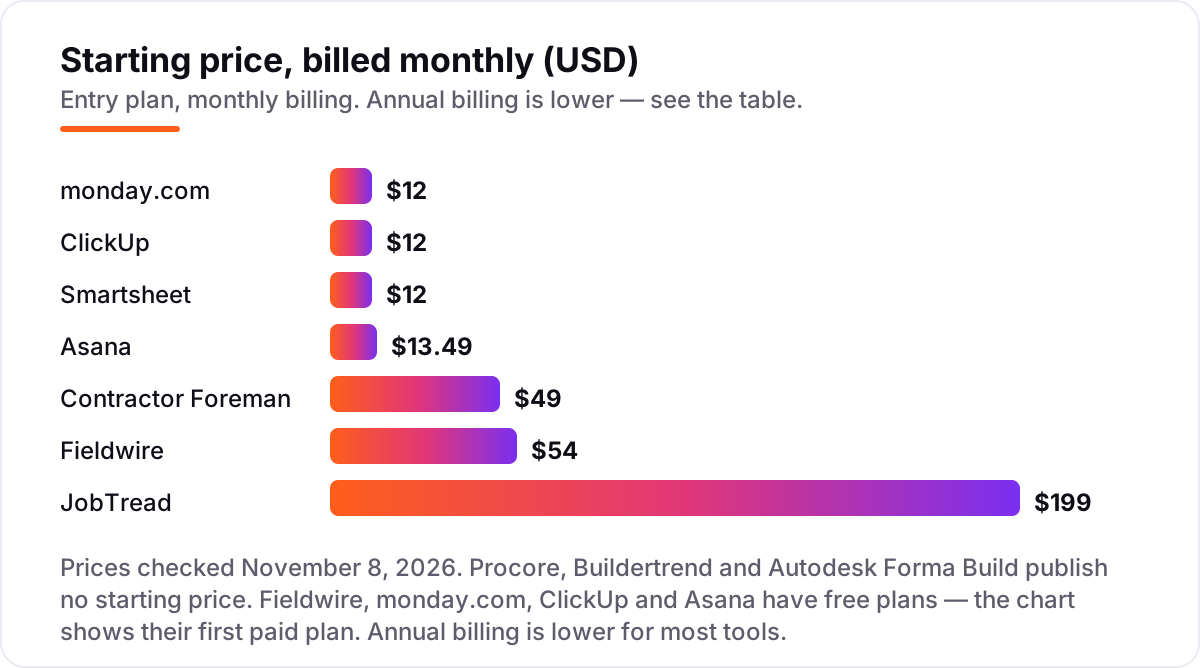
Project management software for contractors pricing: what you will actually pay
Take a five-person team: one project manager and four people in the field and office. On list prices, the subscription costs $0 on Fieldwire Basic, $45 a month on monday.com Basic or ClickUp Core or Smartsheet Pro billed annually, $54.95 on Asana Starter billed annually, $166 on Contractor Foreman Plus, and $279 on JobTread billed monthly. Two of those numbers need adjusting before they are real: monday.com sells seats in buckets, so four people still buy five seats, and Asana Starter at $10.99 a seat is the annual figure — billed monthly it is $13.49 a seat, or $67.45 a month for five.
Over a year, that is $0 on Fieldwire Basic, $540 on monday.com, ClickUp or Smartsheet billed annually, $659.40 on Asana Starter billed annually, $1,992 on Contractor Foreman Plus, and $3,348 on JobTread billed monthly, or $2,676 billed annually. The same five people cost $0 at the cheap end and $3,348 at the dear end — a gap that comes entirely from the billing model and what the tool includes, not from the size of the team. Fieldwire Basic is free, but it has no reports, so most teams pay for Pro at $195 a month for five users billed annually.
Three costs sit outside every number above. First, the quote-only tools — Procore, Buildertrend and Autodesk Forma Build — publish no price at all, so their cost is a sales conversation, not a number in this list. Second, onboarding: Procore and Autodesk Forma Build both need real setup time, and Buildertrend's first year takes admin effort. Third, the second tool: the four general tools have no estimating, so budget for estimating software alongside them — see our guide to the best estimating software for contractors for what that costs.
Annual billing cuts the bill on the tools that publish it: JobTread drops from $3,348 to $2,676 a year for five users, Fieldwire Pro from $3,240 to $2,340, Asana Starter from $809.40 to $659.40, and ClickUp Core from $720 to $540. Contractor Foreman Basic bills annually only, so the $49 figure is already the annual rate. One more cost to check before you commit: subcontractors and clients are free on JobTread and Fieldwire, but on the per-seat general tools every person who needs a paid seat adds $9–$13 a month.
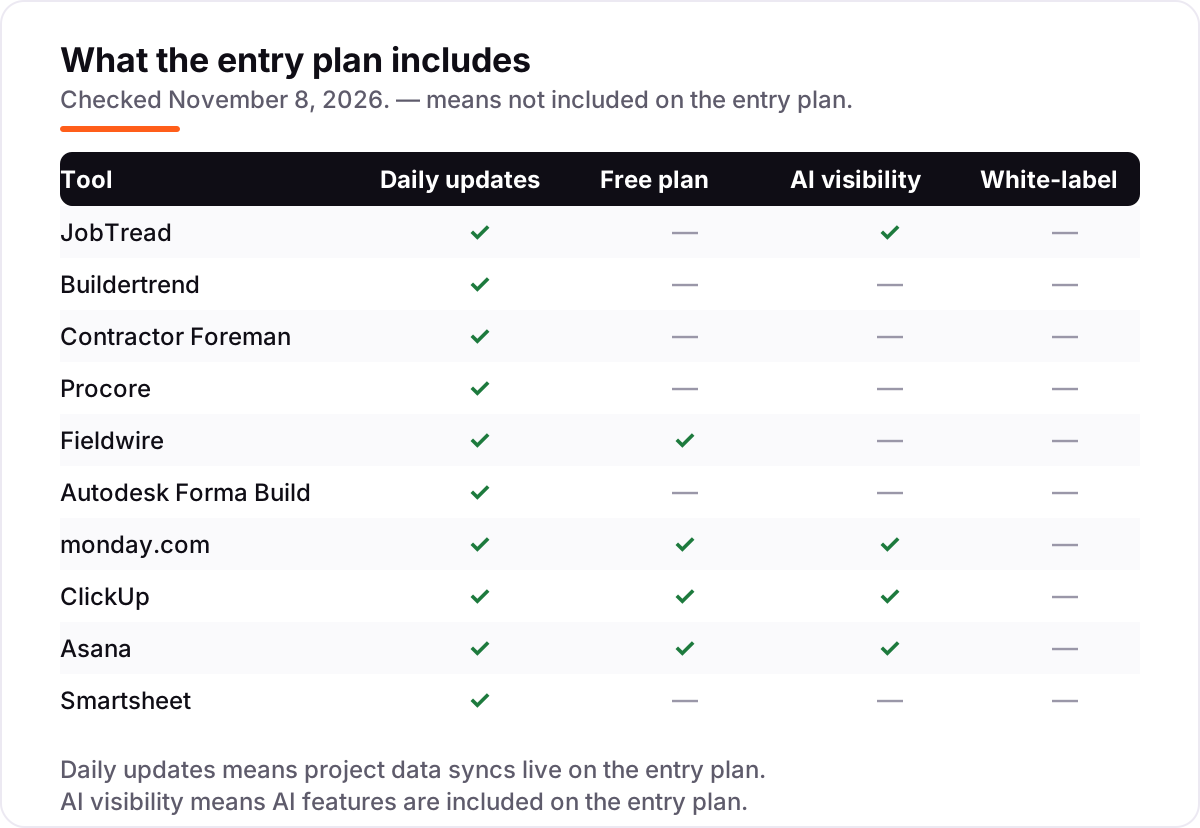
Know the difference: construction-specific tools vs general project tools
The confusion in this category is between a tool built for construction and a tool built for any team. A construction-specific tool — JobTread, Buildertrend, Contractor Foreman, Procore, Fieldwire or Autodesk Forma Build — speaks the language of the job: estimates, change orders, RFIs, submittals, daily logs, punch lists and plan markup are built in, not bolted on. A general tool — monday.com, ClickUp, Asana or Smartsheet — gives you boards, tasks and timelines, and you build the construction workflow yourself with custom fields and templates.
The practical difference is who does the building. On a construction tool, the vendor has already decided how an RFI flows from the field to the architect and back; on a general tool, you design that flow, and you maintain it when the team grows. That is why the general tools are cheaper per seat and the construction tools cost more: you are paying for the workflow, not just the software. A contractor who buys monday.com to replace JobTread will spend the saving on setup time within the first month.
There is a second, quieter difference: who the free plan serves. Fieldwire Basic is the only free plan in this list built for a crew — 5 users, 3 projects, 100 sheets, with real plan viewing and task tracking. The general tools' free plans serve two people in an office. So a small crew can genuinely run jobs on Fieldwire for $0, while a general tool's free plan is a trial with a different name. Match the free plan to the team that will use it, not to the price tag.
Quick comparison: tool type by need
| Buyer | Best pick | Why |
|---|---|---|
| Most builders and remodelers | JobTread | Estimating, budgets and job costing in one plan, $199/month plus $20 per user |
| Residential builders, full lifecycle | Buildertrend | Estimate to warranty in one system, custom quote, unlimited users |
| Small shop on a fixed budget | Contractor Foreman | Widest feature list at the lowest flat price, $49/month |
| Large commercial projects | Procore | Deepest platform here, custom quote, no per-seat fees |
| Field crews on drawings all day | Fieldwire | Free Basic plan, Pro is $39/user/month billed annually |
| Cheapest flexible general tool | ClickUp | Core is $9/user/month billed annually, free plan included |
Mistakes to avoid
- Budgeting on the promo price. The annual-billing figures in this list are the ones that last. Monthly billing costs 20–33% more on the general tools, so compare tools on the billing term you will actually use.
- Buying a general tool and finding the estimate costs extra. monday.com, ClickUp, Asana and Smartsheet have no estimating at all. If the bid lives in a spreadsheet today, it will still live there after you buy — budget for the estimating tool too.
- Ignoring the seat math. A per-seat price looks cheap until you count heads: Asana sells seats in groups of five, monday.com has a three-seat minimum, and ClickUp charges for every member of the workspace.
- Paying for a quote-only platform before you know the number. Procore, Buildertrend and Autodesk Forma Build publish no price. Get the written quote before you shortlist them, not after you have already decided.
- Forgetting the field test. A tool the crew will not open on site is money wasted, however good it looks in the office. Run the trial on a live job and check offline access and photo uploads before you commit to a year.
How we chose
We checked each vendor's own pricing page on November 8, 2026 and recorded the starting price exactly as shown, including the annual-billing figure where the page lists one, and we ranked the tools by fit for the most common buyer — a contractor running several jobs at once — not by brand size. Procore, Buildertrend and Autodesk Forma Build publish no starting price, so they are listed as custom quote; third-party trackers report per-user figures for Autodesk Forma Build, but we do not assert them because the vendor publishes no static list price. Ratings come from G2, checked November 8, 2026; the Autodesk rating covers the whole Autodesk Forma platform, not Build alone. JobTread's $199 base price is the vendor's published figure, confirmed by October 2026 reads of its pricing page and by a fresh read today that confirms the per-user tiers. No vendor paid for a place in this list, and none of the links here are affiliate links.
What to do next
Start with the free plan or trial of your top pick and run one real job through it. Check that the estimate matches the budget, the schedule matches the site, and the crew actually opens the app before you commit to a year. If the jobs are sorted but new customers are not finding you, our local SEO service handles the visibility side — or compare providers in our guide to general contractor software. Once your tools are in place, find out what's holding your rankings back.
Your stack only works if people find you
SerpAstra fixes what keeps your site off page one and makes it easy for AI assistants to recommend.
Get a free audit→Sources we checked (20)
- JobTread pricing — jobtread.com/pricing (checked November 8, 2026)
- Buildertrend pricing — buildertrend.com/pricing (checked November 8, 2026)
- Contractor Foreman pricing — contractorforeman.com/pricing (checked November 8, 2026)
- Procore pricing — procore.com/pricing (checked November 8, 2026)
- Fieldwire pricing — fieldwire.com/pricing (checked November 8, 2026)
- Autodesk Forma Build pricing — construction.autodesk.com/pricing (checked November 8, 2026)
- monday.com pricing — monday.com/pricing (checked November 8, 2026)
- ClickUp pricing — clickup.com/pricing (checked November 8, 2026)
- Asana pricing — asana.com/pricing (checked November 8, 2026)
- Smartsheet pricing — smartsheet.com/pricing (checked November 8, 2026)
- JobTread reviews — g2.com/products/jobtread/reviews (checked November 8, 2026)
- Buildertrend reviews — g2.com/products/buildertrend/reviews (checked November 8, 2026)
- Contractor Foreman reviews — g2.com/products/contractor-foreman/reviews (checked November 8, 2026)
- Procore reviews — g2.com/products/procore/reviews (checked November 8, 2026)
- Fieldwire reviews — g2.com/products/fieldwire-by-hilti/reviews (checked November 8, 2026)
- Autodesk Forma Build reviews — g2.com/products/autodesk-construction-cloud/reviews (checked November 8, 2026)
- monday.com reviews — g2.com/products/monday-com/reviews (checked November 8, 2026)
- ClickUp reviews — g2.com/products/clickup/reviews (checked November 8, 2026)
- Asana reviews — g2.com/products/asana/reviews (checked November 8, 2026)
- Smartsheet reviews — g2.com/products/smartsheet/reviews (checked November 8, 2026)
Shamim
Founder of SerpAstra
A full-stack SEO and digital marketer who spends most days on Local SEO for dental practices, AI search visibility and lead generation.
Frequently asked questions
What is the best project management software for contractors?
JobTread is the best fit for most contractors: estimating, budgets, job costing and scheduling in one platform for $199 a month plus $20 per user. Buildertrend suits residential builders who want the full lifecycle, and Contractor Foreman suits small shops on a fixed budget at $49 a month.
How much does project management software for contractors cost?
Entry prices run from $0 to $199 a month, plus custom quotes at the top end. Fieldwire is free to start, monday.com and ClickUp start at $9 a seat a month billed annually, Contractor Foreman is $49 a month flat, and JobTread is $199 a month. Procore, Buildertrend and Autodesk Forma Build quote each company individually.
Is there free project management software for contractors?
Yes, with limits. Fieldwire Basic is free for 5 users and 3 projects, and monday.com and Asana both have free plans for two seats. ClickUp has a Free Forever plan. None of the construction-specific tools except Fieldwire has a free plan — the rest offer trials or demos.
What is the difference between Procore and Buildertrend?
Procore is built for large commercial work, with deep cost, quality, safety and BIM tools and no per-seat fees, priced by quote on construction volume. Buildertrend is built for residential builders and remodelers, covering estimating through warranty in one system, also priced by quote. Both publish no price.
Can general tools like monday.com or Asana manage construction projects?
They can manage the tasks, timelines and client coordination, but not the construction work itself. Neither has estimating, RFIs, daily logs or plan markup built in, so you build those workflows yourself or pair the tool with a construction-specific app like Fieldwire or JobTread.
Do I still need estimating software if I buy project management software?
Usually not with a construction-specific tool: JobTread, Buildertrend and Contractor Foreman all include estimating. With a general tool like monday.com, Asana or Smartsheet, you do — they have no estimating at all, so you need a separate estimating tool or spreadsheet alongside them.
Free SEO and AI visibility audit
Find out what is holding your rankings back
Send us your site. Within 2 business days you get a written audit, an AI visibility check and a short fix list ranked by impact. Free, with no contract attached.
Request my free audit→Related guides
 Local Business & Vertical Software12 Best General Contractor Software in 2026, ComparedCompare the 12 best general contractor software tools on price, free plans, estimating and field features, with every price checked November 7, 2026.Read guide →
 Local Business & Vertical Software8 Best Estimating Software for Contractors in 2026, ComparedCompare the 8 best estimating software for contractors on price, takeoff, cost databases and free trials, with every price checked November 7, 2026.Read guide →
 Local Business & Vertical Software10 Best Contractor Management Software in 2026, ComparedCompare the 10 best contractor management software platforms on price, compliance and global payments, with every price checked November 7, 2026.Read guide →