
Best Proofreading Software for 2026: 10 Options Compared by Use Case
Compare the 10 best proofreading software tools on price, free plans, grammar depth and plagiarism checks, with every price checked November 8, 2026.
 Shamim Mia, Founder, SerpAstraLast verified November 8, 202614 min read
We compare pricing pages, documentation and public reviews. We never accept payment for rankings.

Key takeaways
- Grammarly Pro is the best fit for most writers at $30/month ($12/month billed annually); ProWritingAid follows at $30/month ($10/month annually) for deep editing, and Wordtune Advanced is the cheapest paid start at $6.99/month.
- Nine of the ten tools have genuinely free plans — every tool here except WhiteSmoke — but free word and feature caps decide when you pay.
- The single most important buying factor is the cap that forces your next upgrade: word limits, document-length limits and per-check character caps decide what you actually pay, not the headline price.
- Annual billing cuts most subscriptions by 40–60%: Grammarly drops from $360 to $144 a year, and ProWritingAid from $360 to $120.
On this page
Quick comparison
| Tool | Best for | Starting price | Free plan |
|---|---|---|---|
| Grammarly | Professionals and small teams who write every day in email, Docs and Word and want one checker everywhere | $30/mo | Yes (free plan) |
| ProWritingAid | Authors and long-form writers who want deep style reports and a lifetime licence option | $30/mo | Yes (free plan) |
| LanguageTool | Writers working in more than one language who need strong checks in 30+ languages | $24.90/mo | Yes (free plan) |
| QuillBot | Students and researchers who paraphrase and proofread academic text every day | $19.95/mo | Yes (free plan) |
| Hemingway Editor | Bloggers and editors who want tighter, more readable sentences and a grade-level score | $10/mo | Yes (free web editor) |
| Wordtune | Professionals who rewrite emails and reports for tone and clarity several times a day | $6.99/mo | Yes (free plan) |
| Trinka | Researchers and academics polishing papers for journal submission | $20/mo | Yes (free plan) |
| Ginger | Non-native English writers who want sentence-level corrections plus translation | $13/mo | Yes (free plan) |
| WhiteSmoke | Windows writers who want a desktop checker with a translator and dictionary built in | $9.95/mo | No (free trial) |
| PaperRater | Students and teachers who want free grammar, plagiarism and essay-scoring checks | $14.95/mo | Yes (free plan) |
Make one of these tools?
We re-check this list every quarter. Send a correction, request a review, or ask about a clearly labeled sponsored spot.
Request a listingThe best proofreading software

Grammarly
Best for: Professionals and small teams who write every day in email, Docs and Word and want one checker everywhere
Grammarly is the default proofreading pick for a reason: it checks grammar, spelling and punctuation as you type in the browser, Google Docs, Word and email, and the Pro plan adds full-sentence rewrites, tone adjustment and a plagiarism checker. Pro costs $30 a month billed monthly or $12 a month billed annually, and the free plan covers basic corrections with 100 AI prompts a month.
The trade-off is the price gap between billing terms: monthly billing costs $360 a year against $144 on the annual plan, so occasional users pay more than double for flexibility. The free plan also caps advanced suggestions, and style guides and brand tones sit on Pro. Buy Grammarly when you write every day across many apps and want one checker everywhere; buy LanguageTool or ProWritingAid when a single language or long documents matter more.
What we like
- Checks grammar, spelling and tone in real time across the browser, Google Docs, Word and email
- Pro adds full-sentence rewrites, tone adjustment, plagiarism detection and 2,000 AI prompts a month
- Free plan covers basic corrections, so you can test it on real work before paying
- Rated 4.7 out of 5 on G2 from more than 14,000 reviews, the highest-rated tool here
Watch out for
- Monthly billing costs $360 a year against $144 on the annual plan — the steepest flexibility penalty here
- Style guides and brand tones need Pro, and team controls need the Business tier
- No lifetime licence and no offline desktop app

ProWritingAid
Best for: Authors and long-form writers who want deep style reports and a lifetime licence option
ProWritingAid is built for writers who edit whole documents, not single sentences: its 25+ reports track style, sticky sentences, overused words, pacing and dialogue, alongside grammar and spelling. Premium costs $30 a month billed monthly or $10 a month billed annually, and a $399 lifetime licence covers the same features forever, which no other tool here offers.
The catch is the add-on economy. Manuscript-level AI analysis — Manuscript Analysis, Plot Analysis, Virtual Beta Reader — is not in any subscription and runs on Story Credits from $25 each, so a full manuscript analysis can cost more than a year of Premium. Buy ProWritingAid when you write books or long reports and want the deepest edit; buy Grammarly when you want the fastest check inside every app.
What we like
- 25+ whole-document reports cover style, sticky sentences, overused words and pacing, not just grammar
- Premium costs $120 a year, or $399 once for a lifetime licence — the only lifetime option here
- Integrates with Word, Scrivener, Google Docs and Chrome, so long documents stay in one place
- Free plan includes the full report set on 500-word passages
Watch out for
- Manuscript-level AI analysis (Manuscript Analysis, Virtual Beta Reader) costs extra Story Credits, from $25 each
- Monthly billing at $30 costs $360 a year, three times the annual price
- No mobile app, and the interface feels heavier than Grammarly for quick email checks

LanguageTool
Best for: Writers working in more than one language who need strong checks in 30+ languages
LanguageTool is the strongest proofreading choice when English is not the only language you write in: it checks grammar, spelling and style in more than 30 languages, on top of an open-source engine running since 2003. Premium costs $24.90 a month billed monthly or $5.83 a month billed annually, and the free plan works with no account and no card on texts up to 2,000 characters.
The monthly price is the thing to watch: $24.90 a month is the second-highest monthly figure here, while the annual plan costs $69.90 a year — less than three months at the monthly rate. European visitors see euro prices instead (€19.90 a month, €59.89 a year). Buy LanguageTool when you write in several languages or value the open-source core; buy Grammarly when you write only in English and want the widest app coverage.
What we like
- Checks grammar and style in more than 30 languages, the widest language coverage here
- Free plan works with no account and no card, with core checks on short texts
- Premium raises the limit to 150,000 characters per check and adds unlimited AI paraphrasing
- Open-source core engine, with a personal style guide and dictionary on Premium
Watch out for
- Monthly billing is $24.90, the second-highest monthly price here, against $5.83 on the annual plan
- EU visitors see euro prices (€19.90 a month, €59.89 a year), so the checkout total varies by region
- Smaller G2 review base (45 reviews) than the big US tools

QuillBot
Best for: Students and researchers who paraphrase and proofread academic text every day
QuillBot is the proofreading tool for writers who rewrite as much as they correct: nine paraphrasing modes rework sentences for fluency, formality and tone, and Premium adds a grammar checker, a plagiarism checker and a summarizer. Premium costs $19.95 a month billed monthly or $8.33 a month billed annually, and the free plan paraphrases up to 100 words at a time in two modes.
The limits to watch are the free cap and the moving price. The 100-word free cap makes long passages a Premium job, and the site shows different annual prices to different visitors, including first-year offers below the standard $99.95. Buy QuillBot when paraphrasing and plagiarism checks are daily work; buy Grammarly or LanguageTool when straight grammar correction is the priority.
What we like
- Nine paraphrasing modes plus custom modes, with unlimited paraphrasing on Premium
- Plagiarism checker covers up to 25,000 words a month on Premium, and the summarizer handles 6,000 words
- Premium at $99.95 a year undercuts Grammarly Pro by $44 a year
- Free plan covers basic paraphrasing in two modes with no card required
Watch out for
- Free paraphrasing caps at 100 words at a time, so long passages need Premium
- The site shows different annual prices to different visitors, including first-year offers, so confirm at checkout
- Grammar checking is weaker than its paraphrasing; pair it with a dedicated checker for final passes

Hemingway Editor
Best for: Bloggers and editors who want tighter, more readable sentences and a grade-level score
Hemingway Editor does a different job from the grammar checkers: it scores readability, highlights long sentences, passive voice and weak adverbs, and gives every draft a grade level. The web editor is free with no account, the Editor 3 desktop app is a one-time $19.99 purchase, and Editor Plus adds AI sentence rewrites from $10 a month billed monthly or $8.33 a month billed annually.
Do not buy Hemingway as your only checker. The desktop app carries no AI features, and even Plus is a style tool first — it will not catch every grammar error the way Grammarly or LanguageTool do. Buy Hemingway when your drafts are correct but wordy, and pair it with a grammar checker for the final pass; skip it if you need one tool that does everything.
What we like
- Free web editor needs no account and gives an instant readability grade and colour-coded highlights
- Desktop app is a one-time $19.99 purchase with offline editing and PDF export
- Plus adds AI sentence rewrites from $8.33 a month billed annually, with a 14-day trial and no card required
- The grade-level score makes it easy to check whether a draft suits its audience
Watch out for
- The desktop app has no AI features — AI rewriting lives only in the Plus subscription
- It flags style and readability, not grammar: it is not a full grammar checker on its own
- No browser extension, so it cannot check text inside Gmail or Google Docs

Wordtune
Best for: Professionals who rewrite emails and reports for tone and clarity several times a day
Wordtune is a sentence surgeon: paste a sentence and it offers rewrites for tone, formality and length, which suits professionals who send the same email five times a day. Advanced costs $6.99 a month billed monthly or $4.89 a month billed annually, the cheapest paid start in this list, and the free Basic plan gives 10 rewrites a day.
The warning is about the product's future: AI21 Labs stopped active development of Wordtune in 2025, so the tool works today but new features are unlikely. The iOS app also charges $24.99 a month for the same plan that costs $6.99 on the web. Buy Wordtune on the website when rewriting is the daily job; skip it if you need a tool still under active development.
What we like
- Advanced costs $6.99 a month, the cheapest paid start in this list
- Rewrites whole sentences for tone, formality and length, not just single words
- Free Basic plan gives 10 rewrites a day, enough to test it on real emails
- Rated 4.6 out of 5 on G2 from 200 reviews, the second-highest score here
Watch out for
- AI21 Labs stopped active development of Wordtune in 2025, so new features are unlikely
- The iOS app charges $24.99 a month — buy on the web, where Advanced is $6.99
- Advanced caps at 30 rewrites a day; unlimited rewrites need the Unlimited plan at $9.99 a month

Trinka
Best for: Researchers and academics polishing papers for journal submission
Trinka is the proofreading tool built for papers, not posts: it checks academic and technical writing for grammar, style and consistency, then adds publication-readiness checks and a journal finder for submission. Premium costs $20 a month billed monthly or $6.67 a month billed annually, and the free Basic plan covers 5,000 words a month.
The rating is the caution: Trinka scores 3.9 out of 5 on G2 from 17 reviews, the lowest here, with some reviewers reporting missed errors in long paragraphs. Its formal academic tone also suits manuscripts better than casual copy. Buy Trinka when a paper is headed for a journal; buy Grammarly or QuillBot when the writing is marketing, email or general business.
What we like
- Built for academic and technical writing, with publication-readiness checks and a journal finder
- Premium at $80 a year is cheaper than Grammarly Pro and ProWritingAid on annual billing
- Plagiarism and AI-detection checks run on the same platform, with credits included
- Free Basic plan covers 5,000 words a month with advanced grammar checks
Watch out for
- Lowest G2 score here at 3.9 out of 5 from 17 reviews, with some reviewers reporting missed errors in long paragraphs
- Formal academic tone is the default — it suits papers better than casual marketing copy
- Premium Plus and data-privacy plans add cost quickly for heavy plagiarism-check users

Ginger
Best for: Non-native English writers who want sentence-level corrections plus translation
Ginger corrects whole sentences in context and translates into more than 40 languages, which makes it the natural pick for non-native English writers. Premium costs $13 a month billed monthly or $7.50 a month billed annually, and a personal trainer mode turns your own mistakes into lessons. It works in the browser, in Word and on mobile.
The price needs a check before you pay: the vendor page lists Premium at $13 a month while G2's vendor-supplied listing says $13.99, and the two-year plan drops the rate further to $6 a month. There is also no plagiarism checker at any tier. Buy Ginger when translation and sentence-level correction matter most; buy LanguageTool when you need more languages checked, or QuillBot when originality checks matter.
What we like
- Corrects whole sentences in context, not just single words, and translates into more than 40 languages
- Premium at $7.50 a month billed annually is one of the cheapest annual plans here
- Personal trainer mode teaches from your own mistakes, which suits non-native writers
- Works in the browser, Word and mobile apps
Watch out for
- Monthly billing is $13 against $7.50 on the annual plan, and G2 lists $13.99 — confirm the price at checkout
- Free plan limits rephrasing, and there is no plagiarism checker at any tier
- Reviewers report it sometimes misunderstands context in complex sentences

WhiteSmoke
Best for: Windows writers who want a desktop checker with a translator and dictionary built in
WhiteSmoke is the old-school desktop checker in this list: one Windows and web tool that checks grammar, spelling, style and punctuation, with a translator and dictionary built in. Essential costs $9.95 a month billed monthly or $79.95 a year, and a three-year plan cuts the rate to about $4.44 a month.
The cautions are the missing free plan and the thin evidence. There is no free tier, only a trial, and the vendor website no longer shows a clear pricing page — the price here comes from directory listings. The 4.6 G2 rating also rests on 10 reviews. Buy WhiteSmoke when you want a desktop tool with translation built in; buy Grammarly or LanguageTool when you want a free plan and a tool still adding features.
What we like
- Essential at $9.95 a month covers grammar, spelling, style and punctuation in one desktop tool
- Three-year plan cuts the price to about $4.44 a month, the longest commitment discount here
- Includes a translator and a dictionary alongside the checker
- Rated 4.6 out of 5 on G2, though from only 10 reviews
Watch out for
- No free plan — only a free trial — and the website no longer shows a clear pricing page
- The interface and feature set have changed little in years, and there is no AI rewriting
- Smallest review base here, so the 4.6 rating rests on 10 reviews

PaperRater
Best for: Students and teachers who want free grammar, plagiarism and essay-scoring checks
PaperRater is the student pick: a free, ad-supported checker that grades essays, checks grammar and spelling, and scans for plagiarism, all by pasting text into the site. Premium costs $14.95 a month billed monthly or $95.40 a year, and raises the limits to 20 pages per submission, 200 submissions a month and 25 plagiarism checks.
The free plan's caps are the limit: 5 pages per submission, 50 submissions and 10 plagiarism checks a month, and there is no browser extension or Word add-in, so every check means a trip to the website. Accuracy reviews are also mixed. Buy PaperRater when free essay scoring and plagiarism checks are the job; buy QuillBot or Trinka when the work is professional and needs an extension that follows you.
What we like
- Free plan covers grammar, spelling and plagiarism checks with no card required
- Automated scoring grades essays, which suits students and teachers
- Premium raises the limit to 20 pages per submission and 200 submissions a month
- Premium at $95.40 a year is cheaper than Grammarly Pro and ProWritingAid annually
Watch out for
- Free plan caps at 5 pages, 50 submissions and 10 plagiarism checks a month
- No browser extension or Word add-in — checks run by pasting text on the site
- Accuracy reviews are mixed, and there is no style guide or team plan
The best proofreading software catches the errors your eyes skip: wrong words, tangled sentences, inconsistent tone and the typos that survive three read-throughs. We ranked the ten tools below by fit for the most common buyer — a writer or small team that proofreads every day — starting with the all-rounders and ending with the specialists, and every price was checked on November 8, 2026.
How to choose the best proofreading software
- Check the free plan's real limit first. Grammarly's free plan covers basic corrections, ProWritingAid caps free checks at 500 words, and LanguageTool caps free checks at 2,000 characters — the cap you hit first is your real starting price.
- Match the tool to the document. Long-form authors need ProWritingAid's reports, researchers need Trinka's academic checks, and multilingual writers need LanguageTool's 30+ languages.
- Decide whether you need plagiarism checks. QuillBot, Trinka and PaperRater include them; Grammarly Pro covers them too, while Hemingway, Ginger and WhiteSmoke do not check originality at all.
- Count the billing gap. Monthly billing costs $360 a year for Grammarly and ProWritingAid against $144 and $120 annually — the annual plan is the real price for daily users.
- Try it on your own text. Every tool here has a free plan or trial, so run one real document through it before paying and check whether it catches the errors you actually make.
Proofreading is one system in your stack, not the whole stack. If the business also needs to be found online, our guide to AI writing tools for SEO covers the visibility side. And before you publish a page you have just proofread, run it through the free readability checker — it scores the same draft for grade level and sentence length in seconds.
Whatever you shortlist, try it with real work before you pay. The free plans and trials in this list are long enough to run one genuine week — your emails, your drafts, your papers — and that week tells you more than any review can. Check two things in the trial: that it catches the mistakes you actually make, and that it works where you write, whether that is the browser, Word or Google Docs.
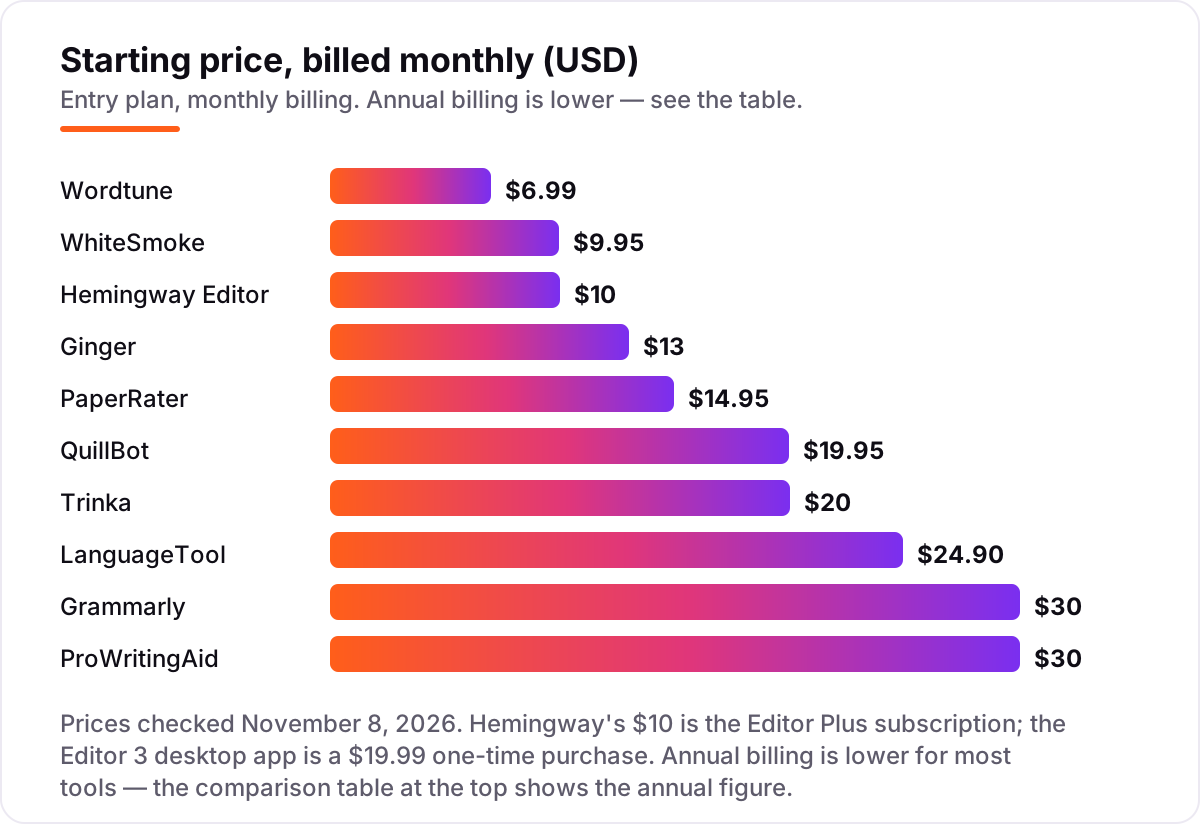
Proofreading software pricing: what you will actually pay
Take a freelance writer who proofreads about 10,000 words a month and pays annually. The subscription costs $58.68 a year on Wordtune Advanced, $69.90 on LanguageTool Premium, $79.95 on WhiteSmoke Essential, $80 on Trinka Premium, $90 on Ginger Premium, $95.40 on PaperRater Premium, $99.95 on QuillBot Premium, $100 on Hemingway Editor Plus, $120 on ProWritingAid Premium and $144 on Grammarly Pro.
Pay monthly instead and the same writer spends $83.88 a year on Wordtune Advanced, $119.40 on WhiteSmoke Essential, $120 on Hemingway Plus, $156 on Ginger Premium, $179.40 on PaperRater Premium, $239.40 on QuillBot Premium, $240 on Trinka Premium, $298.80 on LanguageTool Premium and $360 each on Grammarly Pro and ProWritingAid Premium. The gap between the cheapest and dearest annual plan is $85.32; on monthly billing it is $276.12 — the billing term matters more than the brand.
Two costs sit outside every number above. First, the extras: ProWritingAid's manuscript-level AI analysis runs on Story Credits from $25 each, and Trinka's heavier plagiarism checking needs Premium Plus. Second, the second seat: most of these prices are per person, so a three-person team on Grammarly Pro pays $432 a year on annual billing, not $144. If the team also needs content that ranks, see our guide to SEO content writing tools.
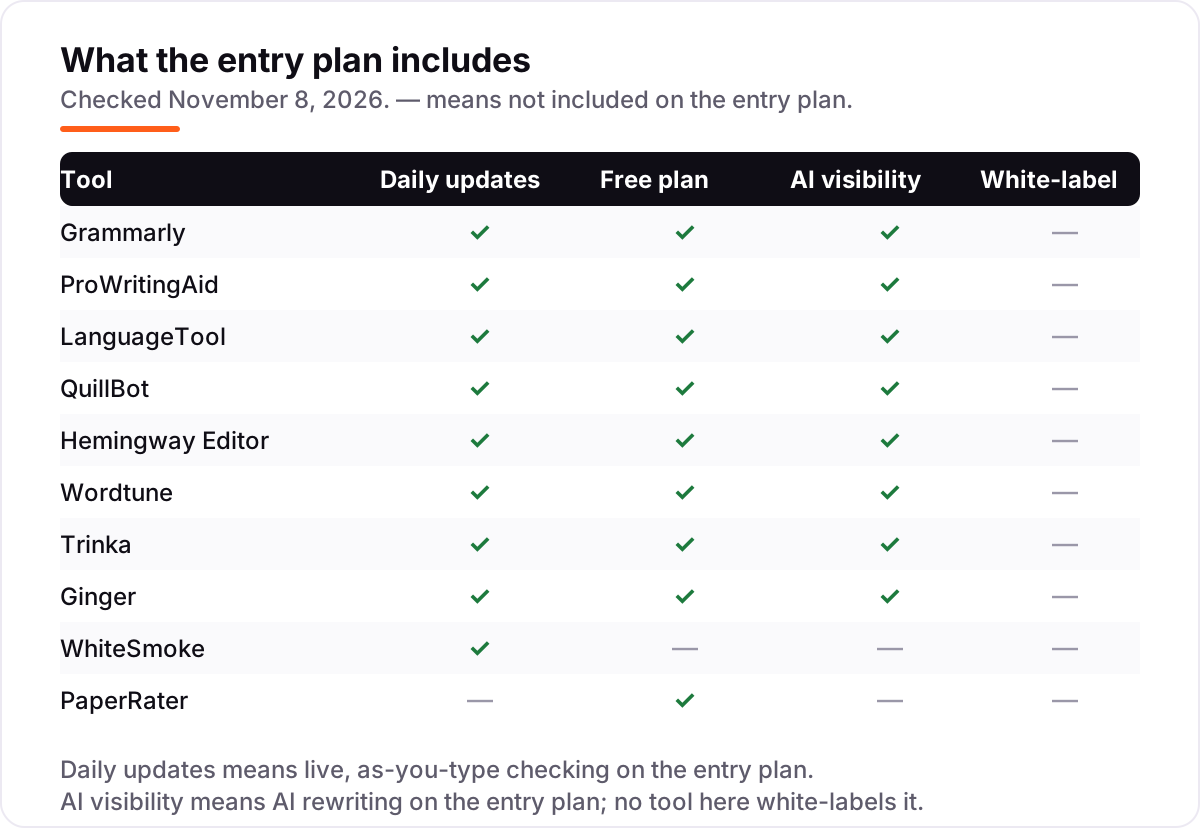
Know the difference: proofreading software vs a human proofreader
The confusion in this category is between a tool and a person. Proofreading software finds errors in text you give it — grammar, spelling, punctuation and style — in seconds, for a few dollars a month. A human proofreader reads for meaning: whether the argument holds, whether the tone fits the reader, and whether a technically correct sentence still says the wrong thing. Software is faster and cheaper; a person is smarter about context.
There is a second confusion: grammar checkers are not all proofreaders. A grammar checker flags errors as you type; a proofreader, human or software, checks the finished draft as a whole. Hemingway Editor sits in between — it scores readability and flags long sentences and passive voice, but it does not do full grammar checking, so it pairs with Grammarly or LanguageTool rather than replacing them. Use software for every draft, and a human for anything that carries your name in print, a contract or a journal submission.
A third distinction is plagiarism checking versus proofreading. QuillBot, Trinka and PaperRater check whether text matches published sources, and Grammarly Pro includes a plagiarism checker too; the other tools in this list do not. If originality matters — student essays, submitted papers, client work — pick a tool with a plagiarism checker built in rather than buying a second subscription.
Quick comparison: tool type by need
| Buyer | Best pick | Why |
|---|---|---|
| Everyday writing in many apps | Grammarly | Real-time checks everywhere, from $30/month ($12 annual) |
| Long-form books and reports | ProWritingAid | 25+ style reports, $30/month ($10 annual), $399 lifetime |
| Writing in several languages | LanguageTool | 30+ languages, $24.90/month ($5.83 annual) |
| Paraphrasing and academic work | QuillBot | 9 paraphrase modes, $19.95/month ($8.33 annual) |
| Shorter, clearer sentences | Hemingway Editor | Readability grade and highlights, Plus from $10/month |
| Academic papers for submission | Trinka | Publication checks and journal finder, $20/month ($6.67 annual) |
Mistakes to avoid
- Budgeting on the monthly price without checking the annual one. Grammarly and ProWritingAid cost $360 a year on monthly billing and $144 and $120 annually — compare tools on the annual figure if you write daily.
- Buying for the headline feature, then hitting the free cap. ProWritingAid's free plan stops at 500 words, LanguageTool's at 2,000 characters, and QuillBot's at 100 words per paraphrase — the cap decides when you pay.
- Assuming one tool does everything. Hemingway does not grammar-check, Ginger and WhiteSmoke do not check plagiarism, and only QuillBot, Trinka, PaperRater and Grammarly Pro bundle originality checks.
- Paying in the app store. Wordtune's iOS app charges $24.99 a month for the same Advanced plan that costs $6.99 on the web — always buy on the vendor's website.
- Trusting the rating without reading the review count. WhiteSmoke scores 4.6 out of 5 on G2 from 10 reviews while Grammarly scores 4.7 from more than 14,000 — a high score on a tiny base means less.
How we chose
We checked each vendor's own pricing page on November 8, 2026 and recorded the starting price exactly as shown, including the annual-billing figure where the page lists one, and we ranked the tools by fit for the most common buyer — a writer or small team that proofreads every day — not by brand size. Two prices could not be read on the vendor's own page because the pages would not open on November 8, 2026: WhiteSmoke's Essential price ($9.95 a month) comes from FinancesOnline's listing, and PaperRater's Premium price ($14.95 a month) comes from GetApp's vendor-supplied listing, both consistent with independent October and November 2026 reads. Ginger's page lists Premium at $13 a month while G2's vendor-supplied listing says $13.99; we used the vendor-page figure. Ratings are G2 scores with review counts, checked November 8, 2026. No vendor paid for a place in this list, and none of the links here are affiliate links.
What to do next
Start with the free plan or trial of your top pick and run one real week of your own writing through it. Check that it catches the errors you actually make and that it works where you write — browser, Word or Google Docs — before you commit to a year. If the writing is sorted but new customers are not finding you, our monthly SEO service handles the visibility side — or compare providers in our guide to SEO companies for small business. Once your tools are in place, find out what's holding your rankings back.
Your stack only works if people find you
SerpAstra fixes what keeps your site off page one and makes it easy for AI assistants to recommend.
Get a free audit→Sources we checked (22)
- Grammarly pricing — grammarly.com/plans (checked November 8, 2026)
- ProWritingAid pricing — prowritingaid.com/pricing (checked November 8, 2026)
- LanguageTool pricing — languagetool.org/premium (checked November 8, 2026)
- QuillBot pricing — quillbot.com/premium (checked November 8, 2026)
- Hemingway Editor Plus pricing — hemingwayapp.com/hemingway-editor-plus (checked November 8, 2026)
- Hemingway Editor desktop — hemingwayapp.com/desktop (checked November 8, 2026)
- Wordtune pricing — wordtune.com/plans (checked November 8, 2026)
- Trinka pricing — trinka.ai/pricing (checked November 8, 2026)
- Ginger pricing — gingersoftware.com/pricing (checked November 8, 2026)
- WhiteSmoke pricing — FinancesOnline listing (checked November 8, 2026)
- PaperRater pricing — GetApp listing (checked November 8, 2026)
- Grammarly on G2 — g2.com/products/grammarly/reviews (checked November 8, 2026)
- ProWritingAid on G2 — g2.com/products/prowritingaid/reviews (checked November 8, 2026)
- LanguageTool on G2 — g2.com/products/languagetool/reviews (checked November 8, 2026)
- QuillBot on G2 — g2.com/products/quillbot/reviews (checked November 8, 2026)
- Hemingway on G2 — g2.com/products/hemingway/reviews (checked November 8, 2026)
- Wordtune on G2 — g2.com/products/ai21labs-wordtune/reviews (checked November 8, 2026)
- Trinka on G2 — g2.com/products/trinka/reviews (checked November 8, 2026)
- Ginger on G2 — g2.com/products/ginger-software/reviews (checked November 8, 2026)
- WhiteSmoke on G2 — g2.com/products/whitesmoke/reviews (checked November 8, 2026)
- PaperRater on G2 — g2.com/products/paperrater/reviews (checked November 8, 2026)
- Wordtune review (development discontinued) — aiignitions.com (checked November 8, 2026)
Shamim
Founder of SerpAstra
A full-stack SEO and digital marketer who spends most days on Local SEO for dental practices, AI search visibility and lead generation.
Frequently asked questions
What is the best proofreading software?
Grammarly Pro is the best fit for most writers: real-time grammar, tone and clarity checks in the browser, Google Docs, Word and email, from $30 a month or $12 a month billed annually. ProWritingAid is the better pick for long-form authors who want deep style reports, and LanguageTool is the better pick for writers working in more than one language.
How much does proofreading software cost?
Entry prices run from $6.99 to $30 a month on monthly billing, or $58.68 to $144 a year on annual billing. Wordtune Advanced is the cheapest paid start at $6.99 a month, and Grammarly Pro and ProWritingAid Premium are the dearest at $30 a month. Eight of the ten tools also have free plans, so many writers never pay at all.
Is there free proofreading software?
Yes, with limits. Grammarly, ProWritingAid, LanguageTool, QuillBot, Hemingway, Wordtune, Trinka, Ginger and PaperRater all have free plans. The limits decide when you pay: ProWritingAid caps free checks at 500 words, LanguageTool at 2,000 characters, and QuillBot at 100 words per paraphrase. WhiteSmoke is the only tool here with no free plan.
What is the difference between proofreading software and a human proofreader?
Software finds errors in text you give it — grammar, spelling, punctuation and style — in seconds, for a few dollars a month. A human proofreader reads for meaning: whether the argument holds and the tone fits the reader. Use software for every draft, and a human for anything that carries your name in print, a contract or a journal submission.
Does proofreading software check for plagiarism?
Some of it does. QuillBot Premium checks up to 25,000 words a month, Trinka includes plagiarism and AI-detection credits, PaperRater includes 10 plagiarism checks a month free, and Grammarly Pro includes a plagiarism checker. Hemingway, Ginger and WhiteSmoke do not check originality, so pair them with a second tool if plagiarism matters.
Can I use proofreading software in Google Docs and Word?
Most tools here work in both. Grammarly, ProWritingAid, LanguageTool, QuillBot, Ginger and Trinka all offer browser extensions or Word add-ins, and Grammarly and LanguageTool also check text in Google Docs. Hemingway and PaperRater are the exceptions: both work by pasting text into their own editor, with no extension for Docs or Word.
Free SEO and AI visibility audit
Find out what is holding your rankings back
Send us your site. Within 2 business days you get a written audit, an AI visibility check and a short fix list ranked by impact. Free, with no contract attached.
Request my free audit→Related guides
 SEO & AI SearchBest AI Writing Tools for SEO in 2026: 7 Picks Ranked by What You Need7 best ai writing tools for seo compared on price, live scoring, and drafting power. Prices checked on each vendor pricing page, November 1, 2026.Read guide →
 Digital Marketing & Ads10 Best Apps for Writing a Book in 2026: Free and Paid Apps RankedCompare the 10 best app for writing a book picks on price, free plans and formatting, with every price checked November 4, 2026, and ranked by use case.Read guide →
 SEO & AI Search8 Best SEO Content Writing Tools in 2026 (Free and Paid, Compared)8 best SEO content writing tools compared on price, AI drafting and live SERP scoring, with real prices checked on each vendor's pricing page, November 1, 2026.Read guide →