
10 Best SEO Blog Platforms for 2026 (Pros, Cons and Pricing)
10 best SEO blog platforms compared on price, SEO controls, ownership and audience reach. Prices checked on each vendor's pricing page, November 1, 2026.
 Shamim Mia, Founder, SerpAstraLast verified November 1, 202614 min read
We compare pricing pages, documentation and public reviews. We never accept payment for rankings.

Key takeaways
- WordPress.org is the best SEO blog platform for most buyers: free software, full control of technical SEO, and the biggest plugin ecosystem ever made — hosting costs extra, typically $3–$12/month.
- Ghost ($18/month billed annually) and WordPress.com Personal ($4/month billed annually) are the best hosted options: real blogging tools, a custom domain, and no server to manage.
- Medium and Substack buy you readers, not rankings — the SEO value builds their domain, not yours.
- The single most important buying factor is ownership of the domain and the content: if you cannot move the blog, you do not own the rankings it earns.
- Every price below was checked on November 1, 2026, and every rating is from G2, checked the same day.
On this page
Quick comparison
| Tool | Best for | Starting price | Free plan |
|---|---|---|---|
| WordPress.org | Bloggers and businesses that want full SEO control, any plugin and any host, and do not mind setup and maintenance | $0 (free) | Yes (hosting extra) |
| WordPress.com | Bloggers who want WordPress without managing hosting, and a custom domain from the cheapest paid plan | $4/mo (annual) | Yes (free plan) |
| Ghost | Independent publishers and newsletter writers who want a fast, clean blog with paid memberships built in | $18/mo (annual) | No (14-day trial) |
| Wix | Beginners and small businesses that want a drag-and-drop blog with hosting and support included | $17/mo (annual) | Yes (free plan) |
| Squarespace | Creative and service businesses that want a polished blog and website with no setup or maintenance | $19/mo (annual) | No (14-day trial) |
| Webflow | Design-led marketing teams that want pixel-level control over a fast blog and can pay for the Premium plan | $25/mo (annual) | Yes (Starter) |
| Framer | Designers and small teams who want a fast, visual blog and publish from Figma-style canvas editing | $10/mo (annual) | Yes (free plan) |
| HubSpot Content Hub | B2B marketing teams already running HubSpot CRM who want the blog tied to contacts, email and reporting | $20/mo per seat | Yes (free tools) |
| Medium | New writers who want readers from day one and will trade domain ownership for distribution | $0 (free) | Yes (free to publish) |
| Substack | Writers building a paid email list who want to monetise subscriptions without a monthly bill | $0 (free) | Yes (free to publish) |
Make one of these tools?
We re-check this list every quarter. Send a correction, request a review, or ask about a clearly labeled sponsored spot.
Request a listingThe best seo blog platforms

WordPress.org
Best for: Bloggers and businesses that want full SEO control, any plugin and any host, and do not mind setup and maintenance
WordPress.org is the best SEO blog platform in this list because nothing is gated: the software is free, the SEO plugins are the best in the business, and every technical setting — URLs, redirects, schema, sitemaps, caching — is yours to control. W3Techs puts WordPress on about 40% of all websites, so the ecosystem of themes, plugins and developers is bigger than every other platform here combined.
The price is freedom with homework. You pay for hosting and a domain — typically $3–$12 a month for starter hosting — and you own updates, backups and security. A bad theme or a plugin conflict can slow the site, and there is no support desk to call. If you want the highest SEO ceiling and you are willing to maintain the site, start here.
What we like
- Free open-source software with the largest plugin and theme ecosystem of any platform here, including Rank Math and Yoast SEO
- Full control of technical SEO: URL structure, redirects, schema, sitemaps, robots.txt and server-level speed settings
- Your content and data are fully portable — export the whole site and move hosts at any time
Watch out for
- No hosting, support or backups included — you choose and pay for a host, and you handle updates and security
- SEO quality depends on your theme and plugins; a bad theme or plugin can slow the site and hurt rankings
- No official support channel — help comes from forums, documentation and your host

WordPress.com
Best for: Bloggers who want WordPress without managing hosting, and a custom domain from the cheapest paid plan
WordPress.com is the hosted version of WordPress: the same editor, themes and plugin library, with Automattic running the servers. Personal costs $4 a month billed annually and includes a custom domain free for the first year, 6 GB of storage and no WordPress.com ads — and since April 2026, every paid plan can install plugins, which used to be the main reason to self-host.
The trade-off is control. There is no server access, staging and SFTP need the Business plan, and moving away means rebuilding the theme elsewhere. But for a blogger who wants WordPress SEO without server maintenance, this is the cheapest hosted route to a real WordPress blog on a custom domain.
What we like
- Cheapest hosted route to a WordPress blog on your own domain: Personal is $9/month billed monthly, $4/month billed annually
- Since April 2026 every paid plan, Personal included, can install plugins and upload third-party themes
- Hosting, SSL, backups and security are handled, and the free plan lets you start before paying
Watch out for
- Less control than self-hosted WordPress: no server access, and advanced tools such as SFTP and staging need Business ($25/month billed annually)
- WordPress.com takes a cut of some payments and limits monetisation options on lower plans
- Moving away later means exporting content and rebuilding the theme elsewhere

Ghost
Best for: Independent publishers and newsletter writers who want a fast, clean blog with paid memberships built in
Ghost is built for one job — publishing — and it shows. The editor is fast and distraction-free, newsletters and memberships are built in rather than bolted on, and Ghost takes 0% of paid subscription revenue. SEO basics come standard: XML sitemaps, structured data, canonical tags and RSS, with no plugins to maintain.
The catch is the plan ladder. Starter is $18 a month billed annually for up to 1,000 members, but it cannot take paid subscriptions — that needs Publisher at $29 a month billed annually. And the bill climbs with member count. Choose Ghost when the newsletter matters as much as the blog; choose WordPress when you need plugins.
What we like
- Publishing-first design: a fast editor, built-in newsletters and memberships, and 0% Ghost transaction fees on paid subscriptions
- Clean, fast output with built-in SEO basics — XML sitemaps, structured data, canonical tags and RSS — and no plugin maintenance
- Self-hosting is free open-source software, so you can leave Ghost(Pro) without losing the platform
Watch out for
- Starter ($18/month billed annually) has no paid subscriptions, custom themes or advanced analytics — those need Publisher ($29/month billed annually)
- Pricing rises with member count, so a growing list raises the bill even if traffic does not
- Smaller theme and plugin ecosystem than WordPress, and no page-builder style editing

Wix
Best for: Beginners and small businesses that want a drag-and-drop blog with hosting and support included
Wix is the lowest-friction start in this list: pick a template, drag blocks into place, and the blog can be live the same afternoon. Light costs $17 a month billed annually and covers a custom domain, 2 GB of storage, unlimited bandwidth and per-post SEO settings, with scheduled posts and categories built in.
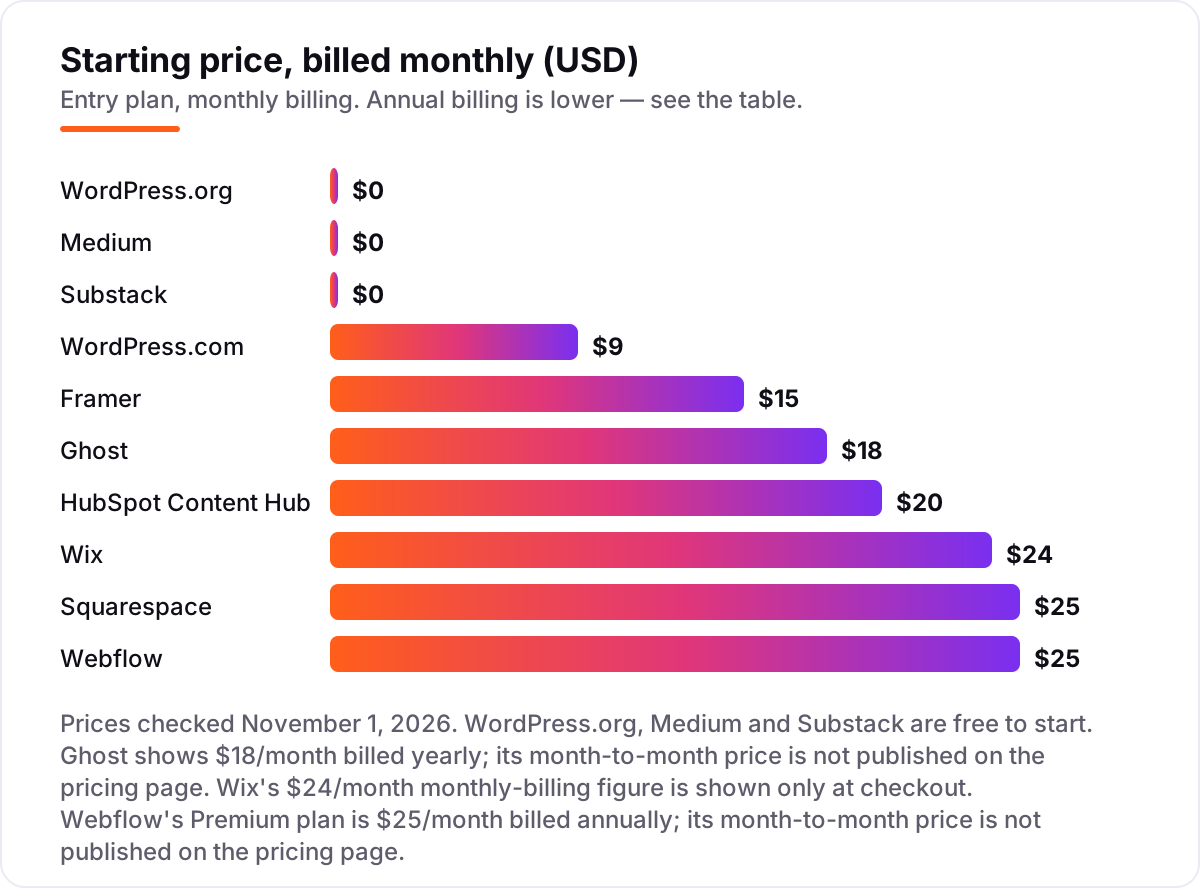
Two honest catches. First, you cannot switch templates without rebuilding the site, and the blog tools are simpler than WordPress or Ghost. Second, the pricing page shows annual rates by default — the $24 a month monthly-billing figure only appears at checkout. Wix is the right pick when ease beats control; it is the wrong pick when you expect to outgrow the template.
What we like
- The easiest builder to learn: drag-and-drop editing, an AI site builder and hundreds of templates, with a free plan to start
- Blog tools cover scheduled posts, categories, SEO settings per post and an app market for extra features
- Unlimited bandwidth on every paid plan, and a free domain for the first year on yearly plans
Watch out for
- Light ($17/month billed annually) cannot take payments and has only 2 GB of storage, so a growing blog outgrows it fast
- No way to switch templates without rebuilding, and the blog tools are simpler than WordPress or Ghost
- Prices vary by location and the pricing page shows annual rates by default, so the monthly-billing price is higher than the headline

Squarespace
Best for: Creative and service businesses that want a polished blog and website with no setup or maintenance
Squarespace is the design pick: its templates make a blog look finished without a designer, and blogging is built into every plan — scheduled posts, categories, tags, comments and contributor management. Basic costs $19 a month billed annually and includes hosting, SSL, analytics and a free custom domain for the first year.
The limits are the usual walled-garden ones. There is no plugin ecosystem, so technical SEO control is thinner than WordPress, and Basic allows only 2 contributors. Prices also rose in 2026 — many guides still quote the old $16 Personal plan. Pick Squarespace when the blog has to look beautiful on day one; pick WordPress when it has to do something unusual.
What we like
- The strongest templates here — a design-led blog looks finished without hiring a designer
- Blogging is built in on every plan: scheduled posts, categories and tags, comments, contributor management and content paywalls
- Hosting, SSL, analytics and SEO basics are included, with a free custom domain for the first year on annual plans
Watch out for
- Prices rose in 2026: Basic is now $19/month billed annually ($25 billed monthly), up from the $16 Personal plan many guides still quote
- Basic allows only 2 contributors and charges a 2% transaction fee on store sales plus 7% on digital products and memberships
- Less SEO flexibility than WordPress — no plugin ecosystem and limited control over technical details

Webflow
Best for: Design-led marketing teams that want pixel-level control over a fast blog and can pay for the Premium plan
Webflow is the most design-capable platform in this list: a visual canvas with real CMS collections behind it, editable meta titles and descriptions, redirects, sitemaps and clean code output. Premium costs $25 a month billed annually and covers 20,000 CMS items, 40 collections, site search and 50 GB of bandwidth.
Blogging starts at Premium because Basic has no CMS at all, so the real entry price is $25 a month billed annually, not $15. The Designer also takes weeks to learn, and leaving Webflow means rebuilding the CMS elsewhere. Choose Webflow when design control is the priority and the budget covers Premium; choose Wix or Squarespace when it is not.
What we like
- Strong built-in SEO controls: editable meta titles and descriptions, Open Graph settings, redirects, sitemaps and clean, fast code output
- Premium includes 20,000 CMS items across 40 collections, site search and 50 GB of bandwidth — room for a large blog
- Visual CMS with scheduled publishing, so editors can run the blog without a developer
Watch out for
- Blogging needs the Premium plan ($25/month billed annually) because Basic ($15/month billed annually) has no CMS
- Steep learning curve — the Designer is powerful but takes weeks to learn well
- High switching costs: exporting a Webflow site means rebuilding the CMS elsewhere

Framer
Best for: Designers and small teams who want a fast, visual blog and publish from Figma-style canvas editing
Framer is the quickest path from a Figma-style canvas to a live, fast blog. Design on the canvas, publish, and the site ships with built-in SEO settings, automatic sitemaps and clean code — plus AI credits for drafting and translation. Basic costs $10 a month billed annually and includes a custom domain, 30 pages and 1,000 CMS items.
The ceiling is lower than Webflow's. Basic allows only 2 CMS collections, so a blog plus a second collection needs Pro at $30 a month billed annually, and there is no native ecommerce checkout. Extra editors cost $20 a month each. Framer is the right pick for a solo designer or a small team; a large content operation will outgrow it.
What we like
- The fastest setup here for a good-looking blog: design on a canvas, publish, and the site is fast out of the box
- Built-in SEO settings, automatic sitemaps and clean code, with AI credits included for drafting and translation
- Cheapest paid entry with a custom domain of the design-led builders: Basic is $15/month billed monthly, $10 billed annually
Watch out for
- Basic ($10/month billed annually) allows only 2 CMS collections and 1,000 CMS items, so a blog plus a second collection needs Pro ($30/month billed annually)
- Younger plugin and integration ecosystem than Webflow or WordPress, and no native ecommerce checkout
- Extra editors cost $20/month each and extra locales $20/month each, so team costs add up

HubSpot Content Hub
Best for: B2B marketing teams already running HubSpot CRM who want the blog tied to contacts, email and reporting
HubSpot Content Hub is the only platform here where a blog post can feed your CRM directly: readers become contacts, and lead capture, email and reporting live in the same place. Starter costs $20 a month per seat billed monthly — a limited-time rate for new customers brings it to $7 a month per seat billed annually — and it removes HubSpot branding and adds a custom domain.
The catch is the upsell curve. A/B testing, smart content and content remix need Professional at $450 a month billed annually for 3 seats. And the blog is not portable: leaving HubSpot means rebuilding elsewhere. Buy it only if HubSpot is already home.
What we like
- The blog plugs straight into HubSpot CRM: every reader can become a contact with lead capture, email and reporting in one place
- Built-in SEO recommendations, content remix and AI writing help, with hosting, CDN and SSL included
- Starter removes HubSpot branding and adds a custom domain, so a small team can start cheaply inside the CRM
Watch out for
- Starter is $20/month per seat billed monthly, and the $7/month billed-annually figure is a limited-time rate for new customers
- Real blogging power — A/B testing, smart content, content remix — needs Professional at $450/month billed annually with 3 seats
- Leaving HubSpot means rebuilding the site elsewhere; the blog is not portable the way WordPress content is

Medium
Best for: New writers who want readers from day one and will trade domain ownership for distribution
Medium is the fastest way to be read: no setup, no theme, no maintenance — just write and publish into a recommendation feed that reaches millions of readers. Publishing is free, and the Partner Program pays from member reading time, so a new writer can earn without building an audience first.
The price is ownership. You publish on medium.com, so the SEO value builds Medium's authority, not yours, and a custom domain needs the $5 a month membership. Design control is minimal and there are no plugins. Use Medium to find readers and test ideas; build the blog you want to rank on a platform you own.
What we like
- Built-in audience of millions of readers, with recommendations and human-curated Boost surfacing new writers
- The cleanest writing experience here — no setup, no theme choices, no maintenance
- Free to publish, and the Partner Program pays from member reading time with no upfront cost
Watch out for
- You publish on medium.com, not your own domain, so the SEO value builds Medium's authority, not yours
- A custom domain and the Partner Program need a $5/month membership, and earnings depend on member reading time you cannot predict
- Limited design control and no plugins — every Medium publication looks much the same

Substack
Best for: Writers building a paid email list who want to monetise subscriptions without a monthly bill
Substack is the cheapest way to start a paid publication: $0 to publish at any size, with email list and publication in one product and recommendations between publications bringing new subscribers. You set the price — minimum $5 a month or $30 a year — and Substack takes 10% of paid subscriptions plus Stripe fees.
That 10% is forever, and at scale it costs far more than a flat monthly plan: on a $10 subscription you keep about $8.34 after Substack and Stripe take their shares. SEO is also thin — no plugins, limited technical control, and the design is unmistakably Substack. Use it to build a paid list; use WordPress or Ghost for a blog that has to rank.
What we like
- Free to start with no monthly bill — you pay only when readers pay you, 10% of paid subscriptions plus Stripe fees
- Email list and publication in one product, with recommendations between publications bringing new subscribers
- You set your own subscription price (minimum $5/month or $30/year) and keep about 83% of a $10 subscription after fees
Watch out for
- Substack keeps 10% of every paid subscription forever, plus Stripe fees — at scale that costs far more than a flat monthly plan
- A custom domain costs a one-time $50, and the site still carries Substack branding and design limits
- Weak SEO tools for a standalone blog: no plugin ecosystem and limited control over technical SEO
This guide to the best seo blog platform for your site is organised by what you actually need, not by brand size: free and open-source options first, then hosted blogging platforms, then the all-in-one builders and the CRM-connected option. Every price below was checked on November 1, 2026, and every rating is from G2, checked the same day. If you are comparing the best blog software for SEO, the deciding question is not which editor you like, but which platform lets you own the domain, the content and the technical settings. The short version: WordPress.org wins on SEO control, Ghost wins on hosted publishing, and Medium and Substack win on readers — but not on rankings you own.
What the best seo blog platform actually does
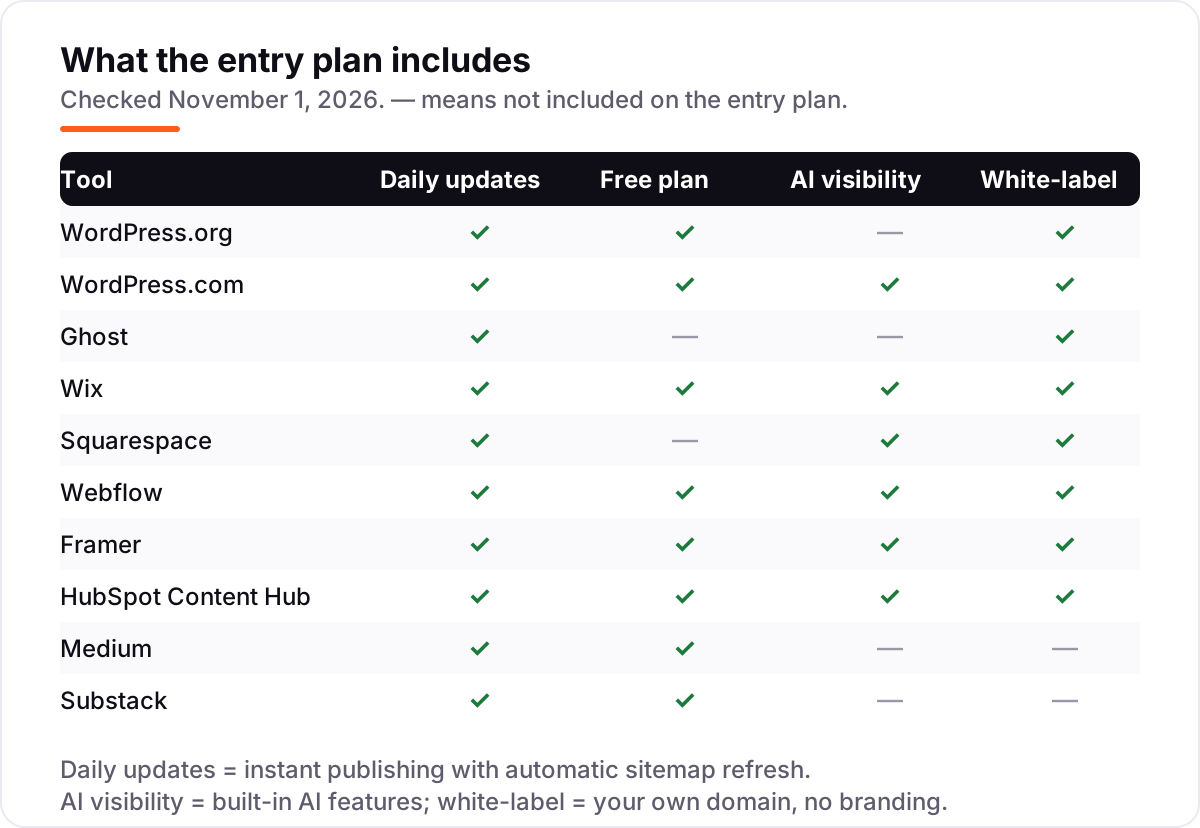
A blog platform does three jobs for SEO: it publishes posts, it tells Google what each post is about, and it makes the site fast and easy to crawl. The publishing part is the same everywhere — an editor, categories, scheduled posts. The SEO part is where platforms split: the good ones let you control the title tag, meta description, URL, canonical tag, redirects, sitemap and structured data for every post, and they serve pages fast without plugins fighting each other.
That control is why one platform still dominates. W3Techs puts WordPress on about 40% of all websites as of October 2026 — roughly 58% of sites with a known CMS — which is why its SEO plugin ecosystem is bigger than every other platform's combined. The rest of this guide is about when that dominance matters, and when a simpler or more specialised platform is the better buy.
Speed is the third job, and it is the one buyers forget. Google has used page speed as a ranking signal for years, and a slow blog loses readers before the content gets a chance. The fastest platforms here — Ghost, Framer and Webflow — ship clean, light pages out of the box. WordPress can be just as fast, but only if the theme and plugins are chosen well; a heavy theme with a dozen plugins will drag it down. Whatever platform you pick, test a real post with a speed checker before you commit.
Ownership is the part buyers underrate. A blog platform holds your posts, your subscribers and your search rankings, and the cost of leaving varies from trivial to impossible. WordPress.org and Ghost let you export everything and move; Wix, Webflow and Framer let you export content but not the design or the CMS structure; Medium and Substack let you export posts but not the audience relationship in the same form. Before you pick, ask what leaving looks like — because the platform that is easiest to join is rarely the easiest to leave.
Free options first
If the blog has no budget yet, start free — but start on a platform you can leave. WordPress.org is free software: you pay only for hosting and a domain, typically $3–$12 a month for starter hosting, and you can move the whole site to another host at any time. Medium and Substack are free to publish on at any size, and WordPress.com, Wix, Webflow and Framer all have free plans with a platform subdomain.
The free plans differ in what they cost you later. WordPress.org costs money only for hosting; the content and the domain are yours from day one. Medium and Substack cost nothing, but the audience and the rankings live on their domains — moving means starting over. The builders' free plans are demos with the platform's branding on them. For a single small blog, start free on WordPress.org or on a builder's free plan; for anything you expect to monetise, pay for the cheapest plan with a custom domain from the start.
Dedicated blogging platforms vs all-in-one builders
The 10 platforms in this list split into two camps. The dedicated blogging platforms — WordPress.org, WordPress.com, Ghost, Medium and Substack — are built around publishing. They have the best editors, the best newsletter and membership tools, and the least to learn. The all-in-one builders — Wix, Squarespace, Webflow and Framer — build whole websites, and the blog is one feature among many: pages, stores, bookings and forms included.
The builders win when the blog is part of a business site that also needs pages and a store, and when design matters on day one — Squarespace and Framer produce a finished-looking site faster than any blogging platform. The blogging platforms win when the blog is the product: Ghost's newsletter and memberships, WordPress's plugin library, Substack's paid list. HubSpot Content Hub is a third camp of one: a blog wired into a CRM, worth it only if HubSpot is already home.
Audience-first platforms and the SEO trade-off
Medium and Substack solve the hardest problem in blogging — getting read — and that is exactly why they are dangerous for SEO. A new post on Medium can reach thousands of readers through recommendations and human-curated Boost, and a Substack recommendation can add subscribers overnight. No self-hosted blog does that in its first month. If your goal is readers this week, start there.
The trade-off is that every link, every ranking and every subscriber relationship builds their domain, not yours. A Medium post that ranks for your keyword sends its authority to medium.com; a Substack publication that grows to 10,000 subscribers still pays 10% of every paid subscription forever. The fix most writers land on is both: publish where the readers are, and keep the canonical home — the blog that has to rank for your business — on a domain you own. Our local SEO service is built around exactly that kind of owned asset.
Quick comparison: tool type by need
| Buyer | Best pick | Why |
|---|---|---|
| Solo blogger on no budget | WordPress.org | Free software, full SEO control, hosting from about $3/month |
| Blogger who wants hosting handled | Ghost or WordPress.com | Real blogging tools from $4–$18/month billed annually, no server to manage |
| Small business that needs a whole website | Wix or Squarespace | Drag-and-drop site plus blog from $17–$19/month billed annually |
| Design-led team that wants pixel control | Webflow or Framer | Visual canvas and CMS from $10–$25/month billed annually |
| B2B team already on HubSpot | HubSpot Content Hub | Blog wired into the CRM from $20/month per seat |
| Writer who wants readers first | Medium or Substack | Free to publish with built-in distribution; you trade away domain ownership |
How to choose: a short decision path
- Decide who owns the domain. If the blog has to rank for your business, it lives on your own domain — WordPress.org, Ghost, WordPress.com, or a builder. Medium and Substack are for distribution, not for owned rankings.
- Count what the blog must do besides publish. Just posts and a newsletter: Ghost or WordPress. Whole website with pages and a store: Wix, Squarespace, Webflow or Framer. CRM and lead capture: HubSpot.
- Check the price that actually applies to you. Annual billing is 15–40% cheaper than monthly on most platforms here, and per-seat pricing (HubSpot) and member-count pricing (Ghost) grow with the team and the list. On annual billing, a year costs about $48 on WordPress.com Personal, $120 on Framer Basic, $216 on Ghost Starter, $204 on Wix Light, $228 on Squarespace Basic and $300 on Webflow Premium.
- Test the editor before you pay. Every platform here has a free plan or a free trial. Write and publish three real posts, then check the output: title tags, URLs, sitemap and page speed.
- Check the exit before you enter. Export your content on day one and confirm it imports somewhere else. A platform you cannot leave owns your rankings.
Before you publish, run your titles through the free SERP snippet preview tool — it shows exactly how the title and description will look in Google.
Mistakes to avoid
- Choosing the platform with the best editor and ignoring the exit. If you cannot export your posts and redirect your URLs, the platform owns your rankings.
- Comparing monthly prices without checking billing. The annual price is usually 15–40% lower, and a few figures — Wix's monthly rate, HubSpot's promo rate — do not appear on the pricing page at all.
- Paying for a builder when you only need a blog. A $25 a month website builder is a bad buy if the site is ten posts and a newsletter — Ghost or WordPress.com cost less.
- Publishing your best work where you do not own the domain. Medium and Substack are for distribution; the posts that have to rank for your business belong on your own site.
- Trusting a directory price. Ghost's Starter is quoted as $18 a month billed annually in guides that predate its current pricing; the live figure is $15 billed annually ($18 billed monthly). Always check the vendor's own page.
How we chose
We checked each vendor's own pricing page on November 1, 2026 and recorded the starting price exactly as shown, including the annual-billing figure where the page lists one. Two prices needed extra work: Ghost's pricing page was unreachable during verification, so its Starter price ($18 a month billed annually) is corroborated by the live ghost.org/pricing page, which lists Starter at $18 a month billed yearly and publishes no month-to-month price; and Wix shows annual rates on its pricing page, so the $24 a month monthly-billing figure for Light is the checkout price, not a figure the page publishes. Ratings come from G2 product pages, checked November 1, 2026; Medium has no G2 product page, so it carries no rating. We ranked the platforms by fit for the most common buyer — someone starting an SEO-focused blog who wants rankings they own — not by brand size. No vendor paid for a place in this list, and none of the links here are affiliate links.
What to do next
Start with the decision path above: pick owned domain or distribution, count what the blog must do besides publish, and check the annual price. Then take the free plan or trial of your top pick and publish three real posts — check the title tags, the URLs and the sitemap before you commit. If the numbers look right and the editor feels good, you have your platform. If you'd rather have this set up and read for you, request a free SEO + AI visibility audit and get a ranked fix list in 2 business days.
Rather not run the tools yourself?
Tools show you the data. SerpAstra turns it into higher rankings, more map-pack calls and citations in AI answers.
Get a free SEO + AI visibility audit→Sources we checked (20)
- WordPress.org — free open-source software, no pricing page (checked November 1, 2026)
- WordPress.org on G2 — 4.4/5, 9,553 reviews (checked November 1, 2026)
- WordPress.com pricing — wordpress.com/pricing (checked November 1, 2026)
- WordPress.com on G2 — 4.4/5, 2,720 reviews (checked November 1, 2026)
- Ghost pricing — ghost.org/pricing (checked November 1, 2026; see How we chose)
- Ghost on G2 — 4.0/5, 40 reviews (checked November 1, 2026)
- Wix pricing — wix.com/plans (checked November 1, 2026)
- Wix on G2 — 4.2/5, 1,910 reviews (checked November 1, 2026)
- Squarespace pricing — squarespace.com/pricing (checked November 1, 2026)
- Squarespace on G2 — 4.4/5, 1,137 reviews (checked November 1, 2026)
- Webflow pricing — webflow.com/pricing (checked November 1, 2026)
- Webflow on G2 — 4.4/5, 996 reviews (checked November 1, 2026)
- Framer pricing — framer.com/pricing (checked November 1, 2026)
- Framer on G2 — 4.5/5, 147 reviews (checked November 1, 2026)
- HubSpot Content Hub pricing — hubspot.com/pricing/content (checked November 1, 2026)
- HubSpot Content Hub on G2 — 4.5/5, 2,205 reviews (checked November 1, 2026)
- Medium membership — medium.com/membership (checked November 1, 2026)
- Substack — substack.com (free to publish; 10% of paid subscriptions, checked November 1, 2026)
- Substack on G2 — 4.3/5, 17 reviews (checked November 1, 2026)
- WordPress statistics 2026 (W3Techs data) — wpexposure.com/research/wordpress-statistics (checked November 1, 2026)
Shamim
Founder of SerpAstra
A full-stack SEO and digital marketer who spends most days on Local SEO for dental practices, AI search visibility and lead generation.
Frequently asked questions
What is the best SEO blog platform in 2026?
WordPress.org, for most buyers: free software, the biggest plugin ecosystem and full control of technical SEO. If you want hosting handled, Ghost at $18 a month billed annually is the best hosted blogging platform, and WordPress.com Personal at $4 a month billed annually is the cheapest hosted WordPress. Medium and Substack win on readers, not on rankings you own.
How much does an SEO blog platform cost?
From $0 to $25 a month at the entry level. WordPress.org, Medium and Substack are free to start; WordPress.com Personal is $4 a month billed annually; Ghost Starter is $18; Wix Light $17; Squarespace Basic $19; Webflow Premium $25; Framer Basic $10 — all billed annually. HubSpot Starter is $20 a month per seat.
Is there a free SEO blog platform?
Yes. WordPress.org is free open-source software — you pay only for hosting and a domain. Medium and Substack are free to publish on, and WordPress.com, Wix, Webflow and Framer all have free plans. Free plans work for starting out, but a custom domain and the SEO controls that matter usually need a paid plan.
What is the difference between WordPress.org and WordPress.com?
WordPress.org is free software you install on your own hosting, with full control of plugins, themes and technical SEO. WordPress.com is the hosted service: Automattic runs the servers, and you pay for the plan. Since April 2026 every paid WordPress.com plan can install plugins, so the gap is now mainly control versus convenience.
Is Ghost or WordPress better for blogging SEO?
WordPress wins on ceiling: plugins like Rank Math and Yoast, plus full control of URLs, schema and speed settings. Ghost wins on simplicity: fast, clean output with sitemaps and structured data built in and nothing to maintain. If the newsletter matters as much as the blog, Ghost is the better pick; for maximum SEO control, WordPress.org.
Can I rank on Google with a Medium or Substack blog?
Yes — Medium and Substack posts do rank, and Medium's domain authority can help a new writer get seen fast. The catch is ownership: the rankings build Medium's or Substack's domain, not yours, and you cannot move the authority if you leave. For a blog you want to own long term, publish on your own domain.
What should I check before paying for a blog platform?
Four things: whether you get a custom domain without platform branding, whether you can export your content and leave, whether the plan includes the SEO controls you need — redirects, schema, sitemaps — and whether the price is monthly or annual billing. All four vary widely, and the comparison table at the top shows the starting price and free plan for each platform.
Free SEO and AI visibility audit
Find out what is holding your rankings back
Send us your site. Within 2 business days you get a written audit, an AI visibility check and a short fix list ranked by impact. Free, with no contract attached.
Request my free audit→Related guides
 SEO & AI Search12 Best Blogging Platforms for SEO in 2026 (Pros, Cons and Pricing)Compare the best blogging platform for SEO for your budget: 12 platforms ranked on price, SEO controls and ownership, from free WordPress to Ghost and Webflow.Read guide →
 SEO & AI SearchBest CMS for SEO in 2026: 8 Options Ranked and Reviewed8 best CMS for SEO compared with real 2026 prices, free plans and SEO controls. WordPress, Webflow, Shopify and more, ranked by fit for a small business site.Read guide →
 ContentHow to write SEO content that ranks (and reads like a human wrote it)How to write SEO content that ranks: match search intent, structure before sentences, write like a person, and use AI honestly. A practical guide for 2026.Read guide →