
9 Best SEO CMS Platforms for 2026 (Pros, Cons and Pricing)
9 best SEO CMS platforms compared on price, SEO controls, free plans and AI tools. Every starting price checked on the vendor pricing page, November 1, 2026.
 Shamim Mia, Founder, SerpAstraLast verified November 1, 202614 min read
We compare pricing pages, documentation and public reviews. We never accept payment for rankings.

Key takeaways
- WordPress is the free starting point with total SEO control; Wix ($24/month) is the easiest paid start, and Webflow ($25/month) is the design-led pick.
- The single most important buying factor is how much SEO control the entry plan gives you — custom URLs, meta, schema and redirects — not the template gallery.
- Free plans exist — WordPress, Wix and Webflow all start free — but a custom domain and no platform branding need a paid plan from $17 to $25 a month billed annually.
- Stores pay a different price: Shopify and BigCommerce both start at $39 a month, and both cap what the entry plan can sell.
- Every price below was checked on the vendor's own pricing page on November 1, 2026. Ratings are G2, except HubSpot, where we show no rating.
On this page
Quick comparison
| Tool | Best for | Starting price | Free plan |
|---|---|---|---|
| WordPress | Bloggers and businesses that want full control over SEO — every title tag, schema field and redirect — and the largest plugin library on the web | $0 (free software) | Yes (free software) |
| Wix | Small businesses that want a website live this week, with SEO tools built in and no developer on call | $24/mo | Yes (with ads) |
| Squarespace | Design-led small businesses and portfolios that want polished templates and built-in SEO without plugins | $25/mo | No (14-day trial) |
| Webflow | Design and marketing teams that want pixel-level control over pages plus a real CMS, without writing production code | $25/mo (annual) | Yes (Starter) |
| Shopify | Stores that sell online and need product, collection and blog pages that rank, with SEO basics built in | $39/mo | No (3-day trial) |
| Duda | Agencies and freelancers building SEO-ready sites for clients at volume, with white-label handoff on higher plans | $25/mo | No (14-day trial) |
| Ghost | Publishers and newsletters that live on content and memberships and want fast, clean pages with no plugin upkeep | $18/mo (annual) | No (14-day trial) |
| BigCommerce | Growing stores with large catalogs that need built-in SEO features and no per-product app fees | $39/mo | No (15-day trial) |
| HubSpot Content Hub | Teams already running HubSpot CRM that want the website, blog and SEO reporting in the same system | $20/mo per seat | Yes (free tools) |
Make one of these tools?
We re-check this list every quarter. Send a correction, request a review, or ask about a clearly labeled sponsored spot.
Request a listingThe best seo cms platforms

WordPress
Best for: Bloggers and businesses that want full control over SEO — every title tag, schema field and redirect — and the largest plugin library on the web
WordPress is the default answer for a reason: the software is free, and nothing in this list gives you more control over how a page is built for search. You set the URL, the title, the meta description, the schema and the redirects, and plugins like Rank Math and Yoast add the checks and the sitemaps. W3Techs puts WordPress on about 40% of all websites, so every theme, plugin and host already supports it.
The cost is your time and your hosting. A self-hosted install needs updates, backups and security, and a bad plugin can slow the site or break it. The hosted route is simpler: WordPress.com Personal costs $4 a month billed annually, includes a custom domain and now allows plugin installation. Start here unless you need a drag-and-drop builder or a store.
What we like
- Free open-source software with complete control: custom URLs, meta, schema, redirects and sitemaps with no platform limits
- More than 60,000 plugins, including the mature SEO plugins Rank Math and Yoast, plus thousands of themes
- Hosted WordPress.com Personal starts at $4/month billed annually and now includes plugin installation on every paid plan
Watch out for
- You handle hosting, security and plugin updates yourself on a self-hosted install, and a bad plugin update can break the site
- The hosted Personal plan has no advanced SEO plugin setup help and only 6 GB of storage

Wix
Best for: Small businesses that want a website live this week, with SEO tools built in and no developer on call
Wix is the fastest way from an idea to a live site that Google can index. The Light plan connects a custom domain, removes Wix ads and includes SSL, SEO settings on every page and a free domain for the first year. The AI builder drafts a whole site from a few answers, and the template library covers nearly every small-business niche.
Two honest catches. The monthly price is $24, not the $17 the pricing page advertises — that figure needs annual billing, and the monthly rate only appears at checkout. And once you pick a template you cannot switch it without rebuilding, so choose slowly. For a small business that wants a site this week, Wix is still the easiest start in this list.
What we like
- Light plan includes a custom domain, SSL, SEO tools, 2 GB storage and a free domain for one year
- AI site builder and design agent generate a full site from a few prompts, with built-in SEO settings on every page
- More than 2,000 templates and a large app market cover bookings, events, stores and forms without code
Watch out for
- Monthly billing costs more and the price is only shown at checkout — Light is $24/month billed monthly versus $17/month billed annually
- Switching templates later means rebuilding the site, and heavy apps and animations can slow pages down

Squarespace
Best for: Design-led small businesses and portfolios that want polished templates and built-in SEO without plugins
Squarespace wins on looks. Its templates are the most polished in this list, and a Basic site looks finished the day you publish it, with hosting, SSL, blogging and analytics included and a free domain for the first year on annual billing. SEO fields for titles, descriptions and social images are built into every page, so there is nothing to install.
The trade-offs are flexibility and selling fees. There is no free plan, only a 14-day trial, and Basic takes a 2% cut of online store sales — Core removes it at $39 a month. Layouts also resist deep changes: you work inside the template's structure. If design matters more than tinkering, Squarespace is the right home.
What we like
- Basic includes hosting, SSL, blogging, analytics and a free custom domain for the first year on annual billing
- Templates look finished on day one, with clean mobile layouts and built-in SEO fields on every page
- Core ($39/month) removes the 2% store fee and adds unlimited contributors and a free year of Google Workspace
Watch out for
- No free plan — only a 14-day trial — and Basic charges a 2% fee on online store sales
- Template layouts are hard to change beyond their structure, and deeper customization needs code

Webflow
Best for: Design and marketing teams that want pixel-level control over pages plus a real CMS, without writing production code
Webflow is the choice when design is the product. Its visual canvas builds real HTML and CSS, so a marketing team can ship pages that look custom without waiting on developers, and the CMS handles blogs, case studies and directories as structured collections. The Premium plan includes the full CMS, site search and hosting on a global CDN, and every page carries its own SEO controls.
The catch is the learning curve and the price of entry. The $15 Basic plan (billed annually) has no CMS, so the real starting point is the Premium plan at $25 a month billed annually. The Designer also rewards CSS knowledge and punishes casual edits. Buy Webflow when a designer or a design-minded marketer will own the site; buy Wix when anyone on the team might.
What we like
- Premium plan includes the full CMS, site search and hosting on a global CDN with SSL
- Visual canvas builds real HTML and CSS with clean code output, plus built-in SEO controls per page and per collection
- Free Starter plan lets you design and stage a full site before paying anything
Watch out for
- The Premium plan costs $25/month billed annually, and the $15 Basic plan (billed annually) has no CMS at all
- Steep learning curve: the Designer rewards CSS knowledge and punishes casual tinkering

Shopify
Best for: Stores that sell online and need product, collection and blog pages that rank, with SEO basics built in
Shopify is the store-first pick. Basic covers the whole shop — unlimited products, a blog, SSL, hosting and automatic sitemaps and redirects — and the checkout is the fastest in this list. Product, collection and blog pages all carry the SEO fields you need, and the app store adds reviews, merchandising and schema tools when the built-ins run out.
The bill grows beyond $39 a month. Paid apps and a premium theme are the norm for a serious store, and the blog is basic next to WordPress or Ghost. Shopify also does not bring traffic on its own; ranking still needs content and links. Choose it when selling is the job and the site exists to support the store, not the other way round.
What we like
- Basic includes unlimited products, a blog, SSL, hosting and automatic sitemaps and redirects on every plan
- Fast, reliable checkout and the largest ecommerce app store for SEO, reviews and merchandising
- Sells everywhere from one dashboard: online store, social channels, marketplaces and point of sale
Watch out for
- Costs climb fast once you add paid apps and a premium theme — the $39 plan is only the start
- Blogging is basic next to WordPress or Ghost, and advanced SEO needs apps or code

Duda
Best for: Agencies and freelancers building SEO-ready sites for clients at volume, with white-label handoff on higher plans
Duda is built for people who build sites for other people. One account manages many client sites, each with unlimited storage and bandwidth on AWS hosting, and the editor's AI tools write copy, build sections and generate image alt text while you work. Client workspaces, comments and team seats from the Team plan up make handoff clean, and the built-in SEO tools cover the basics on every page.
The pricing model needs a careful read. Basic is $25 a month but covers a single site subscription, and eCommerce is a separate paid add-on. Full white-label client access — the editor under your brand — needs the $199 White Label plan. For a freelancer or agency shipping several sites a month, Duda pays for itself; for one personal site, Wix or Squarespace costs less.
What we like
- Basic includes one site with unlimited storage and bandwidth, AWS hosting and built-in SEO tools
- AI site generation and Copilot write copy, build sections and generate image alt text from inside the editor
- Agency features from Team up: client workspaces, team seats, site comments and an API for automation
Watch out for
- Priced per account, not per site, and eCommerce is a separate paid subscription on top
- Full white-label client access needs the $199/month White Label plan, not Basic

Ghost
Best for: Publishers and newsletters that live on content and memberships and want fast, clean pages with no plugin upkeep
Ghost is the publisher's CMS: a fast, clean platform for writing, newsletters and memberships with nothing to maintain. The Starter plan includes your site, a newsletter with unlimited sends, 1,000 members and a free custom domain, and pages are lean by default, with built-in SEO tools and RSS. There are no plugins to update and no theme marketplace to get lost in.
The limits are about money and shape. Starter cannot take paid subscriptions — that starts at Publisher, $29 a month billed annually — and there is no page builder for landing pages beyond the blog. Ghost is also a small community: its G2 rating rests on only 40 reviews. Pick it when content and subscribers are the business; skip it for a general business site.
What we like
- Starter includes your own website, newsletter, unlimited email sends, 1,000 members and a free custom domain
- Clean, fast pages with built-in SEO tools, RSS and modern markup — no plugins to maintain
- 0% transaction fees on paid subscriptions from Publisher up, so you keep everything Stripe collects
Watch out for
- Starter has no paid subscriptions, custom themes or advanced analytics — those start at Publisher ($29/month)
- Only 40 G2 reviews, so the public rating is a thin signal, and there is no page builder for non-blog pages

BigCommerce
Best for: Growing stores with large catalogs that need built-in SEO features and no per-product app fees
BigCommerce is the catalog pick. Core includes unlimited products, storage, bandwidth and staff accounts — the things Shopify and Wix meter or charge extra for — with built-in SEO controls for URLs, meta, redirects and sitemaps and no app needed. It is a serious platform for a store with hundreds or thousands of products, and it stays fast under a big catalog.
Two costs hide behind the $39 entry price. Core caps trailing 12-month sales at $30,000, and crossing it triggers an automatic upgrade to Growth. Orders through payment providers outside BigCommerce's embedded list also carry a 2% fee. Check your sales volume and your payment provider before you commit — a store near the cap belongs on Growth.
What we like
- Core includes unlimited products, storage, bandwidth and staff accounts — limits competitors meter
- Built-in SEO controls cover custom URLs, meta, redirects and sitemaps with no app required
- No transaction fee when you use BigCommerce Payments or another embedded provider
Watch out for
- Core caps trailing 12-month sales at $30,000 — pass it and you are automatically upgraded to Growth
- A 2% fee applies to orders through payment providers outside BigCommerce's embedded list

HubSpot Content Hub
Best for: Teams already running HubSpot CRM that want the website, blog and SEO reporting in the same system
HubSpot Content Hub is the CMS for teams that already live in HubSpot. The website, blog and landing pages sit in the same system as the CRM, so a page view becomes a contact, a form fill becomes a lead, and SEO reporting ties traffic to revenue instead of sessions. Starter removes HubSpot branding, adds multi-language content and includes the free edition's landing pages and AI assistant.
The price is per seat, and that is the trap. A second editor doubles the $20 monthly bill, and the advanced SEO tools, automation and A/B testing only arrive on Professional at $500 a month. Buy Content Hub when the CRM is already the center of the business; as a standalone CMS it costs more than Wix or Squarespace for less design freedom.
What we like
- Starter removes HubSpot branding and adds a blog, landing pages and multi-language content on your own domain
- Every page, form and contact lives in the same CRM, so SEO traffic ties straight to leads and revenue
- Free edition includes landing pages, forms and an AI assistant, so you can start before paying
Watch out for
- Starter is priced per seat, so a second editor doubles the bill, and Professional jumps to $500/month
- Advanced SEO tools, automation and A/B testing sit on Professional — Starter covers the basics only
What the best SEO CMS platform actually does
The best SEO CMS platform is the system your pages live in, and its job is to make those pages easy for search engines to find, read and rank. It stores your content, builds your URLs, writes your sitemaps, serves pages fast and gives you the fields — titles, meta descriptions, schema, redirects — that tell Google what each page is about. When the CMS does those jobs well, SEO is mostly writing and links; when it does them badly, you fight the platform on every page.
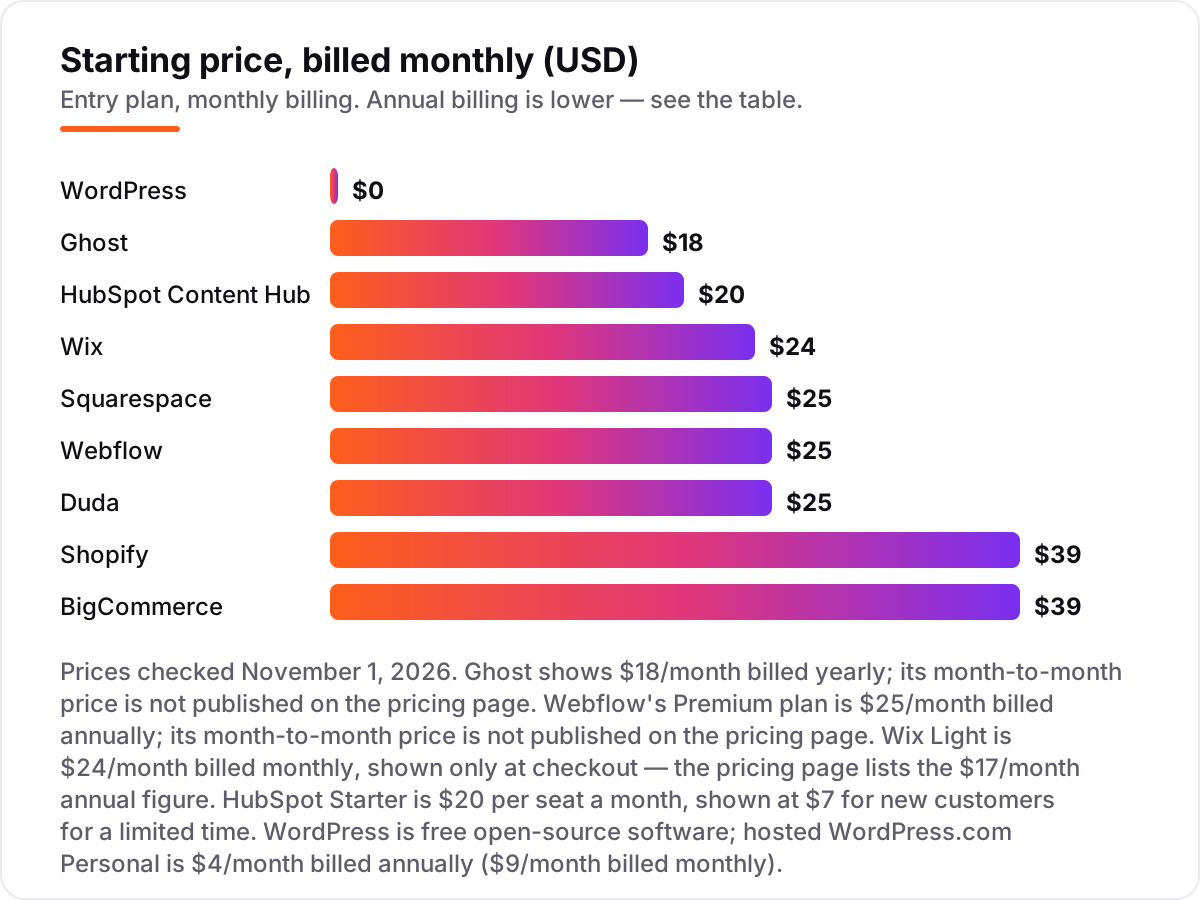
The nine platforms in this list are organised by what you actually need: a free start, a site live this week, a design-led build, a store, or a CRM that holds the content too. Prices run from free to $39 a month at the entry level, and every starting price below was checked on the vendor's own pricing page on November 1, 2026.
One number explains why WordPress dominates every comparison in this category: W3Techs reports it runs about 40% of all websites, and close to 60% of sites with a known CMS. That share is why the plugin, theme and hosting markets all build for WordPress first — and why switching away from it later costs more than switching between the hosted platforms.
Free and open-source first
WordPress and Ghost are the two open routes in this list, and they work in opposite ways. WordPress is free software you install on hosting you choose, with the whole plugin market behind it; Ghost is free software too, but most buyers pay for Ghost(Pro) hosting at $18 a month billed annually and never touch a server. Both give you clean, fast pages and full control over the SEO fields that matter.
Start free when the budget is zero and the site is a blog or a personal project. WordPress.com's free plan and Webflow's free Starter plan both let you publish before paying, and the WordPress software itself costs nothing — only the hosting does. Move to a paid plan the moment the site carries your business name: a custom domain, no platform branding and plugin access are worth the $4 to $18 a month. Our guide to the best CMS for SEO covers the same free-versus-hosted choice in more depth.
All-in-one builders for small business
Wix and Squarespace are the two builders for owners who want a site, not a project. Both include hosting, SSL, templates, blogging and analytics in one subscription, and both put SEO fields on every page without a plugin. The difference is temperament: Wix is faster and more flexible, with an AI builder and more than 2,000 templates; Squarespace is more polished, with templates that look designed rather than assembled.
Price is where they split. Wix Light is $24 a month billed monthly, or $17 billed annually — and the monthly figure only appears at checkout, which is worth knowing before you budget. Squarespace Basic is $25 a month, or $19 billed annually, but adds a 2% fee on store sales that Wix Light does not charge. Neither has a meaningful free tier for a business site: Wix's free plan carries ads and a subdomain, and Squarespace offers only a 14-day trial.
Design-led platforms and agency tools
Webflow and Duda serve the people who build sites for a living, and the choice between them is about who the site is for. Webflow is for a design or marketing team building its own site: the visual canvas, the CMS collections and the clean code output reward design skill, and the $29 CMS plan is the real entry point because Basic has no CMS. Duda is for agencies building sites for clients: one dashboard, client workspaces, team seats and AI tools that speed up each build.
Both charge for what they are good at. Webflow's per-site pricing means each new site is another $23 to $29 a month, and the Designer takes weeks to learn. Duda's per-account pricing means one $25 subscription covers the account but a single site, with eCommerce as a paid extra and white-label handoff held for the $199 plan. If you build one site, Webflow; if you build ten a month for clients, Duda.
Stores and CRM-first teams
Shopify, BigCommerce and HubSpot Content Hub are the three platforms where the website is not the whole product. Shopify and BigCommerce are stores first: both start at $39 a month, both include the SEO basics, and the choice comes down to catalog and fees. Shopify has the bigger app store and the faster checkout; BigCommerce gives you unlimited products, storage and staff on Core, but caps trailing sales at $30,000 and adds a 2% fee on outside payment providers.
HubSpot is the outlier: a CRM with a CMS attached. Content Hub makes sense only when the CRM is already the center of the business, because the website, the blog and the lead data live in one place and SEO reporting ties traffic to revenue. As a standalone CMS it is the most expensive way to publish pages in this list, at $20 a month per seat before Professional. Stores choosing between the two commerce platforms should also read our best ecommerce platform for SEO guide, and publishers weighing the content-first options should read the best blogging platform for SEO.
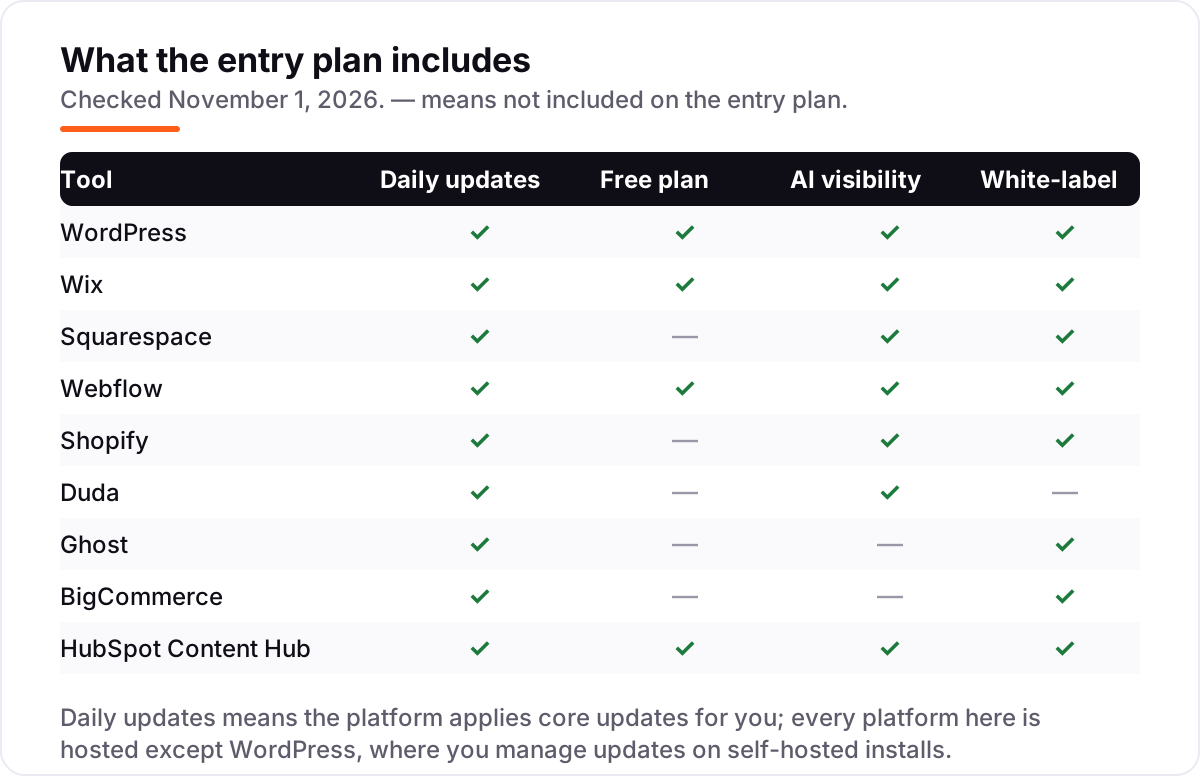
Quick comparison: tool type by need
| Buyer | Best pick | Why |
|---|---|---|
| Solo blogger on a budget | WordPress | Free software, full SEO control, plugins for everything |
| Small business, live this week | Wix | $24/month, free plan to start, SEO built in |
| Design-first brand or portfolio | Squarespace | $25/month, templates that look finished on day one |
| Marketing team that designs | Webflow | $25/month, a real CMS with clean code output |
| A store that needs to rank | Shopify or BigCommerce | $39/month each, SEO basics included |
| Agency building client sites | Duda | $25/month, client workspaces and fast builds |
| Publisher or newsletter | Ghost | $18/month billed annually, fast pages and memberships |
| Team already on HubSpot | HubSpot Content Hub | $20/month per seat, CRM and content together |
How to choose: a short decision path
- Start with the site's job. A blog or content site points to WordPress or Ghost; a business site points to Wix or Squarespace; a store points to Shopify or BigCommerce; client work points to Duda; a HubSpot team points to Content Hub.
- Check the entry plan, not the homepage. The plan that carries a custom domain, no platform branding and the SEO fields you need is the real starting price — on Webflow that is the $29 CMS plan, not the $14 Basic plan.
- Count the second year, not the first. Annual billing cuts 20–25% off most plans here, but Wix's monthly rate, Ghost's missing monthly price and HubSpot's per-seat pricing all change the bill. Price the plan you will still be on in twelve months.
- Try the free tier with real content. WordPress, Wix and Webflow all start free. Publish five real pages, check them in Search Console, and run your titles through the free SERP snippet preview tool before you pay.
- Confirm the exit. Make sure you can export your content and redirect your URLs before you commit — the platforms that lock content in are the ones that cost the most to leave.
Mistakes to avoid
- Comparing monthly prices without checking billing. Wix Light is $24 a month billed monthly and $17 billed annually, and the monthly figure only shows at checkout. Annual billing is usually 20–25% cheaper across this list.
- Buying the cheapest plan that cannot do the job. Webflow Basic has no CMS, Ghost Starter has no paid subscriptions, and Shopify Basic still needs paid apps for serious SEO. The entry plan is not always the usable plan.
- Ignoring what the plan caps. BigCommerce Core caps trailing sales at $30,000 and upgrades you automatically; Shopify's app costs grow with every feature; HubSpot charges per seat, so a second editor doubles the bill.
- Choosing on templates alone. Templates are the easiest thing to change and the least important for rankings. The SEO controls, the page speed and whether your team will actually publish matter more than the gallery.
- Skipping the audit before a migration. If you already have a site, an SEO audit will tell you which URLs, titles and redirects the new CMS has to preserve — before you move, not after traffic drops.
How we chose
We checked each vendor's own pricing page on November 1, 2026 and recorded the starting price exactly as shown, including the annual-billing figure where the page lists one. Three prices needed a note: Wix shows only annual figures on its pricing page, so the $24 monthly Light price comes from Wix's own pricing guide, which states monthly billing costs more; Ghost publishes no month-to-month price, so $18 is the annual-billed figure; and HubSpot's $7 annual Starter rate is a limited-time offer for new customers. WordPress.com's pricing page loads its figures by script, so we cross-checked the Personal plan against the vendor-supplied price on its G2 profile ($4 a month) and independent reads of the page dated October 2026. Ratings come from G2, opened the same day — except HubSpot Content Hub, where G2's page would not load, so we show no rating rather than an old one. We ranked the platforms by fit for the most common buyer — a small business or marketing team picking one CMS for the site that has to rank — not by brand size. No vendor paid for a place in this list, and none of the links here are affiliate links.
What to do next
Start with the decision path above: name the site's job, check the entry plan that can actually do it, and price the second year. Then take the free plan or trial of your top pick — WordPress, Wix and Webflow all start free — and publish five real pages before you pay. If the pages index cleanly, the titles look right in search results and the editor feels fast, you have your CMS. If you'd rather have this set up and read for you, request a free SEO + AI visibility audit and get a ranked fix list in 2 business days.
Rather not run the tools yourself?
Tools show you the data. SerpAstra turns it into higher rankings, more map-pack calls and citations in AI answers.
Get a free SEO + AI visibility audit→Sources we checked (18)
- WordPress.com pricing — wordpress.com/pricing (checked November 1, 2026)
- WordPress.com on G2 — 4.4/5, 2,720 reviews (checked November 1, 2026)
- Wix pricing — wix.com/pricing (checked November 1, 2026)
- Wix on G2 — 4.2/5, 1,910 reviews (checked November 1, 2026)
- Squarespace pricing — squarespace.com/pricing (checked November 1, 2026)
- Squarespace on G2 — 4.4/5, 1,137 reviews (checked November 1, 2026)
- Webflow pricing — webflow.com/pricing (checked November 1, 2026)
- Webflow on G2 — 4.4/5, 996 reviews (checked November 1, 2026)
- Shopify pricing — shopify.com/pricing (checked November 1, 2026)
- Shopify on G2 — 4.4/5, 5,152 reviews (checked November 1, 2026)
- Duda pricing — duda.co/plans (checked November 1, 2026)
- Duda on G2 — 4.6/5, 794 reviews (checked November 1, 2026)
- Ghost pricing — ghost.org/pricing (checked November 1, 2026)
- Ghost on G2 — 4.0/5, 40 reviews (checked November 1, 2026)
- BigCommerce pricing — bigcommerce.com/pricing (checked November 1, 2026)
- BigCommerce on G2 — 4.2/5, 585 reviews (checked November 1, 2026)
- HubSpot Content Hub pricing — hubspot.com/pricing/content (checked November 1, 2026)
- W3Techs CMS market share, October 2026 (WordPress about 40% of all websites)
Shamim
Founder of SerpAstra
A full-stack SEO and digital marketer who spends most days on Local SEO for dental practices, AI search visibility and lead generation.
Frequently asked questions
What is the best SEO CMS platform in 2026?
WordPress, for most sites: it is free, gives full control over URLs, meta, schema and redirects, and runs about 40% of all websites. If you want no maintenance, Wix is the easiest paid start at $24 a month, and Webflow is the pick for design-led teams. The best platform is the one your team will actually update.
How much does an SEO CMS cost?
Between free and $39 a month at the entry level. WordPress software is free, Wix Light is $24 a month, Squarespace and Duda are $25, Webflow's CMS plan is $29, and Shopify and BigCommerce are $39. Annual billing cuts most of these by 20–25%, and stores should also budget for apps and a theme.
Is there a free SEO CMS?
Yes. WordPress is free open-source software, and WordPress.com, Wix and Webflow all offer free plans. The free tiers work for a personal site or a test, but they show platform branding or a subdomain, so a business site needs a paid plan — from $4 a month for WordPress.com Personal billed annually.
WordPress vs Wix vs Squarespace: which is best for SEO?
WordPress gives the most control and the deepest plugin bench, so it wins on ceiling. Wix is the fastest to launch and its built-in SEO covers the basics well. Squarespace sits between them on design, with less flexibility. If you will hire an SEO or publish weekly, choose WordPress; if you want a site this week, choose Wix.
Can I switch CMS later without losing rankings?
Yes, if the move is planned: map every old URL to a new one with 301 redirects, keep titles and meta, move the sitemap, and watch Search Console for a month. Rankings usually dip for a few weeks and recover. The risky moves are the unplanned ones — a rebuild with new URLs and no redirects can cost months of traffic.
Do I need a developer to rank on these platforms?
No, not on the hosted platforms: Wix, Squarespace, Shopify, Duda and BigCommerce handle hosting, SSL and sitemaps for you, and their SEO fields need no code. WordPress rewards a developer for speed and custom schema, but a careful owner can rank with Rank Math or Yoast alone. Budget for help only when the site outgrows the built-ins.
What should I check before paying for a CMS?
Four things: whether the entry plan includes a custom domain and no platform branding, what counts toward the plan limits, whether the price is monthly or annual billing, and whether the SEO tools you need are included or paid extras. The comparison table at the top of this guide shows the starting price and free plan for each platform.
Free SEO and AI visibility audit
Find out what is holding your rankings back
Send us your site. Within 2 business days you get a written audit, an AI visibility check and a short fix list ranked by impact. Free, with no contract attached.
Request my free audit→Related guides
 SEO & AI SearchBest CMS for SEO in 2026: 8 Options Ranked and Reviewed8 best CMS for SEO compared with real 2026 prices, free plans and SEO controls. WordPress, Webflow, Shopify and more, ranked by fit for a small business site.Read guide →
 SEO & AI Search12 Best Blogging Platforms for SEO in 2026 (Pros, Cons and Pricing)Compare the best blogging platform for SEO for your budget: 12 platforms ranked on price, SEO controls and ownership, from free WordPress to Ghost and Webflow.Read guide →
 SEO & AI Search7 Best Ecommerce Platforms for SEO in 2026 (Pros, Cons and Pricing)The 7 best ecommerce platform for SEO picks compared on price, SEO controls and ease of use, with real 2026 prices checked on each vendor's pricing page.Read guide →