
10 Best Social Media Advertising Software in 2026, Compared
Compare the 10 best social media advertising software options on price, free plans and ad tools, with every price checked on November 5, 2026.
 Shamim Mia, Founder, SerpAstraLast verified November 5, 202614 min read
We compare pricing pages, documentation and public reviews. We never accept payment for rankings.

Key takeaways
- Meta Ads Manager and TikTok Ads Manager are free and cover most small businesses; the cheapest paid tool is Buffer at $6 per channel a month, and AdEspresso starts at $49 a month for Meta split testing.
- Five tools in this list charge no subscription at all — Meta, TikTok, LinkedIn, Pinterest and X — so your real budget is the ad spend, not the software.
- The single most important buying factor is the pricing unit: per channel, per seat, per social set or a spend cap decides what you actually pay, not the headline price.
- B2B advertisers should start on LinkedIn Campaign Manager for job-title targeting, and visual brands should start on Pinterest for shopping ads.
On this page
Quick comparison
| Tool | Best for | Starting price | Free plan |
|---|---|---|---|
| Meta Ads Manager | Small businesses advertising on Facebook and Instagram that want the full native toolset for free | Free | Yes (free) |
| TikTok Ads Manager | Brands that want to reach TikTok's audience with short video ads and Spark Ads from creator posts | Free | Yes (free) |
| AdEspresso | Small Facebook and Instagram advertisers spending under $1,000 a month who want split testing without learning Ads Manager | $49/mo | No (14-day trial) |
| Buffer | Solo creators and small teams that want the cheapest scheduler with AI help and a real free plan | $6/mo/channel | Yes (free plan) |
| Later | Instagram-first brands that plan visually and want Link in Bio and scheduling in one place | $25/mo | Yes (free plan) |
| Hootsuite | Teams that want publishing, listening and analytics for many networks in one governed suite | $99/mo | No (30-day trial) |
| Sprout Social | Growing teams that need a shared inbox, review management and reporting clients will trust | $99/mo | No (30-day trial) |
| LinkedIn Campaign Manager | B2B advertisers who want to target by job title, company, industry and seniority | Free | Yes (free) |
| Pinterest Ads Manager | Ecommerce and home brands whose products sell through visual discovery and shopping pins | Free | Yes (free) |
| X Ads | Brands that want real-time conversation around live events, launches and trending topics | Free | Yes (free) |
Make one of these tools?
We re-check this list every quarter. Send a correction, request a review, or ask about a clearly labeled sponsored spot.
Request a listingThe best social media advertising software

Meta Ads Manager
Best for: Small businesses advertising on Facebook and Instagram that want the full native toolset for free
Meta Ads Manager is where most small businesses should start, because it costs nothing and reaches the biggest social audience in this list. You build campaigns for Facebook and Instagram in one place, and Advantage+ AI handles the parts beginners find hardest: it picks placements, tests creative variations and finds audiences that behave like your buyers. Every campaign reports back by age, gender, placement and device, so you can see exactly which ad and which audience produced each sale.
The trade-off is that Ads Manager only knows Meta. There is no scheduling for TikTok or LinkedIn, no cross-network reporting and no help from a human unless your spend is large. Start here when Facebook or Instagram is where your customers are, and add a scheduler like Buffer only when you are also publishing organic posts across several networks.
What we like
- Free to use with no subscription — you pay only for the ads you run
- Advantage+ AI automates targeting, placements and creative variations
- The largest social ad audience in this list, across Facebook, Instagram, Messenger and WhatsApp
- Detailed breakdowns by age, gender, placement and device for every campaign
Watch out for
- No built-in cross-network scheduling or reporting — Meta only
- The interface is dense and the learning curve is steep for first-time advertisers
- Support is mostly self-serve help articles unless you spend at scale

TikTok Ads Manager
Best for: Brands that want to reach TikTok's audience with short video ads and Spark Ads from creator posts
TikTok Ads Manager is free, and it is the cheapest way to reach an audience that ignores polished advertising. Short vertical video is the whole format, and the built-in editor plus trending sounds mean a phone-shot clip can be an ad in an afternoon. Spark Ads are the smartest feature here: instead of producing a commercial, you boost a creator's real post about your product, which reads as a recommendation rather than an interruption.
The catch is creative volume. A winning TikTok ad stops working within weeks, so you need a steady supply of fresh video, and the reporting will not answer every attribution question Meta can. Choose TikTok when your product looks good on video and your buyers are under 40; skip it when you have no one to film.
What we like
- Free to use with no subscription — you pay only for the ads you run
- Smart+ AI automates creative selection, targeting and budget allocation
- Spark Ads let you boost real creator posts instead of making polished ads
- Built-in video editor and a library of trending sounds and templates
Watch out for
- Video-first format — still images and text ads do not perform here
- Creative burns out fast, so new video is needed every few weeks
- Reporting is weaker than Meta's for multi-touch attribution

AdEspresso
Best for: Small Facebook and Instagram advertisers spending under $1,000 a month who want split testing without learning Ads Manager
AdEspresso does one job well: it turns one ad idea into dozens of variations and tells you which one wins. You feed in headlines, images and audiences; it builds every combination, runs the split test and shows the winner in a visual report anyone can read. Simple rules pause losing ads automatically, and unlimited ad accounts come on every plan, so one freelancer can manage several clients on Starter.
The limit that matters is the spend cap. Starter allows $1,000 of monthly ad spend, and crossing it moves you to Plus at $99 a month, so a growing advertiser's bill doubles on volume alone. It is also a Meta-only tool in practice. Pick AdEspresso when split testing is the job; stick with free Ads Manager when you run a handful of ads and do not need testing.
What we like
- Creates dozens of ad variations from one set of headlines, images and audiences
- Split testing shows the winning combination automatically, with clear visual reports
- Unlimited ad accounts on every plan, including Starter at $49/month
- Simple rules pause losing ads and promote winners without manual checking
Watch out for
- Starter caps monthly ad spend at $1,000 — passing it forces Plus at $99/month
- Meta-only focus; Google Ads support is basic and treated as an afterthought
- G2 reviewers repeatedly report slow customer support and billing disputes

Buffer
Best for: Solo creators and small teams that want the cheapest scheduler with AI help and a real free plan
Buffer is the calmest tool in this list, and for a solo creator that is the point. The free plan covers three channels with ten scheduled posts each, which is enough to run a small business's organic posting without paying anything. Essentials costs $6 per channel a month, or $5 billed annually, and adds unlimited scheduling, an AI Assistant that drafts and repurposes copy, and advanced analytics. The queue-based composer is simple enough to learn in an afternoon.
Buffer does not manage ads. It schedules organic posts and reports on them; your paid campaigns still live in Meta, TikTok or LinkedIn's own managers, and per-channel pricing means five channels cost $30 a month. Pick Buffer when organic scheduling is the job and the budget is small; pick Hootsuite or Sprout Social when you need listening and team workflows too.
What we like
- The cheapest paid start here: Essentials is $6 per channel per month
- A real free plan covers 3 channels with 10 scheduled posts each
- AI Assistant drafts post copy and repurposes it across channels
- The cleanest, calmest interface in this list — easy to learn in an afternoon
Watch out for
- Per-channel pricing adds up fast — five channels cost $30/month on Essentials
- No ad creation or ad spend management; it schedules organic posts, not paid campaigns
- Analytics are basic compared with Hootsuite or Sprout Social

Later
Best for: Instagram-first brands that plan visually and want Link in Bio and scheduling in one place
Later is built for brands that plan by looking at the grid. The drag-and-drop calendar shows your Instagram and TikTok feed as it will actually appear, and the media library, best-time-to-post suggestions and Link in Bio tool sit in the same planner. Starter costs $25 a month, or $18.75 billed annually, for one social set (one profile on each of eight networks), one user and 30 scheduled posts per profile, with five monthly AI credits.
Check the caps first: 30 scheduled posts per profile suits a weekly poster, not a daily one, and there is a free plan (one social set, 10 posts a month) alongside a 14-day trial. Later also dropped X support in 2025. Pick Later when Instagram is your home base and the visual plan matters; pick Buffer when the budget is smaller and X still counts.
What we like
- Visual drag-and-drop calendar that makes Instagram and TikTok planning feel native
- Link in Bio tool included on every plan, with click tracking
- AI credits on Starter draft captions and suggest hashtags
- Media library and best-time-to-post suggestions built into the planner
Watch out for
- Starter caps at 30 scheduled posts per profile and 1 social set (8 profiles)
- No free plan — only a 14-day trial
- Dropped X support in 2025, so X publishing needs another tool

Hootsuite
Best for: Teams that want publishing, listening and analytics for many networks in one governed suite
Hootsuite is the veteran suite in this list, and it shows in the breadth: publishing, streams for mentions and messages, social listening and competitor benchmarking across more than 35 networks from one dashboard. Professional costs $99 a month billed annually for one user and ten social accounts, with unlimited scheduling, OwlyWriter AI for drafting and rewriting posts, and basic analytics. Team is $249 a month for three users and twenty accounts.
The price is the honest objection. At $99 a month for a single seat, Hootsuite costs more than Buffer, Later and AdEspresso combined for a solo user, and there has been no free plan since 2023. Pick Hootsuite when a team needs one governed suite across many networks; pick Buffer or Later when one person is doing the posting.
What we like
- Covers the most networks in this list from one dashboard, with streams for mentions and messages
- OwlyWriter AI drafts posts and rewrites them for each network
- Built-in social listening and competitor benchmarking on paid plans
- AdEspresso is the same company's Meta ads tool, so the two connect cleanly
Watch out for
- Professional is $99/month for a single user — the most expensive solo start here
- No free plan since 2023; only a 30-day trial
- Per-user pricing means every extra seat multiplies the bill

Sprout Social
Best for: Growing teams that need a shared inbox, review management and reporting clients will trust
Sprout Social is the best-reviewed tool in this list at 4.4 out of 5 on G2 from more than 6,400 reviews, and the reason is the inbox. Smart Inbox merges comments, mentions, reviews and direct messages from every network into one queue with tags, sentiment and spike alerts, so a team can answer customers instead of hunting across apps. Essentials costs $99 per seat a month billed monthly, or $79 billed annually, for five profiles, publishing and standard reports.
Check the plan ladder first. Essentials is publishing-only: the shared inbox that makes Sprout special starts on Standard at $199 per seat a month, so three people cost $597 a month, and listening and Premium Analytics are paid add-ons on top. Pick Sprout when customer care and client-ready reporting are the job; pick Hootsuite when listening matters more than the inbox.
What we like
- The highest-rated tool here on G2 at 4.4/5 from more than 6,400 reviews
- Smart Inbox merges comments, mentions, reviews and DMs into one queue
- Clean, client-ready reports with Salesforce and helpdesk integrations
- Keyword and location monitoring included from the Standard plan
Watch out for
- Essentials is publishing-only — the shared inbox starts on Standard at $199/seat/month
- Per-seat pricing: three people on Standard cost $597/month
- Social listening and Premium Analytics are paid add-ons, not included

LinkedIn Campaign Manager
Best for: B2B advertisers who want to target by job title, company, industry and seniority
LinkedIn Campaign Manager is free to use, and for B2B advertisers its targeting is unmatched: job title, company, industry, seniority and skills, none of which any other tool in this list can match. Accelerate AI builds a campaign from a landing page URL and optimizes it automatically, and Lead Gen Forms capture a prospect's details without sending them off LinkedIn, which lifts conversion on whitepapers and demos. Sponsored Content, Message Ads and Dynamic Ads all run from the same dashboard.
The catch is the cost per click, which is the highest in this list — B2B attention is expensive, and minimum daily budgets make small tests costly. Lead volume is also low for niche titles. Use LinkedIn when a single qualified lead is worth far more than a click; use Meta or TikTok when volume matters more than job title.
What we like
- Free to use with no subscription — you pay only for the ads you run
- The only targeting in this list by job title, company size, industry and seniority
- Accelerate AI builds and optimizes campaigns from a landing page URL
- Lead Gen Forms capture leads without sending people off LinkedIn
Watch out for
- The highest cost per click in this list — B2B audiences are expensive to reach
- Minimum daily budgets make small tests costly compared with Meta or TikTok
- Lead quality is high but volume is low for niche job titles

Pinterest Ads Manager
Best for: Ecommerce and home brands whose products sell through visual discovery and shopping pins
Pinterest Ads Manager is free, and it suits a different kind of buyer than the other free platforms: people arrive already looking for something to buy. Catalog and shopping ads put your products in front of that intent, and Performance+ AI automates targeting and budget for shopping campaigns. A promoted pin also keeps working after the campaign ends, because it stays on boards and keeps being discovered — no other ad format in this list has that second life.
The limits are reach and setup. The audience is smaller than Meta or TikTok, so campaigns cap out sooner, and shopping ads need a clean product catalog and a correctly installed Pinterest tag before they can be trusted. Pick Pinterest when you sell products people discover visually — home, fashion, food, crafts; skip it when you sell services.
What we like
- Free to use with no subscription — you pay only for the ads you run
- Shoppers arrive with buying intent, so catalog and shopping ads convert well
- Performance+ AI automates targeting and budget for shopping campaigns
- Promoted Pins keep working as organic content long after the campaign ends
Watch out for
- Smaller audience than Meta or TikTok, so reach caps out sooner
- Shopping and catalog setup takes real work before the first ad runs
- Conversion tracking needs the Pinterest tag installed correctly to be trusted

X Ads
Best for: Brands that want real-time conversation around live events, launches and trending topics
X Ads is free to use, and its one real advantage is speed: no other platform lets a promoted post join a live conversation within minutes of a launch, an event or a trending topic. Keyword and follower targeting reaches people by what they talk about rather than who they are, and video and carousel formats work well for announcements. For a brand whose moment is now — a game, a launch, a breaking story — X is the fastest paid route into the feed.
Everything else is a compromise. The audience is the smallest in this list, pricing swings around big events, brand safety needs careful keyword controls, and the reporting is thinner than Meta's or TikTok's. Use X as a second network for moments that matter; do not build your whole ad strategy on it.
What we like
- Free to use with no subscription — you pay only for the ads you run
- The fastest way to join a live conversation or trending topic with a promoted post
- Keyword and follower targeting reaches people by what they talk about
- Video and carousel formats work well for launches and announcements
Watch out for
- The smallest ad audience in this list, with volatile pricing around big events
- Brand safety needs careful keyword and placement controls
- Fewer ad formats and weaker reporting than Meta or TikTok
The best social media advertising software depends on one decision you make before you compare prices: whether you want the network's own free ad manager or a paid tool that sits on top of it. Meta, TikTok, LinkedIn, Pinterest and X all give you their ad manager free, and you pay only for the ads you run. The five paid tools below add split testing, scheduling, listening and reporting on top of those free managers, and every price was checked on the vendor's own pricing page on November 5, 2026.
How to choose the best social media advertising software
- Start with where your customers are. Facebook and Instagram cover most buyers, TikTok covers video-first audiences under 40, LinkedIn covers B2B job titles, and Pinterest covers shoppers. The network decides the tool, not the other way round.
- Check the pricing unit before the price. Buffer charges per channel, Hootsuite and Sprout Social charge per seat, Later charges per social set, and AdEspresso caps your ad spend. The same $49 can mean five channels or one seat.
- Separate the software cost from the ad spend. The free managers cost $0 in software and everything in ad spend; a $99 subscription is small next to a $1,000 monthly ad budget, so judge tools on what they save, not what they cost.
- Match the tool to the job. Split testing belongs to AdEspresso, visual planning to Later, a shared inbox to Sprout Social, and listening across many networks to Hootsuite. No single tool wins every job.
- Try the free tier first. The five free ad managers cost nothing to test, and Buffer's free plan covers three channels. Run one real campaign before you pay for any subscription.
Advertising is one part of getting found online. If the business also needs to rank in search, our monthly SEO service handles the visibility side, and our guide to advertising platforms for small businesses covers the wider paid-media picture. Before you publish new landing pages for your campaigns, run your titles through the free SERP snippet preview tool — it shows exactly how the title and description will look in Google.
Whatever you shortlist, test it with real money before you commit. A $100 test campaign on one network tells you more about cost per lead than any comparison table, and the free managers make that test cheap: the only cost is the ad spend itself. Check two things in the test: the cost per lead or sale against your break-even number, and whether the reporting answers the question your boss or client will actually ask.
Social media advertising software pricing: what you will actually pay
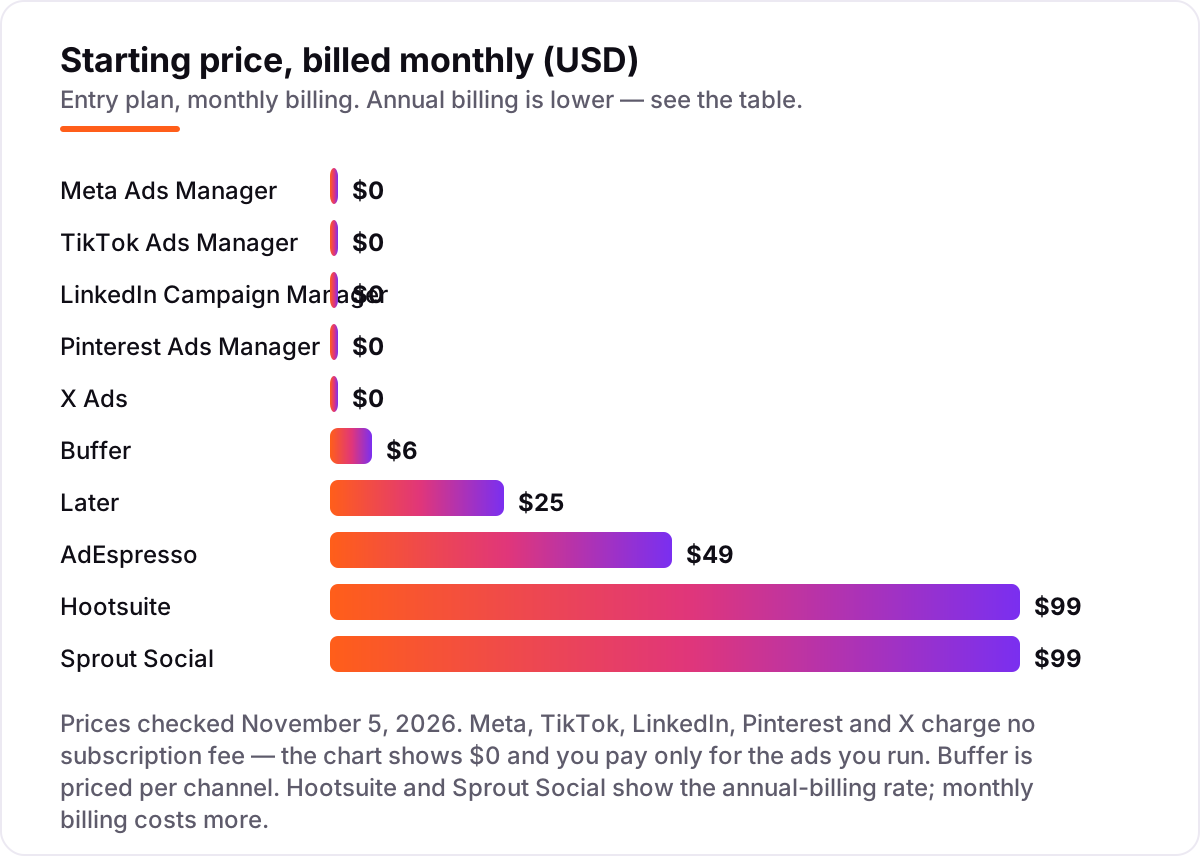
Take a small business spending $1,000 a month on ads across Meta and TikTok, with one person running them and five social channels to keep up. The ad managers themselves cost $0 — Meta and TikTok charge no subscription, so the $1,000 is pure ad spend. The software bill depends on what that person adds: Buffer Essentials for five channels is $30 a month, or $25 billed annually; Later Starter is $25 a month, or $18.75 billed annually; AdEspresso Starter is $49 a month and its $1,000 spend cap fits this budget exactly; Sprout Social Essentials is $99 a month per seat billed monthly ($79 billed annually); Hootsuite Professional is $99 a month billed annually.
Over a year, that is $300 on Buffer billed annually, $225 on Later billed annually, $588 on AdEspresso, $1,188 on Sprout Social Essentials and $1,188 on Hootsuite Professional — before the $12,000 of ad spend, which is the same on every option. The gap between the cheapest and dearest software is $963 a year, and it buys scheduling, testing, an inbox or listening, not better ads: the ads themselves run on the same free managers either way.
Three costs sit outside every number above. First, the spend caps: AdEspresso Starter stops at $1,000 of monthly ad spend, so a budget increase forces Plus at $99 a month. Second, the per-seat trap: Hootsuite Professional covers one user, so a second person doubles the $99, and three people on Sprout Social Standard cost $597 a month. Third, the creative: TikTok ads burn out in weeks, so budget for fresh video every month, whether you film it or hire it out.
Know the difference: ad managers vs ad management tools
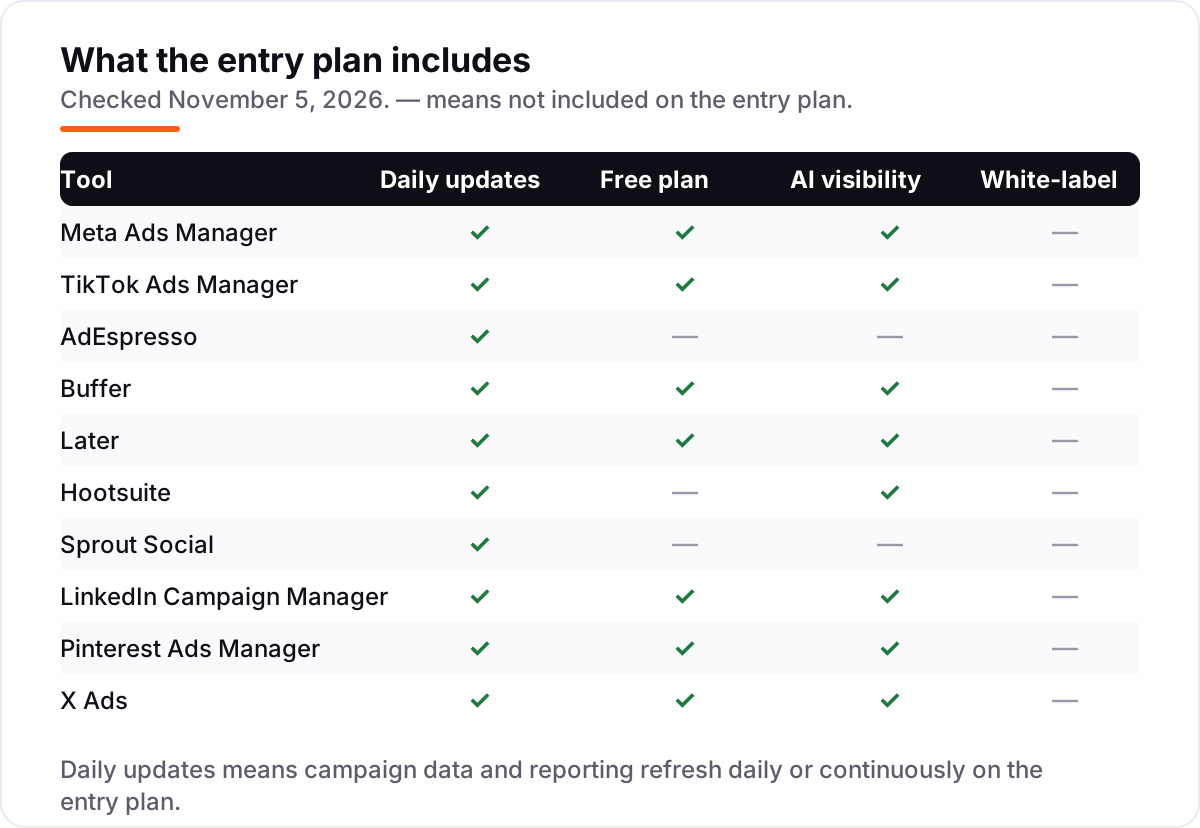
The confusion in this category is between a platform and a layer on top of it. An ad manager — Meta Ads Manager, TikTok Ads Manager, LinkedIn Campaign Manager — is the network's own free tool, and it is the only place where money actually changes hands: you build the ad there, set the budget there and pay the network there. An ad management tool — AdEspresso, Hootsuite, Sprout Social, Buffer, Later — sits on top of those managers and adds something the network does not: split testing across many variations, scheduling across networks, a shared inbox, listening or client-ready reports.
The practical rule is simple. If you run ads on one network and a handful of campaigns, the free manager is enough and the paid tool adds nothing you need. If you run the same campaign across three networks, test fifty ad variations, or answer customer messages as a team, the paid layer starts earning its fee. A second distinction worth knowing is scheduling versus advertising: Buffer and Later schedule organic posts, not paid ads. They are useful neighbours to an ad stack, not replacements for an ad manager, and their prices belong in a different budget line from the ad spend.
A third distinction is the spend cap versus the seat cap. AdEspresso limits how much you can spend, so growth raises its price; Hootsuite and Sprout Social limit how many people can use the tool, so hiring raises theirs. Buffer limits channels, so adding networks raises its price. Check which cap you will hit first, because that cap is your real starting price.
Quick comparison: tool type by need
| Buyer | Best pick | Why |
|---|---|---|
| Most small businesses | Meta Ads Manager | Free, biggest audience, Advantage+ AI built in |
| Video-first brands | TikTok Ads Manager | Free, Spark Ads boost real creator posts |
| Meta split testing | AdEspresso | One-click variations and automatic winners, $49/month |
| Cheapest scheduler | Buffer | Free plan for 3 channels, Essentials $6 per channel |
| Visual Instagram planning | Later | Drag-and-drop calendar and Link in Bio, $25/month |
| Team suite, many networks | Hootsuite | Publishing, listening and analytics in one place, $99/month |
| Team inbox and reporting | Sprout Social | Best-reviewed here at 4.4/5, from $99 per seat |
| B2B lead generation | LinkedIn Campaign Manager | Free, unmatched job-title targeting |
| Shopping and discovery | Pinterest Ads Manager | Free, buyers arrive with intent |
Mistakes to avoid
- Budgeting on the subscription and forgetting the ad spend. The software is the small number: a $25 subscription next to a $1,000 ad budget is 2.5% of the total. Plan the ad budget first, then pick the software that fits inside it.
- Paying for a scheduler when you only run ads. Buffer and Later schedule organic posts; they do not create or manage paid campaigns. If your only job is paid ads, the free ad managers already cover it.
- Ignoring the cap that bites first. AdEspresso's $1,000 spend cap, Hootsuite's single seat on Professional and Buffer's per-channel pricing all turn a cheap start into a dear bill. Price the second seat, the sixth channel and the next $1,000 of spend before you buy.
- Testing on too many networks at once. A $100 test split five ways tells you nothing on any network. Spend the whole test budget on the one network where your customers are, learn the cost per lead, then expand.
- Judging ads on clicks instead of cost per sale. A cheap click that never buys is the most expensive click in the account. Set up conversion tracking — the Meta pixel, the TikTok pixel, the Pinterest tag — before the first campaign, not after.
How we chose
We checked each vendor's own pricing page on November 5, 2026 and recorded the starting price exactly as shown, including the annual-billing figure where the page lists one. The five native ad managers publish no subscription price because there is none — they are free and you pay only for ad spend — so we show them at $0 and say so in the price chart. Ratings come from G2 pages checked the same day: AdEspresso, Buffer, Later, Hootsuite and Sprout Social. The native ad managers carry no rating because G2's listings for them are not product review pages we could verify, and we would rather show no rating than an unverified one. No vendor paid for a place in this list, and none of the links here are affiliate links.
What to do next
Start with the free ad manager on the network where your customers already are — Meta for most businesses, TikTok for video-first brands, LinkedIn for B2B — and run a $100 test campaign with conversion tracking in place. If the cost per lead beats your break-even number, scale the budget before you buy any software. Add a paid tool only when a real bottleneck appears: split testing, scheduling across networks, or a team inbox. If the ads are sorted but new customers are not finding you in search, our AI search optimization service covers that side. Once your tools are in place, find out what's holding your rankings back.
Your stack only works if people find you
SerpAstra fixes what keeps your site off page one and makes it easy for AI assistants to recommend.
Get a free audit→Sources we checked (15)
- Meta Ads Manager — facebook.com/business/ads (checked November 5, 2026)
- TikTok Ads Manager — ads.tiktok.com (checked November 5, 2026)
- AdEspresso pricing — adespresso.com/pricing (checked November 5, 2026)
- Buffer pricing — buffer.com/pricing (checked November 5, 2026)
- Later pricing — later.com/pricing (checked November 5, 2026)
- Hootsuite plans — hootsuite.com/plans (checked November 5, 2026)
- Sprout Social pricing — sproutsocial.com/pricing (checked November 5, 2026)
- LinkedIn Campaign Manager — business.linkedin.com/marketing-solutions/ads (checked November 5, 2026)
- Pinterest Ads — business.pinterest.com/en-us/advertising (checked November 5, 2026)
- X Ads — business.x.com/en/advertising (checked November 5, 2026)
- AdEspresso G2 reviews — g2.com/products/adespresso-by-hootsuite/reviews (checked November 5, 2026)
- Buffer G2 reviews — g2.com/products/buffer/reviews (checked November 5, 2026)
- Later G2 reviews — g2.com/products/later/reviews (checked November 5, 2026)
- Hootsuite G2 reviews — g2.com/products/hootsuite/reviews (checked November 5, 2026)
- Sprout Social G2 reviews — g2.com/products/sprout-social/reviews (checked November 5, 2026)
Shamim
Founder of SerpAstra
A full-stack SEO and digital marketer who spends most days on Local SEO for dental practices, AI search visibility and lead generation.
Frequently asked questions
What is the best social media advertising software?
Meta Ads Manager is the best starting point for most advertisers: it is free, reaches the biggest audience and includes Advantage+ AI. TikTok Ads Manager is the best free choice for video-first brands. AdEspresso at $49 a month is the best paid pick for Meta split testing.
How much does social media advertising software cost?
Five tools here are free — Meta, TikTok, LinkedIn, Pinterest and X — and you pay only for ad spend. Paid tools start at $6 per channel a month on Buffer, $25 on Later, $49 on AdEspresso, $99 per seat on Sprout Social and $99 on Hootsuite. Ad spend itself is a separate budget on every tool.
Is there free social media advertising software?
Yes. Every major network's own ad manager is free: Meta, TikTok, LinkedIn, Pinterest and X all charge no subscription and you pay only for the ads you run. Buffer also has a free plan for organic scheduling across three channels. The paid tools add testing, scheduling and reporting, not access to the networks.
What is the difference between an ad manager and an ad management tool?
An ad manager is the network's own free tool — Meta Ads Manager or TikTok Ads Manager — where you build and pay for ads on that network only. An ad management tool such as AdEspresso, Hootsuite or Sprout Social sits on top, adding scheduling, split testing, listening and cross-network reporting for a monthly fee.
How much should a small business spend on social media ads?
Start with a test budget you can afford to lose, such as $300 to $500 a month, and put it on the one network where your customers already are. Judge the test on cost per lead or sale, not clicks, and only scale the campaigns that beat your break-even number. The software cost is small next to the ad spend.
Can I run social media ads without paying for software?
Yes. Meta, TikTok, LinkedIn, Pinterest and X all give you their ad manager free, and that covers most small businesses. Paid software earns its fee when you need split testing across many ad variations, scheduling across networks, a shared team inbox or client-ready reports — not for running a few ads.
Which social media advertising software is best for B2B?
LinkedIn Campaign Manager, because it is the only tool here that targets by job title, company, industry and seniority, and it is free. Its cost per click is the highest in this list, so use it for high-value leads and let Meta or TikTok handle broader awareness.
Free SEO and AI visibility audit
Find out what is holding your rankings back
Send us your site. Within 2 business days you get a written audit, an AI visibility check and a short fix list ranked by impact. Free, with no contract attached.
Request my free audit→Related guides
 Digital Marketing & Ads7 Best Advertising Platforms for Small Businesses in 2026, Compared7 best advertising platforms for small businesses compared on minimum budgets, cost per click and who each one fits — minimums checked on each vendor's page.Read guide →
 Digital Marketing & Ads10 Best Display Advertising Software in 2026, ComparedThe 10 best display advertising software tools compared on price, reach and ease of use, from Google Ads to The Trade Desk. Checked November 4, 2026.Read guide →
 Digital Marketing & Ads10 Best Digital Advertising Platforms in 2026, ComparedCompare the 10 best digital advertising platforms on price, minimum budgets, targeting and AI tools — every figure checked November 4, 2026.Read guide →