
11 Best Software for Handyman Business in 2026, Compared
Compare the 11 best software for handyman business on price, scheduling, invoicing and payments, with every price checked live November 8, 2026.
 Shamim Mia, Founder, SerpAstraLast verified November 8, 202614 min read
We compare pricing pages, documentation and public reviews. We never accept payment for rankings.

Key takeaways
- Jobber is the best fit for most handymen at $49/month, Housecall Pro follows at $79/month with online booking built in, and ServiceM8 is free for up to 30 jobs a month, then $29/month.
- The single most important buying factor is the pricing model: per user, per job or one flat company price decides what you actually pay as the crew grows, not the headline rate.
- Four tools here publish no starting price at all — Workiz, FieldPulse, ServiceTitan and mHelpDesk are quote-only, so get the number in writing before you compare them.
- A solo handyman can run on $29 to $90 a month; a three-person crew pays $75 to $245 a month on the published plans, before card processing and add-ons.
On this page
Quick comparison
| Tool | Best for | Starting price | Free plan |
|---|---|---|---|
| Jobber | Solo handymen and small crews that want the easiest all-in-one setup for quotes, scheduling, invoicing and payments | $49/mo | No (14-day trial) |
| Housecall Pro | Handymen who want customers to book online and pay at the door, with marketing and review tools built in | $79/mo | No (14-day trial) |
| ServiceM8 | Solo handymen doing under 30 jobs a month who want real job software free, with no per-user fees when they grow | Free; Starter $29/mo | Yes (free) |
| Kickserv | Small crews of up to 5 who want the cheapest flat team price with QuickBooks sync included | $75/mo | No (30-day trial) |
| Workiz | Handymen who lose jobs to missed calls and want a built-in phone system, call tracking and AI answering | Custom quote | Yes (Lite plan) |
| FieldPulse | Handymen who want deep job tracking, project management and QuickBooks sync and will sit through a sales call | Custom quote | No (demo only) |
| Service Fusion | Growing crews of any size that want one flat company price with no per-user math at all | $245/mo | No (demo only) |
| RazorSync | Small handyman crews that want simple flat plans by team size and a low-cost Solo option | $90/mo | No (14-day trial) |
| Launch27 | Handymen who get most work from their own website and want customers to book and pay without a phone call | $75/mo | No (free trial) |
| ServiceTitan | Large handyman and home-service operations doing high volume that need deep dispatch, reporting and memberships | Custom quote | No (demo only) |
| mHelpDesk | Budget-first handymen who want one simple plan, five seats and an offline mode for basements and dead zones | Custom quote | No (7-day trial) |
Make one of these tools?
We re-check this list every quarter. Send a correction, request a review, or ask about a clearly labeled sponsored spot.
Request a listingThe best software for handyman business

Jobber
Best for: Solo handymen and small crews that want the easiest all-in-one setup for quotes, scheduling, invoicing and payments
Jobber is the default choice for a handyman business because it covers the whole job in one place: a quote goes out, the customer approves it in the client hub, the job lands on the schedule, and the invoice and payment follow without a second app. Core costs $49 a month for one user ($29 billed annually); Connect is $139 a month billed monthly for one user and adds automated follow-ups and QuickBooks sync.
The catch is the user count. Core is strictly one user, so the moment a helper or office person needs a login, the bill jumps to Connect. Grow adds job costing and two-way texting at $199 a month billed monthly. Buy Jobber for the simplest setup handymen know; buy ServiceM8 when the budget is $0, or Kickserv when five seats for one flat price matters more.
What we like
- The cleanest setup in this list: quotes, scheduling, invoicing and payments in one subscription
- Client hub lets customers approve quotes and pay online without a phone call
- Job costing and two-way texting arrive on Grow at $199/month billed monthly
- More than 100,000 customers use it, so hiring help who already know it is easy
Watch out for
- Core covers one user only, so a second person means Connect at $139/month billed monthly
- QuickBooks sync and automated follow-ups wait for Connect, not Core
- Card processing at 2.9% plus $0.30 per transaction is charged on top of the subscription

Housecall Pro
Best for: Handymen who want customers to book online and pay at the door, with marketing and review tools built in
Housecall Pro is built for the customer-facing side of a handyman business: a homeowner books online, gets an estimate, pays at the door and is asked for a review afterward, all in one subscription. Basic is $79 a month ($59 billed annually) for one user, and already includes a price book, job costing and review management. Essentials costs $189 a month billed monthly for five users and adds routes, GPS tracking and QuickBooks sync.
The trade-off is the add-on list. CSR AI, campaigns, payroll, VoIP and vehicle GPS are all quoted separately, so the real bill can run well past the plan price. The pricing page also runs a quiz that can show different prices by trade and team size. Buy Housecall Pro when booking and reviews drive your work; buy Jobber for a cheaper start and simpler plan ladder.
What we like
- Online booking, scheduling, estimates, invoicing and payments in one place from Basic
- Price book and job costing are included on the entry plan, not held for a higher tier
- Review management and consumer financing are built in, so repeat work is easier to win
- AI team members are listed as included on every plan on the pricing page
Watch out for
- Basic covers one user and leaves QuickBooks sync and GPS tracking to Essentials at $189/month billed monthly
- Most add-ons, including CSR AI, campaigns, payroll and VoIP, are quoted separately
- The quiz on the pricing page can show different prices by trade and team size, so confirm the standard rate

ServiceM8
Best for: Solo handymen doing under 30 jobs a month who want real job software free, with no per-user fees when they grow
ServiceM8 is the cheapest honest way to run a handyman business because the free plan is real job software, not a demo: one user, 30 jobs a month, scheduling, quoting, invoicing, time tracking and AI smart helpers at $0. Starter costs $29 a month for 50 jobs, Growing costs $79 for 150 jobs, and Premium costs $149 for 500 jobs, with unlimited users on every paid plan.
The limit to watch is the job count, not the headcount. A handyman doing 40 jobs a month fits Starter, but a busy month past 50 jobs means Growing, so the bill follows the workload rather than the crew. The app also works best on iPhone and iPad. Pick ServiceM8 when the business is small and the budget is tight; pick Jobber when Android parity and a bigger integration list matter.
What we like
- The only free plan here with real scheduling, quoting and invoicing at $0
- Paid plans charge by jobs per month, not by user, so adding staff costs nothing extra
- Starter at $29/month covers 50 jobs a month with unlimited users
- AI smart helpers are included even on the free plan, with 10 AI uses a day
Watch out for
- Plans are capped by jobs per month, so a busy month can force an upgrade mid-month
- The mobile app is strongest on iPhone and iPad, with thinner Android support
- Job costing and markup billing wait for Premium at $149/month

Kickserv
Best for: Small crews of up to 5 who want the cheapest flat team price with QuickBooks sync included
Kickserv is the value pick for a small crew because its cheapest plan is priced for a team, not a person: Start costs $75 a month, or $60 a month billed annually, and covers five users with CRM, a customer center, automated reminders, time tracking and QuickBooks Online sync. Run costs $149 a month billed monthly for ten users and adds dispatch mapping and GPS check-ins, while Scale costs $249 for twenty.
The weakness is the solo buyer. There is no one-user plan, so a handyman working alone pays the five-seat price, and there is no two-way texting at any tier. QuickBooks Desktop sync is a $50 a month add-on on Run and above. Pick Kickserv when two to five people share the work and the budget is fixed; pick Jobber Core when one person needs the cheapest possible start.
What we like
- Start at $75/month covers 5 users, the cheapest per-seat team price here
- QuickBooks Online sync is included on the entry plan
- Automated email and text reminders and more than 20 business reports come standard
- A 30-day free trial, the longest in this list, with no credit card required
Watch out for
- No single-user plan: a solo handyman pays for 5 seats on Start
- Two-way texting is not included on any plan
- QuickBooks Desktop sync is a $50/month add-on on Run and above

Workiz
Best for: Handymen who lose jobs to missed calls and want a built-in phone system, call tracking and AI answering
Workiz is the phone-first option in this list: a built-in phone system with call tracking and recording, plus Genius AI answering that books jobs from missed calls, sits on top of scheduling, dispatch, estimates and invoicing. The Lite plan is free for up to two users with a 20-invoice monthly limit. Paid plans Standard, Pro and the top tier are quote-only, so there is no published number to compare.
That quote-only model is the real cost of Workiz. Third-party reports from early 2026 put paid plans around $225 to $325 a month for five users, with the phone system about $100 a month and Genius AI answering about $200 on top — reported figures, not Workiz prices. Buy Workiz when missed calls are your biggest leak; buy Jobber when you want a price you can read before the sales call.
What we like
- Built-in phone system with call tracking and recording, rare in this list
- Genius AI answering books jobs from missed calls around the clock
- No job-volume cap on paid plans, so a busy month costs the same as a quiet one
- Strong dispatch and automation for crews that run several jobs a day
Watch out for
- No starting price is published: every plan needs a sales quote before you know the bill
- The phone system and Genius AI answering are paid add-ons, about $100 and $200 a month
- Paid plans jump straight from the free Lite tier to quoted team plans, with no cheap middle step

FieldPulse
Best for: Handymen who want deep job tracking, project management and QuickBooks sync and will sit through a sales call
FieldPulse is the top-rated tool in this list, at 4.7 out of 5 on G2 from 358 reviews, and it earns that score with depth: scheduling, work orders, estimates and invoicing on Essentials, project management and QuickBooks sync on Professional, and multi-location management with an open API on Enterprise. Custom fields and workflow automation fit handymen whose jobs do not follow a standard template.
The catch is that none of it has a published price. Every plan is quote-only, and third-party reports put the tiers around $65 to $115 per user a month, which makes it one of the dearer options for a small crew. Fleet tracking and the Engage phone system cost extra. Buy FieldPulse when rating and depth matter most; buy Kickserv or Jobber when a published price matters more.
What we like
- The highest G2 rating in this list at 4.7 out of 5 from 358 reviews
- Project management and QuickBooks sync on Professional, for handymen who also run remodels
- Custom fields and workflow automation fit crews with unusual job types
- Mobile app is well reviewed by field technicians
Watch out for
- No price is published anywhere: Essentials, Professional and Enterprise are all quote-only
- Seat-based pricing means the bill grows with every hire, including field-only seats
- Fleet tracking and the Engage phone system are add-ons at about $30 per vehicle a month

Service Fusion
Best for: Growing crews of any size that want one flat company price with no per-user math at all
Service Fusion is the flat-rate answer to per-user pricing: one company price, unlimited users, no matter how many techs or office staff you add. Starter costs $245 a month, or $208 a month billed annually, and covers scheduling, dispatch, estimates, invoicing, integrated payments and QuickBooks sync. Plus costs $382 a month billed monthly and adds job photos, inventory and job costing, while Pro costs $627 and adds an open API and eSign.
The flat price is a bargain for a crew of eight and a luxury for a solo handyman, who pays the same $245 as a team of ten. Billing is month-to-month with no contract, and the annual charge is taken as one payment at sign-up. Pick Service Fusion when headcount is growing fast; pick Jobber or Kickserv when one or two people do all the work.
What we like
- One flat price per company with unlimited users on every plan, so hiring never raises the bill
- Starter includes scheduling, dispatch, estimates, invoicing, payments and QuickBooks sync
- Month-to-month billing with no contract, and annual billing saves 15%
- Open API, eSign and a customer portal arrive on Pro at $627/month billed monthly
Watch out for
- Starter at $245/month is steep for a solo handyman, even though it covers unlimited users
- Job costing, inventory and job photos wait for Plus at $382/month billed monthly
- GPS fleet tracking is an add-on on every plan, with no published rate

RazorSync
Best for: Small handyman crews that want simple flat plans by team size and a low-cost Solo option
RazorSync keeps pricing simple: pick a team size and pay one flat monthly fee, with no per-user charges inside the plan. Solo costs $90 a month, or $85 a month billed annually, for two users; Team costs $225 a month for up to seven; Pro costs $499 for up to fifteen. Each plan covers scheduling, dispatch, estimates and invoicing in one app, with a one-time activation fee as the only setup cost.
Watch the step between plans: a third person moves a Solo crew to Team at $225 a month, more than double Solo, so the flat model is kind to pairs and harsh to trios. There is no free plan, only a 14-day trial, and integrations are fewer than Jobber or Housecall Pro. Pick RazorSync for a two-person crew; pick Kickserv when five seats for $75 fits better.
What we like
- Simple flat plans: Solo $90/month for 2 users, Team $225 for 7, Pro $499 for 15
- One-time activation fee is the only setup cost, with no per-user charges inside a plan
- Scheduling, dispatch, estimates and invoicing cover the whole job in one app
- Annual billing drops Solo to $85/month, Team to $195 and Pro to $439
Watch out for
- Solo covers only 2 users, so a third person means Team at $225/month billed monthly
- No free plan, only a 14-day trial
- Fewer integrations than Jobber or Housecall Pro, and no offline mode is advertised

Launch27
Best for: Handymen who get most work from their own website and want customers to book and pay without a phone call
Launch27 is not a full field service suite; it is a booking engine, and it is very good at that one job. Customers book from a form on your own website, pay online, and get reminders automatically, while customer, cleaner and office portals keep everyone on the same job. Base is $75 a month ($765 a year billed annually) with unlimited users and bookings; Pro is $150 a month for unbranded forms, SMS and QuickBooks.
The limit is scope. There is no dispatch board, no price book and no job costing, so a handyman who needs to run a crew from the same tool will outgrow it. The Base booking form also carries Launch27 branding. Buy Launch27 when your website already brings work and you want bookings without phone tag; buy Jobber when scheduling and invoicing must share one tool.
What we like
- Unlimited users and bookings on the Base plan at $75/month
- Customers book, pay and get reminders from one form on your own website
- Annual billing drops Base to $765 a year, about $64 a month
- Customer, cleaner and office portals keep everyone on the same job
Watch out for
- Booking only: there is no dispatch board, price book or job costing here
- The Base plan carries Launch27 branding on the booking form; unbranded forms need Pro at $150/month
- Cleaner and staff mobile apps and automatic card charging wait for Plus at $299/month

ServiceTitan
Best for: Large handyman and home-service operations doing high volume that need deep dispatch, reporting and memberships
ServiceTitan is the enterprise end of this list, built for high-volume home-service operations, not a solo handyman. It runs booking, dispatch, estimates, invoicing, payments, memberships, marketing and reporting on one platform, with the deepest capacity planning and financial reporting here. It holds 4.5 out of 5 on G2 from 371 reviews, and its pricebook and membership tools suit shops selling service plans.
The cost is the reason most handymen should not start here. There is no published price and no free trial; every package needs a custom quote after a demo, third-party reports put it around $245 to $500 per technician a month, and implementation is reported at $5,000 to $50,000 with a 12-month minimum. Buy ServiceTitan when volume and reporting justify it; buy Housecall Pro when a smaller shop wants the same shape at a published price.
What we like
- The deepest dispatch, capacity planning and financial reporting in this list
- Memberships, pricebook and marketing tools are built for high-volume shops
- Rated 4.5 out of 5 on G2 from 371 reviews, the strongest score among the enterprise options
- Integrations cover accounting, marketing and payroll at a scale the small tools cannot match
Watch out for
- No published price and no free trial: every package needs a custom quote after a sales demo
- Third-party reports put it around $245 to $500 per technician a month, plus $5,000 to $50,000 of implementation
- A 12-month minimum term and a 60 to 90 day onboarding make it the heaviest commitment here

mHelpDesk
Best for: Budget-first handymen who want one simple plan, five seats and an offline mode for basements and dead zones
mHelpDesk keeps things as simple as they get: one Standard plan, five users included, scheduling, work orders, invoicing and QuickBooks sync, month-to-month with no long contract. Its one rare strength is offline mode, which keeps working in basements and dead zones where other apps go blank. There is no tier to choose and no upgrade ladder to climb, which suits a handyman who wants the decision made once.
The simplicity is also the ceiling. There is no GPS tracking, no customer portal, no service agreements and no review tools at any price, and the price itself is not published — third-party reports put the single plan around $169 a month. Pick mHelpDesk when offline work and simplicity matter most; pick Kickserv when five seats at a published $75 a month covers the same crew for less.
What we like
- One simple Standard plan with five users included, so there is no tier to choose
- Offline mode works in basements and areas with no signal, rare in this list
- Scheduling, work orders, invoicing and QuickBooks sync are all in the single plan
- Month-to-month billing with no long contract
Watch out for
- No price is published: the single Standard plan is quote-only, with third-party reports around $169/month
- One plan only, so there is no ladder to service agreements, a customer portal or review tools
- No GPS tracking and no customer portal at any price
The best software for handyman business owners does three jobs in one place: it books the work, sends the quote and invoice, and takes the payment, without making a one-person crew learn a new system every week. We ranked the eleven tools below by fit for the most common buyer — a solo handyman or a crew of two to five — starting with the easiest all-in-one options and ending with the enterprise and quote-only tools, and every price was checked on the vendor's own pricing page on November 8, 2026.
How to choose the best software for handyman business
- Count your people first. Jobber Core covers one user, Kickserv Start covers five for one price, and Service Fusion covers unlimited users for one flat fee. The user count decides your real starting price.
- Check how the price grows. Per-user tools bill more with every hire, per-job tools like ServiceM8 bill more with every job, and flat-rate tools never move. Pick the model that matches how you grow.
- Decide whether customers book online. Housecall Pro and Launch27 take bookings from your website; Jobber, Kickserv and FieldPulse are stronger on the dispatch side and weaker on self-booking.
- Check the QuickBooks gate. Jobber and Housecall Pro hold the QuickBooks sync for a higher tier, while Kickserv and Service Fusion include it from the entry plan.
- Ask for the quote in writing. Four tools here publish no price at all, so a demo and a written quote are part of the buying process, not an optional extra.
Handyman software is one system in your stack, not the whole stack. If the business also needs to be found online, our guide to marketing software for contractors covers the visibility side, and a local SEO audit shows how your business appears on Google Maps and in AI answers. Before you publish new pages for the services you sell, run your titles through the free SERP snippet preview tool — it shows exactly how the title and description will look in Google.
Whatever you shortlist, try it with real jobs before you pay. The free plans and trials in this list are long enough to run one genuine week — your customers, your price book, your invoices — and that week tells you more than any review can. Check two things in the trial: that the mobile app works in the field with one hand, and that an invoice goes from quote to paid without a phone call. Every tool here offers a trial or a free plan, so there is no reason to buy before you have run a real job through it.
Software for handyman business pricing: what you will actually pay
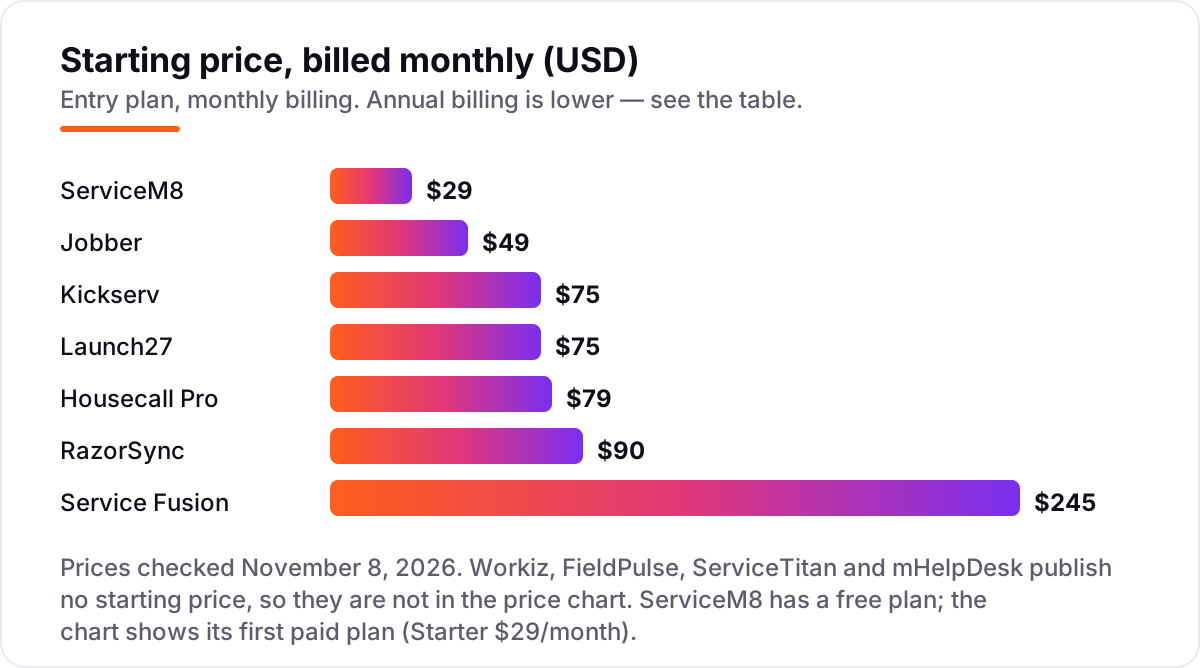
Take a three-person handyman crew doing about 60 jobs a month. On list prices, the subscription costs $75 a month on Kickserv Start or Launch27 Base, $79 on ServiceM8 Growing, $199 on Jobber Connect for five users, $189 on Housecall Pro Essentials for five users, $225 on RazorSync Team, and $245 on Service Fusion Starter. Four tools have no published number at all — Workiz, FieldPulse, ServiceTitan and mHelpDesk are quote-only, so budget a sales call for each of them.
Over a year on annual billing, that is $720 on Kickserv Start, $765 on Launch27 Base, $948 on ServiceM8 Growing, $1,788 on Jobber Connect or Housecall Pro Essentials, $2,340 on RazorSync Team, and $2,496 on Service Fusion Starter. The same three people and the same 60 jobs cost $720 a year at the cheap end and $2,496 at the dear end — a $1,776 gap that comes entirely from the pricing model, not from features. A solo handyman pays less: Jobber Core is $588 a year billed monthly or $348 billed annually, and Housecall Pro Basic is $948 billed monthly or $708 billed annually.
Three costs sit outside every number above. First, card processing: 2.59% to 2.9% plus about $0.30 on every card payment, which on $10,000 of monthly card takings is $259 to $290 a month. Second, the add-ons: phone systems, AI answering, GPS tracking and fleet tracking are quoted separately on most tools here. Third, the introductory offers — Housecall Pro shows $26 for the first month on Basic and Essentials — end, so budget on the list price. If you run a wider contracting business rather than handyman work alone, the visibility tools differ too — see our guide to the best general contractor software.
Know the difference: field service software vs booking software
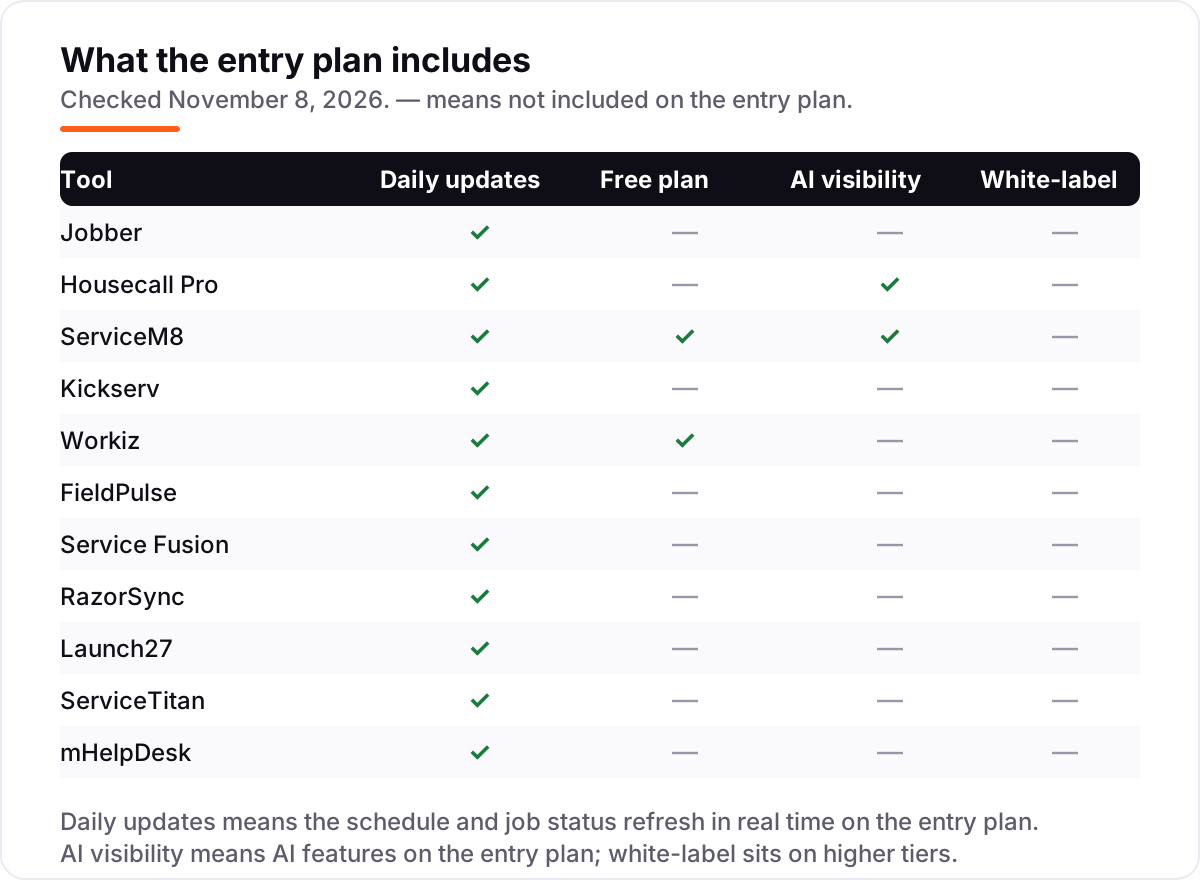
The confusion in this category is between a tool that runs the business and a tool that takes the booking. Field service software — Jobber, Housecall Pro, ServiceM8, Kickserv and the rest — schedules the crew, sends the quote, tracks the job, invoices and takes payment. Booking software — Launch27 is the example here — takes the booking and the payment from your website and stops there: no dispatch board, no price book, no job costing.
A handyman who gets work from repeat customers and referrals usually needs the field service side more than the booking side, because the job itself is where the time goes. A handyman whose website already brings a steady stream of small jobs can run on booking software alone, as long as someone still tracks the schedule by hand. The mistake is buying the booking tool and expecting it to dispatch a crew, or buying the enterprise field service tool and using it only as a booking form.
There is a second, quieter confusion: per-user, per-job and flat-rate pricing are three different bills, not three prices for the same thing. A per-user tool gets dearer with every hire, a per-job tool gets dearer with every busy month, and a flat-rate tool never moves at all. A solo handyman on a flat $245 a month plan pays for capacity he does not use; a ten-person crew on a per-user plan pays for every seat. Read the model before the number.
Quick comparison: tool type by need
| Buyer | Best pick | Why |
|---|---|---|
| Solo handyman on a budget | ServiceM8 | Free for 30 jobs a month, Starter is $29/month for 50 jobs |
| Most handyman businesses | Jobber | The easiest all-in-one setup, from $49/month for one user |
| Customer booking and reviews | Housecall Pro | Online booking and review management from $79/month |
| Small crew on one flat price | Kickserv | Five users for $75/month, QuickBooks sync included |
| Missed calls are the leak | Workiz | Built-in phone system and AI answering, priced by quote |
| Growing crew, no per-user math | Service Fusion | One flat $245/month company price, unlimited users |
Mistakes to avoid
- Budgeting on the promo price. Housecall Pro shows $26 for the first month on Basic and Essentials, and the annual rates are lower than the monthly ones. The list price is what you pay once the offer ends, so compare tools on that number.
- Buying on the user count, then finding the QuickBooks sync costs extra. Jobber and Housecall Pro hold the sync for a higher tier. If your accountant works in QuickBooks, count the higher tier in the price from day one.
- Ignoring the cap that bites first. A tool can be cheap and still be the wrong buy: ServiceM8 Starter at $29 is no bargain once you pass 50 jobs a month, and Jobber Core at $49 is no bargain once a second person needs a login.
- Comparing a quote to a published price. Workiz, FieldPulse, ServiceTitan and mHelpDesk publish no starting price, so a $225 a month third-party estimate is not the same as a $225 a month list price. Get the quote in writing before you rank them.
- Paying for the enterprise tool too early. ServiceTitan is built for high-volume shops with a 12-month minimum and weeks of onboarding. A three-person crew pays for capacity it will not use for years.
How we chose
We checked each vendor's own pricing page on November 8, 2026 and recorded the starting price exactly as shown, including the annual-billing figure where the page lists one, and we ranked the tools by fit for the most common buyer — a solo handyman or a crew of two to five — not by brand size. Workiz, FieldPulse, ServiceTitan and mHelpDesk publish no starting price, so they are listed as custom quote and left out of the price chart; the third-party figures quoted for them in this post (Workiz around $225 to $325 a month, FieldPulse around $65 to $115 per user a month, ServiceTitan around $245 to $500 per technician a month, mHelpDesk around $169 a month) come from independent pricing roundups, not from the vendors, and are given only as planning ranges. Ratings are shown only where a G2 page was opened and read on November 8, 2026; the other five tools carry no rating rather than a stale or estimated one. No vendor paid for a place in this list, and none of the links here are affiliate links.
What to do next
Start with the free plan or trial of your top pick and run one real week of jobs through it. Check that the mobile app works in the field, the quote goes out cleanly, and the invoice gets paid without a phone call before you commit to a year. If the tools are sorted but new customers are not finding you, our monthly SEO service handles the visibility side — or compare providers in our guide to contractor management software. Once your tools are in place, find out what's holding your rankings back.
Your stack only works if people find you
SerpAstra fixes what keeps your site off page one and makes it easy for AI assistants to recommend.
Get a free audit→Sources we checked (14)
- Jobber pricing — getjobber.com/pricing (checked November 8, 2026)
- Housecall Pro pricing — housecallpro.com/pricing (checked November 8, 2026)
- ServiceM8 pricing — servicem8.com/pricing (checked November 8, 2026)
- Kickserv pricing — kickserv.com/pricing (checked November 8, 2026)
- Workiz pricing — workiz.com/pricing-plans (checked November 8, 2026)
- FieldPulse pricing — fieldpulse.com/pricing (checked November 8, 2026)
- Service Fusion pricing — servicefusion.com/pricing (checked November 8, 2026)
- RazorSync pricing — razorsync.com/pricing (checked November 8, 2026)
- Launch27 pricing — launch27.com/pricing (checked November 8, 2026)
- ServiceTitan pricing — servicetitan.com/pricing (checked November 8, 2026)
- mHelpDesk pricing — mhelpdesk.com/pricing (checked November 8, 2026)
- Jobber and Housecall Pro on G2 — g2.com/compare/housecall-pro-vs-jobber (checked November 8, 2026)
- Kickserv, FieldPulse and ServiceTitan on G2 — g2.com/products/kickserv/competitors/alternatives (checked November 8, 2026)
- mHelpDesk on G2 — g2.com/compare/housecall-pro-vs-mhelpdesk (checked November 8, 2026)
Shamim
Founder of SerpAstra
A full-stack SEO and digital marketer who spends most days on Local SEO for dental practices, AI search visibility and lead generation.
Frequently asked questions
What is the best software for a handyman business?
Jobber is the best fit for most handymen: quotes, scheduling, invoicing and payments in one subscription from $49/month, with a 14-day trial. Housecall Pro is the better pick when online booking and reviews drive your work, and ServiceM8 is the best free option.
How much does handyman software cost per month?
Published entry prices run from free to $245 a month. ServiceM8 is free for up to 30 jobs, Jobber starts at $49, Kickserv at $75 for five users, and Service Fusion at $245 with unlimited users. Four tools here are quote-only, so get their price in writing.
Is there free software for a handyman business?
Yes, with limits. ServiceM8 is free for one user and 30 jobs a month, with real scheduling, quoting and invoicing. Workiz has a free Lite plan for up to two users and 20 invoices a month. Both are real tools, not trials, but neither covers a busy crew.
What is the difference between per-user and flat-rate handyman software?
Per-user tools like Jobber charge for each login, so the bill grows with every hire. Flat-rate tools like Service Fusion charge one company price no matter how many people use it. Per-job tools like ServiceM8 charge by monthly job count instead. Match the model to how you grow.
Do I need QuickBooks with handyman software?
Not always, but most handymen sync to QuickBooks for tax time. Jobber, Housecall Pro, FieldPulse, Kickserv, Service Fusion, RazorSync and mHelpDesk all offer a QuickBooks sync, though on Jobber and Housecall Pro it starts on a higher tier, not the entry plan.
Can I switch handyman software later?
Yes, but plan the move for a quiet week. Export your customer list, open jobs, price book and invoice history from the old tool, then import them into the new one and run both systems for a few days. Switching mid-season means double entry on every job until the new tool is live.
Does handyman software include payment processing?
Most tools here take payments, but the processing fee sits on top of the subscription. Jobber charges 2.9% plus $0.30 per card transaction, Housecall Pro starts at 2.59%, and mHelpDesk lists 2.89% plus $0.30. Budget the fee on every card payment you take.
Free SEO and AI visibility audit
Find out what is holding your rankings back
Send us your site. Within 2 business days you get a written audit, an AI visibility check and a short fix list ranked by impact. Free, with no contract attached.
Request my free audit→Related guides
 Local Business & Vertical Software12 Best General Contractor Software in 2026, ComparedCompare the 12 best general contractor software tools on price, free plans, estimating and field features, with every price checked November 7, 2026.Read guide →
 Local Business & Vertical Software10 Best Contractor Management Software in 2026, ComparedCompare the 10 best contractor management software platforms on price, compliance and global payments, with every price checked November 7, 2026.Read guide →
 Digital Marketing & Ads7 Best Marketing Software for Contractors in 2026, ComparedCompare the 7 best marketing software for contractors on price, reviews and trade-specific features, with every price checked November 5, 2026.Read guide →